Category: DevOps Practice

  • The Secure Software Development Life Cycle: Syncing Development and Security

    The Secure Software Development Life Cycle: Syncing Development and Security

    Over the last five to 10 years, the nature of software development has shifted dramatically. Whereas large software releases occurred every six to 18 months in the past, current release schedules have become much more frequent. The waterfall model of software development has morphed into what we now know as the DevOps model.

    As a consequence, DevOps has instigated changes in the traditional waterfall security touchpoints. In essence, DevOps has changed the very nature of how application security needs to be implemented. To avoid friction in the development process, application security activities must be adapted to the new world of DevOps practices. It has to go beyond the basics of threat modeling, design review and two weeks of pen testing.

    Under DevOps, some development organizations now do software releases on a daily, weekly or bi-weekly cadence. But they’re still grappling with older application security models. As a result, development and security testing can be out of sync—you cannot conduct a two-week pen test on software that’s released weekly. These organizations need effective security assurance in their SDLC that’s good, quick, early and—above all else—automated.

    The Changing Nature of Software Development

    The way software is developed keeps changing. And it keeps accelerating. Application security needs to change to catch up. Automation will play a key role in enabling application security to maintain the pace of DevOps. DevOps needs automation to effectively deal with software release cadences that occur on a daily, weekly and bi-weekly basis as well as to increase agility generally within the SDLC.

    For example, DevOps accelerates when the automated pipeline embeds application security scanning into pre-commit checks. In this way, consistent levels of application security testing apply every time developers check in code, resulting in a fully automated check-in process. But automation doesn’t lock developers into the same level of security for every code change. For example, if the change only involves altering the color of a logo, heavy security scanning and manual won’t be necessary. At least not the way it would be if the application is accessing sensitive data.

    So, instead of giving developers quarterly SAST results, automation puts the code analysis right there in front of developers as they’re checking in code (via certain IDE plugins). Presenting the code analysis findings to developers, while they are still in the code, has several advantages:

    • The code is still fresh in the developers’ minds.
    • Coding problems can be caught earlier and more easily while developers are still thinking about the code.
    • It mitigates the risk of developers not remembering the code context at a later date.

    Overall, the more automation there is in application security the better it is for open source validation, container scanning containers, QA testing, API security and more.

    Automated Security Assurance and Out-of-Band Activities

    When it comes to implementing testing in DevOps, you must balance automated security assurance with out-of-band activities. That means it’s sometimes appropriate to slow down the automated security process. Even in a completely automated DevOps process you may need to slow down to make necessary changes. It’s true a code change, such as just changing the background color on a web app, may not be too risky. There’s no problem with automating that DevOps step and pushing out the change. But, if your web app interacts with customer data, you’d be prudent to slow down and take the next application security test out of band, and make sure you’ve got the procedure right because it’s much riskier.

    There are different levels of risk and severity within each release of an application. Development organizations need to accept this and adapt to each release’s potential risk and severity level. Then, they need to provide the appropriate level of security assurance and security coverage, whether that is automated within the DevOps workflow, performed out of band or some combination of the two.

    Life in the Fast Lane

    For DevOps organizations, one of two avenues beckons to them: the security express lane or the security slow lane. You could create an automated DevSecOps process across the development organization—the security fast lane. But, there’s no one-size-fits-all DevSecOps process for enterprises. That’s because there could be up to hundreds of development teams within an enterprise. And there’s not always a standardized process that all dev teams can follow. It’s a challenge to adapt automated security to each development team. Those in the security fast lane should use a security champion to work with the development team and be the point person to assist them with understanding application security needs and remediation guidance.

    In the security slow lane, individual development teams may still be enabled to go fast. The difference is that they will pick the SDLC tools that make the most sense for that team. Then, they should also pick the application security tools that make the most sense for them. The bottom line for organizations is that application security needs to involve an acceptable level of friction for developers to make DevSecOps work. If there is too much friction, developers will bypass application security in favor of expediting coding activities.

  • LaunchNotes Adds Communications Tool for App Release

    LaunchNotes Adds Communications Tool for App Release

    LaunchNotes today launched a namesake software-as-a-service (SaaS) platform for managing the communications surrounding the release of an application.

    Company co-founder Jake Brereton said LaunchNotes streamlines internal and external communications for DevOps teams, eliminating the need to employ a collaboration tool such as Slack or a project management application.

    Each message can be designated as either a private communication for the internal DevOps team or shared publicly with business shareholders. Instead of having to subscribe to yet another Slack channel, business stakeholders now have a dedicated and easier means to track the progress of application releases, said Brereton.

    Communications surrounding application releases have always been problematic. Most applications are developed using multiple platforms, so standardizing the communications tools provided by those platforms isn’t usually practical. LaunchNotes is designed to provide an easy way to manage communications regardless of the platform employed to build and deploy an application, Brereton said.

    DevOps teams can also post things such as articles that might, for example, explain the history of any given application development project, he added.

    Interest in application release timetables has never been higher. In the age of digital business, more organizations than ever have come to equate with revenue the rate at which applications are deployed and updated. However, it’s not always been easy for business leaders to decipher the release notes that DevOps team members routinely share with one another. LaunchNotes is meant to provide a means for DevOps teams to communicate privately with one another while creating a separate channel within the same platform to share frequent updates in plain language in real-time with other members of the organization.

    The issue with Slack and other communications platforms is they have become too noisy, noted Brereton. In the stream of updates being provided about things going on inside the organization and beyond, it can be easy to miss a critical update about an application release.

    LaunchNotes has been available through a private beta involving 60 organizations. The company views its platform as a complement to project management applications rather than a replacement. The sole focus is on streamlining DevOps communications, said Brereton.

    To one degree or another most DevOps teams suffer from a failure to communicate. Most of the time that failure is not because a message wasn’t shared; rather, the medium employed to deliver that message made it easy to miss or be misconstrued. If the medium is the proverbial message, then DevOps teams might be better off employing a medium designed specifically for optimizing application release cycles.

    Of course, many organizations will continue to employ the communications tools that are most readily available. However, those general-purpose communications platforms also make it easy for users to be distracted by everything from messages from human resources about the latest form to be filled out to who won the football pool this week.

  • Low-Code and RPA With Appian CTO Michael Beckley

    Low-Code and RPA With Appian CTO Michael Beckley

    On the eve of the first virtual Appian World, we caught up with Appian founder and CTO Michael Beckley. Michael spoke to us about low-code and RPA as well as AI and robotics, all being leveraged to help organizations during the COVID-19 crisis.

    Obviously, given the current situation, developing applications quickly with a minimum of coding while harnessing automation and AI would be a big premium. This is a situation that seems perfect for Appian.

    In fact, the whole low-code and RPA model seems tailor-made for a COVID-like situation. Michael shares with us several instances of healthcare and governmental agencies using Appian and RPA to deliver massively scalable applications to measure and gather data around COVID-19.

    Low-code and RPA are not just COVID-19 trends, either. Michael and I discussed why the new normal will reward organizations that use RPA and low-code, as well as harnessing AI and robotics to build apps that can scale massively quickly with minimal coding.

    If Michael is correct, Appian is in an enviable position to deliver a robust, proven platform that will allow organizations to harness the power of low-code and RPA.

    My discussion with Michael is below. While Appian World virtual kicks off today, Michael actually delivers the keynote for the second day of Appian World on Wednesday. If you get a moment, don’t miss Michael’s talk. He has some great insight into how low-code and RPA can be a benefit during the COVID-19 crisis.

    While you’re at it, I highly recommend attending as much of Appian World that you can. I had the pleasure of attending one in Miami two years ago and was very much looking forward to this year’s event in Ft. Lauderdale, before it was converted to a virtual event. Appian’s hackathon is usually a great event to check out at Appian World as well.

  • Getting Past Legacy Software Pains in Requirements Management

    Getting Past Legacy Software Pains in Requirements Management

    If you feel like you have outgrown your requirements management (RM) software, you are far from alone. From complex systems, such as IBM Doors, to document-based tracking through Microsoft Office, legacy RM tools are having a hard time catching up to the innovation occurring in highly-regulated industries. As we see the line between hardware and software become increasingly blurred, development methodologies are evolving faster than ever before. Sometimes, these changes happen day-to-day or even hour-to-hour, making project traceability feel impossible.

    No matter how complex the software or notable the reputation, RM providers don’t always deliver a system that matches the goals of teams that need to quickly adapt, innovate and grow. This misalignment can create several pain points that interfere with productivity. While some can be attributed to shifts in the marketplace, others are directly rooted in the software tools you are using to meet compliance.

    Here are some common snafus and how to work your way out of them.

    Multiple Stakeholders, Multiple Problems

    From avionics to automotive to medtech, highly-regulated industries see many different stakeholders and players, and that is a good thing. In order to reach peak public and functional safety, it’s crucial to value the input of multiple roles and skill sets. But, what happens if one or some of these folks don’t know how to use your RM software? At best it’s a shame that they can provide their two cents and at worst this begins a recipe for compliance disaster. To sidestep this conundrum, opt for a software that seamlessly flows with multiple roles. More so, make sure whatever software you choose integreates user-friendly traceability. It’s crucial that each and every individual on the project be able to see the progress made from beginning to end. 

    So, You Missed a Deadline…

    It happens to the best of us. You were asked to provide feedback on a requirement and you missed your shot to chime in. Whether a colleague left a comment for you in a Word or Google Doc or shot over an email to glean your opinion, the mode of collaboration you have in place failed you. That’s right, this isn’t all your fault. Review processes are too complex these days and they require collaboration software that sets the intentions of the users clearly. This requires real-time editing and notifications to help keep you and your team on track. To prevent falling into this trap, look for an RM tool that prompts next steps and sends timely notifications with clear instructions. Conversations about “who dropped the ball” aren’t productive or fair, the RM software you integrate should fill this gap in human error.

    You’ve Been Blocked

    You are frantically trying to enter crucial data into the system but you are somehow locked out. You can’t get a hold of the person who manages access and you are beginning to feel frantic. This isn’t just frustrating for you, it also poses some substantial risks to the company. On top of losing a couple of hours trying to break into the system, this clunky process inevitably chips away at the desire to provide feedback with any regularity or confidence. This goes against the entire purpose of collecting data in the first place. To facilitate continuous growth and data collection, your RM tool should be open, accessible and intuitive. Only then will you encourage the kind of constant input and collaboration from stakeholders that is necessary to keep up with breakneck innovation. 

    When an Upgrade Spells Doom

    Back in the day, we all used to get skittish when an iPhone software upgrade notification popped up on our screen. Will I lose all my photos and contacts? What about all those passwords I saved to log-in to my favorite apps? With the advent of the Cloud, much of this fear has dissipated. When it comes to your RM software, your team shouldn’t be afraid to upgrade the system to fix issues, improve security and access the latest features.

    Yet, these systems are often so customized or patched-together that an upgrade could mean disaster. Because the products you are building change and improve over time, you should have a RM system that can adapt quickly. When it’s time to purchase legacy software, weigh the opportunity costs of investing in something so stale. Ultimately, is the pain of being locked-out or unsupported on various platforms worth the headache?

    Pain points aside, we are living in an age that has bred the most disruptive and creative products to date. From ultra-fast and sleek electric cars to life-like prosthetics to self-piloted spaceships, we have some of the best and brightest minds toiling away on how to propel us into the future. At the same time, the regulatory environment has become even more stringent to meet both the demands of the marketplace and public safety. It is going to take synced and streamlined teams to decrease time-to-market and meet the ever-increasing demands of compliance. To pull this off, you need collaboration infrastructure in place that keeps your team organized and catches mistakes often missed by disconnected individuals.

  • Decoding the Self-Healing Kubernetes

    Decoding the Self-Healing Kubernetes

    A business application that fails to operate 24/7 would be considered inefficient in the market. The idea is that applications run uninterrupted, irrespective of a technical glitch, feature update or a natural disaster. In today’s heterogeneous environment where infrastructure is intricately layered, a continuous workflow of application is possible via self-healing.   

    Kubernetes, which is a container orchestration tool, facilitates the smooth working of the application by abstracting machines physically. Moreover, the pods and containers in Kubernetes can self-heal.

    In the Avengers movie, Captain America asked Bruce Banner to get angry so he could transform into The Hulk. Bruce replied, “That’s my secret Captain. I’m always angry.” You must have understood the analogy here. Let’s simplify: Kubernetes will self-heal organically, whenever the system is affected. 

    Kubernetes’s self-healing property ensures that the clusters always function at the optimal state. Kubernetes can effectively self-detect two types of objects—podstatus and container status. Kubernetes’s orchestration capabilities can monitor and replace unhealthy containers as per the desired configuration. Likewise, Kubernetes can fix pods, which are the smallest units encompassing single or multiple containers. 

    The Three Container States Include

    1. Waiting: created but not running. A container, which is in a waiting stage, will still run operations such as pulling images or applying secrets, etc. To check the waiting pod status, use the following command:
      Checking waiting status
      Along with this state, a message and reason about the state are displayed to provide more information.
      Waiting before entering running stage
    2. Running Pods: containers that are running without issues. The following command is executed before the pod enters the running state:
      postStart
      Running pods will display the time of the entrance of the container.
      Time of entrance of the container
    3. Terminated Pods: a container that fails or completes its execution. The following command is executed before the pod is moved to terminated:
      prestop
      Terminated pods will display the time of the entrance of the container.
      Terminated pod - time of entrance

    Kubernetes’ Self-Healing Concepts – Pod’s Phase, Probes and Restart Policy

    The pod phase in Kubernetes offers insight into the pod’s placement. We can have: 

    • Pending Pods–created but not running.
    • Running Pods–runs all the containers.
    • Succeeded Pods–successfully completed container lifecycle.
    • Failed Pods–minimum one container failed and all containers terminated.
    • Unknown Pods.

    Kubernetes execute liveness and readiness probes for the pods to check if they function as per the desired state. The liveness probe will check a container for its running status. If a container fails the probe, Kubernetes will terminate it and create a new container in accordance with the restart policy. The readiness probe will check a container for its service request serving capabilities. If a container fails the probe, then Kubernetes will remove the IP address of the related pod. 

    Liveness probe example:

    Liveness probe example

    The probes include:

    • ExecAction–to execute commands in containers.
    • TCPSocketAction–to implement a TCP check w.r.t to the IP address of a container.
    • HTTPGetAction–to implement a HTTP Get check w.r.t to the IP address of a container.

    Each probe gives one of three results:

    • Success: The container passed the diagnostic.
    • Failure: The container failed the diagnostic.
    • Unknown: The diagnostic failed, so no action should be taken.

    Demo Description of Self-Healing Kubernetes

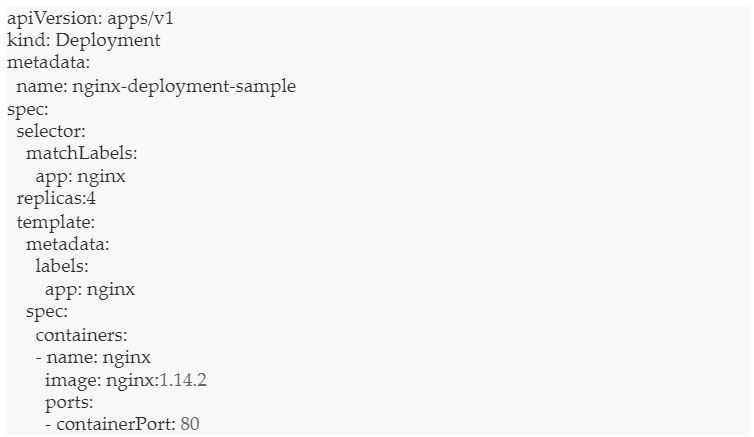
    We need to set the code replication to trigger the self-healing capability of Kubernetes. 

    Let’s see an example of the Nginx file:

    Nginx example

    In the above code, we see that the total number of pods across the cluster must be four.

    Next, let’s deploy the file.

    kubectl apply nginx-deployment-sample

    Let’s list the pods, using:

    kubectl get pods -1 app=nginx

    Here is the output:

    output_nginx-deployment-test

    As you see above, we have created four pods. 

    Now, let’s delete one of the pods.

    deleting a pod

    The pod is now deleted. We get the following output:

    pod deleted

    Let’s list the pods again.

    get pods

    We get the following output:

    Output: 4 pods

    We have four pods again, despite deleting one. Kubernetes has self-healed to create a new node and maintain the count to four.

    Conclusion

    Kubernetes can self-heal applications and containers, but what about healing itself when the nodes are down? For Kubernetes to continue self-healing, it needs a dedicated set of infrastructure, with access to self-healing nodes all the time. The infrastructure must be driven by automation and powered by predictive analytics to preempt and fix issues beforehand. The bottom line is that at any given point in time, the infrastructure nodes should maintain the required count for uninterrupted services.

  • Why Aren’t Enterprises Developing More Mobile Apps?

    Why Aren’t Enterprises Developing More Mobile Apps?

    We live in a mobile age, and enterprise IT leaders recognize it. But even though 64.5% of enterprises say that mobility is a top IT priority, most won’t deploy more than five mobile apps this year, according to a December study from Enterprise Mobility Forum. That’s a very small number, especially considering that large organizations manage an average of 163 apps, according to an Okta study. It begs the question: Why so few, especially given the strong demand for a mobile experience from employees, customers and partners?

    There are many barriers to enterprise mobile app development and deployment, but the biggest is simply a lack of time and resources. Modern organizations rely on web apps for critical internal processes, and development teams are expected to continuously roll out new capabilities. When presented with a choice between releasing new functionality or converting old web apps to iOS or Android, enterprise developers don’t have the resources to do both. Releasing new features will almost always win out, especially since a single conversion to mobile could require months of developer-hours and hundreds of thousands of dollars.

    What’s more, mobile development skills for the two biggest operating systems—iOS and Android—are already in short supply and specialized mobile security skills are even more scarce. So, even if the team is willing, it may not possess the expertise to create a secure app.

    Lack of a Robust Mobile Infrastructure

    Mobile apps require a robust infrastructure to support them and it differs significantly from the web app infrastructure that most organizations already operate. For example, to distribute and manage mobile apps on its own, enterprise IT has to set up a proprietary app store, and they’ll need to install enterprise device management software on all devices, including employees’ personal phones. Employees’ devices will initially warn them that the software is not trusted, requiring a number of steps to bypass, plus there are serious privacy concerns. Who would willingly give their employer access to all activity on their personal mobile device?

    Finally, regarding SaaS applications, if the vendor doesn’t provide a native mobile version, obtaining the binary to convert it to mobile in-house is almost impossible. And while many SaaS applications incorporate responsive design, mobile browsers provide poor performance and lack features such as persistence and push notifications.

    “Our customers have dozens of web and cloud services that they need to integrate into their enterprise mobile environment,” said Marcelo Nascimento, head of cybersecurity at TIQS Consultoria Brazil. “But the lack of mobile development resources or access to mobile binaries from app makers has halted their progress.”

    Public App Stores and PWAs

    Thankfully, there are solutions to each of these challenges. For instance, enterprises no longer need to manage distribution and management in-house. Increasingly, Fortune 1000 companies are using public app stores to distribute their internal employee-facing apps, according to a December study conducted by Appdome. Going this route eliminates the need to set up a proprietary app store and place management software on personal devices.

    When it comes to converting web apps to mobile apps, traditional progressive web apps (PWAs) can provide a fast, cost-effective solution. But PWAs and web clips have their limitations.

    Ideally, enterprises would be able to create hybrid apps, because they can provide both the benefits of the PWA for rendering web and cloud service apps along with a high-performance user experience and persistence. Platforms are available to conduct the conversion in minutes with no manual coding and some are able to incorporate strong security. As a result, an organization can rapidly convert web apps into mobile apps and distribute them via any distribution method, from private UEM and MAM stores to Google Play and the Apple App Store.

    So there’s no reason enterprise IT needs to shy away from providing everyone a mobile experience. With auto-build systems to create secure hybrid apps, enterprises can overcome most of the barriers and deploy secure mobile apps at scale.

  • DevOps Deeper Dive: Teams Adjust to New WFH Normal

    DevOps Deeper Dive: Teams Adjust to New WFH Normal

    In the wake of the COVID-19 pandemic the level of software development activity has remained relatively constant, but developers—who, like everyone else—are now largely working from home, are putting in more hours. Organizations are now grappling with whether working remotely on software development projects now represents the “new normal.”

    A report published this week by GitHub shows that while there was a slight dip in activity in various regions of the world as the pandemic spread, activity on the public GitHub repository quickly recovered. Whether developers are spending more time working on projects is difficult to conclude given all the potential distractions at home, but according to the GitHub report, the amount of time spent on the platform per developer has increased. This could be due to various factors including the fact that developers are not commuting to work or are managing multiple tasks—some of which are directly related to work—across an extended working day. Others simply may be taking more breaks between activities.

    Despite working in isolation, it would appear developers are remaining productive, said Kelly Stirman, vice president of product strategy and marketing for GitHub. “More time to code increases productivity.”

    Providers of other DevOps platforms have observed similar increases in activity during the pandemic. Moritz Plassnig, senior vice president and general manager for software delivery management and software delivery automation cloud at CloudBees, said many organizations have been launching custom application development projects to drive digital business transformation initiatives. Now those projects are becoming core to the organization’s business continuity strategy.

    “The current situation has only accelerated that trend,” said Plassnig.

    The biggest challenge in managing a highly distributed workforce is ensuring the right code is being worked on at the right time, said Fred Simon, chief data scientist of JFrog. “Everyone needs feedback.”

    To provide that feedback, managers have employed collaboration tools such as Zoom and, when necessary, shifted work to DevOps platforms made available as a cloud service, added Simon.

    At the same time, the level of communications tooling baked into a DevOps platform matters more than ever, said Emrah Samdan, vice president of product at Thundra, a provider of a platform for securing and observing cloud-native microservices. Developers can collaborate with each other much more effectively using asynchronous communications tools to, for example, share code.

    “A lot of productivity is being lost setting up Zoom calls,” said Samdan.

    The issue now is whether working on software development projects remotely represents the new normal. A recent survey of chief financial officers published by PwC finds that nearly half of the respondents (49%) plan to make remote work a permanent option for roles within their organizations that allow for it.

    How employees will respond to that change will vary. According to results from a recent survey of workers conducted by GitLab, 52% of employees say they are more productive working remotely, while 48% are more efficient. Of course, those results also suggest half of employees don’t share that same level of appreciation for working from home.

    It’s worth noting that many software development teams were already heading in the direction of working remotely more often prior to the pandemic, said Brendan O’Leary, senior developer evangelist at GitLab. In fact, he noted, resources such as the GitLab Remote Playbook have been downloaded more frequently over the last few months.

    “I think it is a time that will see a real separation of bosses and leaders,” O’Leary said, noting leaders will go beyond simply tracking metrics to enable organizations to continue to launch innovative software development projects.

    Obviously, DevOps teams that were working in a distributed fashion prior to the pandemic have a distinct advantage over those that have worked primarily in the same central location. However, given all the current uncertainties organizations now face, it’s probable every member of a DevOps team going forward is going to be working from home a lot more often.

  • CloudBees Brings Feature Flagging to On-Prem Environs

    CloudBees Brings Feature Flagging to On-Prem Environs

    CloudBees this week announced an update to CloudBees Feature Flags that now makes it possible to deploy this capability in on-premises IT environments.

    Moritz Plassnig, senior vice president and general manager for software delivery management and software delivery automation cloud at CloudBees, said CloudBees Feature Flags previously was available only as a software-as-a-service (SaaS) application following the company’s acquisition of Rollout last year.

    However, there are still many organizations in highly regulated industries that are prohibited from developing applications in the cloud. The latest version now allows those organizations to employ CloudBees Feature Flags to roll out new features in a more controlled way, he said.

    Cloud computing, of course, has been around for more than a decade. The adoption of cloud computing has increased dramatically in recent years; however, the bulk of applications are still deployed in on-premises IT environments. CloudBees makes on-premises editions of its platforms available alongside cloud services to meet IT teams wherever they are on the application development spectrum, said Plassnig.

    While feature flagging has been around for some time most enterprise IT organizations are just now starting to employ it. As organizations roll out new capabilities, feature flagging enables DevOps teams to make a new capability available to only a small segment of application users. Assuming all goes well, the DevOps teams can then go ahead make that capability available to all users with greater confidence. Feature flagging makes deploying updates to applications less scary for all concerned by reducing the inherent risks, Plassnig noted.

    Feature flagging is used mainly within the context of application development. However, Plassnig said eventually this capability will be deployed more widely in production environments. Organizations, for example, might employ feature flagging to make specific capabilities available to specific classes of users.

    Of course, CloudBees is not the only provider of a DevOps platform to embrace feature flagging. However, as the provider of an enterprise edition of one of the most widely employed continuous integration/continuous delivery (CI/CD) platforms, CloudBees is betting it’s in a better position to make feature flagging a standard capability within any software development life cycle (SDLC). Plassnig said DevOps teams should also expect to see CloudBees tighten the integration between CloudBees Feature Flags and CloudBees Flow, a tool for orchestrating releases and automating application deployments.

    With the rise of microservices, it’s become easier for DevOps teams to isolate functions within applications. The challenge is that managing all those modules of code often requires DevOps teams to implement more complex workflow processes. Advances in automation will simplify those processes; nevertheless, DevOps teams still have to define the workflow processes that will be automated.

    In the meantime, it’s only a matter of time before DevOps teams come to view feature flagging as a standard requirement. It will be interesting to see to what degree feature flagging might one day be incorporated into the core open source CI/CD platform itself.

  • Best Practices for Remote IT Management

    Best Practices for Remote IT Management

    As companies adjust to the new normal of a completely remote workforce, IT teams still struggle to maintain productivity and workflows, meaning DevOps practices have never been more of an asset. IT teams must be more agile and efficient to manage their IT infrastructure from remote locations; otherwise, confusion and errors can ensue at a moment’s notice. 

    To ensure IT teams remain efficient and thrive in a collaborative, open culture, there are several steps that companies can take now to cultivate an innovative environment long after COVID-19 is over.

    Implementing “Game Day-Style” Practices

    In theory, “game day-style” practices are probably one of the best ways to ensure teams are ready for any remote work. This involves companies having IT teams work remotely as a test run, and then reporting problems early and often to avoid issues when everyone needs to be remote. Unfortunately, we’re well past this, which means that it’s now up to teams to communicate early and often. Breaking down siloed work environments, while creating open dialogue up and down the leadership chain, can go a long way. Naturally, connectivity is also a key factor here. With communication and connectivity at the core, companies can more easily assemble and designate teams for specific issues.

    This does, though, depend on the encouragement of company leadership, with senior decision-making being integral to the IT team’s success.

    Identifying a Trusted Team Leader

    An enterprise’s IT director or manager requires substantial expertise, true empathy and effective communication. Not with a command-and-control approach, but rather one that supports people by helping to facilitate communications and working to remove impediments without micromanaging.

    However, the most important condition for a director or manager is their own aptitude for working remotely as they must always maintain a high degree of diligence. Their communication and guidance reflect their leadership as well as strengthen the IT team’s capabilities.

    Directors or managers must ensure there is seamless coordination, strengthening cohesion between each team and reducing the number of dependencies. A DevOps approach is instrumental as it entails mechanisms such as version control, automated testing and deployment, ultimately creating autonomous, resourceful teams. Additionally, directors or managers can develop a methodology for pinpointing conflicts and enhancing synergy within IT teams. As a result, when working remotely, IT teams can operate at maximum efficiency and maintain high levels of productivity.

    The Components for Maximum Productivity

    With IT teams working in different locations, productivity and workflow are likely to be strained, especially with the current crisis. To counter this, IT teams have adopted collaboration tools to interact with one another, such as Microsoft Teams, Slack and Zoom. These three platforms have seen a massive uptick in users:

    • Microsoft Teams has a total of 44 million daily active users.
    • Slack added 9,000 new paid customers, having over 12 million daily active users.
    • Zoom has a total of 300 million daily active users.

    While not any one platform is better than the other, it’s important to create the conditions for autonomous, empowered teams. This is where making the most of tools, such as version control, automated testing and other aspects of a good DevOps approach to software development and deployment, come into play. You not only have to manage the teams and their deliverables, but you have to ensure that you have a methodology that quickly identifies when they’re creating conflicts for one another. IT teams should select which is easiest to use and best satisfies their needs. Effective communication is the objective as using multiple messaging channels can cause confusion or reduce any likelihood of productivity.

    Communication Is Key

    Clear and consistent communication is the key to an IT team’s success as members must know what’s happening at all times, including the project’s current status and necessary components, assigned roles and responsibilities, and the overall goals and expectations of the project.

    The enemy of communication is assumption, which can harm an entire group’s synergy and productivity. For example, you assume that the software will simply work as intended, or you assume delivery will happen on time regardless of the project’s timeline.

    Assumption guarantees a project’s failure, which is why it is important to outline everything about the project, both the tangible and intangible.

    Never Forget About the People

    Companies, large and small, need to foster an environment exuding collaboration, communication and good will, which causes IT teams to flourish and grow. Given the current crisis, some companies are taking several measures to ensure that morale remains consistently high among all employees. This means investing time and effort into team-building or team-bonding activities such as virtual coffee breaks, lunches via Skype or Zoom, or even games.

    There is much fear surrounding COVID-19 and companies must prioritize each employee’s well-being, including routine check-ins, team or staff meetings and 1:1 time with managers to ensure that the health and safety of employees is kept at the forefront of decision making.  Creating an inclusive atmosphere also helps remind IT teams that they can depend on one another and are part of a larger community, regardless of the distance.

    The Common Denominator

    Most importantly, for all of the above to work, teams must rely on one underlying element: communication. It is virtually impossible for remote IT management to thrive without clear communication between individuals and their teams. Furthermore, there is the possibility that IT teams will adopt this remote lifestyle permanently once COVID-19 subsides. If so, companies must implement these best practices to ensure their growth and longevity as they will encounter more complex, demanding assignments from others.

  • GitHub Extends Scope and Reach of Repository

    GitHub Extends Scope and Reach of Repository

    GitHub today at its GitHub Satellite virtual conference announced it has made it easier for developers to either launch a project or join an existing project on its repository and has added collaboration tools directly within the platform.

    GitHub is also moving to advance DevSecOps by adding code scanning tools and making secret scanning tools available for private repositories, in addition to making available GitHub Private Instances to provide organizations in highly regulated industries access to a more secure managed implementation of the GitHub repository.

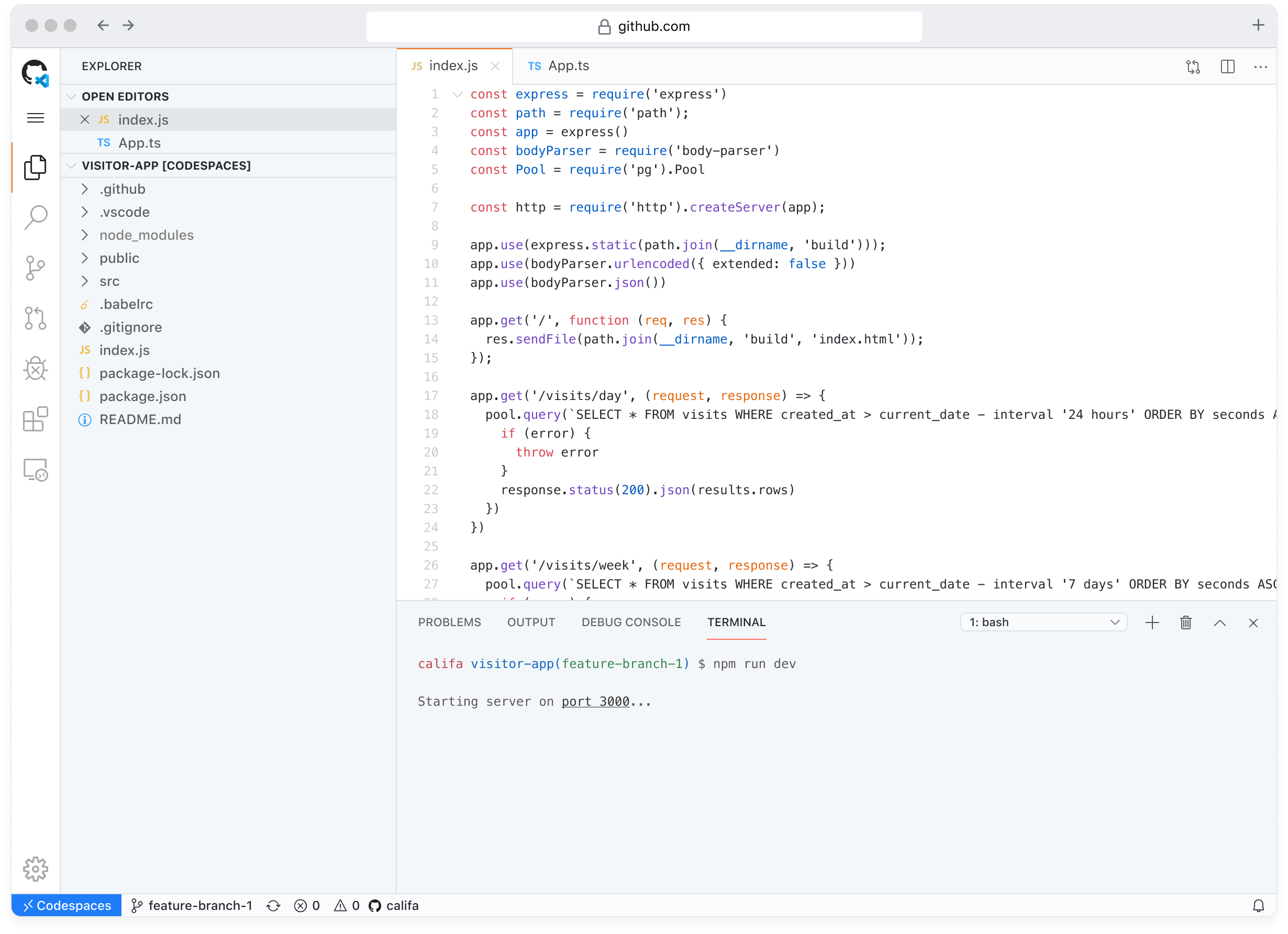
    Max Schoening, VP of Product Design, said GitHub Codespaces removes a lot of friction associated with starting or joining a project by enabling developers to spin up a project in seconds. In many cases, he said, developers never launch a project simply because the effort required was too great relative to the value of the effort.

    Available in limited public beta, GitHub Codespaces should not only improve developer productivity but also significantly increase the number of projects being hosted on GitHub, said Schoening.

    GitHub Discussions, meanwhile, will provide a threaded format to organize unstructured conversations without having to leave the GitHub repository. Scheduled to be available in beta shortly, GitHub Discussions should increase developer productivity in addition to providing a place for developers to maintain a frequently asked questions document. Over time, Schoening said GitHub expects millions of communities to be formed around GitHub Discussions.

    GitHub is also moving to make DevSecOps a natural extension of any application development project. GitHub Advanced Security Cloud provides access to native code scanning and secret scanning tools that can be embedded within the developer workflow. Currently in beta, GitHub Advanced Security Cloud is based on security tools it gained via its acquisition of Semmle last year. Every Git push can now be scanned using a CodeQL semantic analysis engine to discover vulnerabilities. GitHub Advanced Security Cloud is designed to be an extension of an existing GitHub Advanced Security service.

    Finally, GitHub Private Instances will provide a fully managed alternative that, among other things, allows for bring-your-own-key encryption, backup, archiving and compliance with various regional data sovereignty requirements. GitHub did not reveal, however, when GitHub Private Instances will be available.

    As GitHub continues to evolve as an arm of Microsoft, there is no doubt more IT teams will be embracing DevOps. The biggest challenge is often making it easy to get started. In fact, many developers may find themselves unconsciously embracing best DevOps and DevSecOps processes as they, for example, employ scanning tools baked into the GitHub repository.

    Of course, no one knows for sure whether organizations will continue the pace of application development projects in the wake of the economic downturn brought on by the COVID-19 pandemic. However, Schoening noted the amount of time between pull requests has declined on the GitHub repository, which he suggests is an indication of increased activity and productivity now that more developers are working away from the office.