Category: DevOps Practice

  • Debugging is Broken – Here’s How To Fix It

    Debugging is Broken – Here’s How To Fix It

    Let’s face it, debugging is broken.

    Whether you wholeheartedly agree or vehemently disagree with that statement, I think we can all agree that debugging, at the very least, has room for improvement. In fact, the way software developers debug their code hasn’t changed much. Of course, there are now a wide array of observability and monitoring tools available to make a developer’s life easier, but when we look at the process developers typically follow when debugging code, it’s stayed relatively unchanged over the years.

    Having the right tools available definitely improved the overall debugging experience, but they’re not the only factor. Internal organizational processes are equally as important, and should be adapted to make developers’ lives as smooth and stress-free as possible while still maintaining the proper levels of organizational security and compliance. Inefficient or highly restrictive processes, while great for the compliance team, can adversely affect the velocity of getting to the bottom of issues quickly. The right solution is typically a combination of adapting those processes to fit the company culture, along with a combination of tools that allow for compliance with industry standards and best practices.

    How Developers Debug Code

    When you talk to developers today about how they debug their applications, the process is typically not all that different than it was many years ago. The standard approach to debugging is still through the use of logging frameworks. Of course, teams are taking advantage of things like application performance management (APM) tools and other tools in the monitoring and observability space, but when you look at the primary method of debugging issues that require developers to dive into the code, logging is typically the main approach.

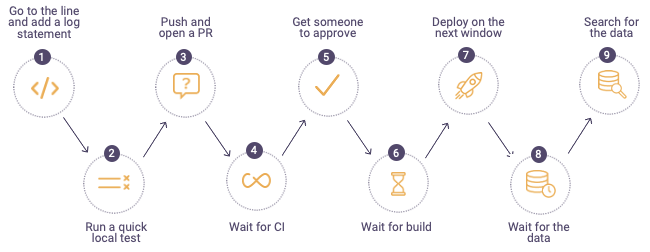
    The process typically looks something like this:


    debugging process

    When a defect is found, developers will first go to the log files on the production or pre-production servers in the environment where they are debugging. If they can’t find information in the logs to help them get to the root cause of the issue, they go back to their code and add additional log lines, finally sending their code through the process shown above. For highly advanced organizations, the process can take minutes or hours, but more often than not, this process drags on for days – or even weeks. It becomes especially time-consuming when the defect developers are trying to find and remediate is in production. In these cases, the cost to the business can be staggering; there’s got to be a better and more efficient approach to debugging.

    Where Tools Can Help

    While new and shiny tools don’t always solve all debugging problems, they can often ease some of the pain developers face and, in the process, make their lives a little bit easier. Debugging, observability and monitoring tools can get developers the data they need to solve problems faster than the more traditional method of digging through logs and using trial and error.

    The place many organizations start when considering diagnostic tools is with APM. These types of tools focus specifically on monitoring and management of the application availability, and can help to collect metrics and other relevant application information that can aid in pinpointing infrastructure issues. Most often, these tools are not actually used by developers themselves, but rather operations or production support teams to ensure availability and performance thresholds of applications.

    Another critical category of telemetry are tracing tools, which can help developers better understand how requests flow through multiple tiers of applications and even help identify error rates and latency. There are many vendors selling this category of tools, but there are also open source options which allow developers to integrate tracing into their applications via a vendor-neutral approach.

    After diagnosing an issue with an APM solution, there is often a handoff to development to remediate the issue. When developers need to debug, they often use their local IDEs or, even better, a remote debugging solution. Remote debuggers are used directly by developers to simplify debugging of applications in remote environments. These tools helps developers get to the bottom of customer issues faster by giving them direct access to the underlying application data in a safe and secure way while the application is running without stopping it or having to redeploy it. A major benefit of remote debuggers is that they can give developers the data they need from production environments without compromising security or requiring developers to have direct access to sensitive environments. While remote debuggers and other debugging tools are not a silver bullet, they can be a critical component that empowers developers to better address critical issues.

    Fixing Organizational Problems

    If solving customer issues is taking longer than expected or is potentially hurting your brand, it’s critical to sit down with your development team and use a data-driven approach to identify where the problems lie. Do a deep dive into your issue tracking or ITSM system to identify trends or recurring issues within particular application components. Development teams can often become so overwhelmed tackling issues and building out new features that valuable information in these internal systems can go untapped. Customer issues and defects should be reviewed periodically to assess things like business impact, cost to fix and alignment with the product roadmap. There is valuable information that can help focus the team’s effort on time-saving activities as well as improving the product, making for happier customers.

    Another area to look at is your software delivery process. Are there bottlenecks in your delivery pipeline that could be made easier or more efficient but have been overlooked? The speed and efficiency of your software delivery pipeline has a direct impact on developers’ ability to debug effectively and can contribute to a broken or slow debugging process. Developers should have the ability to push code into new environments as quickly as possible to remove slowdowns from too much context switching. This means automating as much of the delivery pipeline as possible, removing unnecessary manual deployment approvals and shifting left as many activities as possible.

    When it comes to empowering developers and fixing broken debugging processes, organizations should focus on fixing organizational bottlenecks as well as equipping developers with tools that can save them time and improve their daily workflows. Focusing on these areas can increase development team velocity and eliminate costly day-to-day slowdowns which add up over time and negatively impact productivity. With a few key changes, debugging can be a much more manageable and predictable process.

  • China’s Open Source Activity Surged in 2020

    China’s Open Source Activity Surged in 2020

    Activity among China-based open source project contributors and creators surged in 2020, as Alibaba, Huawei, Tencent and other leading Chinese tech companies are playing an increasingly important role in the open source development community worldwide. 

    According to the recently released Open Source Contributor Index (OSCI) ranking, as of March 2021, Alibaba, Huawei, and Tencent collectively ranked in the top 20 worldwide for the first time. Rankings are based on the total number of contributors and contributions on GitHub. Microsoft, Google and Red Hat ranked first, second and third, respectively.

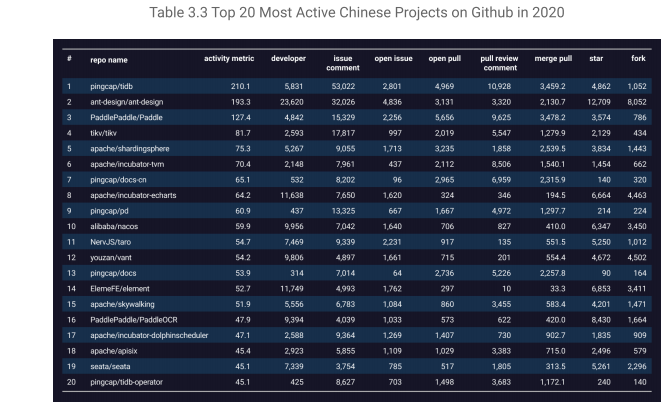
    Alibaba, as well as China-based Pingcap, came within striking distance of reaching the top 20 worldwide open source ranking for 2020 measured in activity; the total number of forks, commits, stars, pull requests, issue comments and other metrics, according to the GitHub 2020 Digital Insight Report released in April. 

    Authored by X-lab in conjunction with East China Normal University, Kaiyuanshe, Shanghai Open Source Information Technology Association and other unnamed “scientific research institutions and open source community institutes,” the X-lab report revealed Pingcap’s eponymous Pingcap (a distributed relational database) and Alibaba’s AntDesign (a Microsoft React framework) activity metrics of 210 and 193, respectively, in 2020. Meanwhile, jwasham (an open source study plan detailing how to become a software engineer) ranked 20th worldwide with an activity metric of 234. 

    Open Elastic’s Kibana, recently forked by Amazon Web Services (AWS) and Kubernetes ranked first and second worldwide with activity metrics of 698 and 602, respectively.


    open source China

    Torsten Volk, an analyst for Enterprise Management Associates (EMA), says the increased popularity of and activity in China-based open source projects are proof that the concept behind open source software actually works. 

    “This is the classic ‘one plus one adds up to more than only two’ theory, and that applies to most companies anywhere in the world. And if it was possibly to gain advantages by only using open source code but not contributing, companies anywhere else in the world would have done so right from the start,” says Volk. “Remember that the core idea behind open source software is not to give out your secret sauce for other companies to enjoy for free, but to spend the least possible amount of funding on building commodity code.”

    What, if anything, China-backed open source projects means for the community worldwide — as well as China’s influence in the industry in general – remain to be seen. Tencent, which entered the top 20 in March ranked by contributors in the OSCI study, for example, has become a leading supplier of components for machine learning (ML) databases in, for example, Kubernetes and cloud-native environments.  

    “This is great for everyone, and there is no benefit for anyone to purposefully not contribute to a project they benefit from. The benefit comes from your own contributions, in terms of reputation and credibility gain, across your industry. This motivates others to also contribute, as there is little to no benefit in keeping your own code secret while self-serving from the GitHub buffet,” says Volk. “As in the case of Kubernetes, your own company’s differentiation needs to come from the manner your proprietary apps [integrate] on top of this platform, or from the way you are able to integrate Kubernetes clusters with machine learning databases and other elements higher up the stack. And that’s why open source works.”

  • How to Spot SRE Adoption Barriers

    How to Spot SRE Adoption Barriers

    It’s no secret that site reliability engineering (SRE) adoption is growing. The operating model, it seems, is pivotal for digital transformations across the enterprise. According to the Upskilling 2021: Enterprise DevOps Skills Report, 22% of respondents (up 7% from last year) cited SRE as the approach they need to continue automation in 2021.

    Common Adoption Barriers

    However, for some companies, adopting SRE principles and practices isn’t always easy. Ahead of the upcoming SKILup Day conference focused on SRE (Register for SKILup Day: SRE here), I asked several DevOps Institute Ambassadors and SRE subject matter experts to provide insights into the barriers of SRE adoption. Here’s what they shared:

    Marc Hornbeek, CEO and Principal Consultant at Engineering DevOps Consulting and author of the book, “Engineering DevOps”

    “The primary barrier for SRE adoption is executive vision and team alignment around a goal to transform to SRE practices. SRE affects the entire organization’s practices, roles and investment priorities. Without an executive sponsor, SRE transformations are not going to go far.”

    Stephen Walters, Solution Architect at xMatters, Inc.

    “Culture, and in particular, cultural change, is the greatest barrier to SRE adoption. As much as everything about the human race, the things that got us to being the creatures we are today, is about evolution, which is change, and we are not particularly good at it. Or, more specifically, the bigger the change, the more resistant we are to it. It has always been a great oxymoron in IT philosophy that in order to “transform,” you must change, but that transformation is occurring because we are not good at change. So it was with agile in the early days. Organizations wishing to transform to agile (small, iterative change) would do so under a transformation project, which would typically be waterfall (big bang). Big change, big cultural resistance. The key is to implement transformation in smaller, agile chunks. They are more easily accepted and testable, and also easier to roll back or adapt if they do not work or are not acceptable. All of the benefits of agile development apply to agile transformation.

    The second greatest barrier is, then, “buy-in,” where the simple answer is, unfortunately, show the end user “what is in it for them.” This will typically override the enterprise-scale view of “what is in it for us?” but, over time, with any cultural transformation, this is one of the things that should change, iteratively, and also be a focus for developing a more holistic and empathetic culture.”

    Shivagami Gugan, Chief Technology Officer at CX Tech Unicorn

    “Any organization, irrespective of whichever level of maturity they currently exist on today, can adopt SRE and improve their business outcomes. However, the key underlying principles of SRE and its applicability should be understood properly. There is a lot of hype around transformation and the first barrier is about understanding what SRE means within your organizational context. I find most of the time, people try to imitate what highly mature companies like Google or Spotify or some other cloud-born company does, and this usually results in failures. SRE is the purest form of the implementation of DevOps. SRE is about removing the silos in a product life cycle to achieve business outcomes in a safer, faster, cheaper and better manner. If this is understood clearly, the first barrier gets removed.

    The second barrier is this complicated vision of boiling the ocean – doing 100% Agile, 100% DevOps or 100% SRE. This doesn’t work, especially when you have heritage systems of records, on-premises services and heritage infrastructure and a whole lot of baggage built over several years (sometimes decades) which is the usual case for most companies. So be very clear in choosing target areas.

    The third barrier is when you think SREs specialize in building operational reliability, but do not have anything to do with the development or the deployment phases of the life cycle. Reliability is everyone’s problem – the technical product manager, the developer, the tester, the support engineer; not just the SREs. The reality of the SRE role is to ensure services availability and reliability by supporting the other teams that own these services. SREs are enablers, they are collaborators, and their goal is to ensure that the services are overall resilient, reliable and that incremental value is delivered in a continual manner. When an organization understands that implementing SRE is an underpinning cultural change that affects all parts of the organization, then it becomes easier to remove the main barriers.”

    Lisa Chan, Head of Software Engineering & DevOps at PETRONAS

    “Not all organizations have the luxury of having an Ops team composed of skilled developers, which is a key success factor for the adoption of the SRE working model. In my case, I’m in an IT organization of 1,800 folks that has supported an oil and gas company since its inception 40 years ago. We serve a captive market of an integrated energy business with more than 100 companies under its portfolio. As a result, there is a legacy landscape of more than 2000+ applications. The IT organization still maintains the common “Dev is Dev, and Ops is Ops” anti-pattern. Even though we are in transition towards a working model that is more collaborative, it is unrealistic to expect our 300 Ops personnel to reskill themselves to be developers, because many of them have traditional skill sets along the typical Ops silos; e.g., networking, database admins, server admins, data center management, call center agents, etc.”

    BMK Lakshminarayanan, Value Stream Architect at Bank of New Zealand

    “Building the SRE practices and skills within enterprises are always challenging, as some are still embroiled with old ways of thinking. The thinking, associated techniques, available tools and limited skills are constraining SRE adoption in most enterprises.

    Renaming the system admins to SREs neither helps nor makes SRE experts. Investing in expensive tools doesn’t help, either. Any adoption and transformation is a gradual process. A typical medium to large enterprise has a few hundred systems, applications and services with various operating systems to support, database platforms to manage and hundreds of application databases to monitor or administrate. To this complexity, add all the dependencies of other services and components, as well. Hence, redefining the SLOs, SLAs and SLIs for these services, automating everyday maintenance tasks, understanding the toil, building resilience and fault-tolerant characteristics within these systems and applications are uphill tasks for most enterprises.”

    Identifying Other Common Adoption Barriers

    Many other common barriers for enterprises are:

    • Availability of up-to-date system and application information in a centralized platform
    • Observable nature of legacy systems
    • Understanding the dependencies and service levels (Promise Theory)
    • Availability of the right tools for the right job
    • Skills – old ways do not open new doors.
    • Time – time and space for people to upskill, train and experiment.

    Want to learn more about SRE and how to overcome these adoption barriers? Join us for SKILup Day: Site Reliability Engineering on May 20. Register here: https://devopsinstitute.com/sre-2021/.

  • 5 Steps to an Open Source DevOps Strategy

    5 Steps to an Open Source DevOps Strategy

    Open source technology thrives during times of mass disruption, and this pandemic has been no different. Across the board, companies are accelerating their digital transformation and DevOps strategies, looking to open source technology as a way to streamline operations. While deploying open source software (OSS) in DevOps can help organizations lower costs and avoid vendor lock-in, the tools are often not backed by an ecosystem that makes them transferable across the enterprise, leading to interoperability issues across the board and creating a haphazard workflow.

    Before embarking on an open source migration, companies need to plan out their strategy. Following these five steps will help companies create an organized plan and a seamless open source stack so that they can capitalize on the lower costs and tap into the benefits of the open source community.

    Determine if you Can Self-Support Your Strategy

    A recent Gartner study determined that at least 75% of open source policies don’t yield effective results. This stat is largely due to companies believing that they can self-support their open source stack. However, as technology becomes increasingly complicated, companies should take a step back and evaluate if they actually have the right resources and skill sets to get the job done. Enterprise architects with open source expertise are a niche group that’s in high demand, so don’t worry if you don’t have the resources – there are plenty of trusted vendors out there who have a proven track record of delivering results.

    Consolidate

    Fewer vendors equal fewer problems. When evaluating potential partners, keep in mind that working with a few key partners (versus several) will be beneficial in the long run by ensuring that applications will work together seamlessly, while also avoiding vendor finger-pointing if they don’t. Assess potential partners to see which packages, application stacks and infrastructure they support, and what level of freedom you have to switch out various components. Avoiding vendor lock-in is key, as switching vendors will be a costly undertaking if you ultimately decide to go in another direction.

    Invest in Security

    Security is a major concern in enterprise open source software, and it’s critical to make sure you have the ability to act quickly on potential issues and vulnerabilities. Consider partnering with a vendor who specializes in OSS security, and can keep clients informed of the latest security updates and bug fixes to ensure that your program isn’t vulnerable to security threats. Having a security specialist on standby is a must-have for organizations so that when security is breached, it can be remediated immediately.

    Pick the Right Tools

    Not all tools are alike. There are plenty of options out there that can help elevate your open source strategy, but consider how each will affect your overall program. At each phase of your pipeline, test the open source tools selected to ensure that they can integrate together within the broader toolchain and every layer of your software stack, including databases, platforms and monitoring solutions. If you have questions about their connectivity, either consult with an expert who understands how the software will truly behave in various environments or engage with free apps that help developers determine if their tools are compatible across the broader stack. Doing so will help enterprises choose the right open source technology early on, saving both time and money.

    Adapt

    Open source implementation in DevOps is more than a one and done approach; it requires adapting and tweaking in order to stay relevant, keep a competitive advantage and optimize new technology. Ensure that your open source strategy can be improved to include new offerings and services that the company will implement down the road and that your vendors—or internal team—can modify the framework fairly easily when necessary.

    While open source technology continues to drive innovation in the DevOps industry, including it in a company’s DevOps strategy requires thoughtful planning. When done right, an open source policy will save a company time, money and people power, allowing them to collaborate seamlessly with the greatest minds in the industry.

  • Low-Code/No-Code and Simple APIs

    Low-Code/No-Code and Simple APIs

    In recent years, implementing AI and IoT technologies has been top priority for many organizations as their leading-edge capabilities have become a requisite for digital transformation – but the speed of their adoption is greatly influenced by the flexibility of supporting software. Enter low-code, no-code programming and truly open APIs.

    Low-code/no-code platforms are a promising alternative to traditional software platforms for non-technical business users; a more democratic approach to software development, built on either no or minimal code. The approach begins by minimizing external expenses and time required by outside developers or programmers as business analysts and line managers can now structure new process flows and functionalities.

    This is coming into sharp focus, as the increasing need to get new applications to market quickly is coupled with a growing demand for digital transformation from the C-suite. But to access the benefits, organizations must ensure that their underlying software can integrate well with external systems—introducing application programming interfaces (APIs).

    Low-Code/No-Code – The New Focus

    Analyst predictions have revealed an industrywide trend geared towards these platforms, as 60% of CIOs are set to employ low-code/no-code tools by 2025, with plans to bolster their output capacity. Other analysts expect to see 65% of all application development taking place in low-code/no-code environments by 2024. But, it is the openness of APIs that will determine the success of this software.

    APIs have reached new heights since the early days of component-based architecture, but today’s APIs are still inspired by Roy Fielding’s Representational State Transfer (RESTful) API.

    APIs – Providing Essential Internal and External Openness

    Some vendors will talk about how they have open APIs, but these are often limited and designed for specific, pre-determined integration scenarios. The application, in the meantime, internally communicates in a proprietary fashion that cannot be leveraged by external systems. To maximize the agility delivered by low-code/no-code tools, the entire application should be built on open APIs.

    Enterprise applications can go a step further by relying on the ISO/ICE–approved OASIS Open Data Protocol (OData), making things even more interoperable with more choice, flexibility and capabilities for customers. When the application is built on the same set of RESTful APIs it exposes to other systems, it is even easier to access the precise spot in a value flow with which organizations need to integrate.

    With the support of open APIs, there is an opportunity for companies to leverage low-code/ no-code tools and achieve crucial business returns in three ways:

    1. Undisrupted Connectivity

    A robust architecture built on RESTful Data APIs, documented according to the Open API Initiative specifications, gives organizations the ability to extend enterprise software on the outside to create task specific apps or connect to other systems.
    This may simply be used for automating steps around onboarding a new employee; for instance, filling in a desk number in an office floor plan, initiating payroll activities and creating an Outlook account. It could also populate a serialized part structure from a machinery manufacturing process into the software that will be used to annually service that piece of equipment. Any data, action or event should be accessible in a clear and thorough API library.

    With enough of these RESTful APIs, any number of low-code/no-code tools can be used to create targeted apps that interact with enterprise software and other systems running in a business. Commercial software offerings can be used to build an experience and drive processes in enterprise software.

    2. Digital Transformation Accelerated and Uninterrupted

    The main benefit of using RESTful APIs is that an organization’s external and internal systems can automate processes, expand access to data, and create extensions to their enterprise software on the outside. Regardless of whether an internal process automation (IPA) tool or external low-code/no-code process orchestration software is used, their ERP system should offer transparent access to the part of the system supporting any given integration or process automation.

    Here’s where a low-code/no-code approach helps to develop new solutions and industry specific functionalities that can be built faster, cheaper and with higher quality. Integrating a low-code domain-specific language (DSL) into solutions not only helps create value faster, but also insulates organizations from future technology changes. The DSL describes the intent of what a component in the application (for example, an API) should do, rather than how it is technically done.

    3. Increased Software Governance

    Low-code/no-code tools are also more commonly used to tailor how enterprise software works internally, giving organizations more control over their software. Software providers might currently offer the ability to extend the data model or to tailor the user interface and user navigation flow through a process to an organization’s specific needs, using no-code tooling. But this is not enough.

    Low-Code/No-Code: Go the Extra Mile

    Enterprise software platforms should offer intuitive low-code/no-code tools that will not only automate process steps or actions, but add machine learning capabilities for intelligent process automation. This democratizes the creation of intelligent systems by putting it within reach of business analysts and line managers—a simple what-you-see-is-what-you-get.

    Logical, Automated Processes

    With the IPA capability embedded into software, any additional input needed from users can be captured automatically. These capabilities can then be further enhanced with intelligent parts, such as AI and machine learning models, to make choices inside the automation about what to do next (branching decisions), or predicting values to be filled in.

    As the need to digitally transform continues to surge, enterprise solutions based on open APIs, strengthened by low-code/no-code programming, will become fundamental business tools—speeding up deployment times and delivering business value when it matters most.

  • DevOps Practices Gap Assessment

    DevOps Practices Gap Assessment

    Using DevOps to continuously deliver software has proven value for organizations that are on a path towards digital transformation and continuous improvement. To get the maximum value from DevOps, it is important to use recommended best practices, inclusive of people, processes and technologies. A gap assessment is a great way to efficiently evaluate an organization’s practices for DevOps, and determine a strategy for improvement. Gap analysis provides valuable inputs for formulating a strategy and roadmap to improve a topic including DevOps.

    My SlideShare, Gap Survey, Assessment and Analysis For DevOps, explains how my Nine Pillars Gap Assessment Tool greatly speeds up the gap survey, gap assessment and gap analysis process for DevOps.

    It is important to clarify a few definitions for this blog, because I have found that different people and organizations use these terms differently. In this blog, and in my consulting work, I use the following definitions.

    • Gap survey is a discovery tool used to collect information about the current state of practices for a topic.
    • Gap assessment is a process to determine differences (gaps) between current practices and recommended practices for a topic. Gap assessment is also used to refer to the entire collection of activities in this list.
    • Gap assessment workshop is a meeting in which the gap assessment is validated prior to gap analysis.
    • Gap analysis is the process of determining priorities for reducing gaps found during a gap assessment.
    • Gap assessment tool is software that helps perform gap surveys, gap assessments and gap analysis.

    For those that want to dig deeper on this topic, additional definitions and contextual information related to the way I do gap assessments are clarified in my book Engineering DevOps.

    I define a seven-step process for gap assessments. The steps are as follows:

    1. Pick a topic to analyze. The same processes and tools can be applied equally well to almost any topic.
    2. Determine recommended practices for the topic. Something that is worth doing a gap assessment for, such as DevOps, will normally be fairly complex with dozens, if not hundreds of practices. Categorize the practices into groupings (I call the groups “pillars”) to make the list of practices more understandable and meaningful. To do this will require some research and work. For example, I have a database of practices and pillars for DevOps, continuous testing, DevSecOps and SRE and some other topics such as DevOps.
    3. Enter the practices from step two into a gap assessment tool. The tool can be a simple survey tool you create, a commercial survey tool or something custom-made.
    4. Determine who needs to be included in the gap survey.
    5. Collect data using the gap survey.
    6. Perform a gap assessment.
    7. Perform a gap analysis.

    For the remainder of this blog, I explain the above seven steps for DevOps.

    Step one: Pick a Topic to Analyze
    In this blog, the topic is DevOps.

    Step two: Determine Recommended Practices for DevOps
    For an example DevOps assessment, I used the practices under the nine practices categories described in a blog that I co-authored called Nine Pillars of DevOps Best Practices. The nine practice category pillars are:

    • Leadership
    • Collaborative culture
    • Design for DevOps
    • Continuous integration
    • Continuous testing
    • Continuous monitoring
    • Elastic infrastructure
    • Continuous delivery
    • Continuous security

    Step three: Enter the Practices from Step Two into a Gap Assessment Tool
    A gap assessment tool, pre-loaded with a sample of DevOps practices, in a file called DevOps Assessment, can be downloaded for free from one of the resource pages found on my website Engineering DevOps. You can edit the practices categories and add/delete practices from each category if you prefer to make changes.

    Step four: Determine Who Needs to be Included in the Gap Survey
    For the gap analysis to be comprehensive, people in roles that are affected by DevOps practices need to be surveyed, or at least represented, to ensure their perspectives are included. The following are example roles that typically are included.

    • Business leaders – because they influence culture and budgets for DevOps.
    • Developers – because they need to design in accordance with DevOps practices.
    • Project owners – because they influence product work priorities.
    • QA testers – because they need to test in accordance with DevOps practices.
    • Ops – because DevOps practices affect operations.
    • Security – because DevOps affects security practices.

    The survey can be conducted for an individual application, a group of applications, or all the applications in the enterprise. However, it is important that the gap assessment and gap analysis be performed on the organization segment that is being targeted for improvement.

    Step five: Collect Data Using the Gap Survey
    A gap survey should allow each surveyed person to enter an importance level score, a practice level score and comments for each practice. All this information is essential for the gap assessment and gap analysis. In the gap survey included within my gap assessment tool, survey respondents are asked to score the importance of each practice as one of 0=not relevant, 1=not important, 2=nice to Have, 3=important, 4=very important or 5=critical. Practice level choices are 0=not sure, 1=rarely, if ever, 2= sometimes, 3=most of the time, 4=always or 5=We are really good at this. Comments that are relevant to qualify or explain the scores entered for each practice should also be entered, especially if there is any doubt or ambiguity.

    Step six: Perform a Gap Assessment
    The gap assessment process requires all the practices scores collected from the surveys to be collected and assembled to calculate an aggregate set of scores. Gap scores are calculated using a formula that weights each practice level score with the corresponding importance level score. A visual representation helps to identify practices areas and individual practices that have the highest, most important gaps.

    No matter how professionally written the practices and score definitions are, it is not unusual for some people to misunderstand and to enter scores that they would not have otherwise. For this reason, it is important to ensure that the data collected is validated before conducting the gap analysis. The preferred approach is to conduct a gap assessment workshop with key representatives from each role that participated in the survey. During the workshop, the scores for each practice that have a high deviation between survey responses are discussed and, if necessary, adjusted.

    Step seven: Perform a Gap Analysis
    The gap analysis process involves extracting the high gap practices and tagging and ranking each of them against solution categories determined by a consultant or topic expert.

    The results of the gap analysis indicate where solution strategies and implementation roadmaps need to be focused to reduce the most important gaps.

    What This Means

    While it is true you can easily stand up DevOps tools quite quickly, this alone will not realize the benefits of following effective and safe DevOps practices. Those who are serious about DevOps will do well to learn from others, and be serious about using recommended DevOps practices. This blog explained a gap assessment approach, which uses my nine pillars of best practices for DevOps. My free DevOps gap assessment tool facilitates getting a gap analysis for DevOps and priorities to improve DevOps practices for an organization.

  • Make Metrics Matter: Measure What’s Important

    Make Metrics Matter: Measure What’s Important

    In a data-driven society, organizations rely heavily on sets of metrics to evaluate how they’re doing on a particular task, initiative or resource allocation. Metrics are particularly important to DevOps teams, whose very function is tied to concepts like collaboration and continuous improvement.

    But, while metrics can help drive efficiencies, they can also drive DevOps teams down the wrong path. Just because you’re measuring specific things doesn’t mean you’re measuring the right things. And if you add more metrics, it doesn’t necessarily mean you’re creating more value; you may just be spinning your wheels faster and getting nowhere.

    The key is choosing the right metrics that drive the right outcomes for your organization. But how do you choose the right metrics? And how do you measure the true value you’re creating? Organizations that successfully navigate this challenge will not only build successful DevOps cultures but also improve their overall competitiveness in an increasingly demanding business climate.

    Be Measurable – and Be Actionable

    First, choose metrics that are objectively measurable. Eliminate individual subjectivity from your metrics palette. Rather than ask “How beautiful is my UI?” focus on measurable data such as, “Is the UI accessible to people with disabilities?” or “Did it drive more clicks?”

    It is important to choose metrics that are actionable, not just “vanity metrics.” Back in the 1970s, McDonald’s used to update the signs outside its restaurants with actual numbers: “3 Billion Served;” “4 Billion Served.” Now the signs read, “Billions and Billions Served.” That is the ultimate vanity metric – it’s not easily auditable and not actionable. How many billions? Should McDonald’s be aiming for trillions? A good example of a DevOps vanity metric is server uptime. In fact, it’s actually a contraindicative metric: with cloud instances playing such an important role, you could make the case that low server uptimes are actually preferable.

    Metrics should focus on inter-team and intra-team performance and outcomes. DevOps is all about cross-functional teams — development, test, operations and information security, among others — working together to deliver business value. So, rather than focus on individual metrics like “lines of code,” focus on outcomes like “cost of customer acquisition,” “new customer signups” or “overall revenue.” It may not always be obvious how to move the needle, but that is where experimentation comes in.

    Avoid the Noise

    Focus on as few metrics as possible and maintain a high signal-to-noise ratio. When everything is a priority, nothing is. If you’re presenting your metrics to the board of directors and you have 50 different graphs on the screen, you’re focusing more on how the presentation looks than on showing real, tactical information. Choose metrics that align with your current goals and be ruthless about ensuring those metrics are accurate, timely and focused on a strategic goal.

    Expect goals – and the metrics you track – to evolve over time. You may want to shorten feature delivery time, but to do that, you may start with measuring things like build time, regression testing time, deployment time, etc. You will be impacting the feature delivery metric but doing it in a roundabout way. The key strategy is to pick an outcome you want to achieve. Once you knock down that problem, you can keep that metric around, but you’ll want to push it down. You can put an alert on it so if it ever crosses a threshold where you don’t want it to be, you can act on it.

    Engineering organizations should focus on four to five metrics that they actively are attempting to improve at that time, so they can achieve those outcomes. As they achieve those outcomes, they can retire them or put those metrics in the background. Then, they can pick the next one, identify the next outcome to achieve and assign some new metrics around that.

    Align Metrics With Your Priorities

    Metrics can be situational. If you work in the network ops center, there are going to be some things you want to have up all the time. You’ll want to know the second a denial-of-service hits or the second error rates start going up. But for a software delivery pipeline, you can’t just throw out a bunch of metrics and hope the right ones will find their way to the forefront. You want to focus on metrics that align with your priorities today, next week, next month, this quarter or this year.

    So, which metrics are most important for a DevOps organization to pursue? A series of metrics identified by the Google DevOps Research and Assessments (DORA) team has emerged as the industry standard to determine how successful a company is at DevOps. These measurements include deployment frequency (DF); mean lead time for changes (MLT); mean time to recover (MTTR) and change failure rate (CFR).  These metrics show how well development teams deliver better software, faster, to their customers.

    I would add a fifth metric: mean time to discover. From the time a problem is injected into a project, how long does it take for us to discover it? Did our organization discover it or did the customer? From there, we can strategize about the cheapest possible way we could’ve caught a particular bug ourselves. Could we have written a five-line unit test that takes 100 milliseconds to run that would have caught that? Or was it more complicated? Was the UI misaligned so that it was impossible to catch that automatically?

    Different segments of the software delivery process will be concerned with different sets of metrics. While the Dev/CI practice focuses on development lead time, cycle time and work in progress/technical debt, the QA team pays closer attention to idle time, defects discovered and escaped, and the aforementioned mean time to discover. While the deployment group aims to improve deployment frequency and change success rate, operations gets jazzed from studying the cost and frequency of outages.

    Metrics are useful tools for DevOps organizations. They can push teams to be more efficient and more accountable. But to truly optimize the value they’re getting out of people and particular initiatives, it’s important to choose metrics carefully. Recognize that metrics aren’t a one-size-fits-all mechanism, and that more metrics doesn’t always equate to better performance. Choosing the right metrics – and reevaluating them on a consistent basis – is the best path to long-term improvement.

  • Data Needs and Challenges with CData

    Data Needs and Challenges with CData

    The data businesses and applications need are everywhere and access through a multitude of technical interfaces, including APIs, database queries, data layers like ODBC, cloud services and SaaS applications (to name a few).

    In this episode of TechStrong TV, Jerod Johnson, technical evangelist at CData, joins Mitch Ashley to discuss the challenges of meeting the data needs applications require to support digital and transformation initiatives.

    The video is immediately below, followed by the transcript of the conversation. Enjoy!

    Transcript

    Mitch Ashley: I’m joined today by Jerod Johnson. Jerrod is technology evangelist with CData. Jerod, good to be talking to you today.

    Jerod Johnson: Yeah, no, it’s my pleasure to be here.

    Ashley: Well, as an old ex-DBA, data is always kind of a passion of mine, interest of mine, so I’m anxious to hear more about CData. Would you introduce yourself and tell us a little bit about what CData does?

    Johnson: Yeah, sure. So, like you introduced me, my name is Jerod Johnson, I’m a Technology Evangelist for CData Software. I’ll start with CData. So, we call ourselves a leading provider of data connectivity solutions. In short, what that means is, we make it easier for every user in an organization to connect to their data, which lets them focus on the job of finding value from that data or building applications on top of that data instead of having to focus on the integration, instead of tasking IT teams to build connectors or pipes or flows, whatever the case is, in order to work with the data that they need to drive business.

    Ashley: Mm-hmm. You are number two on my list of what are the reasons people come to IT when they’re building apps.

    Johnson: Yeah.

    Ashley: And that is, security, data, and other apps.

    Johnson: Yeah. [Laughter] 

    Ashley: So, always need data. Well, tell us a little bit about yourself. I’m curious—how did you become a technology evangelist? How did you—

    Johnson: Yeah, so, I actually spent six years teaching before I got into software. So, my education background was in teaching and computer science, and spent six years in a classroom teaching math and computer science, and just decided that we needed a change, for myself and my family.

    So, I started at CData, I was actually a member of the support team, which meant I was answering e-mails and helping solve customer problems. And then I moved into engineering, and spent some time there, but it really became obvious that there was a need in the company for somebody with a skill set that I had, being able to speak to people, being able to present information, even write technical documents. 

    And so, I was pulled into the marketing team, and I’ve been doing that since 2016 for the company. So, writing technical documents, giving talks at trade shows when those used to happen, through webinars.

    Ashley: When we were [Cross talk], right? Hopefully soon, hopefully soon.

    Johnson: Yeah.

    Ashley: Interesting. You’re not the first person I’ve talked to who’s come out of an education background and moved into technology and, in your case, moving into an evangelist role. That whole skill of being able to explain sometimes very complex concepts, sometimes not so complex, but you may not necessarily have the context or the background for a certain thing that you need to learn or understand—

    Johnson: Sure.

    Ashley: Or even explain to non-technical folks, right? So, a great thing to have, especially in the DevRel world that we all live in now of really focusing on how we work with service and kinda think like a developer.

    Johnson: Sure.

    Ashley: Because that’s the people who are using it, whether they’re business developers or people inside IT. Let’s talk about sort of the data challenges, and I’m curious, maybe you’ve seen some things over the last kinda year plus, too, with the acceleration of digital transformation projects.

    Johnson: Yeah.

    Ashley: It seems that one of the challenges always is data sprawl—it’s everywhere, and every application is creating data, consuming data, sometimes creating data exhaust that’s unused or somebody else might be able to use it. It’s no small feat just to find where it is, more or less find out how you can get to it and use it.

    Johnson: Yeah, no, absolutely. I think there have been studies done, I think programmable web is probably the best place to look if you’re looking for a list of APIs. And I think that they have 22,000 public APIs listed at this point.

    Ashley: Wow.

    Johnson: So, I mean, and each of those APIs, you know, there’s data behind it. So, you have that kind of explosion, the API explosion. On top of that, you’ve got private APIs and then databases, data warehouses, these traditional stores. So, data is everywhere.

    One of the things that we’ve found is that, as data explodes, as businesses transform digitally, you get the opportunity to pick the best service for your needs. So, you know, you’ve picked your CRM application because it meets your needs the best. You’ve picked your ERP solution because it meets your needs the best.

    The consequence of that is that your data is now spread everywhere. So, your CRM data is somewhere, your ERP data is somewhere, your warehousing data is somewhere else. And so, there’s this, as you said, this data sprawl where data is everywhere.

    And what we do is, we make it all look the same. So, we like to say that CData lets you see the world as a database. So, we’ve created technologies that allow users to connect to their data, no matter where it is, as if they were connecting to a database. And so, I’ll drop some buzz words, some acronyms here—so, JDBC, ODBC, ADO.NET, these are all database connectivity standards that we’ve produced that now can connect to things that are not databases.

    And so, you know, what that does is, it really democratizes data access. Now, anybody can get to data, from any of the tools or applications that they’re using. So, whether you’re looking at an IT team or a DBA or something like a citizen analyst or a data scientist, it doesn’t matter. As soon as your data looks like a database, anybody can work with it.

    Ashley: Mm-hmm. That’s interesting you say that citizen data scientist—it’s not just developers. Of course, developers are very familiar with ODBC and other connectivity layers for data access, which are fantastic for developers, but you have to have some pretty specific development skills to be able to [Cross talk] this thing.

    Johnson: Sure.

    Ashley:  A lot of this data is sitting on a Dropbox file server in some cloud application, you know, we signed up for a CRM system—well, guess what, I need to connect that with my workflow for when an order comes in. And, you know, as good as Zapier and things like that are for doing kinda nice integrations for automation, that’s not even gonna cut close to solving these kinda problems.

    And you mentioned, too, making it look like a database. I’m curious, from my experience, it’s how you get to it and making that understandable.

    Johnson: Sure.

    Ashley: But it’s also understanding the data and what it means and how it’s represented, because a customer is not necessarily defining the attributes similar in a CRM that they might be in an order system, there may be some variations in just the format of how we capture that data.

    Johnson: Yeah. Yeah, so, you know, what we do is, everything that we make sits on top of the API. So, your API is gonna have endpoints, and those endpoints are gonna expose fields for entities.

    So, let’s take a customer, for example. When you hit a customer using one of our drivers—hit the customer, well, now, it’s a table, it was an API endpoint. What we’ve done is, we’ve kinda tabularized that data model. So, now, every customer is a row in a database table and then each of the fields for that customer becomes a column.

    And then, you know, what we do from there is basically free you to map the data from one system to another as you need, in the tool that you’re using. So, we don’t force a model on you, we’re not trying to create one universal picture of a customer across your organization. We’re gonna let your business specialists do that part. We just make it easier to see, and because it looks like a database, the schema, the metadata, however you define it is really self-describing. 

    Ashley:  Mm-hmm.

    Johnson: You know, if you can talk to a database, you can point your tool. So, let’s say you’re looking at something like Tableau. When you point it to a database, it’s gonna show you all of the tables that are available and then all of the columns that are available for each of those tables.

    Well, we do the same thing, but for something that isn’t a database. So, it could be a NoSQL store like MongoDB or Couchbase or even Amazon S3. It could be a SaaS application like NetSuite, or even Dynamic CRM. So, whatever it is, you get that full tabular model where you can see exactly what’s there and then you can decide how best to work with that data.

    Ashley:  I mean, think about the advantage of, if you don’t have, necessarily, all the programming skills you might want, to go get that data, just not having to use an ABI, but use the driver instead.

    Johnson: Right.

    Ashley: And so, just get that to me in a table form that I can—now, I can compare how one customer is _____ and one, I’m just making that example, to another customer set of attributes and other applications.

    Johnson: Yeah.

    Ashley: Sometimes it’s hard enough just defining who is—what a customer is. [Laughter] 

    Johnson: Sure.

    Ashley: I remember that modeling. But now, you can see what the data is without writing a whole bunch of software and translation and trying APIs and learning specifics about this particular service or this cloud application or whatever it might be.

    Johnson: Right. Yeah, yeah. And that’s one of the things that we really offer is, we free you from that integration problem. We free your developers, we free up IT resources. So, APIs are constantly changing. I don’t know if you’re familiar with the Facebook API, but I think they give a new version, like, every three minutes. I think it’s realistically like every three weeks, but it feels like three minutes when you’re a developer.

    Ashley:  I try not to be familiar with the Facebook API. [Laughter] 

    Johnson: Yeah, which—that’s fair. [Laughter] But with our drivers, our engineers are the ones that are keeping up with those changes. So, every quarter, we release a new product, and that includes all of the API changes that have happened on the back end. So, the only thing you have to do is literally install a new driver into your system. There are no changes—no breaking changes to the API, we merge everything as much as we can. And it really, as I said in the beginning, it lets your business experts focus on your business, whatever that is.

    Ashley: Mm-hmm. I’m curious, too, is it primarily developers that are using CData and the drivers that you have? How many folks may be from a non-super technical environment, maybe some maybe a little technical skills and might use CData?

    Johnson: Yeah, so, that’s a good question. I think it’s a pretty solid blend. So, you know, one customer story might be a mom and pop shop, they wanna be able to look at their QuickBooks data in Excel, they wanna be able to work with it, print it out, edit it, even, and update it that way. They don’t like the QuickBooks UI, they’re familiar with Excel, and so they simply install our Excel add-in, and now they’re connecting directly to QuickBooks from Excel, with full read and write capabilities.

    We can get more complicated than that with customer stories. We have one customer who was dealing with that data sprawl, the data silos where their data is everywhere, and they needed a solution that allowed them to replicate all of their data into the data warehouse that they were already using for BI and analytics. And so, we have a tool, CData Sync, that allows them to do that. So, connectivity—solving the connectivity problem and solving the replication problem, so they get automated, incremental replication of all of their business data into one place for BI and analytics.

    And then, you know, I touched on this before, but we solved that BI and analytics problem in other ways. So, you know, you have data scientists that are familiar with, that really love their reporting tools, whether that’s Tableau or Power BI or any other tool on the market. They don’t wanna have to change tools just to be able to connect to the data. And with our connectors, that’s exactly what they get to do. They get to stay in the tool that they’re already using.

    Ashley: Mm-hmm.

    Johnson: But when it comes to developers, this is where we kind of get into our most complex customers. Ultimately, the customer is an organization that’s building a data-centric tool or a platform, and their developers, you know, they’re the ones responsible for maintaining the connections to data from those tools and platforms. So, you know, you’re building the best BI tool on the planet but if it only connects to SQL server, is it really the best? So, we’ve had companies come to us and use our drivers to build products. And what it really frees up there is one-off API integration.

    So, if you’re building a tool and you’re connecting directly to the API from your tool, integrating against Salesforce looks one way, integrating against NetSuite looks another way. Integrating against Google BigQuery looks a completely different way. But as soon as you use our drivers, it all looks the same. If you can develop a tool that can talk to a database, you can develop a tool that can talk to anything.

    Ashley: And one of the situations I’ve run across several times is through M&A, when you start bringing companies together through acquisitions and of course—

    Johnson: Right.

    Ashley: – you know, you need information, you need data to operate. I mean, just imagine combining a sales organization across two or multiple companies together and ones in Salesforce and one’s in HubSpot and one’s in homegrown whatever.

    Johnson: Sure.

    Ashley: And, you know, getting that data quickly, you don’t wanna have to go through a whole conversion and, “Okay, now everybody’s in Salesforce” or whatever your tool of choice.

    Johnson: Right.

    Ashley:  Maybe that’s where you go, but you may live six months, two years, where you need data out of multiple systems to see your pipeline, see the sales bundle, see, you know, how we’re closing the deal and what’s the conversion rate and all those kinda things for. And tools like CData are extremely valuable in getting to data very quickly to get value out of that [Cross talk].

    Johnson: Right, yeah. I mean, that’s, legitimately, our own personal story. So, when we first started as a business, we had a homegrown CRM, and then we started incorporating HubSpot. And now, you know, as we grow, as we get bigger, those systems don’t work for us anymore, and so now, we’re using Salesforce. And we’re in a place right now where we are concurrently using all three, and actually using our own technology internally to build reports, to do analytics, and then, as part of that process, to migrate data from one system to another—so, moving our data from our internal CRM into HubSpot and then into Salesforce.

    So, because the drivers are standard based, because they make things look like a database, it’s incredibly empowering for IT teams and DBAs to work with the data and to either consolidate it or migrate it, or leave it where it is, but build up connections to it in a way that lets the other data experts, the C suite, whoever needs to see the data, see it quickly and easily.

    Ashley: That’s a good point. We don’t always wanna take on the work of combining things, migrating things. If you can leave data in place, that makes sense to do.

    Johnson: Yeah.

    Ashley:  Boy, what an asset, because now you can get to it, but—okay, just manage it the way you were. And it’s great that you could relate to that example that I brought up where we didn’t coordinate that, at all.

    Johnson: Yeah.

    Ashley: I’m curious, how about the security? What comes with data, security is always super important to access control, things like that. Where in the stack does that fall, and how does CData play in those roles?

    Johnson: Yeah, so, we will leverage whatever security is available from the API. So, you know, as one example, Salesforce users have different permissions, whether that’s permissions to access different entities, permissions to only read entities, to write entities, whatever the case is. 

    So, when you connect to Salesforce using any of our connectors, you choose the user that you wanna connect through and then everything that they can do, you can now do through our connector. Anything that they couldn’t do before, you can’t do. And then we support the full gamut of authentication protocols. So, if an API supports OWASP, we’ll support it. If an API supports other authentication schemes, even—so, like, your Microsoft based products, on premise, we do NTLM. If you’re looking at Kerberos authentication, we can manage single sign-on—just whatever is available there, we allow.

    And then the protocols that the API uses for security—so, SSL, the encryption, all of that is supported as well, so.

    Ashley: I think an advantage you have, since you’re not pulling the data out of those systems and storing it somewhere else, it’s still data that’s living there—

    Johnson: Right.

    Ashley: – all the security systems, the access controls permissions, policies, et cetera, are still within those applications, however they’re managed, either standalone or collectively across those. So, you’re not having to devise some new data permission scheme from that, right?

    Johnson: Right, right.

    Ashley: That’s gotta be a huge plus.

    Johnson: Yeah.

    Ashley: Cool. What do you see as—while we have some time left, here—I’m interested in what you see as sort of emerging applications. You know, we’ve seen a lot of acceleration with digital transformation.

    Johnson: Yeah.

    Ashley: Digital engagement with customers, automation—there’s many more things happening, and of course, those both need data and create data.

    Johnson: Yeah. So, you know, I think one of the things that we’ve seen of late is just this migration to the cloud, where everything is in the cloud, your data’s in the cloud, you’re doing BI in the cloud. So, through products like Tableau Online or the Power BI service, instead of Power BI Desktop, Google Data Studio, AWS QuickSight, whatever the case is, you know, you’re working with data from a cloud platform now instead of something on premise.

    So, what we’ve created is, we have a cloud platform that creates a cloud to cloud connection. A lot of the tools that exist today, you know, even if you wanna go from a cloud platform to a cloud data store, you’re still required to put a gateway on premise somewhere. You know, this is the case with a lot of the Power BI connectivity. And, you know, if that doesn’t—why would you go down from the cloud, to on prem, back up to the cloud in order to work with your cloud data? And so, that’s—the CData Connect Cloud Platform is what it’s called, but it allows live, real time cloud to cloud connectivity. 

    And so, you know, that’s one of the, kinda the emerging trends that we’ve seen is people wanting to just do everything in the cloud. And it makes sense, especially—you know, I think about this past year, right? Everybody’s working remote, you know, you don’t have an on premise server sitting somewhere that can run your platform, you have to move it to the cloud so that everybody that’s working from home can access it, and that’s just one example of this cloud migration that we’ve seen.

    Ashley: Nothing like a pandemic—I say that knowing the human tragedy side of it, all due respect, but—

    Johnson: Yes.

    Ashley:  – to really force some very aggressive changes in our business and how we operate and some really interesting things. Is there a particular area of, you mentioned cloud and more usage of cloud services—what’s sort of the next frontier, if you will, that CData is tackling of how to make this data problem easier?

    Johnson: Yeah, so, I think—you know, we’re thinking about that cloud integration problem and trying to look for ways to help that. But you know, an area that we’ve started pushing into recently is kinda low code developers. So, I had mentioned you have your IT teams and your full stack developers that are used to working with data, that are used to writing code. But something else that we’ve seen crop up is this low code application development—whether that’s in a cloud platform or an on premise platform. And it’s great. You can build a workflow or an app using a drag and drop menu. These platforms tend to be intuitive. And now, your citizen analysts can build a workflow to combine data to get what they need into their BI tool.

    The problem that we’ve seen there is connectivity to data from these platforms, and so, that’s kind of an area that we’ve been pushing in an integration kind of marketing side is reaching out and trying to connect with low code and shoring up our integration with these platforms.

    Ashley: Yeah, and by the way, that happens to be an area of research that we’re working on with CData, and we’ll talk a little bit more about that here coming up in a few weeks—some really good, interesting findings from that research.

    And that was really interesting to Accelerated Strategies, the analyst firm that I run, because there is so much interesting in low code/no code right now.

    Johnson: Yeah.

    Ashley: And of course, it’s so broad of what that means. It could mean a spreadsheet to somebody, you know, as well as low code or platform, you know, there’s a number of platforms for creating applications and accessing data through a CData kinda combined platform. So, it’s really interesting, to me, of kinda who is using low code technologies to create applications.

    And I think the world used to view it, or maybe currently views it as, those are the business users, non-technical. That’s certainly a population, but it’s more and more coming into IT is what I’m seeing.

    Johnson: Yeah, that’s cool. I mean, as somebody who was a developer, was a support engineer, it’s fascinating for me to get my hands on a low code platform and figure out, you know—well, what exactly can I do with this?

    Ashley: Mm-hmm. Yeah, it’s interesting technology. Another way to solve problems, another technology, right, to build the applications.

    Johnson: Right.

    Ashley: How about the mobile side of this? With so many more mobile apps, we’re almost in an era, maybe we’re in the era of, “I’d like fries with that, I’d like a mobile app with that.”

    Johnson: Sure.

    Ashley: Or maybe it is mobile first. Does that change the dynamics of some of the data needs or challenges?

    Johnson: So, I think once you start looking at mobile applications, you’re looking for lightweight applications, right? You can’t—I mean, phones are impressive now, right? Like, I think about the amount of data that I can store on my phone versus the first smartphone that I got, you know, the amount of space that I have for apps. But at the same time, you know, embedding a software library or a driver or whatever the case is into your app, it doesn’t always make sense. Especially if you’re building an app that supposed to be able to connect to hundreds of different data sources.

    Ashley: Mm-hmm.

    Johnson: You know, are you gonna install 100 different 7 megabyte drivers with your app? Like, is that really the best way to go? And that’s another place where our cloud platform makes sense. So, you can be on your mobile app, you can connect—you can build an application that connects to a cloud platform that then allows users to connect to data from anywhere.

    Ashley: Mm-hmm.

    Johnson: So, you know, using the same technology that we have, it’s just consolidated into one single platform. So, you hit that platform and now, you know, you can pull in Salesforce data, you can write back to HubSpot, you can dump a report as CSV into AWS S3, all through one platform.

    Ashley: And you know, so many of those apps aren’t necessarily greenfield apps, right? All that data, maybe even the transactions processing, much of it is happening in other apps, other cloud locations.

    Johnson: Right.

    Ashley: So, when you’re building a mobile app, you know, you’re not inventing everything from the bottom up, right?

    Johnson: Right.

    Ashley: You’re merging a lot of existing resources—functionality as well as data. So, it seems like no better—what better of a kind of application where making it easier to get the data? Because, you know, mobile developers don’t like writing database access code, right? They like building interfaces and doing cool interactions and useful interactions with customers.

    Johnson: Right, right.

    Ashley: So, when you can let them focus on that and really create great experiences with that data, that’s a win/win for everybody, it seems like.

    Johnson: Yeah, no, I agree.

    Ashley: Well, cool. I really enjoyed talking with you, and where can folks find out about CData? What kinds of abilities do they have to check you out, from free accounts or sandboxing or things like that?

    Johnson: Yeah. So, CData.com is our website, and you’ll find all the information that you need there. For any of our installable products, we offer 30-day free trials, and they’re fully functional trials. You know, we’re not rate limiting, we’re not doing anything like that. And then with our trials, you get access to our support team, which we’ve been called world class, we have testimonials on our website if you really wanna dig into those.

    Ashley: Comes from a man who was on the support team, so.

    Johnson: That’s right. [Laughter] 

    Ashley:[Laughter] No, I’m sure it’s really great.

    Johnson: And then, you know, for the Cloud Platform, I think we offer a two-week trial, and so, you can kinda kick the tires on that as well. So, CData.com/drivers is where you wanna go if you’re interested in an installable driver. CData.com/connect is where you can go if you’re interested in that Connect platform, that Cloud Platform for connectivity. And then, you know, you can find us on LinkedIn, you can find us on Twitter, we’re @CDataSoftware. You can find us on Facebook. A lot of our posting there is upcoming events or recent articles or other news announcements, so.

    Ashley: Yeah, and I have checked out your drivers, and you know, an analogy like a Swiss Army knife falls apart very quickly, because you have so many technologies, so many platforms that you interface with—it’s about 50 Swiss Army knives. [Laughter] 

    Johnson: Yeah. So, I’m just gonna plug this—so, I think we’re 250 plus different data sources across 11 technologies. So, somebody out there is doing the math right now in their head to figure out how many SKUs we’re sitting on right now.

    Ashley:  The number of permutations—well, good. It’s really been good talking with you, and I look forward to having you all on again and talking some more, I think, about the low code/no code space and some things that are happening there, so we’ll look forward to that.

    Johnson: Yeah. Alright, yeah. Thanks, Mitch, it’s been my pleasure.

    Ashley: Great. Jerod Johnson, who’s Technology Evangelist with CData.

  • The Pandemic’s Impact on Mobile App Security

    The Pandemic’s Impact on Mobile App Security

    Mobile device use has continued to grow throughout the global pandemic, surpassing 5.19 billion mobile phone users worldwide over the past year. As a result, companies have been launching mobile apps at an incredible pace to capitalize on the abundance of potential users.

    The rapid pace of mobile app development, however, has led to a sudden uptick in privacy and security issues as well. As a result, many mobile developers are starting to recognize the need for a more proactive and streamlined approach to app security by adopting a DevSecOps mindset.

    Mobile Security In The Spotlight

    Mobile apps have become an enticing target for criminal exploitation because many developers don’t have the time to prioritize security measures like obfuscating their code, encrypting sensitive information or monitoring for live attacks after publishing an app. In fact, the FBI has reported a 50% surge in mobile banking usage, which has led to an increase in banking trojans and other attempts at financial fraud. Moreover, studies have shown that nearly every sector and companies across industries are facing cyberthreats, with 55% saying that being compromised had a lasting impact.

    With regard to government responses to COVID-19, the release of contact tracing apps intended to help contain the coronavirus were recently in the spotlight for their lack of adequate security measures. These crowdsourced solutions gave governments more widespread reach for warning individuals that may have been exposed to the virus, but many mobile app developers had to launch them quickly, and security was not made a priority. Some contact tracing apps, like many other mobile apps on the market, failed to protect user privacy because they relied on the phone’s GPS, harvested personal information or sent data to a centralized database.

    In an effort to make these contact tracing apps more secure, build trust and gain more user adoption, Apple and Google jointly released an Exposure Notification API. One year into the pandemic, mobile developers can use this API to build more secure contact tracing apps without compromising personal information. While the majority of contact tracing apps have adopted the API, this issue has revealed broader concerns about mobile application security and the need for DevSecOps in the industry.

    DevSecOps For Mobile Developers

    DevSecOps is an approach to application security that integrates security processes throughout the entire development pipeline. For mobile apps, this means scanning for issues during development, testing, deployment and following up on threats after release. By creating a secure software development life cycle (SSDLC), organizations can leverage automation to improve application security without burdening developers.

    A key aspect of DevSecOps is catching issues earlier in the SSDLC, which is often called “shift left.” This is a proactive approach to application security where app developers use code hardening tools to protect their apps and code scanning tools to detect and remediate issues during development. By preventing vulnerabilities from reaching later stages of the SSDLC, the cost and effort involved with remediating security issues is much lower. While mobile app developers have prioritized being first to market in the past, many companies are now recognizing that a shift left of security efforts aligns with this goal.

    Besides the development phase of the pipeline, it’s crucial for mobile app developers to implement security processes in the testing phase, as well. Both static and dynamic automated testing tools can detect vulnerabilities in the source code and execution of mobile apps to prevent issues from reaching production. With a DevSecOps approach, mobile developers can integrate these tools directly into the continuous integration and continuous delivery (CI/CD) pipeline to minimize the manual effort involved with improving their security posture.

    While many mobile app developers have had to learn the hard way by experiencing a security breach, the pandemic has motivated others to take security more seriously. As people spend more time at home and shift to digital means for everyday tasks like shopping and banking, they’re using mobile apps far more frequently. Prioritizing security as well as speed by adopting DevSecOps methodologies allows mobile app developers to better protect their users and intellectual property as well as build greater trust in their apps without sacrificing time-to-market.

    Enterprises may have more mature security programs in place, but mobile app developers are quickly catching up. The pandemic has put mobile security issues in the spotlight and motivated app developers to adopt DevSecOps. As mobile apps continue to become more critical for businesses, the maturity of security programs within the mobile app industry will likely improve even further.

  • How to Modernize Data Integration

    How to Modernize Data Integration

    In times of uncertainty, accurate real-time data becomes essential to informed decision-making. When the pandemic ends and businesses begin to reopen, this will be truer than ever. While there is no precedent for COVID-19’s impact on the economy, what is clear is that the enterprise is clamoring for more analytics than ever. Data engineering is at the heart of operationalizing the delivery of that data, wherever it originates and wherever it’s needed.

    To operationalize data flows, engineers must be able to collaborate with different personas, reuse peer assets, support data pipelines in production and, as platforms and business requirements change, evolve quickly and with confidence. The focus of data engineering can no longer be limited to ease-of-use and developer productivity. In today’s fast-changing world, we need to enable modern engineers to embrace DataOps. In doing so, they will be able to guarantee continuous data for fast, confident decisions by and for the business.

    Current Options Are Too Simple or Too Complex

    Current approaches follow either a “grab-and-go” mentality that focuses on simplifying ad-hoc access for first-time analysis, or lurches towards specialized coding for anything complex. Both of these approaches lead to ongoing and recurring headaches. Significant effort is required to debug data pipelines, rerun them and rework them every time a change happens. Today’s data engineers end up spending 80% of their time just keeping the lights on, leaving very little time for new value-added work.

    Using Intelligent and Responsive Data Pipelines

    Data engineers face mounting pressures and challenges, from an ever-increasing project backlog to an accelerating pace of upstream changes to the emergence of cloud data platforms driving re-platforming projects. To tackle these issues, engineers need a solution that allows them to operationalize their work by abstracting the “what” of the data—the business meaning and the logic—away from the “how” of the data—the technical implementation details that the business doesn’t care about. To achieve this, businesses need to think about data pipelines as dynamic, intelligent sources that can (and should) be capable of real-time adjustments.

    There are three ways that data pipelines can be considered smart or dynamic: they are easy to start and easy to extend; they are resilient to changes that occur over time and they are portable, supporting hybrid and multi-cloud environments.

    Companies that have focused on removing the “how” by developing intelligent and responsive systems free up their engineers to stay focused on the “what” – what are the outputs? Are the analytics providing the right ROI or information? They also make it easy to get started building pipelines through intent-driven design, removing tedious tasks for engineers and empowering ETL developers to self-service. This includes the repetitive task of managing data drift, whether it’s a schema change, a database version upgrade or a file format change. Smart pipelines handle such changes with minimal to no intervention required.

    Demand Continuous Data for the Business, Now

    COVID-19 has segmented businesses into have-lots, haves and have-nots. The have-lots have experienced unimaginable growth and, consequently, are generating incredible amounts of data. They have had to deliver better engagement with their constituents, optimize their product offerings and stop bad actors, fraudsters and cybercriminals from exploiting the unexpected surge in demand for their business. If they have risen to the challenge, you can bet that they have modernized their data practice and can deliver continuous data to all consumers.

    The haves and have-nots have generally been in survival mode, operating under short-term mindsets to reduce cost, consolidate as much as possible and wring out any waste. Depending on each individual situation, that may have meant staying on legacy platforms and postponing modernization efforts. Some have enjoyed cost savings by reducing consumption and negotiating with their vendors. Others have made a tactical move to the cloud, but simply as a path to lower costs of their data platforms. Only a select few have done the right thing and made the complementary investments in data engineering to reap the full benefits of their shift to cloud.

    As this pandemic comes to an end, the prospects for the haves and the have-nots will start to look more promising. If you have been focused solely on keeping the lights on and managing costs, you may have been mortgaging your future. This needs to end. Don’t wait. By modernizing your ETL to create more dynamic, real-time data pipelines now, your engineers can operationalize their work, deliver a new level of innovation and self-service to the business and demonstrate their true worth as data heroes.