Category: DevOps Practice

  • Transform Mobile DevOps into Mobile DevSecOps

    Transform Mobile DevOps into Mobile DevSecOps

    Mobile developers are mostly focused on adding new features and functionality to their apps. Security features—such as RASP protection, obfuscation, encryption, jailbreak/root prevention and MiTM prevention—are usually addressed at the end of the development cycle if they are addressed at all. Unfortunately, most apps ship with significant vulnerabilities. One internal app test showed that most apps can be cracked within 15 minutes, and a recent academic study found that 67% of the malicious app installs came from the Google Play Store.

    An Appdome global survey of more than 10,000 smartphone consumers released in August 2021 showed that this approach—features over security—is an enormous mistake. Nearly two-thirds (63%) of consumers say they value security as much or more than features when it comes to mobile apps. Nearly three-fourths (73%) said that they would stop using a mobile app if it left them unprotected against attacks.

    The survey revealed a big shift in consumer sentiment. For the first time in recent history, consumers are on the security team’s side! They expect strong protection from threats and fraud. But meeting these expectations is extremely challenging for development teams, because DevOps and security are so often at odds. 

    Here’s why: Nearly all the work done in DevOps is automated, from GitHub to Jenkins to Fastlane, while almost all security work is manual. Sure, security software development kit (SDK) vendors position themselves as an alternative, but buyer beware. Implementing a security SDK is never just a couple of lines of code. It’s still a brittle, manual process that does not offer a guaranteed outcome.

    Mobile app security solutions available today don’t fit into the automated delivery model that is DevOps. The only way to automate security and make it fit within the DevOps workflow is to stop trying to squeeze it in at the end of the Dev cycle. As a result, security does not have a seat at the mobile app development table today. And as long as security is manual and cannot be seamlessly plugged into the existing DevOps workflows, it will remain an afterthought, at best.

    The Encryption Example: Why Security is so Hard

    As an illustration, let’s take a look at incorporating mobile encryption, an absolute necessity to protect data against harvesting, theft, interception, deception and trickery. For every type of data inside the app, developers must choose the right combination for each component of the encryption model, including encryption algorithm/protocols, cipher suites, key strength, key derivation technique, key protection and safeguarding. It has to match both the security and performance requirements for a highly variable set of data format characteristics. Even small errors or mismatches could slow app performance or render the app unusable. On the other hand, the app may perform well, but the encryption may be too weak to provide sufficient protection. 

    It’s complex, time-consuming work that developers don’t want to have to do twice. That’s why they tend to wait until after the app is built to add encryption. Unfortunately, this means all the network information is stored in the app unencrypted, and if a bad actor gets their hands on a UAT version of the app, the “keys to the kingdom” are in the clear, ripe for the picking.

    The demands on DevOps to get new releases out of the door quickly are high. Security is often seen as a negative force that holds back innovation and delays release, especially when it’s left until the very end of the software development life cycle (SDLC). The term DevSecOps is used to describe a security-focused, continuous delivery SDLC. But that should involve much more than penetration testing. Identifying issues isn’t enough. Security needs to be built into the development cycle without slowing down release times or creating uncontrollable costs.  

    The only way to incorporate security into DevOps and to achieve DevSecOps is to imbue security with as much automation as development currently enjoys. By using an automated, no-code platform that builds security directly into the app, security can become a natural part of the DevSecOps workflow. Plus, security can be consistently applied with documentation that demonstrates protection. It’s the only way to enable developers to get their secured mobile apps into the hands of their end-users at a rapid pace, align all stakeholders to a common shared set of objectives and outcomes and eliminate the sources of friction commonly found between DevOps and security teams. 

  • Harnessing the Value of Log Data Analytics

    Harnessing the Value of Log Data Analytics

    Each day, the average enterprise’s cloud applications, containers, compute nodes and other components throw off millions of tiny logs. Each log is a file whose data describes an event such as a user action, service request, application task or compute error. Logs also capture messages that applications and other components send to one another.

    There’s a wealth of information and value hidden in those logs, which is why businesses are so keen on using them to address business needs like customer engagement, IT security and cloud operations. 

    The need for understanding and managing this data is so high that Markets and Markets valued the market for log analytics data at $1.9 billion in 2020. Analysts predict this to grow to $3.7 billion by 2025. It’s not just the sheer growth of data driving this market—it’s also the demand to gain business insights. 

    That’s why ChaosSearch recently conducted a survey to better understand how businesses are currently using and managing their log data. Insights were collected from practitioners at 50 medium-to-large enterprise organizations. What the survey found is that organizations see a lot of value from tapping into their log data to achieve better outcomes across both business and IT functions. That said, these practitioners face challenges handling the scale requirements and they know there are still more opportunities for them to expand the scope and discipline for log management.

    Top Use Cases

    This study confirmed that businesses are using log data in a number of ways, spanning both business and IT functions. We see that more than 90% of respondents are using log management and analytics for at least two primary use cases. It’s not surprising that the top use cases for log management are security (70%) and IT monitoring (68%), but many are prioritizing BI & analytics (46%) and business operations (28%) as well.  


    It’s interesting to look more closely at the security use cases: Investigations (45%) and insider threats (45%) top the list of SecOps uses for log data. Audits and compliance (32%), threat hunting (32%) and anomaly detection (30%) also made the list. 

    Growing Desire to Support Business Operations

    We also saw that these practitioners want to use log data to support business operations—specifically to drive better business outcomes and improve competitiveness. For example:

    1. A global industrial equipment manufacturer attached IoT devices to farm equipment to track weather, temperature, humidity, time of day, depth of planting, soil conditions, seeds planted and geo-routing on farms. This raw data is continually collected and analyzed within the central log analytics solution, thereby allowing the vendor to deliver farm productivity reporting and recommendations back to their clients.
    2. A biopharmaceutical firm tracks cell culture logs with alerts on temperature and humidity. The company uses its log analytics platform to store long-term data to run queries that help in hypothesis testing. They also conduct various long-tail analyses that reveal trends and allow scientists to make informed decisions about future experiments. 
    3. A large online retailer leverages log data from web visits and other customer activities to develop 360-degree profiles of customers and analyze the steps in the “customer journey” to identify opportunities for improved efficiency and increased revenue capture.

    Tackling Challenges of Growth and Complexity

    Even with more interest in using log data for security and business operations, the surveyed practitioners called out a range of challenges. The top three being: Complex infrastructure (48%), managing costs (42%) and managing growth (34%). They also said the lack of centralization, reporting and data quality were problems. These challenges are perhaps exacerbated by the expectation that data will continue to grow and data retention will increase. 


    There are a lot of variables that drive the volume of log data generation, like the number of users, devices, applications, IT environments and infrastructure elements. The survey found two things were universal—data growth rates are high and are a source of pain and data retention is an increasing priority. 

    Among the participants, 94% ingest at least one TB or more of data per day, with 18% in the 10TB + range. Consider this—the average daily ingest volume for these companies was 7.9 TB! 

    The problem is, despite the massive amounts of data being ingested daily, only 28% of respondents are capturing 80% of log data or more today. And 78% believe that capturing more than 80% of log data is ideal. That’s a big gap. 

    Practitioners Rate Most Important Log Management Capabilities

    We also learned that these practitioners are generally satisfied with their existing solutions, but many of them still expect to bring in a new solution for log management and analytics within the next three years. That’s because they want better scale and a cloud-native solution. 

    When we asked about important capabilities for a log management platform, scalability (58%), resilience (54%) and advanced analytics (52%) topped the list. 


    Budgets Increase to Meet Demand for Log Analytics

    To address these challenges and opportunities before them, survey respondents are growing their budgets; 86% anticipate their budgets will grow by at least 20% and 36% expect an increase of 50% or more. These budgets will not only support more data capture and increase retention periods but also help them go after the growing use cases for supporting the business. In fact, 68% said they expect the number of use cases to grow in the next 12 months.

    There is no doubt: Companies who value log data and invest in capturing data will harness insights that will propel their businesses forward.

  • LogDNA Previews Streaming Module for Observability Platform

    LogDNA Previews Streaming Module for Observability Platform

    LogDNA is making available on a limited basis the ability to process streaming data to its observability platform as part of an effort to give DevOps teams more control over log data.

    Tucker Callaway, LogDNA CEO, said the data ingestion pipeline that LogDNA already provides can ingest, parse and normalize massive amounts of structured and unstructured log data. LogDNA Streaming adds the ability to automatically send log data to any application or analysis tool.

    That capability also helps reduce storage costs by limiting the number of copies of log data that might otherwise be created, he added.

    LogDNA also expects that DevOps teams will also be able to analyze data in flight as part of an effort to make it simpler to surface issues even before log data is stored, noted Callaway.

    While there are multiple streaming data platforms available, Callaway said LogDNA opted to build one on its own to meet the requirements of an observability platform. Ultimately, the goal is to shift observability left at the data level to provide more granular insights in real-time, he said.

    That capability will also lay the foundation for a wide range of autonomous processes that would be driven by the observability data collected via LogDNA, added Callaway.

    LogDNA

    Observability has always been a core tenet of any DevOps best practice. Most DevOps teams typically focus on some form of continuous monitoring to more proactively manage application environments. However, it can still take days, sometimes weeks, to discover the root cause of an issue. Monitoring tools are designed to consume predefined metrics to identify when a specific platform or application is performing within expectations. The metrics tracked generally focus on, for example, resource utilization.

    Observability combines metrics, logs and traces—a specialized form of logging—to instrument applications in a way that makes it simpler to troubleshot issues without having to rely solely on a limited set of metrics that have been pre-defined to monitor a specific process or function. DevOps teams can more easily employ queries to interrogate data in a way that makes it easier to discover the root cause of an issue. An observability platform correlates events in a way that makes it easier for analytics tools to identify anomalous behavior indicative of an IT issue.

    It’s now only a matter of time before providers of the platform widely employ machine learning algorithms to analyze machine data faster. There may even come a day when so-called “war room” meetings—that today need to be convened to identify the cause of an IT issue via a painstaking process of elimination—are no longer required.

    In the meantime, the percentage of applications that are instrumented in an IT environment needs to increase to achieve that goal. Fortunately, thanks to the rise of open source agent software, the cost of instrumenting applications is starting to decline. At the same time, DevOps teams should expect to see a marked increase in the volumes of incoming data, and they will need to find somewhere to store that data as well as determine the length of time it should be retained.

  • Relyance AI Shifts Compliance Left Using ML Algorithms

    Relyance AI Shifts Compliance Left Using ML Algorithms

    Relyance AI emerged from stealth this week to unveil a namesake platform for managing privacy and data governance in real-time within the context of a larger DevOps workflow.

    Fresh off raising $30 million in seed capital, Relyance AI co-CEO Leila Golchehreh said organizations can now quickly and accurately answer essential privacy questions and ensure compliance and governance by mapping requirements directly to their codebase. The platform provides transparency and visibility all the way down to the source code in real-time using machine learning algorithms, she added.

    Relyance AI co-CEO Abhi Sharma also noted most legal and data protection teams today have limited visibility into digital operations. Developers and data scientists are constantly creating and updating applications. By the time compliance teams gather the data required, it’s obsolete, said Sharma.

    The Relyance AI platform analyzes contractual requirements against the operational reality as determined by data processing in real-time. Compliance teams can then address privacy issues as they arise, added Sharma.

    At the core of the Relyance AI platform are five integrated components that first inventory assets by connecting to application programming interfaces (APIs); generate universal records of processing activities (ROPAs) by scanning code and understanding how data is being processed; share alerts when issues are detected; provide views into data life cycles to highlight data subject access request (DSAR) exceptions and extensions and address vendor life cycle management to ensure third-parties are complying with policies.

    Relyance AI

    Sharma said compliance, much like security, is shifting further left toward application development as organizations look to eliminate issues before they arise in a production environment. The Relyance AI platform is designed to be integrated with continuous integration/continuous delivery (CI/CD) platforms that are the core of modern software development life cycle processes, he added.

    Undoubtedly, as the worlds of compliance and application development collide, there will be cultural challenges similar to what is now occurring with the rest of DevSecOps best practices that require more collaboration between developers and security teams. The challenge is compliance officers tend to be even further removed from application development than their IT security counterparts.

    However, it’s now only a matter of time before compliance becomes code. Modern applications already make use of the Open Policy Agent, for example, to embed compliance rules in applications. AI platforms should make it simpler to identify compliance issues as they arise so that they can be addressed before any infraction ever occurs.

    DevOps teams, of course, have a vested interest in managing compliance as code. It’s not uncommon for DevOps teams to race to build and deploy an application only to encounter a wave of compliance issues that need to be addressed by recoding elements of the application. Not surprisingly, those compliance issues often result in application delivery deadlines being missed. Machine learning algorithms provide an alternative to the current raft of documents that compliance officers create, but not enough other members of the IT team read those, much less understand them.

  • Dell Updates AIOps Platform to Better Automate IT Ops

    Dell Updates AIOps Platform to Better Automate IT Ops

    Dell Technologies this week updated its IT operations platform infused with artificial intelligence, dubbed CloudIQ, to add support for its PowerEdge servers. In addition, Dell pledged to add support for its PowerSwitch networking hardware next month as part of an ongoing effort to extend the reach of its AIOps platform across the entire Dell EMC portfolio.

    At the same time, Dell next month also plans to employ webhooks and a REST application programming interface (API) to both integrate the CloudIQ cloud service with third-party platforms and share notifications and recommended actions via tools and platforms such as ServiceNow, Slack, Microsoft Teams, Ansible and vRealize.

    Dell has also defined an autonomous operations framework that defines the various stages of AIOps capabilities that organizations should be able to take advantage of as CloudIQ continues to evolve.

    Dell AIOps

    Drew Schulke, vice president of product management for Dell Technologies, said CloudIQ currently enables IT organizations to achieve level three of that framework. As Dell continues to update CloudIQ alongside delivering ongoing infrastructure upgrades, additional capabilities will be steadily added, noted Schulke.

    Dell is making a case for standardizing on both its infrastructure and the IT operations platform it provides. Whether acquired and managed by an internal IT team or consumed as-a-service provided by Dell, the goal is to convince IT teams to reduce their reliance on rival infrastructure platforms that are not as tightly integrated with CloudIQ. In effect, Dell is delivering continuous intelligence as an AIOps service, said Schulke.

    Of course, IT operations teams could opt to standardize on an AIOps platform that is integrated with infrastructure provided by multiple vendors. However, Dell is betting that an AIOps framework optimized for its platforms will reduce the total cost of IT in a way that IT organizations will not be able to ignore.

    Each IT organization will need to decide for themselves what path forward makes the most sense for them. However, as more AI capabilities are infused into IT operations platforms, it’s becoming clear that many of the tasks routinely performed by IT teams are becoming increasingly automated. Most organizations will need to make a decision in the months ahead about the degree to which they are comfortable waiting for their existing IT operations platform to be enhanced with AI capabilities versus acquiring a new one that might be more advanced.

    Regardless of the path forward, the level of cultural disruption AIOps will bring to IT teams will be high. DevOps teams, naturally, have always been at the forefront of IT automation. However, most of the recent advances in IT operations have generally been applied in a piecemeal fashion. Platforms such as CloudIQ are designed to be implemented on a more end-to-end basis.

    Thate level of automation will have a profound impact on everything from the number of applications an IT team can support to the roles of the individuals that make up that team. It’s not likely that AIOps will replace the need for those IT teams as much as augment them and redefines the job they are being asked to perform.

  • …And all Those Other DevOps Tools

    …And all Those Other DevOps Tools

    When we started going through the DevOps toolchain for our new project, we found a ton of bits that normally we (and most likely you) wouldn’t pay too much attention to, because they don’t matter—until they do. Then we all pay attention. That’s why we added them to the toolchain list of options before they became a problem.

    It is time to stop, take a look around, make sure you have an inventory of what tools are going into the process of making your secret sauce. The easy one is IDE. For the last little while—say, a decade—we’ve let this largely be a team or an individual decision, but the steps required to do things and the add-ons/libraries used make this less and less about individual choice and more of at least a team, often an organizational decision. We’re doing it at the project level, so functionally equivalent to team. Our Java/Spring app is done in Eclipse because most of you are doing the same for that architecture. But our new Godot project will be in the built-in Godot editor (for Godot Script) and VS Code for C#. Again, because that’s all the rage in several languages, including C#.

    Here is the thing though – if you are using VS Code, you should keep a detailed and current list of plug-ins. I’m not a fan of their whole extension installing methodology through the command palette and want to make sure everyone has the tools needed at hand. In an enterprise setting, the ROI is there to just set it up and distribute to developers what they need in a package. But this is only a real possibility if most developers are on the same platform.

    What Git Desktop client is in use? While all of them support Git command line in the same format, helping each other use the UI for different operations kind of begs for standardization. Our team doesn’t change much, so I’m not terribly worried about this particular issue. We’re officially using GitHub Desktop, but as long as I’m not doing tech support (because you have a tool that you can’t use well), I don’t care if people stick to it. You might care more about that than we do—in this regard, we’re more like a startup than an enterprise. Since they share a command line, we can afford not to care. If you, as an enterprise, are providing ready-to-code environments, that is a different story.

    A couple of years ago we would have had to worry about containers, but these days we’re okay saying Docker locally and Kubernetes for production. While the Godot app doesn’t have a server component (hence the reason we’re keeping the Java/Spring app around), the build environment will be containers because we want to be able to build wherever we need to.

    Keep rocking it. I just thought I’d drop a list of what we’re going over—there is more, of course; this bit was focused on the developer tools side of things. I’ll eventually update with the final full stack, but for now, this bit is being put on the back burner while I look at some other areas. ::waves at security peeps::

  • Clubhouse Becomes Shortcut to Transform Software Project Management

    Clubhouse Becomes Shortcut to Transform Software Project Management

    Shortcut, formerly known as Clubhouse Software, today announced that its project management software for software development teams has been expanded to include additional workflow capabilities.

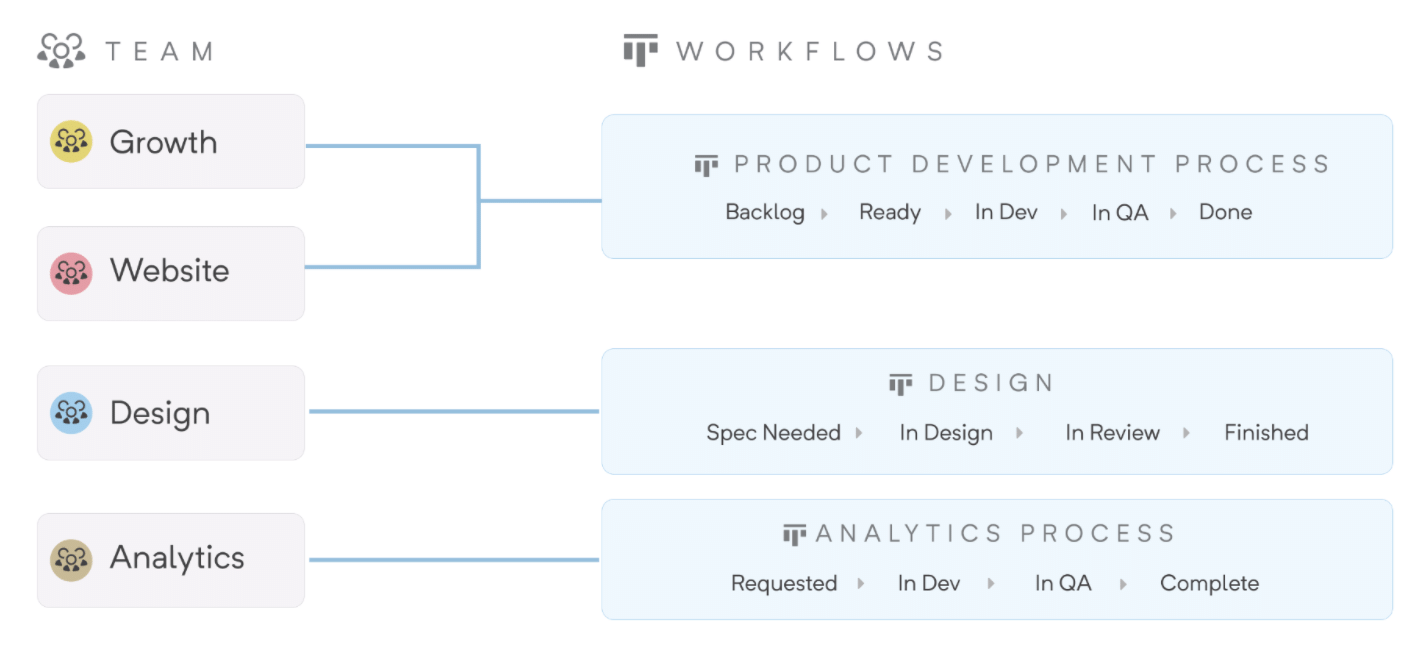
    CEO Kurt Schrader said team-to-workflow functionality is being added to the software-as-a-service (SaaS) platform and will make it easier to share workflows across software development teams in a more standardized way.

    Organizations can standardize workflows across multiple teams while still giving each team the ability to customize workflows for their own unique processes. As work gets created and assigned, it automatically moves into a workflow without having to manually update processes.

    Shortcut is designed to make it simpler for development teams to collaborate in a way that maintains transparency with other teams working on projects that are part of the same larger initiative, said Schrader. It allows product managers, engineers and designers to plan, track and measure their work without friction as the organization continues to grow in size, he added.

    For example, Shortcut will surface what teams need to focus on as priorities and timetables change within a specific project in addition to allowing users to define sprints using start and end dates, and the tool then sends reminders so the team can reserve time to focus on specific projects.

    Shortcut will also integrate with continuous integration/continuous delivery (CI/CD) platforms via application programming interfaces (APIs) to enable the development of custom workflows that include, for example, integration with real-time conversations occurring via the Slack collaboration service.

    Most of the project management software DevOps teams employ today is too complex and intimidating for the average business executive. Rather than forcing business users to learn how to master these applications, a case can be made for a more intuitive set of project management tools for both software development teams and the product managers they ultimately serve.

    As more organizations realize how dependent they are on software to drive business processes, many of them are reviewing the tools they currently rely on to manage software development. The goal is to not only reduce friction and enable more transparency across teams but also to provide stakeholders outside of the development team with more visibility into the status of any given project.

    At the same time, organizations are simultaneously launching more software development projects that have many dependencies. Many of those initiatives are based on microservices that are being built in isolation from one another before being aggregated to create an application. The dependencies between those microservices require organizations to make sure they are developed and deployed in a way that doesn’t leave one software development team waiting on another to finish a project before they can complete their work.

    Shortcut

    Schrader said that humans, as a species, are bad at organization. Project management applications should make it simpler for companies to understand how projects are not only organized but also all the dependencies that exist between them.

    Regardless of how software development projects are managed the need for greater visibility is obvious to all. Less clear is the best way to go about achieving that given all the communications channels available.

  • 5 App Modernization Best Practices

    5 App Modernization Best Practices

    An organization’s digital transformation is ineffectual if it doesn’t bring out the best from its applications. This is a near-universal concern since most enterprises still have core applications that are architected primarily to work in legacy IT landscapes in an on-premises dedicated environment, slowing down IT and business performance, stymieing innovation and increasing vulnerability to risk. Businesses are paying the price of their technical debt by forsaking agility, adaptability and competitiveness. That’s bad enough in regular times; in a post-pandemic scenario, this can have devastating consequences. 

    Acquiring a few cloud-native applications that are not integrated with existing systems is of limited value and, at best, provides just part of the answer. On the other hand, overhauling the legacy application landscape is usually out of the question. The only reasonable solution, then, is application modernization. But where does an enterprise begin?

    Pick and Shift

    A great place to start is by examining existing applications. Understanding every application’s function, performance and issues and what it can gain from modernization will help to establish a ‘universal set’ to pick from. The candidates for modernization can be prioritized based on technology factors—for example, when the architecture adds cost, vulnerability or complexity—as well as business considerations, such as compromised agility or value potential. Finally, the enterprise needs to weigh the potential benefits, especially ROI, against the difficulty of modernization.  

    Typically, the biggest, most important applications at the core of the enterprise are the hardest to modernize. But without their involvement, the transformation will most often be incomplete. Rather than lifting and shifting these monolithic applications and their vast data to the cloud, the enterprise can enclose them in an API layer to connect them to all the other applications that are being migrated as well as any new applications that are deployed. Using APIs to expose the functions and data of a legacy core system, such as ERP, allows it to be widely used, reused and modified, as well as leveraged to build new solutions and services. 

    Split Into Microservices

    Refactoring is a useful way of modernizing legacy applications that involves breaking them into microservices, which are then connected to cloud infrastructure such as Docker or Kubernetes. These microservices, which are loosely coupled, can be ‘called’ and scaled individually. Since refactoring requires significant rewriting and restructuring of the code, it is best done progressively over several iterations to make sure everything is functioning properly.  

    Provide Full-Stack Visibility 

    Even when an application is modernized into microservices on the cloud, it needs to communicate with other legacy systems in the enterprise. The problem is that now there are more services and environments to monitor and secure, not to mention single points of failure, which not only increases complexity but also denies the enterprise full-stack visibility. But visibility across environments—edge to core (on-premises) to cloud—is imperative for success. This is achieved by ensuring that the modernized applications fit within the organization’s data fabric. The enterprise needs to capture data across the stack, from end to end, and process it in real-time to have an uninterrupted view of the performance and availability  of its applications.

    Modernize the Process Landscape

    A perfectly executed application modernization program can fail to deliver results if the surrounding requirements—for example, planning and meeting quality standards—are not met. Legacy processes can be a drag on modernization efforts. It is therefore necessary to address this issue by rearchitecting processes to fit a more automated setup by supporting code developers with teammates who understand the business requirements, adopt best practices and follow the example of successful digital natives. 

    Track Performance Metrics

    Going back to the point about visibility; enterprises need to establish key metrics to track so they can monitor the performance of applications right down to the code level. And it’s not just applications—the entire infrastructure, from cloud to databases to networks, needs to be tracked continuously to identify problems before they blow up. The performance of applications needs to be compared with the corresponding pre-modernization values to understand the benefits as well as identify areas needing optimization.

    Balance and Act

    Application modernization approaches range from rehosting and refactoring to rearchitecting and replacing, which are progressively costlier and riskier, but also progressively more impactful. Enterprises need to decide what’s best for them based on considerations of effort, cost, risk and result. While some enterprises may go slower than others, eventually they will have to modernize all their applications to be competitive and meet their customers’ needs in the most effective way.

  • Zero-Trust Network Access Platforms Slash DevOps Bottlenecks

    Zero-Trust Network Access Platforms Slash DevOps Bottlenecks

    In a prior article, I indicated why a new remote zero-trust platform is needed to support DevOps teams.

    Traditional remote access configurations are not well-suited for DevOps given a shifting user population comprised of employees, contractors and other third parties often using their own devices; the large number of tools and systems to which access must be provided and the hybrid nature of the infrastructure itself (on-premises, hybrid and multi-cloud).

    DevOps Pain Points

    Three pain points are associated with traditional approaches when used with DevOps.

    1. DevOps user experience is poor in traditional remote access configurations. Each DevOps service must be accessed as separate secured sessions, which is confusing and tedious.
    2. System management requires IP whitelisting rules in VPN, static SSH keys in Bastion, firewall rules controlled by different teams and application-specific authentication. The coordination and execution of so many touchpoints for common actions—including the onboarding of new team members, changing roles or adding a new service—invites mistakes that cause productivity issues and introduces unforeseen security holes.
    3. Security is complex and error-prone. DevOps users must be granted restricted access to the individual services they need to be productive. Administering restricted access for individuals and groups is time-consuming. Security policies typically require monitoring detailed audit logs of user access.

    How a Zero-Trust Remote Access Platform Works with DevOps

    In my whitepaper, Zero-Trust-Remote Access-For-DevOps, I explain how a zero-trust remote access platform can resolve the requirements for improved DevOps user experience, consistent and manageable administration and simplified, less error-prone security.

    Improved DevOps User Experience

    By replacing the need for the user to tediously set up separate sessions for each DevOps service they need to use, a client-side DevOps service catalog enables all DevOps services to be accessed with a single click. This service catalog approach is more convenient for DevOps users and provides a form of DevOps governance. It does this by encouraging DevOps teams to select choices that are available in the catalog instead of creating new choices that result in expensive DevOps tool sprawl.

    Simplified DevOps Management

    Management of remote DevOps users is simplified by consolidating access for all DevOps users and services under a single unified service manager and connector. The need to manage each user and service with different teams, each with their own processes, is unified and streamlined when the management requirements for DevOps users and services are consolidated under a common zero-trust remote access platform.

    In addition, this approach makes it much easier to implement more adaptive policies across the breadth of users and services.

    With a zero-trust remote access platform, onboarding new DevOps users and groups is accomplished within a single session—not separate sessions for each onboarding requirement.

    Simplified and Less Error-Prone Security

    Consolidating access to DevOps services under a common zero-trust remote access platform with unified services and services connectors enables simplified and less error-prone security controls, improved security monitoring and policy management. Audit logs of access are reported consistently for all services. Monitoring and changing access rules can be supported for individuals or groups when adjusting a policy. Trust-based access controls can be implemented consistently. Granular policies ensure access is predicated on appropriate device trust score thresholds being met. Rather than a single check prior to granting access, these production services policies continuously assess the security of the users and devices accessing the services.

    Transforming to a Zero-Trust Remote Access platform for DevOps

    Transformations of all types, and especially those for DevOps, are made more certain by following a
    seven-step transformation process, described in my book Engineering DevOps. This process serves as a framework for implementing the zero-trust remote access platform.

    The first two steps, vision and team alignment, involve getting the leaders, key influencers and implementers of an organization to recognize and establish actionable goals for the implementation of the zero-trust remote access platform.

    The third step, assessment, requires taking inventory of the current state of DevOps users, DevOps services and policies that need to be supported by the new platform.

    The fourth step, road map, requires determining the plan for implementation. Typically, it makes sense to start with one application. Start with a set of DevOps users and DevOps services needed for a single application or pipeline which can serve as a model to drive adoption to other applications as the solution is proved and accepted.

    The fifth step, realize, is the step in which the zero-trust remote access platform is installed and set up for the initial model application or pipeline. Banyan Security explains how an example tool vendor helps to simplify this step.

    Capabilities to look in for in zero-trust remote access tools include:

    • Deploys in minutes, with no integration requirements on any existing DevOps services or infrastructure.
    • No need to set up VPNs, open inbound firewall ports or manage DNS.
    • Use existing DevOps user devices without diminishing security.
    • DevOps service catalog provides users visibility and one-click access to DevOps services.
    • Support for bundled services, favorites, and autorun capabilities.

    In step six, operationalize, the procedures for commissioning and using the zero-trust remote access platform are proven, benefits are measured and playbooks are hardened for the organization.

    In step seven, expansion, the zero-trust remote access platform deployment is expanded to other DevOps applications pipelines, DevOps users and DevOps services across the enterprise.

    What This Means

    Traditional remote access configurations are not well suited for DevOps administrators or users given the dynamic nature of services, team members, and environments. A zero-trust remote access platform addresses the need for an improved DevOps admin and user experience, simplified access management to DevOps services and simpler, less error-prone security practices and monitoring.


    I want to express my appreciation for the time spent with the Banyan Security team, who has pioneered many of the concepts outlined in this blog and contributed valuable insight.

  • Google DORA Report Shows Modest DevOps Gains

    Google DORA Report Shows Modest DevOps Gains

    Google today published the annual Accelerate State of DevOps Report created by its DevOps Research and Assessment (DORA) team that finds 26% of DevOps teams surveyed can now be classified as elite performers. That compares to 20% the last time the study was conducted in 2019.

    DevOps teams, made up of a total of 32,000 IT professionals from around the globe, were evaluated based on their ability to frequently deploy, code, lead time for changes, time to restore service, change failure rates and operational performance. An elite team is expected to be able to restore service in the event of an outage in less than an hour.

    Dr. Dustin Smith, a user experience researcher for Google, said the increased rate suggests steady gains in DevOps maturity continue to be made despite all the challenges the COVID-19 pandemic presented. A full 96% of respondents said that prior to the pandemic they had not worked from home on a regular basis.

    The DORA report finds high and elite performers make up two-thirds of respondents. Elite performers were able to collectively decrease their lead time for changes when compared to previous studies. It’s also worth noting only elite performers have minimized their change failure rate. In previous years, medium and high performers were able to do the same.

    Overall, more than half of respondents (52%) report they have adopted site reliability engineering (SRE) best practices to some degree.

    Elite performers deploy code 973 times more frequently than low performers, who reported deploying less than once every six months. The normalized annual deployment numbers range from 1,460 deploys per year for the highest performers to 1.5 deploys per year for low performers. Not surprisingly, for elite performers, the lead times from commit to deploy are 6,570 times faster than low performers.

    Security practices have also improved with 60% conducting security reviews, with 58% reporting that the reviews include testing. Nearly two-thirds (63%) said they work closely with information security teams. The report finds teams with high-quality documentation were 3.8 times more likely to integrate security throughout their development process.

    Reliance on cloud platforms has also increased, with 56% of respondents indicating they employ a public cloud, a 5% increase from 2019. Only 21% of respondents reported deploying to multiple public clouds. Over a quarter (26%) of respondents did so to leverage the unique benefits of each cloud provider, followed closely by 22% that cited availability.

    Just over a third (34%) report they are using a hybrid cloud, while 29% have a private cloud. A total of 21% still don’t use a public cloud.

    The report also finds elite performers were 3.5 times more likely to have met all essential cloud characteristics defined by the National Institute for Standards and Technology (NIST). Those characteristics are defined as on-demand self-service, broad network access, resource pooling, rapid elasticity or expansion and measured service. Only 32% of respondents who said they were using cloud infrastructure agreed or strongly agreed that they met all five of the essential characteristics of cloud computing defined by NIST, an increase of 3% from 2019. Overall, usage of those characteristics of cloud computing have increased by 14% to 19%, with rapid elasticity showing the largest gain.

    The DORA report makes it clear there is still a long way to go before DevOps nirvana is more widely achieved. On the plus side, however, the number of organizations that have embraced DevOps to some degree continues to steadily increase.