Category: DevOps Practice

  • AWS Saves Ukraine’s Data | WPF ‘is not Dead’ (yet) | Devs Quit for Cash

    AWS Saves Ukraine’s Data | WPF ‘is not Dead’ (yet) | Devs Quit for Cash

    Welcome to The Long View—where we peruse the news of the week and strip it to the essentials. Let’s work out what really matters.

    This week: Amazon S3 is keeping Ukraine’s data safe, we ask if Windows Presentation Foundation is dead, and developers tell us why they switch jobs. (more…)

  • It’s a Toolchain!

    It’s a Toolchain!

    I was talking with some friends the other day, and we got to discussing how inaccurate the word “toolchain” is. We pundits–and even a lot of marketers–use the word toolchain regularly and, while it’s not a terrible encapsulation of what we’re doing, it is, at best, a hasty generalization. There are a lot of reasons for this.

    The biggest reason is that “your toolchain” can have meaning when talking to a single DevOps team, but an organization rarely has just one. And increasingly, even single teams will use different tools depending upon the project they’re currently focused on. There are a lot of languages, targets, environments, specialized tools, frameworks, etc. that are unique and interdependent. Any organization that actually ends up reaching “one toolchain” will keep that honor only until the next merger. Or until the next project starts up. Because in the end, IT is about solving problems and while some things like OSes get standardized, others do not, as they are focused on solving those problems.

    Then we have the variations. Even ‘one’ toolchain is really not the same chain of tools; it is the same CI/CD tool managing a pool of others. This has really interesting connotations for the idea of the “weakest link in the chain,” whether we’re talking security, compliance or testing, because the weakest link might depend on which tools are spawned this run. To take an easy example that doesn’t overlap with the biggest reason above—targeting containers for test and virtual machines (VMs) for deployment. Some organizations do this type of thing regularly due to licensing or space issues. Two different deployment steps in ‘one’ toolchain. There are more instances like this than you would think. “This project uses make, that one uses cmake” is an example of the type of scenarios we’re talking about. These minor variations are handled by what gets called from CI.

    Finally, most of the real-life organizations I stay in touch with are both project-based and are constantly evolving. That makes both of the above scenarios the norms, not the exceptions. While they would love to have one stack and one toolchain for all projects, no one realistically sees that happening anytime soon. Some organizations that crank out precisely one type of application for one type of audience (dynamic web apps for a particular market, for example) can get to a single DevOps toolchain, but most do not.

    A windbag like myself claiming that we’re using the wrong term—and that toolchains should always be plural when having these discussions—does not make it important. I do think it matters though because what is useful for one toolchain is not for the next. The oldest, most established and, arguably, most thorough code analysis tools are for C/C++. Talking about how we have a solution to help add testing to your toolchain is not terribly useful if the point is to extoll the virtues of those code analysis tools and the audience is full of people from primarily Python or Go shops.

    Right now, important tools for you to consider are those that make your work easier. Consolidation should be high on your list of priorities; we have far too many DevOps tools. Merging should be a consideration. Yes, Python and Ruby have different needs, but if there is a single tool that can offer build or test for either based on information contained in the pipeline, grab it so two toolsets don’t bifurcate your build process.

    And keep kicking it. Seriously. In the grand scheme of things, we’re entering a bit of a rough patch in IT, but you all have been managing to keep the org online and functioning for plenty of rough years. Don’t stop now. Your users would thank you if they weren’t annoyed by that spelling error on the button of the “About” page. So I’ll do it for them. Thank you.

  • The DevOps Workflow is Broken. Here’s How to Fix It

    The DevOps Workflow is Broken. Here’s How to Fix It

    While great progress has been made in bridging the gap between developers and operations engineers, fundamental differences in roles and responsibilities, alignment, and access to information hinder further progress. 

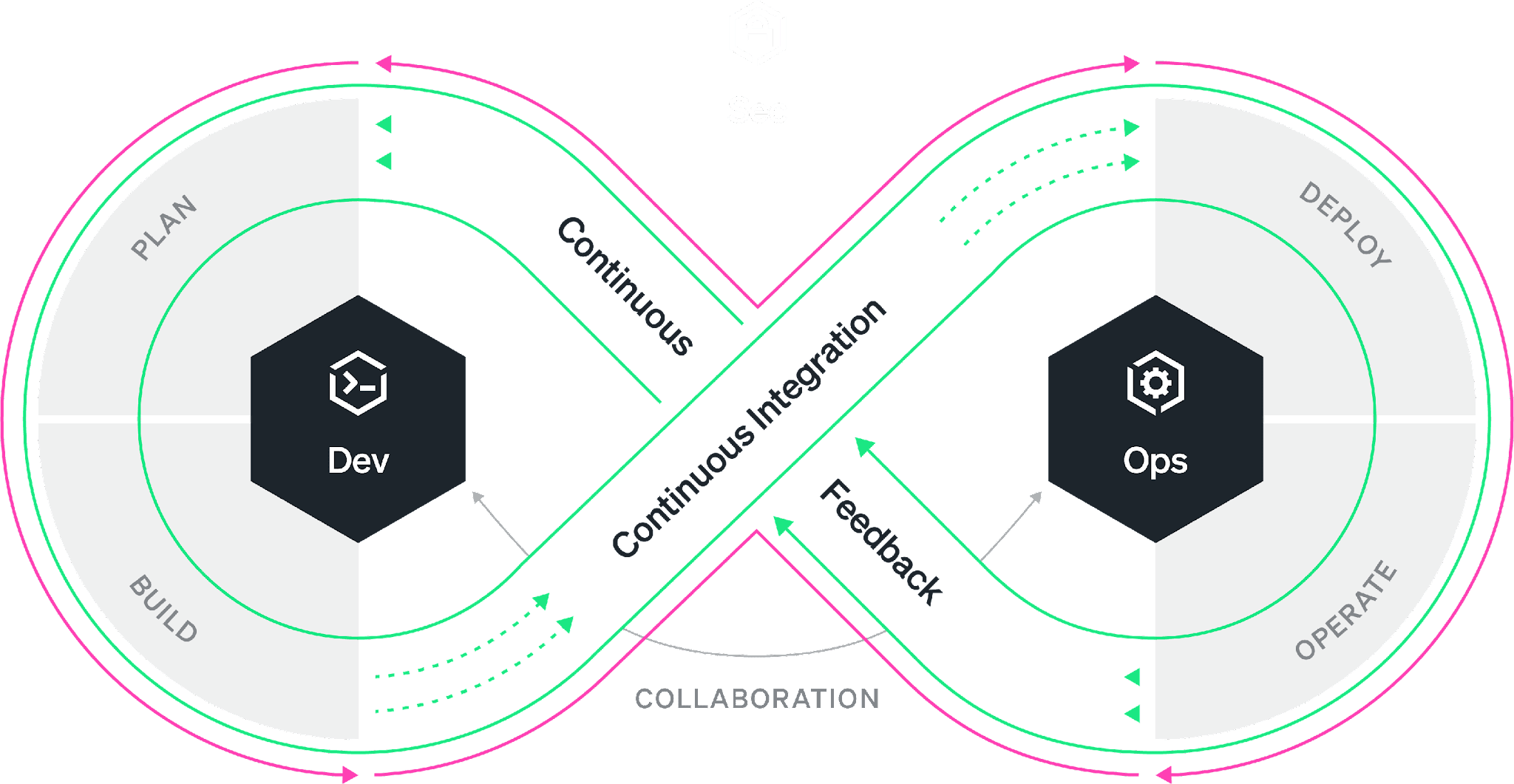
    Everyone is familiar with the DevOps infinity loop: This is an ideal workflow where every stage of the software development life cycle feeds into the next. While the philosophy is well understood, organizations have worked on bringing developers and SREs closer together under the DevOps banner. The reality is most of the time, the DevOps infinity loop is broken. Developers continue to focus on building features without the benefit of data-driven insights that production data can provide. Developers often “push and pray” without fully understanding how their changes will affect performance and the user experience. As a result, companies miss the opportunity to improve products faster and delight the customer sooner.

    According to Gartner, 90% of DevOps initiatives will fail to fully meet expectations. And yet, the global DevOps market, which accounted for $7.3 billion in 2021, is expected to reach $37 billion by 2030. So to summarize, we’re all spending billions of dollars on the implementation of initiatives that are expected to fail in some meaningful way 90% of the time. The question is: What is failing and what can be done about it? 

    As the DevOps toolchain continues to expand, collaboration across tools is difficult and success depends on your organization’s ability to simplify and automate while achieving alignment. Developers use a variety of tools from various vendors in their daily work. The most widely used are VS Code from Microsoft, Jira from Atlassian and Slack from Salesforce. The most popular code hosts/repositories include GitHub, GitLab and Bitbucket. Bridging the gap are CI/CD vendors such as Jenkins and CircleCI. Ops engineers typically rely on other vendors for their daily work, such as New Relic, Datadog and Dynatrace. So, how do we ensure that all stakeholders in the SDLC have access to all the relevant information simultaneously, understand the objectives and get an integrated perspective of the different inputs and workstreams independently of the tools used?

    There are three essential areas that DevOps initiatives must tackle to create alignment, collaborate successfully and streamline workflows. Let’s tackle each of these areas individually.

    1. Collaboration. The first step is good collaboration. Most organizations rely on Slack or Microsoft Teams for this purpose, but they are both suboptimal when it comes to collaborating on code and incidents that point to code. Having code and data at the center of DevOps collaboration ensures that everyone has access to the information needed to tackle issues, reducing and even eliminating differences of opinion in the process.
    2. Visibility. Second, ops engineers and developers must have visibility into the performance of applications across the entire tech stack. These three barriers can occur in different aspects of an organization’s operations and their impact can limit the team’s ability to deliver value to the customer just as much as workflow inefficiencies. Visibility helps the organization reach alignment on common objectives.
    3. Context Switching. Third, given the number of processes and tools involved in a successful DevOps implementation, it’s important to work toward reducing context switching and integrating tools within established workflows. Integrating collaboration, tracking, history and observability into a single pane of glass can greatly improve clarity and time to resolution.

    For DevOps teams, increased velocity and transparency are always worthwhile pursuits. However, it’s important to avoid myopic focus on workflows when other nagging problems could be hiding in plain sight.

    By committing production telemetry, developer teams can adopt an objective, data-driven approach to software engineering—saving time and avoiding potentially misguided approaches based on opinions rather than facts. Visibility, transparency and velocity can help engineering teams meet ever-increasing requirements and provide their organization with the best possible business outcomes.

  • Five Great DevOps Job Opportunities

    Five Great DevOps Job Opportunities

    DevOps.com is now providing a weekly DevOps jobs report through which opportunities for DevOps professionals will be highlighted to better serve our audience.

    Our goal in these challenging economic times is to make it easier for DevOps professionals to advance their careers.

    Of course, the pool of available DevOps talent is still relatively constrained, so when one DevOps professional takes on a new role it tends to create an opportunity for others.

    The five job postings shared this week are selected based on the company looking to hire, the vertical industry segment and, naturally, the pay scale being offered.

    We’re also committed to providing additional insights into the state of the DevOps job market. In the meantime, for your consideration:

    Monster.com

    Sentient Energy
    Milpitas, California
    Lead Software Engineer – DevOps
    $167,149

    Dice.com

    Paladin Consulting Group
    Remote
    Principal DevOps Engineer
    $160,000 to $180,000

    Indeed.com

    MIT Open Learning
    Cambridge, Massachusetts
    Senior DevOps Engineer
    $120,000 to $152,000

    ZipRecruiter

    Edward Jones
    Remote
    Site Reliability Engineer Architect
    $106,916 to $182,047

    SimplyHired

    Visa
    Miami, Florida
    DevOps Engineer
    $80,000 to $110,000

  • How Enterprise Software Architects can Design for Sustainability

    How Enterprise Software Architects can Design for Sustainability

    Organizations of all sizes are feeling the pressure to introduce more aggressive sustainability measures to combat climate change. For example, most cloud service providers have announced significant climate pledges to either reduce or offset their carbon emissions. But these initiatives can only go far to move the needle—it’s up to individual companies and departments to participate in curbing their climate impact, and DevOps certainly has a role to play in enacting positive change.

    One way to design for sustainability is to optimize information technology systems to reduce waste. Enterprise IT typically supports a lot of unnecessary technical debt and perpetuates toilsome tasks that contribute to energy inefficiencies. Removing unused instances and features or idle workloads that aren’t contributing value could be an easy way to reduce waste. Yet other optimizations will require more effort.

    I recently chatted with André Christ, co-founder and CEO of LeanIX, to discover what techniques enterprise-level software architects can use to get the most out of their technology modernization efforts while leaving the least carbon footprint. According to Christ, optimizing existing processes, using cloud-native technologies and leveraging value stream management are some tactics architects can take to “do more with less.”

    1. Match Technology to Sustainability Targets

    First, technology leaders must understand the capabilities of their business that could help contribute to meeting sustainability targets. “This requires understanding and systematic mapping,” said Christ. “It’s really about understanding what you can do as a company to contribute to sustainability in a more holistic way.”

    For example, a routing and logistics provider might optimize operations by redesigning its floor plan to maximize efficiency and reduce energy use. Similarly, Christ recommended software professionals take stock of their existing capabilities to determine what should change. This could equate to discovering internal microservices that aid one department and extending them across the entire organization.

    Optimizing data transfers is another way to create a leaner IT system. For example, teams could reduce constant polling by eliminating overfetching and underfetching or embracing a new API standard, like GraphQL, said Christ. Cutting out these superfluous calls reduces unneeded energy consumption.

    2. Ensure Cloud-Architected, Not Lift-and-Shifted

    Cloud migrations can reap significant benefits in terms of scalability and flexibility. But not every cloud migration delivers tangible sustainability benefits. AWS identified six unique strategies for migrating applications into the cloud: Rehosting (known as lift-and-shift), replatforming, repurchasing, refactoring, retiring and retaining. While early gains may be met simply by rehosting applications, replatforming or refactoring them completely with cloud-native components will likely deliver the best optimizations.

    “If you only lift-and-shift applications into the cloud, they will keep running just as inefficiently as a virtual machine,” said Christ. Therefore, architects should design for cloud-native whenever possible rather than simply porting legacy applications to the cloud. On the other hand, it may be prudent to replace specific legacy components with SaaS or retire them altogether. As such, it’s crucial to analyze your existing landscape before making a cloud migration to ensure changes are both cost-effective and advancing sustainability goals.

    3. Practice Value Stream Management

    Practicing value stream management is another potential strategy to cut bloat by ensuring product teams always create more value for the end customer. Planview defined value stream management as such:

    “Value Stream Management is a management technique or practice that focuses on increasing the flow of business value from customer request to customer delivery.”

    This frame of mind could help engineers make more streamlined decisions about what they’re creating. But to achieve value stream management, organizations will require enhanced visibility into how individual services perform, their dependencies under the hood and their approximate emissions.

    The core question you should be asking product teams, said Christ, is how carbon-efficiently are you operating in relation to the number of users you are serving? The answers will highlight which aspects of the business require the most optimization.

    4. Tie Sustainability to the Business Bottom Line

    Many sustainability pledges are founded on carbon offsetting, in which the company purchases “offsets” of its emissions, usually by planting trees or preserving forests. But, the practice of carbon offsetting has received criticism as being ineffective at stemming rising global temperature levels. So what does an honest climate pledge look like that’s more than greenwash? Well, perhaps one more closely associated with the bottom line.

    Taking the idea of value stream management one step further, Christ argued that a real climate pledge would involve reducing carbon footprint by a certain percentage for each new dollar generated. As a business scales and its revenue increases, it should constantly reduce emissions in parallel with this growth. This would equate to assigning a dollar value for every CO2 ton and putting it into the balance sheet, said Christ.

    Doing More With Less

    Nations are striving to reduce carbon emissions through sweeping legislation. Yet, national goals will be insufficient to meet the target decline of 43% percent by 2030 and net zero by 2050, the United Nations reported. Thus, it will take effort from the private sector, as well.

    We’ve identified some steps above to do more with less, yet many current, unsustainable practices are culturally ingrained, making them challenging to change. It will be the work of enterprise software architects to break it down and apply smarter designs to cloud-native applications. This will likely require centralizing views of internal services to enhance visibility and reporting. “You need good visibility into what you’re building and what it’s composed of to reduce the footprint,” said Christ.

  • Decidability: SLOs to Measure Quality Attributes

    Decidability: SLOs to Measure Quality Attributes

    You may be familiar with the “-ilities”–the quality attributes that define a system’s so-called “non-functional” parts. One that isn’t on the list is decidability, which is the ultimate quality attribute because it focuses on what truly matters to your team and your customers.

    You can’t do it all. Fast, cheap and good? Here in the real world, we have tradeoffs. Software is the mouth that keeps on eating, but it isn’t a digital free lunch. When we decide what not to do, we bring greater clarity and productivity to the team.

    Of course, the world is full of “shoulds.” We should make our product accessible, we know. It should be secure; it should be reliable. Of course. But how do you decide the limit of your shoulds? To enable decidability, you need context. To gain a contextual understanding of your most critical quality attributes, you must talk to real people and reason about your situation. There’s no other way.

    New Design, Wrong Decision

    I had an eye-opening experience that demonstrated firsthand how quality attributes don’t necessarily deliver business results. Six years ago, I was working on e-learning software for public schools. One of the main problems was user management. We were selling to massive institutions that often had only one administrator responsible for onboarding all the users across hundreds of schools. While school was out, they had to enter data for the schools, create classes and assign teachers.

    Once we had a design for improving the workflow (luckily, before implementing it), we took the mockups to a customer to show the fancy ideas we had built. They surprised us by showing us “what it looks like for them”–a spreadsheet! They were copying/pasting everything by hand.

    So we asked them, “What if we gave you a way to upload the spreadsheet? Would that work?” And, of course, the answer was yes! So we scrapped our plans to build a fancy form and made a drag-and-drop input field to validate and upload the sheet. The decision was clear.

    Measuring Decidability

    How do we measure the critical business drivers and turn them into decidability? The closest answer I’ve found is service level objectives (SLOs). These take the fuzzy -ilities and turn them into metrics and goals that can quickly inform decisions.

    SLOs are a universal tool for measuring quality attributes from an indicator expressed as a proportion of “good” events for a given quality like reliability or scalability. Decidability comes from aggregating the SLO data across your services, geographies, user groups and quality attributes over time.

    Comparing an indicator to a particular goal (tuned over time as the business and engineering context changes), we can derive an allotment of allowable “bad” time or events–an error budget. Setting an error budget for reliability, performance, scalability, etc., allows you to decide how poorly your service can operate and still keep customers happy. Further, you can find the breaking point of user behavior and defend your service proactively from violating the quality attributes you expect.

    Technical debt inevitably stems from all the -ilities you should focus on but couldn’t quite get to, given your situation. Some technical debt is deliberate and even prudent. To tackle technical debt, you must decide which new features to put on hold to make space in the roadmap. SLOs provide a data-driven baseline to make this decision quickly and accurately by telling you when your -ilities are within error budget or out of whack.

    Scaling Decidedly

    You might start on a small, single-purpose project that’s rarely used. But if that changes, you must decide how to invest, redesign and maintain it. Suddenly, you might care about performance, scalability, security and the rest. First, you need decidability so you can prioritize your work. So you gather the people together who care about the service, and you start to think and talk and stack rank. You use your instrumentation to build metrics, set clear goals and do what it takes to keep the system running within expectations.

    Automating action based on error budgets is the magic of setting SLOs. They aren’t just for sophisticated, highly available services. Error budgets are extremely valuable in systems when you aren’t sure what to do. SLOs create decidability in all the trade-offs of all the quality attributes and the functional needs of the app or service you’ve carefully built.

    If you put decidability first, the rest will fall into place.

  • Salesforce Launches Low-Code DevOps Platform

    Salesforce Launches Low-Code DevOps Platform

    Salesforce made generally available today a low-code DevOps Center service on its infrastructure through which developers are provided an opinionated platform for building custom applications. The Salesforce DevOps Center service is based on the same object model Salesforce uses to construct its own applications.

    Karen Fidelak, senior director of product management at Salesforce, said after nearly two years of development effort, this platform will make it simpler for both professional and citizen developers to build applications consistently using a common Source Control repository. That’s especially critical for professional developers that may need to access source code previously created by a citizen developer, Fidelak noted.

    In 2023, Salesforce will embed more robust continuous integration/continuous delivery (CI/CD) capabilities within the platform to make it simpler to deploy custom applications on the Salesforce platform, Fidelak added.

    In general, the number of developers willing to embrace DevOps best practices to build Salesforce applications has been surprising, since the platform was initially launched in 2020, noted Fidelak. She noted that both citizen and professional developers are looking to adopt best practices that provide a set of guardrails that ensure high-quality applications are secure. Salesforce anticipated a much higher level of DevOps resistance, added Fidelak.

    The DevOps Center platform enables development teams to track and deploy changes to custom objects on the Salesforce platform as Work Items that can be integrated with other Salesforce Flows, a set of process management tools the company provides. As development teams make changes in their sandboxes, DevOps Center automatically tracks them. Developers can then point and click to promote their desired metadata components via custom pipelines they define.

    In addition, Salesforce also provides optional integrations with version control systems such as GitHub to centralize the management and governance of artifacts.

    Finally, Salesforce is committing to tightening integration between DevOps Center and multiple software-as-as-service applications such as Tableau and middleware platforms such as Mulesoft, said Fidelak.

    It’s not clear how much low-code is moving through DevOps pipelines these days, but the volume is increasing as more developers rely on these tools to accelerate application development. The issue that creates is citizen developers typically don’t have the expertise required to build and deploy secure applications at scale—at least not applications that anybody other than themselves really wants to use. Ideally, citizen developers should be supported by application development platforms and DevOps teams that ensure security guardrails are in place for building applications at scale. DevOps teams should also reduce the friction that a citizen developer will most certainly encounter when building any application.

    The fact is, in the absence of that support, most citizen developers—who typically have other tasks that require their attention—will simply abandon an application development project should projects become overly complicated. None of this means organizations shouldn’t be working toward building their own army of citizen developers. The increased reliance on citizen developers is part of an inexorable wave of the democratization of IT. The challenge is making sure those applications are of the highest quality possible regardless of who actually developed them.

  • EU Data Privacy: Try Again | SkyPilot: Choose Cheapest Cloud | WFH: Better Meetings

    EU Data Privacy: Try Again | SkyPilot: Choose Cheapest Cloud | WFH: Better Meetings

    Welcome to The Long View—where we peruse the news of the week and strip it to the essentials. Let’s work out what really matters.

    This week: EU-U.S. Data Privacy Framework reemerges, Berkeley brings cloud selection box, and proof that remote work is good work. (more…)

  • Why Backups and Compliance Go Hand-in-Hand

    Why Backups and Compliance Go Hand-in-Hand

    It’s hard to run a business. Besides the numerous challenges you have to deal with daily, ensuring the security of your business and customer information is essential for operating smoothly. In order to mitigate information security risks that would affect companies and their users, a number of security regulations have been created, including a set of best practices that companies must follow.

    Compliance with these regulations will allow you to:

    ● Reduce security and privacy risks
    ● Strengthen control of key processes
    ● Align cybersecurity requirements with business processes
    ● Better understand cybersecurity goals and how to handle business security challenges
    ● Maintain effective cybersecurity programs
    ● Build customer trust and improve company reputation

    One critical requirement to achieve compliance is backups. Organizations back up information that’s vulnerable to threats like software or hardware failures, cyberattacks or human error. Any one of these problems could potentially lead to data loss, system malfunctions, financial losses and reputational damages. In this post, you’ll learn more about why data backups are an important part of compliance and about the benefits of having a robust backup strategy.

    Why are Backups Important for Compliance?

    Regulations like GDPR, PCI-DSS and HIPAA, along with others, were created to ensure that organizations implement the most reliable methods to secure all types of sensitive data from infrastructure failures and malicious attacks.
    Compliance can’t be achieved unless an organization handles data in a way that adheres to the outlined regulations.

    Certifications like ISO 27001 and SOC 2 are considered the most thorough audits an organization can go through to prove they have taken all the necessary steps to protect business and user data. Unlike the regulations mentioned above, ISO 27001 and SOC 2 aren’t legal requirements, but they’re especially beneficial to SaaS companies, data centers and organizations that deal with sensitive information. They make it very clear that the company takes data security very seriously and considers it a top priority. By properly implementing the data and privacy controls required, you can increase reliability and user trust as well as gain a competitive advantage over other companies.

    To be able to obtain such certifications and comply with regulations and different standards in general, you’ll have to maintain robust, up-to-date backup processes that ensure data is always protected but also available to users—even in cases of unexpected events like natural disasters, cyberattacks, data losses and human error. In other words, to comply with regulations, your backup processes must match your business continuity plan and the data backup tools you are using should be able to handle your backup processes.

    Backups, of course, do more than enhance business continuity, as mentioned above. Although they can’t prevent an attack or a data loss from happening, they’re an integral part of your overall security strategy since they allow you to restore lost or corrupted information, mitigating the consequences of such an event.

    There’s no fixed rule for how frequently you should back up. Still, ideally, to secure valuable information, you should implement a combination of full and partial backups as often as possible. Fortunately, great data backup solutions can efficiently handle this complex but crucial task.

    The Difference Between Backups and Compliance

    Backups and data availability are just one of the many requirements for a company to comply with any regulation. It’s an important part, but it’s not enough on its own. Obtaining a security certification isn’t a quick and easy process that you can decide to do and then finish a month later. It’s a time-consuming process that will require buy-in from every member of your team and will ultimately involve in-depth tests and evaluations of how you secure data.

    Although each certification is slightly different, all of them require a company to implement a wide range of security procedures. For example:

    ● Structure your organization in a way that allows optimal management of your services.
    ● Have a strong disaster recovery plan.
    ● Communicate in detail with users about how your system works, your security policies and your processes.
    ● Perform risk assessments regularly to identify risks, measure their impact and create a plan to address them quickly and effectively.
    ● Continuously monitor your security controls to verify they’re operating as expected.
    ● Make adjustments as needed to stay ahead of the latest security threats.
    ● Control physical access to your devices and prevent unauthorized access to your systems.
    ● Integrate best practice security procedures into your day-to-day workflows.
    ● Optimize system operations to detect vulnerabilities early and deal with security incidents.
    ● Clearly describe how you handle changes in your infrastructure to ensure that they won’t affect your business operations.

    The above is far from an exhaustive list, nor will it guarantee regulatory compliance. There are numerous criteria you need to fulfill. Although compliance might seem a huge undertaking, the benefits surpass the difficulties.

    As the security risks in the technology world are constantly changing and becoming more sophisticated, organizations must be able to deal with them or face the consequences. For businesses that want to protect their customers and themselves, following security standards has become necessary. But security compliance isn’t an easy task, and it’s made more complicated by the fact that all of the vendors you use must also be compliant.

    Having a reliable data backup strategy is a crucial step for compliance with regulations and achieving business continuity. Fortunately, there are top-notch data backup tools that can make this complex process easier. These tools allow you to back up regularly to secure your valuable data, and will often automatically run backups on a schedule of your choosing. If you wish to remain compliant and ensure your data is protected, I highly recommend installing a backup service.

  • Get Comfortable with Shifting Right to Improve Resiliency

    Get Comfortable with Shifting Right to Improve Resiliency

    The operations team receives a page at 2:00 a.m. Something isn’t working correctly. Do they know how to fix it? Perhaps more importantly, do they know whether it matters to customers or how it impacts the business? There are different techniques that companies implement to maximize the quality of their software. We talk about shifting left or right, chaos engineering and others. While they each have their own goals to improve quality, there’s an underlying common goal as well: All three techniques increase your team’s knowledge of the system and their ability to resolve problems quickly.

    Here, we’ll walk through the software life cycle and discuss the common challenges to software quality, running complex systems and managing dependencies between teams. The common thread is a proper observability strategy which can help software quality, hand-offs between different teams and resolve problems quickly by ensuring whole-system resiliency from design to maintenance.

    Techniques for Improving Quality

    Shift left is a concept that has attracted much attention recently. The practice revolves around the idea that detecting and correcting problems sooner minimizes their impact. As the thinking goes, they’re easier to fix, they wind up costing less and there are fewer ongoing issues with bad code.

    The rise of DevOps and DevSecOps has propelled the popularity of shift left. Yet, there’s a fact that development teams often miss: no matter how early an organization spots errors, problems will inevitably remain. Early testing can’t catch everything. As a result, some organizations have begun to rebel and move to a shift-right framework. It normalizes errors and aims to better resolve issues across the development process, including post-production.

    Shift right is the perhaps less-extreme cousin to its rebellious relative, chaos engineering. With chaos engineering, team members cause problems on purpose to keep everyone on their toes and test the limits of the system. They shut down servers, disconnect wires, delete files, etc. The goal is to confirm system resilience–from a user perspective, there should be no impact even with all of this chaos. A resilient system means that teams can fix failed components at their leisure during the day. With a resilient system, critical failures are less likely to happen and it becomes second nature to fix them when the dreaded 2:00 a.m. page does occur. Unlike chaos engineering, shift right doesn’t explicitly break things–it just makes the assumption that broken things will exist so teams need to be ready to handle them.

    Both concepts (and yes, even chaos engineering) are valid—but each company needs to carefully analyze which is right for them. One variable to consider is the complexity of the system you’re building. Working on a rocket launch or a surgery robot? Probably should shift left as much as possible. Changing the color of a button? Maybe it’s not the end of the world to verify the fix in production. For most of us, projects fall somewhere between these two extremes–so sometimes shifting left is necessary, and other times shifting right is pragmatic. A careful analysis of the risks should be performed to determine what kind of testing is needed.

    Although teams tend to be pretty good at analyzing the complexity of their software and making development process decisions, they often forget the complexity of other companies’ code which they depend on. Even a simple web application deployed today has tons of dependencies: The server it’s running on, the local ISPs, transit ISPs, load balancer, DNS provider, TLS certificate, CDN and browser, just to name a few! After analyzing the complexities of all of the dependencies across the internet, it becomes clear that finding every possible issue that might impact their application is a daunting task.

    The goal, again, is to find any issues before they reach production. Or if they reach production, fix them before they impact customers. Or if they impact customers, fix them as soon as possible after that. To do any of these things quickly, the level of observability of the overall system is paramount. With simple systems—or even complex systems that are entirely under one company’s control—tools such as application performance monitoring (APM) are common. But when the scope of the system is as big as the internet, internet performance monitoring (IPM) tools are necessary instead.

    With both APM and IPM tools, the goal is to know as much about the system as possible – enabling teams to identify problems quickly, pinpoint the root cause, and fix it. When an organization is equipped to monitor development and operational processes effectively from application to delivery, there’s a shift toward higher quality code, fewer errors, improved security and lower costs for the enterprise. There are also fewer disruptions and distractions for engineers, DevOps teams and others.

    Dealing With Disconnects

    Whether shift left or shift right is used, there will be problems that enter production. There is an invisible wall in many organizations–where engineering teams “throw code over the wall” to the team which is now responsible for running it. In some companies, this is the operations team; in others, it’s site reliability engineering or production engineering–the common trend is that in most companies, it’s not the same team who created the software.

    These operations teams often lack the nuanced information they need to resolve production issues. They might spend hours or even days attempting to track down the source of the problem. There’s often finger-pointing between different teams who created or own different portions of the system. Things can quickly devolve into chaos—and tempers can fray. After all, these kinds of problems always happen at 2:00 a.m., right?

    That’s where end-to-end observability enters the picture. Imagine a framework with proof that the development team has performed sufficient knowledge transfer to the operations team. That the operations team has asked all of the relevant questions about running and maintaining the application. Using the right tools, engineering and operations teams need to monitor every aspect and every component of the system. Creating this monitoring strategy means that everyone involved also builds an understanding of the system–everyone is on the same page. All of a sudden, there is a common language to discuss problems, and teams operating the software in production can take debugging a lot further before they need to ask for help.

    Ultimately, shifting left or shifting right is a personal choice for every organization. Even if every possible test case is executed before deployment to production though, issues will happen–so take the opportunity to implement a robust system-level monitoring strategy that can be used to solve technical questions during that 2:00 a.m. call.