Category: DevOps and Open Technologies

Editorial Calendar for February 2016

  • ActiveState Makes All Tiers of Curated Artifact Repository Service Free

    ActiveState Makes All Tiers of Curated Artifact Repository Service Free

    ActiveState today announced it is making all tiers of its ActiveState Artifact Repository service available for free for a limited time. The move aims to enable organizations to better secure open source software components incorporated within applications.

    Loreli Cadapan, vice president of product for ActiveState, said the ActiveState Artifact Repository exposes a set of curated instances of open source software for creating binaries that are validated to be secure. That capability reduces the likelihood vulnerabilities will be inadvertently introduced into application environments by developers that have downloaded open source modules from repositories that may contain compromised code, she added.

    In addition, the ActiveState Artifact Repository also makes it possible to automatically generate software bills of materials (SBOMs) that identify which software components were used to build an application after all the code used to construct an application is stored in the repository, Cadapan noted.

    ActiveState’s repository is delivered as a cloud service to organizations that would otherwise have to build their own. Cadapan noted that the goal is to make managing and securing software supply chains simpler when more attacks are being launched against them.

    Most organizations have limited visibility into how they are consuming open source software. It’s become apparent many organizations have no idea what software components have been incorporated across their software supply chain. As a result, when a vulnerability is discovered, there’s no easy way for them to know whether they are impacted.

    However, awareness of this issue has risen, thanks to an executive order issued by the Biden administration which requires federal agencies to have an SBOM for every application they employ by next summer. The executive order was issued in the wake of a zero-day vulnerability in the Log4j tool discovered late last year that is widely used to create logs within Java applications. Many organizations are still looking for all the vulnerable instances of Log4j in their application environments. SBOMs must provide a list of the “ingredients” used to create an application to make it easier to find any component that might one day be similarly affected by a zero-day vulnerability.

    Organizations that want to implement a similar SBOM policy will spend massive amounts of time cataloging software on an ongoing basis. Every time an application is updated, there will be a need to once again verify what components are being employed within the context of larger DevSecOps workflows.

    SBOMs will undoubtedly play a critical role in improving overall application security. However, having an SBOM is not the same thing as operationalizing it. Organizations are ultimately hoping to be able to use an SBOM to decide whether to green-light the deployment of an application, so DevOps teams should expect to be required to not only provide an SBOM but also continuously update it. The challenge, of course, will be determining how many internal resources to devote to that effort versus relying on external platforms to manage that process.

  • Massive Number of Transitive Dependencies Traced to Open Source Code

    Massive Number of Transitive Dependencies Traced to Open Source Code

    An analysis of nearly 2,000 software packages published by Endor Labs found 95% of all application vulnerabilities can be traced back to a transitive dependency created when a developer used an open source component.

    The study, conducted by the Station 9 research arm of Endor Labs, a provider of a platform for identifying software dependencies, concluded there’s still a 32% chance those software packages would have known vulnerabilities even after components are upgraded to the latest version.

    Endor Labs CEO Varun Badhwar said vulnerabilities often remain because the last update made to one of those software components may have been made several years ago even though there are existing known vulnerabilities that affect it. Development teams can’t assume the latest version of a software component is secure, he added.

    In general, functional dependencies are created whenever developers download a third-party component, he noted. The most important thing for any software development team to determine when assessing actual risk levels created by those dependences is determining how accessible any given vulnerability is to an attacker regardless of its severity score, noted Badhwar.

    In the wake of a series of high-profile breaches, there has been an increased focus on software supply chains. The challenge is most developers don’t have a lot of cybersecurity expertise. They often create patches for applications based on a list of potential vulnerabilities surfaced by cybersecurity teams. The issue, of course, is that just because there is a vulnerability it does not immediately follow that the affected software component can be externally accessed.

    Endor Labs is making a case for a graph-based platform that identifies dependencies between the software components that make up an application environment. That approach makes it simpler to prioritize remediation efforts based on the impact a vulnerability might actually have and narrows the current divide between cybersecurity teams and application developers. By the time cybersecurity teams alert developers to a vulnerability they often have moved on to other projects. As a result, developers often lack context because it may have been months since they last looked at the impacted code.

    Of course, the inclusion of DevSecOps best practices should improve the overall state of application security as more responsibility for it shifts left toward developers. However, achieving that goal will require more than just giving developers access to software composition analysis (SCA) tools that only surface vulnerabilities in source code as it is being developed, noted Badhwar.

    In the meantime, the efforts to remediate all existing application vulnerabilities will be measured in years, so organizations need to determine where to focus their efforts. After all, every minute spent developing and deploying patches is less time that can be allocated to building and deploying new code. The trouble is that as more new code is written, the number of vulnerabilities that could be exploited increases and makes a bad situation worse.

  • Codenotary Extends Dynamic SBOM Reach to Serverless Computing Platforms

    Codenotary Extends Dynamic SBOM Reach to Serverless Computing Platforms

    Codenotary has extended the reach of its platform for automatically generating software bills of materials (SBOMs) to serverless computing platforms running software constructed using functions.

    Codenotary CTO Dennis Zimmer said because serverless apps are dynamically created, it’s not possible to generate SBOMs using traditional approaches. The TrueSBOM platform makes it possible to create an SBOM in real-time by adding one line to the source code of any application. The TrueSBOM for Serverless edition of the platform now extends that capability to the serverless computing frameworks made available in the cloud by Amazon Web Services (AWS), Microsoft and Google.

    That approach makes the SBOM a part of the application itself rather than a text file that is stored separately, he noted. Each time an application is updated or a scanner discovers a new vulnerability, a new SBOM is automatically generated, added Zimmer.

    Awareness of the need for SBOMs has skyrocketed since an executive order issued by the Biden administration made it clear that federal agencies would require them from software providers starting next year. Many enterprise IT organizations are likely to follow suit as part of a larger effort to better secure software supply chains in the wake of a series of high-profile cybersecurity breaches.

    Most internal DevOps teams already have a good handle on what software components are used within the applications they deploy. The issue is that the organizations that use that software can’t easily verify what components are being used, noted Zimmer. That’s problematic because an organization may prohibit deployment of a specific software component because of a known vulnerability. TrueSBOM allows organizations that use an application to maintain control over their software environment regardless of what software artifacts are used to build closed or open source components, Zimmer added.

    It’s unclear how most organizations will operationalize SBOMs now that more of them are being created. Ideally, organizations should be able to approve only software with components that have been verified as secure.

    As SBOM mandates become more stringent, the number of application providers that are anxious to comply with rules for securing software supply chains should increase. The issue now is finding a way for both the developer and consumer of that software to streamline a verification process that, in its current form, is too cumbersome to manage effectively. As a result, many organizations are now putting together dedicated teams made up of cybersecurity professionals and software developers to manage SBOM processes, said Zimmer.

    Of course, there is a massive amount of code that has already been deployed that today doesn’t show up in an SBOM. While many emerging applications—created using artifacts such as functions and containers—are likely to be increasingly instrumented to dynamically generate an SBOM, the number of legacy applications that might need to be similarly instrumented is several orders of magnitude greater. As a consequence, the amount of effort required to generate SBOMs for every application in use might be greater than teams first anticipated.

  • Introduction to Flutter

    Introduction to Flutter

    Flutter is a development tool for creating cross-platform applications. Flutter was created by Google to help developers create frontends that run on almost any operating system, including Android, iOS, Mac, Linux, Windows desktop and the web.

    Ready to check it out? You’ll first need to install the Flutter software development kit (SDK).

    Installing Flutter

    To use the Flutter SDK, you need to have git installed on your computer; here are some tips for installing it based on your OS:

    • Windows: Download it here.
    • Mac: Although you can install Git manually, your best bet is to simply install Xcode, which includes Git; you’ll need XCode later.
    • Linux: In addition to Git, you’ll need several other tools listed here. If you’re using Ubuntu or Debian, you can get them all with this single command: sudo apt install git zip unzip curl xz-utils libglu1-mesa
    • ChromeOS: This option requires you to enable Linux on ChromeOS. Then you’ll want to install the same packages that I just listed for Linux.

    After the above prerequisites are met, you can download Flutter by going to this link.

    You can either download the SDK for your operating system or you can obtain it from GitHub. Only attempt the GitHub option if you’re familiar with cloning Git repositories.

    In this example, I’m going to download the Windows version by clicking the Windows link, which brings up the screen shown below. For Windows in particular, pay close attention to the warnings about where to install the SDK. (I like to have a folder called c:\dev where I put all my dev work, and under that a folder called c:\dev\tools. So the latter is the folder where I’ll put the SDK.)
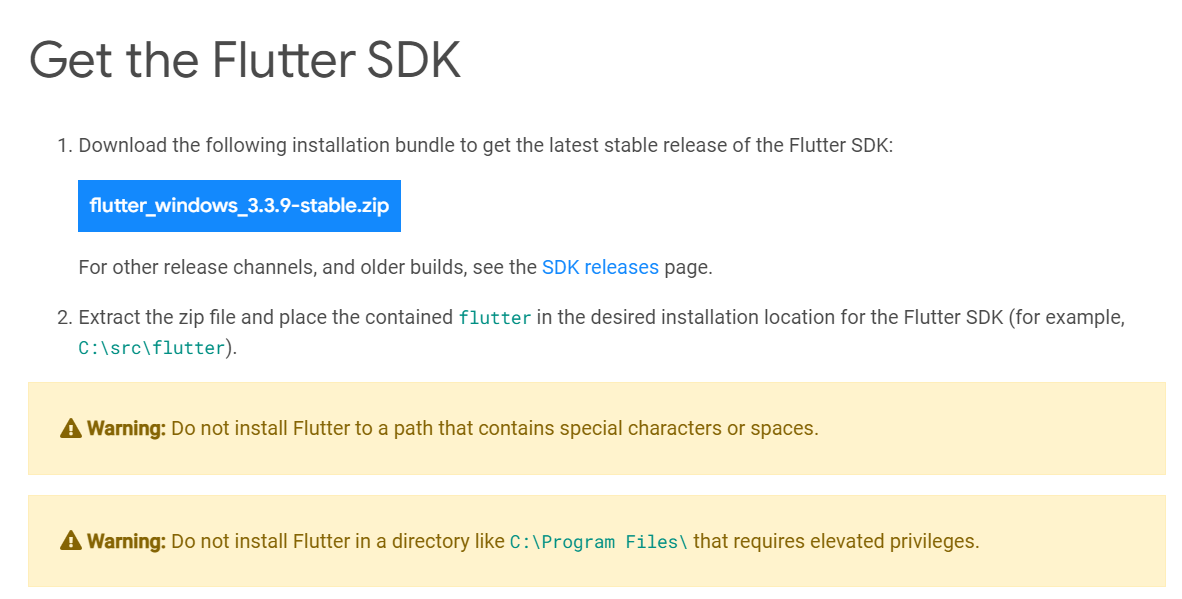
    After the file is downloaded, extract it to a location such as c:\dev\tools.

    For Windows, Linux and ChromeOS, the next step is to update your path so that the system can find the tools found in the Flutter folder’s bin folder. (Mac users don’t need to do this step.) The Flutter installation docs are helpful here:

    • Windows: Make sure you use the full path, starting with the name of the folder you extracted the zip file into. For example, on my machine, that would be C:\dev\tools\flutter\bin, as shown in the image below. Then after you update the path, you’ll need to close and reopen your command-line shell (either Windows CMD or Powershell). For detailed instructions, go here.
    • Linux: Follow the instructions here.
    • ChromeOS: Follow the instructions here.
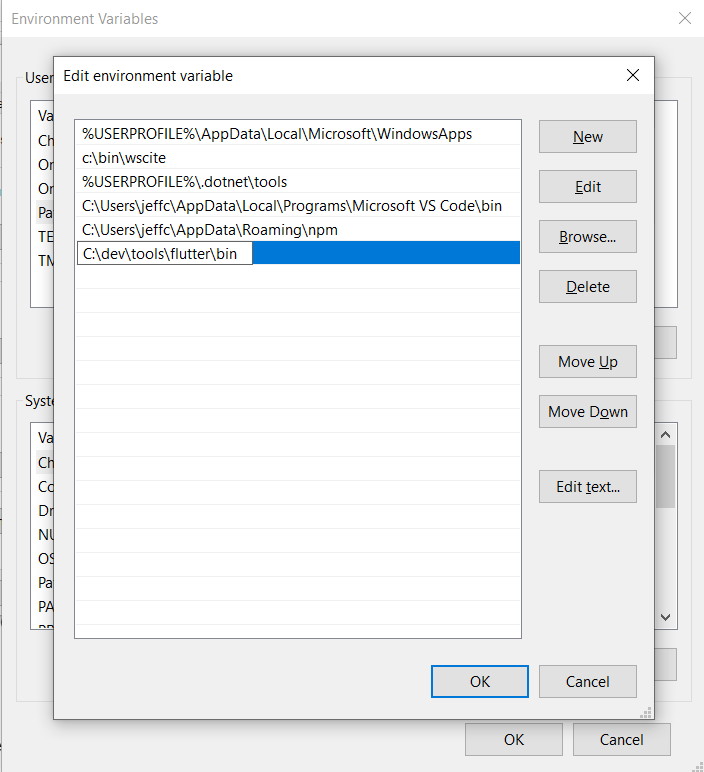
    Now test out the Flutter command to make sure it works by going to a folder outside of the Flutter’s bin folder and typing:

    flutter --version

    You should see a message such as this:

    Flutter 3.3.9 • channel stable • https://github.com/flutter/flutter.git
    Framework • revision b8f7f1f986 (2 weeks ago) • 2022-11-23 06:43:51 +0900
    Engine • revision 8f2221fbef
    Tools • Dart 2.18.5 • DevTools 2.15.0

    This will tell you if the installation is possibly ready. If instead, you see a message that the command is not found, double-check that you have your path correct; that’s typically the most likely cause for that error.

    Now, why did I say ‘possibly’? Because Flutter itself can tell you if there are any other tools you’ll need by running this command:

    flutter doctor

    Here’s an example of what I saw when I ran it:
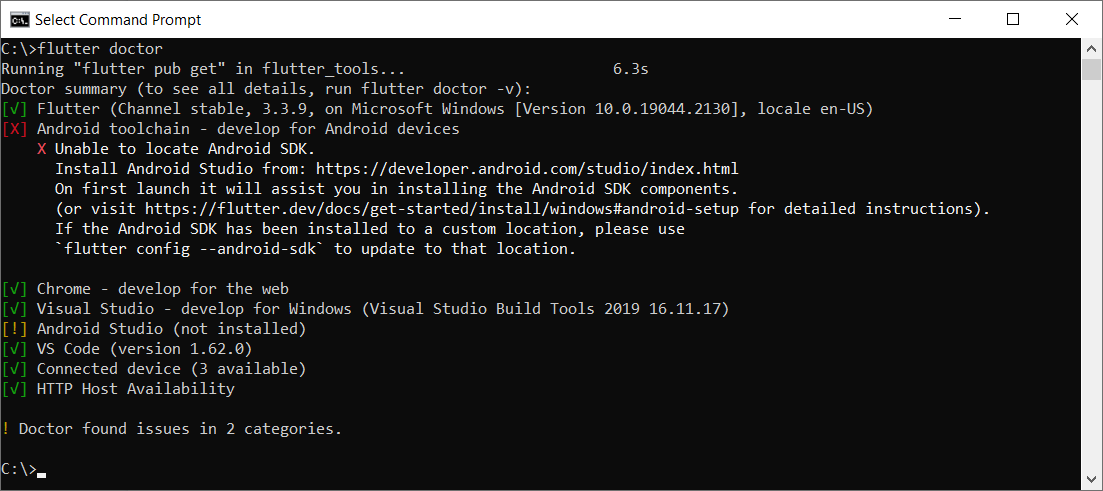
    This tells me I have some of the necessary tools installed, but not all:

    • Flutter itself, as well as all the tools that came with it
    • Android toolchain: I don’t have this one.
    • Chrome browser: You’ll need this for debugging web versions of your app.
    • Visual Studio: This is the full IDE from Microsoft; you’ll need it if you want to develop your app for Windows Desktop. You can use the free Community version. For that, go here and choose the free Community version.
    • Android Studio: I don’t have this one.
    • VS Code: This refers to Visual Studio Code, the free editor/IDE from Microsoft, which is not the same as Visual Studio. It’s a separate tool and neither is dependent on the other. Before you install it, read my notes below.

    Before installing anything else, you’ll want to decide what platforms you’ll be targeting. If you’re going to include Android in that list, you’ll need to download and install both the Android toolchain and Android Studio. In that case, you’ll be developing from within Android Studio.

    But if you’re not targeting Android, you do not need to install the Android toolchain or Android Studio. The official installation docs are a little vague on this point, so I tested it out myself. I was able to target Windows desktop and a browser without needing to install any of the Android tools.

    If you’re not targeting Android, then you’ll want to install VS Code to do your development from within. You can find it here.

    Building an App

    For this example, I’ll continue with Windows, and I’ll build a quick Windows desktop app.

    In a command shell, I’ll first create a folder in my c:\dev to hold my projects by typing these commands:

    cd c:\dev
    md projects
    cd projects

    I’m going to make a Flutter app called flutter_demo by typing the following. (Make sure you’re in the projects folder before typing this):

    flutter create flutter_demo

    Note that the name for your project must be in all lowercase letters, and it can contain underscores. So, for example, using uppercase letters results in an error:

    If I type this:

    flutter create FlutterDemo

    I see this:

    "FlutterDemo" is not a valid Dart package name.
    See https://dart.dev/tools/pub/pubspec#name for more information.

    When done correctly, you’ll see output such as this:

    Creating project flutter_demo...
    Running "flutter pub get" in flutter_demo... 1,186ms
    Wrote 127 files.
    All done!
    In order to run your application, type:
    $ cd flutter_demo
    $ flutter run
    Your application code is in flutter_demo\lib\main.dart.

    Before we open the code, let’s run it! First, go into the new folder flutter created:

    cd flutter_demo

    Then run it by typing:

    flutter run

    This command runs whatever Flutter application is in the current folder. In this case, that’s the app you just created.

    When you start it, it will ask for some choices. Because I don’t have Android or an emulator installed, I only see options for Windows Desktop and Chrome and Edge. (Edge is based on Chrome, so it works, as well.) Here’s what I see:

    Multiple devices found:
    Windows (desktop) • windows • windows-x64 • Microsoft Windows [Version 10.0.19044.2130]
    Chrome (web) • chrome • web-javascript • Google Chrome 107.0.5304.107
    Edge (web) • edge • web-javascript • Microsoft Edge 106.0.1370.37
    [1]: Windows (windows)
    [2]: Chrome (chrome)
    [3]: Edge (edge)
    Please choose one (To quit, press "q/Q"):

    Press the option for Windows. This will build the Windows desktop version (which might take a minute or so) and launch it, resulting in a window that looks like this:
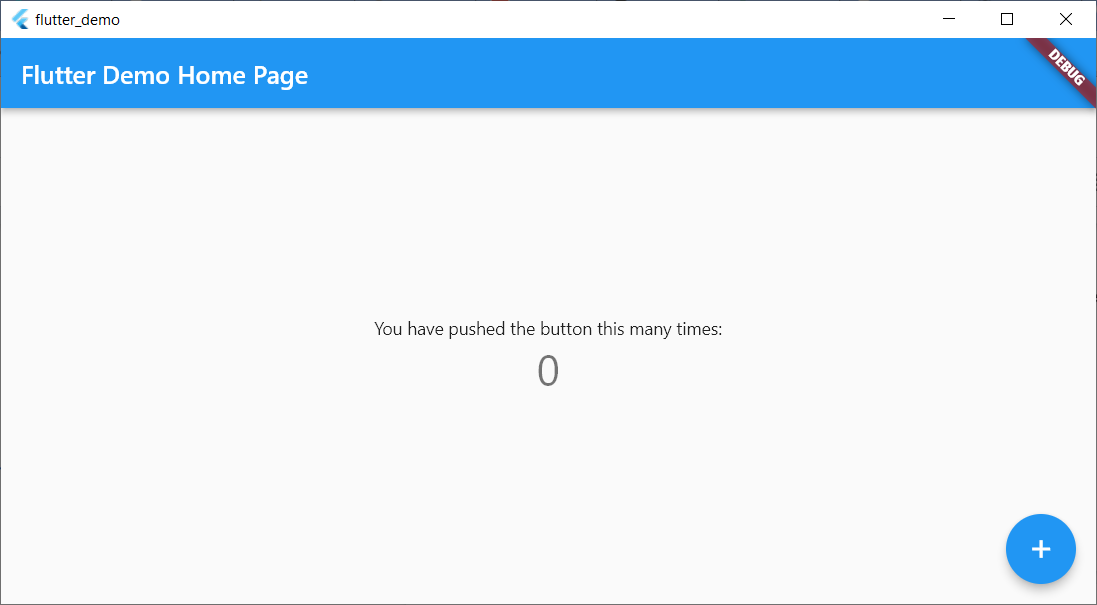
    This isn’t much, but there’s a sample in it where you can click the plus sign and see the number in the middle increment. That’s all.

    Now let’s try running the same app in Chrome. First, close the app window and press Arrow-Up or re-type:

    flutter run

    This time, choose the option for Chrome.

    Now Flutter builds a web-ready version that runs on Chrome, starts a local web server to host the app, launches Chrome and pushes a URL to Chrome to load the app from the local web server. Here’s the browser window:
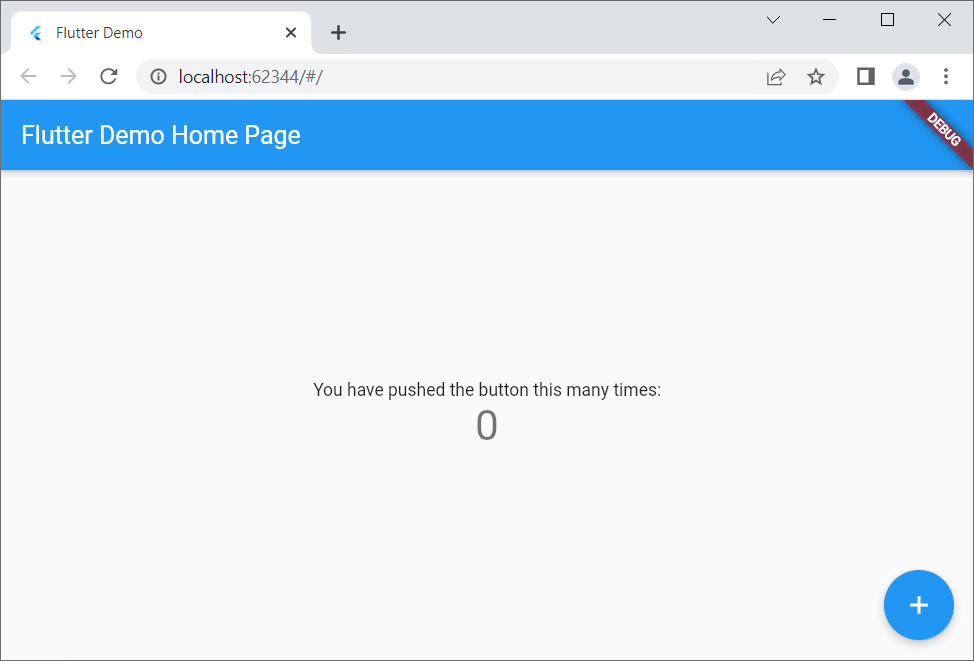
    Notice that it looks virtually identical to the desktop version but is inside a browser this time.

    If you’re a web developer, I encourage you to right-click inside the browser app and select View Page Source. Notice there’s a line that loads a file called flutter.js, and there’s some JavaScript code that responds to the window’s Load event that calls into Flutter. You won’t be writing JavaScript code, but it’s always good to have at least some understanding of what your front end is doing!

    Adding to the Code

    Now let’s add just a bit to the sample code. For this, I’ll use VS Code. From within the app’s main folder (in my case, c:\dev\projects\flutter_demo) type

    code .

    (Make sure to include the dot after the word code; otherwise, VS Code will open in whatever folder it last ran.)

    Before delving into the code, you’ll want to install a special Flutter extension for VS Code. Click the gear in the lower left and click Extensions. In the box labeled Search Extensions in Marketplace, type flutter. (Don’t click Enter; just pause a moment and the search will begin.) Find the one called Flutter that has over five million downloads, as shown here:
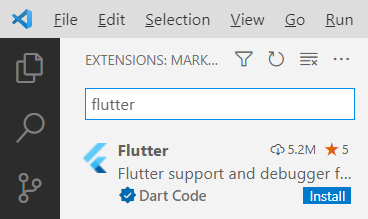
    Click the Install button. The button will show “installing” while the extension is being downloaded and installed.

    After the extension is installed, VS Code will ask whether you want to use it with your current project. You might also see a message regarding updating the Dart extension, which came alongside Flutter. Click Yes for the Flutter one; click Get packages for the Dart one. (You can ignore the message about opening the settings file.)

    Now you have all several flutter tools available VS Code’s Extensions Palette. Press Ctrl+Shift+P to open the palette. Type flutter and you’ll see the full list.

    For now, however, let’s first just run the app. Click the Run menu, and then click Run Without Debugging. You’ll see the Windows app open again.

    Now go back to VS Code. Even if you’re not familiar with Dart, if you know other “curly bracket” languages such as C++, C#, Java, JavaScript and so on, you’ll probably be able to read the code. There’s a function called main() that starts the app, providing a class called MyApp. That class is farther down in the code. Look closely at all the comments. Read them carefully and learn from them. The MyApp class contains a build function that returns an object with a “home” member; that member is an instance of MyHomePage, which is also a class in this file. Continue studying that code, and you’ll see mentions of widgets and layouts. Look closely at the function called _incrementCounter and how it’s triggered later on through an onPressed event.

    Conclusion

    Play around with the code; try changing some of the string literals, for example, until you’re quite familiar with it. Then dive into the first demo provided by the Flutter folks at Google, which you can find here. Soon you’ll be up and running with your own Flutter app that you can run on any device!

  • Dead Downtown: It’s YOUR Fault | Pentagon’s FOUR Cloud Vendors | Apple Adds MORE Price Flexibility

    Dead Downtown: It’s YOUR Fault | Pentagon’s FOUR Cloud Vendors | Apple Adds MORE Price Flexibility

    Welcome to The Long View—where we peruse the news of the week and strip it to the essentials. Let’s work out what really matters.

    This week: Home working is ripping the heart out of cities, the DoD’s bizarre cloud strategy, and Apple adds a $10,000 app price option. (more…)

  • How Devs Can Improve Open Source Security in the Enterprise

    How Devs Can Improve Open Source Security in the Enterprise

    Modern applications are dynamic. They’re distributed and they’re often born in the cloud. These applications can be developed on the fly, spun up and scaled quickly to meet evolving user and market demands—enabling a level of business agility that allows users to make quick, informed decisions in real-time and take advantage of opportunities as they arise.

    Enabling this development velocity are tens of thousands of open source libraries–pieces of code that developers can include in their applications to perform a specific function without having to code it from scratch. Open source libraries prevent developers from having to reinvent the wheel and allow them to focus on their differentiated business logic. While efficient and a major time saver, open source software may be the biggest single threat to software supply chains today. Developers simply have too much faith in the integrity of free, open source code that they casually include and distribute with their applications.

    Despite the operational benefits, the pressure to develop quickly shouldn’t expose the organization to increased security risks. Development teams need to rethink how they use open source software and take steps to ensure they meet the same security standards as other enterprise applications.

    The Open Source Security Issue

    The problem is that most open source projects are maintained by a small number of developers that contribute their time and expertise to build software components that can be reused by the community at large. However, these developers are volunteers who aren’t being paid for their time and effort, nor are they under the same pressure as enterprise developers to ensure there are no vulnerabilities in their code. They may also lack the level of enterprise security expertise necessary to protect applications from increasingly sophisticated attacks. Some may even be hostile to efforts to better secure their code if it means slowing performance or changing the user experience.

    The result is that insecure code is increasingly making its way into enterprise applications that use these open source libraries. In fact, the Log4j vulnerability last year was due to a vulnerability in an open source Java logging library. Recognizing the national security importance of open source software, the Biden administration recently issued an executive order and met with cybersecurity professionals to better safeguard the federal government’s computer systems. The resulting recommendations included policies that would help prevent security vulnerabilities in open source packages, improve the process for identifying and fixing defects and reduce time to remediation for distributing and implementing fixes. 

    It’s imperative that the private sector take notice and make more of an industry-wide effort to secure open source software that makes up businesses’ most critical applications today.

    Three Steps for Better Open Source Security in the Enterprise

    The bottom line is that enterprises themselves need to take more responsibility for securing enterprise applications—especially as these applications rely more on open source libraries. They need to take a more proactive approach that spans the entire software life cycle, embeds security tools directly into development platforms and provides complete transparency into what makes up their most critical applications.

    Here are three things organizations can do to make sure their open source software is secure:

    1. Continuously conduct end-to-end application testing

    Modern applications are constantly evolving—making it more imperative than ever to continually test for vulnerabilities throughout the entire software life cycle. Starting with the planning stage, security should be embedded throughout the process—providing developers with a solid framework for building secure code before it goes through testing. Once pushed, application security testing should continue as an automatic, built-in step when pushing code to production. DevOps and security teams should work together to ensure security is no longer an afterthought to feature development.

    2. Embed enterprise security capabilities directly in development platforms

    Forcing developers to take an extra step to ensure secure code when they’re already under pressure to push code quickly is a recipe for failure. Security teams must make it as easy as possible by integrating security controls directly into existing development processes. Standardizing security testing and controls during development makes it more likely policies are recognized, understood and followed.

    3. Ensure transparency in every snippet of code you use

    Complexity is the enemy of good application security. DevOps teams need to know exactly what makes up their applications—including open source libraries and their dependencies. The federal government is pushing the open source community to standardize a software bill of materials (SBOM). Similar to regulations that require hardware manufacturers to know where every part is sourced, this would force both open source developers and enterprise developers to take more responsibility for the code they include from other sources. That way, if a vulnerability is discovered in a library, enterprises could easily determine if they are at risk and take appropriate action to fully mitigate the issue as quickly as possible.

    It’s Time to Take Greater Responsibility

    Open source software enables the kind of development agility that makes businesses thrive, but open source also greatly expands enterprise threat surfaces—leaving many organizations at risk of a breach. Organizations need to take greater responsibility for the security posture of the open source libraries they use to speed application development. This requires end-to-end application testing throughout the entire software development life cycle; embedded security tools and controls in development platforms and processes and complete transparency into the open source software that makes up critical enterprise applications. This proactive approach will ensure that vulnerabilities such as Log4j are identified and patched quickly before threat actors are able to exploit them and compromise applications.

  • Looking to the Future of Developer Experience

    Looking to the Future of Developer Experience

    Developer experience is where it’s at! Developer experience (DX) means taking a user experience approach to the developer journey. DX (also abbreviated as DevEx) is commonly applied to areas like documentation, sandbox environments, SDK ergonomics and more. By improving a developer’s experience with a tool, software providers can increase stickiness and retain more users.

    Nowadays, having a sleek developer experience is a competitive advantage—especially since developers often have the discretion to purchase new tools. And amid an ongoing skills gap, maintaining quality DX for internal software ecosystems is also important to retaining happy engineers and avoiding burnout. All these factors mean developer experience is becoming a C-suite objective. So, where is DX heading? How will the developer workflow change in the near future?

    I recently met with Ash Arnwine, director of developer relations, Nylas, to ponder what’s on the near horizon regarding developer experience. According to Arnwine, DX is still a very new concept. Yet, it has become an integral aspect of positioning modern software, especially for public-facing SaaS, and will undoubtedly drive purchasing decisions in the year ahead. Below, we’ll share some predictions of how DX will evolve within four general categories: onboarding, building, deploying, and maintaining.

    State of Developer Experience

    First off, what is the state of developer experience within the tech world at large? Well, Arnwine is quick to note that the concept is still relatively nascent. “Developer experience was something that we didn’t talk about that long ago.” Yet, the idea is growing in mindshare as developers exercise greater control over the software life cycle.

    In fact, the 2022 StackOverflow survey found that 66% of professional developers have at least some influence over their organization’s purchases of new technologies, up from 56% in 2020. Furthermore, the way developers learn is changing. The new generation of programmers is primarily self-taught, relying on coding bootcamps or other online resources. An impressive 70% of developers learned how to code from online resources.

    What we end up with, said Arnwine, is a growing developer population with a much wider range of skills than in the past. And since no one is there to hand-hold them, the technology itself must be usable and intuitive—the onus is on the software provider to craft frictionless self-service workflows. And with developers’ growing influence in purchasing, DX becomes a competitive advantage and an executive talking point, said Arnwine.

    Onboarding

    Developer experience is a broad topic, but it’s most often associated with the time it takes to get started with a tool. This is often referred to as ‘Time to First Hello World.’ But although it’s an important step, the metric might doesn’t always carry much significance. Time to value, on the other hand, said Arnwine, takes this a step further and is a better gauge of success.

    For example, onboarding to a web API would likely involve the signup process, creating an account, getting API keys and perusing the documentation—all before a first call is sent. According to Arnwine, there are techniques to apply at this stage to help developers move faster throughout the onboarding process to reach value sooner.

    Here are some ways in which developer onboarding is becoming more streamlined:

    • Automatically generating keys upon signup.
    • Providing a terminal within the developer dashboard to test sample code.
    • Handing developers the code they need to be customized to their specific stack.
    • Using specifications as a single source of truth for documentation.

    Building

    What can SaaS companies do to help improve DX while building? Well, one way is to enable auto-complete within IDEs. When developers onboard with a new tool, they are often handed an SDK and reference documentation. But, it doesn’t add value to send programmers back and forth between a browser to look up method names. Instead, Arnwine believes developer tools should be “baked into the IDE in a way a modern developer would expect.”

    One example of auto-complete on steroids is Fig, a next-gen command line that supports auto-complete for over 500+ popular CLI tools. Taking this a step further is GitHub Copilot, an AI assistant that can take natural language prompts and generate pretty complex code suggestions. The industry appears to be heading toward more AI-fueled low-code software development—a trend that could significantly improve a developer’s experience during the construction process.

    However, one potential downside of increased software development automation is ensuring the AI suggests correct code snippets. Thus, Arnwine said he anticipated possible troubleshooting and debugging problems. Furthermore, SaaS providers will have to vet systems that generate glue code to ensure it’s accurate and up-to-date with the latest versions. His advice to SaaS providers is to meet developers where they are, but do their best to maintain a quality experience that they can control.

    Deploying

    For a long period of software development history, IT administrators were the only ones able to deploy software. The old-school method required getting a hosting provider, installing Ubuntu and plenty of other legwork. Nowadays, however, software deployment has become far more drag-and-drop. DevOps has become more democratized in recent years, and we will likely see greater usability emerge in the years ahead.

    One way to increase developer experience for deployments is through more custom automated routines via GitHub Actions or similar event-based systems. And plug-and-play pre-built actions could reduce the barrier to using such systems. Such connectivity is necessary to enable a docs-as-code approach, said Arnwine.

    Maintaining

    Another area that could use a serious developer experience upgrade is dependency management. Software dependencies go through a life cycle. They are versioned, updated, retired and sometimes replaced outright. As such, keeping track of an evolving surface area of third-party dependencies can be a headache. To make matters worse, software supply chain threats have complicated the integrity of many open source dependencies consumed by most applications.

    Although it’s imperative for organizations to maintain parity with dependencies, a single person is rarely tasked with continuously checking dependencies and monitoring for security threats. Therefore, more automation for dependency management and security monitoring is necessary. For example, Arnwine uses Snyk, which sends a weekly report on the state of his dependencies.

    Final Thoughts

    Assuming you have the killer functionality to back it up, an investment into developer experience can help a developer tool stick out in a crowded marketplace. But of course, improving the DX means many different things depending on your context. It could be a subtle user interface tweak, adding relevant code samples or making your documentation more intuitive.

    On the other hand, a negative developer experience can turn away potential users and cause frustration throughout the application support life cycle. This can instill a poor reputation among programmers.

    To review, in the near future, we’ll likely witness the developer experience evolve in the following areas:

    • Enhanced methods that streamline the signup process.
    • Auto-complete and AI-driven code suggestions that understand a developer’s stack and meet them where they work.
    • More intuitive, automated deployment models.
    • Increased automation around the maintenance of dependencies.

    While developer experience is a growing concern, it shouldn’t be the only measurement of a SaaS — the ongoing value it brings developer consumers and end users is just as (if not more) important to consider.

  • Five Great DevOps Job Opportunities

    Five Great DevOps Job Opportunities

    devopsy.kinsta.cloud is now providing a weekly DevOps jobs report through which opportunities for DevOps professionals will be highlighted to serve our audience better.

    Our goal in these challenging economic times is to make it easier for DevOps professionals to advance their careers. Of course, the pool of available DevOps talent is still relatively constrained, so when one DevOps professional takes on a new role, it creates an opportunity for others.

    The five job postings shared this week are selected based on the company looking to hire, the vertical industry segment and, naturally, the pay scale offered.

    We’re also committed to providing additional insights into the state of the DevOps job market. In the meantime, for your consideration:

    LinkedIn

    Kforce
    McLean, VA
    Senior DevOps Capability Engineer
    $135,000 to $145,000

    Dice.com

    Emids
    Remote
    Technical Product Owner – DevOps
    $120,000 to $140,000

    ZipRecruiter

    Progressive Insurance
    Carmel, IN.
    Azure IT DevOps Engineer Lead
    $120,000 to $135,000

    Indeed.com

    Amazee.io
    Remote
    DevOps Engineer
    $106,000 to $134,000

    SimplyHired

    Starbucks
    Remote
    DevOps Engineer II
    $94,000 to $166,000

  • Why SaaS Vendors Need to Give Back to Open Source

    Why SaaS Vendors Need to Give Back to Open Source

    There aren’t many tech organizations that don’t leverage open source technology. Companies that refuse to import software will rely on a freely available library tool or codebase. Open source is one of the largest and most powerful mechanisms of software propagation. However, open source is in danger.

    The Two Sides of Open Source Development

    In recent years, the ubiquity and dominance of open source tooling have led companies to adopt them en masse. Products like Elasticsearch, Spring and Akka are incredibly popular as open source, freely available tools. But unfortunately, often only one-half of the open source philosophy is being honored.

    The Open Source Philosophy

    What does that mean? Well, open source depends on two things. Customers use the software and those same consumers contribute to the codebase. It’s a feedback loop of like-minded individuals who have a shared interest in building and using an outstanding product and are happy to donate their time to realize their collective goals. This agreement has driven some of the most exciting software achievements of the past two decades.

    Alas, while it became prevalent to use open source software, the popularity of contributions did not scale equally. Suddenly, small teams of dedicated developers were inundated with demands from huge enterprises that equated “open source” with “free.” This caused the owners of open source projects, like Elasticsearch, MongoDB and Akka, to reevaluate their position and change to the increasingly prevalent source available license.

    Growing Risk to the Open Source Community

    If users contribute to the codebases they leverage, then those codebases can thrive and no one needs to worry about subscription fees or fines. Moreover, users can maintain the certainty that they are not doing anything illegal when they depend on a piece of software. Without contributions from the engineering community, an open source project’s commercial and practical basis quickly disintegrates.

    So Why Should SaaS Vendors Give Back?

    SaaS solutions inhabit a particular corner of the market, assisting companies in solving a cross-cutting problem. For example, observability. This is an important detail because many open source tools also operate in this arena. This is exemplified by the fact that it’s common for SaaS vendors to regularly compete against an open source, homegrown alternative. Many SaaS solutions actually base their core infrastructure on the same open source software.

    This means that SaaS providers are often in direct competition with the open source solutions they leverage to build their product(s).

    SaaS Vendors Depend on Open Source Software

    The communities that support vital pieces of open source software, like Apache Kafka or OpenDistro, are helping to unlock innovation in enterprises worldwide. The continued pace of this innovation is inextricably linked to the continued growth and development of the open source tooling on which it depends.

    The only sensible course of action is for SaaS vendors to make every effort possible to contribute back to the open source space. They do not need to give up their unique features, nor do they need to release their proprietary software, but the simple act of maintaining patches, improving performance, increasing compatibility and even correcting poor documentation—all of this is a contribution that will benefit the entire SaaS ecosystem.

    Those Contributions Will Breed Specialization

    A big challenge of using open source software is finding engineers that understand how it works. The plug-and-play nature of many tools means that users never need to dive into the details of a library or application. This, however, comes at a cost. Users often don’t know why the software breaks or behaves unpredictably.

    If a SaaS vendor begins to contribute back into the core of the open source tools on which they depend, not only are they benefiting their product and the open source community, but they’re also seeding specialist knowledge in their teams. This specialist knowledge means they can utilize open source features in new and exciting ways, giving them insights and advantages over their competitors.

    Open Source Contributions Make Commercial Sense

    The SaaS community thrives when open source tooling works smoothly. Conversely, if fundamental open source tools like Kafka or OpenDistro begin to falter, then the success of the SaaS community is also at risk. They are highly interdependent. This means a contribution back to core open source tools is a contribution to the stability of SaaS products. Moreover, growing specialist skills within engineering teams means that when it comes time to leverage a new open-source feature, your developers may have skills and insights that other companies won’t have. This is a clear commercial advantage, and all for the cost of doing the right thing, and keeping the dream of free, open source software alive.

  • Securing Open Source Components in a World of Mixed Committer Motivations

    Securing Open Source Components in a World of Mixed Committer Motivations

    Our world runs on software that contains open source components. This places an increased burden on developers, as the primary consumers and deployers of those components, to use code that is fully up-to-date and secure. The vast majority of open source committers with write access to project repositories remain focused on maintaining and making positive improvements to that code, while also helping to benefit the open source community as a whole. However, the sheer complexity of many open source projects has opened the door to different, more insidious and concerted types of attacks which could cause widespread and serious harm.

    Developers Have to Move Fast and Reuse Gives Them That Speed

    One complicating factor is the prevalence of reuse of third-party open source elements across the majority of open source projects through two main types of dependencies. With direct dependencies, an open source component links straight to a third-party code library, while transitive dependencies occur when a component calls out to a library that is, in turn, communicating with another dependency.

    Dependencies enable developers, under ever-increasing corporate pressure to deliver new software rapidly, to move faster by building on top of existing work by their peers. The downside is that those dependency foundations are vulnerable to attack, with some libraries perhaps under the aegis of a single committer for whom the code collection may be a side project and perhaps not attended to on a regular basis.

    Sonatype research and that of other organizations tells us that developers working with a Java application may be dealing with a staggering 1,500 dependency changes every year, with the average Java application containing 148 dependencies and the average Java project being updated 10 times annually. While the number of open source projects isn’t ballooning, the amount of versions of those projects is skyrocketing. The majority of vulnerabilities today impacting open source projects result from transitive dependencies, the more complex type of dependency.

    In an area where multiple projects may exist effectively solving the same issues, developers need to be aware of which projects are being actively maintained versus those that are either poorly nurtured or no longer in operation. On the other hand, successful open source projects may have tens or hundreds of committers with write repository access, which address a whole different set of issues, including reaching agreement on what a vulnerability consists of and how to fix or patch it.

    Amid a Community for Good, Bad Actors and Incidents of Self-Sabotage Emerge

    The reasons why individuals choose to commit to open source software are wide-ranging; a strong desire to give back to the community to a passionate and, perhaps very single-minded, hobby to an integral and paid part of a developer’s role and responsibilities at work. A few years ago, the concept of a malicious open source committer was an abstract theory. The thought back then was that perhaps a handful of ‘bad apples’ might exist within a community of millions of developers. However, since 2019, researchers’ tools and those of other organizations have identified over 100,000 malicious, suspicious or proof-of-concept packages, pointing to a much higher degree of behavior by cybercriminals.

    Bad actors are deliberately taking advantage of the complexity of open source software to knowingly introduce exploitable vulnerabilities. These attacks are growing in sophistication particularly in relation to malicious code injections into the source code of an open source library. These attacks can often appear as harmless code changes and remain hidden before delivering a malware payload. There is the recent example of a crypto heist that stole over $3 million in cryptocurrency which leveraged compromised access to a private GitHub repository.

    Protestware, where a code maintainer chooses to self-sabotage their open source project often to draw attention to a cause, whether geopolitical or specific to that individual, has become an issue over the past year. In this case, although the stated goal is not malicious hacking, real harm, in terms of major disruption, to developers using that code can occur.

    To counter both the impact of bad actors and of self-sabotage on open source components, developers need to take advantage of release integrity features to help protect themselves and their organizations from harm. They must be able to have full visibility and control over the software they build and the open source components that they are sourcing as part of that development work. At the same time, governments around the world, including in the U.S., are weighing into issues related to the security of software supply chains, so increased regulations and penalties should also factor into how developers and their organizations behave moving forward.

    We’re only one step away from the next potential Log4j attack, and every developer and organization needs to up their game and be ready to move fast on vulnerability identification and remediation. The gathering and sharing of data is what will help to increase everyone’s safety.