Category: Doin’ DevOps

  • PyMongo Pointers: How to Make Robust and Highly Available Mongo Queries

    PyMongo Pointers: How to Make Robust and Highly Available Mongo Queries

    In today’s clusters made of commodity servers, failures are the norm. Having your code fail because one data node happened to be down when you were querying it is frustrating and no fun. Based on my experience hardening our product, I wanted to share a few quick and easy pointers that can help make your MongoDB queries more robust to node failures. Let’s get started.

    Background for Beginners

    Note: If you are completely new to MongoDB, I would recommend reading the following links. They should give you a high-level understanding of the components that make up a MongoDB cluster.

    Let’s first start by understanding PyMongo and its advantages. As you already know, Python is a high-level programming language that provides code readability with object-oriented programming. Its ease of syntax and code written are more readable and smaller than code written in other languages. And MongoDB is a document-oriented scalable database designed for handling big data applications (such as content management systems). Since MongoDB supports dynamic schemas, it also provides the flexibility of storing any kind of data into your database without any rigidity.

    So, in case you have never used PyMongo before, the PyMongo distribution contains tools for interacting with MongoDB databases with Python. It is the most efficient tool for working with MongoDB using the utilities of Python. PyMongo was created to incorporate the advantages of Python as a programming language and MongoDB as a database. Since Python provides an easy-to-implement way of programming and MongoDB can handle large document repositories, the PyMongo tool can be of great use, since it provides the best of these two technologies.

    At the very core of PyMongo is the MongoClient object, which is used to make connections and queries to a MongoDB database cluster. It can be used to connect to a standalone mongod instance, a replica set or mongos instances. To specify which mongo endpoints to contact, you simply pass in the endpoints into the host argument of the object. For example, if we had a standalone mongod node on 10.0.0.3 listening on port 27017, you can contact that node as follows:

    import pymongo
    client = pymongo.MongoClient(host=“10.0.0.3:27017”)

    The node passed into the host is called a seed node. Once you initialize the MongoClient, it will connect to the specified seed node in the background. With some basics, let’s talk about how to make your queries more robust!

    Tip 1: Increase Your Host Seed List

    The first tip is very simple, but quite useful. Instead of passing in a single seed node, pass in a list of seed nodes. Passing in a list of seed nodes gives the MongoClient object more endpoints to contact in case the connection to one of the input nodes is down. This not only makes initializing a mongo connection more robust, but also makes the client robust to later connection failures occurring after initialization. Code-wise, it would look like the following:

    client = pymongo.MongoClient(host=“10.0.0.3:27017”) # Fragile; single point of failure 
    client = pymongo.MongoClient(host=[”10.0.0.3:27017”, “10.0.0.3:27018”, “10.0.0.3:27019”]) # More robust; can contact two other nodes in case one goes down

    Note that all nodes in your seed list must be part of the same logical group. For example, the seed list must contain mongod nodes belonging to the same replica set, or mongos query routers connected to the same config servers, or config servers in the same sharded cluster. Mixing these up will result in unpredictable behavior.

    Tip 2: If at First You Don’t Succeed, Try, Try Again

    After initializing a connection to a mongo node, the connection may fail at any time. This can be caused by a large variety of factors, ranging from network connectivity issues to actual mongo node failures. If one of these failures occurs, the next time a query is issued, the MongoClient will try to contact the unavailable node, determine it is unreachable, and then throw an exception. Afterward, the MongoClient object will automatically try to connect in the background to another live node in the seed list you provided, meaning your subsequent queries are likely to succeed. However, your code is still left with an exception to handle.

    A clean and easy way to handle these situations is to wrap all your queries in a retry decorator that will catch the exception and then retry your query. Here is some sample code:

    def retry(num_tries, exceptions):
        def decorator(func):
            def f_retry(*args, **kwargs):
                for i in xrange(num_tries):
                    try:
                        return func(*args, **kwargs)
                    except exceptions as e:
                        continue
            return f_retry
        return decorator
    # Retry on AutoReconnect exception, maximum 3 times
    retry_auto_reconnect = retry(3, (pymongo.errors.AutoReconnect,))
    @retry_auto_reconnect
    def get_count(client, db, collection):
        return client[db][collection].count()

    By wrapping your queries in a retry decorator, you can make them more robust to node failures and other temporary failures such as primary re-elections. Granted, this method isn’t a guarantee your queries will succeed in all cases as it assumes that there are other healthy nodes in the cluster to fail over to. However, assuming a relatively stable cluster, this method handles a large number of failures.

    Tip 3: Catch the Right Exceptions

    In the above example, we retried on AutoReconnect exceptions, which is raised when a connection to a database is lost. While this is one of the exceptions to catch, it is by no means complete. Other exceptions can be found in the pymongo documentation (see link below). A couple ones you may want to also catch include:

    • pymongo.errors.ConnectionFailure: thrown whenever a connection to a database cannot be made (actually the super-class of AutoReconnect above)
    • pymongo.errors.ServerSelectionTimeoutError: thrown whenever the query you issue cannot find a node to serve the request (e.g. issuing a read on primary, when no primary exists)

    These two exceptions are useful in both unsharded and sharded MongoDB clusters. However, there is some additional complexity in handling node failures for sharded clusters. In sharded clusters, most of your queries should be sent through the mongos because it can route your queries to the appropriate shard. If the mongos instance fails, then aConnectionFailure will be raised. However, what happens if your connection to the mongos is healthy, but the mongos fails to make a connection to a replica set? In these cases, the mongos will aggregate all the errors and send back an error which is then raised as an OperationFailure.

    While it may seem simple to just also retry OperationFailures, it’s not quite that clean because OperationFailures can represent a large variety of errors, ranging from retryable errors such as primary re-elections to non-retryable errors such as authentication errors. You can distinguish between different types of errors by examining the code field of the error. Although at some point in time there was a list of error codes and their meanings, they have since become outdated and removed (see SERVER-24047), which means you’ll have to do some trial and error to discover which codes you should retry on.

    Conclusion

    Hopefully, these tips were helpful for all you MongoDB lovers! If you have any questions, comments, or have your own tips to share, feel free to comment below and get the discussion flowing.

    — Brian Yin

  • To DevOps Or Not To DevOps

    To DevOps Or Not To DevOps

    Although enterprises today all claim to be software companies, there remain four distinct groups of organizations: the technology leaders, the technology followers, the technology hopefuls and the technology laggards.

    The first group are the industry leaders who are paving the way. These are the organizations coming up with new technologies, processes and cultural shifts. They write articles and books and present at conferences, and despite perhaps working at smaller companies, they are the names you may recognize. These are the companies the rest of us aspire to be—the Googles, the Amazons and the Microsofts that keep the rest of the industry hanging on to every word.

    The technology followers typically are smaller organizations that tend to adopt the latest and the greatest technologies. They are the leaders’ first wave of followers who are not afraid to try new things, nor afraid to fail. They have cultures that allow them to experiment and adapt and are given a lot of free time to invest in learning and implementation, after they watch the big guys successfully implement.

    However, the first two groups are the minority of software organizations, since not everyone can lead the way, nor can everyone have the luxury of spending a significant portion of their time experimenting with new methods. After all, most of the new technologies do not have a long lifespan. They appear, generate some attention and then disappear.  Front-end frameworks provide a great example of this: new ones pop up and exist for a few months before being superseded by other frameworks.

    Another example of technology followers is containers—few doubt their usefulness and most of us are convinced they are the best solution. The only question is which cluster orchestration framework to choose. These frameworks are evolving so rapidly, with new ones introduced on a weekly basis, that it’s almost certain most will be defunct within a year. So, if you are into experimenting with the latest offerings, chances are you could make a wrong choice. Will it be Kubernetes? Docker Swarm? Mesosphere Marathon? Rancher OS? Cloud Foundry’s Diego? CoreOS Fleet? The question is not whether to adopt one of those tools, but rather, which one has the best shelf life.

    Most of us fall under the third group, the technology hopefuls. We don’t have the ability to lead the way, nor do we have the luxury to explore the latest and greatest technologies. Yet, we cannot allow ourselves to become obsolete. The industry is moving so fast that just a few years can leave you at the back of the pack where no effort or investment can get you back in the game.

    The technology laggards are the software companies that have fallen behind. This group includes businesses that are struggling to remain intact and run the risk of disappearing. These are the organizations that do not innovate, do not adapt, do not invest (enough) in improvements and do not even understand the current industry trends. They are the organizations that do not comprehend that becoming obsolete doesn’t take decades, but years—sometimes even months.

    Based on the definitions of these groups, chances are, unless you are Google or Microsoft, you are not in the first or even second groups. By reading this article you are making the effort to be informed so you don’t lack the self-awareness that places you in the fourth group. Like most software organizations, you fall into the third group of technology hopefuls.

    As part of this group, you have to balance between the latest and the greatest technologies and the chance of becoming obsolete. You cannot try every new solution that comes along, nor you can let years pass by until you jump on the train. The big questions you have to ask are, How can I distinguish what will stay and what will disappear? How do I make a choice between what to adopt and what to ignore?

    There may not be a one-size-fits-all answer, but one process you absolutely cannot ignore is DevOps. If you’re asking yourself whether your organization should adopt DevOps, the answer is a resounding “yes.” And I encourage you to adopt it now, before you are replaced by other companies that are already living and breathing DevOps. Otherwise, you’ll be unable to adapt to the speed needed to keep up in today’s market and understand the cloud and scale accordingly when an avalanche of users come to your site after a successful marketing campaign. Lacking preparedness could cost you your business, especially in a competitive market.

    DevOps is here to stay, evolving similarly to Agile by providing value and answering many of today’s challenges. The only problem is that adopting DevOps can be difficult. To implement DevOps, you might have to change your company’s culture; you might need to adopt new tools; you might need to change processes; and, you might need to change your software architecture. Changing any of those aspects is hard, but changing all of them is very hard.

    Your culture and company structure need to be agile (in the literal meaning of the word). The old, monolithic tools need to be replaced with smaller, much more dynamic ones that will work well with the ever-changing nature of cloud infrastructure. Processes need to be automated, since there is no time to pause for manual intervention. To accommodate the needs of automation and frequent deployments, your applications and services will need to be relatively small for continuous delivery or deployment to become a standard process. Your teams need to be highly specialized and fully capable of working on all aspects of the software development life cycle, from requirements to post-production support.

    It’s a harsh and challenging road ahead, but at the end of it lies success. You’ll experience faster time to market, greater reliability, high availability and faster adaptability to market changes. Some are already there, while others already embarked on the journey. Don’t be left out—the alternative will leave you obsolete.

    To DevOps or not to DevOps is not the question. For most organizations, adopting DevOps is the answer.

    About the Author / Viktor Farcic

    viktorfarcicViktor Farcic is a Senior Consultant at CloudBees, a member of the Docker Captains group, and books author. He coded using a plethora of languages starting with Pascal (yes, he is old), Basic (before it got Visual prefix), ASP (before it got .Net suffix), C, C++, Perl, Python,ASP.Net, Visual Basic, C#, JavaScript, Java, Scala, etc. His big passions are Microservices, Continuous Integration, Delivery and Deployment (CI/CD) and Test-Driven Development (TDD). He published “The DevOps 2.0 Toolkit: Automating the Continuous Deployment Pipeline with Containerized Microservices,” and  “Test-Driven Java Development.” He is currently working on his third book, “The DevOps 2.1 Toolkit: Docker Swarm.” Connect with him on Twitter.


  • 7 Strategies for Continuous Delivery and Deployment Success

    7 Strategies for Continuous Delivery and Deployment Success

    One of the key advantages of cloud-native applications is the ability to quickly push updates into production for specific microservices—giving developers the ability to respond rapidly to changing business requirements without having to upgrade the entire application. Successfully doing this requires far more than just leveraging a continuous delivery platform. Everything from the culture of the development group to the type of testing required to the underlying platform it will run on is critical.

    Based on applying DevOps principles across several projects to date, I have found that development teams can benefit from following these seven key strategies before launching continuous delivery and deployment initiatives. By doing so, you’ll increase your opportunity for success.

    Culture

    Just having the right tools and technology isn’t enough in today’s enterprises. Successfully adopting an agile, continuous delivery and deployment process will require a culture shift within most development shops. Developers are no longer responsible only for their code; they must take full ownership of the development, testing, automation tools and, most importantly, building operational capabilities into the pipeline so the move to production is easier. Getting developers and the operations team on board with this may take some time and training, but the effort is critical, and your projects won’t succeed without this.

    Automation Platform

    Carefully consider the tool you’ll use for your continuous delivery pipeline because the current tools on the market have different optimal use cases. For example, if you need to do A/B testing you’ll want a tool that has capabilities for phasing the rollout based on the test results. If your application requires multiple updates in a short time span, you’ll need a tool that has advanced release management capabilities including good pipeline visualization and support for the management of cloud environments.

    App Architecture

    Design your applications so they are cloud-native. This is typically associated with microservices and containers and will enable you to independently and frequently update each service independently. The typical stages of a deployment pipeline are build, unit testing, integration testing (including functional testing), API testing, performance and staging, then, finally, on to production. However, with microservice architectures and advanced deployment techniques, more and more customers are bypassing certain stages and testing in production, albeit very contained production environments.

    Each stage also can include the creation of dynamic environments in the cloud, enabling the stage itself to be provisioned, executed and decommissioned as a part of the pipeline. If you choose to do this, look for a tool that has a number of built-in cloud plugins, so creating and destroying environments in AWS, Google Cloud and other clouds can be done easily.

    The application and infrastructure stack for each microservice also should be specified. This could include the application Jar file, a Docker file, or server image such as an AMI; any related services such as AWS Lambda functions; and all configurations and policies. These specifications all should be managed in an infrastructure-as-code manifest, which ensures versioning, consistency, change auditing and testing. It also ensures that the build resources, such as baked images, JARs and AWS Lambda functions, are consistently passed to each stage of the pipeline, from testing to production, eliminating the risk of imposing inconsistent environments and configurations. An AWS CloudFormation template is an example of an infrastructure-as-code manifest.

    Security

    Security is a necessity in the world of increasing threats that we live in; however, the common approach of waiting to test security right before the push to production is the wrong approach. Security should be built in to the pipeline itself and automated as part of the DevOps CI/CD process. It’s essential to validate the building blocks without slowing down the process. For example, leading companies are automating code scanning, template checking and other security tests in within the phases of the pipeline itself.

    Insight

    Visualizing and tracking pipelines, environment variables, test results, versions, issues and other artifacts allows developers and the operations team to share a common view throughout the project life cycle. This improves collaboration and traceability.

    Delivery Strategies

    Automating tests is critical to pipeline design and delivery. Without comprehensive, high-quality, fully automated tests of the deployment pipeline, production failures will occur. Code coverage no longer is a good representation of code quality. In the cloud-native world, test cases and test suites need to be mapped to functionality and business outcomes desired to ensure that the test team gives the green light and then everything goes red in production. In situations where time limitations prevent a comprehensive approach, first automate the critical capabilities and flows, then assess the cost-benefit of automating additional tests.

    Be sure that the data and environment for testing and automating purposes mirrors the production data and environment as closely as possible. Most pipelines have a “pre-production” stage before pushing software into production. You may consider building multiple stages across multiple AWS regions before pushing the software to production.

    If your goal is to update software in production very frequently and without any downtime, make sure your pipeline tool can easily manage multi-region deployments, such as blue/green and canary deployments for server groups and clusters across AWS and other public infrastructure-as-a-service (IaaS) clouds.

    Monitoring and Feedback

    Finally, it is essential to get continuous feedback on the user experience, response times, performance of key business services, and the technical metrics from all stages of the life cycle—development, QA and production. Only through this continuous feedback can you ensure that no degradation occurs as you push out releases with increasing frequency. This too needs to be built into each phase of the pipeline to understand performance and improve things earlier in the process, where it costs much less.

    There’s no doubt that a successful continuous development and deployment process can deliver significant benefits to users, who constantly require new and enhanced capabilities and can’t wait the weeks or months that a traditional development cycle requires By carefully considering these seven strategies, your projects will benefit from reduced application errors, less downtime and much happier users.

    About the Author / David Cramer

    david-cramerDavid Cramer is vice president of Product Management for the Cloud/DCA business unit at BMC. Prior to BMC, David was head of product management for CA Technologies. During his tenure at CA, David was responsible for application delivery, cloud management, virtualization and Infrastructure automation solutions. Before joining CA, David held executive positions at AlterPoint, Motive, NetSolve and Nortel Networks. David’s focus is on continuous delivery, cloud management and web-scale IT. David received his MBA from Southern Methodist University and a BS in Finance from Georgia State University. Connect with him on LinkedIn and Twitter.

  • All Day DevOps

    All Day DevOps


    Over the past year, I have traveled to and delivered presentations at 18 DevOps events. I’ve also heard that over the past several years, John Willis has participated in more than 200 DevOps events. But not all of us have the time or budget to get ourselves and our teams out to these events where we can learn from other practitioners.

    This is why we’ve assembled the All Day DevOps Conference for Nov. 15.

    Free DevOps

    All Day DevOps will deliver 57 practitioner-led sessions over 15 hours and 15 time zones. No vendor pitches are allowed. To break the travel and budget barrier for you and your teams, we are delivering every session live, online and free of charge. Every session will also be recorded. We are doing this because we want to share global DevOps expertise with everyone.

    All Day DevOps

    DevOps Brains

    More than 3,500 people have now registered for the conference. We have an awesome speaker lineup covering three tracks: Modern Infrastructure, CI/CD and Automated Security. Here is a sample of some of the great sessions being delivered:

    • CI/CD
      • Meta Infrastructure as Code: How Capital One Automates our Automation Tools with an Immutable Jenkins, by George Parris (Master Software Engineer at Capital One)
      • Speaking for the Dead: Critical Positive Lessons from Waterfall and Monolithic Architectures, by Michael DeHann (Former CTO & Founder of Ansible)
      • I, For One, Welcome Our New Robot Overlords, by Mykel Alvis (DevOps Computational Demonologist at Cotiviti)
    • AUTOMATED SECURITY
      • Stop Changing Your Password, by Chris Swan (CTO Global Infrastructure at CSC)
      • System Hardening using Ansible: Application Deployment + Configuration Management + Continuous Delivery, by Akash Mahajan (Lead at OWASP Bangalore)
      • Building Codes for Building Code, by Josh Corman (Director of Cyber Statecraft at Atlantic Council)
    • MODERN INFRASTRUCTURE
      • Terraforming Your Infrastructure: From Beginner to Semi-Pro in 30 Minutes, Britt Treece (Production Engineer at PhishMe)
      • DevOps Friendly Doc Publishing for APIs & Microservices, by Mandy Whaley (Director of Developer Experience at Cisco)
      • Monitoring, Hold the Infrastructure – Getting the Most out of Lambda, Michael (DevOps Evangelist at DataDog)

    Don’t Just Listen, Talk DevOps

    One of the big pieces of input we have received from the community is that everyone wants an opportunity to interact. This is why we are building a dedicated team room in Slack for you. Every attendee will have the chance to interact with the speakers in the Slack room. Q&A will be live, online and freely accessible. We will also have Birds-of-a-Feather channels set up for those with questions to be helped by those with answers.

    Register Now

    If you would like to join us, can you register for free.  A big thanks goes out to Alan and his team at devopsy.kinsta.cloud for helping us spread word of the event here. We are really excited to have teams from North America, Europe, Asia, and Australia joining us for the event!

    www.AllDaydevopsy.kinsta.cloud

    screen-shot-2016-10-24-at-12-35-39-pm

    — Derek E. Weeks

  • Four Inspiration-Killing Concepts That Need Redefining

    Four Inspiration-Killing Concepts That Need Redefining

    Software engineering is a creative process, and creativity cannot be measured by the hour. It can be measured only by the value of the contribution. Yet, a majority of companies still measure productivity by hourly contributions. Companies treat the development process as if it still existed in the days of the assembly line, and all we needed to do was to affix 100 widgets a day. This mindset pisses off developers, kills inspiration and causes developers to quit.

    So, how do we measure progress in our companies? How do we ensure that we can increase our probability of success? These are necessary questions for businesses, and it’s easy to see why companies cling to the rules of the past. It’s all we know. And it is a big gamble to change. After all, shareholders and such.

    It will take true visionaries to rewrite the rules. And although many new companies are doing wonders for changing the way we define work, we still have a long way to go. So the question now stands: What does the ideal dev process look like in the future? It might be helpful to attribute new words to the dev process to help us gain better understanding.

    New definitions for the Internet Era

    Task → Contribution

    Approval → Collaboration

    Workplace → Remote

    Workers → Culture

    Task → Contribution

    Remove the worker from the assembly line, and give them a seat at the decision makers’ table.

    This trend has already started in the open-source community. What used to be a to-do or a task is now an “issue” on GitHub or GitLab. If you think about it, task implies, “You got to do this whether you like it or not!” It’s involuntary but necessary involvement; you being creatively engaged with the task is optional. We embraced this unnecessary definition and are justifying it for no reason.

    We have established that creative workers don’t like to be told what to do and how. We should have contribution meetings where creative workers decide what they would like to work on. Unfortunately, many decisions are made in meetings where business owners pre-decide needs and delegate to managers to distribute tasks among engineers. If you want to lose creativity in your team and make everyone feel bad, this top-down approach works exceptionally well. We see the Band-Aid solutions to this top-down approach all over the place now. The manager needed to find ways to motivate workers. How? Ping pong tables! Free laundry! Ice cream! You get the idea. Most creative people see right through that garbage. It’s only novel to inexperienced recent grads who have yet to understand how the real world works.

    You will not have an engaged workforce unless you empower them and let them decide how to give value to the company. The easiest way to achieve this is to communicate transparently to the company what the business requires and give a detailed description as to the reasoning. From there sit back and watch the engineers chime in and say, “Hey, can I do that?” or, “What about this other problem we have?” I believe we could then change the perception from, “This is what I’m expected to do,” to “This is what I’m contributing to the company and I’m passionate about it.”

    Approval → Review

    This change is also apparent in the open-source world, when you submit your changes to a source code repository, your peers can take a look at it and see if they can contribute to its quality. In the past, this process was called “approval” and now is called “review,” where in fact your peer is approving the piece of code you’ve written. Approval implies. “I have authority over you,” whereas review says, “I’m going to help you get this done.”

    Workplace → Remote

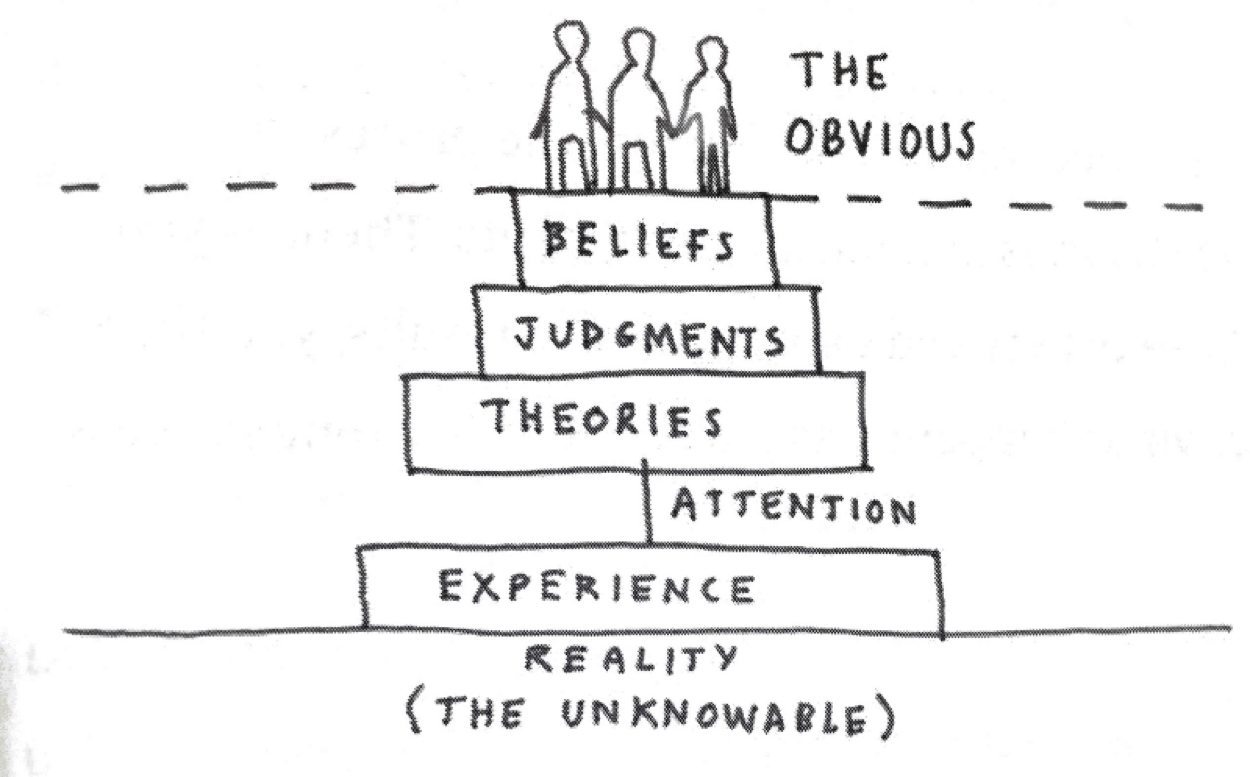
    Dave Gray makes some really interesting points about how we make decisions in his book, “Liminal Thinking: Create the Change You Want by Changing the Way You Think.” He suggests that we only have the ability to make theories, judgments and beliefs based on our personal experiences. And even in our experiences we are only able to process a minuscule sliver of the information available.

    picture1David Gray’s diagram of how we come to our understanding of what the obvious choices is in a situation.

    If we apply this idea to the way we feel about our workplace, then we can quickly see the we are reducing the number of creative solutions available to our workforce. If everyone one of your creative workers gets to work from 9 to 5 at the same desk doing relatively the same thing daily,  they will start narrowing their understanding of what is possible. Just imagine what different solutions might arise if your employee is sitting outside at a lake or in a crowded bar. Their experience would change, thus their well of experience deepens, and their concepts of what is possible, multiplies. Make sure your developers experience new things, both as individuals and as teams. This doesn’t just mean offsites for team-building. It means, let them follow their gut, and work from wherever they need from time to time. This doesn’t mean let them go solo and unplug for days at a time. They need to stay plugged into the team and be a contributing part to the culture, but they need to balance that with building fresh perspectives so they can contribute to the collective experience of the whole.

    Workforce → Culture

    Yes, I know. “Culture” is one of those buzzwords that now cause people to roll their eyes so far back in their head that they fall out. But it’s important to know why the concept is important in relation to the old idea of “the workforce.” When management thinks of its developers as “workers,” the developers are immediately dehumanized and turned into pawns. They are expendable and indistinguishable as creative minds. They act out of fear from punishment and rarely take chances.

    We are no longer cogs in the corporate machine. Our ability to take risks can make the difference between being one of the 99 startups that fail, or the one tech company that succeeds. Managing culture as opposed to a workforce means that we can focus on enabling workers to be as creative as possible. We can focus on nurturing collaboration and honest feedback. A healthy culture is one that is transparent and communicative. A workforce could give a rat’s ass about making positive change. A culture is a living breathing thing that everyone contributes to and improves. A culture is owned by the collective. A workforce is owned by a man in a suit at the top of the tower. Screw the man. Power to the people.

    Conclusion

    Now that we have an understanding of why we must redefine our terminology, it’s time to start defining practical ways to make the switch for each term. In my upcoming writings I will start to lay out practical ways to make the switch in your company.

    About the Author / Devrim Yasar

    devrim_yasarDevrim is the CEO of Koding, a San Francisco-based software development automation platform vendor. Connect with him on LinkedIn and Twitter.

     

  • Continuous Integration vs. Continuous Delivery: There’s an Important Difference

    Continuous Integration vs. Continuous Delivery: There’s an Important Difference

    If you read DevOps blogs today, it can be easy to assume that Continuous Integration (CI) and Continuous Delivery (CD) are synonymous terms. People often use them that way. But that’s a mistake.

    As an example of conflation of the terms CI and CD, take this page, which purports to be a “history of CI/CD tools.” The author does provide a truly excellent history of CI platforms.

    But CI tools are the only subject that the page discusses. It’s not a history of CI and CD. It’s just a history of CI platforms. To work the history of CD into the picture would require discussion of how software testing and delivery practices have changed over time, not just an overview of the history of CI software over the past several years.

    I don’t mean to knock the page. It’s a great read, and the mistake the author makes in treating CI and CD as synonymous is hardly rare. He or she is just repeating a common confusion. You see the same lack of distinction between CI and CD on Docker’s discussion of CI/CD, for instance.

    The Difference between CI and CD

    It’s unclear how this conflation of the two terms originated. But it’s easy enough to clear up.

    Simply put, CI is the process of integrating code into a mainline code base. In almost all scenarios today, CI is done using platforms designed specifically for the purpose. Implementing CI is, therefore, as simple as using the right tools.

    CD is more complicated. CD is about the processes that have to happen after code is integrated for app changes to be delivered to users. Those processes involving testing, staging and deploying code. There is no single type of tool that does all these things. These processes take different forms, depending on the culture of the team and the type of app it is creating.

    In actuality, then, CI and CD share little in common. Besides starting with the same word (“continuous”) and being different stages in modern software delivery pipelines, they don’t have much to do with one another.

    Why the Difference Matters

    Why is it important to steer clear of this confusion? The main reason is because, by conflating CI with CD, organizations can end up doing only the former but thinking they have implemented the latter.

    Setting up a CI server such as Jenkins or Bamboo to integrate code changes continuously does not mean you are doing CD. It just means you are using a CI server.

    To get to CD, you also have to organize your software testing, staging and deployment processes in a way that automates them as much as possible and makes them continuous. Doing so requires more than simply turning on a certain type of tool.

    How you actually do CD is fodder for a separate, much longer article (or you could just read the book about it). But recognizing that CI is not CD, and avoiding confusing formulations including CI/CD, is a start.

    — Chris Tozzi

  • 5 Ways to Ensure IT Service Desk Agility

    5 Ways to Ensure IT Service Desk Agility

    The agile approach is everywhere. Born in the software development world, agility means adaptive planning, ongoing development and continuous improvement. Rapid and flexible response to change is critical. It is not surprising that the best practices of agile software development penetrated into other areas, and IT service management (ITSM) is no exception.

    The Service Desk Can Be Agile

    Unless you’ve been away from ITSM for the last 10 years, you know that an agile IT service desk is flexible, automates processes for quicker incident resolution and emphasizes collaboration between technicians and interactions with users.

    But how do you adopt these seemingly tough principles to make your IT service desk truly agile? We’ve put together five simple ways to help you assess your IT service desk and move toward agility.

    Keep Interactions in Real Time

    IT service desks are constantly nestled in webs of interactions between technicians and users. It’s easy for technicians to get lost in endless emails and delay resolution. To avoid chaos and ensure timely ticket resolution, interactions should stay in real time and communication should be as proactive as possible.

    Let’s say the sales department of a company uses a sales application. But the application crashes, and the department’s users are unable to connect to it. So, they raise a ticket, and the IT admin immediately checks the server and realizes it’s down. They then check the code management database (CMDB0, which indicates that the application is also used by the finance department. Before attempting to resolve the incident, the IT admin should send a notification to the sales and finance departments to inform the users of both departments that the application is down and that the IT team is working on resolving the issue. That way, they can prevent duplicate tickets and focus on fixing the issue.

    Eliminate Productivity Leaks

    Most IT service desks are built on ITIL processes, which means that they are already efficient. But to become agile, you have to track IT service desk performance with key performance indicators (KPIs) such as lost business hours, SLA compliance and cost per ticket—all of which monitor both cost and productivity. While KPIs help you measure productivity leaks, reports help you identify their root cause. For example, your service desk KPIs indicate that there have been a lot of SLA violations. A quick look at your reports shows that a lot of time is spent gathering information rather than on finding solutions. By creating a template for common incidents or service requests, all the information you need is gathered in one place, making it easier for technicians to quickly resolve issues and meet service level agreements (SLAs). Similarly, you can reduce the time spent on routine tasks, such as assigning tickets and tasks to technicians, sending notifications to users and more, by automating these processes.

    Encourage Collaboration Among Stakeholders

    Every IT service desk has stakeholders across various disciplines and geographies. And IT service desks are often rated on how seamless the flow of information is between stakeholders. Therefore, it’s important to have a service desk that provides visibility and encourages collaboration. Let’s say that a company is running its financial application on a legacy server. To cope with increasing transactions, IT proposes a server upgrade. Since this application impacts everyone in the organization, any disruption in service will impact the business significantly. So, IT should keep all business groups and admins in the loop, ask them for recommendations on scheduling the change, ensure backout plans and inform users about the change schedule and expected downtime. An IT service desk application that provides room for this collaboration ensures a smooth upgrade with minimal interruptions.

    Establish Self-Organizing Teams

    An IT service desk is incomplete without its team. And since IT is essentially the command center of a company, it’s imperative to establish a self-organizing IT team. This starts with looking at the current team’s structure and creating workflows around it. In most IT service desks, the technicians are grouped based on their skill sets and level of expertise. So, you can easily assign a technician (or group) to a workflow that requires a certain type or level of skill. You can also auto-assign tickets to technicians or groups, assign a change manager to coordinate with different teams, automate escalation rules for complex issues, configure a backup technician when a one is not available and more.

    Learn Through Iterative Increments

    IT service desks are expected to meet the changing demands of their organizations. This means that they have to make a number of small changes over a period of time. In agile terms, this is called iterative increments. Let’s take, for example, a growing organization that has several employees joining every week. A typical employee onboarding and provisioning process requires the IT team to coordinate with different teams including HR, maintenance and administration. This can take up to 10 hours for each new employee. But, you can simplify this process by dividing the request into smaller tasks and assigning the tasks to corresponding departments. You can also automate this whole process, significantly reducing the time it takes to onboard a new employee.

    Just follow these simple steps and you will be on your way to creating an agile IT service desk that delivers quicker resolutions, increases user satisfaction and evolves with rapidly changing technologies.

    About the Author / Aparna TA

    aparnaAparna TA is a product analyst at ManageEngine, the real-time IT management company and division of Zoho Corp., and works in the ITSM products division for the flagship product ServiceDesk Plus. She keeps an eye on various IT practices and studies their impact on IT service management. In her free time she likes to relax on a couch and read the latest crime novels. Connect with her on LinkedIn and ManageEngine on Twitter.

  • Last-Mile DevOps: How to Keep Employees Happy

    Last-Mile DevOps: How to Keep Employees Happy

    Chances are that your company is embracing DevOps to make sure you can get fresh, new digital capabilities to your customers ASAP. That’s because in today’s market, you either have to be first—or quickly close any gaps between you and your more digitally innovative competitors.

    But when it comes to getting new capabilities into the hands of your own employees, things probably move much slower. That’s because your internally facing apps have to clear a hurdle that your customer-facing apps don’t: administration of access privileges that often are poorly defined and inadequately automated.

    That’s a problem. People can’t be productive if they don’t have access rights for the IT resources they need, when they need them. The growing Millennial workforce is going to be especially unhappy if IT is slow to meet their digital needs. And from a security perspective, slow administration of access privileges is also a problem—because your company must be able to automatically and immediately revoke employee access privileges the moment they’re fired or they quit.

    This automated, accelerated management of internal users’ access rights is the missing “last mile” for DevOps. And it’s something you have to address if you’re going to fulfill the needs of the business with the same excellence as you fulfill the expectations of your customers.

    What Makes the Last Mile So Tough?

    If you bank with Chase or ride with Uber, your access to your personal data is gated by your personal login. But, as a customer, you essentially use the same app as everyone else.

    Application privileges within your own company are entirely different for two reasons:

    • Privileges for your internal workforce are much more complex than for customers. Salespeople have sales apps. Your finance department uses finance systems. Your service reps may be allowed to see RMA numbers, but not SSNs. So you must quickly give each person access to only the resources appropriate to their specific role and responsibilities—or risk consequences that include lost productivity, security breaches, compliance failures and excess software licensing costs.
    • Management of internal privileges is an ongoing activity. Productivity, security and compliance demand that you provision each user account for each application with the right privileges at the right time. Privileges must be immediately and appropriately modified every time an employee is promoted or transferred. Privileges must be terminated immediately when someone leaves your company. Privileges may also have to be temporarily modified in real time due to session context—such as use of non-secure public WiFi or an access attempt from a questionable location or at a questionable time.

    Simply put, for internally facing apps, getting code onto a production server isn’t enough. You also need to automate and accelerate management of the “last mile” between servers and employees.

    What Are ‘Last-Mile’ DevOps Requirements?

    DevOps toolchains automate and monitor the software life cycle from design and development through testing and deployment on a production server. What’s missing is automated provisioning and governance of the “last mile” between the server and the individual worker.

    These tasks include:

    • Capture of current user role/responsibility profiles from HR
    • Provisioning of application-specific accounts with profile-appropriate privileges and controls
    • Self-service inputs from authorized LOB managers
    • Detection of session context (network connection, time of day, location, etc.)
    • Real-time modification of privileges based on that session context
    • Automated revocation of access privileges upon termination, transfer, etc.
    • Employee self-service for permitted optional applications and services
    • Monitoring and reporting on employee account activities and events

    Your team probably performs many of these “last mile” tasks manually. Some may also be automated using homegrown scripts. Excessive dependency on scripts is a bad practice, though. Scripts usually are poorly understood by anyone but the original writer—which makes them difficult to maintain and update over time. They also don’t typically integrate well with DevOps, HR systems or other key pieces of the app delivery puzzle. This lack of integration slows your processes down and opens the door for human error.

    Automation of last-mile DevOps makes much more sense. Automation speeds processes, reduces cost and optimizes accuracy. Integrated automation also gives you a dependable, centralized point-of-control for defining and editing policies—as well as for capturing the event logs necessary for compliance and security reporting. The right automation solution will also integrate with the rest of your operations environment (including directories, VDI, and mobile management tools) to ensure secure, reliable application access.

    Why is ‘Last-Mile’ DevOps Important?

    Most business leaders already understand why rapid rollout of customer-facing applications is so important. Unfortunately, many fail to recognize the importance of being just as fast and accurate when it comes to supporting their own workforce.

    The truth, however, is that automation of last-mile DevOps benefits your business in several important ways:

    • Improved employee productivity and engagement. Your workforce will be much more productive and more engaged when everyone has immediate access to the digital tools they need. That improved employee performance will benefit your customers as well.
    • Higher IT efficiency. The sooner you automate the many everyday service provisioning tasks that your skilled IT staff now performs manually, the sooner they can to shift their precious time and energy from routine work to higher-value projects.
    • Enhanced security and compliance. Well-defined access policies, diligent enforcement of those policies with rules-based automation and centralized logging of access provisioning activities all reduce your IT-related risks—as does immediate, automatic and complete revocation of all access privileges the moment any employee or contractor is terminated.
    • Reduced “Shadow IT.” When IT is more responsive to people’s needs, they are far less inclined to turn to alternative digital resources that aren’t properly monitored, governed or secured.
    • Greater business agility. M&A, reorgs and other organizational moves are chronically bottlenecked by manual execution of mass changes to the workforce’s digital access privileges. Rules-based automation of last-mile DevOps eliminates this agility-killing process friction.

    The bottom line: To achieve true digital agility, your company must automate the “last-mile” tasks that give your people access to the IT resources they need—when they need them.

    About the Author / Stacy Leidwinger

    stacy-leidwingerStacy is the VP of Products at RES where she is responsible for defining overall product direction, roadmap and positioning, to drive product excellence, company growth and customer success in the areas of end user computing and security. Her background is in both product marketing and product management helping to positioning B2B software companies for growth and market leadership. Prior to RES, Stacy led the product management team at Directworks, a cloud-based sourcing and supplier management solution. Before Directworks, she managed the roadmap, product positioning, and go-to-market strategy for Vivisimo, an enterprise search solution, which was acquired by IBM. While at IBM, Stacy was responsible for the integration of Vivisimo’s product line into IBM’s big data portfolio. Connect with her on LinkedIn / Twitter.

  • What Every Front-End Developer Needs to Know

    What Every Front-End Developer Needs to Know

    One of the hardest things about being a front-end developer is the fact that everybody has very different expectations of what it means to be one. This, along with a technology stack that changes at the speed of light, makes interviewing for a front-end position tricky.

    To help you out, and to give you an idea of our views on the role, we have prepared some points on what we consider to be essential knowledge for a front-end developer.

    Be Able to Solve Problems

    This sounds quite abstract, so let’s talk about what it means. Unlike many other developer positions, a front-end developer wields the power of multiple languages and technologies. Being able to look at a task, split it up into necessary steps and choose the right technologies for the job is an essential skill—some things need just a line of CSS, but implementing them in JavaScript would require a 100K library or vice versa.

    Sometimes you won’t know the perfect tool for the situation at hand, and this is also fine. However, you are still expected to provide a solution. This solution may not be the nicest in terms of code quality or speed, but it needs to work—at least for the cases presented at hand.

    JavaScript

    React and Angular, along with other front-end frameworks, are quite impressive pieces of engineering and it is important to know them well if they are the primary frameworks you are using for the job. That said, knowledge of JavaScript, its core libraries and browser APIs will support you no matter which framework you use. Additionally, JavaScript is a general-purpose programming language, so doing some simple array or tree processing shouldn’t cause you any problems and shouldn’t immediately trigger the reflex to include that nifty 100k library that you would barely use.

    One more thing to pay attention to is the asynchronous but single-threaded nature of JavaScript. You should be comfortable with scheduling pieces of work into the future in various ways and know how to execute some code after those asynchronous calls.

    CSS

    In the world of component-based frameworks and living style guides, you can get away with minimal CSS knowledge most of the time. Yet, when something goes wrong with your layout, or when you need to implement something unique, you need to know how browser layouts work. In short, we want you to understand CSS, but not necessarily keep all the flexbox properties or browser-specific hacks in your head—although it is certainly a plus if you do.

    Know Thy Standards and Keep Up To Date

    Nothing gives you as much appreciation of the complexities involved in making the front end work as reading the standards does: HTML, CSS and ECMA. It’s easy to get overwhelmed with more than 2,000 pages of quite dense and very specific reading, so start small. Websites such as SmashingMagazine, PonyFoo, HTML5Rocks and others will keep you up to date on the latest developments and might trigger an urge to understand things deeper.

    Network

    Every awesome front-end application needs to get to the user’s browser somehow. It’s also likely that you will have to make some asynchronous fetch requests to back-end services. All of this makes use of network, which means you should be aware of what is involved in making an HTTP request, at least on the level of Wikipedia with a sprinkle of cache-related topics, as well as what request latency is composed of.

    While it is not a requirement for a front-end developer, knowing the connection on a TCP level is a nice thing to have, as is awareness of HTTP/2. Knowledge of REST services, at least from a consumer perspective, is certainly helpful as well.

    Debugging

    This goes back to the initial section on problem-solving, but also touches on every other front-end topic. Browsers are extremely complicated pieces of software with years of legacy, but still evolving at great speed, and this software is our domain as front-end developers. So whenever something goes wrong there, it’s our job to figure out why.

    Sometimes it means looking for JavaScript errors, other times you may need to profile your code to check for slow code paths, and occasionally you may need to use CURL to fire off some requests from your terminal.

    Security

    Web, being an open platform, is constantly under the threat of various attacks, targeting both users and companies. Every piece of code and every call the browser makes is a potential source of security vulnerabilities—initial load of the page, AJAX request, external scripts or iframe, and even a simple DOM manipulation can be vulnerable to XSS, CSRF and various other vectors of attacks. Being aware and vigilant is an essential requirement for the safety of the data of your customers and your company.

    Testing

    QA, as a department or a position, hasn’t existed at Zalando since we brought in Radical Agility in 2015. We believe that it’s each developer’s responsibility to ensure the quality of their produced code, and front end has some very specific strategies for testing and asserting non-functional properties of the code.

    We believe that unit testing is a must for any project, and we highly encourage TDD, especially for a dynamic language such as JavaScript. Generally, you also would want to supplement this with some end-to-end or functional tests to make sure users can do what we expect they should be able to do.

    Tooling/Automation

    All of the topics discussed here also require very specialized tooling. You definitely should be comfortable with the concept of resource bundling and the tools available for this purpose. As mentioned above, testing by hand is not our thing, so a setup with automated tests is a must for every project.

    Ideally, tooling and automation should be complemented by continuous integration/continuous delivery to make sure no code slips past without running those tests. Depending on the project, you also might want to use a transpiler such as PostCSS or Babel to help you write more modern code.

    Conclusion

    What we’ve collected above is obviously an enormous amount of knowledge and will rarely exist in a single mind; however, the strongest candidates have at least a general understanding and a keen insight with a select few to stand out as a front-end developer.

    About the Author / Dmitriy Kubyshkin

    dmitriykDmitriy Kubyshkin is a front-end architect at Zalando SE, helping delivery teams with the migration of their front-end features from a legacy monolith to their new microservices architecture. Connect with him on LinkedIn / Twitter.

  • Getting Ready for All Day DevOps

    Getting Ready for All Day DevOps

    DevOps Practitioners Unite

    On Nov. 15, we’ll be broadcasting 54 live sessions across 15 hours and 15 time zones. The All Day DevOps conference will be live, online and free. Anyone who registers can watch.

    We have invited some top-notch practitioners from around the world to speak at the event on topics ranging from DevOps transformations, to CI/CD, to automated security, to modern infrastructure (think serverless, microservices and containers). The speaker lineup will include:


    www.alldaydevopsy.kinsta.cloud

    Don’t Watch Alone – Host a Viewing Party!

    One of the best parts of attending a DevOps conference is getting to interact with others in the community. We have had many organizations including Capital One, Intuit and Fannie Mae approach us about hosting viewing parties at their offices—and opening the party to the public. Sound intriguing? Here’s how to do it:

    Secure the location. Pick your corporate auditorium, cafeteria or open meeting space. Secure it all day for Nov. 15. Make sure you have at least one internet-accessible viewing screen.

    Promote the session: One you have the approved locations and times, share them here with the All Day DevOps Conference organizers. We will help you promote your party on AllDaydevopsy.kinsta.cloud and through social media postings, directing them to your registration page.

    Invite People to Register: Set up a place for people to register for your location. You’ll want to know how many people to expect because you need to know how much pizza to order. Meetup.com and Eventbrite.com make event registration easy.

    Make it Fun. Order some pizza and drinks. We’ll send along some cool laptop stickers from the conference and some of the sponsors. Share pictures from the event online (@AllDayDevOps). Join the conversation in the conference Slack channels. Set up birds-of-a-feather stations. Play some music during breaks. Set up viewing screens for each of the conferences three tracks.


    Just to be clear: the All Day DevOps Conference is not a collection of vendor pitches.  In fact, we have tried our darnedest to ensure the agenda is purely focused on real DevOps practitioners sharing their craft.  Take a moment to look at the speakers participating in each of the tracks and you’ll see what we mean.

    Register today. Invite your colleagues to attend.  Then plan a viewing party at your office.

    — Derek E. Weeks