Category: Doin’ DevOps

  • How to Secure CI/CD Pipelines With DevSecOps

    How to Secure CI/CD Pipelines With DevSecOps

    Many companies are adopting a DevOps approach in their workflows as IT moves toward a more automated and cloud-native world—but for some industries, this migration isn’t easy. Many of these companies—in finance, health care, government—are obligated to meet compliance requirements. For these organizations, DevSecOps adds necessary security focus to the DevOps methodology.

    Compliance means adhering to certain standards and controls to ensure that applications are secure. But compliance only goes so far. How many applications contain third-party dependencies inside? How expensive would it be for a company in the financial industry, for example, to fail to meet compliance standards?

    Initially, containerizing an application while complying with requirements of whichever framework or standards apply to your organization could seem close to impossible. Within the cloud-native landscape, however, technologies are also rapidly evolving to enable healthy migration and ensure that applications can meet compliance standards without being rewritten from scratch.

    First, let’s look at the standards organizations must adhere to in terms of compliance.

    CIS Benchmarks for Kubernetes and Docker

    The Center for Internet Security (CIS) benchmarks offer guidelines for the correct use of containers in applications. The CIS benchmarks specifically discuss Docker and Kubernetes.

    NIST SP 800-190

    The U.S. government’s National Institute of Standards and Technology (NIST) defines containers as a form of virtualized operating systems within its application container security guide.

    PCI

    The payment card industry (PCI) standards are a framework that helps protect data in the e-commerce and retail areas.

    HIPAA

    The Health Insurance Portability and Accountability Act (HIPAA) sets the compliance standard for patient data protection in health care.
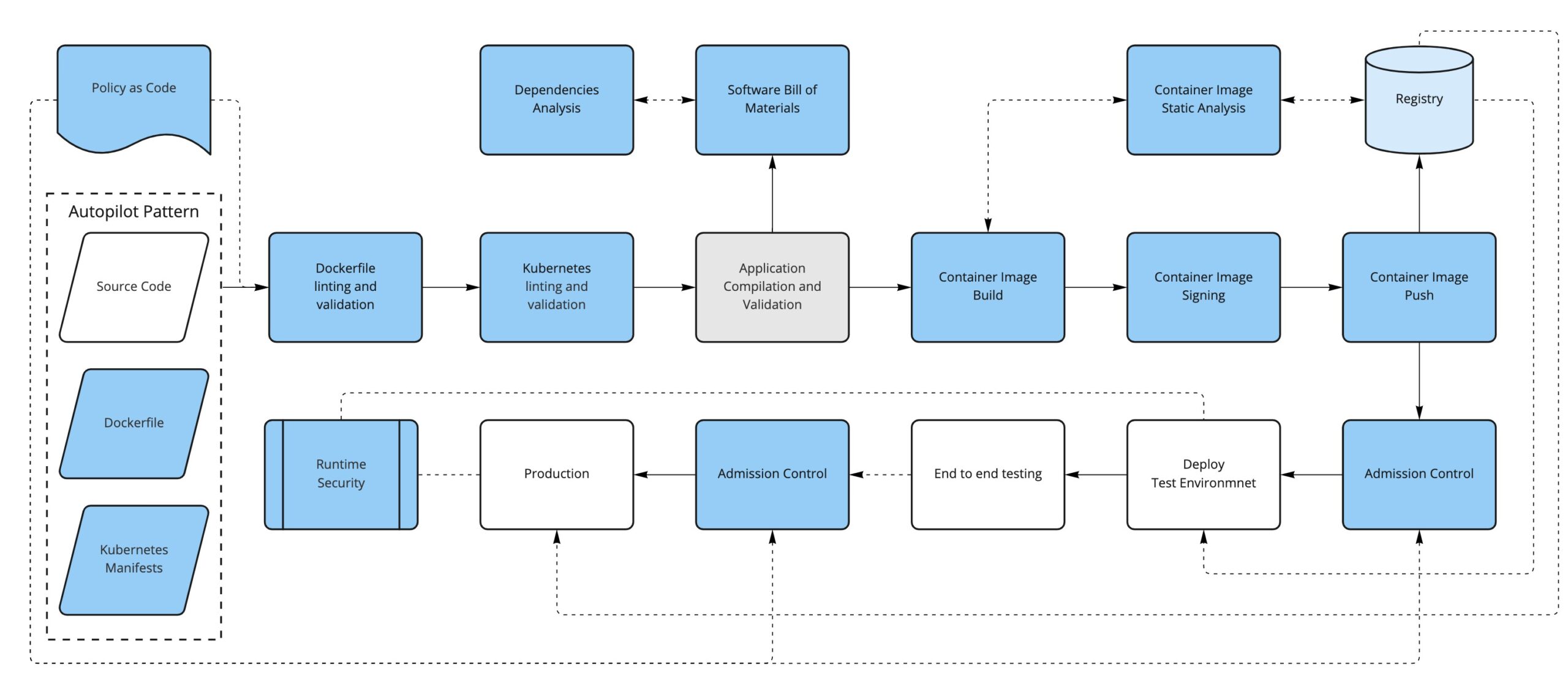
    Securing Infrastructure via CI/CD Pipelines

    All these standards guide organizations to keep their infrastructure secure and compliant with their specific industry best practices, but security doesn’t end (or even start) there.

    Secure systems start from the design stage and from the code itself; you should aim to have security controls and enforcement built in as early as possible in the development life cycle. The practice of moving security checks earlier in the development pipeline (and, thus, nearer the source code) is known as shift left.

    You likely already have CI/CD pipelines in place for your application(s), and this is a great place to shift left your security checks. There are some great tools in the CNCF portfolio to help you achieve this.

    Enter Containers

    In the cloud-native world, containers are first-class citizens. From the DevSecOps point of view, containers represent a new attack surface to consider, starting with how the container image is defined and what ends up inside the container (the Dockerfile) to how the container evolves over time in response to new vulnerabilities that might be found.

    The first thing we can do is to convert our written policies to something that we can automate (such as code); for example, using a tool like OPA/conftest and a Dockerfile linter like hadolint, we can validate that the Dockerfile is compliant with our security policies.

    For instance, we could have a policy in place to limit the base images used to build new containers (limiting the FROM directive in the Dockerfile, for example).

    The second thing to consider is that, depending on how it has been built, a container image can have not only our application but also additional software included, like dependencies and operating system binaries.

    This additional software could have new vulnerabilities discovered in the future, so we should monitor the images that we have already built and pushed to our registry by periodically scanning them to find if they are open to any vulnerabilities that weren’t known at the time of building the container image.

    Just as before, we could sign our application artifacts. Now, our deliverable artifact is a container image, so it is preferable to be able to sign container images. In this way, we can trust that the container image we run comes from us and that it has been through our security process. There are projects like Notary, Grafeas and sigstore/cosign that can help with the container signature process.

    Running Containers in Kubernetes

    If we are running containers, the next logical step is to consider how we run them. Kubernetes use is on the rise as a solution to orchestrating containers across several machines. Introducing Kubernetes into the equation requires considering yet another attack surface in our DevSecOps workflow.

    Manifests

    Alongside our application’s source code, we will have the Kubernetes manifests that define how to deploy our application into a Kubernetes cluster.

    We can take the same approach as the container definition: Define some policies-as-code to enforce early in the process so our manifests are aligned with our security policies (not running untagged images, running images only from our trusted sources, ingress must have TLS, not using node port services, for example) and lint the YAML files to fail early if there are syntax problems, for example.

    We could also enforce most of the same policies and some additional ones at runtime when the manifests get applied to the cluster via a Kubernetes Admission Controller.

    Some tools that can help us with these enforcements are OPA/conftest, kubeval or kubelinter for linting and validation and, for the admission controls, we can use OPA/Gatekeeper or Kyverno, in addition to the API server admission plugins.

    Secrets

    Secrets require special attention since they contain sensitive information.

    If you’re using a GitOps approach, application secrets are often stored in repositories. Here are some resources that discuss sealed secrets in GitOps and Kubernetes secrets. 

    RBAC

    Do not use default service accounts: Define explicit service accounts associated with their permissions so you know exactly who can do what.

    Avoid the use of wildcards in roles and cluster roles; with RBAC you can define fine-grained permissions for users and for service accounts, as well.

    Know Your Dependencies

    Another attack surface that we need to consider is the application’s dependencies. It is important to first know what they are and if they have any known vulnerabilities. To help us with that, we can create a software bill of materials for the application and run an analysis on it.

    Finally, just like we periodically check for the images stored in the registry, we can continuously analyze what’s running in our Kubernetes cluster. This will ensure that there is no suspicious activity like abnormal network requests, images with critical CVEs running, etc.

    Conclusion

    By now, you should have a better idea of what it takes to secure your pipeline. Keep in mind, however, that this is mostly about process and cultural change.

    First of all, you need to know your attack surface—that is not only a technological choice, it’s also about what you think is important.

    These concepts are hard to apply from the beginning, so a better approach is to introduce changes, get used to them and think about how to improve the existing process step by step.


    Join us for KubeCon + CloudNativeCon Europe 2022 in Valencia, Spain (and virtual) from May 16-20—the first in-person European event in three years!

  • Jamstack Will Revolutionize How Websites Are Built

    Jamstack Will Revolutionize How Websites Are Built

    Today, every organization wants a website that loads quickly and looks sharp. The reasons go much deeper than cosmetic motivations, though—even a slight delay in loading can cause users to exit a page prematurely and site performance plays an important role in search engine rankings. Meanwhile, threats like ransomware and phishing are everywhere and are constantly evolving, requiring organizations to look for more ways to improve site security and protect user data from bad actors. Then, of course, there’s the need to quickly and easily scale websites to meet sudden spikes in demand. The need to adapt quickly has become especially apparent over the last two years as we have come to rely on the internet in new and profound ways compared to pre-pandemic times. Fortunately, a relatively new but popular approach to web development—Jamstack—is taking websites to a nearly infinite level of scalability and performance, serving up only what you need, when you need it. To understand the value that Jamstack brings today, it’s helpful to take a look at how we got here. 

    Throughout the history of the internet, web and database servers were the primary infrastructure for site hosting. When websites got more complicated, another layer, called the application tier, would take on more complex aspects of the site (like an API, for example). As traffic increased, web servers were scaled out to add capacity with the help of load balancers. Scaling in this manner wasn’t always easy or cost-effective, given how unpredictable consumer demand and spikes in traffic often are. Later, content delivery networks (CDNs) came into the picture, taking a load off web servers by pushing static content to the edge. But, for most traffic, the origin servers would still have to be ready to serve site visitors. In this approach, website development and management were often costly and difficult to scale, and sites faced constant security risks. 

    Enter Jamstack. With Jamstack, all site content sits on a CDN, ready to be served. Web pages are pre-rendered instead of being rendered in real-time (as was the case in pre-Jamstack days). As such, content is closer to the end user, pages load faster and sites can easily scale up or down to handle unexpected shifts in traffic.

    Jamstack represents an exciting and fundamental shift in how we have traditionally approached web development—one that is inclusive of the needs for performance, security, availability and scalability and at a much lower cost to the developer. It’s no surprise that Jamstack has taken the web development world by storm over the last couple of years; in 2020, the number of sites developed with Jamstack jumped 85% from the year prior. Here, I’ll share some basic tips for getting the most out of Jamstack.

    Adding Dynamic Features to Static Sites

    Jamstack starts with the idea of a static site—pre-building as much of a site as is practical—and incorporates dynamic elements to achieve fast websites with fewer attack vectors. The term, which was coined in 2015 as JAMstack, derives from: 

    • J = JavaScript, the website’s programming language 
    • A = APIs, which enable dynamic content on an otherwise static page
    • M = Markup, which is the HTML and CSS code that provides formatting instructions to the browser 

    By combining these three elements, Jamstack allows developers to quickly create and maintain websites that can be served efficiently to users. A static site renders well for mobile, web and video while relying on APIs for dynamic features. High page speed is achievable by pre-building as much of a site as possible and then using a CDN to deliver the page to users around the world. When a user visits a website, they see a pre-rendered page delivered by the CDN with no dedicated servers needed.

    Notably, the page’s static nature does not require the content to be static. Leveraging third-party APIs can enable dynamic content such as search, payment processing and real-time data. This modular approach allows for flexibility and avoids vendor lock-in—swapping out different APIs as technology changes and new tools become available is easy. The ability to integrate with serverless functions also lends itself to Jamstack sites becoming more dynamic.

    Without the need for web application servers and database servers, Jamstack pages scale well as visitors increase, improving both the experience of the visitor and the organization’s bottom line.

    In essence, a Jamstack site has no backend that needs to be managed by a developer. The static nature of the page means there is no link between the website and a database, which reduces the security attack surface. Since all site elements are delivered from the CDN or an API, potential attackers aren’t able to hack web application servers or database servers.

    When an organization creates a website with this approach, there are no servers to maintain and no staging environments to create, so there is less of a need for complex DevOps resources. Jamstack’s simplicity means there are fewer moving parts than in a traditional site and less room for error. Because of this decoupling between the frontend and backend, Jamstack sites are faster to launch and more reliable.

    Another advantage of the static setup is that reverting to an earlier version of a page is simple. This is possible through the concept of atomic deploys, where the entire site is updated at once, creating a new version. With Jamstack, developers have more freedom to experiment and avoid the tiring trial and error of traditional sites—if something does not render as intended, switching the entire site back to a previous version is painless. 

    Assembling a Jamstack Toolkit

    Jamstack’s tools, processes, and best practices are evolving rapidly, and an important part of diving in is remaining open to experimentation and tracking emerging developments. Getting started is simple since Jamstack integrates with existing workflows and many organizations have established relationships with vendors already in place for key technologies, speeding up the decision-making process. These technologies include:

    • CDN: To deliver pages from locations close to users—a requirement for achieving fast performance. 
    • Static site generator (SSG): To generate the site using raw data and templates—automating the process of coding pages and ensuring they are pre-built and ready for users.
    • Content management system (CMS): To act as a content repository. A CMS for a Jamstack website is described as “headless,” which means that content is stored outside of the codebase and delivered via APIs for seamless display across different devices.

    Expanding the Value of Jamstack

    We are still in the early years of Jamstack’s maturation, and not all deployments are equally effective. For example, some Jamstack platforms are hosted out of centralized data centers coupled with a CDN, which slows performance relative to delivering sites directly from the edge. Some Jamstack hosts also charge more to add developer seats, which discourages collaboration among large teams and can result in unpredictable pricing. 

    Regardless, Jamstack is one of the best technological solutions to come to developers in recent years and one which will surely influence the future of web development. Not only does it make websites faster, more secure, and easier to scale, but it builds on many of the tools developers already know and love—empowering them to achieve their maximum productivity.

  • This is Not Just a Test: DevOps and the Need to Automate

    This is Not Just a Test: DevOps and the Need to Automate

    Creating software is as much about the process as it is about the product. In recent years, we’ve seen the speed of innovation reach new heights due to more efficient development and quality control. DevOps has further accelerated development by combining software and operations in unified, self-improving teams. With automation taking care of rote tasks, developers can now tackle more difficult issues, resulting in even greater software quality and faster development. The need for speed to market is vital; a month or two can make or break a product launch. Then again, if a product isn’t tested thoroughly in the rush to get to market, flaws can slip through and an organization’s revenue and reputation can take a serious hit. In the U.S., software failures in businesses’ operations systems cost a total of almost $1.6 trillion in 2019. The problem is that it can be a bottleneck and create major delays in the release cycle. In fact, A recent survey of 4,300 developers revealed that it is the top reason that releases are delayed.

    In the past, the waterfall approach was common. Tests usually took place after code was written; carried out by testers who had no interaction with the original developers. As a result, bugs that could have taken moments to correct during development required days or even weeks to fix afterward. Even worse, the complexity of the finished software and its many dependencies meant that fixing a localized bug could introduce additional problems that needed to be fixed after another round of testing, further delaying the release.

    But even in a modern DevOps environment, testers and developers are still speaking entirely different languages. By and large, testers do not code and software developers are not expert testers. The two teams typically converse through multiple logs, event viewers and other operating system tools. It creates a great deal of friction and slows down the process.

    Shift Left 

    DevOps represented a big improvement over waterfall methods but, even so, it’s far from a set-in-stone process. It, too, has evolved and right now, shift left testing has moved into the spotlight.

    In this approach, the guiding philosophy is to test early and often, beginning very early in the development cycle and continuously throughout every stage whenever there’s an opportunity. As a result, bugs are caught early when the relevant code is still fresh in the developers’ minds, so it’s easier to fix. In the end, businesses are able to release higher quality software much faster and more frequently.

    Environmental Tests

    When it comes to the DevOps process, it’s not always clear where and how to automate the process. The following looks at how that can be incorporated into DevOps based on four different environments in a continuous delivery (CD) pipeline.

    These environments include local development (usually a coder’s personal device), a continuous integration (CI) or development server, test servers for user interface (UI) testing and the production environment itself. Each has stages with requirements that must be met for code to advance.

    Whenever any new software features or capabilities are entertained, though, developers and the QA team should begin by answering the question, “How can this be tested?”

    Moving Through the Stages

    Once code is created, it must be able to be built without error, passing all unit tests and local verification.

    This stage is particularly important because the development environment echoes the requirements of production; if it works here it’ll likely also work for the customer.

    At this stage, running early regression and developer verification tests ensures the build is ready while providing feedback about the reliability of the environment. It’s useful to have individual test cases as part of more than one schedule. This enables developers to test minor parts of the software without undergoing regression tests of all product features. These tests should be automated and triggered as part of the same process.

    Developers should have the ability to perform basic tests on their own code. After all, the sooner a flaw is identified, the easier it is to eradicate. Just as testers are not experts in coding, neither are developers expert testers. To shift left and effectively integrate tests at all stages of the development life cycle, it must be automated. This will allow developers to test larger quantities of code earlier and more frequently.

    Once through this stage, the software can advance to the test environment.

    This is where a variety of product tests take place, including those for function, load and performance. Passing this stage entails completing all automated functional UI tests, verification of visual appearance, an inspection of server logs and performance evaluation.

    This is where most regression tests are conducted and automation is crucial for scheduled tests to be triggered.

    Next, the product moves into the production stage.

    Tests still occur in this stage to pinpoint any remaining bugs. Automated tests are then run against the production environment to closely mirror interactions with real end users. At this point, it’s highly unlikely there will be major issues but, if there are, running tests at earlier stages could very well be the culprit.

    Throughout the process, ideally, testers will use a visual, no-code tool to create these automated tests. In this way, testers are able to more rapidly and intuitively implement test automation without having to tap into programming resources. Additionally, the integrated documentation of the actions taken during automation will be interactively connected to visual documentation of the test results. The upshot is that testers and developers gain a shared language for both building test automation and troubleshooting the issues it identifies.

    This is Not Just a Test

    Effective, scalable tests are crucial to delivering the reliable, high-quality software that today’s businesses rely on for day-to-day operations. This is why DevOps and development teams need to integrate tests at all stages of software development. Shift left speeds up the creation of better quality software, which provides a significant market advantage. After all, it’s not just about software quality; it can show which companies are best prepared to meet market demands.

  • Defining the Next Cycle of Technology

    Defining the Next Cycle of Technology

    We’re in the middle of what we at ScyllaDB dubbed The Next Tech Cycle. Not “The World of Tomorrow” nor “The Shape of Things to Come” nor “The Wave of the Future”—because it’s already here today. We’re right in the middle of it. It’s a wave that’s carrying us forward, but it began with trends that got their start earlier this century.

    Everything is co-evolving, simultaneously, from the hardware you run on to the languages and operating systems you work with to the operating methodologies you use day-to-day. All of those familiar technologies and business models are themselves undergoing revolutionary change.

    This Next Tech Cycle Goes far Beyond “Big Data”

    We’re talking about huge data. Welcome to the Zettabyte Era. This era, depending on who is defining it and what it is measuring, either started in 2010 (if you’re measuring total data stored on earth) or in 2016 (if you’re measuring total internet protocol traffic in a year).

    Right now, individual data-intensive corporations are generating information at the rate of petabytes per day and storing exabytes in total. There are some prognosticators who believe we’ll see humanity, our computing systems and our IoT-enabled machinery generating half a zettabyte of data per day by 2025.

    Yet, conversely, we’re also seeing the importance of small data. Look at the genomics revolution.

    Because the RNA gene sequence of, say, COVID-19 is actually not that big, data-wise—you can store it in less than 100kb; less than an ancient floppy. But it is increasingly important to understand every single byte of that information because vaccinating against this global pandemic requires understanding every change of that rapidly-evolving pathogen.

    So, this next tech cycle has to scale everything from huge data and small data systems. And the database you will use and the data analytics you perform need to align with the volume, variety and velocity of the data you have under management.

    “Great! Now Make it All Multi-Cloud!”

    Also, this next tech cycle is not just the “cloud computing cycle.” AWS launched in 2006. Google Cloud was launched in 2008. And Microsoft Azure was formally launched in 2010. So, we’re already well over a decade past the dawn of the public cloud. Yet this next tech cycle definitely builds on the ecosystems, methodologies and technologies these hyperscalers provide.

    The database you use also has to align with where you need to deploy it. Does it only work in the cloud, or can it be deployed on-premises far behind your firewall? Does it just work with one cloud vendor or is it deployable to any of them? Or all of them simultaneously? These are important questions.

    Just as we do not want to be locked into old ways of thinking and doing, the industry does not want to be locked into any one technology provider.

    If you’ve just been mastering the art of running stateful distributed databases on a single cloud using Kubernetes, that’s not good enough. Now you’re being asked to do it all over again; this time in a hybrid or multi-cloud environment using Anthos, OpenShift, Tanzu, EKS Anywhere or Azure Arc.

    Computing Beyond Moore’s Law

    It’s also not the basic broadband or wireless internet revolutions. We’re a full two decades into both of those. Yet the advent of gigabit broadband and the new diverse range of 5G services—also capable of scaling to a gigabit—enable incredible new opportunities in real-time data streaming services, IoT and more.

    So how does your database work when you need to connect to systems far and near? How important are the limitations of the speed of light to your latencies? How well do you deal with data ingested from hundreds of millions of endpoints at gigabit-per-second scale?

    And finally, underpinning all of this are the raw capabilities of silicon, summed up by the transistor and core counts of current generation CPUs. We’ve already reached 64-core CPUs. The next generation(s) will double that, to the point where a single CPU will have more than 100 processors. Fill a rack-based high-performance computer with those and you can easily get into thousands of cores per server.

    And all of this is just traditional CPU-based computing. You also have GPU advancements that are powering the world of distributed ledger technologies like blockchain. Plus, all of this is happening concurrently as IBM plans to deliver a 1,000 qubit quantum computer in 2023 and Google plans to deliver a computer with one million qubits by 2029.

    This next tech cycle is powered by all of these fundamentally revolutionary capabilities. It’s what’s enabling real-time full streaming data from anyone to anywhere. And this is just the infrastructure.

    If you dive deeper into that infrastructure, you know that each of the hardware architecture bottleneck points is undergoing its own revolution.

    We’ve already seen CPU densities growing. Yet vanilla standalone CPUs themselves are also giving way to full systems on a chip (or SoCs).

    And while they’ve been used in high-performance computing in the past, expect to see commonly-available server systems with greater than 1,000 CPUs. These will be the workhorses —or, more specifically, the warhorses—of this next generation: Huge beasts capable of carrying mighty workloads.

    Memory, another classic bottleneck, is getting a huge boost from DDR5 today and DDR6 in just a few years. Densities are going up, so you can expect to see warhorse systems with a full terabyte of RAM. These and larger scales are going to be increasingly common—and, for businesses, increasingly affordable.

    Storage is also seeing its own revolution with the recently-approved NVMe base and transport specifications, which will enable much easier implementation of NVMe over fabrics.

    Now, software will have to play catch-up to these capabilities. Just as it took time for kernels and then applications inside of a vertically scaled box to be made async everywhere, shared-nothing, sharded-per-core, and NUMA-aware, this next tech cycle is going to require systems to adapt to whole new methodologies of getting the most from these new hardware capabilities. We will need to reconsider many foundational software assumptions.

    Evolving Methodologies: Agile and Beyond

    Speaking of methodologies, just look at these from the dawn of the millennium and onward. As an industry, we’ve moved from batch operations and monolithic upgrades performed with multi-hour windows of downtime on the weekend to a world of streaming data and continuous software delivery performed 24 × 7 × 365 with zero downtime ever.

    And by migrating to the cloud (and this always-on world) we’ve exposed ourselves and our organizations to a world of random chaos and security threats. We now have to operate fleets of servers autonomously and orchestrate them across on-premises, edge and multiple public cloud vendor environments.

    While Scrum has been around since the 1980s, and continuous integration since 1991, in this century, the twelve principles of the Agile Manifesto in 2001 altered the very philosophy—never mind the methodologies—underlying the way software is developed.

    The Agile Manifesto’s very first line talks about the highest priority being “to satisfy the customer through early and continuous delivery of valuable software.”

    However, the specific term continuous delivery (CD), as we know it today, didn’t take hold until 2009. It was then joined to continuous integration and coincided with the birth of what we now know as DevOps.

    With that, you had a framework for defining change-oriented processes and software life cycles through a responsive developer culture that now, a decade or two into this revolution, everyone takes as a given.

    This graph shows how continuous integration (CI) and continuous delivery (CD) evolved independently. They were eventually conjoined by the term CI/CD, whose popularity as a search term only began to rise around 2016 and did not displace the two separate terms until early in 2020. It is now increasingly rare to refer to CI or CD separately, according to Google Trends.

    Onto that baseline were built tools and systems and philosophies that extended those fundamental principles. The Chaos Monkeys of the world, as well as the pentesters, want to break your system—or break into them—to uncover flaws and defects long before something stochastic and catastrophic or someone maliciously does it for you.

    Cloud-native technologies like Kubernetes and single-source-of-truth for infrastructure methodologies like GitOps were created out of sheer necessity to scale systems to the hundreds of thousands of production software deployments under management.

    DevSecOps

    And that’s still not enough. We’ve already seen software supply chain attacks like SolarWinds, low-level system attacks like Spectre, Meltdown and Zombieload, or human-factor threats like viral deep fakes and millions of fictitious social media accounts using profile images generated by generative adversarial networks, never mind millions of IoT-enabled devices being nefariously harnessed for distributed denial-of-service (DDoS) botnet attacks. Just recently, news broke of the Log4j vulnerability—our best wishes to anyone who was patching code this past holiday season.

    These are all just the bowshocks of what’s still to come.

    So now, your AI-powered security systems are locked in combat every day in real-time against the threat actors attempting to undermine your normal operations. We know this because a growing number of intrusion prevention and malware analysis systems are built at terabyte-and-beyond scale using distributed databases as their underlying storage engines.

    Hence, these days, rather than just DevOps, increasingly we talk about DevSecOps—because security cannot be an afterthought. Not even for your MVP. Not in 2022.

    And these methodologies are continuing to evolve.

    Summary

    This next tech cycle is already upon us. We’re in the thick of it. You can feel it in the same way you’d yearn for major life or career change. Maybe it’s a programming language rebase. Is it time to rewrite some of your core code as Rust? Or maybe it’s in the way you are considering repatriating certain cloud workloads or extending your favorite cloud services on-premises such as through an AWS Outpost. Or maybe you’re actually looking to move data to the edge? Planning for a massive fan-out? Whatever this sea change means to you, you’ll need rock-solid infrastructure that’s available today to take workloads into production right now, but flexible enough to keep growing with your emerging, evolving requirements.

  • Russian Dev Exodus | Puppet IPO FAIL | Intel 18A Ahead of Sched.

    Russian Dev Exodus | Puppet IPO FAIL | Intel 18A Ahead of Sched.

    Welcome to The Long View—where we peruse the news of the week and strip it to the essentials. Let’s work out what really matters.

    This week: More than 100,000 tech workers leave Russia, Perforce buys Puppet, and Intel moves faster than planned. (more…)

  • Why MTTR is a Vital Metric for DevOps Teams

    Why MTTR is a Vital Metric for DevOps Teams

    In DevOps, every second counts. System failures mean your engineers lose valuable time improving software and developing new features. So how do you effectively detect and manage these issues? Mean-time-to-resolve (MTTR) can provide insight into how effectively your DevOps team responds to incidents and how reliable your software is. It’s difficult to know how your team can improve or determine a performance baseline if you don’t have data to analyze your incident management workflows. In this article, you will learn about this valuable metric, interpret it and leverage this information to minimize downtime.

    Why MTTR Matters

    Whether you’re a legacy organization striving to modernize, a startup looking to gain an edge or somewhere in between, MTTR is a vital metric for your organization. It can indicate whether your processes are standardized and can highlight crucial areas for optimization. Most importantly, mean-time-to-resolve provides insight into how stable your software is and how responsive your team is over time.

    Mean-Time-to-Resolve and How to Interpret it

    MTTR can stand for many different things: Mean-time-to-repair, mean-time-to-recovery, mean-time-to-restore or mean-time-to-resolution are just a few interpretations of this versatile acronym. Each of these metrics examines a different aspect of addressing an incident. For example, mean-time-to-repair is the average time it takes engineers to fix a problem, calculated from the moment they begin to the moment a change is pushed to production. But this metric does not account for the amount of time between when an alert comes in and when work begins.

    Mean-time-to-resolution is the most high-level of these metrics—it considers the average time from when an alert comes in until the incident has been resolved, including postmortems and implementing process changes to avoid the same issue in the future. While the standards for this metric can vary by industry, the highest-performing DevOps teams see an MTTR of less than one day.

    Because it is such a comprehensive metric, a high mean-time-to-resolve measurement might indicate problems with alerting or that your engineers are spending a lot of time on repairs. Therefore, it’s essential to look at MTTR over time and analyze each component of your incident management workflow: Time to alert engineers, diagnose the issue, test fixes, ship to production, conduct reviews and learn from the incident.

    It may also be helpful to examine mean-time-to-resolve in conjunction with other metrics. To determine if your DevOps team is facing production challenges, evaluate your change failure rate (CFR) to see how many releases result in a downgraded service. Other DORA metrics, like deployment frequency and lead-time-to-changes, are perfect companions for mean-time-to-resolve.

    To establish the reliability of your software, you can look at mean-time-to-resolve beside mean-time-between-failures (MTBF), which calculates the average amount of time between incidents. If you’re updating your software often, compare mean-time-to-resolve with mean-time-to-failure (MTTF), which measures its duration before a program needs to be redesigned for functionality. To gain insight into your alerting processes, examine mean-time-to-detect (MTTD), which evaluates the time it takes your team to recognize that an issue exists.

    How to Improve Mean-Time-to-Resolve

    Alerting is the first stage of responding to an incident and should be one of the first areas to target when working to reduce mean-time-to-resolve. Ensure alerts are actionable and that DevOps team members have the tools they need to respond immediately. A straightforward escalation process is essential: Define responsibilities for each member and train the team in one another’s roles so that the process never grinds to a halt if someone is unavailable.

    Preemptive monitoring can help you get ahead of problems before they arise—by proactively checking for potential incidents, you can avoid unexpected downtime.

    The best way to improve MTTR is to standardize your operating procedures with runbooks. Without runbooks, DevOps teams have to respond without a clear direction and spend time messaging one another for information—they can’t act immediately. With runbooks, however, your organization’s knowledge base is centralized and accessible to all team members, enabling them to respond as soon as an issue comes up.

    If you’re already using runbooks, consider automating responses. Automation not only improves your mean-time-to-resolve but will give your DevOps team more time to devote to implementing long-term changes that improve the stability of your service.

    When implemented correctly, mean-time-to-resolve is a proven metric that can indicate how effective your DevOps team responds to challenges and how reliable your software is. But be careful not to incentivize the wrong behavior in a quest to minimize this metric. You could, for example, quickly reduce MTTR by eliminating all alerting protocols, but that would also mean poor service for your end users and likely result in poor team morale. Examine this metric over time and aim for slow and steady growth rather than a quick fix.

  • Agile Development at 20: Can it Thrive in the Hybrid Work Era?

    Agile Development at 20: Can it Thrive in the Hybrid Work Era?

    The Agile Manifesto turns 20 this year, and while many of the core tenets are still applicable, the world has changed considerably in the last two decades. What would the Agile Manifesto look like if it was written today and took into consideration our new reality of hybrid working environments? Changes are most definitely needed, as software leaders still find themselves struggling to navigate the murky waters of 21st-century project management to get the most out of their team.

    Developers have many complaints about Agile, but most of them boil down to the fact that they often spend more time planning for work than doing it. For example, developers sometimes feel that frameworks like Scrum are top-heavy and bureaucratic, which is the opposite of their intended purpose. Developers can also feel disconnected from the bigger goals of their project, being trapped in an endless list of “to-dos” without the time to think holistically about the features they’re creating.

    With these concerns in mind, let’s take a quick look at what the original Agile Manifesto actually included. It started with four primary values:

    • Individuals and interactions over processes and tools
    • Working software over comprehensive documentation
    • Customer collaboration over contract negotiation
    • Responding to change by following a plan

    On their faces, all of these seem reasonable; even approaching plain ol’ common sense. But in their zeal to focus on code development rather than bureaucracy, the authors couldn’t have anticipated how much the industry would change. Consider some of the trends we’re seeing in today’s software development teams.

    First and foremost, the idea that “every company will be a software company” has become a reality. It’s hard to imagine an industry that doesn’t leverage software in some way to address its core competency. This trend has, in turn, fueled another major trend: The war for developer talent. Skilled developers were already at a premium prior to the Great Resignation in the wake of the pandemic. Now, developers hold substantial leverage over their employers in ways never seen before.

    The Pandemic and the New Normal of Hybrid Teams

    The pandemic has also brought us the new normal of remote, distributed teams and asynchronous work styles and skilled workers are spread across the globe. There are also new technologies that enable more automation for software teams, including machine learning and AI and other methodologies (like DevOps and DevSecOps) that reduce workloads for developer teams by using automation and process-driven workflows.

    These trends have given rise to particular needs for almost all hybrid developer teams. They include significantly improved productivity for faster software delivery and developer-friendly tool experiences that speak directly to how developers work today. Teams also require guided, asynchronous processes that map to the reality of highly distributed teams. Finally, as the cloud era is firmly a reality, developers need new technologies that offer the ability to scale predictably without suffering from increased complexity.

    Now, let’s look at the original Agile values through the lens of today’s trends and needs. The first is valuing individuals and interactions over processes and tools—this definitely requires an update for today’s developer teams. Specifically, process is a prerequisite for productivity. It is an enormous challenge to measure productivity or determine if the team is improving without a consistent process to follow. Without agreed-upon rules for working together, software development can quickly devolve into chaos. Second, putting individuals and interactions over tools seems like a restrictive viewpoint today. Good tools are explicitly designed to facilitate productive interactions between individuals. If they don’t accomplish this goal, they are poor tools; but there are many solid reasons that great tools can increase productivity and make developer teams’ lives much more manageable.

    The second value of the Manifesto also seems to present a false choice, as it prioritizes working software over comprehensive documentation. Its heart is in the right place—who wouldn’t want to focus on building workable code rather than creating documentation? However, in the world of distributed teams, detailed documentation is critical for both remote and hybrid teams. This also encompasses documentation that goes beyond just the codebase. Documentation involving decisions, requirements, process, etc. also provides context for teams that are adjacent to developer teams and help them understand progress and goals. Documentation is also helpful for addressing the skills gap and talent shortage. New hires or newly-promoted team members need to get up to speed quickly and provide value as quickly as possible. In addition to training, good documentation can help them do that and help their teams be more productive more quickly.

    The third value of the Agile Manifesto said that we should focus on customer collaboration rather than contract negotiation. I believe this needs a slight but essential adjustment for today’s hybrid teams. Specifically, teams should be building with end-users,—not just “customers”—in mind, which means that the needs of whoever will be using the end application regularly should be paramount. This is particularly important today given how many end users are involved in buying decisions.

    I think the final value of the Agile Manifesto—responding to change over following a plan—needs no edits whatsoever. This remains great guidance for developer teams everywhere, and it seems the Manifesto should take this advice and adapt to the many changes that have occurred since it was first written.

    Many of the 12 principles of the Agile Manifesto continue to be outstanding guidance that is applicable for most developer teams. There is, however, some nuance that should be considered for a couple of them. To wit:

    “The most efficient and effective method of conveying information to and within a development team is face-to-face conversation.”—This is true, but today, remote and hybrid teams are a reality. That’s not changing any time soon. Teams need to optimize for asynchronous communication and collaboration.

    “Agile processes promote sustainable development. The sponsors, developers and users should be able to maintain a constant pace indefinitely.”—Sure, but given the myriad demands on software teams, developer burnout needs to be monitored and managed or overall quality and productivity will suffer.

    “Simplicity—the art of maximizing the amount of work not done is essential.”—I couldn’t agree more, but in my mind, this means that teams should leverage automation where possible to maximize “work not done.”

    Conclusions

    In general, it seems that the Agile Manifesto holds up pretty well, provided that today’s workplace realities are taken into account. If software teams recognize that tools and processes create conditions for greater productivity and that documentation is critical in a remote/hybrid world, their remote Agile teams will be much better off. In addition, teams should build with end-users in mind, not just customers. With this added nuance and recognition of a changing world, today’s software teams can continue to thrive while leveraging this decades-old advice.

  • DevSecOps in Azure

    DevSecOps in Azure

    DevSecOps is everywhere, and chances are your organization is shifting toward this convergence of development, security and operations. In an on-premises environment, you build your own DevSecOps process by mixing and matching existing and new tools. However, in the cloud, much of the environment is determined by your cloud provider. Microsoft’s Azure cloud is known for its robust security capabilities. Specifically, Microsoft has developed a set of capabilities and services that can help you ease into a DevSecOps workflow without much effort. The tools are pre-integrated and support everything from CI/CD to identity management. Let’s see how they work.

    What is DevSecOps?

    Security is an important part of DevOps. But it can be challenging to ensure that software developed in a CI/CD process is really secure.

    DevSecOps is an organizational pattern that can make this possible, even at high development velocity. It is an approach the DevOps team can use to prevent security issues from the outset of the development life cycle, ensuring their software is not only high quality but also secure and resilient to failure.

    DevSecOps is a discipline that combines application development, security, operations and infrastructure-as-code (IaC) with an automated continuous delivery cycle. Here are three practices that can help a team move towards a DevSecOps process:

    • Focus on average detection and recovery times—These metrics show how long it took to detect a breach and how long it took to recover. This can be tracked through continuous field testing. Improving these indicators should be an important consideration when evaluating potential policies.
    • Defense in depth—Every component in the architecture should be secure so that if and when attackers manage to compromise the system, there are multiple security measures and controls holding them back. This puts an end to the notion of a ‘secure perimeter’ that the organization must defend at all costs. Each component must have its own secure micro-perimeter—this is a zero-trust approach.
    • Continuous learning—Teams should conduct regular assessments of security practices and their environment, especially after security incidents. Every time a security incident is discovered and resolved, the team must evaluate what went wrong in the development life cycle, explore how it enabled the incident and identify ways to improve the process.

    Features and Services That Enable DevSecOps in Azure

    The Azure cloud provides several built-in capabilities that make it possible to adopt a DevSecOps process.

    1. Azure DevOps

    Azure DevOps provides developer services that enable teams to plan tasks, collaborate on code development and build and deploy applications. Azure DevOps supports a collaborative culture and process in which developers, project managers and contributors work together to develop software. You can use Azure DevOps Services in the cloud or Azure DevOps Server on-premises.

    2. Build and Deploy Containers With Azure Pipelines

    You can integrate Azure Pipelines, the Azure cloud’s CI/CD solution, with your Kubernetes clusters. Use the same YAML document to build multi-stage CI/CD pipelines.

    Azure Pipelines lets you track metadata, such as commit hashes and issue numbers, from Azure Boards into container images. This provides direct traceability from any security issue to a specific change made in development. It also provides clear, easy-to-read documentation that can improve the feedback loop between development, operations and security teams.

    3. Run and Debug Containers with Dev Spaces

    When developing Kubernetes applications, there is a need to test applications locally and understand how they interact with dependent services. You may need to develop and test multiple services in collaboration with other developers or teams.

    Azure provides Bridge to Kubernetes, which lets you run and debug code on your development machine while connecting to your Kubernetes cluster. You can test your code end-to-end, set breakpoints on code running on the cluster and share your development cluster among team members. This makes it possible to test and resolve Kubernetes security issues in a realistic environment before deploying to production.

    4. Manage Identities and Access with Azure AD

    The Microsoft Identity Platform takes the Azure Active Directory (Azure AD) developer platform one step further. It allows applications to accept logins from any Microsoft identity, and obtain tokens that can be used to call Microsoft APIs or APIs created by other developers. This creates a large, interoperable ecosystem.

    Azure Active Directory B2C provides B2C identity services—customers get single sign-on (SSO) access to applications and APIs using their preferred social, enterprise or local account ID. Another option is to integrate Azure AD with on-premises Active Directory for hybrid and Azure migration scenarios.

    You can also use Azure Role-Based Access Control (RBAC) to manage access to cloud resources. RBAC lets you manage who can access your Azure resources, what they can do with them, and which regions can access them.

    You can also use the Microsoft Identity Platform to protect DevOps tools themselves, including native support for Azure DevOps and integration with GitHub Enterprise.

    5. Manage Keys and Secrets with Azure Key Vault

    Exposed secrets are a severe security issue that is very common in modern applications. Azure Key Vault lets you manage the distribution of secrets by storing them centrally in Azure Key Vault. Key Vault greatly reduces the chance of accidentally disclosing secrets. With Key Vault, application developers no longer need to store credentials or other sensitive information in their application code.

    6. Azure Policy and Azure Security Center

    Azure Policy lets you specify a default allowed configuration that is automatically applied to all cloud resources. This can avoid misconfigurations that violate security policies. Azure Policy works on the basis of desired state configuration (also known as declarative configuration), letting you specify to what degree resources and services should be secured and whether to alert or block/modify deployments in Azure if they don’t meet the policy.

    When using Azure in multi-tenant mode, policies can be applied at the management group, subscription or resource group level. You can define specific policies and enforce compliance requirements for test, staging, and production environments.

    The Azure Security Center (ASC) and Advisor can also be easily integrated into the DevOps process. ASC makes it possible to augment event streams in Azure with threat intelligence or analysis by third-party security tools.

    7. Penetration Testing

    Penetration testing is the recommended method for examining your environment for infrastructure or application configuration vulnerabilities that could create vulnerabilities that an attacker could exploit.

    An Azure penetration test should check for vulnerabilities on endpoints, apply fuzzing (malformed input) to discover business logic vulnerabilities, and perform port scanning to identify network vulnerabilities.

    Microsoft provides specific guidance for penetration testing in Azure with recommended products and penetration testing service providers.

    8. Configuration and Infrastructure Scanning

    To ensure security for cloud subscriptions and resource configuration across multiple subscriptions, you can use the tenant security solution part of the Secure DevOps Kit for Azure (AzSK).

    In addition, you can leverage Microsoft security technologies like Microsoft Defender for Cloud and Microsoft Sentinel. These solutions provide monitoring and security features designed to detect and alert on unusual events or configurations that require investigation and possible remediation.

    Conclusion

    In this article, I introduced DevSecOps and showed how the Azure cloud provides a range of services that let you easily implement DevSecOps practices. These include:

    • Azure DevOps: The venerable toolset with strong support for DevSecOps environments.
    • Azure Pipelines: The home-grown CI/CD product.
    • Azure AD: A comprehensive zero-trust identity management solution.
    • Azure Policy and Security Center: Enables unified control over security policies for cloud automation and security visibility over cloud workloads.

    I hope this will be useful as you take your first steps to practice DevSecOps in the cloud.

  • Facebook Bans Innocent Users | Azure and ARM/Ampere | ‘Great Resignation’—No End in Sight

    Facebook Bans Innocent Users | Azure and ARM/Ampere | ‘Great Resignation’—No End in Sight

    Welcome to The Long View—where we peruse the news of the week and strip it to the essentials. Let’s work out what really matters.

    This week: No remedy for banned Facebook users, new ARM-based VMs on Microsoft Azure, and The Great Resignation will still be a Thing for the foreseeable. (more…)

  • Bringing Development Environments Into the Modern Age

    Bringing Development Environments Into the Modern Age

    It’s time to rethink how we deliver distributed access to software development environments.

    We know how to write code. And there are plenty of well-established tools, techniques and processes for doing so.

    We know what kind of code to write: Functional, scalable and efficient code that’s inherently secure and that we can readily modify whenever and however we need to modify it.

    We know why we write code. We write it to enhance the value we offer customers, to expand our market reach, outperform the competition, cut costs, minimize risks and otherwise engage in what we call “digital transformation.”

    We know who writes code—or, more accurately, the various “whos” who write it. We need developers with a diverse range of skills. And as our needs keep changing, we keep adjusting the mix of in-house and contract developers accordingly.

    We also know when to write code—which is now and for the foreseeable future.

    The one thing we still struggle with is where to write code. Not ‘where’ in the physical sense; we’re way past that. We know that for development teams to be optimally productive, we have to enable everyone to work from any physical location at any time. COVID-19 has dramatically reinforced this principle.

    The ‘where’ we struggle with is the virtual ‘where’ of the developer workspace. Yes, we already provide developers with remote access to development resources. Sort of. But there are a lot—a lot—of problems with the way we do that. These problems adversely impact development every day by, among other things,

    • Bogging developers down in annoying technical problems that hamper their ability to set up their environments.
    • Forcing developers to wrestle with the maddening complexity of configuring and managing the multiple dependencies associated with each project.
    • Trapping developers in an endless cycle of building, terminating and recreating environments as projects begin, end and are resurrected for updates and enhancements.

    Unfortunately, we’ve become so accustomed to these problems that we tend to accept them as normal. But we cannot afford to accept them any longer. Here’s why.

    Development Environments: Insecurity, Lost Productivity and Technical Debt

    One big problem for both developers and the enterprise is that developer workspaces aren’t fully portable. The methods we use to give developers remote access to their environments invariably come with unacceptable insecurity. There’s also the issue of onboarding. When a developer joins a team—whether as a new hire, temporary contractor or current employee switching to another project—it can take days for them to get them fully up to speed with access to all the project-specific resources they need. That ramp-up time invariably frustrates developers.

    On the other hand, offboarding developers can be a security and compliance issue. Piecemeal provisioning of the multiple resources developers need inherently results in the piecemeal deactivation of those same resources. So when a developer quits or is fired—or when a contractor’s contract is up—we can’t be 100% certain that all their permissions have been revoked.

    Moreover, what happens when a developer needs to go back into a project that no one has touched in months or even years? How does a developer recreate the full workspace associated with that project and have high confidence that they’re doing it right?

    The answer is that we can’t. Instead, some unfortunate developer inevitably has to spin their wheels trying to piece together a long-dormant project. All your aging code is thus guaranteed to become “legacy” (which is just another name for ‘code no one is quite sure how to work on’), thereby guaranteeing that your organization will forever be burdened with an ever-growing mountain of resource-draining technical debt.

    The Shoemaker’s Children

    So how can we re-engineer the delivery of remote workspaces so we make life easier for developers while also fulfilling the security and compliance requirements of the enterprise?

    Here are a few ideas to consider:

    • Host developer workspaces in the cloud. Developers provide everybody else with a wealth of cloud resources, yet rarely take full advantage of the cloud themselves. Some resources they need may reside in the cloud, but the complete workspaces they require to be fully productive do not.
    • But why not? Everything a developer needs for every project should exist as a complete, unified, project-specific workspace that’s available to them anywhere—just like all the other SaaS solutions developers build for end-users every day.
    • And given the sophistication of today’s browsers, cloud-based workspaces can be made available to developers without requiring them to install a desktop client. The cloud also enables workspaces to be hosted anywhere to avoid latency delays.
    • Nothing should leave your secure workspace repository. Ever. To ensure the security of all developer work-product, no actual code or data should ever leave the hosting environment.
    • Only screen pixels and keystrokes should move across the network. This remote-access model makes developers’ workspaces fully secure and fully portable. It also provides the best protection against data exfiltration.
    • Simplify the definition and administration of project-specific workspaces. You don’t want developers looking around for tasks in progress, relevant datasets or process workflows. Instead, administrators should be able to configure workspaces that give developers access to all the resources they need for each project via a single sign-on (SSO).
    • Leverage containerization into your workspace hosting. Better, safer enterprise development isn’t just about re-engineering remote workspace access. It’s also about making those workspaces easier to manage on the back end. The best way to do this is containerization, which allows you to flexibly mix-and-match workspace elements. That way, you don’t have to build every workspace from scratch.

    And those workspaces don’t exist as monolithic, “all or nothing” environments that you pray you’ve gotten right. Instead, with containerization, you can build project-specific workspaces more quickly, at less cost and with less risk.

    Effective hosting of fully portable developer workspaces requires other important functionality as well: Inactivity time-outs, cloud cost/utilization controls, etc. Before addressing these details, however, development leaders must first come to terms with the fact that developers need a much better way to work remotely—and that every remote workspace must be a secure one.