Category: Doin’ DevOps

  • AWS Saves Ukraine’s Data | WPF ‘is not Dead’ (yet) | Devs Quit for Cash

    AWS Saves Ukraine’s Data | WPF ‘is not Dead’ (yet) | Devs Quit for Cash

    Welcome to The Long View—where we peruse the news of the week and strip it to the essentials. Let’s work out what really matters.

    This week: Amazon S3 is keeping Ukraine’s data safe, we ask if Windows Presentation Foundation is dead, and developers tell us why they switch jobs. (more…)

  • The DevOps Workflow is Broken. Here’s How to Fix It

    The DevOps Workflow is Broken. Here’s How to Fix It

    While great progress has been made in bridging the gap between developers and operations engineers, fundamental differences in roles and responsibilities, alignment, and access to information hinder further progress. 

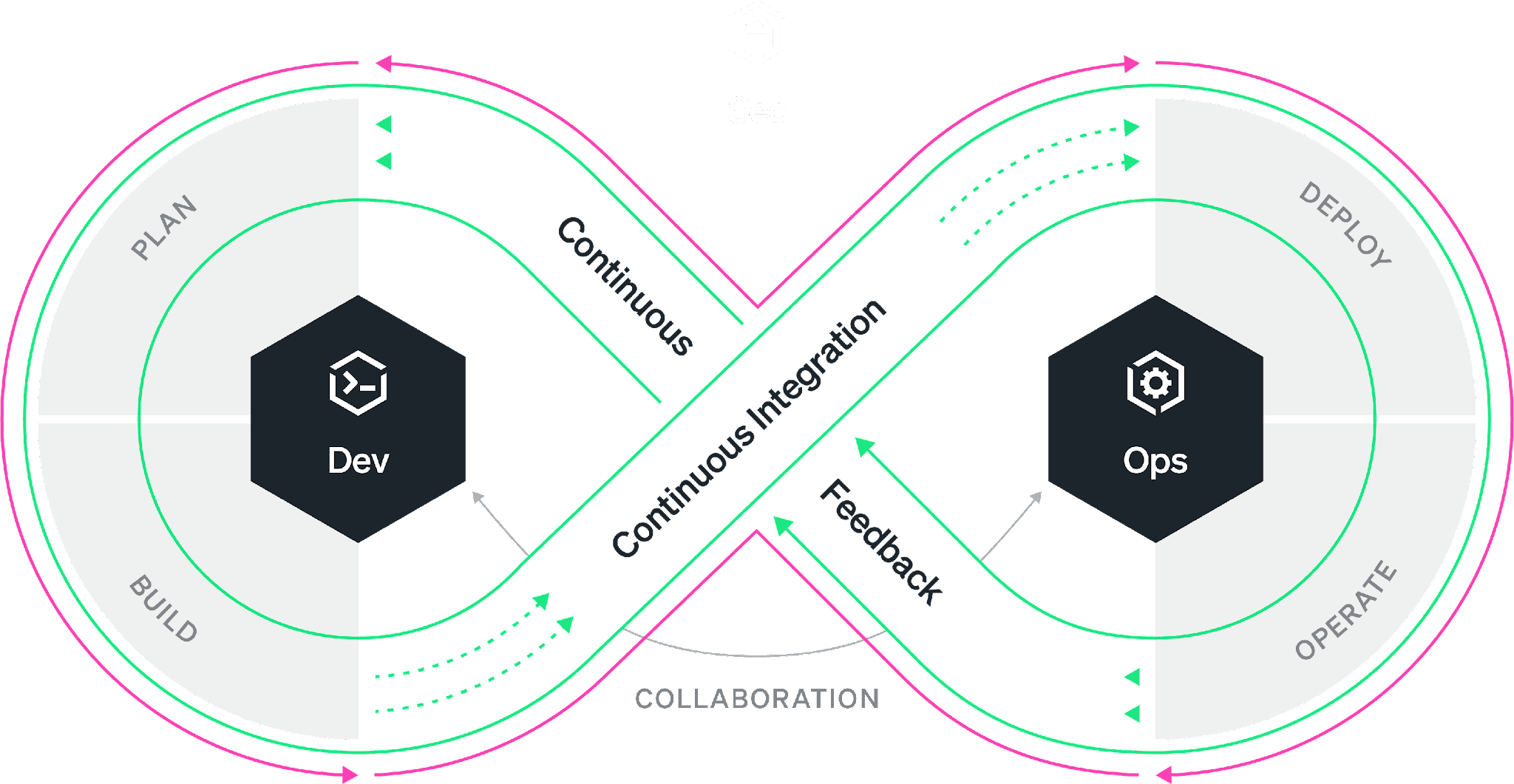
    Everyone is familiar with the DevOps infinity loop: This is an ideal workflow where every stage of the software development life cycle feeds into the next. While the philosophy is well understood, organizations have worked on bringing developers and SREs closer together under the DevOps banner. The reality is most of the time, the DevOps infinity loop is broken. Developers continue to focus on building features without the benefit of data-driven insights that production data can provide. Developers often “push and pray” without fully understanding how their changes will affect performance and the user experience. As a result, companies miss the opportunity to improve products faster and delight the customer sooner.

    According to Gartner, 90% of DevOps initiatives will fail to fully meet expectations. And yet, the global DevOps market, which accounted for $7.3 billion in 2021, is expected to reach $37 billion by 2030. So to summarize, we’re all spending billions of dollars on the implementation of initiatives that are expected to fail in some meaningful way 90% of the time. The question is: What is failing and what can be done about it? 

    As the DevOps toolchain continues to expand, collaboration across tools is difficult and success depends on your organization’s ability to simplify and automate while achieving alignment. Developers use a variety of tools from various vendors in their daily work. The most widely used are VS Code from Microsoft, Jira from Atlassian and Slack from Salesforce. The most popular code hosts/repositories include GitHub, GitLab and Bitbucket. Bridging the gap are CI/CD vendors such as Jenkins and CircleCI. Ops engineers typically rely on other vendors for their daily work, such as New Relic, Datadog and Dynatrace. So, how do we ensure that all stakeholders in the SDLC have access to all the relevant information simultaneously, understand the objectives and get an integrated perspective of the different inputs and workstreams independently of the tools used?

    There are three essential areas that DevOps initiatives must tackle to create alignment, collaborate successfully and streamline workflows. Let’s tackle each of these areas individually.

    1. Collaboration. The first step is good collaboration. Most organizations rely on Slack or Microsoft Teams for this purpose, but they are both suboptimal when it comes to collaborating on code and incidents that point to code. Having code and data at the center of DevOps collaboration ensures that everyone has access to the information needed to tackle issues, reducing and even eliminating differences of opinion in the process.
    2. Visibility. Second, ops engineers and developers must have visibility into the performance of applications across the entire tech stack. These three barriers can occur in different aspects of an organization’s operations and their impact can limit the team’s ability to deliver value to the customer just as much as workflow inefficiencies. Visibility helps the organization reach alignment on common objectives.
    3. Context Switching. Third, given the number of processes and tools involved in a successful DevOps implementation, it’s important to work toward reducing context switching and integrating tools within established workflows. Integrating collaboration, tracking, history and observability into a single pane of glass can greatly improve clarity and time to resolution.

    For DevOps teams, increased velocity and transparency are always worthwhile pursuits. However, it’s important to avoid myopic focus on workflows when other nagging problems could be hiding in plain sight.

    By committing production telemetry, developer teams can adopt an objective, data-driven approach to software engineering—saving time and avoiding potentially misguided approaches based on opinions rather than facts. Visibility, transparency and velocity can help engineering teams meet ever-increasing requirements and provide their organization with the best possible business outcomes.

  • Navigating the MLOps Revolution: Three Missteps to Avoid

    Navigating the MLOps Revolution: Three Missteps to Avoid

    With nearly 60% of businesses set to adopt MLOps by 2024, this function has quickly established itself as an indispensable part of the enterprise technology world. And with computing needs rapidly expanding as digital transformation efforts continue, the growth of the MLOps market is unlikely to stop anytime soon.

    That said, as with any emerging technology–particularly something as powerful as MLOps–there is no shortage of potential pitfalls that businesses and their tech teams can fall into if they move too quickly. More importantly, these missteps can have significant impacts on a company’s ability to generate revenue and optimize performance.

    With that in mind, below are three of the biggest mistakes that companies tend to make when adopting MLOps.

    Jumping in Without Testing the Waters

    If you doubt your MLOps maturity, you should probably wait. One of the biggest factors that undermine MLOps adoption and long-term success is that companies jump in before they are actually ready to adopt the technology. This not only leads to MLOps feeling like a burden but also often devolves the customer-vendor relationship into a transactional sales relationship rather than what it should be: a partnership. Onboarding technology needs to be a give-and-take process with ongoing dialogue between the customer and the vendor. If not, vendors – even the most ethical ones – have to rely on partial situational intelligence and guesswork to offer solutions that may or may not address the problems and deliver results. The best way to overcome this is for companies to map out exactly what MLOps challenges they are up against, what barriers are present, and also the outcomes they are looking for. With these key components understood and agreed to in advance, not only can companies make sure they are getting the best vendor partner, but the vendor can then provide much more tailored guidance.

    Misunderstanding What MLOps Actually Is

    There is a tendency among new adopters to distill MLOps down to the idea that it is made up of two components: Storage and compute. Yes, these are two significant elements of the MLOps equation, but this view is a massive oversimplification. Also, if it is not clarified at the outset, this misperception can lead organizations to feel overwhelmed by MLOps and make adoption less “sticky” as a result.

    The fact is, MLOps is composed of numerous pieces–from experimentation to deployment–that each come with their own specific nuances. Each of these parts is interconnected to the next and can derail MLOps results if not properly planned for and maintained. In addition, making sure that every necessary component is functioning the way it should in order to meet the needs and expectations of each client takes time. So businesses and their broader DevOps teams need to be prepared to exercise patience if they have any hopes of successfully adopting MLOps in a way that is geared towards long-term sustainable results.

    Not Realizing the Amount of Iteration MLOps Takes

    When looking at projects from a traditional DevOps perspective, there is a common belief that if a project is stable enough to get it to DevOps, it is ready for production. With MLOps projects, however, this simply isn’t the case. In comparison to DevOps, MLOps is prone to evolution – meaning that iteration and reiteration are incredibly common. For example, in the midst of the MLOps process, companies will want to iterate over the existing process, sometimes at a much more frequent cadence than their software release cadence. This means that there is greater ongoing contact and collaboration between MLOps teams and other teams. This interaction stands in stark contrast to traditional DevOps projects where once production is complete, developers hand over the keys and are essentially hands-off. Businesses and their traditional DevOps teams need to become comfortable with this new way of doing business and build in the flexibility and leeway to make sure that while their MLOps is able to function correctly and grow, that it does so in a way that works for them.

    Businesses are right to be excited about the prospect of adopting MLOps. However, to hit the ground running and deliver impact over the short, medium, and long term, it is essential that companies deploy a comprehensive strategy to ease onboarding headaches and make the process as seamless as possible. And by keeping these key missteps in mind, businesses can do just that.

  • Decidability: SLOs to Measure Quality Attributes

    Decidability: SLOs to Measure Quality Attributes

    You may be familiar with the “-ilities”–the quality attributes that define a system’s so-called “non-functional” parts. One that isn’t on the list is decidability, which is the ultimate quality attribute because it focuses on what truly matters to your team and your customers.

    You can’t do it all. Fast, cheap and good? Here in the real world, we have tradeoffs. Software is the mouth that keeps on eating, but it isn’t a digital free lunch. When we decide what not to do, we bring greater clarity and productivity to the team.

    Of course, the world is full of “shoulds.” We should make our product accessible, we know. It should be secure; it should be reliable. Of course. But how do you decide the limit of your shoulds? To enable decidability, you need context. To gain a contextual understanding of your most critical quality attributes, you must talk to real people and reason about your situation. There’s no other way.

    New Design, Wrong Decision

    I had an eye-opening experience that demonstrated firsthand how quality attributes don’t necessarily deliver business results. Six years ago, I was working on e-learning software for public schools. One of the main problems was user management. We were selling to massive institutions that often had only one administrator responsible for onboarding all the users across hundreds of schools. While school was out, they had to enter data for the schools, create classes and assign teachers.

    Once we had a design for improving the workflow (luckily, before implementing it), we took the mockups to a customer to show the fancy ideas we had built. They surprised us by showing us “what it looks like for them”–a spreadsheet! They were copying/pasting everything by hand.

    So we asked them, “What if we gave you a way to upload the spreadsheet? Would that work?” And, of course, the answer was yes! So we scrapped our plans to build a fancy form and made a drag-and-drop input field to validate and upload the sheet. The decision was clear.

    Measuring Decidability

    How do we measure the critical business drivers and turn them into decidability? The closest answer I’ve found is service level objectives (SLOs). These take the fuzzy -ilities and turn them into metrics and goals that can quickly inform decisions.

    SLOs are a universal tool for measuring quality attributes from an indicator expressed as a proportion of “good” events for a given quality like reliability or scalability. Decidability comes from aggregating the SLO data across your services, geographies, user groups and quality attributes over time.

    Comparing an indicator to a particular goal (tuned over time as the business and engineering context changes), we can derive an allotment of allowable “bad” time or events–an error budget. Setting an error budget for reliability, performance, scalability, etc., allows you to decide how poorly your service can operate and still keep customers happy. Further, you can find the breaking point of user behavior and defend your service proactively from violating the quality attributes you expect.

    Technical debt inevitably stems from all the -ilities you should focus on but couldn’t quite get to, given your situation. Some technical debt is deliberate and even prudent. To tackle technical debt, you must decide which new features to put on hold to make space in the roadmap. SLOs provide a data-driven baseline to make this decision quickly and accurately by telling you when your -ilities are within error budget or out of whack.

    Scaling Decidedly

    You might start on a small, single-purpose project that’s rarely used. But if that changes, you must decide how to invest, redesign and maintain it. Suddenly, you might care about performance, scalability, security and the rest. First, you need decidability so you can prioritize your work. So you gather the people together who care about the service, and you start to think and talk and stack rank. You use your instrumentation to build metrics, set clear goals and do what it takes to keep the system running within expectations.

    Automating action based on error budgets is the magic of setting SLOs. They aren’t just for sophisticated, highly available services. Error budgets are extremely valuable in systems when you aren’t sure what to do. SLOs create decidability in all the trade-offs of all the quality attributes and the functional needs of the app or service you’ve carefully built.

    If you put decidability first, the rest will fall into place.

  • Why Backups and Compliance Go Hand-in-Hand

    Why Backups and Compliance Go Hand-in-Hand

    It’s hard to run a business. Besides the numerous challenges you have to deal with daily, ensuring the security of your business and customer information is essential for operating smoothly. In order to mitigate information security risks that would affect companies and their users, a number of security regulations have been created, including a set of best practices that companies must follow.

    Compliance with these regulations will allow you to:

    ● Reduce security and privacy risks
    ● Strengthen control of key processes
    ● Align cybersecurity requirements with business processes
    ● Better understand cybersecurity goals and how to handle business security challenges
    ● Maintain effective cybersecurity programs
    ● Build customer trust and improve company reputation

    One critical requirement to achieve compliance is backups. Organizations back up information that’s vulnerable to threats like software or hardware failures, cyberattacks or human error. Any one of these problems could potentially lead to data loss, system malfunctions, financial losses and reputational damages. In this post, you’ll learn more about why data backups are an important part of compliance and about the benefits of having a robust backup strategy.

    Why are Backups Important for Compliance?

    Regulations like GDPR, PCI-DSS and HIPAA, along with others, were created to ensure that organizations implement the most reliable methods to secure all types of sensitive data from infrastructure failures and malicious attacks.
    Compliance can’t be achieved unless an organization handles data in a way that adheres to the outlined regulations.

    Certifications like ISO 27001 and SOC 2 are considered the most thorough audits an organization can go through to prove they have taken all the necessary steps to protect business and user data. Unlike the regulations mentioned above, ISO 27001 and SOC 2 aren’t legal requirements, but they’re especially beneficial to SaaS companies, data centers and organizations that deal with sensitive information. They make it very clear that the company takes data security very seriously and considers it a top priority. By properly implementing the data and privacy controls required, you can increase reliability and user trust as well as gain a competitive advantage over other companies.

    To be able to obtain such certifications and comply with regulations and different standards in general, you’ll have to maintain robust, up-to-date backup processes that ensure data is always protected but also available to users—even in cases of unexpected events like natural disasters, cyberattacks, data losses and human error. In other words, to comply with regulations, your backup processes must match your business continuity plan and the data backup tools you are using should be able to handle your backup processes.

    Backups, of course, do more than enhance business continuity, as mentioned above. Although they can’t prevent an attack or a data loss from happening, they’re an integral part of your overall security strategy since they allow you to restore lost or corrupted information, mitigating the consequences of such an event.

    There’s no fixed rule for how frequently you should back up. Still, ideally, to secure valuable information, you should implement a combination of full and partial backups as often as possible. Fortunately, great data backup solutions can efficiently handle this complex but crucial task.

    The Difference Between Backups and Compliance

    Backups and data availability are just one of the many requirements for a company to comply with any regulation. It’s an important part, but it’s not enough on its own. Obtaining a security certification isn’t a quick and easy process that you can decide to do and then finish a month later. It’s a time-consuming process that will require buy-in from every member of your team and will ultimately involve in-depth tests and evaluations of how you secure data.

    Although each certification is slightly different, all of them require a company to implement a wide range of security procedures. For example:

    ● Structure your organization in a way that allows optimal management of your services.
    ● Have a strong disaster recovery plan.
    ● Communicate in detail with users about how your system works, your security policies and your processes.
    ● Perform risk assessments regularly to identify risks, measure their impact and create a plan to address them quickly and effectively.
    ● Continuously monitor your security controls to verify they’re operating as expected.
    ● Make adjustments as needed to stay ahead of the latest security threats.
    ● Control physical access to your devices and prevent unauthorized access to your systems.
    ● Integrate best practice security procedures into your day-to-day workflows.
    ● Optimize system operations to detect vulnerabilities early and deal with security incidents.
    ● Clearly describe how you handle changes in your infrastructure to ensure that they won’t affect your business operations.

    The above is far from an exhaustive list, nor will it guarantee regulatory compliance. There are numerous criteria you need to fulfill. Although compliance might seem a huge undertaking, the benefits surpass the difficulties.

    As the security risks in the technology world are constantly changing and becoming more sophisticated, organizations must be able to deal with them or face the consequences. For businesses that want to protect their customers and themselves, following security standards has become necessary. But security compliance isn’t an easy task, and it’s made more complicated by the fact that all of the vendors you use must also be compliant.

    Having a reliable data backup strategy is a crucial step for compliance with regulations and achieving business continuity. Fortunately, there are top-notch data backup tools that can make this complex process easier. These tools allow you to back up regularly to secure your valuable data, and will often automatically run backups on a schedule of your choosing. If you wish to remain compliant and ensure your data is protected, I highly recommend installing a backup service.

  • Get Comfortable with Shifting Right to Improve Resiliency

    Get Comfortable with Shifting Right to Improve Resiliency

    The operations team receives a page at 2:00 a.m. Something isn’t working correctly. Do they know how to fix it? Perhaps more importantly, do they know whether it matters to customers or how it impacts the business? There are different techniques that companies implement to maximize the quality of their software. We talk about shifting left or right, chaos engineering and others. While they each have their own goals to improve quality, there’s an underlying common goal as well: All three techniques increase your team’s knowledge of the system and their ability to resolve problems quickly.

    Here, we’ll walk through the software life cycle and discuss the common challenges to software quality, running complex systems and managing dependencies between teams. The common thread is a proper observability strategy which can help software quality, hand-offs between different teams and resolve problems quickly by ensuring whole-system resiliency from design to maintenance.

    Techniques for Improving Quality

    Shift left is a concept that has attracted much attention recently. The practice revolves around the idea that detecting and correcting problems sooner minimizes their impact. As the thinking goes, they’re easier to fix, they wind up costing less and there are fewer ongoing issues with bad code.

    The rise of DevOps and DevSecOps has propelled the popularity of shift left. Yet, there’s a fact that development teams often miss: no matter how early an organization spots errors, problems will inevitably remain. Early testing can’t catch everything. As a result, some organizations have begun to rebel and move to a shift-right framework. It normalizes errors and aims to better resolve issues across the development process, including post-production.

    Shift right is the perhaps less-extreme cousin to its rebellious relative, chaos engineering. With chaos engineering, team members cause problems on purpose to keep everyone on their toes and test the limits of the system. They shut down servers, disconnect wires, delete files, etc. The goal is to confirm system resilience–from a user perspective, there should be no impact even with all of this chaos. A resilient system means that teams can fix failed components at their leisure during the day. With a resilient system, critical failures are less likely to happen and it becomes second nature to fix them when the dreaded 2:00 a.m. page does occur. Unlike chaos engineering, shift right doesn’t explicitly break things–it just makes the assumption that broken things will exist so teams need to be ready to handle them.

    Both concepts (and yes, even chaos engineering) are valid—but each company needs to carefully analyze which is right for them. One variable to consider is the complexity of the system you’re building. Working on a rocket launch or a surgery robot? Probably should shift left as much as possible. Changing the color of a button? Maybe it’s not the end of the world to verify the fix in production. For most of us, projects fall somewhere between these two extremes–so sometimes shifting left is necessary, and other times shifting right is pragmatic. A careful analysis of the risks should be performed to determine what kind of testing is needed.

    Although teams tend to be pretty good at analyzing the complexity of their software and making development process decisions, they often forget the complexity of other companies’ code which they depend on. Even a simple web application deployed today has tons of dependencies: The server it’s running on, the local ISPs, transit ISPs, load balancer, DNS provider, TLS certificate, CDN and browser, just to name a few! After analyzing the complexities of all of the dependencies across the internet, it becomes clear that finding every possible issue that might impact their application is a daunting task.

    The goal, again, is to find any issues before they reach production. Or if they reach production, fix them before they impact customers. Or if they impact customers, fix them as soon as possible after that. To do any of these things quickly, the level of observability of the overall system is paramount. With simple systems—or even complex systems that are entirely under one company’s control—tools such as application performance monitoring (APM) are common. But when the scope of the system is as big as the internet, internet performance monitoring (IPM) tools are necessary instead.

    With both APM and IPM tools, the goal is to know as much about the system as possible – enabling teams to identify problems quickly, pinpoint the root cause, and fix it. When an organization is equipped to monitor development and operational processes effectively from application to delivery, there’s a shift toward higher quality code, fewer errors, improved security and lower costs for the enterprise. There are also fewer disruptions and distractions for engineers, DevOps teams and others.

    Dealing With Disconnects

    Whether shift left or shift right is used, there will be problems that enter production. There is an invisible wall in many organizations–where engineering teams “throw code over the wall” to the team which is now responsible for running it. In some companies, this is the operations team; in others, it’s site reliability engineering or production engineering–the common trend is that in most companies, it’s not the same team who created the software.

    These operations teams often lack the nuanced information they need to resolve production issues. They might spend hours or even days attempting to track down the source of the problem. There’s often finger-pointing between different teams who created or own different portions of the system. Things can quickly devolve into chaos—and tempers can fray. After all, these kinds of problems always happen at 2:00 a.m., right?

    That’s where end-to-end observability enters the picture. Imagine a framework with proof that the development team has performed sufficient knowledge transfer to the operations team. That the operations team has asked all of the relevant questions about running and maintaining the application. Using the right tools, engineering and operations teams need to monitor every aspect and every component of the system. Creating this monitoring strategy means that everyone involved also builds an understanding of the system–everyone is on the same page. All of a sudden, there is a common language to discuss problems, and teams operating the software in production can take debugging a lot further before they need to ask for help.

    Ultimately, shifting left or shifting right is a personal choice for every organization. Even if every possible test case is executed before deployment to production though, issues will happen–so take the opportunity to implement a robust system-level monitoring strategy that can be used to solve technical questions during that 2:00 a.m. call.

  • Prioritizing Product Security With DevSecOps

    Prioritizing Product Security With DevSecOps

    Building software with strong security can no longer be an afterthought for organizations. The need for a reliable cybersecurity posture has proven vital amid the constant attacks we’re seeing across industries, all over the world. Product-specific security is top of mind for most companies, and a successful product security practice requires integrating with the ethos of the engineering team—DevSecOps. Consider a three-fold strategy, which has proven successful again and again in the industry.

    It consists of first creating a culture of security, with all stakeholders understanding the priorities, strategies, and business value. Second, teams must integrate security with the software development life cycle (SDLC). It’s not enough to shift left–organizations must shift their thinking from shift left to shift everywhere. And lastly, monitoring product systems at all times is non-negotiable. In a 24/7/365 world, there must be teams to watch over security 24/7/365. Part of the engineering deliverable becomes providing data to these teams so that they can have all eyes on the products, always.

    A Successful Practice Starts With the Culture

    In building a strong culture, the goal is to make the entire engineering team a part of the mission. This includes putting a product security team in place to support engineering needs as well as providing continuous education with resources available for addressing any eventuality.

    While every organization has its own unique needs, considerations and approaches to creating a product security team, these five roles are highly recommended:

    1. Technical Product Manager (TPM): Responsible for driving security priorities in planning
    2. Security Architect: Sits on the Architecture Review Board and ensures architecture and design have security processes incorporated
    3. AppSec Engineer: Responsible for implementing the security development life cycle
    4. Adversarial Engineer: Hammers on the attack surfaces to identify weaknesses
    5. Security Champions: Engineers from each Scrum team with an interest in supporting their teams with security fundamentals; they are instrumental in scaling out the overall product security effort

    Creating and executing an engaging security education program is also pivotal to winning over the hearts and minds of employees. Consider initiatives such as in-depth security boot camps, vulnerability-of-the-month presentations, capture-the-flag (CTF) contests and security consultation programs.

    Integrating Security Into the SDLC

    From a high level, all SDLCs consist of planning, development and release, and each phase should have its own set of security controls.

    Planning: The product security TPM is responsible for working with the product management team to determine security priorities–derived from sources like risk reduction, executive priorities, customer requests, security findings and regulatory requirements. Determining what is most important is key.

    Development: Much of the heavy product security lifting comes during the development phase, which includes implementing threat modeling, security baselines and automated scanning.

    Threat modeling: The process of identifying potential threats in a system. Once identified, the threat modeling team can create mitigations, and results are integrated into penetration testing to verify that the threats did not make it into implementation. It’s most efficient to test models during the architecture phase before coding begins to avoid rework and Band-Aids. For example, a company may have a policy disallowing access to port 22 from the Internet. Threat modeling automation can detect violations in the design and notify the owning team asking them to close the port. Tools that support this use case include IriusRisk and ThreatModeler, as well as Microsoft Threat Modeling Tool, which is a free option but does not include automation.

    Security Baselines: Teams should create secured images that are fully patched, meet security policies and have mandatory security agents preinstalled. Doing this for both OS images and containers allows developers to get a level of security for “free” and avoid ongoing security reviews. Baselines should automatically update and flow into CI/CD systems.

    Automated scanning: To keep up with Agile processes, scanning should be automated and have a low number of false positives. In fact, it is better to report on fewer issues than kill credibility with a lot of noise. Continuous tuning will increase the fidelity rule sets and helpful tools include static application security testing (SAST), software composition analysis (SCA), and dynamic application security testing (DAST). Automation is critical to securing applications that use a CI/CD development process and providing security right at the code push is invaluable–developers get immediate feedback, not a ticket weeks later when they likely have forgotten important context. Integrating these tools into build pipelines is a solved problem.

    For example, the below YAML demonstrates automating source scans for embedded secrets (e.g., passwords and keys).

    sast:secrets-detection:
    extends: .sast:secrets-detection
    stage: deployment:development

    Release: When teams reach the release phase, adversarial testing becomes an important component. Penetration testing can be in-house, outsourced or both. An internal red team will have a better understanding of the technology and, therefore, have a broader scope than external security partners. For example, they test across product boundaries, test processes and people and test live production systems. For a mature product, consider a bug bounty program. This will invite white hat hackers to find weaknesses in exchange for cash. But “mature products” is essential; otherwise, the number of payouts will become overwhelming.

    24/7 Monitoring

    As mentioned earlier, 24/7 monitoring is key, especially for any cloud-based technology. A dedicated security operations center (SOC) can help, scrutinizing for threats against the company, employees and customers. The SOC’s responsibilities are much broader than those of a product security team, and they allow product security folks to sleep well at night. Security teams should configure systems, load balancers, public cloud platforms and networks to feed data directly into the security information and event management (SIEM) system. The SOC can then respond to custom automated alerts that identify any data anomalies that are being streamed to them.

    As products–and technology overall–become more advanced, the way organizations secure them must do so as well. The perfect security approach varies from business to business, but empowering IT, engineering and security teams is a beneficial first step to identifying, optimizing and integrating security for both employees and customers.

  • Index Tracks Impressive Growth of API-First Startups

    Index Tracks Impressive Growth of API-First Startups

    APIs are the building blocks of modern software, and their use continues to grow around the globe. A full 89% of investment into APIs will increase or stay the same over the next 12 months, Postman’s 2022 State of the API report found. And the evolving API-first approach is ushering in many innovations and startups into the field. This trend is epitomized by the latest research from GGV Capital, which maintains an API-First Index of leading developer-first software companies.

    The API-First Index tracks API-first companies that have raised $50 million in funding or more. And as of Q3 2022, the number of businesses that met this threshold increased to over 60. Just in Q3 alone, $350 million in funding was raised by companies on the index, and, in total, the index represents over $14 billion in funding. Undoubtedly, interest and investment in this space are expanding and will continue to increase in the year ahead. It’s a good area to keep tabs on, as the emphasis on modularity impacts how software is pieced together.

    I recently met with Tiffany Luck, partner at GGV Capitol, who oversees the API-First Index. Below, we’ll explore the index a bit more and get Luck’s viewpoint on why these findings represent a unique moment for API-first technology and business models as a whole.

    The API-First Index

    The API-First Index focuses on companies that serve niche functionally through APIs; also known as API-as-a-product. The list includes an assortment of API-based tools from FinTech, communications, health care, commerce and other sectors.

    For example, Stripe is likely the most well-known API-as-a-product, as it is commonly integrated as a way for businesses to accept payments. There’s also MessageBird, an API for sending notifications across any channel. Other examples include Mapbox, an API for geolocation data, Mux, an API for creating live and on-demand video experiences, Nylas, which offers a popular email API and Alpaca, an API for stock and cryptocurrency trading and many others.

    Currently, the index doesn’t include the entire API platform landscape of tools, which ranges from areas like API management to testing, documentation, monitoring, design, security and observability. There are also middleware integration platforms to consider as well. With these included, the list of well-funded API-related toolsets would surely be even longer.

    Why the Excitement About API-First?

    The number of people deciding to build API-first companies is rapidly increasing. These API-based web components are interchangeable and represent the future of software development. “The world is going toward web and cloud components,” said Luck. The trend represents a global movement with much effort reflected in Europe, Asia and the U.S. Furthermore, API models seemed resilient throughout ongoing economic uncertainty and the patchy VC funding of 2022. “APIs are holding up very well compared to the broader VC landscape,” said Luck.

    So, why is there so much excitement around APIs? Well, people are looking for best-in-class structural blocks that can be used to build common features like geolocation, AI, weather, payments or specific CRM functions. Niche APIs can swiftly deliver particular features without the bulk of a large platform. Another reason is that they’re relatively sticky—API-based delivery models are efficient at building a self-service platform that expands over time, which is a very keen prospect to investors, said Luck.

    Unicorn APIs Solve Hard Problems

    In evaluating API-first companies, Luck looks for those offering B2B solutions to super-hard, shared problems. This equates to reusable functionality that is difficult to build, maintain and scale individually. Furthermore, the solution must solve a need that’s common across companies but that is not core to their products.

    For example, Luck has her eye on a few impressive API-first use cases. Stream, for example, powers in-app user-facing features. Knock offers solutions for handling notifications. But many of the top most-challenging areas include financial services, as this functionality is difficult to build from a regulatory and connectivity perspective. Examples include Pinwheel, which aggregates real-time income and employment data. Method API does something similar but for aggregating consumer debts.

    Luck described APIs as a “modern way of accessing what would otherwise be technically inaccessible.” We’re seeing this action unfold in open banking, as new standards around the globe now mandate that consumer financial data be programmatically accessible, often in the form of an API connection.

    Developer Experience: The New Competitive Advantage

    In a competitive market surging with powerful developer-facing tools, non-functional aspects such as developer experience (DX), security, performance and reliability are becoming more of a focus. According to Luck, developer experience is probably at the top of the pyramid as it represents a catch-all for many of the aforementioned traits. Specifically, developer tools with high-quality DX have excellent documentation and must maintain backward compatibility to avoid breaking changes on the consumer side. “Ultimately, what you’re implementing impacts that customer’s end customer. Customers want zero negative impact and zero disruption,” she said.

    The API-First Index is good for the industry as it helps educate the public on private investing rounds. And as discussion around it increases, it brings awareness and visibility to the benefits of building API-first.

  • Introduction to Flutter

    Introduction to Flutter

    Flutter is a development tool for creating cross-platform applications. Flutter was created by Google to help developers create frontends that run on almost any operating system, including Android, iOS, Mac, Linux, Windows desktop and the web.

    Ready to check it out? You’ll first need to install the Flutter software development kit (SDK).

    Installing Flutter

    To use the Flutter SDK, you need to have git installed on your computer; here are some tips for installing it based on your OS:

    • Windows: Download it here.
    • Mac: Although you can install Git manually, your best bet is to simply install Xcode, which includes Git; you’ll need XCode later.
    • Linux: In addition to Git, you’ll need several other tools listed here. If you’re using Ubuntu or Debian, you can get them all with this single command: sudo apt install git zip unzip curl xz-utils libglu1-mesa
    • ChromeOS: This option requires you to enable Linux on ChromeOS. Then you’ll want to install the same packages that I just listed for Linux.

    After the above prerequisites are met, you can download Flutter by going to this link.

    You can either download the SDK for your operating system or you can obtain it from GitHub. Only attempt the GitHub option if you’re familiar with cloning Git repositories.

    In this example, I’m going to download the Windows version by clicking the Windows link, which brings up the screen shown below. For Windows in particular, pay close attention to the warnings about where to install the SDK. (I like to have a folder called c:\dev where I put all my dev work, and under that a folder called c:\dev\tools. So the latter is the folder where I’ll put the SDK.)
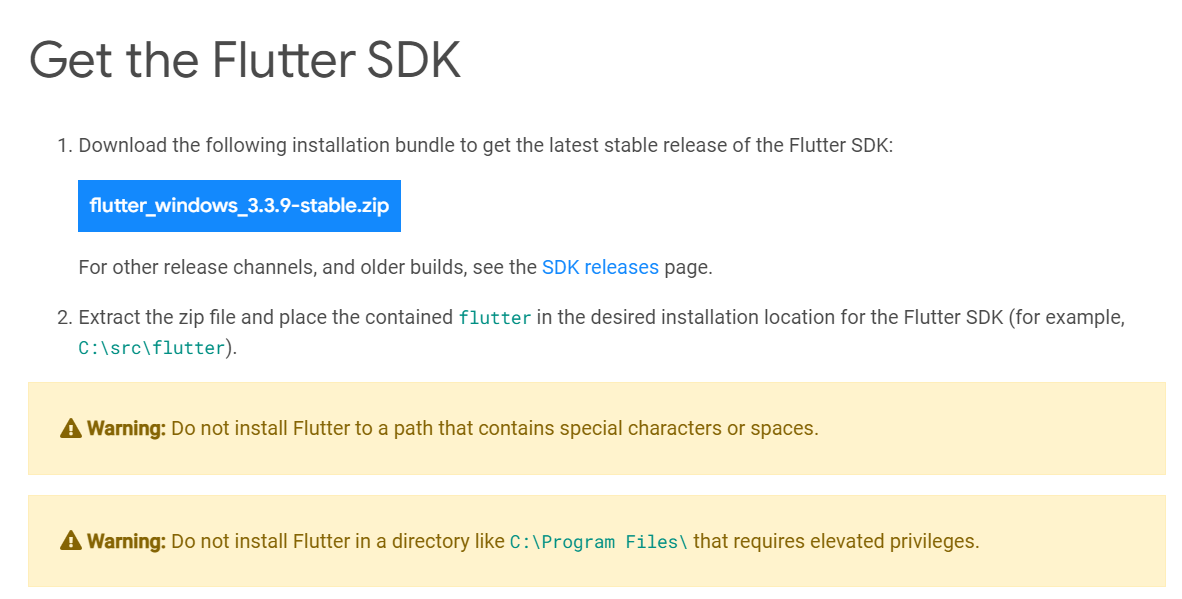
    After the file is downloaded, extract it to a location such as c:\dev\tools.

    For Windows, Linux and ChromeOS, the next step is to update your path so that the system can find the tools found in the Flutter folder’s bin folder. (Mac users don’t need to do this step.) The Flutter installation docs are helpful here:

    • Windows: Make sure you use the full path, starting with the name of the folder you extracted the zip file into. For example, on my machine, that would be C:\dev\tools\flutter\bin, as shown in the image below. Then after you update the path, you’ll need to close and reopen your command-line shell (either Windows CMD or Powershell). For detailed instructions, go here.
    • Linux: Follow the instructions here.
    • ChromeOS: Follow the instructions here.
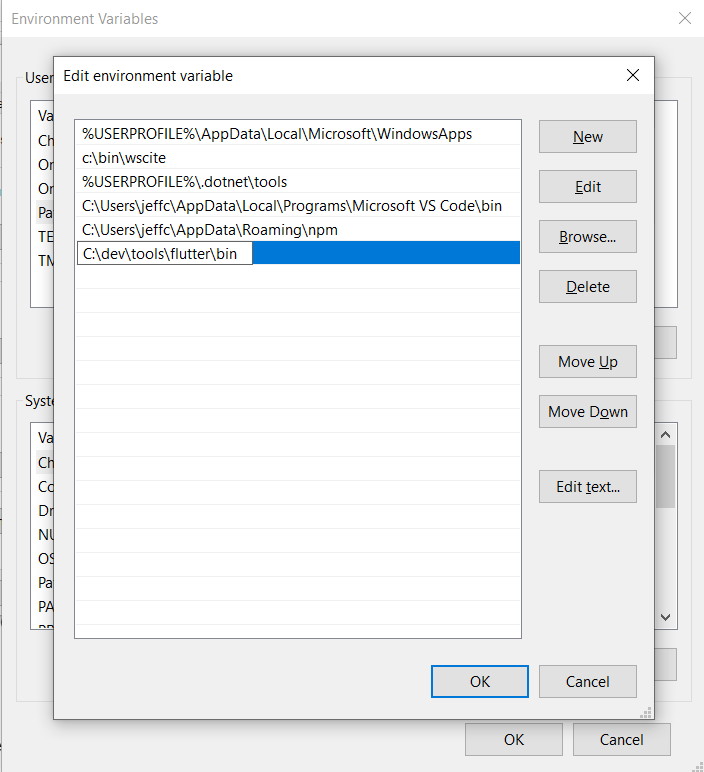
    Now test out the Flutter command to make sure it works by going to a folder outside of the Flutter’s bin folder and typing:

    flutter --version

    You should see a message such as this:

    Flutter 3.3.9 • channel stable • https://github.com/flutter/flutter.git
    Framework • revision b8f7f1f986 (2 weeks ago) • 2022-11-23 06:43:51 +0900
    Engine • revision 8f2221fbef
    Tools • Dart 2.18.5 • DevTools 2.15.0

    This will tell you if the installation is possibly ready. If instead, you see a message that the command is not found, double-check that you have your path correct; that’s typically the most likely cause for that error.

    Now, why did I say ‘possibly’? Because Flutter itself can tell you if there are any other tools you’ll need by running this command:

    flutter doctor

    Here’s an example of what I saw when I ran it:
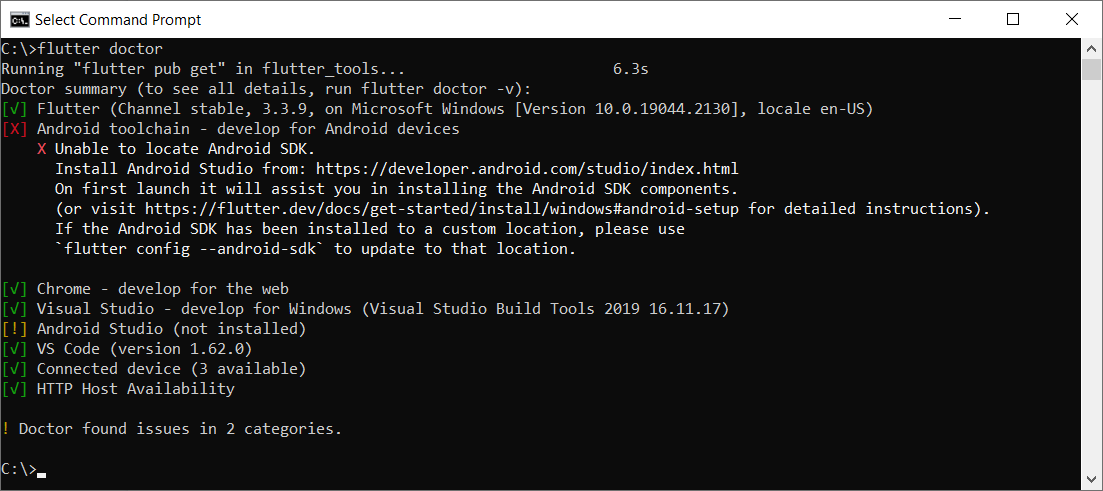
    This tells me I have some of the necessary tools installed, but not all:

    • Flutter itself, as well as all the tools that came with it
    • Android toolchain: I don’t have this one.
    • Chrome browser: You’ll need this for debugging web versions of your app.
    • Visual Studio: This is the full IDE from Microsoft; you’ll need it if you want to develop your app for Windows Desktop. You can use the free Community version. For that, go here and choose the free Community version.
    • Android Studio: I don’t have this one.
    • VS Code: This refers to Visual Studio Code, the free editor/IDE from Microsoft, which is not the same as Visual Studio. It’s a separate tool and neither is dependent on the other. Before you install it, read my notes below.

    Before installing anything else, you’ll want to decide what platforms you’ll be targeting. If you’re going to include Android in that list, you’ll need to download and install both the Android toolchain and Android Studio. In that case, you’ll be developing from within Android Studio.

    But if you’re not targeting Android, you do not need to install the Android toolchain or Android Studio. The official installation docs are a little vague on this point, so I tested it out myself. I was able to target Windows desktop and a browser without needing to install any of the Android tools.

    If you’re not targeting Android, then you’ll want to install VS Code to do your development from within. You can find it here.

    Building an App

    For this example, I’ll continue with Windows, and I’ll build a quick Windows desktop app.

    In a command shell, I’ll first create a folder in my c:\dev to hold my projects by typing these commands:

    cd c:\dev
    md projects
    cd projects

    I’m going to make a Flutter app called flutter_demo by typing the following. (Make sure you’re in the projects folder before typing this):

    flutter create flutter_demo

    Note that the name for your project must be in all lowercase letters, and it can contain underscores. So, for example, using uppercase letters results in an error:

    If I type this:

    flutter create FlutterDemo

    I see this:

    "FlutterDemo" is not a valid Dart package name.
    See https://dart.dev/tools/pub/pubspec#name for more information.

    When done correctly, you’ll see output such as this:

    Creating project flutter_demo...
    Running "flutter pub get" in flutter_demo... 1,186ms
    Wrote 127 files.
    All done!
    In order to run your application, type:
    $ cd flutter_demo
    $ flutter run
    Your application code is in flutter_demo\lib\main.dart.

    Before we open the code, let’s run it! First, go into the new folder flutter created:

    cd flutter_demo

    Then run it by typing:

    flutter run

    This command runs whatever Flutter application is in the current folder. In this case, that’s the app you just created.

    When you start it, it will ask for some choices. Because I don’t have Android or an emulator installed, I only see options for Windows Desktop and Chrome and Edge. (Edge is based on Chrome, so it works, as well.) Here’s what I see:

    Multiple devices found:
    Windows (desktop) • windows • windows-x64 • Microsoft Windows [Version 10.0.19044.2130]
    Chrome (web) • chrome • web-javascript • Google Chrome 107.0.5304.107
    Edge (web) • edge • web-javascript • Microsoft Edge 106.0.1370.37
    [1]: Windows (windows)
    [2]: Chrome (chrome)
    [3]: Edge (edge)
    Please choose one (To quit, press "q/Q"):

    Press the option for Windows. This will build the Windows desktop version (which might take a minute or so) and launch it, resulting in a window that looks like this:
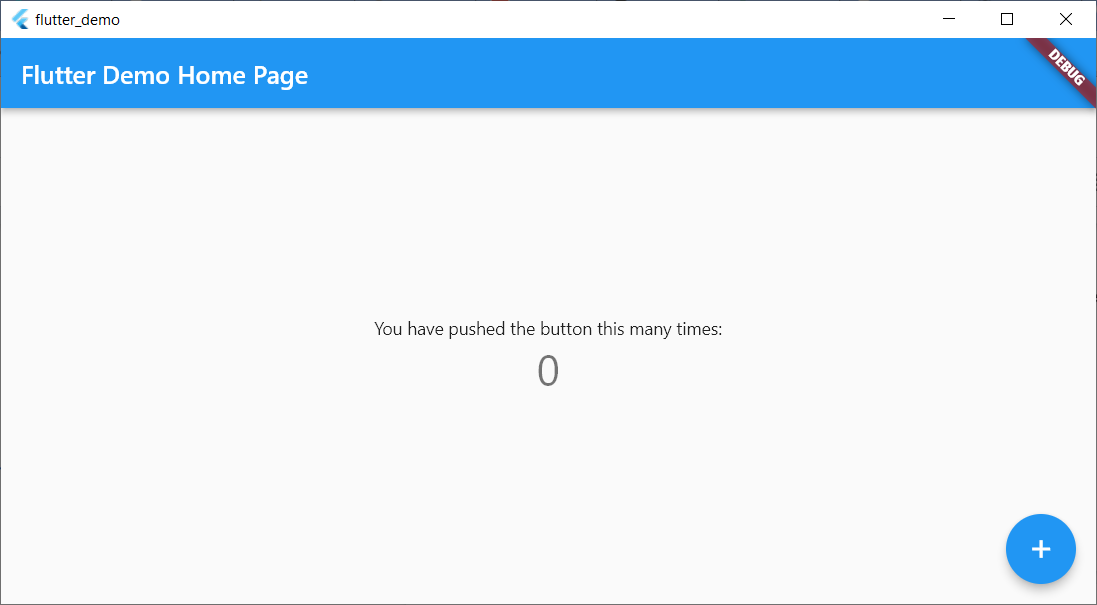
    This isn’t much, but there’s a sample in it where you can click the plus sign and see the number in the middle increment. That’s all.

    Now let’s try running the same app in Chrome. First, close the app window and press Arrow-Up or re-type:

    flutter run

    This time, choose the option for Chrome.

    Now Flutter builds a web-ready version that runs on Chrome, starts a local web server to host the app, launches Chrome and pushes a URL to Chrome to load the app from the local web server. Here’s the browser window:

    Notice that it looks virtually identical to the desktop version but is inside a browser this time.

    If you’re a web developer, I encourage you to right-click inside the browser app and select View Page Source. Notice there’s a line that loads a file called flutter.js, and there’s some JavaScript code that responds to the window’s Load event that calls into Flutter. You won’t be writing JavaScript code, but it’s always good to have at least some understanding of what your front end is doing!

    Adding to the Code

    Now let’s add just a bit to the sample code. For this, I’ll use VS Code. From within the app’s main folder (in my case, c:\dev\projects\flutter_demo) type

    code .

    (Make sure to include the dot after the word code; otherwise, VS Code will open in whatever folder it last ran.)

    Before delving into the code, you’ll want to install a special Flutter extension for VS Code. Click the gear in the lower left and click Extensions. In the box labeled Search Extensions in Marketplace, type flutter. (Don’t click Enter; just pause a moment and the search will begin.) Find the one called Flutter that has over five million downloads, as shown here:
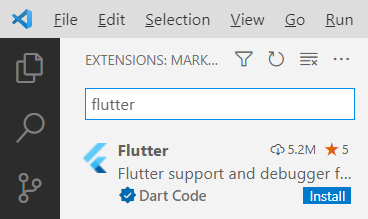
    Click the Install button. The button will show “installing” while the extension is being downloaded and installed.

    After the extension is installed, VS Code will ask whether you want to use it with your current project. You might also see a message regarding updating the Dart extension, which came alongside Flutter. Click Yes for the Flutter one; click Get packages for the Dart one. (You can ignore the message about opening the settings file.)

    Now you have all several flutter tools available VS Code’s Extensions Palette. Press Ctrl+Shift+P to open the palette. Type flutter and you’ll see the full list.

    For now, however, let’s first just run the app. Click the Run menu, and then click Run Without Debugging. You’ll see the Windows app open again.

    Now go back to VS Code. Even if you’re not familiar with Dart, if you know other “curly bracket” languages such as C++, C#, Java, JavaScript and so on, you’ll probably be able to read the code. There’s a function called main() that starts the app, providing a class called MyApp. That class is farther down in the code. Look closely at all the comments. Read them carefully and learn from them. The MyApp class contains a build function that returns an object with a “home” member; that member is an instance of MyHomePage, which is also a class in this file. Continue studying that code, and you’ll see mentions of widgets and layouts. Look closely at the function called _incrementCounter and how it’s triggered later on through an onPressed event.

    Conclusion

    Play around with the code; try changing some of the string literals, for example, until you’re quite familiar with it. Then dive into the first demo provided by the Flutter folks at Google, which you can find here. Soon you’ll be up and running with your own Flutter app that you can run on any device!


  • Three is the Magic Number: Planning and Executing a Successful DevOps Project

    Three is the Magic Number: Planning and Executing a Successful DevOps Project

    Diligent preparation, clearly defined workflows and watchful monitoring are key to delivering a high-performing DevOps project. DevOps is one of the hottest buzzwords in programming, but everyone seems to have their own ideas when it comes to structuring and deploying a DevOps team.

    In basic terms, DevOps is the integration of developers and IT operations workers into a single group, with the goal of increasing the speed and quality of software deployment. Its creation was a response to concerns over the segregation of teams, which led to communication breakdowns and a lack of cohesion.

    Since its inception, DevOps has grown in popularity, with 83% of IT decision-makers stating that they have implemented this style of working in some form.

    However, transitioning business focus in this way does not guarantee an immediate change in fortunes–this dynamic represents an IT culture shift, with increased emphasis placed on collaboration and interpersonal skills. For this model to yield returns, engineers should be open to new information, technology and ways of working.

    So, what vital steps must a DevOps team take to ensure the successful delivery of a project?

    Understanding the Needs of the Client

    The preliminary stages can make or break a DevOps project. If the team does not emerge with a vivid idea of what the client wants and how this can be delivered, the venture is doomed to failure.

    It is crucial that both the team and the client are willing to put the time in to understand each other’s goals, ensuring that their visions align for the steps to follow. This can be done through a series of meetings and workshops, where objectives are identified and both establish a good comprehension of how the final product should look.

    If executed correctly, the DevOps team will exit the project’s first phase with a well-defined brief and a crystal-clear understanding of what the client wants to see delivered. When this step is rushed, engineers will be held back by a lack of direction, increasing the chances that the finished product will not reflect the client’s hopes.

    Configuring the Environment

    This next phase is where the developmental process of the app begins, which is usually facilitated using a cloud-based solution. The team begins by preparing the environment’s aesthetic, working out the components it should contain and exploring how they should be configured to maximize efficiency.

    It is during this period that cybersecurity measures are added so that the final version of the app is as close to impenetrable as possible. This shows why a DevOps team needs a diverse range of skill sets: Cybersecurity experts are few and far between, but there should be at least one member of the group whose knowledge can be called upon to ensure protective measures are properly implemented.

    A successful developmental phase is underpinned by clearly structured workflows, with the project mapped out step by step and everyone involved understanding where they fit into the plan and how they can contribute.

    However, a DevOps project is rarely smooth sailing from start to finish–development is often disrupted by missed deadlines, bugs and conflicting duties pulling engineers away from their stations. For this reason, agile and multi-skilled team members, who can ably jump in and assist in various areas, are extremely important for ensuring continuity when workflows are derailed.

    Avoid Failing at the Final Stages of the Project

    Just because the development of a product is complete and the app is live, this does not mean it is time for the DevOps team to rest on their laurels and move on to the next project. It is essential that they continue to monitor the app in its early stages so that any bugs can be identified and immediately fixed.

    Engineers should be in place to see how much the environment is burdened and how it responds depending on the rate and number of new users. Any data obtained is a precious commodity and should be treated as such, with teams ordering and labeling results as soon as they are collected.

    Once the baseline data has been gathered, results can be analyzed to pinpoint which parts of the app may need recalibrating. After making these improvements, the final result should be a product performing at an optimal level while also meeting the client’s specifications.

    Don’t Rush the Project’s Process

    At the conclusion of all three phases, DevOps teams should have absolute confidence that the project is headed in the right direction and that they are fully equipped to execute the next procedural steps.

    A well-designed app is far easier to produce when a team is made up of specialists from an array of fields eager to collaborate and communicate with one another. Assembling the right personnel will aid the smooth transition between the stages of a DevOps project.