Category: Doin’ DevOps

  • Why GraphQL is a Better Choice for Building Microservices

    Why GraphQL is a Better Choice for Building Microservices

    There’s been a long debate about whether it’s better to use REST or GraphQL for building microservices. Both technologies have their proponents and critics, but when it comes to the specific needs of microservices architectures, GraphQL emerges as the clear front-runner. Here’s why.

    Understanding the RESTful Concerns

    While REST has been the go-to API style for many years, lauded for its simplicity and general applicability, its limitations become glaringly apparent in the context of microservices. These limitations include:

    • Over-fetching of data
    • Multiple HTTP requests for related data
    • Complex versioning strategies

    Such issues can impede microservices architectures’ performance and scalability.

    Over-fetching of data: REST APIs are designed to return a fixed set of data, which often results in over-fetching. This redundancy is particularly problematic in mobile networks, where every extra byte of data can lead to slower applications and degraded user experiences.

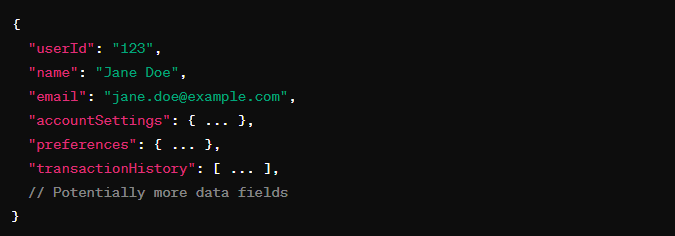
    For example, imagine we have a REST API endpoint /api/user/{userId}, which returns the following data for a user:


    In scenarios where mobile apps only require specific user details like name and email for a profile overview, fetching comprehensive user data means over-fetching.

    This excess data usage can be costly for users with limited data plans and result in slower app performance and degradation of user experience.

    Latency and the N+1 problem: Microservices often require data spread across multiple services.

    Suppose you have an ecommerce application where the order domain handles product, customer, order and return entities, and the stock domain manages product, stock, warehouse and delivery entities. A common operation might be to display order details along with the current stock status for each product.

    Let’s say we have an order microservice and a stock microservice to handle orders and stocks.

    In our scenario, a customer places three orders (N=3) and each order contains four different products. To display the order details with the stock status for each product, the application initially makes one request to fetch the orders. Then, for each product in each order, it makes additional requests to the stock microservice to retrieve stock information. This results in one initial request, plus 12 subsequent requests (three orders times four products per order), summing up to 13 API calls. This multiplicative increase in requests leads to higher latency due to multiple round-trip times (RTT) and increased load on the network and servers, embodying the N+1 problem.

    Versioning challenges: Maintaining REST APIs over time involves complex versioning strategies, such as introducing new endpoints or embedding version numbers in the API path. This can lead to bloat and confusion, complicating API development and consumption.

    The GraphQL Advantage

    GraphQL addresses many REST weaknesses.

    Domain-Driven Design: Microservices thrive on a domain-driven design, where each service is built around a specific business capability. GraphQL’s schema-centric approach aligns perfectly with this, enabling a more organized and coherent structure for microservices.

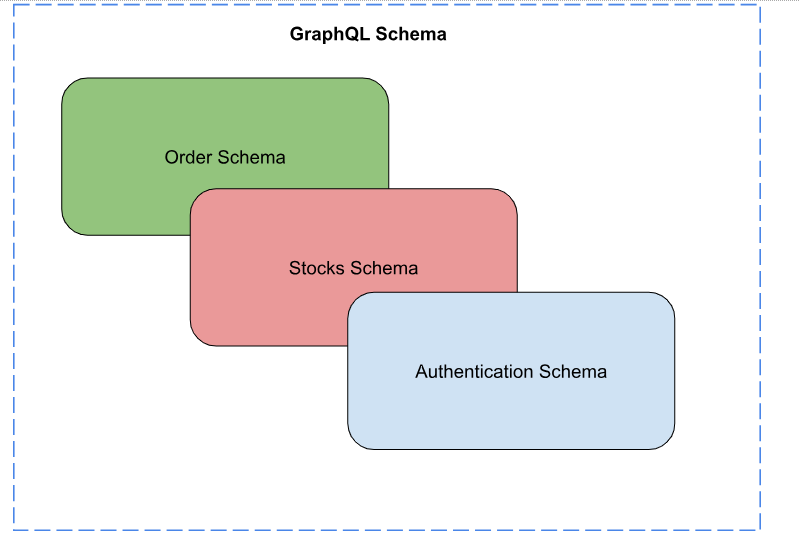
    Unified schema: In a microservices architecture, each service may have its schema, representing a portion of the business domain. GraphQL stands out by allowing these schemas to be combined or stitched together, presenting a unified interface to clients. This means that clients can query data from multiple services in a single request, drastically reducing the complexity and number of network calls.

    Solving the N+1 problem: GraphQL’s ability to fetch data with a single request, regardless of how many underlying services need to be called, directly addresses the N+1 problem inherent in REST architectures. This not only improves performance but also simplifies client-side data fetching logic.

    For the N + 1 problem described earlier, if the services support GraphQL, it can be used to fetch nested data in a single query, effectively solving the N+1 problem.

    Efficiency and performance: By allowing clients to specify exactly what data they need, GraphQL eliminates over-fetching and under-fetching issues common in REST APIs. This leads to more efficient data retrieval, reduced bandwidth usage, and faster applications, particularly noticeable in mobile environments.

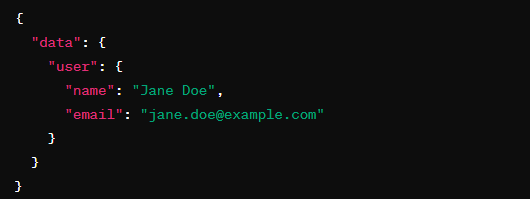
    In the earlier scenario where mobile apps only require specific user details like name and email for a profile overview, clients can request name and email alone.

    Simplified versioning: Unlike REST, GraphQL reduces the need for versioning by allowing new fields and types to be added to the schema without impacting existing queries. This forward compatibility means that clients and servers can evolve more smoothly over time. GraphQL stands today as a mature technology that addresses specific needs in modern web development that are not fully met by traditional REST APIs. Its design promotes efficiency, flexibility, and developer productivity.

    Looking ahead, the future of GraphQL is bright, with community-driven efforts focused on addressing its current limitations, particularly around security, performance and standardization. As these efforts bear fruit, GraphQL’s adoption is expected to widen, consolidating its position as a key technology in the API landscape.

  • Bringing DevOps Automation to Legacy Systems

    Bringing DevOps Automation to Legacy Systems

    A critical step toward adopting automation for legacy applications is to change your organization’s mindset about legacy systems.

    Applying automation to operations isn’t always straightforward, especially with older systems that don’t easily fit into typical DevOps automation tools and strategies. However, legacy systems don’t have to sit on the sidelines of your DevOps automation strategy. Using the right tools and methodologies, it’s possible to integrate legacy system requirements with modern automation techniques.

    Most organizations that adopt DevOps for conventional applications use automation tools and techniques, including Infrastructure-as-Code (IaC) and Configuration-as-Code (CaC), automated testing, release automation and application orchestration. If you’ve been paying attention to DevOps for any length of time, you probably are familiar with the concepts.

    However, those DevOps automation solutions aren’t always straightforward to implement with legacy systems made up of hardware or software deployed long before modern, DevOps-friendly application architectures and deployment strategies existed.

    For example, IaC tools may not support the configuration languages or management tools that the systems require. Most current systems are configured using languages like YAML, but legacy systems may depend on proprietary configuration languages and frameworks.

    For similar reasons, test automation can be cumbersome. Today’s automation frameworks are designed for browser-based or mobile apps. Legacy systems may run locally and often use proprietary user interfaces, making automating testing using standard frameworks more difficult.

    Likewise, many release automation and application orchestration platforms are designed for applications deployed using containers. Because containers didn’t become popular until the release of Docker in 2013, most legacy systems have limited native support for application containerization.

    Bringing Automation to Legacy Systems

    Fortunately, these obstacles are possible to overcome. Addressing these challenges requires adopting innovative practices that enable the integration of automation with legacy systems:
    • Migrate to the cloud: Legacy system vendors now offer cloud-based hosting platforms. While transferring legacy workloads from on-premises to the Cloud doesn’t automatically enable all DevOps automation features, it does significantly facilitate the use of automatically scalable infrastructure. Organizations can move workloads between cloud data centers to mitigate failures in a single location.
    • Containerize legacy workloads: In certain situations, it’s possible to get a legacy application to run in a container. That allows businesses to manage the older software using orchestration solutions like Kubernetes, bringing much greater agility and scalability to legacy application management.
    • Use machine learning: Incorporating machine learning into monitoring and management operations for legacy systems helps to detect issues effectively in contexts where conventional automation is not feasible. For example, if you can’t run automated tests for a legacy application because Selenium won’t support it, advanced ML techniques might help you identify bugs based on how the application behaves.
    • Change your mindset: Instead of classifying legacy systems as outdated and inefficient environments, treat them with equal respect to all the other applications within your IT estate. When your team approaches legacy systems from a perspective that values them, it becomes much easier to refine a corporate culture toward collaboration and innovation that extends to those legacy systems as well.

    To Optimize DevOps Automation, Don’t Ignore Legacy Environments

    There’s no denying that automating the management of legacy apps for DevOps teams is often more challenging than implementing automation for modern apps. However, this doesn’t mean that it’s impossible. Many organizations successfully adopt automation as a strategy for improving the flexibility and quality of legacy apps, while also reducing the costs of building and deploying them. But to achieve this, it’s necessary to think beyond the conventional approaches of DevOps.

  • A Brief History of DevOps and the Link to Cloud Development Environments

    A Brief History of DevOps and the Link to Cloud Development Environments

    The history of DevOps is worth reading about, and “The Phoenix Project,” self-characterized as “a novel of IT and DevOps,” is often mentioned as a must-read. Yet for practitioners like myself, a more hands-on account is “The DevOps Handbook” (by the same author, Gene Kim, and others), which recounts some of the watershed moments around the evolution of software engineering and illustrates it with technology that provides good references around implementation. This book describes how to replicate the transformation explained in the Phoenix Project and provides case studies.

    In this brief article, I will use my notes on that book to outline a concise history of DevOps, add my personal experience and opinion and establish a link to cloud development environments (CDEs), i.e., the technology category at the center of the platform that we have been developing at my company, Strong Network.

    In particular, I explain how a cloud development environment finalizes the effort of bringing DevOps “fully online.” This notion of completeness, i.e., how CDEs mark the end of moving software development online, is my main contribution to this brief article. To clarify the link between DevOps and CDEs, let’s first dig into the chain of events and technical contributions that led to today’s main methodology for delivering software.

    The Agile Manifesto

    The creation of the Agile Manifesto in 2001 sets forth values and principles as a response to more cumbersome software development methodologies like Waterfall and the Rational Unified Process (RUP).

    One of the manifesto’s core principles emphasizes the importance of delivering working software frequently, ranging from a few weeks to a couple of months, with a preference for shorter timescales. The Agile movement’s influence expanded in 2008 during the Agile Conference in Toronto, where Andrew Shafer suggested applying Agile principles to IT infrastructure rather than just application code.

    This idea was further propelled by a 2009 presentation at the Velocity Conference, where a paper from Flickr demonstrated the impressive feat of “10 deployments a day” using Dev and Ops collaboration. Inspired by these developments, Patrick Debois organized the first DevOps Days in Belgium, effectively coining “DevOps.” This marked a significant milestone in the evolution of software development and operational practices, blending Agile’s swift adaptability with a more inclusive approach to the entire IT infrastructure.

    The Three Ways of DevOps and the Principles of Flow

    All the concepts discussed so far are incarnated into the “Three Ways of DevOps,” which are the foundational principles that guide the practices and processes in DevOps. In brief, these principles focus on:

    1. Improving the flow of work (first way) by eliminating bottlenecks, reducing batch sizes, and accelerating workflow from development to production.
    2. Amplifying feedback loops (second way) by quickly and accurately receiving information about any issues or inefficiencies in the system.
    3. Fostering a culture of continuous learning and experimentation (third way) by encouraging a culture of continuous learning, experimentation and taking risks.

    Following the lead of lean manufacturing and Agile, it is easy to understand what led to the definition of the above three principles. I delve more deeply into each of these principles in other articles. For the current discussion of how DevOps history connects to cloud development environments, we must look at the first way, the principle of flow, to understand the causative link.

    Chapter nine of the DevOps Handbook explains that version control and containerization are central to implementing DevOps flows and establishing a reliable and consistent development process.

    First, incorporating all production artifacts into version control serves as a single source of truth, enabling the recreation of the entire production environment in a repeatable and documented fashion. This ensures that production-like code development environments can be automatically generated and entirely self-serviced without requiring manual intervention from operations.

    The significance of this approach becomes evident at release time, which is often the first instance where an application’s behavior is observed in a production-like setting, complete with realistic load and production data sets. To reduce the likelihood of issues, developers are encouraged to operate production-like environments on their workstations, created on-demand and self-serviced through mechanisms such as virtual images or containers, utilizing tools like Vagrant or Docker. Putting these environments under version control allows the entire pre-production and build processes to be recreated.

    From Developer Workstations to a CDE Platform

    The notion of self-service is already emphasized in this 2016 book as a key enabler of the principle of flow. Looking back at the TPS, the notion of self-service aims to empower Toyota’s workers to be more effective in controlling the development process. Using 2016 technology, this notion is realized by downloading environments to the developers’ workstations from a registry (an online portal) that provides pre-configured, production-like environments.

    Through this operation, developers, in effect, (1) Copy files with infrastructure information to their machines, (2) add source code to it, and (3) build the application using their workstation computing resources.

    Once the application works correctly, the source code is sent (pushed) to a central code repository, and the application is built and deployed using online or cloud-based resources.

    The three steps listed above are, in effect, the only operations in addition to authoring source code using a “local” IDE. In other words, they use workstations’ physical storage and computing resources. All the rest of the DevOps operations are performed using web-based applications used as-a-service by development (even when these applications are self-hosted by the organization). The goal of cloud development environments is to move these operations online as well.

    To do that, the CDE platform, in essence, provides the following basic services:

    ● Manage development environments online, as containers or virtual machines such that developers can access them fully built and configured, replacing step (1) above.
    ● Provide a mechanism for authoring source code directly online, such as inside the development environment using an IDE or a terminal, replacing step (2).
    ● Provide a way to execute build commands inside the development environment (via the IDE or terminal), replacing step (3).

    Note that the replacement of step (2) can be done in several ways: For example, the IDE can be browser-based (in a cloud IDE), or a locally installed IDE can implement a way to remotely author the code in the remote environment. It is possible to use a console text editor via a terminal such as vim.

    I cannot conclude this discussion without taking a recursive step to rethink the developer’s workflow. Often, multiple containerized environments are used for local testing, particularly in combination with the main containerized development environment. Hence, cloud IDE platforms need to provide the ability to run containerized environments inside the cloud development environment (itself a containerized environment). If this becomes a bit complicated, no worries. We have reached the end of the discussion, and we can move to the conclusion.

    What Comes Out of Using Cloud Development Environments in DevOps

    A good way to conclude this discussion is to summarize the benefits of moving development environments from the developers’ workstations online. For example, the use of CDEs for DevOps leads to the following advantages:

    ● Streamlined Workflow: CDEs enhance the workflow by removing data from the developer’s workstation and decoupling the hardware from the development process. This ensures the development environment is consistent and not limited by local hardware constraints.
    ● Version Control Integration: With CDEs, version control becomes more robust as it can uniformize the environment definition and all the tools attached to the workflow, leading to a standardized development process across the organization.
    ● Self-Service Environments: The self-service aspect is improved by centralizing production, maintenance and evolution of environments based on distributed development activities. This allows developers to quickly access and manage their environments without the need for operations manual work.
    ● Consistency Across Teams: The use of CDEs leads to uniform environments and tooling, which opens the possibility of harmonizing the entire development workflow, making it easier to onboard new team members and ensure that all developers are using the same configurations and tools.
    ● Reduced Local Resource Dependence: Migrating the consumption of computing resources from local hardware to centralized and shared cloud resources lightens the load on local machines and leads to more efficient use of organizational resources and potential cost savings.
    ● Improved Collaboration: Ubiquitous access to development environments, secured by embedded security measures in the access mechanisms, allows organizations to cater to a diverse group of developers, including internal, external and temporary workers, fostering collaboration across various teams and geographies.
    ● Scalability and Flexibility: CDEs offer scalable cloud resources that can be adjusted to project demands, facilitating the management of multiple containerized environments for testing and development, thus supporting the distributed nature of modern software development teams.
    ● Enhanced Security and Observability: Centralizing development environments in the cloud bolsters security and provides immediate observability due to their online nature, allowing for real-time monitoring and management of development activities.

    By integrating these aspects, CDEs become a comprehensive solution for modern software development. They align with the principles of DevOps to improve flow, feedback and continuous learning, while also addressing the practical needs of development teams for security, accessibility and resource efficiency.

    Dispelling a Few Myths About DevOps

    For starters, “The DevOps Handbook” aims to dispel common misconceptions about DevOps and how it is applicable across diverse business environments, including non-software product delivery. That last point was one of my first moments of personal enlightenment when reading the book about the general applicability of the method. That led me to suggest to a friend creating a business of globally designed yet locally manufactured home furniture that designers post their models via a platform for furniture pieces to be built by local (relative to the delivery address) woodshops and that his manufacturing process perfectly fits a DevOps canvas.

    Furthermore, the book refutes the notion that DevOps means eliminating IT operations. Instead, it highlights the importance of collaboration and integration between development and operations teams. On that point, it also strikes me that the mention of DevOps still has a strong attachment to the IT operations of building and deploying software rather than to the design and coding phases of that process. In other words, some managers fail to recognize that developers are indeed “doing DevOps” in the same way that IT operators are. Platform engineering aims to further reduce the gap between developers and IT operations by empowering developers (and other roles) to perform complex IT operations in a self-service environment.

    Lastly, the idea that DevOps is solely about “infrastructure as code” and automation is also challenged in the book. While automation is a crucial component of many DevOps patterns, the book stresses that DevOps also requires a cultural shift and an architecture that supports shared goals across the IT value stream.

    The RUP was the main software engineering methodology that IBM used to structure its development process and the ones of its customers, at the time I was part of the IBM Research division at T.J. Watson, New York in the 2000s. We sold RUP across every industry, including automotive manufacturers (a nice feedback loop), when they started to embed gigabytes of software in cars.

    At IBM Research, we even evolved the RUP into a methodology to fit the needs of software-laden product development from a system perspective, dubbed model-driven systems development. This is important because software in manufacturing needs to communicate and actuate with independently-built hardware. I have taught that concept in Japan at Keio University (along with Prof. Nishimura) from 2006 to the mid-2010s.

  • Building an Open Source Observability Platform

    Building an Open Source Observability Platform

    Enterprises are under constant pressure to ensure their IT infrastructure and applications are available throughout the year. The complexity of modern architectures (containers, hybrid cloud, SOA, microservices, etc.) is constantly growing, generating vast volumes of unmanageable logs. We need intelligent application performance management (APM) and observability tools to achieve production excellence and meet the availability and uptime goals. These include analyzing application health, performance and user experience. Adopting machine learning techniques to identify anomalies and behavior patterns will help detect the root cause early and meet customer service level agreements (SLA).

    The APM and observability tools market is undoubtedly hot. These tools ingest multiple telemetry data feeds and are powerful analytics platforms providing critical insights into application and infrastructure health, including system performance. The software development teams that adopt observability are much better equipped to release their application code iteratively. As per “MarketsandMarkets” research, the market size of observability tools and platforms is expected to grow from $2.4 billion in 2023 to $4+ billion by 2028 at a compound annual growth rate (CAGR) of 11.7%.

    What is Observability?

    Observability is the ability to collect data about the distributed applications, infrastructure and communication among its internal and external components and services, allowing teams to debug their systems diligently. It enables the site reliability engineering (SRE), software engineering and operations teams to analyze the customer impact and triage a service outage. Observability and monitoring are sometimes used interchangeably. Observability (proactive) makes the data accessible and allows you to ask any system question to know how the code behaves more deeply. Monitoring (reactive) is the task of collecting and displaying that data and the ability to determine the system’s overall state.
    Observability can be further broken down into three key pillars: Logs, traces and metrics, which are essential for SRE observability.

    • Logs help us diagnose the issues and tell us why they happened.
    • Traces help us isolate issues and tell us where they happened.
    • Metrics help us detect the issues and tell us what happened.

    Market Tools, Capabilities and Challenges

    Gartner’s magic quadrant for APM and observability has identified 20+ vendor products offering APM and observability capabilities, including self-hosted, vendor-managed or SaaS deployments. These products provide multiple features, including application performance metrics, monitoring and alerting on events, traceability, anomaly detection and vulnerabilities, etc.

    An enterprise business application comprises homegrown applications (such as .NET, Java, Python, SQL, NoSQL DB, etc.), third-party/off-the-shelf products (such as Salesforce, HubSpot, etc.), and integrations (such as Stripe, PayPal, etc.). Homegrown applications are hosted in an on-premises data center or by cloud vendors like AWS, GCP, or Azure. The off-the-shelf products are SaaS-based or integrated via APIs. There are highly distributed applications spanning tens and hundreds of nodes, services and instances.

    • Too Many Tools: Enterprise applications use various tools for monitoring application health and performance (such as New Relic, Data Dog, etc.), Error logging (such as Splunk), and cloud vendor-provided tools (such as CloudWatch). These products overlap in functionality and maintaining and managing these tools (procurement, learning curve, etc.) can be cumbersome.

    • Unpredictable Data Volume: Imagine the volume of observability data (logs, traces, metrics) collected based on the application traffic, usage, dependency on external products, etc. The amount of data storage required to consolidate these data feeds can quickly grow out of control.

    • Pricing is Complex: These vendor products also offer different pricing models such as charge per host (such as Splunk, Data Dog, Dynatrace), per-user (such as New Relic), per-ingestion (such as SumoLogic, AppDynamics). The complexity of pricing models makes it challenging to compare total cost of ownership (TCO) among vendors and determine the right tool that fits your requirements and budget.

    Why Choose Open Source Observability Platform?

    Open source-based observability tools aim to provide a standard, vendor-agnostic approach for ingesting, transforming and sending data to an observability backend. The open source observability tools can be an alternative to save on licensing costs and consolidate multiple APM tools with the tool that fits your requirements and budget.

    However, maintaining open-source systems may require efforts to set up and maintain and will add to your initial operational cost. But in the long term, you will save on licensing fees and avoid vendor lock-in and contractual agreements.

    Gartner predicts that, by 2025, 70% of new cloud-native application monitoring will use open-source instrumentation rather than vendor-specific agents for improved interoperability, and 70% of new cloud-native applications will adopt OpenTelemetry for observability rather than vendor-specific agents and software development kits (SDKs).

    Scale Observability Using the Open Source Ecosystem

    The open source landscape for observability is quite dynamic. There are multiple Cloud Native Computing Foundation (CNCF) open source tools for observability and monitoring. This post will primarily focus on the OpenTelemetry framework and LGTM technology stack.

    OpenTelemetry:
    The “too many tools” challenge described above brings up a new struggle in telemetry data collection. Each tool vendor has its own APIs, SDKs, agents and collectors for logs, metrics and traces. We need a unified telemetry collection using the OpenTelemetry framework to create and manage telemetry data such as logs, traces and metrics.

    The OTEL project under the auspices of the CNCF offers a unified set of vendor-agnostic APIs, SDKs, and tools for generating and collecting telemetry data and exporting it to various analysis tools. You get one API and SDK per programming language to extract your application’s observability data, a standard collector, a transmission protocol (OTLP) and more.

    LGTM:
    The most popular open source-based observability and monitoring is implemented using the LGTM technology stack.

    In the LGTM stack, we leverage:
    • Loki for log aggregation
    • Grafana dashboards for telemetry visualizations
    • Tempo (or Jaeger) for trace aggregation
    • Managed Prometheus for metrics aggregation

    Conclusion

    Observability is about complete visibility across your systems and tying business metrics with technical data. Monitoring is about understanding if things are working correctly, and AIOps is about getting meaning from that visibility. Observability and monitoring are critical to ensure the smooth functioning of applications and meet customer SLAs. In conclusion, by investing in open source OTel frameworks and LGTM tools, SRE teams can effectively monitor their applications and gain insights into system behavior and potential issues. These tools offer cost-effectiveness and customization to suit specific requirements. It promotes vendor neutrality, which can be critical for avoiding vendor lock-in.

  • Is Backstage the Right Internal Developer Portal for You?

    Is Backstage the Right Internal Developer Portal for You?

    There has never been a better time to be a software developer. There is a language and framework to solve virtually any challenges we encounter. New tools, architectural patterns and methodologies like DevOps and Agile have changed how we work, architect our applications and organize ourselves. This has enabled teams to be nimbler than ever before. But this has all come with a hidden cost: Sprawling complexity.

    Sprawl is a complex web of disparate tools, languages and frameworks used across an organization’s projects. While this diversity allows for specialized solutions tailored to specific problems, it creates a labyrinth of interdependencies and varied skill requirements. This complexity often results in developers constantly navigating through a maze of tools, leading to inefficiencies and a steep learning curve for new team members. As organizations adopt more tools and technologies, the cohesive understanding of the entire software ecosystem diminishes. There are two areas in particular where this pain is felt acutely.

    The first area sprawl acutely impacts is the ability to find essential knowledge about systems, which becomes fragmented across tools and resources as sprawl increases. This fragmentation leads to longer incident response times and makes it more difficult for newly hired engineers to ramp up. Knowledge fragmentation also makes it considerably harder for enterprises to measure and manage initiatives to achieve high standards for security and reliability, as well as track migrations to new architectures like containers or clouds.

    Sprawl also impacts frequently occurring tasks for developers, such as managing “day two operations” like changing environment variables, adding secrets or modifying a replica count, or creating something new like a microservice or an environment. Given the complexity required to create and operate infrastructure, many organizations have invested in creating automations via infrastructure-as-code and CI/CD systems; however, these automations are often difficult for developers to discover and use. As a result, developers often file tickets with ops teams to complete these tasks, creating a process bottleneck that slows development velocity while burdening ops teams with mundane, repetitive tasks. This is commonly referred to as TicketOps.

    All of this has made the developer experience worse than ever. Developers report high levels of cognitive overload and burnout, which can cause unwanted developer attrition and reduced overall productivity. But it doesn’t have to be this way!

    Introducing Backstage

    In the early days of the cloud, only a handful of enterprises with lofty valuations could afford to solve these challenges by dedicating 50 – 100 engineers to build internal tooling designed to address the challenges of sprawl. Everyone else was left to suffer with subpar developer experiences or partial solutions like stale spreadsheets, manual processes and information that were often out of sync with the underlying system.

    Just as the pain was becoming unbearable for most enterprises, Spotify donated the tooling it created to address these challenges internally to the Cloud Native Computing Foundation. As a free, customizable, open-source project focused on these pain points, Backstage quickly captured the attention of enterprises worldwide.

    Over 2,000 enterprises have tried Backstage, making the project a tremendous success by promoting a vision for how internal developer portals can alleviate the pain of sprawl. However, a surprising number of enterprises struggle to adopt Backstage. In an interview with the head of engineering for Backstage, it was revealed many companies that have deployed Backstage have achieved only ~10% adoption rates, which is typically equivalent to a proof of concept. Understand why enterprises have struggled to succeed and decide if Backstage is right for you.

    Deciding if Backstage is Right for You

    Here are key questions to help guide your decision.

    Are You Ready to Build a New Product?
    Backstage is a framework to build an internal developer portal, but it is not an off-the-shelf tool or a solution. Many adopters have not understood what this means, at least at first.

    As a framework to build a tool, Backstage requires dedicated product and engineering resources to configure, customize and maintain. It is not uncommon for organizations to require four to six or more fully dedicated resources to succeed with Backstage. The engineers you dedicate to building this framework into a product will need to be skilled in TypeScript and React, and willing to work with an open source community and product.

    Getting up and running with Backstage involves more than 70 steps. It is not intuitive and can result in months of work before you can demonstrate value. Some of the steps and associated time commitments are obvious, such as deploying your instance of Backstage. Other steps may not be obvious to new adopters.

    For example, Backstage has historically relied on open-source plugins to enable organizations to connect their tools. The open-source nature of these plugins has been a key selling point of Backstage; however, the plugins have uneven quality and depth and can require additional customization to enable basic functionality like search. In another example, tuning the Backstage data model to your organization is so difficult that many adopters abandon hope and work with the default data model. Upgrading versions and plugins and the effort required to keep the data in Backstage synced with your system contribute to the engineering resource load required to succeed.

    The advantage of Backstage is the infinite customization you can accomplish thanks to its open-source code base. You can change anything you want if you write and maintain it. This includes adding custom data sources, customizing the data model, extending plugin functionality and having the UI reflect your corporate brand identity. Again, the trade-off is time and complexity relative to your alternatives. For instance, configure8 and Port offer the flexibility to tailor the portal’s data model to the contours of your organization and process any custom data source for use throughout the porta. Several vendors can support custom logos and color schemes in the portal’s UI (or you can build a more tailored UI on top of their APIs).

    Does it Support Your Scenarios of Interest?
    Internal developer portals as a product category have evolved well beyond their microservice catalog roots. If you are considering Backstage, it is important to ensure it offers functionality that addresses the needs of your enterprise’s stakeholders.

    For example, many organizations leverage functionality called Scorecards to define and measure teams’ compliance with reliability standards, security and architecture. Open source Backstage has a version of this functionality, but it is not intuitive and has a fairly high difficulty level (i.e., writing code, writing data collectors, etc.). The commercial vendor community typically all offer Scorecards. Adopters should consider the breadth and depth of information that can be checked, the ease of creating new scorecards, and the quality of the developer workflow and UI when evaluating Scorecards.

    In another example, Backstage enables users to scaffold new services via the Cookiecutter open-source package. Why take a principled dependency on a code generation solution instead of an open approach that enables you to use the best tool for the job? There is a robust landscape of available solutions to generate code and orchestrate workflows. Having a flexible way to directly integrate these reduces complexity.

    Backstage also offers functionality that enables developers to see the cloud costs of the code they operate. Upon closer inspection, adopters find this module only enables high-level aggregations of costs over a fixed timeframe. To truly provide developers with the knowledge and functionality they need to improve costs, consider closed-source vendors that offer more granular insights and actions, such as drilling in beyond aggregate costs at the microservice level to see the per resource cost drivers, an individual resource’s cost drivers, config settings and blast radius and weave in self-serve actions so developers can safely make changes where appropriate and permitted.

    The resource and environment catalog is another area to consider. Is it necessary to have the environments and resources that power them automatically mapped to each service? Do you want a centralized catalog of your resources across clouds and data centers that you can sort and filter using various keys? Backstage can support some of these scenarios, but not without significant work and at present, the connection to this data is brittle and manual versus automatic. This stands in contrast to certain closed-source vendors, such as configure8 which has extensive functionality.

    In a prior section, we discussed the importance of data model flexibility. This is an important evaluation criterion for organizations that want the flexibility to push in and present any data source, to customize the schema of the catalog, and finally to insert custom keys for results filtration and analysis (i.e., does this resource touch personally identifiable information; show me results related to a line of business, etc.). Ensure you understand whether you are poised to succeed in tailoring Backstage’s data model, which has stymied many adopters, and that any commercial vendor you evaluate can easily support customizations.

    Another consideration is Backstage’s TechDocs, and whether you want to adopt TechDocs for your entire enterprise or allow teams to use best-of-breed solutions. Whereas Backstage locks you into TechDocs (which can also make a future migration to a new portal solution more difficult once end-user behavior becomes entrenched), commercial vendors generally support open and flexible approaches that enable integration with any documentation solution.

    Also, ensure Backstage meets your information security needs. For example, most organizations desire a robust role-based access control model so developers only see permitted services, scorecards and actions in the UI, via search and the API. Backstage does not offer this functionality in the open-source edition. There is a framework to work with permissions included in Backstage but to get real value out of it, you need to budget to license a closed-source RBAC solution from Spotify or build it yourself.

    Finally, evaluate the pace of innovation you desire from your internal developer solution. Closed source vendors, two in particular, have demonstrated an extremely rapid pace of innovation, launching many industry firsts. Compare this to the pace of innovation in the open source community as internal developer portals are sticky once installed and tend to be long-term relationships.

    Are You Prepared for Success?
    Achieving broad internal adoption of an internal developer portal requires more than getting a portal configured, it requires solving the pain points that matter to your organization, demonstrating success, making the organization aware of that success, and creating a feedback loop to overcome challenges. To accomplish this, you must be aware of best practices, create content and forums to engage the organization, and ultimately adopt a product-oriented approach to ensure your platform engineering effort succeeds.

    Success in this area often combines budgeting and access to best practices.

    The Backstage community is vibrant and active, and you can pick up best practices by engaging with community members. But for enterprises and internal champions who need to succeed in driving the adoption of a new internal developer portal, you may wish to consider alternatives to community support.

    This can be accomplished via multiple methods. Consulting firms and individual practitioners specialize in this area and can coach you. Organizations above a certain size often invest in dedicated product management resources to own this function. Finally, certain vendors like configure8 focus on delivering success versus a tool (or framework to build a tool like Backstage) by providing consultative best practices, content and other value-adds packaged with their software to ensure you achieve robust adoption levels.

    Finally, to the extent your scenarios of interest involve self-serve actions to alleviate TicketOps, ensure that you have budgeted the appropriate engineering investment to develop the golden paths or blueprints that are vended inside an internal developer portal. Certain vendors like configure8 offer a solutions layer that creates custom golden paths for you. However you procure golden paths, you must balance your investment to ensure you get a great “razor” and all of the “razor blades” you will need to support the unique needs of your various internal customers.

    Do You Understand Your Total Cost of Ownership and Alternatives?
    One of the considerations of Backstage is understanding its total cost of ownership versus its best alternative.

    While Backstage is open source and free, we have noted that a meaningful engineering investment is required for installation, customization, maintenance, internal support and product management. Quantify the fully loaded cost (i.e., salary, taxes, benefits, facility charges, etc.) of each human resource required to succeed with Backstage.

    We have noted there may be licensing costs from Spotify for any essential features you do not wish to build yourself. There will be internal hosting costs and budgeting for any consulting costs.

    Several enterprises who have evaluated Backstage now realize the total cost of ownership of alternative vendors is much lower and more predictable. Leading vendors offer robust alternatives for catalog and scorecarding, self-serve actions, and collaborative cost management, and two vendors have evolved to provide compelling functionality and high degrees of flexibility. The key is finding a vendor who balances overall functionality and flexibility with ease of use, speed to value, and enterprise-grade support. This is where configure8 has struck a unique balance in addition to a lower cost of ownership relative to Backstage.

    Finally, any return on investment analysis must capture the opportunity costs. Here are some common examples:

    • Time to market trade-offs. Setting up Backstage for your proof of concept can take over a month, getting to a first releasable version can take 3-6 months, and full adoption can take 6-12 months. During this time, you may generate no or minimal business value. Specialist vendors can deliver success faster. The incremental business value you can generate with a specialist vendor versus Backstage related to ‘speed to value’ represents an opportunity cost you need to quantify.
    • Foregone features: Scenarios like Scorecards or RBAC that are important to your organization and you will have to pay for or forgo, you need to factor these incremental costs (or the cost of not having these features) into your analysis.
    • Opportunity cost of internal engineering resources: How many engineers are required to support Backstage over and above what’s needed to succeed with a specialist vendor? What business value could these incremental engineers have generated by instead supporting the unique value your enterprise brings to its customers versus an internal tool in a world of compelling alternatives? This becomes another cost of owning Backstage you need to compare v. the cost of buying a solution from a vendor.

    Understanding the direct and opportunity costs of your best alternatives will help you put your budget to work in the most efficient way and aid in your internal discussions with finance and other stakeholders.

    Carefully Consider Any Clones

    Given the initial popularity of Backstage, it is not surprising to see clones emerge built on Backstage. A clone is a vendor who has taken Backstage source code and added some feature crust on top, often a security wrapper, hosting and maintenance, light UI customizations, and potentially filling in a functionality gap like Scorecards. This approach can alleviate some of the burdens of open source Backstage in exchange for licensing costs you incur, it is important to understand if the clone is the best fit for your unique needs given the highly competitive vendor landscape that is now available. An easy way to think about it might be comparing Jenkins versus hosted Jenkins versus Jenkins with a vendor security wrapper relative to what enterprises get with Azure DevOps and GitHub Actions.

    Final Thoughts

    Building an internal developer portal from an open-source framework can be rewarding for organizations that can achieve value from extensive customization that is impossible elsewhere. For many organizations, however, it is important to properly scope the effort required to succeed with Backstage and compare it to your alternatives in the vendor community. While Backstage does offer certain advantages, DevEx and platform teams are increasingly finding greater success more quickly and at a lower total cost of ownership via specialist vendors like configure8.

  • Best Practices for Configuring MySQL Replication

    Best Practices for Configuring MySQL Replication

    MySQL provides several replication configuration options. However, ensuring it is done correctly may take time and effort, with considerable choices. Replication is a crucial initial step to enhance availability in MySQL databases. A properly designed replication architecture can significantly impact the accessibility of your data and prevent potential management complications. This article will delve into best practices for replication, covering local and long-distance scenarios.

    Active and Passive Setups

    When using active/passive mode for replication in MySQL, one server acts as the source while others serve as read-only replicas. The replicas can handle read-only queries, but all writes must be directed to the source. This configuration distributes the load across all replicas. Still, in the default asynchronous replication mode, there might be a delay between when data is written to the source and when it’s available on the replica. Keep this in mind while designing your application.

    Alternatively, the active/active configuration allows multiple servers to handle both read and write operations. While it may seem beneficial to have two servers for write requests, each server still needs to process the query workload of the other, making write distribution less effective. Additionally, MySQL lacks native conflict resolution logic, so conflicts can quickly arise, making it challenging to determine the true source of data without significant data loss when a rebuild is necessary.

    I recommend using the active/passive configuration for replication and sharding if you require higher throughput from your database.

    Enable GTIDs

    Global transaction identifiers (GTIDs) are unique IDs attached to transactions in a replicated environment. By default, replicas track processed records in the binary log file of a source database. However, this method is fragile if the source crashes and logs need to be restored.

    With GTIDs enabled, each transaction receives a UUID-based ID, allowing replicas to determine if a transaction has been processed. The GTID is a UUID representing the source server, followed by an auto-incrementing ID (e.g., 14a54b2f-2ad0-43b6-b803-72b5d7151d3b:1). As transactions occur on the source, the UUID remains the same while the ID increases. When a replica processes a transaction, the GTID or GTID range (e.g., 14a54b2f-2ad0-43b6-b803-72b5d7151d3b:1-10) is stored in the gtid_executed table.

    This process significantly reduces the risk of data becoming unsynchronized due to unprocessed or excessively processed transactions.

    Replication Modes for Optimal Configuration

    MySQL offers two replication modes that behave differently and should be understood to ensure optimal configuration for your environment. By default, MySQL employs asynchronous replication, where transactions are sent to the source, read by replicas and processed independently without source validation.

    Alternatively, MySQL supports semi-synchronous replication, enabled as a plugin. In this mode, transactions are received by the source and processed by replicas, but the source waits for at least one replica to accept the transaction before responding. Semi-synchronous replication provides greater data consistency, though it introduces some overhead in response time.

    With semi-sync mode, there are additional options that can be adjusted. By default, the primary server waits 10 seconds for a replica with semi-sync mode enabled to acknowledge the transaction. If data consistency relies on semi-sync, consider increasing this timeout value to ensure guaranteed consistency.

    It’s important to note that these modes can be mixed and matched. For instance, you can configure one replica with semi-sync and another without, ensuring that one specific server always has an up-to-date copy of your database while other replicas catch up at their own pace. This approach aids disaster recovery by easily identifying the best candidate for recovery.

    Understanding the distinctions between these modes will help you make informed decisions that align with your business needs.

    Optimize Replica Instances With Separate Log Storage

    Replica instances in your environment rely on the binary logs of the source for accurate information, as mentioned earlier. These logs are stored on the same disk as the database by default. However, this setup can overwhelm busy databases due to high throughput, including database manipulation and reading binary logs for replication. To address this, storing the binary logs on a separate disk from the database is recommended.

    This approach offers performance benefits and cost savings in cloud environments where free volumes have strict IOPS limits.

    Monitor Replication and Metrics in Managed Clusters

    Monitoring is crucial for all infrastructure, including replication. With monitoring, it is possible to know if data is being replicated after configuration. SolarWinds database performance (formerly VividCortex) and Prometheus are popular solutions for monitoring replication and other metrics in managed clusters. Regardless of the chosen solution, it is essential to promptly notify the appropriate individuals when issues arise and address them before they escalate.

    Create a Failover Plan for Minimizing Disruptions

    Inevitable software or hardware failures necessitate failover planning to minimize potential disruptions. Utilizing replication offers resilience by ensuring multiple servers house your online data simultaneously. Therefore, your team must possess a well-prepared strategy should the primary data source fail. The following example outlines an unplanned failover process:

    ● Ensure the downed source remains offline to avoid unexpected replication issues.
    ● Identify and remove the read_only option from the chosen replica that will serve as the new data source. If using semi-sync, select the replica previously configured with the plugin and source.
    ● Update your application to direct queries to the newly promoted source.
    ● Modify the remaining replicas to start replicating from the new source.

    Optimize Cross-Region Replication

    Cloud providers typically provide services across multiple geographic regions comprising several data centers. These data centers, known as availability zones (AZs), are strategically located within the same region but far enough to withstand disasters. Replicating databases to different physical locations is recommended but requires careful consideration. Replication introduces additional latency due to the distance the data needs to travel. Fortunately, latency between AZs is generally low, with AWS claiming single-digit millisecond latency within the same region.

    In contrast, there is significant latency between regions. For example, at the time of writing, the latency between us-east-1 and us-west-1 was reported to be over 60ms by Cloudping.co. Replication across regions results in replication lag, which is the time difference between data being written to the source and being written to a replica. This lag is even more pronounced when replicating across longer distances.

    Asynchronous mode should be used for replication across regions to avoid unnecessary delays for applications making requests.

    A comprehensive understanding of replication configuration options is crucial. However, it is equally important to determine the optimal configuration for these options. This can significantly impact your MySQL cluster’s operational efficiency and data-serving capabilities.

  • DevSecOps: 5 Tips for Developing Better, Safer Apps

    DevSecOps: 5 Tips for Developing Better, Safer Apps

    The cloud is rapidly becoming a major battleground for cyberattacks — and the cost of a breach has never been higher. According to IBM, the average cost of a breach was $4.5 million, and according to the CrowdStrike 2023 Global Threat Report, there was a 95% increase in cloud exploits in 2022, with a three-fold increase in cases involving cloud-conscious threat actors. The acceleration of cloud-focused threat activity and its effects has made security a key priority across organizations – especially DevOps teams.

    Security in the Cloud is a Shared Responsibility

    Security teams are accountable for protecting against risks but cannot be the only ones. Each team must try to communicate why their part of the development lifecycle is important to the other teams in the pipeline. With the growth of cloud-native applications and the demand for faster application delivery or continuous integration/continuous delivery (CI/CD), the use of containers is increasing widely. Complex security issues arise as businesses adopt containerized and serverless technologies and cloud-based services.

    Application developers have a tricky balance to maintain between speed and security. In DevOps, security used to be an issue addressed after development — but that’s changing. Now, developers who previously had to code right up to the last minute — leaving almost no time to find and fix vulnerabilities — are using shift-left capabilities to ensure that code with security vulnerabilities is not moved into production.

    When security is considered at every step in the pipeline, it ensures developers find and address issues early on and reduces the cost of downstream fixes. DevSecOps helps developers find and remediate vulnerabilities earlier in the app development process. Vulnerabilities discovered and addressed during development are less expensive and faster to fix. Automation of testing, remediation and delivery ensures stronger software security without slowing development cycles. The goal is to make security a part of the software development workflow, instead of having to address more issues during runtime.

    Below are five key tips for developing apps with security and efficiency.

    1. Automate Security Reviews and Testing.

    Every DevSecOps pipeline should utilize a combination or variation of tools and features like those listed below. A good automated and unified solution will provide broad visibility and address those issues as they arise, while alerting, enforcing compliance and providing customized reports with relevant insights for the DevOps and security teams.

    SAST: Static application security testing to detect insecure code before it’s used

    SCA: Software composition analysis to detect library vulnerabilities before building

    CSA: Container scanning analysis to detect operating system library vulnerabilities and mitigate risk

    IaC scanning: Infrastructure-as-code scanning to detect vulnerabilities in infrastructure

    ASPM: Application security posture management to detect application vulnerabilities and risks once deployed

    2. Integrate With Developer Toolchains.

    Streamline and consolidate your toolchain so developers and security teams can focus attention on a single interface and source of truth. The tighter the integration between security and app development, the earlier threats can be identified, and the faster delivery can be accelerated. Seamlessly integrate with Jenkins, Jira, Bamboo, GitLab and other cloud security solutions to allow DevOps teams to respond to and remediate incidents faster within the toolsets they already use.

    3. Share Security Knowledge Among Teams.

    DevSecOps is a journey enabled by technology but a process that starts with people. Your DevSecOps team should share lessons learned and mitigation steps after resolving the compromise. Some organizations even assign a security champion who helps introduce this sense of responsibility for security within the team. Be prepared to get your teams on board before changing the process, and ensure everyone understands the benefits of DevSecOps. Make security testing part of your project kickoffs and charters, and empower your teams with training, education and tools to make their jobs easier.

    4. Measure Your Security Posture.

    Identify the software development pain points and security risks, create a plan that works well for your organization and your team, and drive execution. Ensure you track and measure results such as the time lost in dealing with vulnerabilities after code is merged. Then, look for patterns in the type or cause of those vulnerabilities, and make adjustments to detect and address them earlier. This introduces a shared plan with integration into the build and production phases.

    5. “Shift Right” as well as “Shift Left.”

    Detection doesn’t always guarantee security. Shifting right and knowing how secure your applications and APIs are in production is just as important. By leveraging ASPM to uncover potential vulnerabilities in the application code once they are up and deployed, teams can find potential exposure in their application code that could allow backdoor access to other critical data and systems.

    The bottom line is that while security and development used to be separate, the lines are now blurring to a point where security is becoming more integrated with the day-to-day job of developers. The benefit is that the modern practice brings together teams across the company to a common understanding, which drives business growth. DevSecOps requires teams to collaborate and enable the organization to deliver safer applications to customers without compromising security.

    Security is not meant to be a red light on the road to your business goals or slow down your software development. It is to enable you to reach those goals safely with minimal risk.