Category: Doin’ DevOps

  • 5 ways APM can solve your DevOps worries

    5 ways APM can solve your DevOps worries

    This week at the InterOp conference in New York I had the chance to talk to a lot of IT managers transforming their organizations to adopt a DevOps culture. One of the key questions I heard repeatedly was – are there some best practices to break down the wall between Dev and Ops?  How do you get to a point where we can deploy code multiple times a day like Facebook , Amazon and Netflix without impacting our users’ experience ? How do we minimize the risk of deployment failures and the blame game that ensues? With the need to innovate and close the customer feedback loop quickly Ops is being asked to deploy code more rapidly than ever before.  The complexity of hundreds of developers updating code makes it a very sensitive environment. The last thing Operations wants is an outage leading to financial loss and the last thing development wants is to get a call in the middle of the night to figure out what code change caused it.

    To have tight control over this fast paced environment we need Application Performance Management at every step. APM can help break down the Chinese wall between Dev and Ops and eliminate the finger pointing that happens during outages. Here are 5 APM best practices to enable a smooth DevOps working environment

    1. Use the same APM tool in Dev and Ops: APM should not be an afterthought , should not be a tool that only Operations looks at to monitor apps. APM is essential in every step along the way , from dev/test to staging to production. As a part of test deployment, developers should use the same APM tool as Ops to see the impact of the code deployment on the application’s performance and catch issues before hand. With the same tool everyone is on the same page and there is less confusion on the metrics being tracked. Developers can’t say “Sorry Ops, we are not seeing the problem”
    2. Isolate and fix performance problems sooner with Code Level Diagnostics:  Today’s APM tools come equipped with deep diagnostics that lets you drill down to the line of code that may be causing a performance slowdown. When code deployed in the Test or Staging environment results in a response time spike, developers can use deep dive code diagnostics to detect the line of code, the SQL query, the method call that may have caused the spike and fix the problem before it is deployed on production. For example, you can detect that a SQL query is taking way longer than it did last week for a specific mobile device platform.
    3. Detect changes with Deployment Detection: When new version of code is deployed in production, the change should be detected automatically without having to reconfigure the APM tool.
    4. Analyze Pre and Post Deployment Performance Trends: Get before and after snapshots of the end to end transactions from your APM tool and compare performance trends over time. With topological visualizations you can, at a glance, see if any particular business transaction slowed down post deployment. With historical data you can see how the application’s performance and resource consumption is evolving over time. This will help fine tune your apps’ resources as well. For example you can determine whether an AJAX call has been slowing down over the last 2 weeks due to the slow down of a third party API call or because a disk consumption is increasing over time.
    5. Automate actions on failures: Configure your APM tool to take actions on failures. For example configure an action to automatically increase memory if a memory spike alert is generated post-deployment while you take the time to diagnose the root cause.

    Using APM let your developers focus on writing code rather than spend time fighting deployment catastrophes and enable a healthy collaborative working environment between Dev and Ops.

  • Programming: from too hard to too easy

    Programming: from too hard to too easy

    I can still remember how happy I was the first time my friends and I managed to program a Pong alike game on our Texas Instrument calculators. It took us weeks before figuring out the algorithm and months before being able to render something decent, almost playable, with zeros and ones on the screen.

    At that time, we had to understand low level languages that young folks can not even name today. We had no debug tool and the only way to understand why our application crashed was to try to reproduce the case… on paper.

    Later on, I studied in the only university in France that was teaching both Cobol and Java. Their philosophy was that however important Java was becoming (it was the beginning of the two thousands), it was still important to understand the main concepts of IT. They also forced their students to learn the language theory but that was just for the fun. In my last year there, only 6 years after programming my first pong game, we had to produce an OpenGL 3D first person shooter game. It was nothing that we would ever use later on in our lives, but understanding the key concepts of 3D and being able to use complex math was more important than filling up a CV. The whole project took us a couple of weeks.

    With today’s technologies, you can build up a playable level of a single game with the latest lighting and texturing technologies in just a couple of hours, thanks to the power, the diversity and the flexibility of the available tools.

    The same concept applies to pretty much everything that requires coding. We went from writing eighty characters per line with no objects, to defining a variable name and a method call represented by a box.

    Nowadays, most people learn IT the “fast way” that is, with tools that enable auto-completion, give coding advices and have integrated GUI builders based on drags and drops. Creating an application has never been that easy. A couple of clicks here and there, a Google search or two and voila!

    But is time sparing worth sacrificing knowledge? What is the big picture on a long term perspective? What will happen to hardcore experts?

    If programming is that easy, debugging becomes harder. With all that generated code and programming conventions not always being respected, if someone else than the original developer has to read and fix the code, things can become quite hard and costly. How many of us had to fix a code which contained variable names like txtBox1, txtBox2…, or even worse, ex girlfriends’ names? How many hours are spent yearly debugging simple mathematics operations because precedence rules are not respected? Those are just the easy ones, the most common and harder coding mistakes include, but are not limited to: global variables accessed and modified randomly, methods of tens of lines, exceptions being caught but discarded…

    There are tons of resources out there for developers to learn from and many acronyms to discover or to deeper investigate like TDD or BDD (test driven deployment), which is an often mentioned key to high quality softwares, SOLID (Single responsibility, Open-closed, Liskov substitution, Interface segregation and Dependency inversion) which describes the “first five principles” of object-oriented programming and design and so many more. Thanks to the internet, knowledge is only a click away, motivation however, has to be found somewhere else.

    On a long term perspective, without proper training, programmers won’t learn much more about the fundamentals and might become somewhat limited. Their errors’ becoming someone else’s to fix and their lack of knowledge becoming time consuming for others.

    Most companies understand that principle and have found an easy solution, encouraging through different means, their employees to develop their skills through seminars, conferences, classes and basically everything that can potentially make one become better. This tendency has started in most countries that understand that programming can be a career path and not only another step on a stair that leads to management. Unfortunately, training individuals can be costly and not everyone can afford it. That is where dedication and thrive to learn kick in, buying a book and reading it is affordable by most.

    The other problem implied is that as time goes by, experts will become rarer and busier, leaving new programmers to themselves, in charge of their own fixing, eventually leading to chaos and destruction of the world as we know it.

    Already in 1995, Niklaus Wirth stated that “software is getting slower more rapidly than hardware becomes faster”. A variant by David May is even more explicit by doing a corollary with Gordon Moore’s law: “Software efficiency halves every 18 months, compensating Moore’s law”.

    This proves that knowledge is the key to a good programmer and IT, as every single science, always evolves and so should the people working with it.

  • Counterpoint: Right-Picking the First Project to Go DevOps On

    Counterpoint: Right-Picking the First Project to Go DevOps On

    Lori and I were discussing DevOps and surveys the other day, and in what must be described a rare occurrence, we disagreed on the best path to undertake your first DevOps project. Her take is here , and well, you’re about to hear mine.

    Lori proposes that agile projects are the best for a first DevOps implementation. Her rationalization is that by doing DevOps where it will come into play more quickly and frequently, the value of DevOps will be readily on display to add weight to requests for more funding/staffing to move on with a wider DevOps implementation.

    This is all true, and certainly is worthy of consideration. Indeed, in a perfect world we would do all of the DevOps work as part of the overall project plan, hand-in-hand with developers, so that “finished” meant completely ready to repeatedly deploy, upgrade, and manage. Some shops are headed in this direction, and a very few shops that stand to gain the most from DevOps – highly dynamic environments like cloud providers that need to provision/change/delete systems at a rate that makes most of us think of alcohol – have already gotten to that point. But for your first project, such cooperation is unlikely.

    There is a lot to learn in your first DevOps project. The primary perceived benefit of agile development is more iterations, faster. Are you seeing my concern yet? You’re trying to figure what/where/when for the very first time – not to mention the big ‘who’ part – and meanwhile iterations are flying by. For some organizations, there are enough automation bits already in place that this may be a feasible idea for a first project, but for most, let’s not fail to deliver, or worse, rush to catch up and deliver a massive failure, just because we wanted to be fast.

    Learn first, rush later. That’s a reasonable motto to live by in DevOps. If an iteration of an agile project is bad, the dev team talks about issues in a stand-up, refactors the workload, and works on another iteration without deploying the broken code. In DevOps, if an iteration is bad, unless you have an entire mirror of your production environment, all of the customers will see it. That’s not good for selling the benefits. Indeed, it is the opposite of good.

    So Lori is right, you could indeed gain some great mind-share by doing it right the first time in a high-iteration project, but doing it wrong in that same environment will kill the chances you can get the opportunity to do it more and better.

    I’m not a cautious person, but I am realistic. When the cost of failure is high, and the probability of failure due to learning curve is accentuated, pick a project with timelines that will allow you to do an excellent job of showing off the power of DevOps. That means giving you time to digest the new processes, procedures, automation tools, and testing goals. Agile reduces that time, and while an agile project may fit your needs perfectly, chances are, you’re better off approaching the first project with extra time built in to learn.

    Of course, neither Lori or I mentioned the real killer in first DevOps projects (though we both have in blogs before now). That’s complexity. Don’t go for the complex project first. The more there is going on, the more lines of control, automation tasks, hidden dependencies, and just flat-out gotchas you’ll find… And the greater the risk to successful delivery.

    Even if you’re not trying to garner the attention of those holding the budget purse strings, successful delivery is certainly a key indicator to ability/willingness to implement more DevOps projects. And if making it all automated with lines of communication that facilitate rapid recovery of errors, and reduce call times are your goals… well success in the first project, even if not hugely visible, is important.

    If you are lucky enough to be able to roll DevOps right into the development effort of an agile project, and grow the DevOps side as the dev team is adding functionality on the development side, by all means it is a worthy attempt, even for a first project. But if you are automating an agile project already well along in its lifecycle, think twice, consider the timelines for releases, and the issues that have to be considered for that particular project, before you commit to investing your initial (presumably limited) DevOps resources there.

  • Why Continuous Integration Doesn’t Work

    Why Continuous Integration Doesn’t Work

    Continuous integration is easy. Download Jenkins, install, create a job, click the button, and get a nice email saying that your build is broken (I assume your build is automated). Then, fix broken tests (I assume you have tests), and get a much better looking email saying that your build is clean. Then, tweet about it, claiming that your team is using continuous integration.

    I’ve seen it multiple times in multiple projects. The start is always bright and smooth. Problems start later when the build gets broken again and we simply don’t have time to fix it. We’re simply busy doing something else and a few broken unit tests shouldn’t be a distraction for us. After all, we all know that unit testing is not for a team working with deadlines, right?

    Wrong. Continuous integration can and must work. The latest build should always be clean. Always.

    What is Continuous Integration?

    Nowadays, software development is done in teams. We develop in feature branches and isolate changes while they are in development. Then, we merge branches into master (Git usage is assumed). After every merge, we test the entire product, executing all available unit and integration tests. This is what is called continuous integration, abbreviated as CI.

    Sometimes, some tests fail. When this happens, we say that our “build is broken”. Such a failure is a positive side effect of quality control because it raises a red flag immediately after an error gets into master. It is a well-known practice, when fixing that error becomes a top priority for its author and the entire team. The error should be fixed right after a red flag is raised by the continuous integration server.

    # Why Continuous Integration Doesn’t Work?

    CI is great, but the bigger the team (and the code base), the more often builds get broken. And, the longer it takes to fix them. I’ve seen many examples where a hard working team starts to ignore red flags, raised by Jenkins, after a few weeks or trying to keep up.

    The team simply becomes incapable of fixing all errors in time. Mostly because the business has other priorities. Product owners do not understand the importance of a “clean build” and technical leaders can’t buy time for fixing unit tests. Moreover, the code that broke them was already in master and, in most cases, has been already deployed to production and delivered to end-users. What’s the urgency of fixing some tests if business value was already delivered?

    In the end, most development teams don’t take continuous integration alerts seriously. Jenkins or Travis are just fancy tools for them that play no role in the entire development and delivery pipeline. No matter what continuous integration server says, we still deliver new features to our end-users. We’ll fix our build later. And it’s only logical.

    # What Is a Solution?

    The solution I propose is simple — prohibit anyone from merging anything into master and create scripts that anyone can call. The script will merge, test, and commit. The script will not make any exceptions. If any branch is breaking at even one unit test, the entire branch will be rejected.

    In other words, we should raise that red flag before the code gets into master. We should put the blame for broken tests on the shoulders of its author.

    Say, I’m developing a feature in my own branch. I finished the development and broke a few tests, accidentally. It happens, we all make mistakes. I can’t merge my changes into master. Git simply rejects my push, because I don’t have the appropriate permissions. All I can do is call a magic script, asking it to merge my branch. The script will try to merge, but before pushing into master, it will run all tests. And if any of them break, my branch will be rejected. My changes won’t be merged. Now it’s my responsibility — to fix them and call the script again.

    In the beginning, this approach slows down the development, because everybody has to start writing cleaner code. At the end, though, this method pays off big time.

    In my projects I automate this merging operation using www.rultor.com, a free hosted DevOps service. Its usage is explained in this article: Rultor.com, a Merging Bot. I would be glad to answer your questions, just shoot me an email.

  • Buzzword abuse: The anatomy of a DevOps Engineer

    Buzzword abuse: The anatomy of a DevOps Engineer

    Once, people used the word genius only when describing someone who really was a genius. Someone with extraordinary intellectual and perceptual capabilities. Today every parent uses this word to describe their, likely cognitively regular child – and this term has lost any good taste.  I find the same trend holds true for DevOps. And yet, that doesn’t stop everyone from saying the word DevOps, a lot (and more often than not, in a completely wrong context).

    The Problem

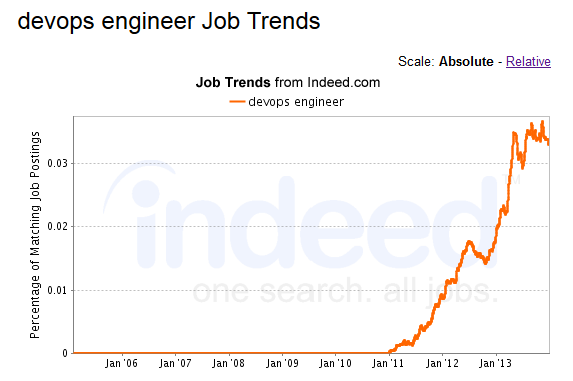
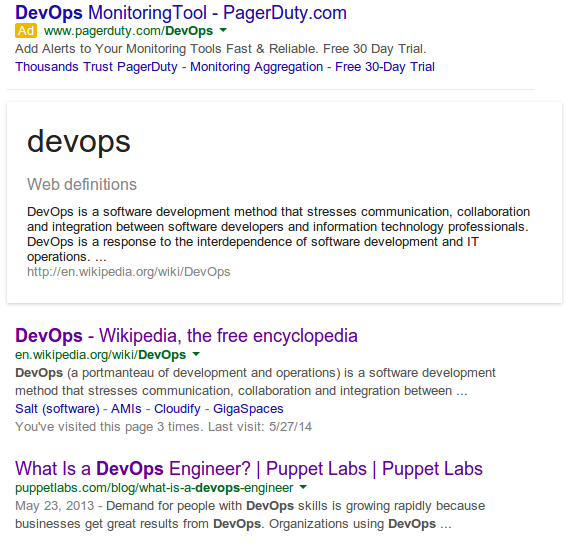
    Many recruiters are now looking for “DevOps Engineers”.  The demand for “DevOps engineers” has grown exponentially over the course of the last few years by thousands of %, just a small trend graph from indeed.com, and snippet from Google.
    buzz 1

    buzz 2


    We constantly hear about companies building, “DevOps Teams”, and developing “DevOps Tools”. Everyone wants “DevOps” but have no idea what it means.

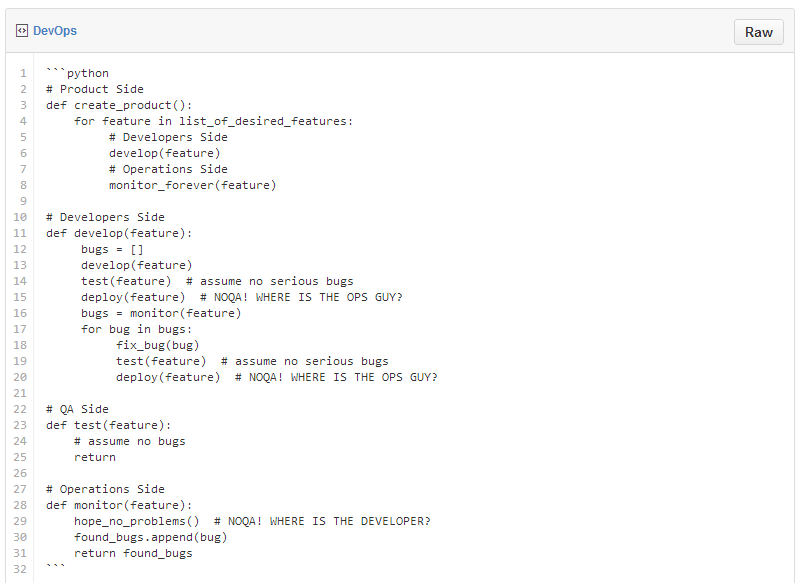
    The short definition of DevOps is the ultimate business-requirements to customer to business-requirements cycle (often referred to as the best “development to production cycle”). How this would look in code:
    buzz3


    (Of course, this snippet presents the problem very broadly and doesn’t take serious bugs into consideration)

    All of this, aside from the development process is expected to happen automatically, not affect users at all, and have monitoring that is so exceptionally smart that it always points to the exact problem.  Hmmm.  What’s described above, is of course…. utopia.

    Reality Check. Most companies are more likely in the camp that:

    • runs tests manually or not at all
    • monitors the wrong things
    • reacts to the wrong problems in the wrong manner
    • doesn’t improve work processes
    • keep doing the above in iterations and trying to set out fires while more fires appear.
    • more bad stuff…

    DevOps aims to solve these problems.

    It is a culture, in which people work together to improve the product delivery cycle.

    At its base, it requires good collaboration/communication (with the other teams), familiarity (with the system), control (over features and failures), short dev-to-prod cycles (this isn’t mandatory, but can help to prevent major bugs), and quality testing (‘nuff said). This is practically a great analogy to a good relationship except that it also requires automation (to make all of the above possible), which is something you should probably refrain from in your relationship if you want your belongings to remain inside the house.


    The Perceived Anatomy of a “DevOps Engineer”

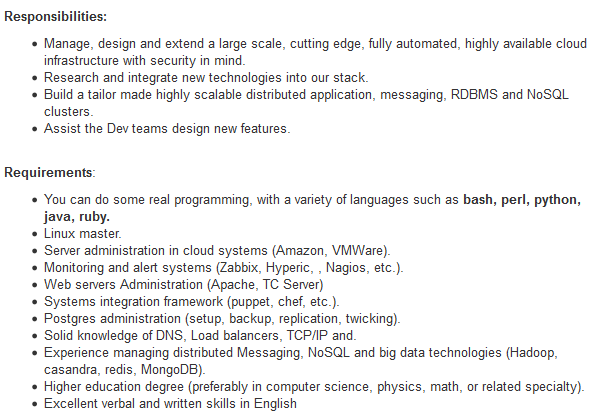
    Let’s look at the following job descriptions.

    DevOps Expert
    buzz3a


    buzz4

    See anything… strange about them? Yes, they want a God.

    The Dream Errr…”DevOps Team” is basically a group of:

    • Linux Experts (preferably all distributions in the world)
    • Coders (preferably Python, Ruby, Perl, Bash, Batch, Powershell, Powerpoint…)
    • Adept at CM, CI, CD, NBA and NBC (So they must know Chef, Puppet, Jenkins, Hudson, Travis, Git…)
    • Have vast knowledge in Cloud (like.. in the sky?)
    • are familiar with Databases (Including high availability, disaster recovery, fault tolerance, fail-over… something like the average marriage)
    • Know Storage (WTF?)
    • Know Monitoring (Nagios? REALLY?!)
    • Know Networks…
    • Know Big Data (the bigger, the better)

    Bottom line, they are supposed to be a group of people who know everything, can do anything, yet do not develop the application (That’s the Devs Job), nor do they install servers manually (That’s the Ops job).

    Don’t even get me started on “DevOps Tools” – Puppet, Chef, Ansible, Cloudify, Saltstack, OpsWorks, Jenkins.. these are all “DevOps Tools”, right? WRONG! They are automation tools! They don’t “DevOps”. They automate, i.e. enable “DevOps”.  JIRA, HipChat, PagerDuty, CloudWatch, New Relic… these are communication, collaboration and monitoring tools. You get the idea.

    There are no “DevOps Tools”. Developers have development tools because a developer is a profession. Just like a blacksmith has a mallet. Can you define a set of culture tools? Are the pen, the paintbrush, and the violin considered culture tools? No, they are instruments for the writer, painter, and musician to create works of cultural significance.

    In the same way, there are automation, collaboration and communication tools that enable the DevOps culture to be implemented into the organizational DNA.

    What we tend to mean when we say DevOps:

    • ‘We use Puppet to manage our servers’ configuration’.
    • ‘We use Ansible to deploy our application versions’.
    • ‘We use AWS as our infrastructure’, ‘we use Cloudify for our orchestration.

    What we should mean when we say DevOps:

    • ‘Our Devs and Ops work closely together’.
    • ‘They’re familiar with each other’s work so that Devs know the system they’re writing code for, (and adjust to it) and Ops know the code they’re deploying (and understand how it affects the system)’.
    • ‘They develop in short iterations and can deploy fast (both infrastructure and application) to overcome bugs ASAP and create smaller problems if any new bugs arise’ (again, not mandatory, but can help).
    • There are many more items in this list… but you get the gist.

    This is enabled by:

    • Keeping code tidy and well documented so it’s easily understood by all.
    • Keeping our code under version control and backed up so that we can always go back to a previous version in our environments, when needed.
    • Testing and monitoring the most important aspects of the system rather than the ones that we don’t care about.
    • Automating our Infrastructure, because deploying servers and configuring them manually makes them more susceptible to human errors.
    • Automating our code deployment so that we can deploy a lot (that doesn’t mean that we HAVE to deploy a lot), without making mistakes.

    Where did we stray off course?

    Culture is a very abstract and complicated concept. It isn’t as simple and obvious as a tool.

    Along the way, we took the tools and skills that are required to implement DevOps and named them DevOps instead. We appended the skills necessary to deal with these tools to a list, created a job description, and from there… the rest is history.

    What people refer to as “DevOps people” is usually (not always) a term that describes operations people who know how to code and who automate stuff – “InfraCoders”.

    So pretty much, you can’t (well,you can – it just doesn’t make much sense) have a “DevOps Team” or a “DevOps Engineer” because “DevOps” is not a thing.

    It is a how. It doesn’t respond to the question: ‘What’s your job?’ or ‘What does your team do?’ it responds to: ‘How does your company do it?’.  And most importantly: DevOps, is “DevsWITHOps”, not “DevANDOp.”

    Having said that, DevOps is not ONLY for Devs and Ops. It’s for everyone. It’s not about the titles or teams, it’s about the way a company handles the process of delivering a product to production in the best way possible.

    The problem with the “everything is DevOps” attitude is that it renders definitions meaningless. If everything is DevOps, then it’s everything and nothing, and de facto has no meaning. DevOps is already a complex concept. Making it mean everything, will make it practically impossible to implement.

    Ultimately, it really makes no difference whatsoever what you call your special forces team. You can call them “DevOps” or you can call them Bean Soup. Just be sure not to delude yourself that by constantly using the word DevOps in the wrong context, that your company is doing DevOps, while all you’re actually doing, is using Puppet.

    About the Author

    nircohenNir Cohen – is an Ops Architect at GigaSpaces working on Cloudify and a co-organizer of DevOps Days Tel Aviv.  He’s the brainchild behind the awesome open source tool Packman for package management. Nir loves system architecture, likes to think of himself as an innovative, think-tank type of guy who adores challenges and has an extremely strong affinity to automation and system architecture. He’s primarily driven by researching and deploying new systems and services. To Nir, the most important thing in life is ethics. Find Nir on GitHub or follow him on Twitter.

  • Time and complexity; or, Why are some things hard to do?

    Time and complexity; or, Why are some things hard to do?

    Why are some things hard to do? If we want to make complicated tasks easier, which is one of the goals of DevOps, we need to have some theory of why they are difficult in the first place.

    Richard Garfield, a mathematician and game designer, presents two factors that make tasks more difficult: time constraints and complexity. Our ability to solve a problem depends on the amount of time we can spend working on it and the complexity of the problem.

    Time and Difficulty

    DevOps discussions generally focus on time as the relevant dimension. Business value is measured in time: time to market, time to recover, and lead time for change are all important metrics for DevOps. Doing the same amount of work in a smaller amount of time is better. But an emphasis on time can also be misleading. Allotting less time for a task isn’t the same as truly being faster.

    So what makes something take more or less time? Part of the difficulty of a task is relative to the person doing it. Provisioning a new server might be straightforward for an administrator, challenging for an application developer, and impossible for a graphic designer. Hiring good people and matching them with the right tasks reduces the difficulty of the task and the time required to complete it.

    Complexity and Difficulty

    But regardless of who’s doing it, the task to be done is the same. The specifications have an objective existence outside of whatever person is doing the work. The objective part of a task’s difficulty is its complexity.

    The parallel between time and complexity is evident in the thought experiment Richard Garfield proposes. Imagine you are standing in front of two doors. One has a dragon behind it, the other has treasure. Each door is printed with a math problem that reveals whether the door contains a dragon or treasure. If you have a very short amount of time to decide, you will only be able to solve a fairly simple problem before being forced to guess which door is safe. Similarly, if you have a lot of time but must solve a very complex problem, you will again be reduced to guessing. Either insufficient time or excessive complexity can force a person to guess in a situation where a knowable answer exists.

    Automation and Complexity

    DevOps typically aims to reduce complexity through the “automation” leg of the CAMS definition. Now that we have examined the problem more broadly it’s clear that automation is a subset of the class of “things that reduce complexity.” Before automating, or if automation efforts at your organization have yielded disappointing results, a good check would be to ask “will this reduce the complexity of deploying code?”

    Automating without visibility into what/how you are automating will move complexity around but it won’t reduce it. You’ll be able to spin up new builds really quickly—once you’ve tracked down the person who pushed the latest version and forgot to mention the three little configuration settings you need to change for it to work. Configuration drift or pockets of automation reintroduce complexity. Without visibility and monitoring, these problems grow on automation systems like mold on untended fruit.

    This is not to say that automation is bad. When done in a mature environment with testing and visibility, automation is the greatest tool for reducing complexity. But without independent validation and monitoring, you’ll find that automation can also be one of the biggest sources of complexity.

  • Lead from the Podium: 6 Essential Concepts New Technical Managers Miss

    Lead from the Podium: 6 Essential Concepts New Technical Managers Miss

    The transition from programmer to Team Lead or Software Manager can be a difficult one.

    One week, you’re in your cubicle cranking out masterful code, and the next, you’re managing a whole team that has to navigate innovative solutions, coordinate input from different departments, then anticipate and eliminate potential showstoppers.

    Stepping away from your identity as a superior coder into a role in management requires a whole new perspective on your work. Grasp the difference now, and you’ll save yourself months of frustration, friction, and fumbling.

    Here’s the biggest realization that most new managers miss: you’re not a production unit anymore.

    Starting now, you’re a leader. An encourager. A troubleshooter. A BS-caller. Most of all, you’re communication hub.

    Your daily focus is no longer the perfection and elegance of your code, it’s the creation of something much larger using the coordinated work of many other people.

    In other words, it’s all about communication and responsibility.

    Think of it this way. When you attend a night at the symphony, you don’t go to see the conductor wave her arms around in an expressive and inspiring way. You expect to look past her the entire night, seeing only the orchestra as she keeps the whole group together, keeping time and leading the musicians through each crucial part of the piece.

    She’s not making the music, but she makes the entire performance possible.

    If the tuba player screws up–even in rehearsal–the last thing she’s going to do is march over, wrestle the tuba away from him and play the part herself. That’s just a formula for disaster.

    Because the moment she forgets her role and steps off the podium to wade into the orchestra, the entire show starts to run off the rails.

    It’s not the conductor’s job to play every instrument better than the musicians. They don’t need her to stand over their shoulder every moment in the practice room. And they don’t need a lecture insisting that there’s only one right way to play the piece.

    Everyone, from the concertmaster to the triangle player, completely understands that they need her leadership at the podium to keep the entire ensemble together. They are relying on her to know the entire piece inside and out and have a good connection with each musician. This allows her to call out the best in them during the performance.

    It is just as imperative that new technical managers stay at their podium. Most fancy leadership books are full of inspirational phrases, but they pass over this essential fact.

    You and everyone else on your team needs to be secure in the knowledge that the while programmers are responsible for their craft and their individual output, you are in command of the entire process.

    Even if your company hasn’t specifically communicated this to you, they’re very clear on your responsibilities for them. I’m here to help you understand those priorities–and own them.

    Here are a few essential lead-from-the-podium concepts that every new tech manager should learn and develop.

    6 Leadership Concepts Most New Technical Managers Miss

    1. Keep your eye on the entire project. Yes, coding is your specialty, but unless you keep track of how every programmer’s output is coming together into the product, you’ll miss an issue that can derail yourself, your team, other departments and the delivery date.
    2. Know the demands of the project and the players’ capabilities. This means reading between the lines of team comments like, “This is easy,” or “This can’t be done.” A solid manager knows what elements of the project are triggering these statements. He can also anticipate hidden complexity in a seemingly simple project or determine how he’s going to have to direct the team around hidden landmines.
    3. Call BS on idealism and shortsightedness. Occasionally, a conductor has to be brave enough to hurt the tuba player’s feelings in order to have the entire performance come off well. Likewise, managers have to step in with a dose of reality when programmers insist that a project will “only take an hour”, and you have that gut feeling that even an all-night session won’t get it done. Remember that programmers are overly optimistic about their abilities, so build a realistic cushion into the timeline for them–and yourself.
    4. Don’t take the tuba away from the tuba player. Just don’t. I know, you’re an expert at the work that you’re now managing. That makes it almost impossible to avoid the temptation to jump in and do it yourself. But let me tell you, this is the most time-sucking, team-killing mistake that most new tech managers make. It’s so destructive and prevalent that I’m dedicating an entire lesson to it soon. But for now, just trust me. Stick to your job and let the programmers stick to theirs.
    5. Realize that communication–not production–is your priority. A manager’s value is crafting relationships on his team that allow him to motivate, direct, persuade, and correct the people on his team. This is the most important aspect of management and the core of your job. But after being in production mode for years, this kind of “work” can feel like you’re not “doing” anything. When you’re feeling this way, start tracking the number of conversations you have with your team members, and then see how your sense of your own production improves. Communication UPWARDS and OUTWARDS is just as important as INWARDS.
    6. Take the blame when failure hits. While it’s natural to want to shift responsibility to someone else when the deadline was missed or a key function of the software bombed, but pulling the blame card just looks immature. Face the pain, learn the lessons and move on.  Learn to say “My Team Screwed up” publicly, and then hold people accountable privately.

    Making the shift from a respected programmer to an effective manager is a tough one, and not all of the best practices are obvious. The most essential realization you need to make–one that you’ll have to reinforce repeatedly in your first months in leadership–is that you’re no longer a maker.

    You’re a conductor.

    About the Author

    marcusblankenshipMarcus Blankenship – Nearly 20 years ago I made the leap from senior-level hacker to full-on tech lead. Practically overnight I went from writing code to being in charge of actual human beings. Without training or guidance, I suddenly had to deliver entire products on time and under budget, hit huge company goals, and do it all with a smile on my face. I share what I’ve learned here.

  • A Simple Service Discovery Solution for Docker

    A Simple Service Discovery Solution for Docker

    The ambassador pattern is an approach for multi-host Docker application deployment. It helps containers on different hosts to discover each other and communicate. Despite of the variants, the idea can be illustrated as the following:

    (web) –link–> (web proxy) —network—> (db proxy) –link–> (db)

    Instead of the web connecting with the db directly,

    1. A local web proxy is linked with web and web is configured to send all traffic to localhost, which is received by the web proxy
    2. Alongside this, the db proxy announces the db container with a predefined key in a key/value registry (etcd, consul, etc). The key is also used by the web proxy to discover the db container in the registry

    3. Once discovered, the web proxy will route the traffic to the db proxy, which is linked with the db container.

    As a result, the connection is setup.


    Pros & Cons

    This pattern has a number of advantages:

    1. Non-intrusive: The Docker image can be used without any modification, as it is configured statically
    2. Dynamic: Containers can discover each other in a dynamic way, particularly valuable to the autoscaling/load balancing case
    3. Resilient: Failover is made transparent to the container

    However, there is also some amount of tradeoff for the above benefits:

    1. Complex: There are more components to learn and manage
    2. More moving parts: A wrong key or value could lead to some bizarre results, which may be particularly difficult to debug
    3. Inflexible: The proxy is good for 1-to-1 or a load-balanced connection, but it couldn’t handle other topology, such like Dynamo ring


    Solution

    Compared with the ambassador pattern, another solution of service discovery is to leverage the file mount feature to mount the application configuration file from the host instance into the container:

    $ sudo docker run —rm -it -v ~/.bash_history:/.bash_history ubuntu /bin/bash

    The approach is:

    • Simple: No proxy, no registry, easy configuration files
    • Non-intrusive: No code changes or image modification
    • Flexible: Works with any application configuration
    • No moving parts: Easy to reason about

    One may argue that this is a static configuration of the containers, which does not cope with scenarios like autoscaling and failover. The answer to this is an orchestration engine. The engine need to keeps a watchful eye over the cluster and re-generate the configuration file to make sure the containers always get the correct connection whenever something happens.

    Technically, the solution can be illustrated as:

    Docker Service Discovery Solution

    Instead of letting instances announce and discover each other via a central database, this explicit route specifies the logical relationship between services. Then the engine renders the file upon provisioning:

    mysql://root@@{db.PrivateIpAddress}:3306 — -> mysql://root@10.0.0.4:3306

    Using this approach to deploy a multi-instance Docker application, all you need to do is to specify three things:

    • which docker image to run, i.e. my/node
    • the container setup, i.e. port, cpu, mem
    • the app configuration file content and link with other containers

    This solution does not look particularly sexy, but what it is, is dead simple and robust; and works an absolute charm for any type of application.

  • Walgreens reminds us to keep our database healthy

    Walgreens reminds us to keep our database healthy

    It’s clear that the super app you developed with your team, is really something, and it has high chance to be the “Bread and butter 3.0”, but are you prepared for the worst? There is a good chance that some combination of data, events and circumstances out of your control will eventually collude against you, to cause a failure or a software defect. You can try to anticipate and reason about all of the things that can go wrong with your application to prepare, but in a complex system it’s impossible to predict everything.

    (more…)

  • The DevOps Juice is Worth the Squeeze

    The DevOps Juice is Worth the Squeeze


    “To such an extent does nature delight and abound in variety that among her trees there is not one plant to be found which is exactly like another; and not only among the plants, but among the boughs, the leaves and the fruits, you will not find one which is exactly similar to another. “ 

                                                                                                                                                                                                            ~ Leonardo DaVinci


    DaVinci never stepped inside the produce section of a modern grocery store. The food we get today is horribly consistent. The store may have five kinds of apples, but any two of the same kind seem cloned from a mother apple locked in a factory vault somewhere.


    A tradition from my childhood my family has recently adopted is the summer peach run. Growing up in south west Georgia we’d regularly stop at random road side stands and buy whatever produce they were selling. Regular fruits and vegetables like corn and peaches but other more colloquial varieties like butter beans and zipper peas as well.

    Since I moved to Atlanta it’s become less frequent. We go to the farmers’ markets and occasionally we will find a road side stand in the north west suburbs where I reside, but the quality just isn’t the same. I’m starting to think that many of the road side stands up here are just reselling stuff they bought at the grocery store down the street.

    A couple of summers ago my wife and I decided our kids were old enough to start visiting historical landmarks, as we both endured long summers of being educated against our will under the ruse of a road trip ourselves. Our first trip was to Andersonville, near Montezuma, GA. While there’s not much left of Andersonville itself, the story and the national POW museum (which is an international account throughout history) are worth stopping by should you be through middle Georgia.

    When we passed a produce stand while driving home on some two lane back road I insisted we turn around. I new we were in the height of peach season and close to the orchards. Being close matters because the best peaches do not ship well.

    The peaches they send off elsewhere are uniform in size and at a ripeness where they can survive the truck ride and some time on the shelf before they’re bought. We don’t have to worry so much about them going bad before we eat them because of this particular ripeness. In pursuit of this portability we have sacrificed taste. They won’t get ripe enough to rot but they won’t get ripe enough to really taste like a peach either.


    This year we bought 75 pounds of peaches (those are my kids with the actual peaches in the picture). At this volume they end up being pretty cheap, which is good given the high rate of attrition. They’re late off the tree and inconsistent in age and size more than ripeness. Some have rotten pits and must be thrown away immediately. Others are lost in transit. I carefully brought 30 peaches to work with me and ended up tossing the 10 that were on the bottom of the box. They were bruised just from the weight of the fruit on top of them.

    Most the folks that come to my daily stand-up told me the peaches they picked had some bruising, but they trimmed it off  and the rest was juicy and sweet. I gave one to a VP that stopped by my desk. I hope it was good but haven’t had a chance to ask. A few other co-workers, however, had the best peach of their entire life. I have confirmations that the peaches they selected from the box ruined store bought peaches for them, rendering them oddly disappointing since they tried the fruit I brought from middle Georgia.

    Food is meant to be eaten and enjoyed, not shipped. Some time ago taste played a huge part in what seeds were planted the following season. Instead of being shipped across the country produce was bought local and could afford to be tender. It didn’t have the greatest shelf life, but that’s why things like canning, pickling, and preserving are popular in agrarian societies. Preserves made with these peaches (along with muffins, cobblers, and ice cream) taste that much better too.

    Software is best served fresh as well

    Our users are more concerned with their experience than how the software was developed or how the infrastructure was provisioned. It stands to reason that our innovation should strive to continuously improve their experience as users more than ours as technology professionals. For us that innovation will be an arduous task. DevOps needs the enthusiastic rejection of any yield that is not up to standards. it’s how we get to the juicy sweet quality on the right side of the curve. It’s how you find the changes that redefine how you operate.

    The ability to make changes quickly and painlessly tightens our feedback loops, but it is only an intermediate step towards improving our user experience. It allows us to take the energy we spend on deploys and apply it elsewhere so we can continue to raise our standards every time we push code. This is not light work and it is not for the lazy or the faint of heart, but the juice is definitely worth the squeeze.