Category: Doin’ DevOps

  • The complexity of communication: Are we all Masters of Disaster?

    The complexity of communication: Are we all Masters of Disaster?

    To better the communication between people in tech teams is one important issue in daily work. Although we all grew up with communication from our early childhood on, we know, that communication often fails. But what do we all do about this discrepancy? Why do we accept eyes wide open these frequently painful failures? Why don´t we really care about misunderstandings and their consequences? Are we all Masters of Disaster?

    The answer is: Communication is a very complex topic on both sides of the game – on the sender´s side as well as on the receiver´s. To get aware of what is going wrong in our communication we have to do some very hard stuff: self-reflexion (which is indeed sometimes painful and hard to bear), changing familiar behaviors and leaving the comfort zone. This is really hard work besides all the tasks of our daily job! Additionally to a strong will, we need persistence, patience and most of the time aid from the outside to be successful in changing our communication! But in the end this entire struggle is worth it!

    In DevOps teams, where “ship fast” is taken over from “ship faster” to fulfill the goals of “continuous of everything”, a well accepted and effective, but appreciating communication is the basic skill for success. This means that building a successful team is comparable with building a house: if you spend enough in a strong and solid fundament, it will carry the house you want to build on it for a long, long time. But you have to consider, which kind of house you want to build to develop the fundament.

    In cross-functional teams with high demands – those teams we actually find in the tech industry – communication is the fundament of whatever is built on it. Communication is part of the culture and it is the tool

    • people get in contact with each other
    • knowledge is shared
    • goals and visions are shared
    • feedback is given
    • failures and success are shared
    • appreciation is shown.

    People in such demanding environments need to trust and rely on each other. Or do you want to share your knowledge with someone you do not trust? The success of the team depends on the relationships between all teammates including the leader. Relationship and trust are built among other things through the way we communicate with each other. No it is time to say, that communication is not only what we are saying with the words we are using. Communication goes far beyond the meaning of the words. Remember “Cce” – Communication causes emotions! Even in the tech world, which is still a male dominated world, communication causes emotions and feelings – although lot of people may refuse this.

    With speaking about the complexity of communication it means that there are on the one hand three different parts of sending a message and the impact on the receiver. On the other hand there are lots of possibilities how to interpret the messages. Lots of possibilities – this seem to be a source for many misunderstandings! Now be aware that an immense part of our communication – sending as well as receiving – happens in our subconscious!

    Most probably you have heard about the three different parts of communication: the verbal communication and the nonverbal communication with its subitems ´paraverbal communicationand ´body language.

    The verbal communication is about the wording, the language, the syntax, the grammar and yes, it is also about the logic! There you are: “Things have to be logical, then everything is fine, isn´t it?” Sorry, but: “No, it isn´t!” It is even not half of the truth. Here is the reason, why so called one-track specialists often have problems to convince others, although everything they say is absolutely right and logical. At this point the nonverbal communication appears on the human playing area! The paraverbal part of communication contains facts like the volume, the speech rate and melody, the intonation and articulation and at least the tone of the voice. This is completed by the body language with the fascial expressions the gestures, the body posture, eye contact, body chemistry and the clothing. If the expression of all three components is the same – then everything is fine! If the verbal communication says “YES” and the nonverbal communication “NO” – then people tend to believe in the nonverbal communication because its impact is much higher than the impact of the words.

    Just one example at the end: at one of the DevOpsDays I have joined this year, I saw one young speaker. I guess, he is really an expert in his topic and the idea and content of his talk was excellent. But he didn´t manage to appear convincing and convinced: a wrinkled shirt, a loose jeans, unkempt hair, barefoot in his sandals, a lousy body posture and a bored facial expression. You can say that this is a superficial point of view. Maybe – but that is the way it works! Communication always needs a holistic approach – and seemingly superficial points of view are influencing the our feelings and the way we interpret messages! Or to say it the other way round: if you want to convince somebody and make her/him trust you, you have to focus on all parts of communication! It is the same when you want

    to share knowledge, give feedback or want to lead a team. Communication is more than just the words!

    In the next blog post you will read about the chain of communication!

  • Survey says network agility is still immature

    Survey says network agility is still immature

    At least that’s the word from SDx Central’s Cloud Management, Orchestration and DevOps 2015 Report in which 76% of respondents said the network was the most immature component in the cloud management stack.

    Now to be fair, the network is one of the last components (I’m looking at you, security) to get on board the “automate or die” train, which has already left the station. That’s partly due to pressures from increased DevOps adoption in general and more specifically thanks to greater enterprise penetration which is continuing to up the amperage in the data center with respect to velocity and ease of deployment of all the network bits, bytes, and pipes needed to support each and every application.

    It’s also partly due to the complexity of the network environment and the blast radius of potential errors or misconfigurations as well as the broad set of differences in the object models (and therefore APIs) used to configure, manage, and automate provisioning of network services. The more features and capabilities, the more differences between them.

    OpenStack manages this difference by forcing standardization; that is, it defines the interface for LBaaS and if you want to be a part of the stack, you have to conform. Cisco ACI manages the difference by taking a declarative policy-based approach that let’s plug-ins define their own interfaces and expose them to ACI in a standardized way. VMware NSX and related technologies take yet another approach, leveraging its ecosystems’ APIs to integrate and orchestrate the network.

    All are relatively new to the game (OpenStack may be the exception but even its network implementation has lagged far behind other components of its system) and thus the perception that the network is the most immature in the cloud management stack would seem to be reflective of reality.

    But at least it’s heading in the right direction.

    The network was going to have to be included  at some point in this grand journey to transform the data center through automation and orchestration. At some point Agile and DevOps methodologies being embraced by dev and ops were going to start paying off in the form of more applications with more frequent deploys. Eventually that was going to overwPhases of Agile Network Maturity Allhelm the network (and its staff) and give them cause to start figuring out how they were going to transform the network from the static and very fixed methods of scale and management to a more modern dynamic and fluid method.

    Eventually is now. Whether it’s DevOps expanding into the network or SDN or cloud management stacks, the network has to mature in terms of its orchestration and automation capabilities if organizations are going to continue on their journey toward the agile network.

    We’re still trying to move out of the first phase in that transformation; toward a culture inclusive of measuring and standardization with templates (or configurable policies, if you prefer). We’ve got a long way to go toward a sustainable, agile network and just as it’s taken years for Agile to truly envelope most projects within the enterprise, it’s going to take years for the network to get from where we are today to where we suddenly want to be yesterday but accept that we won’t get there till tomorrow.

  • A Most Perplexing Problem

    DevOpsCom-01
    A most perplexing problem

    — ROELBOB

  • Free Your Metrics

    Free Your Metrics

    If you’re not collecting metrics, how do you know how your organization is doing? Metrics provide the data to get to the root cause of an outage or uncover a bug that would otherwise go undetected. Metrics can also surface trends that are difficult to discern without visualization. Here are some ideas for making the most of the data around you.

    What to measure

    What are the right metrics? As Etsy put it “If it moves, graph it. If it doesn’t, graph it anyway in case it moves later.” Sure, you should collect system metrics like CPU, memory, and disk utilization but those alone won’t tell you how your product is really doing.

    Sell widgets? Measure the rate of widget sales, the time it takes to sell a widget, and the availability of the widget selling system. Serve cat pics? Measure the time to process the images and the size of the processing queue. At the end of the day, these are the types of metrics that indicate how the product is performing.

    Your applications should be instrumented to emit counts and timing for key code paths. This is especially important in service-oriented architectures where a slowdown in one service can impact other services. So, record how long it takes for services to interact with other services so you can pinpoint the source of the latency. If you use a database, there’s a wealth of metrics exposed by the database system that can help determine why a query is slow.

    You should record every code deploy so you can correlate issues with deploys. If memory usage spikes and throughput drops after a deploy – you know it’s probably a new problem introduced by that deploy. Furthermore, you should collect and examine metrics from your pre-production environments so that problems are caught before they go to production and impact users.

    High value metrics

    Non-application metrics are often overlooked but they can provide important insights into the health of the business. Have a support system or call center? Measure the number of new support cases opened. Use social media? Measure mentions and followers. There’s also a wealth of data generated from sales and marketing activities. Imagine being able to correlate an uptick in sales with increased system reliability or the opposite, where outages and bugs are actually causing customer churn. You can’t make these inferences if you don’t have the data.

    Free your metrics

    Collecting metrics is great, but the real value comes from sharing the data across the organization. When you share your metrics, you increase visibility and transparency into the entire stack, which in turn allows you make informed data-driven decisions. So break down the silos and open up your metrics. Put them up on big screens that everyone can see. Put them up in unusual places like the break room. Then watch how people, who wouldn’t normally care about operations, suddenly start paying attention.

    Stay alert!

    You should also alert from your metrics. Response times jump beyond an SLA? Alert on it. Is a queue for a critical part of your workflow high? Alert on it. By reducing the time until detection you can get to fixing the problem faster. After every production outage ask yourself, ‘do I have the correct monitoring in place to detect this problem if it happens again?’ If you don’t, make it a priority to get it in place.

    You’ve got the tools, now go and free those metrics!


    About the Author/Eric Heydrick

    Eric HeydrickEric Heydrick is a DevOps Engineer at Praesidio, a big data Cybersecurity Management (CsM) company that bridges the gap between IT Security and Policy Governance in protecting Financial Institutions from cyberattacks. Praesidio’s integrated policies and best practices help Financial Institutions know definitively that they are safe. Eric has 15+ years of experience wrangling computers and building scalable infrastructures. Eric lives in Seattle, WA where he enjoys only the best microbrews. Email: eric@praesidio.com | Twitter: @eheydrick

  • Analytics from a Developer’s Point-of-View

    Analytics from a Developer’s Point-of-View

    As a developer, I have found that most systems analytics tools can be both an important asset and an unnecessary expense. Their usefulness, in my experience, is ultimately determined by the size and stage of the company. If the company is at a low funding stage, the cost of some of the more advanced analytics tools just isn’t practical. If they have the funding, but not the traffic, the benefits of analytics are completely negated by the lack of data to… you know… analyze.

    The same goes for the team size. Analytics tools can be incredibly useful to any size team, however after a certain level of growth a large Development team will likely split into two separate departments: Development and Operations. At this level, these tools tend to be delegated to Operations, leaving Development free to focus on the whole developing part of the job.

    So, your development and operations departments are still on one team (it’s likely both jobs are shared by everyone on the team), and your company has the right amount of funding and traffic to justify the cost and need for a systems analytics tool. But how do you choose from all of the available tools out there?

    This is a question that can bring any developer in a leadership role to their knees because the effects can last for years. I’ve always found that tools that can be isolated apart from the core application itself are always the best choice in this situation because they often take a language agnostic approach and, in case you don’t like them, they can be hot-swapped for another service with minimal effort.

    Being able to easily undo a poor decision shouldn’t be the only measuring stick you use to make your choice. The type of data you can get, and how accessible it is, are both far more important than being able to hit the reset button. As a developer, when dealing with third party applications, there are three things that I look for: usability, accessibility, and visibility.

    Usability

    We all know about usability. It’s a popular buzzword that is thrown around a lot in the startup world but, if you ask me, it is doubly important when dealing with full-stack tools built for developers. Full-stack tools are often more in-depth than standard consumer products. Rather than only requiring good UI/UX on the application frontend, a good full-stack platform requires a lot of foresight in the backend as well. There is nothing that turns me off more than API-as-an-afterthought. Systems analytics tools almost always fall under the umbrella of “full-stack tools” because they are designed for developers and non-developers alike.

    While the application itself should be easy to navigate and use, it is just as important for the API to be clearly documented and logically architected. The more time I have to spend dealing with integrating something that isn’t directly related to the product, the more likely I am going to cut my losses and pick something that was designed with my needs in mind.

    Accessibility

    While a systems analytics platform may be managed by just one person initially, as the team grows, it becomes exceedingly impractical to keep the knowledge isolated. The one thing that will cause my to ditch a tool immediately is a lack of multiple account management. While there are some great business tools for password management, I would prefer that everybody on my team has their own login. This is a major security concern for me. If we let somebody go (or they quit), I would rather delete their account than have to change a password and disseminate it to the rest of the team.

    Visibility

    Having easily viewable data should be a no-brainer for an analytics platform, but you’d be surprised how often I come across tools that do a very poor job at actually doing what they’re supposed to. Showing me pretty graphs and tables isn’t enough, though. I want control of the data. Let me import, export, manipulate, search, and filter it. If the time it takes to get raw information is longer than the time it takes to actually read and understand it, there is something wrong.
    Ultimately, the most useful systems analytics tools I’ve ever worked with do an amazing job at getting out of the way. They don’t try to predict how I want to work and they don’t limit my ability to get what I need, they simply give me the tools to do things my way. While this probably clashes with the common million-features developer mindset, in practice, simple can often be significantly more powerful.

    About the Author/Zachary Flower

    zachZachary Flower (@zachflower) is a freelance web developer, writer, and polymath. He has an eye for simplicity and usability, and strives to build products with both the end user, and business goals, in mind. From building projects for the NSA to features for Buffer, Zach has always taken a strong stand against needlessly reinventing the wheel, often advocating for using well established third-party and open source services and solutions to improve the efficiency and reliability of a development project.

  • DevOps Connect: cdSummit at Austin Innotech

    DevOps Connect: cdSummit at Austin Innotech

    Last week I was down in Austin, Texas for the DevOps Connect: cdSummit @Innotech show. With almost 1900 people registered for Innotech, we had a solid 150 folks specifically for cdSummit.  I think it fair to say that the attendees got their money’s worth!

    The morning started off with a great presentation by Jez Humble.  If you are talking CD, who better than the guy who literally wrote the book to kick things off.  Jez never disappoints and he didn’t last week.  His presentation is below.

    After Jez, Andy Pemberton of CloudBees presented.  Andy has a great delivery and I have seen him present before. It was a great engaging presentation and it is below for you to view.

    Following Andy we were very lucky to have David Lindquist, IBM Fellow, VP of Development, Mobile and Cloud DevOps. David gave us some great insight into IBM’s own journey of using DevOps to make an enterprise work at startup speed. Again his slides are below.

    We then broke for a great, relaxing lunch break and to give our attendees a chance to explore Innotech. There was a demo theater on the show floor featuring Jenkins, BlueMix, New Relic and AppDynamics demos. Innotech also featured a “Women in Tech” show and CIO roundtable with some great content.

    After lunch we broke into two rooms in a dueling track format. We have enclosed those below. My favorites were from the great, welcoming and amazing Austin DevOps community. Ernest Mueller previewed the talk he is giving at DOES next week.  James Wickett, one of my heroes from the Rugged DevOps movement did a great job on his session and Boyd Hemphill brought the house down closing out with his HomeOps presentation which I found witty and incredible.

    All of the speakers were really good and the feedback from the attendees echoed this.  Many thanks to our sponsors, CloudBees and IBM as presenting sponsors, AppDynamics and New Relic as gold sponsors. Most of all thanks to all of the people who came out and spent a great day with us! We are holding the next cdSummit on December 3rd in Los Angeles and if you are interested in speaking, attending or sponsoring, contact me at editor@devops.com.  We will announce more details shortly.


  • Creating Dev Environments With Docker Compose

    Creating Dev Environments With Docker Compose

    down-the-rabbit-holeThe Slack notification popped up on my phone at 2pm Friday afternoon. “Argh. This is never good” I thought to myself. The message said “do you know anything about Vagrant?”. It was from a client of mine and I knew their environment well enough to know that this question was going to go down a rabbit hole the likes of which would leave Lewis Carroll awestruck. To compound matters, I was in the middle of nowhere, halfway between Las Vegas and Phoenix. I found a place to pull off, overlooking a vast, expansive maze of canyons and riverbeds leading nowhere and everywhere at once. I thought to myself “how fitting” as I started to reply on my phone.
    When launching a startup, there is no rule other than “find out what the
    customer is willing to pay for, then build it”. My client, Roger, had nailed it. His next message confirmed this as I read “I’ve been beating my head against a wall for two days trying to get this Vagrant image running. I’ve got new developers starting next week and need to get them a dev environment setup”. Roger had just discovered startup rule #2: “nothing can prepare you for the panic of success”. craft beerHis current environment was very solid: running in AWS, everything was deployed via OpsWorks to both staging and production environments. It works great… if you’re the only one in staging. It wasn’t going to support multiple developers changing code simultaneously, so he was looking at Vagrant for a solution. Each developer needed mongodb, elasticsearch, redis, and two node.js servers: one for the api and one for the web ui. Vagrant images are great, but I’ve often found them to be most valuable when hand-curated, like craft beer. They are also difficult to share as it requires shuttling large vm images around between developers.
    After reviewing the error logs, I could tell he was facing issues with security permissions between the vagrant image and the host OS. I decided I wanted to try something different. I wanted to try building it out using Docker containers. I had a feeling I could accomplish the same results with Docker, plus the added benefits of the entire environment being stored as config files in a git repo. Small, concise, version controlled, portable… I was liking this idea more and more. I sold him on the idea as well as buying enough time to get back to civilization where I could work on the idea (though the overlooking view was pretty inspirational).
    Scenic Overlook
    Back at the office, I broke open my laptop. I was familiar enough with Docker, but had a suspicion that Compose would help me tie the disparate pieces together. I started with the node.js servers. It was easy enough to kickstart them using a Dockerfile. (NOTE: I could have done this in compose as well, but had a feeling that I would want some extra flexibility later so I created separate Dockerfiles for them.)
    FROM: node:latest
    EXPOSE 3000
    Next, I created the docker-compose.yml file to define the environment. I was able to define all of the containers (minus my previously created node.js servers) using images from Docker Hub.
    web:
      build: ./web
      ports:
        - “3000:3000"
      volumes:
        - ./code/web:/srv/www
      command: node /srv/www/server.js
    
    api:
      build: ./api
      ports:
        - "3000:3000"
      volumes:
        - ./code/api:/srv/www
      command: node /srv/www/server.js
    
    redis:
      image: redis
    
    mongodb:
      image: tutum/mongodb
      ports:
        - "27017:27017"
      environment:
        MONGODB_PASS: password
    
    elasticsearch:
    image: elasticsearch
    ports:
    - "9200:9200"
    - "9300:9300"
    
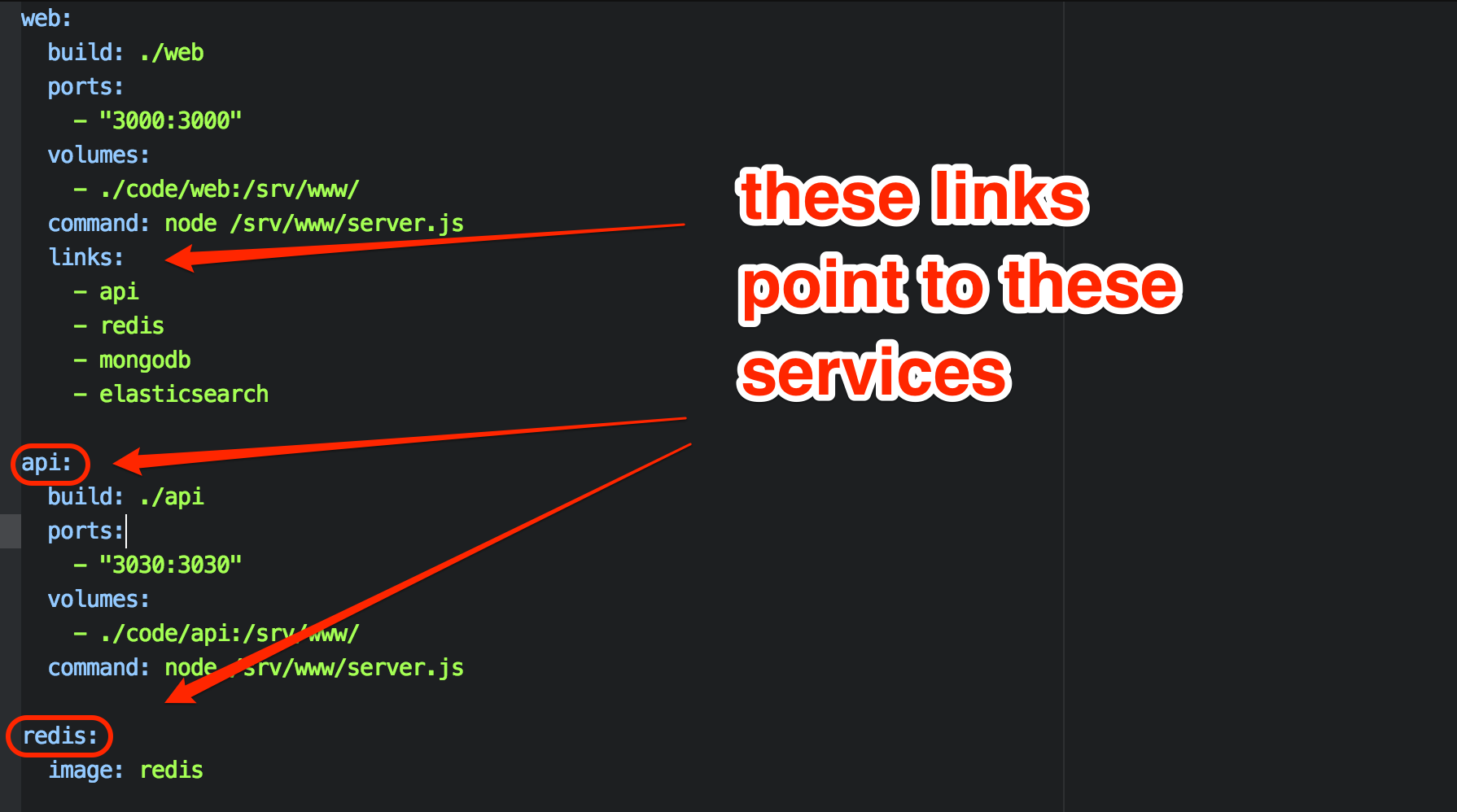
    Once this was done, I created links in the web container. This creates environment variables and hostfile entries in the web container, allowing the web container to access the elasticsearch container via the hostname “elasticsearch”, and the mongodb container via the hostname “mongodb”, etc…
      links:
        - api
        - redis
        - mongodb
        - elasticsearch
    
    Docker Compose links
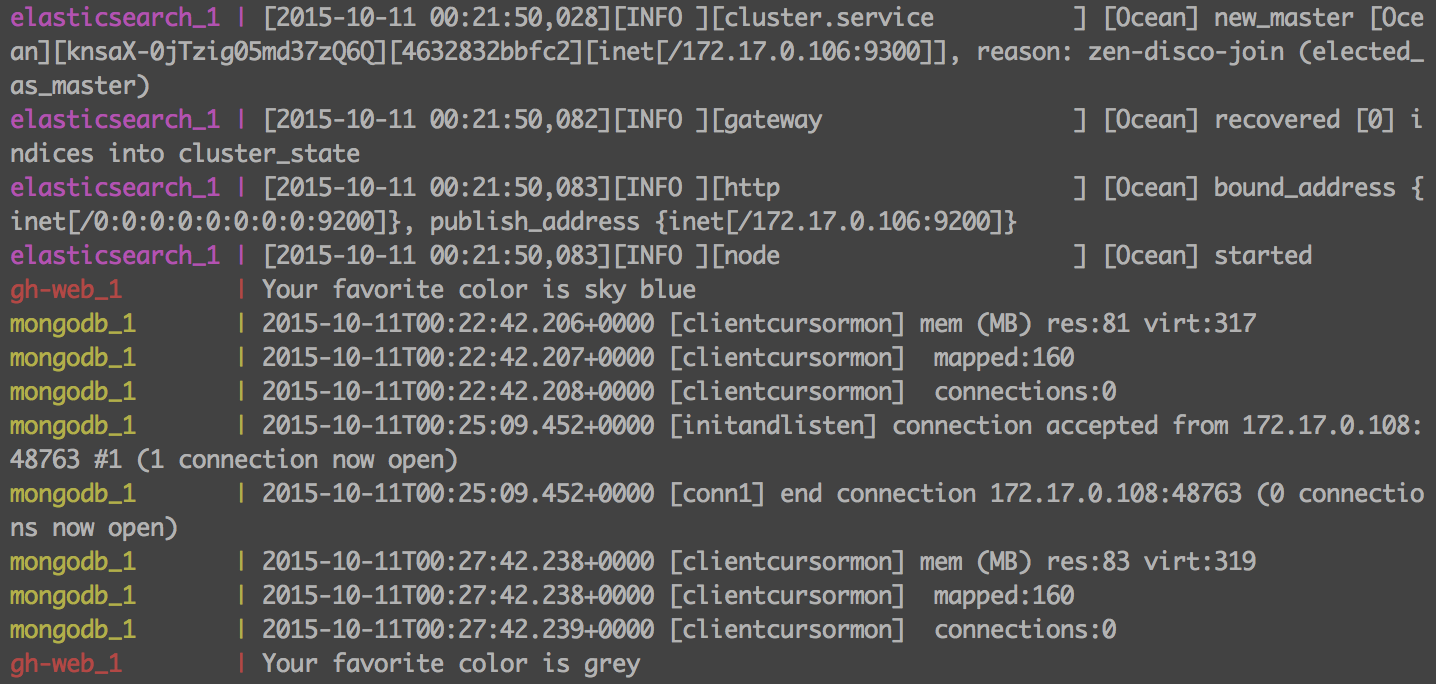
    The environment was complete, and I brought it up with the “docker-compose up” command. The added benefit of this environment is that the docker-compose terminal window maintains a steady stream of logs from all of the containers in a central window. This allows the developer to view the logs realtime, without having to hunt for them.
    Docker container logs
    VirtualBox portsThe only real stumbling block was in the use of VirtualBox. I created the environment on OS X. Since OS X can’t run Docker natively, it all runs in a VirtualBox machine on my workstation. This meant that I needed to go into VirtualBox and setup port forwarding for the required ports (3000, 3030, 27017, 9200, 9300,6379) so that I can access the services locally.
    Including time spent learning the basics of Compose, the entire environment was up in 2 hours. By using Docker, Roger’s new developers will be able to clone the config from a repo and be up and running in minutes regardless of whether they are developing on OS X, Windows, or Linux. Future additions to the repo can be shared by all by continuing to update the repo.
    Interested in trying it out for yourself? All the code described can be found in my git repo at https://github.com/rekibnikufesin/docker-compose. Be sure to let me know your thoughts in the comments or via twitter @wfbutton!
  • State of On-call Survey 2015 – Help Needed!

    State of On-call Survey 2015 – Help Needed!

    Last year, we launched the first ever State of On-call Report. We asked about tools, setting up on-call rotations, what team members are involved and what happens after the incident gets resolved…among other things. We got 500 responses and in the process, learned a lot about what people are doing to handle the challenge of on-call management.
    A few key takeaways from 2014’s results…

    soc_2014
    In an effort to see if on-call is getting any better for anyone, we’re conducting the survey again this year. Because what fun is data if you can’t start picking out patterns, checking out year-over-year changes and looking for trends?

    Our predictions for this year’s results…

    • less folks are using homegrown monitoring and on-call systems because more options are now available off the shelf
    • more organizations will report as having moved their infrastructure (or large parts of it) to the cloud
    • an increase in the adoption of DevOps practices, especially when it comes to sharing the load of being on-call
    • ChatOps will play a bigger role in how organizations do their incident management
    • runbooks and collaboration will continue to be the two biggest factors in solving problems faster
    • a decrease in the number of people saying on-call is getting worse (hopefully!)

    sooc_2015_480

    If you’d like to help the cause, we’d love for you to spend a few minutes answering questions about being on-call. Click on the image above or here to begin the survey. We’ll be choosing one lucky winner from all the respondents to win a BB-8 from Sphero.

    Check back in December when we release the 2015 State of On-call Report. We’ll be hosting a webinar with devopsy.kinsta.cloud, presenting the results. Stay tuned and thanks in advance for your help!

  • HomeOps – Learning DevOps At Home

    HomeOps – Learning DevOps At Home

    When I took a job as Technology Evangelist for StackEngine, my wife’s first question was, “Why would someone pay to fly you around the country and talk about how you work?” My youngest son put a finer point on it, “Yeah Dad, we love you and we don’t listen when you talk about work!”

    I tried to explain Lean principles. That went over like a lead balloon. I tried a more human approach in explaining John Willis’ Karojisatsu post and the rampant stress and depression in the operations industry. They felt sorry for those people, but still didn’t see 100’s of folks crowding in a room to hear about it.

    How am I going to foster organizational change when my own family doesn’t care? I needed a way to communicate my ideas so anyone could approach them.

    So, I started doing a single load of laundry each day.

    LaundryOps

    Really it was pretty obvious looking back. My wife typically did our laundry each Sunday. We could either stay at home most of the day, or we could put it off and stress about running out of clean underwear. It’s the perfect metaphor for the problems with large batches.

    The following Sunday my wife noticed there was about a third of a load in the hamper. She said, “Hey, there’s no laundry to do today, let’s go to the water park this morning before it gets crowded.”

    My wife was pleased. The kids were thrilled. I was thinking, “Hmmm, this continuous delivery model is interesting.” I was also thinking that single piece flow provides supporting precedent.

    LaundryOps – Continuous Delivery

    In their seminal book Continuous Delivery (CD), Humble and Farley stress that CD makes the working environment more humane.

    Lean principles say that I should identify what variable I am trying to impact. This tenant is expressed as the measurement pillar from the CALMS acronym coined by Willis and Damon Edwards.

    My goal was to maximize quality family time. It was not to conserve water or energy. We have done a great deal more hiking, swimming and other fun things because our weekend is full two days.

    Laundry Ops – Reasoning About Change

    So, if I practice continuous delivery, and do a load a day, what happens when I go on a trip and come back with 5 days worth of clothes?

    Well, the first time I panicked! It was apparent that CD did not apply to special situations. I needed to break process. But, after considering the pile of clothes, I realized that doing a large load today and tomorrow would bring the system back to equilibrium the following day.

    Adopting CD thinking for our laundry exposed a stunning amount of spare capacity in our “softener, detergent, laundry cycle” or SDLC for short. I did, however, recognize the inclination to regress to my comfort zone at the first sign of trouble in the new process.

    I need to evolve my thinking about the batch size of work.

    Often during the software delivery life cycle (huh, SDLC too) a developer/project manager/stakeholder thinks: “I will do this one more thing before deploying.” This is often because the current deploy process is highly manual, risky or time-consuming. Certainly none of those things were true of laundry.

    I need to find ways to make deploys easier, safer and repeatable.


    ClosetOps – Unexpected Consequences

    Doing one load per day rather than many on Sunday led to a number of other interesting results that all apply to software delivery.

    ClosetOps – Cash Flow

    If our clothes are not in the hamper, washer or dryer, then where are they? Turns out our closets were burgeoning. At this point my wife said, “I wonder how much money is in there?” So we went through her closet with It’s Deductible and learned the answer was about $3500. Retail we estimate $8500. We figured our house contained about $30,000 in clothing. Today that estimate is about $13,000.

    We released $17,000 of cash in roughly one year.

    Today, in your source control management (SCM) system, you have weeks or months of features, bug fixes and innovation building up. You have paid the salary of the developers, testers, project managers et al who contributed to the effort. Because you are waiting for some date long in the future to release those features, how much cash is in your closet … er … SCM?

    ClosetOps – Tools and Costs

    Too often DevOps is boiled down to tools. For laundry, our use of a low water low energy washing machine and gas dryer means that even though we run them every day, there is no significant impact on our energy and water bills.

    Choosing a tool should be done only in the context of the measures being optimized.

    Back in the Real World

    In my real job as Director of DevOps, customer satisfaction was the bottleneck to sales. We would work for months behind the curtain to produce a beautiful custom web site. Except it wasn’t what the customer wanted. And it was weeks late. And it was way over budget. And making any changes took far too long.

    We changed three things:

    • We instituted a weekly show-and-tell meeting and delivered the site to the project manager for their approval in the production environment.
    • We automated the developer environment and matched it exactly to the production environment.
    • We ensured from the first day of the project that any committed work by the developer was available to be seen by the project manager

    We achieved wild success:

    • Project manager wanted the account manager involved. Account managers brought customers with them. The value chain was fully represented.
    • Customers were thrilled to be part of the process
    • Site launches were a non-event. We had been launching daily or more for months while under construction.
    • Making updates and changes to the site became trivial

    Customer satisfaction measurably improved:

    • Account managers more new business with the confidence we could deliver.
    • Account managers won repeat business from existing customers who appreciated our transparency and delivery.

    SuckOps – DevOps Sucks

    My wife has a number of allergies. If I vacuum the house each day, her quality of life increase dramatically. Since wife maintenance is cheaper than wife repair, I was doing this duty and I was tired of the 30 minutes a day it took. In reality, vacuuming was happening every 3 to 4 days.

    SuckOps – Automating to the Right Degree

    Santa Claus brought us a Roomba last Christmas. It is possible to set this particular model up so that it automatically vacuums sections of the house each day.

    I have never bothered to fully automate this process.

    It turns out that manually setting the towers is easy. These fences are so easy to move that it was not worth the effort to fully automate vacuuming. So each day I close a couple of doors and turn it on. I then set up towers and move it to the living room and leave for work.

    When our kids get home, they reset the towers and run it in their bedrooms, hallway and kitchen. I set it up to cover the office and dining room at night.

    SuckOps – Tools Enable Collaboration

    Notice that the job of vacuuming is now shared with my kids. My wife can run the vacuum too since she does not have to be in the house with the running vacuum. The tool has enabled us to share this chore.

    Choosing tools that foster collaboration between traditional silos is a key factor in tearing down the wall of confusion.

    SuckOps – Quality Through Repetition, Not Control

    The Roomba does not do the same high quality job as our Dyson. However, because it does it far more often, the overall effect is that our house is more allergen free.

    Again, adhering to the key metric: improving the livability of the house for my wife, we can clearly see Santa brought us DevOps with this automation tool.

    Santa gets DevOps.

    Back in the Real World

    The automated development environments allowed the Ops team to share the configuration with developers in a way developers were used to seeing. This is often referred to as Infrastructure as Code https://devopsy.kinsta.cloud/2014/05/05/meet-infrastructure-code/.

    By the third week of using this tool (Vagrant + Chef), some developers were making requests in the code to change the configuration. This fostered a closer working relationship between the developers and operators.

    Because development of the site was closely coupled to delivery of the site, quality of the deployment process was achieved through simple repetition.

    The key pay off, however, was the ability of any developer to work on any customers project with a single command. This one outcome saved a measured 8 hours per week for each engineer!

    PaintOps – My Family Understands Me

    Does my family understand DevOps? Yup.

    Traditionally to paint the interior of our home we would take a couple of days off, buy tons of supplies, move furniture, stress out, eat out … It underscores the problems of large batches again.

    My wife suggested that instead of trying to get it done over 4th of July holiday as we had originally discussed that we instead just painted a bit each weekend when time allowed.

    Measuring Time

    The project took roughly 30% longer total time than it would have. It spanned about 2.5 months. However, time was not the key measure of success. Stress was. Once we go through the first several batches and understood set up and tear down (drop clothes, moving furniture, washing brushes) I would often come home in the evening to find my wife painting a wall.

    My wife was able to deliver paint any time she felt like it.

    Software engineers working under a continuous delivery paradigm can deliver features whenever the feature is ready.

    PaintOps – Surprisingly Lower Costs

    The cost of the project was about 10% smaller than the traditional way. This was due to our ability to easily estimate the amount of paint to buy for a small batches very accurately.

    Market fluctuation in the price of paint (sales) kept this number from being closer to 15%. There was a certain discipline in not buying a very large quantity of paint when the price was temporarily lower.

    PaintOps – A Small Bit of Chaos

    Having our living room half old and half new for a couple of weeks is something we could tolerate. Its part of our family culture.

    Any paradigm shift in how work is done must match the culture of the organization.

    Culture must evolve with, or even before, new models for work can be attempted.

    Back in the Real World

    A DevOps journey is always a work in progress. We constantly change the way we use tools, the tool, the process etc. This means we occasionally miss a deadline, delete a production server or a root file system.

    As part of a cultural shift, the business understood that we were in a far better place than 11 months ago. This shift was enabled by many small wins that built trust over time. Our culture had to be that each mistake came with an effort to ensure it never happened again.

    A bit of chaos is necessary to constantly improve. Measuring the impact of each change justifies the cost of mistakes.

    HomeOps – Food for Thought

    When staring at a DevOps transformation, many executives and leaders are frustrated by the lack of a manual. There is no prescriptive way to do DevOps like there is for ITIL or ISO compliance.

    The reason for this is that the only prescription of DevOps is to continuously improve the system by which you deliver value to your customer.

    Find something small in your life that you want to improve. Measure it based on the metrics that define “improve.” Change behaviors or introduce a tool and note the difference in your metrics. React accordingly. Repeat.

    Choosing small problems leads to solving large ones over time. Soon enough you will feel ready to tackle a problem in your professional life.

    You are now free to DevOps.

    (See Boyd present on HomeOps at DevOps Connect: CD Summit the afternoon of Oct 8 at Austin Convention Center. Tickets are sold out but walk ups are welcome and there is room)