A number of enterprises have a love/hate relationship with cloud computing. Because of its low upfront costs, the expense for cloud is lower, especially in the early years. But historically there has been another cost: the challenge of obtaining good visibility into applications, users and network traffic. I thought advancements in cloud management and security tools in recent years had largely overcome these concerns. Turns out, I was wrong—or, perhaps, market perception hasn’t caught up to reality.
A recent survey from Dimensional Research, which is based on responses from 338 IT professionals, found that fewer than 20% of IT professionals believe they have complete, timely access to data packets in public clouds. In private clouds, the situation is somewhat better, with 55% reporting adequate visibility. Unsurprisingly, on-premises data centers had the most positive response when it came to data visibility.
The survey authors said the results show companies have low visibility into their public cloud environments, and the tools and data supplied by cloud providers are insufficient. They identified some of the challenges such lack of visibility can cause, including the inability to track or diagnose application performance issues and monitor and deliver against service-level agreements, as well as delays in detecting and resolving security vulnerabilities and exploits.
Some of the findings regarding cloud visibility from the survey:
87% of respondents expressed fears that a lack of cloud visibility is obscuring security threats to their organization.
95% of respondents said visibility problems had led them to experience an application or network performance issue.
38% cited insufficient visibility as a key factor in application outages and 31% in network outages.
Interestingly, 99% of respondents identified a direct link between comprehensive network visibility and business value. This shows IT performance contributes directly to the business bottom line. Here are the benefits respondents cited regarding visibility:
Monitors and ensures application performance (60%).
Enables better threat identification (59%).
Helps to identify security indicators of compromise (57%).
Helps identify performance degradation.
Enables threat protection tools to identify malicious traffic by source.
Enables security monitoring tools to detect indicators of compromise.
Enables the monitoring of traffic at every link of their network.
A full 86% of respondents also stated visibility was important for network and application performance monitoring, and 93% stated it was valuable for security. Cloud consumers said predicting application performance was a key challenge.
Still, the lack of perceived visibility isn’t holding back public cloud adoption, with 84% of organizations having increased their cloud usage in the past year. While 3% of those surveyed had a moderate decrease in cloud usage and 13% remained unchanged, 63% experienced a moderate increase and 21% experienced a significant increase.
As organizations engage in digital transformation efforts and continue to turn to public clouds, organizations can’t afford to lose visibility. This is crucial for all of the business benefits of cloud traffic visibility the survey respondents cited, such as attaining superior application performance, meeting SLAs and shrinking the time it takes to detect and remedy security relation issues.
But here’s an unpopular opinion: There’s not much of an excuse for having poor visibility into cloud workloads anymore. There once was—that’s for sure—but today there are many tools made available by cloud service providers and third-party security vendors.
Today, it’s a matter of will and finding the right toolsets, putting them into place and making sure that security and operations teams have the software controls and the training they need to use them, so the organization can attain the level of visibility necessary.
Thousands of developers and cloud security professionals will fill the Moscone Center in San Francisco next week for the sold-out Google Cloud Next ’19 conference. Three days of breakout sessions and keynotes will immerse attendees in deep technical content and opportunities for hands-on learning. It’s all designed to help organizations embrace the cloud. A key element of succeeding in the cloud is cybersecurity. More critically, the cloud demands embracing a cloud-native approach to security challenges.
Leading the Way
Since its inception, Google has been pushing the envelope and blazing trails in the cloud. Like Netflix, Google found itself—and often continues to find itself—in uncharted territory, where it was forced to innovate original solutions to address unique challenges.
To help create standards and tool sets for managing container environments, Google joined the Cloud Native Computing Foundation (CNCF)—a melding of minds between developer communities and platform vendors—as one of the founding members along with CoreOS, Docker, Cisco, IBM and others. Famously, Google also originally developed Kubernetes—an open source container orchestration system for automating application deployment, scaling, and management.
Google eventually donated Kubernetes to the CNCF. Transitioning it from a Google project to a CNCF project helped it gain broader traction and momentum and emerge as the de facto standard for container orchestration. Kubernetes became the first CNCF project to graduate out of incubation.
Cloud-Native Mindset
Kubernetes is a powerful, scalable platform for deploying and managing container environments of all sizes. Still, security needs to be a core focus for organizations, even in a Kubernetes ecosystem. The nature and volatility of container-based applications and cloud environments requires security to be cloud-native as well. Deploying containerized solutions on Kubernetes requires security that is built in to the distributed infrastructure and puts the focus on API security.
Automation is Key
The word “dynamic” is a very polite way to describe most cloud environments; volatile or chaotic might be more accurate, in many cases. Cloud infrastructures typically leverage DevOps tools and principles to compress development and deployment time frames and expedite the process of iterating new versions with continuous integration (CI) and continuous deployment (CD).
The thing is, when development is driven by a CI/CD pipeline, security has to be as well. Manual processes can’t possibly keep up with the volume of assets that need to be monitored and protected, and traditional cybersecurity tools are not equipped for hybrid or multi-cloud environments. What’s more, they lack the scalability necessary for effective cloud security. Implementing and managing security in an environment that is constantly shifting and evolving requires an automated, cloud-native approach.
Security in this context should be managed via API and also optimized to test API-based applications. Speed is crucial as well, though. Security should not break or impede the CI/CD pipeline due to timeouts or delays.
Kubernetes clusters need cloud-native security tools to automate application protection. Tools capable of protecting containerized applications, microservices and APIs across public and private cloud environments while minimizing false positives at the same time.
Conclusion
There will be a ton of great information shared at Google Cloud Next ’19. While you’re networking, gathering insights on cloud strategies and learning how to solve problems in the cloud, don’t forget the crucial role of security. There are a variety of sessions offered that focus on security—how to manage, deploy, and develop security models for the cloud. Or, take a walk through Google’s dedicated Security Area in Moscone Center’s South Exhibition Hall. It’s a great place to connect with experts and educate yourself on why cloud-native solutions are essential for effective cybersecurity in a cloud ecosystem.
In addition, Pivotal revealed it will be adding support for open source technologies including Envoy load balancing and Istio service mesh software developed outside the auspices of the Cloud Foundry Foundation (CFF) to its Pivotal Cloud Foundry (PCF) distribution. Envoy and Istio are being employed to add a new routing tier to tier to PCF to give developers more control over network traffic.
Richard Seroter, vice president of product for Pivotal, said Platform Automation for PCF consists of a series of building block modules that will be applied to all the components of PCF as well as eventually the distribution of Kubernetes that Pivotal curates in collaboration with sister company VMware.
Pivotal also announced that Pivotal Application Service (PAS), the runtime for PCF, will soon support Windows Server 2019 along with the ability to configure multiple custom ports per PAS container to make deploying containerized applications in a PaaS environment more efficient from a networking perspective.
Finally, Pivotal is adding more descriptive metadata to the application programming interfaces (API) it exposes across the PAS runtime.
Seroter said Pivotal continues to focus on automating as much of the IT operations pipeline as possible. Rather than allocating IT staff to create and manage these pipelines, Pivotal is making a case for relying on a set of managed services that span instances of Cloud Foundry and Kubernetes running on top of virtual machines deployed on either a public cloud or on-premises. That approach relies on a highly opinionated operational pipeline defined by Pivotal that IT organizations will need to adopt to benefit from a highly consistent and repeatable approach to managing IT operations at scale, he said.
The need for a more structured approach to managing IT operations is only becoming more acute as organizations embrace Kubernetes platforms alongside Kubernetes, Seroter added. In fact, a survey of 501 IT leaders published by the CFF finds almost half of respondents (48%) report using some combination of PaaS, containers and serverless technologies together.
It’s still unclear how much IT organizations will standardize on a particular application development platform. PaaS environments typically have a more robust set of application development tools, but they can consume tens of virtual machines to stand up. Development tools for Kubernetes platforms are still evolving, but the platform provides a more efficient way to consume both virtual machines and bare-metal servers. It is apparent that for some time to come that many IT organizations will find themselves managing multiple platforms. The challenge that creates for DevOps teams is finding a way to manage those platforms consistently using a common framework rather than having to deploy and master separate management. It may take quite a while for IT leaders to rationalize their management platforms, but with each passing day it becomes clearer that goal increasingly is within reach.
Have you watched Netflix lately? Even if you haven’t, you may have heard of the phenomenon that is Marie Kondo, a tidying consultant who helps families organize their lives to reduce wasted space, material items and time. While watching her carefully organize peoples’ closets, I began to draw parallels between this process and cloud management.
A recent study found that idle resources and overprovisioning will lead to an excess of $14.1 billion in wasted cloud spend in 2019. Enterprises often view the cloud as a major source of cost savings, but without the proper controls in place, savings are by no means a given.
Cloud can be a cost savings center, but organizations need governance and transparency to truly wrangle cloud consumption and rein in unchecked spending. One of Marie Kondo’s core principles is to ask if something “sparks joy” before deciding whether to keep it. From my perspective, overspending on cloud only sparks frustration.
Like the Marie Kondo method, there are ways to reclaim control of your cloud and optimize its capabilities:
Take Stock of Your Cloud Operations
Cloud waste is usually a result of overenthusiastic resource deployments—both in terms of the number of resources and their configurations. Frequently, businesses, accustomed to the sunk costs of on-premises IT environments that can’t be recovered, have added a little “wiggle room” in their provisioning. Often designed to prepare for future demand, this extra cushion can mean businesses are paying for unused capacity if the projected demand fails to materialize.
The same psychology (the sunk costs of on-premises IT infrastructures) has led to resources left running when they are not in use. By some estimates, 44 percent of workloads are non-production workloads, such as those used in quality assurance, development, testing and staging, with a further 15 percent of cloud computing costs stemming from duplicated resources that are no longer required.
To address this, businesses need to take stock of every element of their IT infrastructure and monitor it regularly to ensure it is not going to waste.
Rightsize to Optimize
The next phase of inventorying IT is rightsizing. With rightsizing, businesses must not only identify what has been incorrectly provisioned, but then look to reconfigure those wasted resources to reach optimum levels.
All too often “zombies”—cloud resources that were once useful but have been discontinued, duplicated or no longer required—are subtly bumping up the monthly costs of cloud, without providing any business benefit.
The Portal is Your Friend
Regardless of a company’s cloud provider of choice, there is often a portal to offer greater oversight. Unfortunately, teams can form the bad habit of not using them to their fullest. When used correctly, a portal can enable teams to manually write scheduling scripts or automate the scheduling process to switch off non-production workloads. This is a fast-track trick to savings.
Maintaining Your Reduced Appetite for Cloud
While more attention is often placed on cloud deployments at the onset, ongoing resource management is just as critical. Using policy-driven automation can help maintain cloud cost reduction efforts by creating rules within your cloud environment. Automated policies can address a number of scenarios, including:
Send an alert when projected month-to-date cloud spend is greater than the monthly budget allotment.
Notify cloud managers when daily cloud costs spike more than 10 percent of daily average spend.
Delete unattached storage volumes automatically after a set number of days.
Report when demand decreases over a certain period of time for a particular resource.
While the cloud was purpose-built for businesses, cost overruns can put a big damper on IT plans (and budget). But with the right tools and the right team, cloud cost reduction and management can allow your organization to reap the benefits, as they were intended.
Now, if that doesn’t spark joy in an IT team, I don’t know what will!
With serverless, you delegate the responsibility of running your infrastructure to a platform provider as much as possible. This frees your engineers to focus on building what your customers want from you—the features that differentiate your business from your competitors’. For this philosophy to work, however, the platform needs to not only give you the tools to build those features, but also deliver the performance that will keep engineers satisfied.
Yes, services such as AWS Lambda are powerful, but they have a number of well-documented limitations that make them unsuitable for some workloads. These include:
Cold starts and high latency make them unsuitable for real-time applications that require consistent and millisecond-level response times.
The pay-per-invocation model makes them costly in high throughput scenarios.
The event-driven model, coupled with a max execution time or data size restrictions, makes them unsuitable for long-running tasks or heavy data or AI processing.
They are limited to triggers and event sources that are specific to the cloud provider.
Enter Nuclio, an open source serverless platform that is built on top of Kubernetes and comes in both managed platform-as-a-service (PaaS) and self-hosted flavors. In this post, we will compare Nuclio with AWS Lambda, see how Nuclio addresses the above limitations and explore the new use cases Nuclio is unlocking, such as:
High throughput data processing pipelines or ETL.
Serving machine learning models in real time.
Real-time applications such as multiplayer games.
Long-running jobs and services.
Nuclio vs. AWS Lambda
Concurrency
One of the biggest shifts from traditional application development to AWS Lambda is how concurrency is managed. An Express.js web application running in a container/VM can handle multiple requests concurrently. In other words, your application manages its own concurrency. You scale the application by increasing the number of concurrent requests it can handle (scaling up) and then increasing the number of containers (scaling out).
Figure 1: Traditional applications scale up the currency within the application, then scale out the number of nodes running the application.
With AWS Lambda, concurrency is managed by the platform, and a concurrent execution would process only one request at a time—much like an actor in the actor model, which would process one message at a time. The application can scale out by increasing the number of concurrent executions of the function.
Lambda’s concurrency model has its advantages:
It simplifies application development. Concurrency is a constant source of bugs and performance issues, as developers struggle with writing highly concurrent applications.
It allows you to price each invocation individually because you don’t have resource contention from handling concurrent requests. This enables the pay-per-use pricing model and is one of the cornerstones of findev.
Still, Lambda also has some disadvantages:
You can’t make use of idle CPU cycles when a function is waiting on IO. Since most functions are IO-heavy, this results in significant inefficiencies.
It requires more scaling, which means more cold starts. To handle X concurrent requests, you need X concurrent executions, which equates to X cold starts. This makes it nearly impossible to achieve predictable performance.
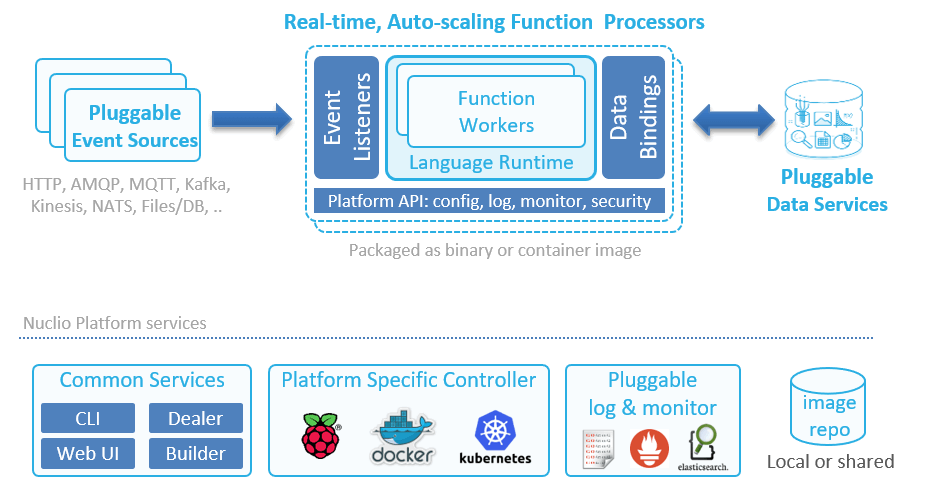
Nuclio, on the other hand, can scale up as well as out. A function processor (analogous to a container) can host multiple function workers. Each worker is then able to process one message at a time. This system supports concurrency within the same processor, and then autoscales the number of replicas of the processor based on load.
Figure 2: The architecture of a Nuclio function.
Another interesting difference between Lambda and Nuclio is that Nuclio lets you specify both the minimum and maximum number of replicas. And as an aside, Nuclio also supports GPUs.
Figure 3: Nuclio lets you configure both the minimum and maximum number of replicas.
With Lambda, you can configure a reserved concurrency for a function, which (counterintuitively) sets its max concurrent executions. But there is no way to tell the system to always keep a certain number of concurrent executions running at all times. The system always scales to zero when there is no traffic—behavior that is highly undesirable for systems that experience regular spikes in traffic.
For example, my employer, DAZN, is in the sports streaming business. We see huge spikes in traffic all the time, as millions of users flood in seconds before a sporting event starts.
Figure 4: Sports streaming platforms, such as DAZN, experience huge spikes in traffic just before a sporting event kicks off.
Without the ability to configure the minimum number of concurrent executions, these spikes result in large numbers of cold starts. Also, in these cases, Lambda has to scale out the number of concurrent executions quickly to meet the surge in demand. Here, we also run into the 500/minute limit on how quickly Lambda is able to scale out. As such, we are currently not able to use Lambda on the critical path of our system, which has to shoulder these spikes.
With Nuclio, you can programmatically update the minimum replica count prior to the event so that when the spikes come, you don’t have to worry about hitting scaling limits or enduring the performance hit from cold starts. You can also tell Nuclio to scale to zero immediately via API calls, which saves resources.
Figure 5: Adjusting the minimum number of replicas enables you to deal with predictable spikes in traffic.
Timeout
Another major difference between Lambda and Nuclio is how timeout is handled. With Lambda, an invocation can run for up to 15 minutes. While it’s possible for you to use recursive functions or step functions to extend this limit, both approaches have their own problems. As such, Lambda functions are great for event-driven architectures and performing short, ephemeral tasks.
With Nuclio, there is no max execution time. The containers can keep on running, which in turn allows you to go beyond the constraints of the event-driven model. You can now turn a function into a long-running service, which unlocks some interesting use cases such as long-running ETL jobs and training machine learning (ML) models.
Caching State Between Invocations
Both Lambda and Nuclio functions accept an event and context during an invocation.
Figure 6: Both Nuclio and Lambda functions accept an invocation event and context as arguments.
With Lambda, the context object is ephemeral and does not persist between invocations. If you want to persist data between invocations (e.g. static configurations, database connections), then you need to declare them as global variables outside of the function handler.
With Nuclio, the execution context itself is persisted between invocations and can be used to cache state. The context object also includes a built-in logger, which supports structured logging with JSON and four log levels: DEBUG, INFO, WARN and ERROR.
You can configure the default log level for a function and can even override this default log level per invocation—which is very useful for debugging. You also have the ability to export your logs to external services such as Elasticsearch.
Figure 7: With Nuclio, you can select the default log level for every function.Figure 8: You can also override the default log level for an invocation.
In addition, there are hooks for performing context initialization, which is called before the first invocation on the function. This allows you to perform initialization logic before the container is put into active use and removes the dreaded cold start problem that Lambda suffers from.
Data Volumes and Persistent Data Connections
With Lambda, functions only run when they are triggered by events. Furthermore, concurrent executions are garbage-collected when they have been idle for a few minutes. This behavior makes life difficult when you are working with relational database management systems (RDBMS) and other systems that require persistent connections. Indeed, a set of guidelines has been developed to help you avoid the many pitfalls of using Lambda with RDBMS. Furthermore, Lambda doesn’t allow you to use persistent data in standard file system mounts, which forces you to copy to/from object storage before working on large files such as images, logs, ML models, etc.
With Nuclio, however, you can use the context object to maintain persistent connections to databases. Since the context is maintained at the processor level, you get better reuse, as they are shared across invocations. You can also take care of other aspects of data-fetching with data bindings, including batching and caching, which helps improve IO performance of the application. Additionally, you can mount volumes to functions, which is useful for working with ML models or Tensorflow, and you can mount Kubernetes secrets as volumes. Indeed, Nuclio supports all of the volume types that Kubernetes supports.
Runtimes
Both Lambda and Nuclio support popular languages such as Go, Node.js, Python, .Net Core, Java and Ruby. Also, both platforms offer a way for you to customize the execution runtime.
With Lambda, you can create a custom runtime and distribute it through AWS Lambda Layers. This lets you introduce additional language runtimes that are not natively supported by the Lambda platform. Several vendors have published runtimes for PHP, Rust, Erlang and Elixir, to name a few.
With Nuclio, you can run functions on your own Docker image (see Figure 9), which can come from a private image repository. This allows you to tailor the execution environment itself.
You can also support additional language runtimes through a Shell function, which allows you to handle invocation events with any executable binary. See this example for more details.
Figure 9: Nuclio lets you run functions on top of your own Docker image, which can come from a private image repository.
Nuclio ships with 13 triggers, including cron, HTTP, Kafka, Kinesis and RabbitMQ. Since Nuclio is open source, you can also write your own trigger for services that you want to integrate with and leverage other people’s contributions. The HTTP trigger gives you an easy way to integrate Nuclio with other event sources that support HTTP as target, such as SNS. Also, since Nuclio supports the CNCF CloudEvents standard, it can arguably support many more event sources that are CloudEvents-compliant.
Nuclio triggers are all normalized to the same Event object. This removes the need to understand the specific event signature for each event source, which is often confusing when working with Lambda. It also makes it easy to switch a function between different triggers.
Built-In HTTP Trigger
With Lambda, you need to use API Gateway to create an HTTP endpoint for your functions. API Gateway is a feature-rich service, but it’s also complicated and often costs more to run than the Lambda invocations themselves. It also adds another source of latency to your API, which, at the minimum, is around 5ms to 10ms, and it can overhead spike to more than 100ms. This cost and latency overhead make it unsuitable for applications with high throughput or hard real-time requirements.
With Nuclio, every function gets a private HTTP interface by default. To expose the endpoint publicly, you need to specify an HTTP trigger similar to API Gateway. However, unlike API Gateway, this HTTP trigger does not incur extra costs and has minimal latency overhead.
Figure 10: With Nuclio, every function gets a private HTTP interface by default.
Unlocking New Use Cases with Nuclio
As you can see from our comparison, Nuclio differs from Lambda in a number of important areas, such as its concurrency model and that it has no max execution time. This opens the door to a whole range of use cases. Let’s take a moment to look at a few.
High-Throughput Data Processing Pipelines or APIs
For a high-throughput API, the cost of both API Gateway and Lambda is drastically higher than an equivalent application running in containers. This cost discrepancy has lead many to rewrite their applications.
Nuclio’s concurrency model makes more efficient use of available resources, which significantly reduces operational cost when running at scale. Functions have built-in HTTP interfaces so you also don’t need to pay for an expensive API Gateway service.
The ability to mount a volume to your function also lets you read and write data to/from a mounted volume at high speed and enables building stateful applications. Again, you can’t do this with Lambda today, as it doesn’t allow you to attach Amazon Elastic File System (Amazon EFS) volumes to functions.
These features make it economically feasible to run high-throughput and high-performance APIs on Nuclio functions. The same can also be said about high-throughput data processing pipelines that have to process multiple terabytes of data per hour.
APIs with Predictable Spikes in Traffic
Nuclio gives you the ability to configure a minimum number of replicas. This allows systems that experience predictable spikes in traffic to reserve sufficient resources ahead of time and avoid degrading the user experience when the spikes happen. Examples include food ordering services such as Just Eat or Deliveroo or sports streaming services such as DAZN.
At the same time, Nuclio still lets you scale to zero by setting the minimum number of replicas to zero. It gives you the control to optimize for resource usage or latency, depending on the situation.
Real-Time Applications
Nuclio does not suffer from cold starts and is able to deliver consistent and sub-millisecond response times on invocations. This makes it a suitable solution for applications with a hard, real-time requirement such as multiplayer games and real-time bots.
Serving Machine Learning Models in Real Time
To serve ML models in real time, you need to have both strong and predictable API latency and the ability to load and work with ML models that often are large in size (GBs).
Nuclio lets you attach Kubernetes volumes to your functions, and there are no size limits on these volumes. Combined with the performance characteristics, it’s possible to implement these demanding workloads with Nuclio functions.
Nuclio also has native integration with Jupyter, and lets you automatically deploy Jupyter notebooks and ML models as Nuclio functions.
Long-Running Jobs and Services
Nuclio does not impose a max execution timeout on function invocations. This allows you to turn your functions into long-running services and perform long-running ETL jobs.
Nuclio’s init_context() hook lets you create long-running services, such as an application that constantly reads off a Twitter feed (e.g. loads the TwythonStreamer with the context, which is polling an external service, versus becoming triggered by an event).
Conclusion
As we discussed, Nuclio is one of the few open source solutions that are also business-viable. It has key architectural advantages for higher performance or data-driven applications, including:
Nuclio is cloud-agnostic. It can be used in multi-cloud/hybrid-cloud scenarios. You can also run Nuclio on a laptop using plain Docker, which makes debugging easier.
Nuclio’s concurrency model and the ability to mount file volumes lets you build high-performance APIs and high-throughput data processing pipelines.
Nuclio gives you greater control over the concurrency of your application, which makes it viable even for applications with very spiky traffic.
Nuclio’s execution contexts are persisted between invocations, and it doesn’t impose a max execution time on invocations. This allows you to create long-running stateful applications such as ETL jobs.
Nuclio lets you attach Kubernetes volumes to your functions and has no limitations on the size of the volume. This makes it possible for you to work with large ML models that often are GBs in size. Nuclio also has native integration with Jupyter and can automatically deploy your Jupyter notebooks and models as functions.
Nuclio provides a good out-of-the-box developer experience. It has a built-in logger with structured logging support, and you can easily export your logs to an external log aggregation service.
If you are looking for a serverless platform that is not tied to a specific cloud provider, Nuclio is worth a look.
Ongoing developments in technology have led businesses to look to the cloud for greater flexibility, scalability and processing power. The telecoms industry is no different. Under growing pressure to meet the demands of the internet of things (IoT) and 5G, service providers are increasingly adopting cloud and virtualization technologies such as network functions virtualization (NFV) and software-defined networking (SDN) to provide them with the capacity they need to manage the explosion in data traffic.
In an environment in which traditional telco revenue has been eroded by OTT (over-the-top, or IP-delivered) players, the commercial advantages offered by a telco cloud have never been more important. It’s hardly surprising then, that the global market is expected to grow at CAGR of 20 percent, reaching $29 billion within the next two years.
Don’t Believe the Hype
Despite the messages of benefits, however, operators have reservations, with many expressing concern that the hype around the promise of NFV and SDN is just that—hype.
During a panel discussion at the MPLS, SDN and NFV World Congress 2018 in Paris, representatives of Orange and Nokia, among others, raised questions over the current level of investment in the technology. SDN was described as “not really a new concept” and NFV as being a “bubble.”
It was additionally suggested that the benefits of virtualization weren’t particularly economical. Operators are becoming increasingly aware that the cost savings that NFV promises often are offset by the need to deploy entire racks of compute resources to handle processes that previously would have been supported by a single appliance. When you factor in the CPU and server requirements, along with the necessary power and physical rack space, the cost of delivering the same performance as a dedicated solution can be at least as expensive as a custom-designed alternative.
Performance and Power
Given the fundamental role that both SDN and NFV play in underpinning telco cloud, opinions such as those expressed in Paris are concerning—particularly when publicly voiced and apparently widely held. It’s clear then, that if they’re not already doing so, operators need to address these issues to realize the potential of telco cloud in the most cost-effective and efficient way possible. Indeed, time is of the essence, as the performance and scaling problems that operators face with generic NFV infrastructure are only set to get worse once 5G networks are fully implemented. The sheer volume and speed of data traffic through a 5G network, for example, will bring entirely new requirements in terms of scalability and performance.
Encouragingly, though, steps are being taken to tackle technical challenges around performance and power consumption, particularly with regard to generic hardware. By distributing workloads between x86 general purpose processors and software-reconfigurable, FPGA-based SMARTNICs that are optimized for virtualized environments or VNF re-architecture, operators are turning to hardware acceleration as a means of improving performance both now and in the future.
Look into the Cloud
The analyst forecast mentioned at the beginning of this article illustrates that, while discussions continue around the relative economic benefits of virtualization, there’s no denying that cloud-based network infrastructure is beginning to take root across the telecoms industry.
Increasingly we are seeing operators moving workloads on to virtualized or containerized infrastructure, for example, as they look to improve performance, reduce costs and hyperscale as required by their various network functions, applications and services.
What’s more, inspired by other sectors that have successfully leveraged cloud-native functionality, operators are embracing Agile and DevOps development practices. Telco cloud provides operators with the development agility they need to combine and re-combine existing functions that, when tested and proven for scale, can deliver entirely new network capabilities. With the ability to quickly bring innovative new ideas to market, operators now have a new avenue of revenue to explore.
The benefits extend into the wider ecosystem, too. Not only will an open multi-vendor platform running on open source software improve operational and cost efficiency, but by allowing software from multiple vendors to be more quickly integrated, it will enable the creation of innovative new network services and IT functions that, in turn, could led to new revenue streams.
And, of course, the new paradigm shift will improve the customer experience. Shortly after last year’s Mobile World Congress (MWC), for example, Verizon and Colt carried out the first demonstration of two-way, inter-carrier SDN orchestration, making near real-time bandwidth changes in each other’s production networks. The implications of this are significant, offering enterprise customers in particular flexibility on demand.
The 5G networks and the new generation of handsets, including foldable devices, dominated this year’s MWC. One look at the show’s agenda, however, shows just how important the cloud has become. And in meeting the demands of 5G and all it entails, its importance will only grow. It’s time, then, for operators to take a serious look into the telco cloud.
At the Adobe Summit 2019 conference this week, Adobe detailed that its Adobe Experience Cloud customer experience ecosystem is reliant on a set of best DevOps processes that is wrapped around a modern microservices architecture and layered on top of big data platform deployed on the Azure cloud.
Adobe last year acquired Magento, provider of an e-commerce platform, and Marketo, provider of a marketing automation platform. Since then, Adobe has been working to integrate those offerings with its existing marketing application to create the Adobe Experience Cloud.
Anjul Bhambhri, vice president of platform engineering for Adobe, said this set of software-as-a-service (SaaS) applications are being integrated around a shared common data model that is layered on a microservices-based architecture of containers running on Kubernetes clusters. On top of that, Adobe is layering a series of machine learning algorithms, dubbed Sensei, to embed artificial intelligence (AI) across the entire portfolio, he said.
As that work progresses, Adobe plans to allow customers and partners to leverage the data stored in the Adobe Experience Cloud to train their own AI models using data curated by Adobe, Bhambhri noted. That data model, known as the Experience Data Model (XDM), is also being shared with partners including Microsoft and SAP, which last year committed to an ambitious initiative to build a common data model in collaboration with Adobe. XDM makes use of open source Kafka messaging software to integrate the various data pipelines that are required to integrate these applications at scale in near real-time, Bhambhri said.
Those efforts complement an existing initiative under which Adobe is exposing open application programming interfaces (APIs) to encourage developers to build applications that extend Adobe Experience Cloud.
Rather than building their own customer data platforms, organizations can drive their digital business initiatives using a big data platform managed by Adobe on their behalf. Many organizations have been building their own platforms to achieve that goal with mixed success, first deploying a data warehouse on top of a big data platform and then working to integrate various applications to provide a richer digital customer experience. Bhambri noted Adobe is pouring considerable resources to obviate the need for organizations to acquire, deploy and manage their own IT infrastructure to achieve that goal.
IT leaders must decide whether they want to reduce the time, money and effort required to build these custom platforms in favor of using a managed service from Adobe—which, arguably, would enable them to pour more resources into developing applications that, as a result, would come to market faster.
In the meantime, it’s clear the need to embrace digital business transformation will drive more organizations to embrace DevOps processes. The question now is to what degree they need to define their own set of best DevOps processes versus simply lifting the DevOps best practices that organizations such as Adobe have already proven.
DevOps tooling seems to be in a never-ending state of self-transformation. The continuing evolution of infrastructure and the tools that go with it are forever creating new ecosystems. On the infrastructure side, we saw VMWare, Citrix and other companies bring to market massive virtualization in the late ’90s and early ’00s. This, of course, prompted a little bookstore in Seattle to unleash something known as “the cloud,” forever changing the way developers push code to production.
The cloud, of course, is just an API around virtualization. A lot of the infrastructure changes prompted configuration management software, including Chef and Puppet, to emerge. Puppet is now 15 years old and Chef is around 10; even Ansible is now 7 years old.
In the past years, we’ve seen tools such as Terraform emerge and other higher-layer infrastructure, such as Docker, which led into Kubernetes. There’s a lot of tooling out there to make applications run on servers. Just as the containers/Kubernetes ecosystems have tried to implement change on top of virtualization infrastructure, we are starting to see developers dig back down into the operating system layer to improve infrastructure there. This leads us to our topic today: unikernels.
Unikernels are single-purpose virtual machines (VM). They only run one application—which is interesting when you think about it, because that’s precisely how a lot of DevOps practitioners provision their applications today. There is way too much software to provision nowadays—pools of app servers, clusters of databases, etc. Unikernels are fast to boot, fast to run, small in size, way more secure than Linux or containers and, if you have access to your own bare metal—either in your data center or through a provider—you can run thousands of them per box.
Some stats? Some can boot in less than five milliseconds—that’s slightly slower than calling fork (three milliseconds) but orders of magnitude faster than Linux. Some can run databases including Cassandra and MySQL, 20 percent faster. Some people (yours truly included) have provisioned thousands of them on a single box with no performance degradation. Some are reporting them running as a VM faster than a comparable bare-metal Linux installation of that application. Clearly, this is worth investigating.
There are many different methods that a given organization can take to provision software, but it’s pretty clear that popping into a server over SSH and sudo apt-get install something is very much of a downtrend. Phrases such as “immutable infrastructure” and “continuous deployment” fly right in the face of this sort of practice. You are either rebuilding your containers, rebuilding your instance or both. Unikernels really embrace this model as there is no apt-get-like functionality in them and you can’t log in to them remotely. They don’t even have the concept of users, mainly because at the end of the day, why do you even need them?
At scale, it’s getting more difficult by the day to make the argument for this construct. If the app is misbehaving, shoot it in the head and take it down. Debug the reason locally. It’s extremely rare for an end user to reason that there is something wrong with the host operating system.
In a unikernel, the only reason you’ll see a reference to a user is that most apps will demand to be run as a particular user or do things such as check for root privileges. In our case, if you look at underlying calls such as getuid, they are just stubs because we don’t need or use them. Keep in mind that this isn’t the mid-’90s anymore. We don’t have boxes laying around, where there are half-dozen users all running their code on the same box anymore. That model has long been gone. Unikernels don’t have shells and don’t have the notion of running other programs besides the one that is running.
If it’s easier to think about, consider that unikernels are much more like processes than they are like operating systems, although they share characteristics of both. While many link, the application in others will load. Unikernels are a concept that are largely misunderstood because everyone assumes it’s somehow like Linux. Just as unikernels are not just “containers 2.0,” unikernels are very different from Linux as well. Linux is a general-purpose operating system, while unikernels only run one application. Linux was made to run on bare metal, while unikernels are made to run as VMs. Keep in mind Linux predates VMWare by a solid eight or nine years and the cloud by many more. Operating system researchers wanted to go this route in the ’90s, but we just weren’t ready yet.
Another way to think about them is that they implement a sandbox for server-side applications. Much in the same way that the Chrome browser isolates each tab from each other to prevent one evil site from messing with another browser tab, unikernels prevent one application from messing with another application. Although under the hood, the technical implementation is quite different. More importantly, the unikernel single-process model eliminates the capability of running other ad-hoc programs inside the same VM. This is a huge blow to attackers who wish to run other programs on the same machine. It doesn’t prevent things such as remote file inclusion (RFI) attacks for various scripting languages, but for compiled and VM runtimes, it’s a striking blow because it deals with the fundamental problem of attackers using exploits only as a key to enter the server. Once they are on the server, they want to run their programs such as mysqldump or a cryptominer. They could care less about your software. Those organizations practicing shift-left security, or zero-trust infrastructure, should be keeping the development of unikernels on their radar.
However, unikernels are not without their problems. These are computers we are talking about here. One of the larger problems for unikernel adoption was that to build them, you had to be a lower-level systems engineer doing things such as twiddling CFLAGS in makefiles or patching foreign codebases you’d never patch yourself. This was problematic and something we wanted to fix with a new open source tool. So, we opened up OPS—which can take any existing Linux application and run it as a unikernel, making their use a lot easier.
If you’ve made it this far, I’m going to reward you: Let’s build and run a unikernel right now. Then, at least, the next time someone asks you if you’ve used them before, you can say yes.
First thing is, you’ll want to grab OPS. You can paste this into a Linux or Mac shell, and it will download and install itself:
var http = require('http');

http.createServer(function (req, res) {

res.writeHead(200, {'Content-Type': 'text/plain'});

res.end('Hello Worldn');

}).listen(8083, "0.0.0.0");

console.log('Server running at http://127.0.0.1:8083/');
This is simply a small little web server that listens on port 8083.
At this point you might be asking yourself, Do I need to install node on my system? The answer is no—not unless you plan on using external packages.
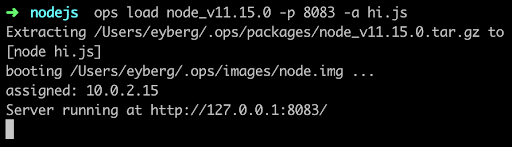
Now we can run it:
If it’s the first time you run ops, it will first download a node “package,” which is the interpreter and anything else it needs to run. For some languages, such as Python and Ruby, this can be substantial.
Then it builds a small disk-bootable disk image that contains your application code and, as you can see, boot straight into it. There is no init manager like Linux and there aren’t 30 different services that get fired off. Keep in mind this is a single process running.
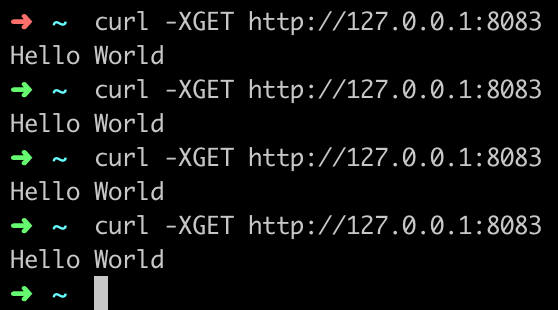
Now you should be able to hit it up with curl and see it run:
You’ve just built and run your first unikernel. How cool is that?
As certain trends such as “serverless,” “functions as a service,” and “no ops” gain steam, these concepts go hand in hand with unikernels. DevOps practitioners at organizations that use microservices and containers will also want to take notice as the amount of work to deploy artifacts such as these decrease considerably. Why is that? One of the many problems that containers had to struggle with was that all the existing underlying infrastructure layers that live at the virtualization layer, such as file systems and networking, had to be shifted up a few layers. Not only did this introduce performance and security challenges, but it also threw out the 20 years of virtualization software and ecosystem development that already existed. What’s interesting about unikernels is that they are always deployed as VMs, so they get to re-use a lot of the underlying ecosystem that has been existent, with very little or no change required.
From an adoption standpoint, unikernels are flying at ultra-sonic speeds under the radar. A lot of people are not aware of how many projects or organizations are working on unikernels today. Unikernels are starting to attract major attention from many various groups and institutions. Even famous, old stalwart Linux contributors such as Ulrich Drepper, the maintainer of libc, are working on unikernel projects today. Now there are even foundations and consortiums for unikernels. One recently announced was the UNICORE project. IBM even listed its No. 1 cloud patent recently as a hypervisor built for unikernels.
If you’re are a self-described DevOps person, it’d behoove you to learn more about unikernels and start playing around with them to understand them better. They aren’t going to kill Linux and they’re not going to kill containers, but do expect to see massive adoption in the coming years—not just because of their security and performance benefits, but because of the new forms of compute they unlock.
VMware today advanced its hybrid cloud strategy by making a series of updates to existing offerings, including the CloudHealth by VMware software-as-a-service (SaaS) application for managing and optimizing cloud applications, which VMware acquired last summer.
In addition, VMware Cloud on AWS is now available in data centers operated by Amazon Web Services in Canada, Paris and Singapore, the company noted. VMware also announced that the latest version of VMware Cloud Foundation—which provides and automatically updates all the VMware compute, storage and networking software required to build a cloud—has been optimized to deploy VMware Horizon virtual desktop infrastructure (VDI) software, and will available on Dell EMC VxRail hyperconverged infrastructure in April.
New capabilities being added to CloudHealth by VMware include enhanced multi-cloud reporting, multidimensional reporting and workspaces reporting.
The CloudHealth platform also is now integrated with the Wavefront by VMware cloud analytics and monitoring platform, enabling users of CloudHealth to employ Wavefront metrics to rightsize and optimize applications running on multiple cloud applications as part of their DevOps practices.
A future update to the CloudHealth platform will add enhanced amortization as well as support for convertible Reserved Instance (RI) exchanger automation, container cluster visibility and cross-family rightsizing for Amazon EC2, according to the company.
Finally, VMware announced it is making available version 9.7 of VMware vCloud Director to cloud service providers. This offering provides a single pane of glass through which multiple VMware environments can be managed regardless of whether they are deployed on-premises or in the cloud. The latest version of VMware vCloud Director adds support for version 3.0 of VMware Cloud Availability, which unifies onboarding, migration and disaster recovery services between multi-tenant clouds. VMware vCloud Director is only available to cloud service providers, but Ajay Patel, senior vice president and general manager for the cloud provider software business unit for VMware, said VMware and its cloud service provider partners plan to make available a software-defined data center (SDDC)-as-a-service offering through which they will manage deployments of VMware from the edge to the cloud on behalf of IT organizations.
VMware also revealed there are now more than 60 partners building or delivering managed service offerings for VMware Cloud on AWS, and more than 280 partners have achieved the VMware Cloud on AWS Solution Competency. VMware also now has 35 VMware Cloud Provider Program partners that have achieved Cloud Verified status, which is required to be eligible to deliver the forthcoming SDDC-as-a-service offering. Patel also revealed the number of organizations running instances of VMware on public clouds now exceeds 1,000, in the wake of the launch of VMware Cloud on AWS last year.
Patel said the shift to hybrid clouds is more about transforming IT operational models than it is about deploying workloads at new physical locations. The challenge many IT organizations will need to come to terms with going forward is deciding what portions of that IT operational model they want to run themselves versus opting to rely on VMware and its partners.
DevOps and the cloud are not only two of today’s biggest tech trends, but are inextricably linked. Research from DORA’s 2018 Accelerate State of DevOps Report and Redgate’s 2019 State of Database DevOps Report outline a clear correlation between cloud and DevOps adoption, with the two working together to contribute to greater business success.
For example, in the DORA report, those companies that met all essential cloud characteristics were 23 times more likely to be in the elite group when it came to DevOps performance. Similarly, Redgate found that 43 percent of organizations that have adopted DevOps have server estates that are all or mostly cloud-based. This compares to just 12 percent of organizations that have not yet adopted DevOps or have no plans to.
Looking into the link in more detail, research shows that there are four common factors that underpin DevOps and the cloud:
Cultural Openness to Transformation
Adopting DevOps is not just a technical or process change, but one that requires a certain type of culture to be in place. The renowned sociologist Ron Westrum famously categorized business cultures into three groups in his seminal paper A Typology of Organizational Cultures:
Pathological: Power-oriented, with low co-operation, a culture of shooting messengers bearing bad news and the crushing of novelty.
Bureaucratic: Rule-oriented, with limited co-operation, a neglect of messengers and a suspicion of novelty.
Generative: Performance-oriented, with high cooperation, messengers encouraged and a focus on learning from mistakes and embracing novelty.
It’s no coincidence that DevOps and cloud adoption both thrive best in a generative culture that is open to innovation and is focused on collaboration and continual learning and improvement. In fact, the DORA research found that a generative culture correlates with elite performance when it comes to software delivery, and that this group is 1.8 times more likely to recommend their team as a great place to work.
Building this open culture requires team members to feel safe about taking risks, rather than continually covering their backs, as well as good communication from leaders. This psychological safety underpins the continuous improvement mantra of DevOps and the innovation that the cloud delivers.
The Importance of the Cloud to Enabling Faster Software Delivery
As the DORA report found, cloud users are more likely to be elite performers when it comes to DevOps. But the research also highlights that there is a lot of confusion about what “moving to the cloud” actually entails. The National Institute of Standards and Technology (NIST) defines cloud computing as having five essential characteristics:
On-demand self-service
Broad network access
Resource pooling
Rapid elasticity
Measured service
Just 22 percent of DORA respondents agreed or strongly agreed that they met all of these criteria. Those that did were 23 times more likely to be elite performers when it came to software delivery. This shows that simply moving to the cloud alone doesn’t lead to DevOps success—the switch needs to be implemented professionally, in a planned way. This goes back to culture—the same openness to innovation has to underpin both, DevOps and the cloud, to realize their full benefits.
Breaking Down Barriers
One of the key points of a generative culture is openness to collaboration, which is clearly essential to DevOps and, in particular, incorporating the database into DevOps flows. In the past silos, rivalries and even animosity built up between application developers and database administrators (DBAs). In many ways this isn’t surprising—developers are focused on getting new code out of the door, while DBAs are seen as protecting data and databases and ensuring uptime.
However, for DevOps and the cloud to succeed, teams need to take a holistic view that breaks down team barriers. Redgate’s research shows that this is now happening, starting with the working relationship. Sixty two percent of respondents characterized the relationship between DBAs and developers as either good or great, up from 58 percent in previous years. This is heartening—only 13 percent said the relationship was poor with DBAs completely siloed, unaware of what’s happening in development, and deploying database changes to production in isolation.
In teams that have adopted DevOps across all projects, the great and good collaboration rises to 76 percent, with 41 percent stating great collaboration—almost double the overall average.
This collaboration is also reflected in daily activities. For example, over three-quarters (77 percent) of application developers are also responsible for database development and building database deployment scripts. In 47 percent of companies, developers are also responsible for the deployment of database changes to production.
Putting in Place the Right Tools
The collaboration behind successful DevOps and cloud adoption requires companies to introduce common practices and common tools across the entire process. This is reflected in figures from the Redgate research, with a growing adoption of the same tools within application and database development. Version control is now used by 83 percent of respondents for application development, and 55 percent for database development, rising steadily from 81 percent and 53 percent respectively in 2018. Particularly encouraging is the significant uptake in continuous integration—a cornerstone of DevOps—which is now used by 53 percent of respondents for application development and 27 percent for database development, up from 40 percent and 21 percent in 2018.
All of this is leading to increased usage of third-party tools across DevOps processes. The most substantial year-on-year change is the use of third-party provisioning tools—which has doubled from 12 percent for the application and 8 percent for the database in 2018 to 25 percent and 15 percent respectively this year.
In increasingly competitive markets, companies rely on software and data to differentiate themselves and drive success. And this, in turn, is underpinned by DevOps and the cloud, which provide the agility, speed, quality and flexibility to develop and deploy software more quickly and safely than before. Businesses therefore need to adopt both if they are to achieve elite performance across their software operations.