Category: DevOps in the Cloud

  • From Automated Cloud Deployment to Progressive Delivery

    From Automated Cloud Deployment to Progressive Delivery

    Your team is on its agile journey and you can more or less track a deployment from a story, through git commits, to an automated builder, to an artifact repository, into a container and then onto the cloud. Or, in fact, any other of the many valid variants that lead you to believe your deployments are largely automated. What you can point to is a business request comes in and the result is a service or a new app. Your purview seems to stop before your users can even respond though. Is that good enough?

    Let’s go back to the early idea of a release. It was a collection of all the features and fixes the loudest stakeholders had persuaded the product owner to put at the top of the story list. A date was promised, but QA was late, and the persistent stakeholders squeezed a little more juice out of a story. Then it was stuffed into a ball and delivered to your servers overnight, lest anyone notice. The next day, the developers had to deal with the fallout as the support queues grew with confused users.

    While developers were getting the hang of the agile notion of automated deployment, the release lifecycle did pretty much end with a deployment going live. This gave certainty that what had been built and placed in the artifact repository was the same thing the testers had seen in the staging environment. And it also had the changes Jira said it had.

    This type of release was very much like a birthday present. Your uncle talked to your dad briefly, without your knowledge, and agreed you really would benefit from a new pair of socks. Then these were delivered on the day with the receipt in the bag, just in case you needed to take them back.

    The first evolution came with the concept that a release wasn’t exactly synonymous with a deployment. Finally, the end-user’s perspective nudged its way into corporate release strategy–updates could be deployed without necessarily impinging directly on every user. What if there were two identical release environments with clever network switching, meaning only one was truly live? This type of flip-flop arrangement (sometimes referred to as blue/green deployment) allowed changes to be tested internally in a realistic environment before going live.

    It was the advertising industry that prompted the idea of A/B testing. Instead of guessing one variation of a campaign might be superior to another, the surprisingly scientific method of using a controlled sample and a variation was used on audiences to see which they preferred. In the digital age, it is possible to deploy two variations of the same release to different server sets. This might mean each user session could be using either release. It would then be necessary to associate the resulting click-throughs, or whatever success measurement is chosen, to the specific release flavor. The worth of this kind of experimentation was only as good as the question you asked, but it was at least observing real user interaction.

    Moving on, DevOps environments began to use more feature flags or toggles. These were code paths that could deliver feature changes in live servers, controlled through configuration changes. This reduced the need to re-deploy to make certain changes. Release minded teams were coalescing around configuration, as opposed to just code. Whereas code once compiled and built was locked away in unreadable artifact files–a larger stakeholder community could administer configuration files, usually encoded in English. This helped to keep the feature changes closer to the stakeholders and less likely to slip back into silos.

    As a more defined understanding of delivery arrived, so did the understanding of the user community. It used to be the case that a user was a one-line entry in a database. Even firms whose business is not mining their user’s data understand there are different sets of users for products and services.

    Traditionally, there has always been internal users or beta testers–those within the firm whose job is to check the bits they understand, or are responsible for, are working as expected. Then outside the firewall, there are the tech savvy community who actively want the latest updates. These guys report bugs and often compare your product with the competition, perhaps using both. This audience will not lose their marbles if you deliver a bug to them. More to the point, they will notice rapidly–perhaps telling everyone on social media–about your failings.

    The disengaged users who may only have the free version or tier of your product come next. These people are more likely to work on impressions and are best not disappointed. They are also unlikely to be keen on updates. Finally, the large core of solid users who pay their way, just want things to work and need to understand a path to continuity will already appreciate the software and will understand the roadmap by osmosis. These will probably include your biggest users, too. Of course, if you have no way of distinguishing your users all the above is moot.

    With services sitting on a public cloud and CDN like edge services such as CloudFront, the ability to release by territory is much more straightforward. This is also increasingly necessary for legal reasons–EU regulations, for example. This allows for tactical releases to communities in different time zones and sizes. The practice of deploying changed services to a small group for risk mitigation, or “canarying,” is another method that takes advantage of smart routing. This requires the ability to quickly observe and rollback releases though.

    Today, most software has some degree of dark launch that restricts the visibility of a release to the appropriate community, until all is well. In this sense, a progressive delivery (defined as “continuous delivery with fine-grained control over the blast radius” by James Governor) can be seen as the virus-like spreading of your software or services from your development teams’ laptops to the last user.

    Observing service use is simply part of the core concern of virtually every company in the tech space. From this perspective, progressive delivery changes the way to see your development team as mere builders to user fulfillment specialists, which of course, they always were.

    The future will undoubtedly involve increasingly customer-driven releases, which goes hand in hand with the increasing use of data science to study user communities and their exhaust. The important take away is to make sure your team is reaching further to the right-hand side of the product journey, and keep the user’s reaction to what you make as a larger part of your sensory input. Think more about constant small changes and less about ceremonial releases.

    — David Eastman

  • Common Cloud Security Mistakes and How to Avoid Them

    Common Cloud Security Mistakes and How to Avoid Them

    Over the last few years, it’s become apparent that traditional on-premise security policies are not a good fit for newer cloud-native environments. Even though the writing has been on the wall for a long time, the brewing security crisis still hasn’t been resolved. Far too many organizations continue to use security measures that are ineffective for cloud-native environments, along with inconsistent policy enforcement that leads to huge oversights and gaping organizational loopholes. The sad truth is that today, it doesn’t take a master hacker to infiltrate most cloud-native deployments.

    Many of the most infamous security breaches would have been extremely difficult to prevent even with an ideal security environment, but the weakness of the system is endemic, reaching far beyond a handful of vulnerable organizations. Even if some malicious actors could still get through, there’s no reason for organizations to leave their attack surface so blatantly unprotected.

    Here are increasingly common cloud security mistakes DevOps teams still make, and our suggestions for how you can stop them in your organization.

    Ignore Zombie Workloads

    Many organizations ignore zombie workloads that run on their architecture. When your team is stretched and you’re facing a number of serious security issues, it’s easy to dismiss zombie programs as nothing more than a harmless irritation.

    In actuality, having zombie resources scattered around your deployment blocks your ability to spot serious cryptojackers. Zombie workloads are often an indication of, and an invitation to, more significant invasions into your infrastructure. A report by SkyBoxSecurity revealed in 2018, cryptojacking was the leading attack vector. DevOps teams need to recognize the threat of hosting a program mining your resources for cryptocurrency, and take immediate steps to block them.

    Turn a Blind Eye to Leaky S3 Buckets

    AWS service buckets, particularly the S3 bucket, is one of the oldest cloud-native services. As a result, many S3 buckets are still governed by very old rules and regulations that leave many ways for someone to accidentally make the bucket public, open up access to unauthorized users and expose sensitive data.

    A study by HTTPCS reports 58% of AWS S3 buckets are accessible to the public, and 20% of them aren’t write-protected. Not only can malicious actors get to your sensitive customer data through S3 buckets, but often they can access your cloud credentials as well. Some of the most disastrous data breaches began from unrestricted access to S3 buckets, and it’s one of the most common causes of data breaches overall. It’s vital to regularly check your AWS console for public buckets.

    Allow Runtime Updates to Bypass the CI/CD Pipeline

    Every DevSecOps team agrees that your deployment is more secure when runtime updates are passed through the CI/CD pipeline, but that doesn’t mean the policy is always enforced. Developers will repeatedly ignore your security policies through practices, such as using open-source libraries, to avoid the security process of the CI/CD pipeline and speed up deployment.

    While this saves developers some time on releasing updates, it places a heavier burden on security teams, who have to run extra scans for these rogue workloads. What’s more, it builds complacency among DevOps teams, who assume there is no way to prevent unauthorized workloads and end up simply accepting them. Eventually, your security posture erodes to the extent that malicious actors can run harmful workloads without attracting your attention–until it’s too late.

    Permit Unrestricted Network Access

    Instead of spending hours on segmentation and separate access permissions, all too many DevOps teams fall back on a blanket set of network configurations that fall far short of the necessary access restrictions. They often place all their workloads into a single VPC, opening up access to third parties in the process.

    Without restrictions on public network access, it takes far longer for security teams to identify and isolate negligent and malicious activities. In a short space of time, DevSecOps teams find themselves overlooking serious oversights like unrestricted public root access, opening up enormous holes in their security profile.

    Faulty Rule Configurations for Micro-Segmentation

    When DevOps teams use micro-segmentation in containers, they face unique challenges. The more granular you get with your segmentation, the greater the risk you’ll miss faulty policy rules.

    Even your most familiar rule sets can create massive vulnerabilities. For example, if you allow your developers to use a specific IP to connect to the production runtime environment through SSH, you could unwittingly end up permitting unrestricted public access to sensitive areas. Sometimes, these faulty rule configurations go overlooked for as long as several months. To avoid supporting faulty rules, it’s important to audit them regularly with a tool such as Amazon Inspector’s Agentless Network Assessment.

    Avoiding AWS cloud security mistakes requires a shift in mindset. The harsh truth is a significant number of cloud-native deployments commit not just one, but several of the mistakes listed above. Cloud environments are deliberately decoupled from the network infrastructure in order to enable agile business practices, but DevSecOps teams continue to use network security techniques that aren’t capable of meeting the unique challenges of the cloud.

    The only way to fix these mistakes is to turn to new technologies designed for cloud security, such as using cloud workload identities to bridge the chasm between business logic and network infrastructure. Until ACLs and security groups are untethered from the network infrastructure and join cloud-agile business logic, they’ll fail to provide adequate cloud-native security.

    — Ran Ilany

  • The New Era of Kubernetes, With StackRox

    The New Era of Kubernetes, With StackRox

    Orchestrators are becoming the operating systems of cloud for the future. Which one do you think has become the dominant one? Ali Golshan, co-founder and CTO of StackRox, placed his bet on Kubernetes right from the start.

    StackRox is a Kubernetes-native security platform that helps DevOps and security teams operationalize security, providing richer context, native enforcement and continuous hardening.

    During this interview with MediaOps founder and editor in chief Alan Shimel, Ali discusses the adoption of Kubernetes and its prevalence today. More companies are realizing they can’t use traditional security. The tooling has to be native to the infrastructure they’re using, it must integrate into the build and the deployment. And Kubernetes is the best solution available, he said.

    Check out the interview below to learn more about microservices, containers and Kubernetes.

    — Veronica Haggar

  • Eclipse Foundation Looks to Create Cloud-Based IDE Standards

    Eclipse Foundation Looks to Create Cloud-Based IDE Standards

    The Eclipse Foundation today announced the formation of a working group to create standards for cloud-based integrated development environments (IDEs) led by Broadcom, EclipseSource, Ericsson, IBM, Intel, Red Hat, SAP, Software AG and Typefox.

    Mike Milinkovich, executive director of the Eclipse Foundation, said the Eclipse Cloud Development Tools Working Group (ECD WG) will work to replicate the success the Eclipse Foundation had in establishing standards for desktop IDEs based on an Eclipse standard among a new generation of cloud-based IDEs.

    There already are several cloud-based IDEs available. However, because each of those IDEs is based on a codebase that differs from the codebase used to create the Eclipse desktop IDE, there is no interoperability across cloud-based IDEs. Milinkovich said that makes collaboration between developers using different cloud-based IDEs all but impossible as currently there is simply too much differentiation among providers of cloud-based IDEs.

    As standards for cloud-based IDEs emerge, the Eclipse Foundation also expects best DevOps practices revolving around the integration of cloud-based IDEs and continuous integration/continuous development tools to advance as well, Milinkovich added.

    Collectively, the ECD WG will drive adoption and standards for cloud-based developer tools, including language support, extensions and developer workspace definition. To achieve that goal, the ECG WD will pull together oversight of several existing open source projects being spearheaded by the Eclipse Foundation, including Eclipse Theia, an IDE framework for building TypeScript applications; Eclipse CodeWind, a project that adds support for containers to IDEs based on Eclipse; Eclipse Dirigible, a cloud-based development platform developed by SAP; Eclipse Sprotty, a diagramming framework; and Eclipse Orion, a browser-based integration platform.

    Milinkovich said via those efforts, the ECD WG hopes to accelerate the adoption of cloud integrated development environment (IDE) and container-based workspace management, including the recently launched Che 7 project that makes available a native instance of Eclipse to build Java applications for Kubernetes environments.

    It may be a while before the ECD WG can create a set of standards for cloud-based IDEs that will have a material impact on application development. The Eclipse Foundation still has to bring numerous application development powerhouses on board for this project, including Microsoft and, once the acquisition of Pivotal Software is completed, VMware. However, organizations that are shifting development to the cloud at the very least can take comfort in the fact that there is now some level of commitment to creating interoperability standards that one day could increase overall developer productivity as more applications are built in the cloud.

    In the meantime, it’s apparent the Eclipse Foundation is committed to remaining relevant in the age of the cloud by both fostering IDE interoperability and acting as the steward for Jakarta Enterprise Edition, the open source follow-on to Java. Of course, not every IDE may be employed to build applications using Java. But at the very least, many of the familiar interfaces and constructs developers know today on their desktops will be moving forward into the cloud.

    — Mike Vizard

  • Understanding and Implementing the APM Puzzle – Performance and Availability

    Understanding and Implementing the APM Puzzle – Performance and Availability

    While every organization is unique, there’s one universal goal everyone can get behind—creating and delivering an exceptional end-user experience. For both classic IT organizations and companies built in the age of cloud, delivering continuous availability and appropriate application performance is key.

    Although digital transformation has become a buzzword some would say is meaningless, the idea of digitizing a traditional company and building new businesses whose foundations are established upon the latest web technologies is critical in today’s IT and non-IT organizations. Think about the prevalence of cloud migration efforts during the past several years. Traditional organizations typically prioritize on-premises applications with increasing quantities of hybrid applications. But, because they aren’t yet fully transitioned to cloud—whether IaaS, PaaS or SaaS—their IT organizations need to live in both universes.

    Monitoring these environments at both the infrastructure and application tiers and across each stage in this transition requires support of a full stack of tools to cover web uptime, user experience, transaction monitoring, application tracing, log analysis and appropriate infrastructure monitoring. That said, modern organizations that have fully embraced cloud and leverage modern microservice architectures have similar challenges, but the exact same level of monitoring visibility requirement.

    Whether public, private, hybrid or multi-cloud, nearly every organization has moved to the cloud in some capacity. Regardless of what the company produces or the services IT provides, it must maintain uptime, availability and seamless performance to create and continuously deliver a user experience rivaling competitors and exceeding user expectations.

    Because let’s face it, even though every business is different and virtually every market is saturated, consumers and B2B companies have more options than ever. Without delivering a solid end-user experience, there’s an ever-increasing plethora of alternative vendors and providers from which customers can choose.

    Public Cloud Platforms for Classic IT Organizations and the Cloud Generation

    Let’s explore a few differences between how traditional IT organizations and cloud-era companies interact with the cloud. At a high level, Azure is a natural choice for IT companies with significant investments in apps traditionally acquired (not built) by the company and managed by their IT team, that are now tasked with digitizing their business by leveraging public cloud platforms. These types of companies often have Microsoft Office, Microsoft Exchange and other Microsoft products already implemented on-premises, and Infrastructure-as-a-Service (IaaS) or Platform-as-a-Service (PaaS) solutions as well. If they’re now adding a public cloud platform to their mix, staff expertise and solution familiarity make adopting Microsoft Azure a natural next step. Microsoft has long recognized the need to make these types of transitions and mixtures easier, demonstrated by its Office365 suite (as an example).

    On the flip side, companies that were born fully in the cloud, (i.e., relatively newer organizations without a legacy anything on-premises, with respect to IT infrastructure) will likely have a higher propensity to choose a provider such as AWS or Google Cloud even though Microsoft, Oracle and others are certainly competing there as well. So, it’s not a matter of one being intrinsically better or more fully-featured, but about which is the best fit for the organization and its priorities.

    At the end of the day, however—regardless of organization type or public cloud platform implemented—every company needs monitoring tools and solutions that keep applications up, running and performing seamlessly. With an integrated set of simple, easy-to-use, quick to value and powerful solutions, organizations can achieve truly proactive lifecycle assurance of application availability and performance.

    Uptime and Seamless Performance: Putting Together the APM Puzzle Using All the Pieces

    Each and every piece of the APM puzzle must be incorporated to achieve full-stack visibility and ultimately top performance: user experience, metrics, traces and logs. Having a log management solution monitoring availability, enables proactivity and enables IT to react quickly to help identify and remediate problems is paramount—it’s table stakes that everything be available. After all, if a website or page isn’t accessible, business transactions cannot be processed and that business is effectively down.

    Creating and maintaining a healthy application involves not only ensuring it’s functionally available to users; it must also be performing appropriately—continuously delivering both a reasonably responsive user experience and supporting the required volume of transactional work. This means a complete view into all aspects of performance—from the website and webpages all the way into and across all relevant application components and their associated infrastructure—be proactively visible and monitored.

    There is thus a natural and increasingly urgent workflow affinity between logs and APM—across the development lifecycle. When errors occur, it’s critical to understand, precisely and immediately, where are the impacts on service performance, or if there even are any impacts. Conversely, when application performance issues arise, it’s critical to immediately know exactly which errors—across the complex and constantly changing infrastructure and application stack—are directly related to the problem at hand.

    Without this bi-directional workflow integration, not only can application performance and availability not be managed proactively, but any issues with application service availability and performance will take far longer to diagnose and repair—seriously impacting the business bottom line.

    Just because everything is available doesn’t necessarily mean it’s appropriately performing for the end user trying to use the application.

    With all this in mind, it’s paramount to implement powerful, easy-to-use solutions that’ll achieve integrated application performance and availability management for any type of organization operating on-premises and/or cloud-based applications across all cloud environments.

    Conclusion

    While traditional IT organizations and cloud-only companies are different in many ways, providing exceptional end-user experience and achieving seamless availability and performance (no matter what) is a common and increasingly critical business goal. To achieve business success, organizations should choose a complete suite of simple, powerful and integrated solutions to optimize and manage their cloud-hosted applications and platforms. Anything less leaves the APM puzzle unsolved.

    — David Wagner

  • Should Your Company Use DBaaS?

    Should Your Company Use DBaaS?

    From SaaS to IaaS, companies are rapidly moving to the cloud to gain huge agility and cost benefits. So, is it time for your company to take advantage of database as a service (DBaaS)? Here’s a high-level discussion to help you along your decision path.

    First, it’s important to distinguish DBaaS from simply running a database on a cloud-based server, such as Amazon AWS or Microsoft Azure. While you can certainly gain some cost and agility benefits from running your database on a virtual machine, you’ll still need to provision and maintain the database, that is, you will need server operations expertise.

    With DBaaS, the cloud provider also provisions and maintains the database, eliminating the need for your organization to maintain server operations expertise in-house. DBaaS manages the entire environment—physical and virtual hardware, operating system, networking, replication configuration, etc.—so you can stay focused on software development. With the click of a button you can set up the database and then connect your application with a simple API call. And you’re ready to go.

    The speed and cost advantages of this approach can be huge, but there are also some limitations, so it’s important to assess whether your company’s resources and your project’s requirements align with the current capabilities of the various DBaaS offerings.

    Reasons to Use DBaaS

    Lack of Expertise: As suggested above, if your technical team is mainly composed of software developers who won’t be able to manage the complexity of provisioning a database, you should consider DBaaS. In addition to handling the management of the database, the DBaaS provider will offer additional services, such as automatic backups of your data. In this worry-free environment, you can focus on optimizing your software instead of constantly worrying if the database is functioning properly.

    Short-Lived Databases: If you need databases to serve as back ends for continuous integration testing, DBaaS will allow you to rapidly provision the databases, populate them with test data and then delete them when they are no longer needed. Having the database provisioned for you makes it far faster and simpler to build the required automation for the testing environment.

    A Microservices Design: DBaaS can be particularly helpful, even in a production environment, if you are using a microservices design composed of a very large number of databases. Even if you have the internal expertise, you may not want to invest the time and effort in deploying all those databases. DBaaS can get you into production significantly faster.

    Reasons Not to Use DBaaS

    While the above benefits are appealing, you likely won’t want to use DBaaS in the following scenarios.

    Database-Centric Applications with Complex Topologies: To ensure ease of deployment, DBaaS providers limit the ability to deploy complex environment topologies. This reduces the flexibility DBaaS customers have. For example, let’s say that for disaster recovery, you have a primary synchronous replication cluster in one region and a secondary synchronous replication cluster in a different region, with an asynchronous relationship between them. This relatively complex topology is outside the scope of most DBaaS offerings.

    IO-Bound Workloads: If your database has IO-bound workloads, you may need very powerful hardware, including high-end CPUs, terabytes of memory and very fast storage. In this case, you may not find a DBaaS provider that offers a configuration that will meet your needs.

    Understand Your Options

    If your database requirements align with the capabilities of DBaaS, you now have the ability to eliminate significant operational complexity and develop, test and deliver your applications faster and at a lower total cost. However, make sure you spend time carefully investigating today’s DBaaS offerings, including Amazon RDS, Google Cloud SQL and Azure SQL Database, which all have different features and focus, including deployment models, performance trade-offs, instance types and more.

    If your needs don’t fit current DBaaS offerings, you’ll need to provision your databases yourself. If you don’t have the expertise in-house and can’t afford new hires, a database consultant may be a cost-effective strategy for getting the support you need.

    — Tyler Duzan

  • Why Integration Must Be Hybrid

    Why Integration Must Be Hybrid

    Integration is the central piece that ties your enterprise together. The need to integrate has only increased with the proliferation of SaaS applications, IoT sensors and devices, B2B e-commerce supply chains and mobile app development in addition to the vast number of applications that still reside in on-premises data centers which also host mainframe, legacy and custom applications. One of the biggest drivers today is digital transformation—organizations are rapidly trying to become digital enterprises in order to differentiate themselves from the competition and develop new business models to create new revenue channels.

    In the meantime, APIs are becoming the standard way of connecting applications, data and devices, and providing services to partners and end users. The API economy is the term used for creating new products as part of an organization’s transformation journey. APIs are also rapidly becoming a new channel for B2B partner interaction. Since APIs and integration are two sides of the same coin, this allows organizations to quickly realize the value of integration to unlock data from different silos, drive consumption of this data and leverage business benefits for the application of this data in various end user and consumer apps.

    It’s a Hybrid World

    The most common understanding of hybrid is that organizations have applications both on-premises as well as the cloud. Pure cloud integration is a fantasy since most organizations will have applications and systems that have to stay on-premises for a variety of reasons: the cost and risk of redeveloping core capabilities (eg. An ERP application that has been heavily customized for the business or a core banking application that is mission critical), the lack of critical services in the cloud, concerns about security and sunk cost of on-premises applications and data sources (mainframe and legacy applications that just work and will be extremely expensive to rip and replace with a SaaS application).

    However, the definition of hybrid is much broader and according to Gartner, such a strategy must address a set of challenges that go across personas, domains, endpoints and deployment models. Lets explain each of these in more detail:

    • Personas: Integration development today is not just the purview of IT specialists but extends into ad-hoc developers and business users (often called citizen integrators) who despite not being technical cannot wait for IT to develop integrations for them.
    • Domains: Integration has always been a continuum supporting a variety of use cases that go across applications, B2B partners, data (for the purpose of doing analytics) and process (to support automation and orchestration).
    • Endpoints: The sources and targets for integration started originally with on-premises, then expanded to the cloud along with the need for mobile connectivity and more recently has exploded with IoT with the proliferation of sensors and devices.
    • Deployment Models: This covers the more traditional definition of hybrid and includes on-premises, cloud and hybrid (cloud and on-premises) but is now expanding into a new style called embedded, using a headless deployment model which is required for SaaS applications that need underlying integrations to satisfy their end user requirements.

    The Hybrid Integration Platform

    A true hybrid integration architecture makes integration available across all environments, for all the personas, overlapping all the domains and connecting all the endpoints. This will span on-premises ERM, CRM and mainframe, cloud and SaaS environments, edge devices and sensors and B2B partners–we call this integrating edge to app.

    A key architectural principle in hybrid integration is to allow integrations to be done close to where the applications are in order to reduce latency and increase performance. From an application connectivity perspective, hybrid requires applications hosted on-premises, public cloud and private cloud to all be connected seamlessly so an integration developer does not worry about where they are and only needs to easily wire together the mapping to move data from one application to another.

    From a B2B perspective, hybrid requires data from B2B partners (customer and suppliers) to easily be identified, exchanged and processed within the integration layer. From an IoT perspective, hybrid requires that data from sensors and devices either directly or aggregated after analysis is integrated with back-end applications. Finally, all the integrations need to be exposed via an API layer for internal business units and external customers to consume the data in a secure and privileged way through mobile or custom apps.

    These requirements have created the need for a hybrid integration platform (HIP) that supports hybrid deployment across on-premises and cloud, democratizes integration development across IT and business users, is versatile enough to support all integration patterns and is extensive enough to integrate everything.

    Components of a HIP

    A lot of organizations originally solved the integration problem by adopting enterprise service bus (ESBs) and integration platforms. These are still widely in use and in many cases powering mission critical applications for organizations. These integration products solved the application to application (A2A) problem and in conjunction with message oriented middleware (MOM) provided capabilities to decouple publishers and subscribers and allow new applications to be easily added.

    However, ESBs are undergoing an evolution since they are considered a monolith and organizations are seeing the need to deploy light weight integrations as microservices. This has led to the emergence of a microservices runtime (MSR) that can be scaled very quickly to meet the needs of the business. MSRs are typically deployed using Docker containers and scale using a container orchestration standard such as Kubernetes and are subsequently monitored using open source tools, such as Prometheus.

    A big requirement for deploying microservices is the need for DevOps which provides the discipline to manage the dev/build/test/deploy process using automated techniques. Many of these organizations also adopted B2B gateways to extend the reach of integration to their trading partners for the purpose of exchanging e-commerce documents such as purchase orders and invoices via standards, such as EDI and XML.

    A lot of transactions still occur using files leading to the need for a managed file transfer (MFT) offering to securely manage file interactions. These in conjunction with adapters and connectors provide reach to a wide variety of applications and data sources. A newer component is API management, which allows existing integrations to be exposed as APIs for access to a variety of consumers while providing policy based enforcement and security of the underlying services. APIs needs end-to-end lifecycle management and governance to control the creation to retirement process and also drives the need for asset management to track dependencies and relationships and provide impact analysis.

    IoT integration is becoming a common use case. An IoT platform along with edge capabilities will allow data from sensors and devices to be easily integrated and analyzed for the purpose of moving to other systems or to take action. In-memory is a key embedded capability for ensuring high performance and scale.

    Finally, iPaaS is a pure cloud offering which enables integration in the cloud but in conjunction with an on-premises integration platform, or agent, it can ensure data is seamlessly exchanged between cloud and on-premises with end-to-end visibility and monitoring across the different environments. Here is a quick summary of the components:

    • ESB or integration platform (with broad connectivity capabilities)
    • Microservices and DevOps
    • API management and governance
    • B2B and MFT
    • Messaging
    • In-memory
    • IoT platform
    • iPaaS

    A Practical Approach to Hybrid Integration

    A HIP can be extremely powerful but involves a number of components which can also make it overwhelming to tackle all at once. A practical approach is to add components (using a building blocks approach) as the need arises to address various integration use cases.

    Most customers already have an ESB or integration platform, so that is usually the starting point for integrating on-premises applications. Once an organization starts adopting SaaS apps then there is a decision to be made whether to simply do cloud integration using the on-premises ESB or to start adopting an iPaaS. A critical factor in this decision process is to follow the general guideline and allow integrations to be done close to the applications. The decision matrix for such a scenario can be described as follows:

    • If the use case is mostly cloud to on-premises and most of the applications are still on-premises (80/20 rule) then this can be done within the ESB by adding cloud connectivity options.
    • If the use case involves a number of cloud-to-cloud integration needs then it may be worthwhile to invest in an iPaaS for efficiency reasons (there is no need to go from cloud to ground and then back to cloud).
    • If the application mix gets switched to mostly being SaaS apps then an iPaaS should be adopted since most integrations will be done in the cloud anyway.

    Once you bring together an ESB and iPaaS you are in a great position to start leveraging API management and add B2B capabilities to round out most of your integration needs and start deriving value from these integrations.

    Business Benefits

    Hybrid integration provides a way for customers to move ahead with critical projects and strategic transformation by exploring more flexible solutions. Not long ago, integration had been painted as a back-office capability with little direct impact on the business. However, integration needs have moved to the front-office and addressing these requirements are key for successful digital transformation initiatives.

    The business benefits are as follows:

    • Organizations are seeing more demand from customers for a better customer experience. Customers have many choices, the best experience wins the business.
    • Businesses need to react faster to disruptive changes by increasing the delivery cadence and deploy integrations faster.
    • The technology world is experiencing many disruptions. Businesses need flexible architectures to disrupt instead of being disrupted. They need to be able to implement new projects, scale rapidly to take advantage of short-term opportunities and try new fast-fail ideas to leapfrog the competition.
    • Gain benefits of the cloud. There is constant pressure to reduce TCO, use an opex model instead of capex and be able to access and leverage all data available from new IoT and SaaS sources.
    • Democratize integrations. IT departments are at breaking point and can no longer meet the needs of the business which means business analysts need to develop integrations on their own in a self-service way, which allows more people to contribute to the company’s goals.

    Real World Customer Case Studies

    Retail Pharmacy: Our first case study is a large global enterprise with more than half a million employees and hundreds of distribution centers. One of the biggest changes in the company’s history was the merger of two iconic brands. The company needed a global platform strategy to stay competitive and remain ahead of Amazon and other digital disruptors in the retail space, and coined their version of a HIP: Independent Federation Layer.

    Software AG provided a solution to standardize global operations—a “cook once, serve many” solution. Rather than buy more tools, the company would invest in a unified set of software capabilities using webMethods HIP to integrate all systems. They set up a 200-person integration center of excellence. All retail stores are being migrated onto webMethods for a mission-critical retail transformation program to simplify and standardize sales and inventory processing. The next phase will be standardized processes for warehouse and order management, replenishment management, financial management and more. With webMethods HIP, this retail pharmacy has the agility to react to market challenges and opportunities.

    Transport Company: Our second case study is a multinational public transport company that operates bus, train and tram services in Europe, Canada and the U.S. They needed to lift and shift services to the cloud in order to create a new business offering that could scale easily. They refactored their webMethods integration code base and moved key services to the webMethods integration cloud to enable customers to purchase tickets using mobile and web platforms via third-party websites. They provided secure access to on-premises databases by exposing APIs to the cloud using webMethods API gateway. In the process, they created a reusable ticketing platform that they’re offering to other transportation providers. They now have a new line of business.

    — Subhash Ramachandran

  • Survey Sees Cloud Foundry Momentum Gains

    Survey Sees Cloud Foundry Momentum Gains

    At a time when many organizations are wondering to what degree they should rely on legacy application development and deployment platform versus emerging container-based platforms, the Cloud Foundry Foundation (CFF) today released the results of a survey that shows reliance on the organization’s namesake open source platform-as-a-service (PaaS) environment continues to grow.

    Announced at the European Cloud Foundry Summit, the annual survey of 306 IT professionals finds 45% of respondents describe their use of the PaaS as “broad,” compared to 30% a year ago. The same survey finds nearly 20% started using Cloud Foundry in just the last 12 months and 39% of developers are deploying applications now in less than one day. More than three-quarters (77%) report application development cycles of fewer than three weeks.

    Nearly half of survey respondents report they have at least 100 developers using the PaaS, a significant jump from just one-third last year, and the share of companies with more than 50 applications on Cloud Foundry grew to 43% in 2019.
    The future of the PaaS has been called into question ever since the rise of Docker containers and Kubernetes. The CFF has been slow to adopt Kubernetes as a more efficient foundation for deploying a PaaS environment. Most recently, the CFF has provided organizations that adopt the PaaS the option of replacing the Diego container orchestration engine developed by the CFF with Kubernetes. At the same time, the CFF is working toward replacing much of the foundation layer for Cloud Foundry with Kubernetes to provide a more efficient means of standing up a Cloud Foundry environment.

    The CFF has also made it possible to deploy applications built on Cloud Foundry on a Kubernetes runtime. CFF CTO Chip Childers says that no one should be surprised when the rise of Kubernetes leads to more adoption of Cloud Foundry. Most of the application development environment available for Kubernetes today are not as robust as the Cloud Foundry PaaS, with the notable exception of the Red Hat OpenShift PaaS. Following the acquisition of Red Hat, IBM is now promoting Red Hat OpenShift as the cornerstone of a hybrid cloud strategy that has Kubernetes at its core. Meanwhile, last month Pivotal Software, provider of a curated instance of a Cloud Foundry PaaS, told financial analysts it expected to see a $40 million to $50 million decline in revenue in fiscal 2020. Shortly after, VMware moved to acquire Pivotal, which, like VMware, is a unit of Dell Technologies.

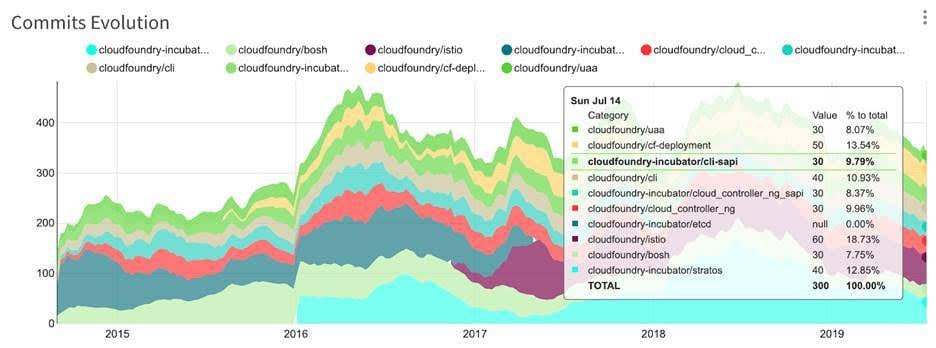
    An update to a previous report published today by source{d} shows there are now 879 repositories in the Cloud Foundry GitHub organization, with the total number of commits reaching approximately 50,000 per month. The report finds the highest levels of activity are centered around the Stratos UI project, Istio integrations and the core Cloud Foundry Application Runtime Cloud Controller.

    The CFF and Kubernetes, under the auspices the Cloud Native Computing Foundation (CNCF), fall under two separate arms of The Linux Foundation. It’s unclear if the Linux Foundation might one day merge these two arms or continue to keep them separate as a means of navigating conflicting vendor strategies. Whatever the outcome, Cloud Foundry is likely to remain a vibrant part of the open source community for many years to come.

    — Mike Vizard

  • Cloud Security: Self-Healing Infrastructure With Fugue

    Cloud Security: Self-Healing Infrastructure With Fugue

    Misconfiguration is the No. 1 cause for data breach in the cloud. Fugue helps to eliminate data breaches, as it fixes anything that gets drifted by providing baseline drift detection and automated remediation. Fugue is all about cloud security. It identifies security risks and compliance violations and ensures they’re never repeated.

    During this interview, Josh Stella, co-founder and CTO of Fugue, explained how his company offers developer-friendly tools that tell you if you are “breaking a rule and how to fix it,” providing visibility and control for all DevSecOps teams. With the self-healing cloud infrastructure, Fugue corrects misconfiguration and works on a whole configuration without having to write code or automation scripts.

    Check out the interview below, which also includes a demo of how the technology works by Stella himself.

    — Alan Shimel

  • Atlassian Looks to the Cloud

    Atlassian Looks to the Cloud

    As part of an effort to accelerate migrations to the cloud, Atlassian is making instances of Jira Software, Confluence, Jira Service Desk and Jira Core running in the cloud available for free, as well as premium options that provide access to the same software with access to additional features and support.

    Harsh Jawharkar, head of go-to-market for Cloud Platform at Atlassian, said it’s apparent most organizations want to shift from on-premises to cloud versions of Atlassian platforms. However, they need control and more transparency into how much that shift will cost, said Jawharkar.

    At the same time, Atlassian views the cloud as an opportunity to expose more end users to its offerings by making them available for free. These editions of Jira Software, Confluence, Jira Service Desk and Jira Core will be available in the coming months alongside existing free editions of Trello, Bitbucket and Opsgenie.

    In addition, Atlassian is now extending its Cloud Premium service to now include Jira Software and Confluence, with a premium edition of the Jira Service Desk coming soon. Atlassian is also making 50% to 75% discounts available to eligible academic organizations and non-profit organizations.

    Atlassian is also moving to provide organizations with more control over where data gets stored. Customers now can choose where data in the Atlassian cloud will be stored to address regulatory compliance concerns. Atlassian also recently added a data encryption at rest and in-transit capability to ensure no data stored in its cloud is compromised by unauthorized access.

    In addition, Atlassian is updating Atlassian Access, a console for managing access to its various platforms, to include support for Google Cloud Identity and Microsoft Active Directory Federation Services (ADFS). Atlassian also committed to providing support for multiple cloud access brokers (CASBs) starting with an early access program involving McAfee and Bitglass before the end of this year.

    Atlassian is also promising enhancements to its audit log and early access to tools, which will help organizations better understand how Atlassian software is being consumed and their associated billing costs. The whole process of onboarding and offboarding users is becoming critical as organizations become more concerned about controlling their cloud application costs, noted Jawharkar.

    Finally, Atlassian is enabling customers to customize the URLs associated with Atlassian cloud service to reflect their own brands.

    Atlassian today has more than 150,000 customers consuming its software, including Costco, Delta Airlines, Office Depot and Visa. The most widely employed Atlassian application in DevOps environments is Jira, a project management application optimized for tracking software development projects. Atlassian is now trying to extend that base of customers to increase usage of OpsGenie, a set of tools for managing alerts.

    Obviously, each IT organization is going to transition to the cloud at its own pace. The issue most of them are wrestling with now is determining whether it makes more economic sense to move to the cloud or stick with the on-premises IT environment they already have in place.

    — Mike Vizard