Category: DevOps in the Cloud

  • Internal Developer Portal: What it Is and Why You Need One

    Internal Developer Portal: What it Is and Why You Need One

    One main advantage of the cloud is that it offers developers flexibility and a self-service solution. Instead of having to contact the central infrastructure team whenever a dev team needs a new server or a cluster, the dev team can do it themselves through a simple web UI. This change drastically improves productivity. But there’s a caveat: Most companies don’t actually want to use the default portals provided by cloud providers. There are a few reasons for this: Security, simplicity or the need for custom, company-specific options, to name a few. That’s why we now see a move toward internal developer portals. In this post, you’ll learn what internal developer portals are and how they can make your developers’ lives easier. 

    What is an Internal Developer Portal?

    An internal developer portal is a self-service application and data store that lets developers and managers track and organize everything their engineering teams build and operate.

    Imagine that you need to create a new microservice. Your developers will first need to provision infrastructure for it; for that, they’ll use a cloud provider portal. Next, they’ll need to create new CI/CD pipelines or modify existing ones. Then, they’ll probably need to implement some changes to existing components like the API gateway and database. Lastly, they’ll probably need to add some documentation or make their new microservice visible to the rest of the company.

    Overall, they’ll need to touch a few different UIs or portals. Now, imagine they can do all of that from one place. That’s what we call an internal developer portal. It’s a self-service portal that lets developers catalog and understand relationships, ownership, resources, external service data and anything else they need to understand and operate their software.

     Why Does an Internal Developer Portal Matter?

    Now that we know what an internal developer portal is, let’s take a step back and discuss why internal developer platforms (IDPs) are on the rise. The main reason is because of the increased complexity of both software and infrastructure. Especially when we’re talking about cloud-based microservices environments, it’s challenging even for senior engineers to keep track of all dependencies and things that must happen every time changes are needed. Microservices architectures are heavily decentralized. Although you’ll still see the typical three-tier software architecture, in most cases, it’s no longer easy to tell by looking at a random component where it fits in the bigger picture just by its name or server location.

    Natural Evolution

    The second reason is that it’s simply a natural next step in the evolutionary process for self-service portals. Old-school, on-premises-based environments barely had any self-service capabilities. Do you remember how difficult that was? To request a new server, you had to email the central infrastructure team. If you were lucky, you’d get what you needed in a matter of hours or days. But more often than not, it took a week or two. And if you made some mistake in the initial request, that would cost you an extra week (or more) of waiting. More advanced companies? Even when they created some custom self-service solutions, these were limited. Often, it wasn’t much more than an online form to be processed by the infrastructure team which often became a bottleneck for all dev teams.

    When most companies started moving to the cloud, they began to see the benefits of self-service platforms. The ability to create servers ad hoc within a matter of minutes led to increased developer productivity, faster time-to-market and better quality software. But again, cloud-provider platforms are suitable for managing cloud infrastructure; you need more than that for a complete solution. Your developers can be more effective at creating and changing cloud infrastructure, but everything else was still done separately. And that’s how we naturally evolved into the demand for internal developer portals. To bring even more flexibility and clarity while increasing your dev teams’ productivity, you need to take the next step in the self-service platform evolution and combine all the things developers need into one internal developer portal.

    Clarity 

    Also, from a business perspective, internal developer portals bring clarity and offer a good overview of all your infrastructure and software development efforts. Even if you’re in the cloud and your dev teams can manage the infrastructure as they choose, you still need some control and oversight—for example, to avoid wasting money on test servers that developers forgot to delete. Sure, you can get simple reporting from your standard cloud-provider portal, but what if you’re using multiple cloud providers or have a hybrid-cloud environment? An internal developer portal can benefit both developers and their managers. Long story short: IDP portals are the future of software development.

    What Can an IDP Actually Do?

    How do you create an IDP for your company? You can build your own from scratch, use some OSS offerings or go for ready-to-use products.

    Build Your Own

    The first option would give you the most flexibility and ability to perfectly tailor the solution to your needs and the needs of your developers. However, building your own IDP from scratch is almost like building your own operating system from scratch. It requires a lot of work which could negate the main benefits that IDP is supposed to bring. You want to implement IDP to increase developer productivity and decrease time-to-market, but it would take you months to build it and years to maintain it to keep it working properly with constantly changing cloud APIs.

    Open Source IDP

    The next option is open source IDPs. Since IDPs are, in general, quite complicated pieces of software, there aren’t many options to choose from. The two most popular are Backstage and Gimlet. Backstage is more of a DIY platform for building developer portals, which means you’ll still need to spend quite a lot of time creating something that actually benefits your company. Gimlet is quite popular, too, but it focuses on Kubernetes-based environments. Both are great tools—don’t get me wrong—but if you’re looking for something ready to use and feature-rich, consider the third option.

    Ready-to-Use Solutions

    The last option is to use a ready-to-use product. Ready-to-use solutions combine the IDP functionality with incident response capabilities as well as metrics, dependencies visualization and filtering across multiple clouds.

    Internal developer portals are gaining popularity for good reason. In fact, many companies have been trying to build IDPs for years without even knowing the solution had a name. This is because an IDP-like solution will naturally evolve in any company that cares about developer experience and moving faster. The problem is that it usually takes years to come up with a single solution that fulfills all their needs. Another problem is that most of these organically created internal developer portals focus only on the tech side and skip the business needs. That’s why a purpose-built tool can be much easier and faster to implement while also doing its job much better.


  • Self-Service Helps Devs Solve Cloud Security and Compliance

    Self-Service Helps Devs Solve Cloud Security and Compliance

    Organizations that need compliance must follow a growing number of security standards—PCI, HIPAA, SOC 2 and GDPR just to name a few. Every new standard gives rise to an exhaustive list of hard-to-implement security controls.

    Cloud providers like AWS have tried to help, but there is still a lot left for developers to do to secure their infrastructure. Cloud providers give you the raw materials necessary to remain compliant, but you’ll have to learn how to use them.

    It may be easier to envision the scale of the compliance challenge by working through an example. PCI DSS is a typical security standard. When moving to the cloud, you’ll have to figure out how to take your compliant infrastructure and implement it using cloud technologies.

    PCI has several requirements regarding network architecture and firewall barriers. For example, specification 1.1.4 calls for a “firewall at each internet connection and between any demilitarized zone (DMZ) and the internal network zone.”

    Segmentation is the goal. Your network can’t allow traffic to move freely to wherever it wants. You need to set up rules and carefully guard sensitive areas of the system.

    In AWS, we’d suggest implementing this requirement using a mixture of services. Testing, staging and production regions of your application should each be in their own VPC. You’ll also need intelligent use of Security Groups, identity and access management (IAM) and instance profiles. Lock everything down and only open the necessary ports. A web application firewall (WAF) should protect the perimeter.

    IaaS services like RDS and Elasticsearch should be isolated via security group. Platform services like Dynamo, S3, SQS and Secrets Manager should be isolated via IAM. Lambda has one leg in the security group and another in IAM.

    PCI control 6.1 states that you must have a mechanism in place to identify security vulnerabilities within your compliant systems. How can you accomplish this in AWS?

    Automation is your best friend in application security. As the speed of development increases, security must keep up. And while there will always be a place for humans to dig into applications through penetration testing to find tricky vulnerabilities, automation will help you find the low-hanging fruit.

    AWS Inspector is an API-based service that will proactively scan and assess your application for vulnerabilities and warn you about them. This is an automatic process once it is set up, but it requires an administrator to choose what to test.

    Other tools exist to automate application security, such as Wazuh. As with AWS Inspector, there is effort involved in setting it up, initially. But once you complete the configuration, you’ll have a constant security scan running to find vulnerabilities before they reach production. And should some slip in, the scans will continue to search and find vulnerabilities before attackers exploit them.

    PCI Requirement 7 states that you must “restrict access to cardholder data by business need to know.” You’ll need to know who has access to what within your application and when they can access it.

    Restricting access in a cloud environment can be challenging because you require administrators to configure the services that your application needs to work. How can you limit access while allowing the admins to do their jobs?

    Orchestrating access control will require careful use of AWS Security Groups, IAM and federated tokens. Give your admins a token for access that expires quickly. Whitelist trusted IPs for access only to the areas of your environment that are necessary for the user’s role.

    The whitelist of IPs and the security groups will need to be kept up-to-date to make sure no holes open when personnel changes. Keep a tight grip on access control in your cloud environment.

    PCI Requirement 10 outlines the need to track and monitor all access to network resources and cardholder data. As your cloud environment grows, you’ll need more help to keep tabs on changes and user activity.

    AWS CloudTrail can be used to track user activity and API usage. But you’ll have to make sure that CloudTrail can’t be disabled without your knowledge to hide someone’s illicit activity. AWS IAM and Config services can be used to make sure CloudTrail can’t be disabled and to alert you if it is.

    CloudTrail can cover user activity, but what about infrastructure changes? You may need to bring in another tool, such as ELK, to track changes to your infrastructure. You can then marry the data from CloudTrail and ELK into a single SIEM for dashboarding.

    From this example and just these few requirements, you can see that the cloud is not a “push-button” solution.

    And this is only one example. Remaining compliant with SOC 2, HIPAA, GDPR, NIST and a host of other standards will require the same careful planning and execution.

    Planning for Compliance

    First, your team must stitch together many different software tools that help with compliance. Second, you must run periodic scans on your infrastructure and security controls after you provision your resources which essentially place Band-Aids on top of the holes you’ve created. Instead, applying controls during the provisioning process places a secure foundation under your developers’ code.

    DevOps teams try to maintain control over infrastructure and application deployment processes to avoid any mistakes from developers. Suddenly, developing software in the cloud begins to look the same as developing on-premises—delays, disappointment and frustration.

    Three things lead to successful cloud compliance:

    1. Careful planning and execution
    2. Automation to provision the necessary controls while you build your infrastructure
    3. Ongoing maintenance to adapt to changing regulations and standards

    You can help developers unlock the power and agility of cloud development while remaining compliant. But you must enable self-service for them as much as possible while maintaining security and compliance. The only way is to give them control of doing things they want while hiding low-level details that can get them in trouble.

  • CloudBolt Adds Modular Automation Framework to Tame Hybrid Clouds

    CloudBolt Adds Modular Automation Framework to Tame Hybrid Clouds

    CloudBolt Software this week added a framework consisting of eight modules that collectively make it simpler to automate, optimize and govern hybrid cloud computing environments.

    Jeff Kukowski, CloudBolt CEO, said the goal is to provide IT teams with a more modular approach to managing multiple clouds that they can employ as they gain additional expertise.

    The modules provided by CloudBolt address everything from providing a repository, dubbed Automation Exchange, through which reusable automation content can be shared to implementing governance policies and tracking cloud spending.

    Other modules address testing and assurance, integration, automated discovery and machine learning algorithms that can be used to automate processes.

    While most organizations employ multiple clouds alongside on-premises IT environments, the management of IT across an extended enterprise is far from unified. A recent survey published by CloudBolt found a full 88% of respondents needed a “manager of managers” that would enable them to unify the various silos that have multiplied across their IT environment. CloudBolt Software is making a case for an IT framework that provides a layer of abstraction through which the management of multiple clouds and on-premises IT environments can be unified.

    It’s not clear whether organizations are deliberately employing multiple clouds or if, because of simple inertia, they have found themselves managing multiple cloud platforms because of decisions made by various application development teams. Some IT organizations employ multiple clouds because they are concerned about either becoming locked in to a specific cloud computing service; others are concerned an outage on one platform might take all their applications offline. Others simply take advantage of services that are better provided by one cloud service provider than another. It’s also not uncommon for one organization to acquire another that relied on a completely different platform to deploy applications.

    Regardless of how IT organizations found themselves managing multiple clouds, the total cost of IT rises as each new platform is added to an IT environment. Just as challenging is the fact that each new platform exposes some type of automation framework. Before too long, IT teams find themselves having to navigate multiple islands of automation implemented across a highly distributed computing environment. In many cases, those automation instances are reinventing the same process that has already been automated on another platform using a completely different toolset.

    It is more a question of time and the degree to which IT organizations will eventually consolidate management of disparate IT environments under some type of unified control plane that enables true hybrid cloud computing. Once that capability is achieved, IT teams should find it simpler to migrate workloads from one platform to another.

    In the meantime, most organizations will be managing multiple IT environments for the foreseeable future. The only thing that is unclear is the volume of workloads that might be running on one of those platforms at any given time. The challenge—and the opportunity—is to regain control over computing environments increasingly more distributed.

  • BMC Integrates DevOps Mainframe Portfolio With Git

    BMC Integrates DevOps Mainframe Portfolio With Git

    BMC has expanded its efforts to bring DevOps best practices to the development of mainframe applications by integrating the BMC Compuware ISPW continuous integration/continuous delivery (CI/CD) platform with Git repositories.

    In addition, the company tightened integration between BMC Compuware ISPW and BMC AMI Ops platform and integrated BMC Compuware Topaz Workbench for building applications with code scanning tools from Vercacode.

    Finally, there is also now a BMC Enterprise Connector for Illumio that provides a bi-directional interface between the zero-trust segmentation platform from Illumio and the mainframe. In addition, the BMC AMI Command Center for Security system can now also surface malicious performance activity to accelerate incident response.

    John McKenny, senior vice president and general manager for intelligent Z optimization and transformation at BMC, said the overall goal is to make the mainframe just another platform where IT teams can apply DevOps best practices to build applications faster. That’s more critical than ever because mainframes are often at the core of digital business transformation initiatives and require integration with a wide range of distributed computing platforms. A recent survey published by BMC found two-thirds of respondents (66%) are investing in new technologies such as AIOps and artificial intelligence/machine learning (AI/ML), DevOps and integrations.

    That approach enables organizations to leverage existing mainframes in a way that minimizes technical debt rather than duplicating functionality, added McKenny.

    When it comes to DevOps in mainframe environments, the biggest challenge these days has more to do with culture than the maturity of the tools being provided, he said. Many of the IT teams building mainframe applications still rely on waterfall processes mainly because of simple inertia and a general fear of change, McKenny noted.

    There is, however, a new generation of IT professionals that have embraced modern development practices across all platforms to accelerate the rate at which applications are built and deployed, said McKenny. That shift is leading to the wider adoption of DevOps best practices within both mainframe and distributed computing environments, he added. In fact, as a result, enterprise IT has never been more hybrid, he noted.

    IBM continues to invest in mainframes, so the platform should remain relevant well through this decade and into the next. Though it’s been nearly 60 years since the venerable platform was introduced, it continues to host mission-critical applications for a broad range of enterprise IT organizations. Most recently, IBM added an IBM z16 edition of the mainframe that adds a dedicated on-chip AI accelerator in addition to quantum-safe cryptography. It’s not clear how quickly organizations that have mainframes will upgrade, but that level of investment suggests IBM is still investing heavily in mainframe research and development.

    Regardless of how—or even who—builds applications for the mainframe, tools such as Git repositories will be more widely used if for no other reason than to more easily share code. Now, the issue is improving the overall level of DevOps maturity within mainframe environments to keep up with the rapid pace at which applications are being built and updated across the rest of the enterprise.

  • Datadog Unfurls Application Security Service

    Datadog Unfurls Application Security Service

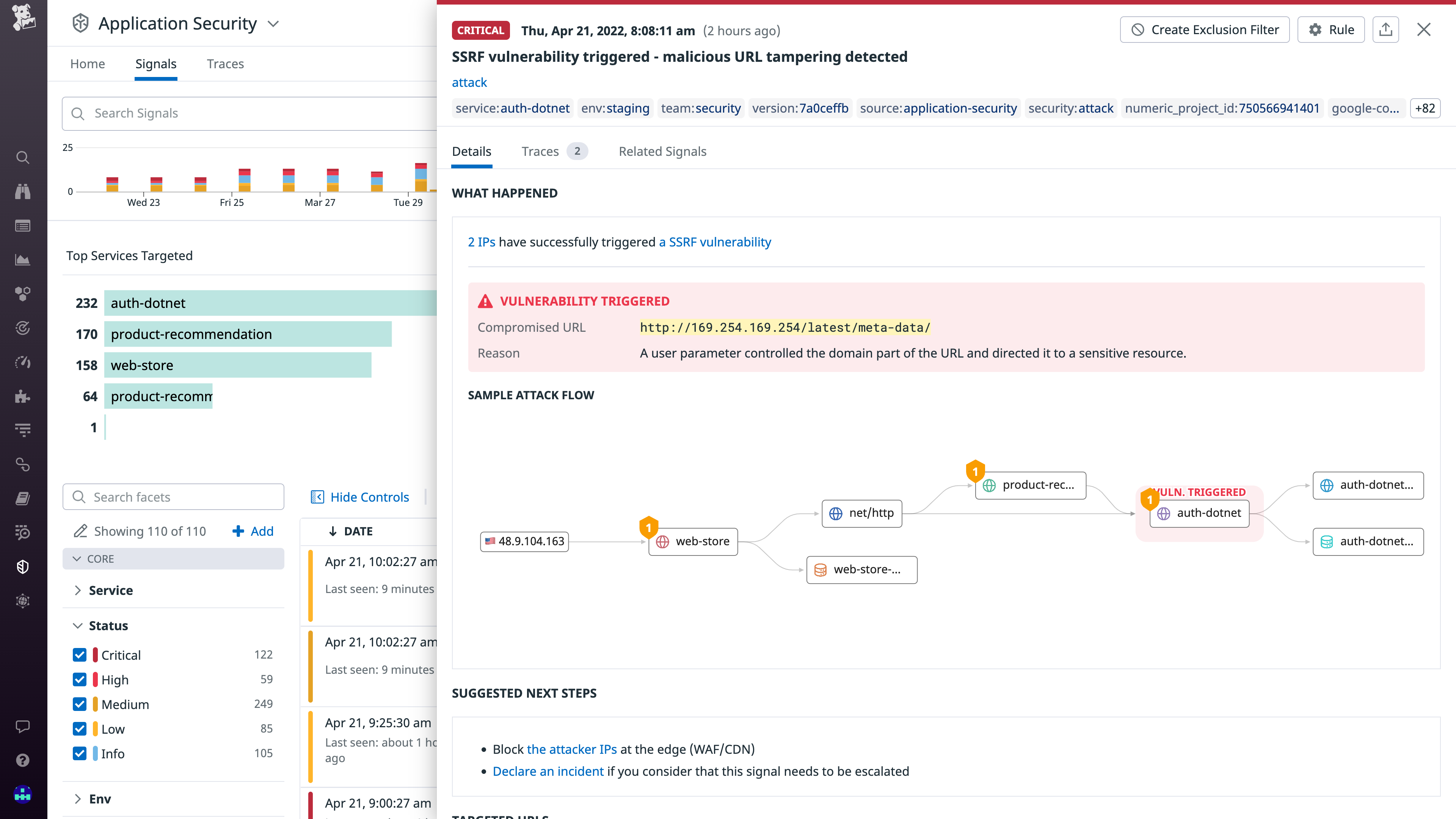
    Datadog, Inc. today made generally available an Application Security Monitoring (ASM) service that is based on the same agent software that many DevOps teams already use to monitor applications.

    Pierre Betouin, vice president of product for the cloud security platform at Datadog, said ASM is designed to make it simpler for DevOps teams to add additional DevSecOps best practices to their existing workflows. The ASM service is based on a runtime application self-protection (RASP) engine and web application firewall that Datadog gained with the acquisition of Sqreen a year ago.

    ASM then employs distributed tracing to discover code-level vulnerabilities such as server-side-request forgeries (SSRFs), SQL injection and cross-site scripting (XSS) flaws. It is designed to extend an existing Datadog Cloud Security Platform that includes cloud security posture management (CSPM), cloud workload security (CWS) and cloud SIEM services.

    The overall goal is to make it simpler for DevOps teams to address application security by eliminating the need to deploy and maintain a separate set of agents within applications, said Betouin. That approach reduces resistance among DevOps teams that would otherwise be concerned about the additional overhead another approach to application security would add to an application environment, he added.

    The number of organizations looking to implement DevSecOps best practices is expected to increase in the weeks and months ahead in the wake of a series of high-profile breaches and zero-day vulnerability disclosures. Many organizations are now performing security reviews across their entire software supply chain as part of an effort to discover any malicious malware that might have been inserted into applications.

    The challenge those organizations face is that as application environments become more dynamic, maintaining application security becomes more difficult as code is continuously updated. The best way to address that engineering challenge is to extend the reach of an observability platform that many DevOps teams already have in place, noted Betouin. Ultimately, the goal is to automate application security as much as possible but that’s not going to be achievable if DevOps teams lack the context required, he added.

    It’s not clear at what rate organizations are embracing DevSecOps best practices. However, it’s clear that DevOps teams are being held more accountable for application security. Most developers are now charged with becoming application security experts overnight, so the only way to effectively ensure application security is to uncover security flaws before applications are deployed in production environments.

    There are, of course, multiple ways of achieving that goal. Datadog is betting that the path of least resistance is via a cloud service that connects to agent software inserted within those applications. DevOps teams have been inserting agent software, in one form or another, into those applications for years. The issue is that with each new agent added there is yet another software component that needs to be deployed and regularly updated. If not carefully tracked, a DevOps team could find itself attempting to manage an entire portfolio of agent software for every platform employed.

  • Digital.ai Extends Scope and Reach of DevOps Platform

    Digital.ai Extends Scope and Reach of DevOps Platform

    Digital.ai today unveiled the Ascension release of its namesake DevOps platform that adds pre-built metrics and best practices dashboards using a Test Lens capability to more easily employ analytics to identify software delivery bottlenecks.

    In addition, the company has added autonomous testing tools that automatically generate performance and security tests for mobile applications. These tools can be run by DevOps teams, developers or business users. An enhanced Change Risk Prediction capability enables machine learning algorithms to make more extensive use of historical data.

    Finally, Digital.ai has also added integrations with the open source Argo continuous integration/continuous delivery (CI/CD) platform and made available an Agility Sync tool for building custom integration with legacy application environments and opened an online marketplace for integrations.

    Jeff Moloughney, chief marketing officer for Digital.ai, said the goal is to extend the reach of the company’s DevOps platform. At its core, the platform has a value stream management (VSM) and version control software originally developed by XebiaLabs and CollabNet VersionOne before the two companies merged to create Digital.ai. The combined company subsequently acquired Numerify, a provider of analytics tools infused with artificial intelligence (AI), Experitest, a set of testing tools, and Arxan, a provider of an application security platform. The company claims that its platforms are used by more than 1,500 organizations.

    In general, DevOps is entering a new era as organizations realize how dependent they are on software to drive business processes, noted Moloughney. Historically, the adoption of DevOps practices has been driven from the bottom up within most organizations. Now, business and IT leaders are also looking to drive the adoption of a consistent set of DevOps best practices to gain more visibility into software delivery, he added.

    That does not mean, however, that organizations can dictate what tools individual developers can use, so the DevOps platform employed has to be extensible in terms of the available integrations, said Moloughney.

    At the same time, Molougney added that more DevOps processes will be automated using machine learning algorithms. Digital.ai is embedding these algorithms within its core platform to both uncover software delivery bottlenecks and automate routine tasks such as testing.

    It’s not clear to what degree organizations that have already embraced DevOps might be considering replacing their existing platforms but, regardless of size, most of them are encountering issues. On the plus side, the number of organizations that are adopting DevOps practices more broadly is increasing as more digital business transformation initiatives are launched. As those practices evolve, the expectation is many of those organizations will embrace analytics in the form of VSM to better optimize their efforts.

    In the meantime, the rate of DevOps adoption across enterprises will continue to vary widely. Each development team within an organization tends to define a set of DevOps practices based on their own requirements. The challenge, given all the dependencies that exist between those projects, is determining the actual rate of progress the organization is making as each of those isolated initiatives progresses.

  • What Should Elon Musk Do? | Passwordless Future: Tense | WebKit iOS Monopoly Ends?

    What Should Elon Musk Do? | Passwordless Future: Tense | WebKit iOS Monopoly Ends?

    Welcome to The Long View—where we peruse the news of the week and strip it to the essentials. Let’s work out what really matters.

    This week: Everyone has Twitter advice for Elon, passwordless vision is vacuous, and Apple prevented from forcing Safari. (more…)

  • Tackling the Complexities of Multi-Cloud With a New IT Model

    Tackling the Complexities of Multi-Cloud With a New IT Model

    The pandemic put incredible pressure on organizations to modernize and accelerate digital transformation efforts, with many businesses rushing to embrace cloud strategies in response. According to this year’s Enterprise Cloud Index from Nutanix, multi-cloud—an IT operating model that combines multiple clouds, public or private—is the most commonly deployed IT environment and the only IT model on an upward adoption trajectory. In fact, nearly two-thirds (64%) of organizations plan to operate a multi-cloud environment within three years.

    But there are complexities and challenges of managing across cloud borders that organizations are still grappling with, and concerns about security, data integration and cost remain. Enterprises will need to find ways to leverage existing cloud investments and redefine best practices and what it means to have agility and resilience in IT.

    Current Challenges

    Businesses have traditionally been designed around managing costs, increasing efficiency and streamlining operations, but lean IT teams find themselves under new pressures to support the challenges we’re facing today. The pandemic forced organizations to prioritize implementations and view the public cloud as a quick solution for everything without proper due diligence at the expense of optimization. This approach lacked focus on strategic business outcomes, and ultimately led to increased complexity, higher costs and less flexibility. According to the study, 87% of respondents agreed that multi-cloud success requires simpler management across mixed-cloud infrastructures.

    Enterprises also continue to rank improving security as a top IT priority, yet managing security was among the top multi-cloud challenges cited. Additionally, the majority of respondents (80%) say that moving apps can be time-consuming and costly, and 77% agree that workload portability is a significant challenge. This underscores the need for uniform management and operations across different cloud environments to avoid costly and time-consuming efforts to move applications.

    “Cloud-Smart” approach to IT

    Current cloud thinking is that there’s a “best” cloud environment for each workload or application, but there is no one-size-fits-all approach to the cloud. Organizations will start to move away from blanket cloud-first approaches to IT, and instead, be more thoughtful about which workloads run where. It is no longer a foregone conclusion that taking every app or workflow to the cloud permanently is the best course of action. The adoption of this “cloud-smart” approach, leveraging the most appropriate cloud environment for each use case, is likely a primary driver behind the proliferation of multi-cloud.

    The use of IT infrastructure by organizations is becoming more strategic over time. Nearly three-quarters of IT professionals (72%) feel that the IT function in their businesses is seen as more strategic now than it was a year ago. While businesses are now viewing and using IT more strategically than ever before, the complexity of multi-cloud is creating challenges that are standing in the way of cloud success. Despite challenges, a strong case is made for why the future of IT is hybrid multi-cloud, a model that enables more operational consistency across clouds. In fact, 83% consider it ideal.

    Multi-Cloud Supports New Ways of Working

    The pandemic has changed how nearly all organizations operate, and the top reasons cited by businesses for changing their infrastructure and deployment models are improving remote work and collaboration. While an organizations’ remote workforces may fluctuate, they are here to stay for the foreseeable future and IT will need to be nimble to support a remote, hybrid workforce and keep people productive and connected regardless of location.

    Over half (61%) of organizations are focused on offering more flexible work setups because of the pandemic, and multi-cloud supports this new way of working. It offers the most agile IT environment for supporting this kind of flexibility by distributing data and allowing remote access to business applications from diverse geolocations for user proximity and business continuity, and enabling organizations to implement technology that helps retain and attract talent.

    Multi-cloud is here to stay—and is the only operating model that is expected to increase in the coming years. 2022 will bring about a shift towards hybrid multi-cloud deployment as organizations look to take advantage of what each cloud has to offer while still having the flexibility and freedom of choice around their applications and data. This would deliver on the flexibility and agility that most organizations seek to compete in today’s digital world while enabling enterprises to significantly simplify operations. Future-proofing cloud strategies is the key to building IT resilience.

  • Optimizing Security in Data Collection Processes

    Optimizing Security in Data Collection Processes

    How you collect and process your data has a direct impact on the security of that data. By following best practices for data collection and processing, DevOps professionals can minimize the risk of data breaches and other security threats. In this article, we’ll share some best practices and tips for optimizing your data collection processes for better security.

    Make use of rotating proxies

    One way to optimize data collection processes is to make use of rotating proxies. This will help to prevent your IP address from being banned or blocked by web servers. Rotating proxies will also help to increase the anonymity of your data collection process.

    Use a Secure Connection

    When you are configuring data collection processes, it is important to ensure that all data is transmitted using a secure connection. This can be accomplished by using TLS/SSL encryption for all communication channels. This will help to protect your data from being intercepted by third parties and will also ensure that the data remains confidential.

    Implement Access Control Measures

    Another important way to secure your data is to implement access control measures. This means that you will need to restrict access to the data to only those individuals who need it. You can do this by using role-based access control or by implementing a least-privilege model. By doing this, you can help to prevent unauthorized access to the data while still giving different business functions across the organization access to the data and tools they need to do their jobs well. 

    Use Data Encryption

    Another way to protect your data is to encrypt it. This means that the data will be converted into a coded format that can only be decrypted by authorized individuals. This can help to prevent unauthorized access to the data and can also help to ensure the confidentiality of the data. There are a variety of encryption methods available to you, including public key encryption and symmetric key encryption.

    Make use of Data Loss Prevention Measures

    Another way to protect your data is to make use of data loss prevention measures. This can help to prevent accidental or unauthorized deletion or modification of the data. Data loss prevention measures can include things like setting up auditing and logging, implementing data recovery plans and using access control measures.

    Create Backup Copies

    It is also important to create backup copies of your data. This way, if the data is lost or corrupted, you will still have a copy that you can use. You should store the backup copies in a secure location and you should encrypt them to help protect the data. The reason backups are such an important part of modern cybersecurity comes down to the threat of ransomware and the rise of cyberextortion.

    Ransomware groups around the world have been increasingly targeting businesses of all sizes in recent years in an effort to extort money from them. And while some businesses have been lucky enough to avoid being targeted, others have not been so fortunate. The end result can be a total loss of reputation and even bankruptcy.

    Monitor Activity

    Another way to help secure your data is to monitor activity. This means that you will need to track who is accessing the data and what they are doing with it. This information can be used to identify unauthorized access and can also help you to determine if the data is being used appropriately.

    Restrict Physical Access

    It is also important to restrict physical access to the data. This means that you will need to ensure that only authorized individuals have access to the physical location where the data is stored. This can help to prevent unauthorized access and can also help to protect the data from being damaged or destroyed.

    Destroy Data When no Longer Needed

    When you no longer need the data, it is important to destroy it. This means that you will need to delete the data from all storage devices and ensure that it cannot be recovered. This can help to prevent unauthorized access and can also help to protect the data from being used inappropriately.

    Implement Security Policies and Procedures

    It is also important to implement security policies and procedures. This means that you will need to develop policies and procedures that govern how the data is to be used and accessed. These policies and procedures should be reviewed regularly and updated as needed.

    Educate Employees

    Another way to help secure your data is to educate employees. This means that you will need to provide training on the importance of protecting the data and on the procedures that should be followed. This training can help to ensure that employees are aware of the importance of security and can also help to prevent unauthorized access.

    Employee education is your first line of defence against cybercrime because your people constitute your largest threat and cybersecurity vulnerability. This is not because of maliciousness or nefariousness, but simply because most people are not aware of many of the necessary cybersecurity best practices when it comes to data collection and handling.

    Conduct regular audits

    It is also important to conduct regular audits of the data. This means that you will need to review the data regularly to ensure that it is being used appropriately and that no unauthorized access has occurred. This can help to identify any security issues and can also help to ensure that the data is being used correctly.

    Use encryption

    As mentioned before, another way to help secure your data is to encrypt it. This means that the data will be converted into a coded format that can only be decrypted by authorized individuals. This can help to prevent unauthorized access to the data and can also help to ensure the confidentiality of the data.

    Implement access control measures

    Another way to help secure your data is to implement access control measures. This means that you will need to restrict access to the data to only those individuals who need it. This can help to prevent unauthorized access and can also help to ensure that the data is being used appropriately.

    Conclusion

    When it comes to data security, there are a number of steps that you can take to help protect your information. By taking the time to implement these measures, you can help to ensure that your data is safe and secure.

  • The Future of Cloud Strategy: Multi-Cloud

    The Future of Cloud Strategy: Multi-Cloud

    As Gartner’s Milind Govekar recently said, “There is no business strategy without a cloud strategy.” But in 2021, some of the world’s biggest brands suffered disruptions in their services due to outages from their cloud service providers, including Google, Slack, Venmo, Disney+, Facebook/Meta, Tinder, iRobot, The Washington Post and Sony.

    While the outages do not negate the overall benefits of moving to the cloud in the first place, they do make IT leaders think twice about putting all their eggs in one cloud provider’s basket. In this article, we will be exploring the multi-cloud strategy, its advantages and how to prepare for your multi-cloud future.

    Let’s Be Clear About Cloud

    The adoption of a cloud strategy was evidenced in a 2021 O’Reilly survey in which 48% of participants reported a plan to migrate more than half their applications to the cloud while 20% planned to migrate all their applications to the cloud.

    Cloud migration is a multi-factored decision made by business leaders to migrate electronic assets from local servers to the cloud. Cloud storage is rapidly overrunning on-premises data warehouses because of its many positive business impacts including scalability, speed, collaboration, continuity, security and rapid ROI. Although it is simple to select one provider, we’re seeing more and more organizations opt for multiple providers to avoid the negative impacts of outages.

    Multi-Cloud Strategy: The Dominant Choice

    Cloud revenue continues to reach new heights. Gartner predicted cloud revenues globally will reach $474 billion in 2022. That number represents a significant increase from $313 billion in 2020. 

    The challenge among many IT leaders is continually mapping the use of the cloud in relation to their business goals. This alignment is critical to the success of overall objectives as cloud solutions need to match business requirements, whether related to security, compliance or other issues. 

    Cloud-based solutions are highly sought after by businesses and IT leaders. In the quest for the “perfect” solution, multi-cloud options are highly appealing. Benefits of a muti-cloud system include: 

    • Avoiding vendor/provider lock-in
    • Allowing for scaling as business grows
    • Increasing security to thwart attacks
    • Harnessing unique capabilities of different providers

    Multi-cloud and hybrid cloud are often used interchangeably, but they actually refer to slightly different approaches. 

    Hybrid, strictly speaking, is the use of cloud infrastructure in conjunction with bare metal (aka traditional) data centers. As such, it has been an approach favored by enterprises migrating to the cloud in phases.

    Multi-cloud, as the name suggests, involves the use of more than one cloud provider to provision IT. Many would argue it’s also the future of operating as a cloud-first entity.

    Fast-Tracking Digital Transformation

    Digital transformation can be a long haul, however, businesses adopting multi-cloud solutions are navigating the digital services path more quickly.

    Why does the cloud present itself as the best solution for businesses?

    • Rapid advancement of cloud solutions
    • Apps are becoming more readily suited for development and deployment
    • Skepticism toward the cloud is now waning; businesses are porting databases and mission-critical apps to the cloud
    • Cloud is key to delivering AI services, an area of increased growth

    Flexibility meets Functionality

    Flexibility is undoubtedly a major attraction in relation to cloud choices. However, making the correct decisions is imperative to meeting strategic business objectives. The cloud proves beneficial to leaders as, in combination with data engineering, they can procure a comprehensive view of relevant data.

    The first critical component to selecting the correct cloud solution is market research. The necessity of this step is two-fold. Yes, it takes time to conduct research, but in the end, diligence can end up saving both time and money.

    Of course, businesses and providers want their relationships to be symbiotic. App migration may go well and all proper dynamics function at the onset, but what happens when a switch needs to be made? It can prove to be both burdensome and costly. With this reason in mind, it’s important to continually weigh both short-term advantages and longer-term flexibility. 

    Another essential component when assessing options is ensuring seamless interoperability between systems. Simply defined, interoperability is the ability of computerized systems to connect and communicate with one another without regard to their manufacturer or industry. 

    In a modern economy, IT leaders are called on to be increasingly conscientious about cloud services to alleviate any issues with future data portability.

    Edge Computing on the Rise

    Edge computing is a subset of a distributed computing topology in which information processing is located close to or at the location where that information is produced or consumed.

    With the trend of edge computing on the rise, the lines between edge and cloud computing continue to become more obscure. Cloud vendors need to use an edge strategy, and some already employ their own specific suite of services aimed at making data processing seamless.

    Data processing and transition should not be an arduous task. This factor alone influences leaders when making decisions on their cloud journey. Digital maturity is a competitive advantage for which all businesses should strive. 

    Adapting to Multi-Cloud

    A more complex cloud environment can be challenging, but the task is manageable. By dedicating the time and resources necessary, businesses can adapt to muti-cloud or hybrid systems with considerable ease.

    Whether through necessity or design, a multi-cloud or hybrid system has numerous benefits in relation to compliance, security, efficiency, scale, and performance. The multi-cloud strategy is here to stay.