Category: DevOps in the Cloud

  • Palo Alto Networks Extends CNAPP to CI/CD Platforms

    Palo Alto Networks Extends CNAPP to CI/CD Platforms

    Palo Alto Networks has extended the reach of its cloud-native application protection platform (CNAPP) to include the ability to secure continuous integration/continuous delivery (CI/CD) platforms.

    Daniel Krivelevich, CTO for application security for Prisma Cloud at Palo Alto Networks, said this extension of the Prisma Cloud platform would make it easier to better secure software supply chains as software builds are continuously updated by application development teams.

    Previously, Palo Alto Networks provided the ability to secure runtimes and secrets and scan code for vulnerabilities as it is being developed. This latest extension now adds the ability to secure the CI/CD platforms that drive DevOps workflows, he noted.

    While more organizations than ever are shifting application security responsibility further left toward developers, many of them overlook the need to secure the CI/CD platform itself. Most developers are not cybersecurity experts, so the chances they will miss something that can find its way into a software build are still high. Extending the reach of Prisma Cloud to the CI/CD platform will ensure the build that forms the foundation of the code is free of vulnerabilities when it finds its way into a production environment.

    That’s critical, because cybercriminals are becoming more adept at injecting malware into software supply chains in the hopes of being able to eventually compromise multiple downstream applications. In fact, this issue has prompted governments around the world to hold more organizations legally responsible for the security of the applications they build and deploy.

    There are, of course, multiple approaches to securing software supply chains, but Palo Alto Networks is making a case for an integrated platform that provides a comprehensive approach to securing the entire IT environment. Rather than integrating multiple point products, a CNAPP ultimately reduces the total cost of cybersecurity on an end-to-end basis, noted Krivelevich.

    It’s not clear how quickly organizations are transitioning to CNAPPs, but as that transition occurs, the overall state of application security should improve. One of the issues that has historically plagued application security is no one in an organization has been specifically tasked with ensuring it. Application development teams assumed cybersecurity professionals were allocating funds to it. Cybersecurity teams, however, tended to focus on areas they directly controlled, such as network firewalls. A CNAPP makes it simpler to deploy a cybersecurity framework in a more extensible way.

    Of course, there’s still much work to be done when it comes to prioritizing vulnerability remediation efforts. The truth is developers only have so much time to allocate to developing patches, so the focus needs to be on identifying the vulnerabilities that are the most severe in terms of the amount of damage that might be inflicted. At the very least, however, a CNAPP should provide the means by which the context required to identify those vulnerabilities could be more easily shared.

    One way or another, however, the number of vulnerabilities finding their way into production environments should steadily decline as more focus is put on securing software supply chains.

  • Overture Maps’ Challenge to Google ¦ Frontier Model Forum’s AI Safety Shtick

    Overture Maps’ Challenge to Google ¦ Frontier Model Forum’s AI Safety Shtick

    Welcome to The Long View—where we peruse the news of the week and strip it to the essentials. Let’s work out what really matters.

    This week: A big-tech consortium goes toe-to-toe with Google Maps, and a big-tech consortium tries to fool AI regulators. (more…)

  • Harnessing AI for Automated and Toil-Free SRE

    Harnessing AI for Automated and Toil-Free SRE

    In my recent blog Revolutionizing the Nine Pillars of SRE With AI-Engineered Tools, I indicated that AI can help reduce toil by automating more complex tasks that were previously challenging to automate. Machine learning models can predict system behavior, enabling proactive responses. In this blog, I explain in more detail how AI-engineered tools can be used to improve toil reduction and automation.

    AI Use Cases for Toil Reduction and Automation

    In each of the following use cases, AI not only reduces toil but also contributes to improving system reliability, efficiency and scalability, forming a critical part of modern site reliability engineering (SRE) practices.

    Anomaly Detection and Predictive Maintenance: AI can monitor system logs and operational metrics to detect anomalies, predict system failures and schedule maintenance. This leads to fewer unexpected issues and lower downtime. Tools such as Splunk‘s Machine Learning Toolkit and Elastic’s Machine Learning features can be used for this purpose.

    Automated Testing: AI can be used to automate testing procedures, ensuring code reliability before deployment and reducing the toil of manual testing. Tools like Mabl or Testim use machine learning to create, execute and maintain tests, reducing the need for human intervention.

    Incident Triage and Resolution: AI can analyze incident data, diagnose issues, suggest solutions and, in some cases, automate the resolution process. Tools such as PagerDuty’s Event Intelligence or BigPanda help automate these processes and reduce resolution times.

    Capacity Planning and Resource Allocation: AI can predict system load and adjust resources accordingly to ensure optimal performance and scalability. Dynatrace and Datadog are examples of AI-driven platforms that can provide predictive analytics and capacity planning.

    Proactive Fault Isolation: AI can help isolate faults before they escalate into significant issues, reducing downtime and maintaining system reliability. IBM’s Watson AIOps and Moogsoft’s AIOps platform use AI to quickly isolate and remediate faults.

    Security and Threat Detection: AI can monitor system activity, detect threats and prevent security incidents, reducing the toil of manual monitoring and intervention. Tools like Darktrace and CrowdStrike Falcon use AI for cybersecurity.

    Network Optimization: AI can analyze network traffic and performance data to optimize network configurations and improve system performance. Tools such as Mist (from Juniper Networks) and Cisco’s DNA Center can provide these functionalities.

    Code Review and Technical Debt Management: AI can analyze code changes and identify issues and potential technical debt, providing guidance for incremental code improvements. Tools like DeepCode and CodeClimate can help manage and reduce technical debt.

    Overcoming Challenges

    Organizations must overcome challenges with their people, processes or technologies when transforming SRE practices to using AI tools for toil reduction and automation.

    Lack of Skilled Personnel: AI technologies often require a level of expertise that may not exist within current teams. This lack of skill can be a significant barrier to the successful implementation and usage of AI tools. Invest in training existing staff and consider hiring new team members with the necessary skill sets. There are plenty of resources and courses available online to train your teams on AI tools and technologies.

    Data Quality Issues: AI tools rely on quality data to deliver reliable insights. Data might be unclean, unstructured or siloed across different systems, which can hinder the effectiveness of AI. Implement robust data management and governance practices to ensure your data is clean, structured and accessible. AI tools can also be used to assist in data cleansing and structuring processes.

    Resistance to Change: People can be resistant to new technologies, especially when it comes to something as transformative as AI. This resistance can slow down or even halt the transition to AI-based SRE practices. Develop a strong change management strategy, which could involve regular communication about the benefits and importance of the change, provide training and support and gradually integrate AI tools into existing workflows to allow for a smoother transition.

    Integration with Existing Systems: AI tools need to work in tandem with existing IT systems, tools and processes. Integration issues can prevent AI tools from accessing necessary data or functioning as expected. Plan the integration process carefully, ensuring that the selected AI tools are compatible with your existing systems. Where possible, choose AI solutions that offer flexible APIs and other integration options.

    High Costs: Implementing AI tools can require substantial investment, including purchasing or subscribing to the tools, integrating them into your existing systems and training staff. Calculate the return on investment (ROI) before implementation to understand the potential benefits and savings the AI tools can provide in the long run. Look for scalable solutions that allow you to start small and increase your investment as you see value.

    Compliance and Security Concerns: The use of AI tools, particularly those that leverage cloud computing, may raise concerns about data security and compliance with various regulations. Conduct a thorough risk assessment before implementing any AI tool. Choose vendors that adhere to industry-standard security protocols and offer comprehensive security features. Consider working with a third-party auditor to ensure compliance.

    Summary

    As organizations journey toward greater operational efficiency and reliability through SRE, the transformative potential of AI is becoming increasingly clear. AI-driven tools are revolutionizing various facets of SRE, including toil reduction, automation and defining service-level indicators, objectives and agreements. These innovative technologies can automate complex tasks, predict system behavior, refine performance targets, optimize deployments and aid in effective incident management. For example, AI tools such as Datadog, Dynatrace and New Relic can provide actionable insights into your systems, while others like Nobl9 can use machine learning to define SLOs based on historical performance data.

    However, the road to this AI-infused future is not without its challenges. Teams might grapple with issues such as a lack of skilled personnel, data quality, resistance to change, system integration, high costs and security concerns. Yet, with the right approach, these hurdles can be overcome. By investing in training and hiring skilled personnel, implementing robust data management practices, fostering a culture receptive to change and carefully planning the integration of AI tools, organizations can leverage the power of AI. Calculating ROI before implementation and choosing vendors who adhere to stringent security protocols can further ensure success. The use of AI in SRE represents a powerful convergence of technology and practice that is reshaping the landscape of modern IT operations.

  • Complete Guide to AWS Savings Plans

    Complete Guide to AWS Savings Plans

    AWS Savings Plans are a flexible and cost-effective way to save on your Amazon Web Services (AWS) usage. These plans allow you to commit to a specific amount of compute capacity over a one- or three-year term in exchange for a significant discount on your AWS usage. Savings plans can help you reduce your AWS bill by up to 72%, depending on the type of plan and your level of commitment.

    Why Do You Need AWS Savings Plans?

    With the growing reliance on cloud infrastructure in modern IT, it is crucial for organizations to optimize cloud computing costs without compromising on performance or scalability. AWS Savings Plans address this need by providing a flexible and cost-effective solution that allows you to commit to a certain level of usage at a discounted rate.

    With AWS Savings Plans, by committing to a specific amount of compute capacity over a set time period, you can save up to 72% on your AWS usage. This can result in significant cost savings for your organization, freeing up resources to invest in other business-critical initiatives.

    Another benefit of AWS Savings Plans is the flexibility they offer. Unlike Reserved Instances, which require you to specify instance type, operating system and region, Savings Plans are more flexible and can be applied across different instance types, regions and operating systems. This flexibility makes it easier for you to optimize your cloud computing costs while still meeting your business needs.

    Difference Between AWS Savings Plans and Reserved Instances

    AWS Savings Plans and Reserved Instances are both designed to help you save on your AWS usage, but they offer different levels of flexibility and cost savings.

    Reserved Instances require you to commit to a specific instance type, operating system and region for a one- or three-year term in exchange for a discount on your AWS usage. While this can result in significant cost savings, it also limits your ability to optimize your cloud computing costs based on changing business needs.

    AWS Savings Plans offer a more flexible solution that allows you to commit to a certain level of usage across different instance types, regions and operating systems. Additionally, in most scenarios, Savings Plans can provide a higher level of cost savings compared to Reserved Instances.

    Types of AWS Savings Plans

    There are two types of AWS Savings Plans: Compute Savings Plans and EC2 Instance Savings Plans.

    Compute Savings Plans

    Compute Savings Plans are the most flexible type of Savings Plans, providing a significant discount on your AWS usage across any instance type, region or operating system. This flexibility makes it easy for you to optimize your cloud computing costs based on your changing business needs.

    Compute Savings Plans offer a discount of up to 66% compared to on-demand pricing, depending on the level of commitment you make. They can be used across all AWS services that are powered by Amazon EC2 instances, including Amazon EMR, AWS Lambda and Amazon ECS.

    EC2 Instance Savings Plans

    EC2 Instance Savings Plans are a more specific type of Savings Plan, offering a discount on your AWS usage for a specific instance type within a region. These plans provide a higher level of cost savings compared to Compute Savings Plans, with discounts of up to 72%.

    EC2 Instance Savings Plans are ideal for organizations that have a predictable workload and require specific instance types within a region. However, they offer less flexibility than Compute Savings Plans, as they cannot be applied across different instance types, regions or operating systems.

    AWS Savings Plans Pricing Models

    AWS Savings Plans offer three different payment options to suit your organization’s budget and commitment level: All Upfront, Partial Upfront and No Upfront.

    All Upfront

    With the All Upfront payment option, you pay for the entire term of your Savings Plan upfront, resulting in the highest discount compared to on-demand pricing. This option is ideal for organizations that have the budget available to make a significant upfront payment in exchange for maximum cost savings.

    Partial Upfront

    The Partial Upfront payment option allows you to pay a portion of your Savings Plan upfront and the remaining balance on a monthly basis. This option provides a balance between upfront commitment and ongoing flexibility, with a lower discount compared to the All Upfront option.

    No Upfront

    With the No Upfront payment option, you pay for your Savings Plan on a monthly basis, with no upfront payment required. This option provides the lowest discount compared to on-demand pricing but offers the greatest flexibility for organizations with limited budgets or uncertain future usage requirements.

    How to Monitor and Manage AWS Savings Plans

    Monitoring and managing your AWS Savings Plans, as part of your overall cloud operations strategy, is critical to ensuring that you are optimizing your cloud computing costs and maximizing your savings. AWS provides several tools and services to help you monitor and manage your Savings Plans effectively:

    • AWS Cost Explorer: A powerful tool that allows you to analyze your Savings Plans usage and costs, helping you identify opportunities to optimize your cloud computing costs. With Cost Explorer, you can view your Savings Plans coverage, utilization and savings, as well as forecast your future usage and costs.
    • AWS Budgets: This service allows you to set custom cost and usage budgets for your organization, helping you track your Savings Plans usage and ensure that you are staying within your budget.
    • Savings Plans Recommendations: This feature analyzes your past usage and recommends the optimal Savings Plans for your organization. It can help you make informed decisions about which Savings Plans to purchase and how much commitment to make.

    Conclusion

    AWS Savings Plans are an excellent solution for organizations looking to optimize their cloud computing costs and save on their AWS usage. With their flexibility, cost savings and easy monitoring and management options, AWS Savings Plans are a valuable tool for any organization using AWS services.

    To unlock the full potential of AWS Savings Plans, it’s crucial to understand the different types of plans, their pricing models and how to effectively monitor and manage your usage. By doing so, you can maximize your savings and ensure that your organization is getting the most out of its investment in AWS.

  • AI ‘is Getting Worse’ ¦ AI ‘Will Lose India Jobs’ (Probably Isn’t ¦ Probably Won’t)

    AI ‘is Getting Worse’ ¦ AI ‘Will Lose India Jobs’ (Probably Isn’t ¦ Probably Won’t)

    Welcome to The Long View—where we peruse the news of the week and strip it to the essentials. Let’s work out what really matters.

    This week, a conundrum: On the one hand, researchers say ChatGPT is losing the plot; and on the other, we hear outsourced coding jobs in India will be replaced by AI. (more…)

  • Google Announces Availability of iPaaS Service

    Google Announces Availability of iPaaS Service

    Google today made available an integration platform-as-a-service (iPaaS) capable of invoking a range of methods to integrate applications.

    Initially developed for the Apigee application programming interface (API) management platform Google acquired in 2016, the Application Integration service can now, for example, also consume a publish and subscribe event or an event driven through a Salesforce platform.

    Amit Zavery, vice president and general manager for Google Platform, said the Application Integration service provides IT organizations with all the benefits of an iPaaS without requiring them to stand up and manage an integration platform themselves.

    The Google Application Integration service also provides access to a Visual Integration Designer tool that can be used to build workflows using a low-code tool. In total, there are now more than 75 connectors that can be used to integrate multiple Google Cloud services and third-party platforms that can run in either a cloud or on-premises IT environment, said Zavery.

    In general, visual tools are transforming how integrations are created and expanded within organizations, noted Zavery. Rather than using lower-level procedural code, a visual tool enables developers to employ low-code to create integrations. That makes it simpler to collaborate with business users that can now more easily participate in developing workflows.

    In fact, in some cases, business users, otherwise known as citizen developers, have enough technical acumen to create their own workflows using low-code tools.

    There are, naturally, going to be plenty of complex integration challenges that will require procedural code, but the bulk of the integrations required today are not especially complex.

    Regardless of who creates the integration, the number of them being employed across an enterprise organization continues to increase as more digital business transformation initiatives are launched. Developers are not going to be able to keep pace with the demand for those integrations if they rely solely on procedural code. The only way to effectively reduce the backlog for integrations is to rely more on visual tools to construct them. In most cases, the integration being created is relatively trivial. The only reason it wasn’t created sooner is there are not enough developers available to complete that task using procedural code.

    There are, of course, no shortage of iPaaS options available. As more workloads are deployed in the cloud, Google is betting the center of gravity for integration will shift toward the places where modern microservices-based workloads are deployed to reduce overall latency.

    It’s not clear whether organizations still view integration as an afterthought versus employing an integration platform around which all applications revolve. That latter approach tends to reduce the total cost of integration when compared to using multiple point products that are not managed via single framework, noted Zavery.

    Ultimately, IT teams that adopt an iPaaS are able to focus more on higher-value IT tasks. The issue is determining which integration projects really require professional developers with lots of integration expertise and which, via a low-code tool, can be handled by almost any developer.

  • How Platform Engineering Bridges the IT and DevOps Divide

    How Platform Engineering Bridges the IT and DevOps Divide

    Ballooning lead and process time, with an opaque corollary relationship to fixed and marginal cost, is a significant and complex burden for any enterprise. And multi-cloud complexity and inefficient organizational and technical processes are some of the most wasteful areas companies face–so much so that Synergy Research reports organizations are cutting back on their cloud spend as tech budgets continue to fall under intense scrutiny, resulting in a Q1 2023 cloud spending growth rate of 19% compared to 32% just last year. With cloud cost containment a top priority, Forrester advised tech leaders to demonstrate to CFOs how they will stay on budget and demonstrate ROI at the board level. A key area where companies can eliminate expensive waste and increase time to value is the relationship and workflow between IT and developers, which, while being the DevOps charter for nearly 15 years, has gotten less attention among the viable cost-containment strategies for enterprises in 2023. Revisiting the latest iteration of this DevOps charter through the implementation of platform engineering strategies can help enterprises create a faster, leaner and more scalable dynamic. Let us examine why it’s now time for enterprises to consider platform engineering as a potent way to not only increase efficiency but also to bridge the divide between DevOps and IT.

    The Old Way: Forcing DevOps to Dance to the ITSM Tune

    In traditional enterprise organizations, IT typically dictates a top-down ITSM practice that limits the tools an organization can use for development and deployment; in many cases, it inhibits CI/CD and other core capabilities and practices of DevOps. This awkward attempt to accommodate modern DevOps practice through an aging ITSM paradigm has led to a suboptimal software delivery performance and poor developer experience (DX).

    McKinsey, highlighting the criticality of DX, found developers at a leading SaaS provider spent 20% to 30% of their time integrating different services such as firewall changes, DNS and security access to deliver code through its CI/CD pipeline. That’s a lot of time spent on low-value, repetitive tasks, ensuring a painful journey for a disappointing result. If the DX pain is high enough, developers often go around IT and create resources on their own, leading to shadow IT, adding new cost burdens and growing security exposures. Every minute and engineer count: Five minutes saved per day among 500 developers saves a week’s development time.

    Surely, there is a better way.

    Platform Engineering: Collaboration Through Composition

    Platforming engineering and “platform as a product” have been key to the PaaS ecosystem for years but are now gaining fresh traction in the industry. In Puppet’s State of DevOps Report, 51% of respondents said they had already adopted platform engineering and 93% said it was a step in the right direction. Gartner predicted 80% of software engineering organizations will have platform teams by 2026.

    The concept can be defined in several ways. Gartner reported platform engineering is “an emerging trend intended to modernize enterprise software delivery… designed to support the needs of software developers and others by providing common, reusable tools and capabilities, and interfacing to complex infrastructure.” PlatformEngineering.org’s recent blog post defines it as the discipline of designing and building toolchains and workflows for self-service capabilities in software engineering organizations during the cloud-native era.

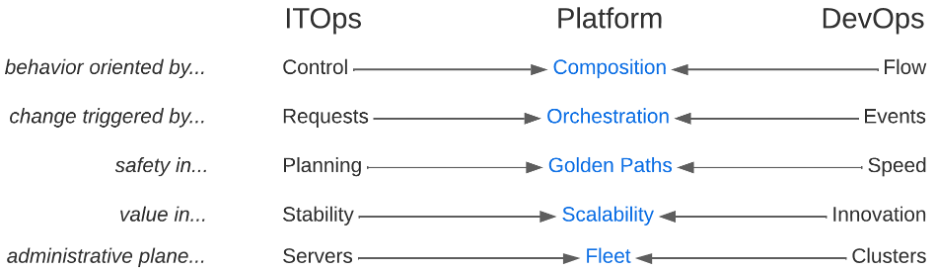
    Regardless of definition, platform engineering is the latest iteration of IT centralization, though now attempting to retain all the benefits of distributed team empowerment through “composition” rather than converged control. As modernization continues, we experience the ebb and flow of composition and decomposition, both organizationally and technically. Microservices, Kubernetes, and GitOps patterns pushed the rational limits of decomposition and significantly raised the level of technical complexity in the enterprise. The natural counter pressure is a new cycle of composition that aims to simplify that complexity through platform engineering practices. Teams now look for these toolchains and workflows to be centralized in internal developer platforms (aka IDPs), exposing the development, deployment and maintenance of the entire life cycle of modern, cloud-native applications.

    IDPs can facilitate the flow, speed and innovation DevOps teams are demanding without sacrificing stability, security and control. They enable developers to configure their toolchain while meeting all controls through approved blueprints or “golden paths,” reducing lead and process time. Developers can focus on delivering business value instead of infrastructure tasks.

    Bringing IT and DevOps Back Into Alignment Saves Time, Money and Sanity

    Platform engineering creates a collaborative framework that connects IT and DevOps teams, so they can focus on outcomes rather than methods. Developers can use an IDP to follow conventions that speed up development and prevent anti-pattern creep. Guardrailing choices through golden paths reduce cognitive load and simplify execution context for security teams. The result? Developers can focus on what they were hired for and want to do–creating innovative, transformative applications and differentiated value. Security can sleep well knowing bespoke behavior isn’t opening new attack surface areas.

    On the Day 2 operations side, IDPs enable SRE and support teams to have a fleet-wide view and work effectively with developers to streamline the management of production needs across all applications, clouds and tech stacks.

    The reframing of composition breaks the false dichotomies between IT and DevOps practices. You don’t have to choose between control and flow, change isn’t triggered by serial requests or async events, safety isn’t found in planning or speed, value isn’t found in stability or innovation and administrative plane primitives aren’t servers or clusters. Platform engineering practices allow you to prioritize composition, orchestration, golden paths, holistic scalability and fleet management to get teams out of entrenched myopia and embrace systems thinking that gets your business delivering strategic gain instead of tactical win/loss tallies.

    Finally, platform engineering positively impacts software delivery and operational performance metrics by streamlining development processes and reducing manual efforts. The bottom line is faster time to market while ensuring more consistency, less human error and improved software quality. This maximizes productivity, minimizes downtime and optimizes resource utilization, leading to cost advantages and increased efficiency for enterprises.

  • Forking RHEL! Oracle and SUSE Join the Fight ¦ Silverman Sues AI Firms

    Forking RHEL! Oracle and SUSE Join the Fight ¦ Silverman Sues AI Firms

    Welcome to The Long View—where we peruse the news of the week and strip it to the essentials. Let’s work out what really matters.

    This week: SUSE announces a Red Hat Enterprise Linux fork after Oracle said a similar thing, and Sarah Silverman says OpenAI and Meta have stolen her words. (more…)

  • Don’t Let Developer Experience Break Your Business

    Don’t Let Developer Experience Break Your Business

    As organizations digitally transform to support the needs of customers and help them win in their markets, IT leaders, software developers and DevOps teams have emerged as the central players in the transformation landscape. They are also key advocates for improving the developer experience and promoting technology adoption—both critical components of a successful digital transformation. They are also on the front lines of understanding operational and team challenges. Their understanding of the business objectives and the role people and technologies play in support of achieving these goals makes IT an indispensable driver of value creation.

    Digital transformation has also fueled the swift adoption of Kubernetes and cloud-native technologies, which promise enterprise speed and scalability. As these technology adoptions accelerate, so too does the demand to make developer experience a priority. After all, developers are tasked with creating and delivering software to the market quickly to support business objectives.

    As more organizations adopt cloud-native development methodologies, developers have taken on a more strategic role across the business. No longer just writing code, they have been asked to take on ownership of the entire application life cycle. In the cloud-native environment, this shift in developer responsibility comes with an evolving ecosystem of technologies and tools that can have enormous complexity and impact how dev teams collaborate as they code, ship, test and run apps to support business goals.

    Asking developers to take on this level of responsibility is not ideal for productivity. Most developers want to know enough about the full software development life cycle (SDLC) and infrastructure to get their work done but do not want to become Kubernetes experts. Giving developers a good developer experience relies on understanding the importance of creating an experience that removes friction, fosters innovation and fuels the ability to move faster.

    Here are four tips to ensure the developer experience is not your Achilles heel in fueling business performance:

    Share the Why: Don’t just tell developers how to do something. Explain why they’re doing it. Storytelling and making the ‘why’ matter play an often hidden but important role in undoing developer frustration and, hopefully, avoiding it altogether.

    With the pressure to do more with less, ensuring that developers understand the reasons behind their actions and activities is key to relieving their frustrations and getting to safer, faster deliveries that underpin business value. Developers don’t like black boxes, and the more you can share upfront about why and how the plan or strategy works, the better the developer experience.

    The 2022 Stack Overflow Developer Survey found that well over half of the developers polled spent more than 30 minutes a day looking for solutions to problems. Not only is this a distraction from core development work and productivity, but it can also account for up to 650+ hours of lost time per week (in a team of 50 developers). Informing developers about the ‘why’ from the start—and then arming them with the right tools—can alleviate both developer and business challenges.

    Reduce Friction and Preserve Existing Workflows: Developers want to focus on what they do best—writing code. They don’t want to be hunting down answers to problems created by a growing list of complex technologies, processes and tooling that impact their ability to write and ship software fast. Most developers don’t want to think about selecting or having to use a variety of different (or new tools) to support their work.

    Clear the path for developers. Find infrastructure that puts your developers in the driver’s seat and allows them to continue using the toolchains they already know and love and the power to pick and choose which capabilities best support their requirements for fast, scalable app delivery.

    Foster Team Collaboration and Communication: Faster, safer development is not just about developer experience, but includes the experience of the entire development team and its ability to collaborate. The entire DevOps team plays a critical role in getting software out the door. Site reliability engineers (SREs), for example, play a key role in guiding developers through the cloud-native learning curve to use platforms and ecosystems effectively. It’s more than firefighting—it is a trusted partner to create success in deploying, releasing and running services.

    Encourage developers to share pain points and learn about tools and best practices from the SRE team. Rethink communication patterns to unify developer and SRE approaches to problem-solving, i.e., remove the “this is a developer problem” or “this is an SRE problem” to reframe them as “this is a business problem” and shared responsibility.

    Let Developer Voices be Heard: Empathy cushions every good developer experience. This includes listening to and understanding the needs and wants of developers. Offering more training, having a robust onboarding experience, focusing on reducing cognitive load and having an ongoing dialog with developers shows empathy and reinforces your commitment to supporting developer skill sets and roles within the organization.

    Organizations that empathize with their developers can eliminate friction and fuel a more collaborative, supportive onboarding experience that allows developers to provide input as they progress in their journey. Continuing that empathy throughout a developer’s time at an organization fosters an overarching culture of communication, collaboration and empathy.

    Additionally, institute measurable and realistic key performance indicators (KPIs) as this will help organizations quantitatively understand the developer experiences and identify areas for improvement and celebration.

    Many organizations that go cloud native to improve development speed and shipping frequency end up in a situation where they ask themselves, “Why is it taking hours to do what we used to do in minutes?” Here it is essential to return to the core question about developer experience. If developers are struggling with hours of repetitive, non-core work, a clear path is not paved for them. If they never got a solid onboarding, there’s no shared development environment, friction is everywhere and lines of communication are closed, it’s inevitable that the developer experience will suffer—and by extension, so will the business.

    How you respond to the needs of the developer and the developer experience can make or break your business. Invest in the developer experience. It’s critical to fueling developer productivity and supporting a faster time-to-market for your business.

  • Five Great DevOps Job Opportunities

    Five Great DevOps Job Opportunities

    devopsy.kinsta.cloud is now providing a weekly DevOps jobs report through which opportunities for DevOps professionals will be highlighted to better serve our audience.

    Our goal in these challenging economic times is to make it easier for DevOps professionals to advance their careers.

    Of course, the pool of available DevOps talent is still relatively constrained, so when one DevOps professional takes on a new role it tends to create an opportunity for others.

    The five job postings shared this week are selected based on the company looking to hire, the vertical industry segment and, naturally, the pay scale being offered.

    We’re also committed to providing additional insights into the state of the DevOps job market. In the meantime, for your consideration:

    LinkedIn

    Harris Allied
    New York, New York
    DevOps Engineer
    $160,000 to $175,000

    CareerBuilder.com

    MassMutual Financial Group
    Remote
    DevOps/Kubernetes Cloud Infrastructure Engineer

    $137,800 to $180,800

    Indeed.com

    Lawrence Livermore Labs
    Livermore, California
    DevOps Engineer
    $123,960 to $159,168

    SimplyHired.com

    CVS Health
    Remote
    DevOps Engineer
    $90,000 to $180,000

    Dice.com

    Idea Entity
    Herndon, Virginia
    Azure DevOps Engineer
    $80,000 to $100,000