Category: DevOps Culture

  • Agile Divide Between IT and Business Is Narrowing

    Agile Divide Between IT and Business Is Narrowing

    A global survey of 1,350 business and IT executives conducted by Jigsaw Research on behalf of NTT Ltd., a provider of IT services, suggests organizations are a lot more agile in the wake of the COVID-19 pandemic, but there’s still a significant gap in terms of prioritizing agility.

    A full 89% of business and IT leaders agree COVID-19 has caused significant changes to their operating processes, with 87% also agreeing it has accelerated their digital transformation strategy. A third of respondents (33%) also noted they pivoted their technology focus to take advantage of a market opportunity or scale their operations.

    However, well over a third of operational executives identified speed and agility as a core component of technology strategy, while only just over half of IT executives agreed (53%).

    Overall, the survey found there is a consensus IT remains a key enabler of business efficiency. A total of 91.4% respondents agreed that enabling business efficiency is a key driver for their technology strategy, with 92% of IT respondents saying their overall technology strategy is aligned either fully or partially with the organization’s business strategy needs.

    However, there’s a significant divide in terms of the importance of IT’s role in driving business efficiency. A technology strategy that drives business efficiency opportunities is seen as being most crucial by 70% of operations teams, yet only 48% of IT teams said the same.

    Sanjay Lakhani, a principal consultant for NTT and head of the IT service management (ITSM) practice for the Americas region said that while the alignment between business operations and IT is not as close as it could be, a lot of improvement has been made. Prior to the COVID-19 pandemic, the divide between IT and the rest of the business was generally wider, noted Lakhani.

    Now that more organizations are realizing how dependent they are on software, there’s a lot more focus on application development with business units, he added. There’s also more pressure on IT operations teams, which are being asked to keep pace with the rate at which digital business transformation initiatives have accelerated, added Lakhani.

    Unfortunately, the survey also highlighted an emerging technology gap. The survey found 92% of business and IT leaders agreed emerging technology is crucial for their technology strategy, but only two-fifths (41%) believed they have the technology to meet their organization’s immediate objectives. Those result suggest a significant transition is underway, both in terms of how software is constructed and the type of IT infrastructure required.

    In the meantime, it remains to be seen to what degree the COVID-19 pandemic has fundamentally altered the DNA of IT operations teams, but it’s apparent enterprise IT will never be the same. Most IT teams have embraced, to varying degrees, agile application development methodologies along with DevOps best practices. The challenge now is aligning the operational cadence IT teams follow with that of the rest of the business in the wake of the pandemic.

  • Empowering DevOps With Cloud Desktops

    Empowering DevOps With Cloud Desktops

    Today’s organizations need to enable their IT teams to rapidly deploy, manage and maintain their applications and services. This is a primary driver behind the growth in adoption of DevOps. By uniting the IT operations and software development teams, organizations are helping to provide continuous delivery and accelerating the systems development life cycle.

    At the same time, the chronic cyberskills shortage makes it hard for organizations to find the talent they need to hire and collaborate with. The cloud, and specifically cloud desktops, can address many of these challenges and help organizations get the most bang for their buck when it comes to their DevOps teams. In fact, the two technologies have a symbiotic relationship.

    DevOps Hiring Challenges

    Due to the shortage of individuals with key skills, organizations are facing a significant challenge these days as they try to find the right developers. In fact, a recent report by the Linux Foundation and edX finds organizations are searching for more people with open source DevOps skills (65%) than developers (59%) for the first time.

    It is possible, in some instances, to hire remotely, but there are potential snags. For instance, hiring people in another country will likely entail a visa process that can take several months to complete. And collaboration with external project partners can create project bottlenecks that inhibit productivity.

    Once the people you need have been hired, the onboarding process begins. Getting new hires settled in a workflow and procuring and shipping the laptops or workstations they need takes at least a couple more weeks before they can even begin to become productive. But organizations want to be able to hire developers anywhere they can find the right people and they need them to be productive within hours, not weeks or months.

    Collaboration Woes

    DevOps teams cannot function without collaboration, but this, too, can be difficult – particularly if those teams are geographically dispersed. Developer teams have attempted to solve this problem by adopting a variety of technologies, such as legacy VDI solutions, VPNs for remote work, physical workstations connected over a WAN and more. These technologies have helped solve some of the problems, but they’ve also introduced a host of other issues that negatively affect productivity and increase cost and complexity. That includes lack of performance, unreliable user experience, IP security concerns and data management problems.

    Cloud Desktops: A New Approach

    In light of all that isn’t working, it’s clear that a new approach is needed. Cloud desktops offer many advantages when it comes to addressing some of the key challenges DevOps teams face. For one thing, they make onboarding much easier. By using cloud desktops and workstations, all that the new, talented software developer needs is a device and an internet connection, and they instantly become a part of the development team. This resolves another headache that consumes unnecessary IT resources.

    Shipping and hardware preferences are no longer an issue with the cloud desktop model. There is no more shipping, no more maintenance overhead, no more Windows-versus-Mac debates. Now, developers can pick the device they want, depending on their role requirements. They can even use smartphones and tablets in docking stations instead of laptops to connect and work in the fully configured and secure cloud desktops.

    Benefits for Developers and Testers

    Because cloud desktops support multiple desktop images, they are ideal for DevOps teams. For developers, this means that they can have multiple desktops, all with differing versions, all kept separate. This is great news if you don’t want to have to keep reimaging a physical device.

    Giving a developer a persistent desktop is one option that cloud desktops enable. Another option is the ability to give the developer a brand-new, “clean” cloud desktop every day (non-persistent). For enterprises, this means they can control the developers’ IDE so code leaks don’t happen from one release to the next, intellectual property is better protected and they can enforce stronger overall data security.

    Testers benefit as well, as they know they’ll have a totally clean, brand-new cloud desktop every day. This allows them to test and test again in isolation, knowing nothing was left behind from a previous test. In addition, the right cloud desktop enables anytime, anyplace collaboration; geographic limits become a thing of the past.

    Empowering DevOps

    The speed and agility of DevOps have made it a mainstay of software development, but certain criteria must be met for it to succeed. Its premise is faster delivery times, but companies cannot provide continuous delivery if they don’t have the skilled DevOps talent they need. Once they’re recruited and hired, provisioning often takes up more valuable time.

    With the clock ticking, organizations need to select skilled individuals, regardless of their location, and get them working and collaborating as quickly as possible. Cloud desktops address both of these challenges. In addition, they improve the user experience compared to typical VDI solutions – even for compute-heavy users. Cloud desktops increase time-to-productivity, too. As you equip and add to your DevOps team, consider the benefits of adding cloud desktops to the mix.

  • Tasktop Adds Dashboard to Surface VSM Insights

    Tasktop Adds Dashboard to Surface VSM Insights

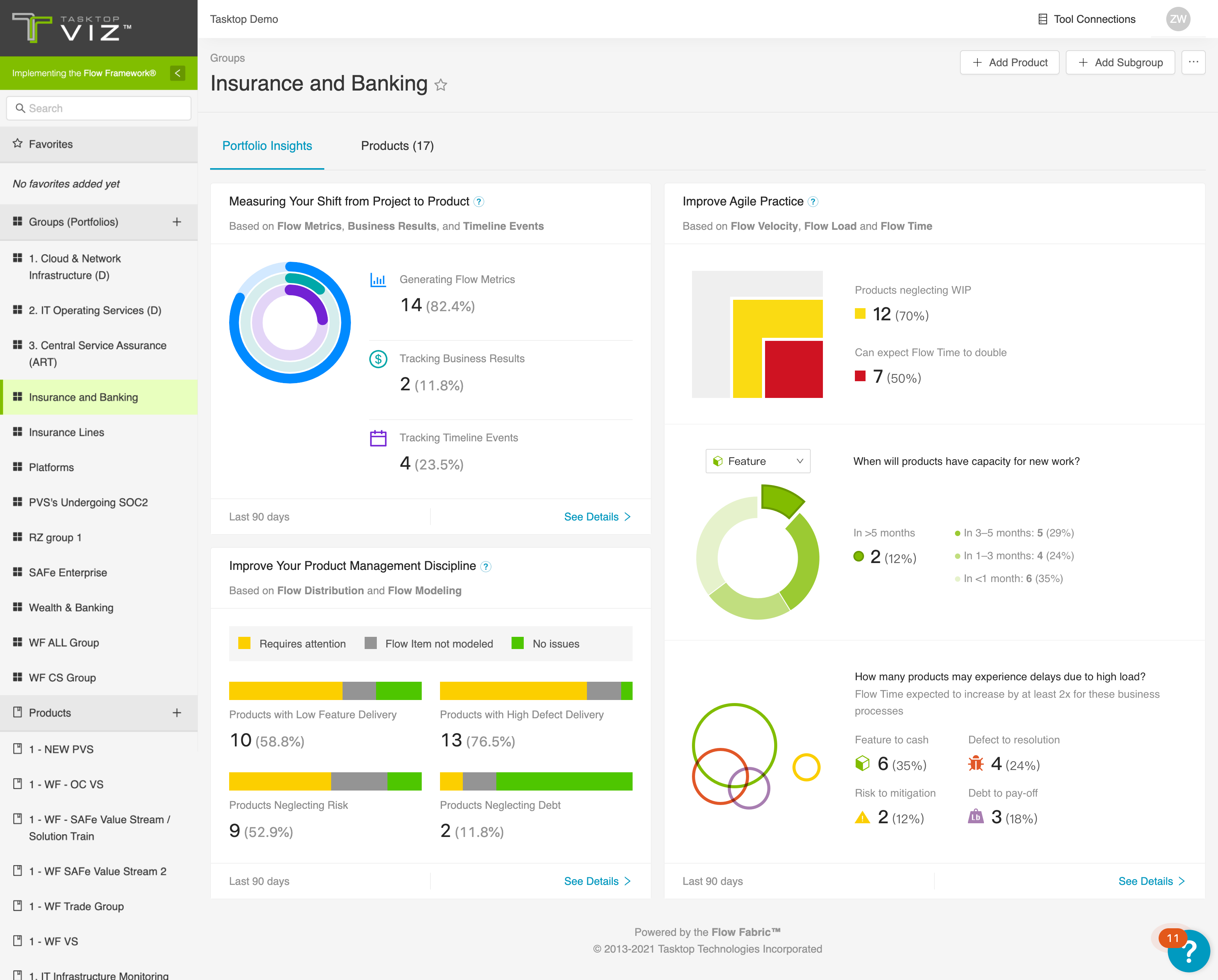
    Tasktop today unveiled a dashboard that it promises will simplify tracking of key performance indicators (KPIs) spanning multiple projects.

    In addition, the value stream management (VSM) platform provider revealed it has garnered an additional $100 million in funding.

    Tasktop CEO Mik Kersten said the Tasktop Viz VSM Portfolio Insights dashboard makes it simpler to surface the insights that the company’s VSM platform aggregates as it collects metrics and analytic data from the tools and platforms that make up a DevOps workflow.

    Organizations are then better able to determine the impact any change to the rate at which an application is being developed will have on the business, noted Kersten. IT and business leaders can also more easily identify how constrained resources or persistent quality control issues might be adversely impacting those business goals, added Kersten.

    As a DevOps discipline, VSM is still relatively new. However, Tasktop claims more than half of the Fortune 100 employ its VSM platform. Customers include BMW, CGI, E*Trade and T-Mobile. Despite the economic downturn brought on by the COVID-19 pandemic, the company reports it saw a 30% increase in revenues driven mainly by organizations that have accelerated multiple digital business transformation initiatives. A recent Forrester Consulting Total Economic Impact Study indicated organizations realize a potential 640% return on investment over a three period after implementing the Tasktop VSM platform.

    Tasktop is also a founding member of the Value Stream Management Consortium, which is seeking to promote adoption of VSM platforms to close the divide that often exists between individual DevOps projects and the strategic business goals of an organization.

    The concept of value stream management traces its lineage back to lean manufacturing methods, which called for each step of a manufacturing process to be continuously measured. As software development has evolved from being a craft to a process that is automated as much as possible using DevOps best practices, the need to monitor the impact of, for example, missed software development deadlines on the business has become more acute as organizations appreciate just how dependent they are on software.

    VSM platforms automatically take technical metrics, gathered via a DevOps process, and match them to a set of key performance indicators (KPIs) defined by business leaders. The challenge many organizations still face is, first, making sure they have the tools in place to collect the appropriate technical metrics and then identifying the KPIs that truly matter to the business. Once those metrics are gathered and KPIs established, organizations are able to apply advanced analytics to optimize allocation of resources that include people, platforms and processes, noted Kersten.

    It may be a while before VSM becomes pervasively applied with organizations. However, those organizations that find a way to consistently deliver quality applications, on time, that have a greater impact on the business will inevitably start to outperform rivals. The challenge and the opportunity is to bring a level of discipline to bear that ensures that goal is always achieved.

  • 4 Ways to Overcome Agile Transformation Obstacles

    4 Ways to Overcome Agile Transformation Obstacles

    If an organization desires a successful Agile transformation, the first step is to shift its thinking from ‘doing Agile’ to ‘being agile.’ Unfortunately, a commonly shared belief that Agile is just a software development methodology keeps too many companies stuck in the ‘doing Agile’ mindset.

    This belief ties back to the principles of Agile thinking from frameworks like Scrum or Lean. Most of these methodologies were focused on teams of developers. Naturally, the vocabulary and tools derived from these methods are unique to software development. While development has evolved away from waterfall approaches, the rest of the organization tends to run into cultural challenges downstream because the vocabulary and ways of working are foreign.

    When an organization begins to lose progress downstream, it is too focused ‘doing Agile’ rather than ‘being agile.’ In order to shift the mindset toward ‘being agile,’ a new mindset must be adopted across the organization. These four insights offer ways to overcome obstacles along the way:

    Instill Agile Thinking Across the Organization

    The first step toward instilling agile thinking is to establish common vocabulary and define what it means to be agile. A common vocabulary and understanding of agility helps teams across the organization understand and see that agility is more than doing sprints.

    As an organizational strategy, agility equates to flexibility – the ability to adapt to changing business requirements. It also means being collaborative and making complex processes more lightweight. Instilling this type of agile thinking into everyone at the organization leads to success. DevOps, for example, successfully instills this type of thinking through value stream management.

    Essentially, this hurdle boils down to setting common goals and creating a common understanding of what ‘agile’ means across the organization.

    Achieve Autonomy Through Self-Organization

    Agile frameworks encourage self-organization. When teams self-organize they are given a task to do. However, no one tells them how they’re going to accomplish it. A self-organizing team gains a certain amount of autonomy, which leads to empowerment.

    With self-organization also comes risk. The organization must learn how to embrace risk, how to look at failure as an opportunity to improve and how to empower teams in a more self-regulating way. When teams self-regulate and self-organize, it’s a team win when they are successful. This develops a sense of communal pride.

    When breaches or too many failures do happen in a self-regulating system, the policies and consequences naturally occur. However, the key differentiator is that these environments are not driven by the policies. Rather, the objectives drive the behavior. When objectives are being met, empowerment stands.

    Agile software development, DevOps and site reliability engineering (SRE) are intended to be self-regulating systems, but all first require leadership to create psychologically safe environments, blameless postmortems and more. There is no room for a blame culture in a self-regulating system, and the organization must be agile enough to meet the demands of the system.

    Leverage Intelligent Lightweight Process

    Agility does not equate to a complete absence of process. It means there is enough process in place to ensure consistency, improve flow between people and teams and that automation replicates the process simply and effectively.

    IT organizations must understand that it is possible to move away from complex and authority-based processes and continue to leverage an element of process.

    Intelligent Process Means Intelligent Automation

    Although humans are the driving force behind agility, automation helps them go faster with more consistency. However, there is no such thing as ‘being agile’ with automation alone. Agile cannot be bought, and it’s important to get teams thinking that way. Automation should complement Agile, but not define it.

    When investing in automation, a cost/benefit analysis is critical. When considering automation, think in terms of two key metrics: time and quality. With two equally important metrics, the organization cannot become dependent on one aspect or another.

    For example, you can’t go faster with a manual process. You also can’t go faster with only automation, because the automation alone doesn’t replicate your intelligent lightweight process. And, you can’t go faster just by having a process, because the process can become very bureaucratic.

    Process is just a means of getting there, but it needs people and automation to make the processes come alive. People, process and automation all play an essential role in creating an intelligent process.

    Successful Agile transformation is more a way of thinking and behaving than simply following a framework. From a human perspective, an organization that experiences true agility, as we’ve defined it today, allows humans to exercise their competencies, grow skills, collaboratively celebrate success and learn from failures.

    If you’d like to learn more about Agile Transformation, especially in regards to Agile Testing, you can register for the next SKILup Day on April 22. Please register for SKILup Day: Agile Test Management for the Enterprise here.

  • How lulu Became a Lemon: A Digital Transformation Fail

    How lulu Became a Lemon: A Digital Transformation Fail

    Many people sometimes have a tough time figuring out what exactly digital transformation is and why it’s so important. I want to tell you a real-life story of how a once-respected brand, lululemon, has failed the digital transformation journey and, as a result, may fail in a new retail landscape.

    The story starts innocently enough with my desire to get my wife a lululemon gift card for her birthday. She has gotten her vaccines and is returning to the gym, so I figured it was a great time to get new workout clothes. I purchased a gift card on March 15 to be delivered via email a few weeks later on her birthday. It was a simple digital transaction that for any company that has its digital transformation act together would be a no-brainer. Well, this is where lulu turns off the tracks and turns into a digital lemon.

    On the day of my wife’s birthday, I had planned that she would wake up and see how thoughtful I was in getting her the gift card. She didn’t say anything about the card, though, so I finally asked if she received the gift card. She didn’t know what I was talking about. I had her check her spam folder, nothing. Nope, no gift card.

    Thus began a day that would see me reach out and communicate with the lulu team no fewer than six times. It seems that lulu uses a third party for digital gift cards. Each time I reached out to a lululemon “educator” (that is what they call them, and did I get an education), I was told a different story:

    1.  A simple apology and card being emailed, give it an hour.
    2. Sorry, it must be that email address, do you have another email address? Give it an hour.
    3. Hmm, seems our third-party gift card provider is having problems today.
    4. We located your card, it was sent to: tlaynguyen@gmail.com  could I check that email? (I would love to, but that isn’t an email address I have.)
    5. Well, we have no control over when the third party sends emails.
    6. Digital gift cards are non-refundable, even if you didn’t receive it. Sorry, can’t help you.
    7. You have blocked our emails from your computer.

    At this point I realized that lululemon, while maybe making great workout gear, is analog to the core. A simple digital transaction like this had them tied in knots, wasted hours of my time and so turned off my wife that she is looking elsewhere for her new workout gear.

    This past year has taught us that retailers that can’t hop on the digital transformation train are heading for the precipice. It seems as though lululemon may have already gone over the deep end. The company better hope the malls fill up quickly because in a digital world, lulu is truly a lemon.

  • The Single-Sentence Postmortem

    The Single-Sentence Postmortem

    Do you have four seconds?  In the time it takes you to read this sentence you could be done with your incident’s postmortem.

    “But my postmortem has 8 sections!  I have to construct a critical timeline, restate my followup tasks, show the major milestones, evaluate root cause…”

    Stop right there.

    First of all, your incident management system should be automatically capturing your timeline, follow-up tasks and major milestones as they happen — so you shouldn’t be worrying about reproducing that content at all.

    Second of all, the most critical thing a responder can bring to a postmortem, in the moments right after the incident concludes, is the one-sentence personal context of what actually happened. It’s the same sentence they’d say to a co-worker in the lunch room when asked what went wrong. But to achieve organizational resilience, the knowledge in that sentence has to be captured and distributed. I can’t emphasize this enough – a single sentence can unlock 80% of the value. Writing something, anything, is so much better than writing nothing, and yet, too often, we see companies skip this part of the incident management process.

    Modern incident management, as a practice, was born on factory floors.  Instead of firing the person who was considered accountable for a major incident, having that person write up their view of what happened was more impactful at preventing future incidents. That’s because only the responder has the complete context to shed light on the contextual, systemic failures that actually caused incidents, as compared to the outside view of management and other employees who will often see problems as human-centered or due to obvious oversights (using 20/20 hindsight).

    When asked if he would fire an employee who made a $600,000 mistake at IBM, Thomas J. Watson famously replied, “No! I just spent $600,000 training him – why would I want somebody to hire his experience?”

    The reality is that any amount of your unique perspective as a responder is invaluable when compared to nothing, and without it, the chances of your company learning from these mistakes is slim. That’s why we encourage a unique approach: we tell our customers to spend four seconds on their postmortem.

    Especially for those new to incident response and management practices, it’s important to develop a practice of doing postmortems right away, as soon as the incident closes. As quickly as possible, open up your postmortem, jump to the ‘What Happened?’ section, and write one useful sentence. That’s it.

    Once you do that, we know that one of two things will happen:

    1) You’ll have other things to do, so you’ll publish the postmortem, and that one critical piece of knowledge will be shared throughout the company. That is infinitely better than nothing. 

    2) Or, you’ll realize you have more to say and get it done, right then and there.

    Like putting your running shoes on even if you don’t want to go for a run — at the very least, you’re up and active; at most, you’ll get out there and rack up some miles.

    Working with companies across industries and seeing thousands of incidents filed; hearing the stories of hundreds of companies’ incident management implementations has taught us that the alternative to a quick postmortem often isn’t often a more in-depth one, it’s no postmortem at all.

    So if you’ve just finished an incident– and if you’re about to pick up your coffee and move on to the next task at hand – instead, spend four seconds writing one sentence. It could make all the difference.

  • GitLab Survey Surfaces Advances in DevOps Education

    GitLab Survey Surfaces Advances in DevOps Education

    As more organizations clamor for employees with some type of DevOps education, higher education is responding in kind, according to survey findings.

    A survey of 843 students and teachers at various academic institutions who have had some exposure to the GitLab continuous integration/continuous delivery (CI/CD) platform suggests the number of individuals with DevOps skills graduating from these programs soon might increase significantly.

    The survey, which was conducted by GitLab, identifies the top four use cases for the platform as learning (28%), teaching (22%), research (20%) and information technology/professional use (19%). Nearly a quarter (22%) also indicated they had a secondary use case on campus.

    Certification (57%) was ranked highest in terms of interest, followed by e-learning (49%) and virtual instructor led-training (35%). Students and graduate students are more interested in certification at 58% and 67%, respectively, while administration, faculty and staff were more interested in e-learning.

    The primary benefit of teaching and learning GitLab was identified as the ability to teach operations competencies (57%) and the ability to teach with an end-to-end tool for learning DevOps competencies (51%). For students specifically, the top benefit cited was the ability to teach operational competencies (49%), followed by the ability to build a portfolio and record of contributions (45%). Workforce readiness was cited at 40% and 46% of students and faculty, respectively.

    Dr. Christina Hupy, senior education program manager at GitLab, said the teaching of best DevOps practices within an academic environment is critical because it takes on average six years for IT professionals to master DevOps in the workplace. To help increase the overall pool for DevOps talent, GitLab has been making its software available for free via individual licenses to students and teachers. That program is now being extended to include a GitLab for Campuses offer, which makes the GitLab platform available to multiple users at a reduced price.

    In general, higher education programs have not been meeting the needs of organizations that are looking to hire IT professionals with proven DevOps skills, noted Hupy. Since launching the GitLab for Education Program in 2018, GitLab is trying to help fill that void, issuing more than $2 billion worth of GitLab software licenses in more than 75 countries. In 2020, the organization added 340,000 seats across 250 institutions to the program.

    More than a third of survey respondents (37%) reported they had access to a GitLab subscription at their institution and used it. The most common use case for GitLab cited was source control management (55%); followed by verification, also known as continuous integration, at 36%; planning, at 30%; and management and release, also known as continuous delivery, at 27% each.

    There is also significant use of GitHub among survey respondents, with 85% reporting using it. A distant second was Jenkins (21%), followed by BitBucket (17%), Travis CI (11%) and GitHub Actions (15%).

    IT organizations, of course, have a vested interest in helping educational institutions develop DevOps programs as the number of application development projects being launched simultaneously continues to increase. Otherwise, they will find themselves paying top dollar for DevOps talent that is difficult to find and retain. The challenge, of course, is identifying the institutions that have access to the DevOps tools and platforms that are going to be a pre-requisite for a successful DevOps career those students might eventually enjoy.

  • Citizen Development Program: Establishing Guardrails

    Citizen Development Program: Establishing Guardrails

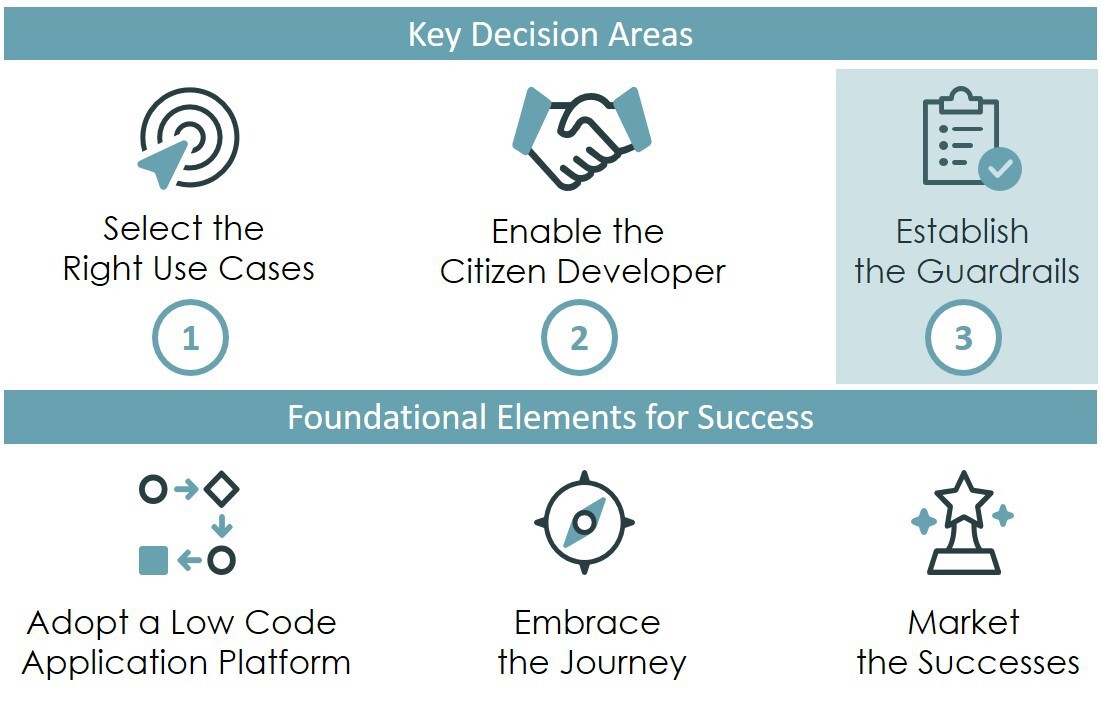
    Citizen development is as easy as one, two, three.

    1. Select the right use cases
    2. Enable the citizen developer(s)
    3. And establish the guardrails, which I will cover here.

    Of course, there is a little more to it than this. Success requires focus, planning and patience. We previously discussed, in parts one and two of the series, the discipline required around use cases and citizen developers (CDs). This third and final post covers how to establish the appropriate technical and process guardrails to ensure the wider enterprise, platform and developers are protected.

    Establishing the Guardrails

    Guardrails exist for two primary purposes: alignment and independence. Clear and concise guardrails ensure alignment across organizational objectives, company policies and disparate teams. Those same guardrails provide CDs with a degree of independence – a safe operating space where they will not be micromanaged or unnecessarily burdened by processes.
    Effective guardrails define and enforce a range of acceptable behaviors, as well as reduce risk and speed application delivery.

    While low-code application platforms (LCAPs) each have their unique capabilities and technical implementations, relevant features can be viewed in three broad categories: platform foundation security, app dev access control and development tools & processes.

    Within the context of your specific LCAP and development methodology, you need to consider and answer the following questions:

    Platform Foundation Security

    • How will you provide your CDs a “safe” environment to build and test their applications? Does your platform support separate and secure development, test and production environments? Will you put your citizen developers in their own discrete development environment?
    • Will your developers be working with data that requires encryption and/or localization? If so, does your platform support data encryption and compliance with relevant data residency laws?
    • Does your LCAP support anti-virus scanning and/or HTML sanitization, and if not, how will you prevent a CD from inadvertently putting your organization at risk?
    • What logging and auditing is required for your CD activities? Who reviews logs? How long is the information kept?
    • Does your platform support enhanced security mechanisms like two-factor authentication (2FA) or virtual private networks (VPNs)? Will citizen developers be working in areas or with applications that require enhanced security?
    • Are there other risk, compliance and security standards that your organization mandates? If so, how will you incorporate them?

    App Dev Access Control

    • How will you provision or deprovision developer and tester accounts? How will you handle developer login and authentication into the development environment?
    • Will CDs have development access to downstream environments across testing, staging and production?
    • Will you use groups to control access to applications in development, and if so, who will manage these groups?
    • Will you use roles to grant access to distinct development capabilities like tables, workflows, UIs, mobile, reporting, analytics, etc.? What determines which role(s) a citizen developer is granted?
    • Will you provide a library of pre-built application components (e.g., workflows, dashboards, virtual agents, etc.)? How will you control access to and usage of the pre-built components?
    • Will you allow citizen developers to access pre-built integrations? How will you control access to and monitor usage of those pre-built integrations?
    • Does the developer identity and access management process need to be driven by an enterprise identity provider, such as Azure Active Directory?
    • Will citizen developed applications be able to access other citizen developed applications? How will app-to-app access be controlled?

    Development Tools and Processes

    • How will you manage your demand intake process? How will you ensure that new applications do not duplicate existing application functionality? What criteria will you use to determine if an application is a good fit for a citizen developer?
    • Will you require your CDs to adhere to all, some or none of your existing development methodology? Can you explain the methodology in terms the citizen developer will understand and accept?
    • Will you require CDs to create requirements or agile stories before building an application?
    • Will you require tests be developed for CDs’ applications, and if so, can these be automated? Who will develop those tests?
    • Will you require code or application reviews of citizen developed applications? What best practices and standards will be used during those reviews? Can those reviews be automated?
    • What level of documentation, if any, will you require developers to produce?
    • How will you promote applications through the development pipeline (i.e., dev to test to prod)? Can the app promotion process be automated?
    • How will you track and manage CDs’ applications through the development pipeline and their life cycle?

    Reflections on Citizen Development Programs

    The exercise of writing this series and your feedback has encouraged me to reflect on parts one (selecting the right use cases) and two (enabling citizen developers). Here are a few final thoughts to consider:

    • Do you care that a CD builds just one app or do you want them to build more?
      Ideally, a CD continues to deliver app after app. But attrition can be high in a CD program. Therefore, if your CD built a single application that delivers business value and then returned to their “day job,” you should still celebrate that success.
    • Is citizen development better suited for creating new apps or maintaining existing apps?
      In my view, the answer is both. LCAPs provide great opportunity for CDs to prototype or even produce an MVP of an application. At the same time, LCAPs allow professional developers to build more complex applications and turn the maintenance of those applications over to CDs.
    • How many LCAPs can you reasonably expect a citizen developer to understand?
      Realistically, perhaps one, or maybe two. Keep in mind that app development is important, but having CDs focus their technology choices on a single LCAP vastly improves their chances of success.
    • Do citizen developers make good professional developers?
      Consider this – some of the best developers I have worked with do not have computer science or software engineering degrees. It’s more important that a developer has a passion for technology and, more importantly, for understanding how technology solves business problems.
    • Finally, explore and embrace citizen development before your competitors do, as the value proposition is real in this new world of work we have found ourselves in. After 30 years in enterprise IT, I can confidently say we’ve reached an inflection point in technology and business, truly democratizing application development.

    This post is the third of a three-part series from Mark Tognetti that provides real-world insights on delivering business value from citizen development initiatives.

  • Best Practices for Digital Experience Management

    Best Practices for Digital Experience Management

    The COVID-19 pandemic put digital services in the spotlight. The winners in 2020 and beyond will be those organizations which provide awesome user experiences for online products, services and apps. There is scant room for error, as digital leaders before the pandemic have upped their game even more.

    For example, streaming service provider Netflix’s 2020 Q4 revenue reached $6.64 billion – almost $14 million more than expected – and added 8.5 million paid subscribers. The company had more than 200 million users in the quarter and saw viewership for non-English titles jump 50% during the year as U.S. viewers sought new content from around the globe.

    Companies in more traditional sectors, such as restaurants and hospitality, also grew by investing further in digital strategies. Chipotle’s 2020 revenue increased 7.1% to $6 billion, with digital sales skyrocketing 174.1% and accounting for more than 46% of sales. Target’s digital sales increased 155% in Q4 while Costco grew e-commerce sales by 91% in FY20, as online ordering and curbside pickup became the new normal.

    Digital Experience Monitoring Basics

    To manage this onslaught of online customers and transactions, IT organizations are turning to digital experience monitoring (DEM). DEM is a broad area, but it comes down to delivering the best experience for your customers and employees by monitoring your IT assets and addressing issues that arise before they become problems. DEM allows you to mimic and test the end-to-end customer and worker experience. Such solutions can be used in on-premises data centers or run in multi-cloud and hybrid cloud environments.

    There are two key methods for DEM:

    Real user monitoring (RUM): This entails using real users’ devices to measure the performance of a page. A script is injected on each page to measure data on page load performance for every request made, monitoring the interaction of an application and the users. The data shows such aspects as how an application is being used and the geographic distribution of users.

    Synthetic monitoring: This technique tests the performance of a page using an automation tool rather than users’ actual experiences. Scripts are used to simulate how a user might move through a web application and then reports are created based on that performance.

    In a recent report, Gartner analysts said DEM products are evolving, moving from a focus on performance and availability to correlating infrastructure and operations (I&O) and business outcomes. Currently, fewer than 15% of digital business initiatives will require I&O leaders to report on business metrics from digital experience; that will jump to 70% by 2025, Gartner says.

    For years, organizations have been using monitoring tools to measure various aspects of their infrastructure. For example, IT operations management (ITOM) solutions track metrics and manage alerts and events for infrastructure hosted on-premises or in the cloud, including servers, networking systems, storage appliances and databases. The data also can be used for historical data analysis and to map out trends.

    DEM is specifically focused on the end user experience, giving IT professionals the visibility to run diagnostics, fix issues and measure performance at each point of contact between the users and the application. Acquiring a new customer is an expensive effort, and a customer can be lost because of a single poor experience. DEM is designed to ensure the optimal experience.

    Getting Started with DEM

    There are two common approaches for implementing DEM:

    Point tools: Domain-specific monitoring tools track and measure different layers of the technology stack, such as networks and applications. The upside to this approach is you get more in-depth coverage from the point tools, but it can lead to tool sprawl, which impairs visibility and increases costs.

    Platform: This approach provides native monitoring for many areas and integrates with other tools, as needed, to deliver a central, unified view that makes it easier to see everything at once. However, it doesn’t include best-of-breed performance or the deepest analysis capabilities you will want in every area.

    An important first step is to identify the metrics and outcomes priorities for your organization. Then spend time researching the proper toolset for the goals you want to achieve. If you decide on deploying multiple single-domain monitoring tools, remember that you will need an integration strategy. The tools will need to easily share data and display that centrally, to deliver a holistic view of digital experience. Integration is also critical for troubleshooting and connecting metrics to a specific business service. You also will need subject matter experts in these technology domains who can ensure that the DEM tool(s) keep pace with advancements in IT infrastructure and development technologies.

    The Future of Digital Experience Monitoring

    The DEM field is evolving, with more parts of the I&O stack coming under its purview. Solutions will offer more capabilities and be easier to integrate out of the box with other tools because the end-to-end flow doesn’t stop with monitoring and collecting metrics. ITOps staff need to take action on critical alerts with efficient workflows and intelligent recommendations. AIOps and machine learning analytics are playing a growing role here.

    DEM can reduce time-to-value for customers and workers, simplify and ease onboarding to new sites and apps and ultimately increase interactions and sales. Advanced solutions can fuel predictive analytics, form a deeper understanding of user behavior to optimize websites and apps in step with user requirements and dynamic infrastructure changes. In a digital-centric world, DEM capabilities are critical to the health and future of organizations in every sector.

  • Cooperative Gaming: Software Teams’ Secret to Success?

    Cooperative Gaming: Software Teams’ Secret to Success?

    Trust falls and team backpacking trips are out — cooperative gaming is in. Don’t think embarking on group Minecraft missions could help deliver great software products? Think again. A 2019 BYU study found a 20% increase in office productivity after just 45 minutes of gaming.

    Software engineering is a mentally taxing endeavor, and many developers are under mounting pressure to deliver. To destress, many software teams use gaming to unwind during work hours. Gaming, it turns out, has added benefits of improved morale, increased productivity and lowered ego around unofficial hierarchies within the office. Setting aside time to recharge with collaborative gaming could increase a workplace’s health and help software teams work together to deliver products more efficiently.

    I recently spoke with Max de Lavenne, founder and CEO of Buildable, ally to the workplace gamer, to see why he embraces gaming as a regular part of his software developer team’s weekly regimen. Buildable adopted gaming and saw a notable impact; de Lavenne shared how other teams could similarly introduce gaming to improve performance.

    Gaming in the Workplace

    Traditional business environments don’t typically embrace fun activities on the clock — there is a clear separation between work and life. But at Buildable, gaming is integrated into the weekly routine. The Buildable engineers set aside about 45 minutes mid-week for collaborative gaming, typically on Wednesday or Thursday. The Buildable team, made up of about 20 software engineers, favors Rocket League and a modded version of Minecraft.

    According to de Lavenne, gaming is a great way to foster collaboration and intuitive group thinking. “Getting recharged is really important,” he said. He encourages the team to adopt cooperative multiplayer games; no solo play. He also discourages violent and aggressive RPGs, like first-person shooters.

    Workplace gaming isn’t unique, in and of itself — many teams at other companies will often play Haxball during coffee breaks or get into a Call of Duty: Warzone match from time to time. Yet, few leaders have the stomach to sanction gaming as integral to the developer’s workflow and overall team dynamic.

    “Engineers collaborate best when they respect each other and have confidence in each other’s skillsets,” said de Lavenne. “They are individuals, but there’s a lot of groupthink in teams.”

    Benefits of Gaming

    Gaming has proven benefits. In fact, researchers at Kansas State University found that employees who spent one or two minutes during breaks in their day playing games such as Candy Crush on their phones reported being happier than their peers. Similarly, de Lavenne noticed improved mood and other positive outcomes from collaborative gaming at Buildable, including:

    • Better team morale: Having scheduled gaming breaks to look forward to each week keeps attitudes positive. Software engineering can cause fatigue, which managers need to monitor carefully. “People get tired, and there’s only so much the brain can do,” de Lavenne said .
    • More fluid communication: Collaborative gaming focuses a team’s effort on a collective activity free from monetary incentives, bonuses or other hidden agendas. Afterward, de Lavenne said he’s noticed more fluid communication emerge among the team.
    • Increased collaboration: There’s satisfaction in doing something together, and de Lavenne reports that gaming has redefined collaboration for his team in unique ways. Employees take the cooperative, creative attitude fostered from gaming experiences and apply it to more structured, scrum-type environments.
    • Increased productivity: Dedicating one hour for gaming per week equates to about a 2% loss of labor time. However, de Lavenne reported that the productivity gains afterward surpass that lost time and more.
    • Reduction of ego: In work environments, unspoken hierarchies inevitably exist. Interestingly, collaborative gaming can completely reverse those social dynamics. Seeing senior engineers at the bottom of a gaming leaderboard can be humorous and boost confidence for younger engineers.
    • Combating isolation: Throughout the pandemic, remote work has left many of us feeling lonely. For young engineers without families, a big chunk of social interaction may occur in the workplace. Games can help maintain good spirits by bringing teams together virtually.

    Tips for Encouraging a Healthy Gaming Culture

    The overall goal is to promote enjoyable, freeform shared experiences. To enable this, de Lavenne shared a few tips on integrating games into developer team workflows.

    First off, gaming should not be mandatory, as making it a required activity would somewhat defeat the purpose. Instead, gaming should be fun and completely voluntary. If people would rather get in some physical exercise or check Instagram, they should feel just as free to do so.

    Also, as much fun as gaming with the team could be, it’s helpful having the CEO removed from this activity, de Lavenne advised. This is important so that players don’t feel they’re constantly monitored. Yet, leaders may want to have a say in the type of game, as well as when it’s played.

    Furthermore, the game doesn’t need to be an immersive RPG — it could be as simple and accessible as Jackbox. Cooperative board games like Dungeons & Dragons or Gloomhaven could have just the same effect as digital games.

    Outside of encouraging collaborative gaming, leaders can take other actions to boost morale and productivity. One such action is leaving chat channels unmonitored, so that team members can engage with each other on whatever subject they want without oversight. Another way to affect morale is location, noted de Lavenne. As I’ve written previously, hiring interest is expanding outside of traditional tech hubs. Buildable, for instance, chose to headquarter in suburban McMinnville, Oregon, for its walkability, greenery and better work-life balance than in larger cities.

    Gaming Is Where It All Began

    Multiplayer video games, LARPing, and AR/VR environments not only offer an escapist retreat — they represent nostalgia. For many programmers, video games were a doorway to the computer science field in general.

    “I’ve rarely met a software engineer that never gamed,” de Lavenne added. Gamers often seek out the highest-performing machines. And chances are, those kids with limited resources built their rigs from scratch. “This inspires you to learn about hardware, and you start to care about speed, compile and software activities,” said de Lavenne.

    From Atari to Minecraft, gaming has been a shared passion among generations of programmers. Recognizing this affinity can unite a team. Because at the end of the day, “building good software is all about people,” said de Lavenne.

    Of course, software development takes extreme diligence, planning, and structure to deliver bug-free, user-centric products. But under intense pressure to perform and meet new digital innovation demands, software developers could get burned out without a bit of distraction. With gaming, “the team really comes alive,” de Lavenne said.

    So, when things get slow, check out what’s hot on Steam. You may, ironically, just find your next productivity breakthrough.