Category: DevOps Culture

  • Apple Outage Outrage | Linux Random Redo | Okta Hacked (or Not)

    Apple Outage Outrage | Linux Random Redo | Okta Hacked (or Not)

    Welcome to The Long View—where we peruse the news of the week and strip it to the essentials. Let’s work out what really matters.

    This week: Why Apple services were down, Linux gets a huge RNG overhaul, and we wonder if Okta was hacked again. (more…)

  • Your DevOps Teams Can Do Better. Here’s How.

    Your DevOps Teams Can Do Better. Here’s How.

    As more organizations focus on digital transformation as the centerpiece of their growth strategy, software developers and IT teams are under heightened pressure to perform—quickly and efficiently.

    That begs two questions: Can we do better? And if so, how can we do better?

    The answers can be elusive, especially for DevOps teams that have over-relied on processes and models that, while previously successful, may not be as relevant for today’s projects. Of course, the point about relevance has been further magnified during the pandemic, when sudden shifts to remote working left many teams scrambling to ensure they had the capacity and infrastructure to support massive work-from-home cohorts.

    Software development and IT operations support teams that are winning by doing better in this new era are truly embracing Agile. And that means taking to heart the definition of “Agile,” which is a mindset of values and principles to continually evolve your way of working (WoW) to ensure your productivity and value are tailored to fit the tasks at hand.

    Conversely, teams that have relied on their go-to framework or approach for every assignment are often missing the boat with respect to efficiencies, effectiveness and even ROI. This is because they aren’t assessing whether their proven WoW is useful for their current projects.

    That can lead to underwhelming results. A report from Digital.ai revealed that while over 90% of software development teams take an Agile approach to their work, a whopping 96% of their digital transformation projects have failed or been delayed. Clearly, that suggests Agile has worked for them in the past, but the nature of digital transformation projects is calling for teams to adapt to new or hybrid approaches that may differ from their go-to WoW.

    Challenging? Yes. Doable? Also Yes

    While there is no quick fix to attain true flexibility amid complexity, the journey begins with the recognition that, yes, you can do better. And to do better—to become an adaptive, lean, responsive and learning organization under any circumstances—there are a number of steps to take to ensure your journey to Agile freedom is successful.

    Here are five that I believe must be considered for DevOps teams to become better and more effective:

    • Consider all options. Agile has been practiced for more than two decades, and literally hundreds of frameworks and approaches have been developed and implemented. If you examine your WoW in a context-driven, pragmatic manner you are more likely to select the best-fitting technique given the situation.
    • Do your homework. Your team leaders may not be familiar with the breadth of the Agile, traditional and hybrid frameworks at their disposal. But there’s help available. Seek out online courses and certifications designed to help organizations and individuals explore and navigate the multitude of Agile frameworks that they may currently be overlooking.
    • Focus on value. It’s great if your gut tells you that your Agile framework is reaping real results, but can you prove it? If your senior leadership has invested in Agile training, coaching and certifications, they’ll demand to see some tangible returns. With well-chosen Agile approaches that match the work required, you will be able to deliver the proof that Agile is driving measurable value that matters. Even further, learning which metrics to use in different situations can help measure this value.
    • Sidestep bottlenecks. By choosing the best WoW for the project at hand, you are more likely to eliminate the wasteful or inefficient processes that can add hours or days to any assignment. Understanding how to unclog these pipes is critical in improving the flow of value to your customers.
    • Motivate with morale. If your team is frustrated and morale is low, productivity, the quality of the work and your retention rate will be, too. But, if you’re able to do Agile well, this can help your teams be happier, more productive and more successful in accomplishing project goals. Ultimately, that means a more joyful customer base, too.

    Conclusion

    In the long run, the framework or approach you choose isn’t as important as your willingness to be open-minded in applying Agile frameworks to projects on a case-by-case basis. As you become more comfortable with new or different approaches, you will promote continuous improvement through carefully considered experimentation.

    That means you’ll become a learning organization, one that is open to change and evolution. With that mindset, your development and IT ops team will do better—guaranteed. Because true agility comes from freedom, not frameworks.

  • 5 Steps to More Sustainable DevOps

    5 Steps to More Sustainable DevOps

    The rise of remote workforces, cryptocurrencies and super-sized data centers brings to the forefront a concern in tech development that doesn’t get enough attention: The impact of computing and advanced technologies on the environment.

    About six months into the pandemic, people began to notice cleaner air, clearer water and an overall calming effect on the environment in the reduced presence of industry. Memes were created and widely circulated that suggested maybe we were the problem after all.

    That lasted for about six weeks before cabin fever set in, and we became impatient and ready to get back to business as usual.

    In the time between the last quarter of 2020 and the sudden waxing and waning of NFTs, a few timid voices again raised concerns about the impact of super-computing and other technologies on the environment. Those concerns eventually became muffled amidst socioeconomic and political turmoil, fears about inflation, staff shortages and logistical issues surrounding supply chain disruption.

    App development tried to fill some of those gaps and new data centers appeared as we struggled to find our footing again in a post-pandemic world.

    While environmental issues have been a matter of growing concern for decades, the past few years have put a particularly intense focus on the issue, with entire industries growing up around everything from climate-friendly investing to carbon offsets, and more. The environmental impact of technology has become an issue yet unresolved in spite of a growing focus on sustainability.

    Addressing the Elephant in Your Staging Area

    The typical DevOps journey focuses mainly on how app development will impact an organization. Rarely does it address how development impacts the environment.

    In addition to factors like improving time-to-market, reducing human error, debugging and making financial resource management more efficient, part of your DevOps strategy should include ways to reduce your carbon footprint and impact on the planet.

    First, it helps to understand exactly how technology affects the climate and depletes natural resources so you can incorporate sustainable development into your plan in a meaningful way.

    • Carbon emissions: It’s estimated that in 2022, there are already more than 16.5 billion mobile devices in use worldwide. Just one iPhone emits up to 86kg of CO2 over its life cycle, and 80% of that occurs before it even gets into the hands of consumers. This is just the tip of the carbon emissions iceberg, and it will only get worse.
    • Power consumption: All of that carbon comes from somewhere, and taking a look at energy consumption from just one slice of technology provides a glimpse into just how heavily computing contributes to the problem. As of 2020, data centers used about 416 terawatts of energy annually. The Bitcoin network alone consumes more power than all global data centers combined. A single NFT transaction consumes 82 kWh of power and emits 48 kg of CO2.

    Even relatively passive use of technology, like video streaming and remote collaboration, for example, has the potential to consume more power than entire countries. Add up all of the hours of Netflix, Zoom meetings and other remote activities and ponder the implications.

    • Waste: Despite the number of devices in use, very little hardware is recycled. Electronic waste comprises 70% of toxic waste worldwide, and it’s estimated to total 40 million tons annually.
    • Water consumption: You don’t often consider mixing water and electricity, but all of those data centers need to be cooled somehow. Internet usage alone uses 3,000 liters of water per person each year and emits 2,000 kg of CO2.

    Cleaning up Your DevOps Process for the Good of the Climate

    To become part of the solution, it’s important to do more than just invest in green businesses. Here are some steps you can take to clean up your DevOps process and become part of the solution rather than contributing to the problem.

    Identify Areas of Vulnerability

    Software engineering and DevOps are increasingly embracing new territory and emphasizing sustainable engineering. The first step in the right direction is to become aware of how power and resources are consumed during your development cycle.

    Consider:

    • How your power is generated. For example, are you dependent on fossil fuels or more eco-friendly methods?
    • How often are you replacing or recycling hardware and other physical components? This is a goal in waste reduction.
    • How are you cooling data centers and computing equipment? Are your efforts at maintaining optimal temperatures wasting resources?

    Balance the Three Areas of Sustainable DevOps

    In the realm of sustainable engineering, the process can be broken down into three categories: Technical, operational and environmental. The goal is to balance these aspects to monitor and optimize the development process and do the least amount of damage possible.

    Enforce Sustainable Development Practices

    Once you’ve identified areas of risk and set goals for sustainable software engineering, use the results to create and enforce a set of development best practices that better support environmentally responsible design and production. If you need some help or ideas, you can model your own initiatives after these emerging standardization principles.

    Become Part of the Green Tech Community

    In 2021, more than 200 countries signed the Glasgow Climate Pact, solidifying their commitment to reducing their carbon footprint and resultant environmental damage from tech development and use. The conference brought together stakeholders from businesses, government agencies and others to share information and create standards and best practices for sustainable computing and tech development.

    Incorporate Tools That Support Sustainable Development

    Tech giants like Google, Amazon, and Microsoft are creating tools to help DevOps and IT monitor and measure the environmental impact of everything from cloud computing to app development. Seek out and incorporate these tools into your own set of best practices or work on creating your own solutions.

    Final Thoughts

    Tech development is intended to improve our quality of life and reshape how we conduct business. There’s no reason that intention shouldn’t extend to the world in which we live and engage in commerce.

    The first step toward combating climate change without negatively impacting development is understanding how technology affects our environment. Then, we can make informed decisions that support responsible, sustainable DevOps.

  • CSS-Tricks Sells Out | Peloton Spins Out | ARM Axes 1,000

    CSS-Tricks Sells Out | Peloton Spins Out | ARM Axes 1,000

    Welcome to The Long View—where we peruse the news of the week and strip it to the essentials. Let’s work out what really matters.

    This week: CSS-Tricks gets bought by DigitalOcean, Peloton pedals while its business burns, and Arm lays off up to 15% of staff. (more…)

  • What Does AIOps Mean for SREs?

    What Does AIOps Mean for SREs?

    It seems SREs are of two minds when it comes to AIOps. On one hand, AIOps’ potential is pretty exciting. By automating complex workflows and troubleshooting processes, AIOps could make your life as an SRE much easier.

    But on the other hand, some SREs may choose to view AIOps with disdain and distrust. They might think of AIOps as just another trendy buzzword that doesn’t live up to the hype and that can become a distraction from the SRE tools that really matter.

    Which perspective is right? Should SREs embrace AIOps with open arms, or should they resist marketers’ efforts to position AIOps as the latest, greatest tooling innovation in the IT industry?

    Those are subjective questions that we can’t answer definitively, but let’s at least gain some perspective by examining what AIOps means for SREs.

    What is AIOps?

    If you keep up with IT buzzwords, you’ve probably at least heard the term AIOps—which is short for artificial intelligence for IT operations—and that it refers to the use of AI and machine learning (ML) to help automate IT operations workflows.

    The big idea behind AIOps is that, by using AI and ML to perform advanced analysis of large volumes of data from IT systems, IT and SRE teams can solve complex problems more efficiently than they could using a traditional, manual approach.

    AIOps can, for example, help to surface the root cause of a performance issue in a complex, multilayered environment like Kubernetes. Or it could make recommendations about how best to resolve an incident.

    AIOps entered the IT lexicon in 2016, when Gartner coined the term. Now, six years later, it’s a relatively well-established tool domain.

    How SREs View AIOps

    Despite the fact that AIOps has been around for some time, it doesn’t yet appear that many SREs have bought into the AIOps revolution. Catchpoint found in a 2021 survey that just 7.5% of SREs reported that AIOps tools delivered high value to their organizations.

    It’s unclear exactly why there are such low rates of excitement about AIOps, but we’d speculate that there are a few key factors at play:

    • AIOps is a new term for an old idea: Many monitoring and observability tools have included at least basic AI and ML analytics features for a long time, even before tool vendors slapped the AIOps label on their products. SREs probably realize this and, to some extent, view AIOps as an effort by marketers to rebrand functionality that is not actually new.
    • AIOps is hard to implement: Setting up an AIOps tool requires integrating it with diverse data sources and customizing it to fit your workflows and environment. It’s possible some SREs view this setup work as requiring more effort than it’s worth.
    • AIOps can’t replace human insight: While AIOps tools may be useful to a point, it would be unwise to place blind trust in AIOps-based analyses or recommendations. For this reason, some SREs may believe that AIOps encourages organizations to rely too heavily on automated tools at the cost of the expert analysis and perspective that only SREs can provide. (This is similar to the fact that it sometimes makes sense to prioritize human intuition and expertise over playbooks.)

    From an SRE’s perspective, then, AIOps may appear over-hyped, overly complicated and underperforming compared to traditional approaches to SRE.

    What SREs can Gain From AIOps

    SREs’ wariness toward AIOps is valid—but only to a point. It’s important not to let suspicions about the limitations of AIOps turn into excuses not to use AIOps at all. AIOps has some value to offer to SREs, even if it’s not perfect.

    For example, AIOps can play a role in reducing toil. To the extent that AIOps tools can recognize complex patterns or discover interrelated data sets more quickly than human engineers, AIOps reduces the time SREs have to spend manually troubleshooting problems or poring over complicated information.

    AIOps also helps to enable a more proactive approach to monitoring and incident management. If AIOps tools can alert SREs to emerging issues before they would otherwise recognize them, AIOps can help the SREs to get in front of the problems before they turn into true incidents. That’s better for SREs and end users alike.

    There is also an argument to be made that AIOps can help SREs do more with fewer engineering resources. If you can use AI to automate some aspects of monitoring and incident response, you can maintain the same levels of availability and performance with fewer human engineers on hand.

    Conclusion: AI Won’t Replace SREs—But it can Help

    None of the above is to say that AIOps can replace SREs, or that it magically solves every problem SREs face. Anyone who believes AIOps is a silver bullet has bought into the marketing hype to an unhealthy degree.

    Nonetheless, AIOps tools do offer value to SREs by making their jobs easier in some respects and improving reliability outcomes.

    So, while it’s wise to maintain a healthy perspective about the limitations of AIOps, SREs shouldn’t rule out AIOps tools as one way to improve reliability engineering.

  • Tackling CostOps When You’re a Developer

    Tackling CostOps When You’re a Developer

    The implementation and successful execution of IT initiatives often comes down to developers. From those working with commercial vendors to those working with open source projects, cloud-based software-as-a-service (SaaS) solutions, managed service providers (MSPs) and internal teams, they all play an important role in the successful running of IT and operations teams.

    One challenge developer and operations teams face is the huge time barrier between development and follow-on operations. What a developer builds today for an organization may continue to be used decades from now, and will likely be maintained, patched, updated and modified by other developers. Though it’s a point of pride for the developer—who will have likely moved on in their career—it can be challenging for the operations team who has to continue to deploy it year after year.

    With more applications than ever before, the traditional role of the developer is changing. Today, developers need to start factoring operations cost containment into their responsibilities.

    Opportunity for the Developer

    Developers are rarely responsible for long-term business decisions. Once code is out of their hands, they often have little to no stewardship of their work. The business will make critical IT cost optimization and containment decisions about its code, language and toolchain epochs later. Developers focus on the now and the near future. Spending hours envisioning the one winning outcome out of 10,000 possibilities years later won’t get code out the door or achieve the delivery goals of their managers.

    However, developers have an often-overlooked opportunity to include the gears to activate cost containment support during initial development. From there, if their work is good, it’ll endure; extended support will eventually be necessary. The first step is to ensure new and modernized applications include solid cloud-native monitoring from the outset. This not only helps DevOps and SRE teams but benefits the entire business, who’ll own those applications for the long term.

    Integrating operations-focused monitoring is a top priority for developers. In some cases, an application using platform-managed serverless or orchestrated containerization has no shortage of opportunities to provide developers and operations with detailed performance data.

    A developer’s expertise with dependency analysis, code maturity and ease of integration is a great measurement tool to evaluate tool durability. A solution capable of easily combining cloud-native application performance details with infrastructure performance, user experience and operational expense data is even more likely to help developers and businesses manage costs in the long run.

    A New Dimension

    As cloud-native becomes a mainstream enterprise strategy, cost containment is a key opportunity. To meet the future challenges of application management, leadership is rapidly expanding their definition of application suitability and quality to incorporate all aspects of application ownership. For some teams, cost containment is a new dimension of senior developer maturity.

  • What is MLOps? DataOps? And Why do They Matter?

    What is MLOps? DataOps? And Why do They Matter?

    Let’s look at three distinct disciplines—DevOps, MLOps and DataOps. In 2011, Marc Andreessen famously proclaimed that software was “eating the world.” A little more than a decade later, it’s all but impossible to argue with his premonition as software has embedded itself into virtually every industry. 

    But now another shift is underway and AI is gobbling up software as we know it. Our emails can finish our sentences for us, connected cars are helping us stay safer on the road and predictive technology is helping minimize supply chain disruptions caused by COVID-19. In the near future, almost every piece of software we interact with will have intelligence built-in, and as AI gains acceptance and new use cases are rolled out, applications will only continue to become more intelligent. The widespread move toward ML-enabled software has the potential to be as transformative and far-reaching as what Andreessen predicted. 

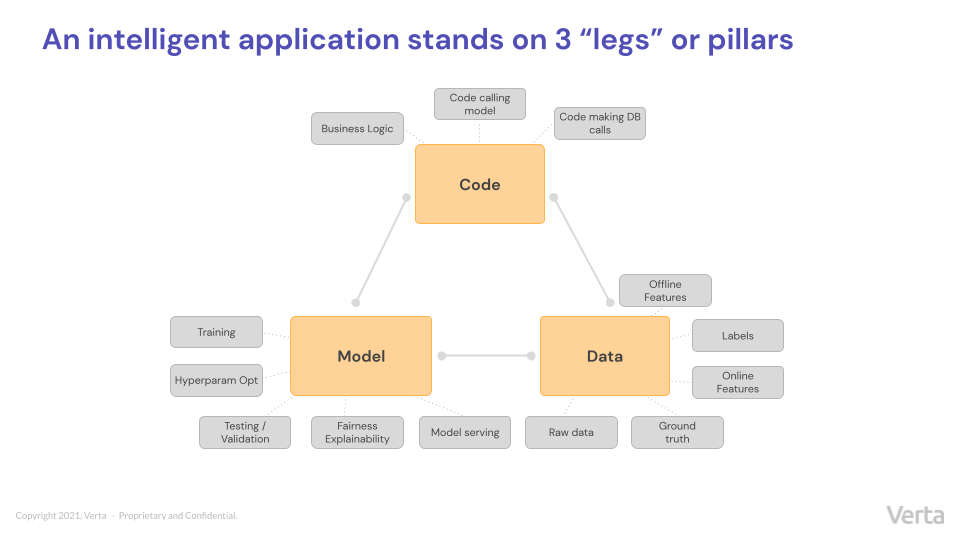
    But innovation is rarely easy or simple—and intelligent applications are no exception. While conventional software involves one thing—code—and not much else, intelligent software relies on a complex relationship between three interconnected variables or legs of a three-legged stool.

    A Three-Legged Stool: DevOps, MLOps and DataOps

    Model:  The one or more AI/ML models (e.g., linear regressions, rules, deep neural networks, etc.) trained to recognize patterns in data and make decisions are what makes an application “intelligent.” 

    Data: Most often, a model is trained on historical data and programmed to emulate it. As a result, an application’s behavior depends heavily on the data—the raw input data, labels and features, as well as the new data to which the model is applied and ground-truth for this data.

    Code: Code is the language an application uses to function. When used in the context of intelligent applications, the code pillar might refer to business logic, calls to models, receiving outputs, decision making and calls to other data systems. 

    A Real-World Example

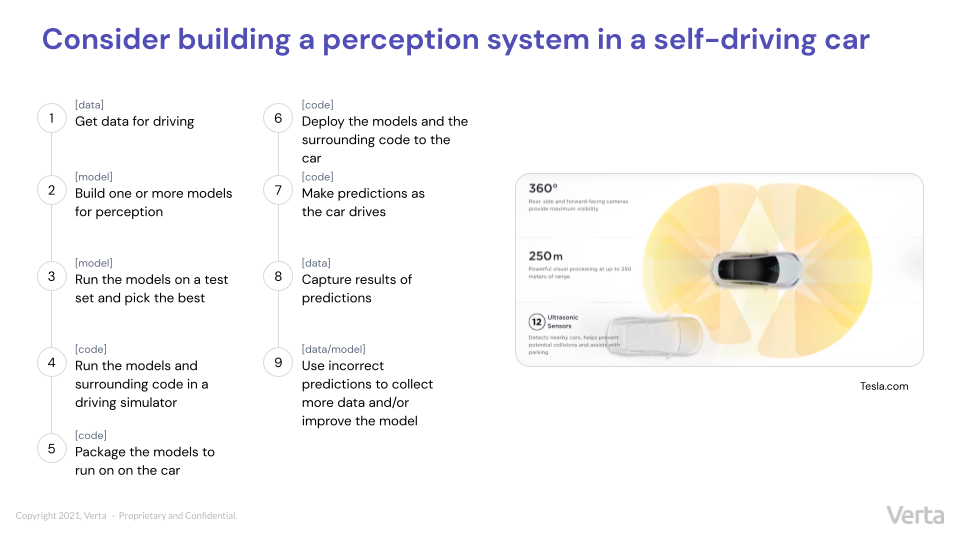
    To see how these pillars play out in real life, consider the example of a perception system for a self-driving car. Such systems use data (provided by offline sources and real-time cameras and sensors), models and code to determine myriad ever-changing variables (for example, if there are obstacles on the road, what lane markings look like, how fast a car can safely travel, etc.) While the following illustration is greatly simplified, it outlines the basic steps needed to build and deploy such a system and indicates which pillar each step belongs to. 

    Regardless of application type, the legs that intelligent applications stand on are always the same: Model, data and code. And if you try to remove any one of them, the application will topple over.

    With the three distinct pillars that make up intelligent applications, three distinct disciplines have emerged to keep each individual pillar functioning as efficiently as possible: DataOps, MLOps and DevOps. The rest of this post examines the details that make each discipline distinct and necessary to the model life cycle.

    DevOps

    Once upon a time, companies used waterfall processes to develop software. The process often moved so slowly that products didn’t realize their potential before they died or were replaced. In 2000, Agile was introduced, allowing developers to work quickly and iteratively in tight sprints where they were constantly delivering. By 2009, Flickr, for example, was the envy of the industry, routinely performing 10+ deploys per day. Companies seeking to increase their own productivity combined software development with established operations principles—and the term “DevOps” was coined. 

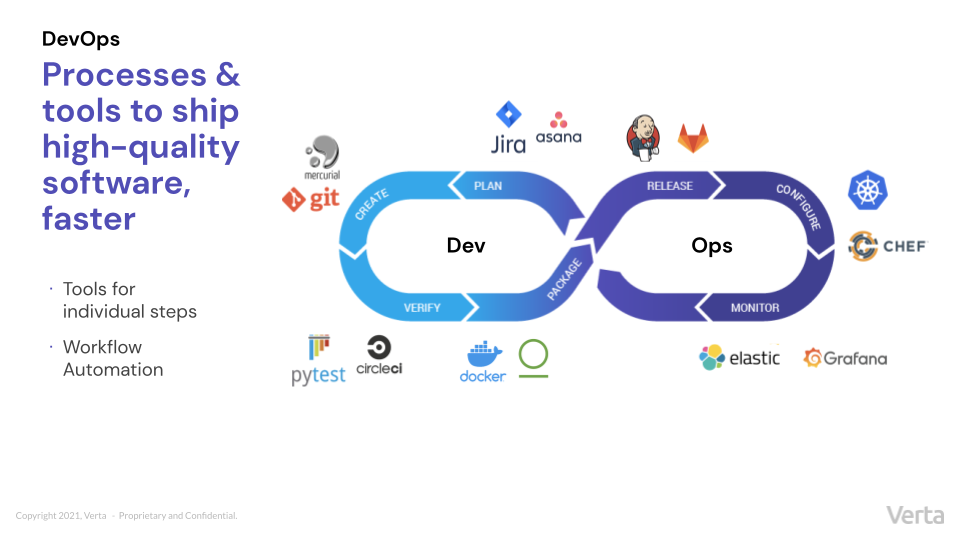
    As the familiar loop graphic below illustrates, the DevOps cycle goes from the planning stages to the creation, testing/verification, packaging, release, configuration, monitoring and then starts over again with planning. Over the past two decades, a host of unique tools have emerged to support individual steps in the DevOps life cycle—helping developers ensure quality by building in continuous integration and continuous testing from the start and helping speed up time-to-market with workflow automation. The DevOps ecosystem is robust, well-thought-out and always iteratively improving.

    MLOps

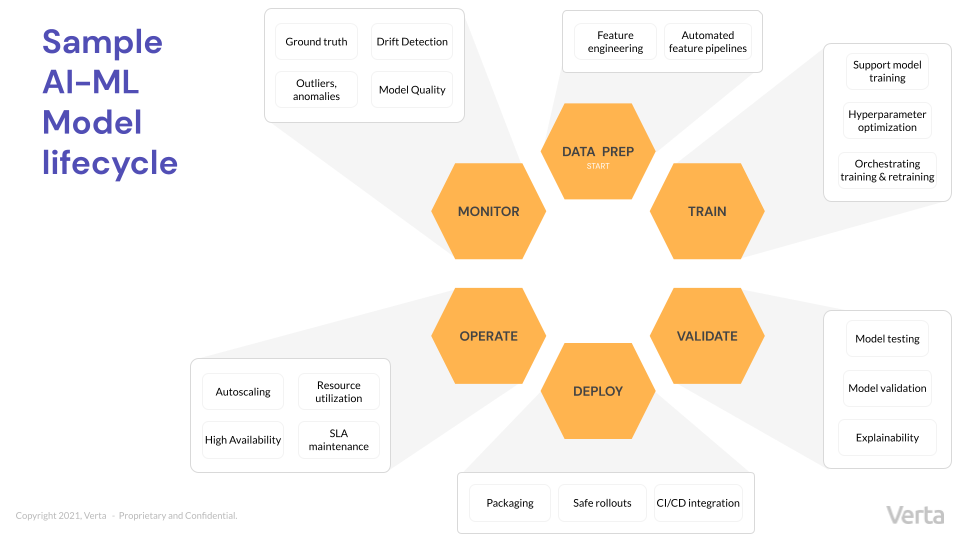
    MLOps helps teams move more quickly and efficiently through the model life cycle—a loop that involves six distinct steps, each of which contains unique considerations. 

    Since MLOps is related to DevOps, businesses sometimes try to adapt the processes used to write conventional software to execute the unfamiliar task of machine learning operationalization. But the approach doesn’t work, as the two disciplines are actually quite different.

    MLOps primarily deals with models, not code—and models are quite different from code. For example, model training and testing look very different from code building and testing. (What does “test case” even mean for a model?) And monitoring model performance is completely different than monitoring traditional software. (DevOps looks at things like CPU utilization, latency and throughput, while MLOps looks at model quality, drift and data quality.)

    Furthermore, the people that MLOps engineers are building for are quite different than their DevOps counterparts. As one might expect, the primary users of models are data scientists while DevOps generally serves software developers. Most often, MLOps engineers come from a background in ML and data science or software engineers who picked up ML. 

    As with DevOps, no single all-inclusive MLOps platform exists. Rather, different tools support different individual steps in the model life cycle and provide some amount of workflow automation to speed up processes. Different tools support specific pieces of the ML life cycle—but the ecosystem is still somewhat fragmented. Ideally, MLOps will evolve to offer more DevOps-like tools that work well together and offer more automation. For companies looking to build an MLOps platform, build a suite of supporting tools with speed, safety and automation in mind.

    DataOps

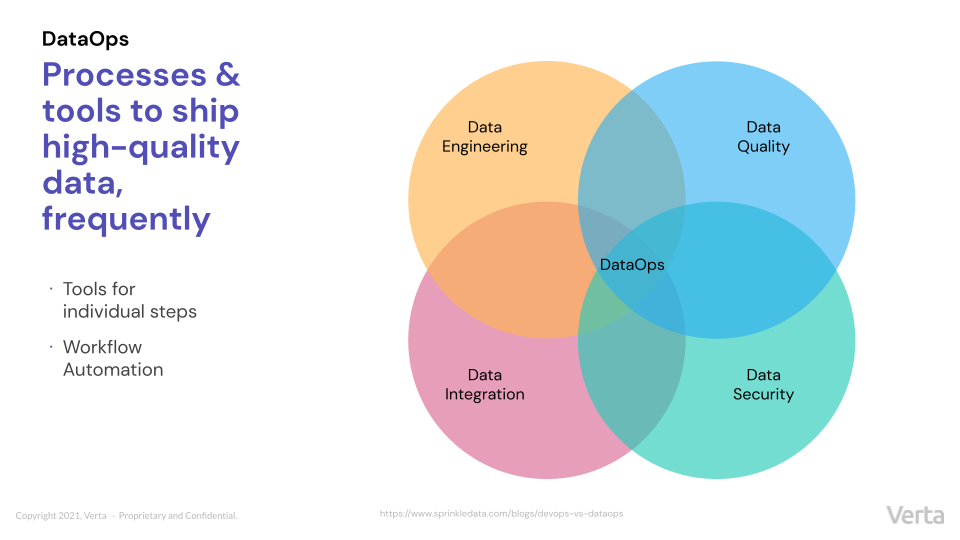
    We’ve seen very well-defined life cycles for the other two pillars discussed above; however, when it comes to DataOps, the life cycle is still being defined. But the overall objective of DataOps should sound familiar: DataOps involves processes and tools to ship high-quality data frequently—which requires a combination of data engineering, data quality, data security and data integration. 

    As with DevOps and MLOps, what the DataOps platform or DataOps engineer is doing is supporting the tools that help perform one of these activities and help build workflows. For example, a workflow may take data from a database, apply some transformation to it and then make it available for a business intelligence (BI) tool. That’s the kind of automation that is involved in DataOps. 

    As you might imagine, the skillset and the tools required for DataOps are quite different from the ones needed in MLOps and DevOps—so expecting a DevOps engineer to also be an expert in DataOps seems a bit unrealistic. While MLOps requires a much tighter integration with data than DevOps historically has required, MLOps is not the same thing as DataOps. More so than the other pillars that support intelligent applications, DataOps tends to be quite separate and distinct. 

    Conclusion

    From perception systems to enterprise-scale fintech software, every intelligent application depends on three distinct disciplines: DevOps, MLOps and DataOps. And therein lies the complexity of developing intelligent products. Each of these fields is distinct, dealing with a different set of questions and objectives within the ML life cycle and requiring different kinds of people and tools. However, they are all fundamentally united by a common goal: Optimizing quality and speed of iteration of the ML life cycle. The tools, practices and organizations that will rise to the top are the ones that will enable more seamless collaboration between different ML teams, helping them move through the ML life cycle quickly and efficiently. 

  • TikTok Shuns Russia | War on Patent Trolls | Chrome is ‘Faster than Safari’

    TikTok Shuns Russia | War on Patent Trolls | Chrome is ‘Faster than Safari’

    Welcome to The Long View—where we peruse the news of the week and strip it to the essentials. Let’s work out what really matters.

    This week: ByteDance restricts TikTok in Russia, Unified Patents escalates the fight against trolls, and Google Chrome beats the magic 300.

    1. Not for your For You Page

    First up this week: Russian TikTok users won’t be able to view or upload new content. For users in Russia, TikTok has frozen its catalog of cringe.

    Analysis: Emotional damage

    Putin’s vague new “fake news” law is concentrating minds in Beijing’s ByteDance. Is your organization exposed too? To protect its employees—and perhaps its users, too—it’s hitting the Safe Mode button.

    Dan Milmo: TikTok restricts service in Russia

    Chinese-owned TikTok said it would block livestreaming and uploading of new content in Russia after the Kremlin criminalised the spreading of what it deems to be fake news about its invasion of Ukraine. … The BBC, CNN and other global media outlets have temporarily suspended reporting in Russia to protect their journalists.
    …
    TikTok spokesperson Hilary McQuaide said the app in Russia now appears in “view-only” mode and won’t let people post or see new videos or livestreams. They can still see older videos, but not if they came from outside the country.
    …
    She said, “The safety of employees is our top priority,” … adding that the video-sharing service—part of China-based tech company ByteDance—did not want to put either its Russian employees or users at risk of severe criminal penalties.


    With more on that head-scratching law, here’s Aimee Chanthadavong:

    Russian President Vladimir Putin signed a new law on Friday that bans what the country calls “fake” news about the military. This law will target any statements referring to the invasion of Ukraine as an “invasion”, any attempt to discredit the armed forces, or calls for sanctions on Russia. Those found to be spreading so-called fake news could face up to 15 years in prison.
    …
    TikTok’s in-app messaging service will not be affected. … “We will continue to evaluate the evolving circumstances in Russia to determine when we might fully resume our services with safety as our top priority,” TikTok added.


    And Scott Nover thinks about the effects on Russian citizens:

    Russia’s fake news law is a severe step for a country whose government is already antagonistic to … a free press. … The country has blocked Facebook, Twitter, and YouTube proactively, but TikTok beat Russia to the punch. The result is the same, however: The people of Russia … will be locked out from another window into the real-life consequences of Putin’s war.


    2. Patent Trolls Still Attacking

    “Patent assertion entities,” also known as “non-practicing entities,” are organizations that don’t produce anything, but simply acquire and hoard patents—later asserting them against unsuspecting organizations. The aim is to extort money from those they claim are infringing.

    The problem? Many of those patent claims are as weak as a sickly kitten.

    Analysis: PAEs aka NPEs are NBG—SNAFU

    You might think you’re safe, but trolls also go after the users of the disputed technology. Examples include podcasting, JPEG images, order-confirmation emails, geo-locating a car and even caching data.

    Steven Vaughan-Nichols: Open Source Zone grinds away at patent trolls

    Patent trolls, aka Patent Assertion Entities (PAEs), have plagued … software for ages. … The attacks keep mounting up. The reason is simple: It’s profitable.
    …
    [But] Unified Patents, an international organization of over 200 businesses … brings the fight to the trolls. It deters patent trolls from attacking its members by making it too expensive for the troll to win. … With United Patents’ high success rate in knocking out bad patents, slowly but surely the patent trolls are being driven back.
    …
    For example, an Accelerated Memory Tech patent 6,513,062, was used by the troll IP Investments Group to claim … Redis, which manages cache resources on the cloud, violated the patent. [The troll] went after Hulu, Citrix Systems, Barracuda Networks, Kemp Technologies, and F5 Networks for their use of Redis software. IP Investments Group gave up rather than fighting it out. Everyone who uses Redis wins.


    Ban software patents? Beware of throwing out the baby with that bathwater, thinks WierdUncle:

    Patents themselves are a good idea: … Inventive people should be rewarded for their contributions to the economy.
    …
    [But] patent trolls are parasites who contribute nothing to the prosperity of citizens. … The patent troll business plan is unfortunately quite viable. You don’t invent anything, or fund new developments. You have sufficient funds to clobber anybody who challenges you, by having better lawyers.


    The underlying issue is weak patents. Here’s nzkbuk:

    Start suing the patent office for damages against wrongly issued patients. It would then be in their best interest to set up this sort of thing as an alternative where the patient can be investigated first.


    3. Google Gloats on Chrome Mac Perf

    Google Chrome on macOS boasts a better benchmark score than Safari on an M1 MacBook Pro. Hilariously, this is using Apple’s own Speedometer benchmark tool.

    Analysis: Benchmarks aren’t the be-all and end-all

    Great PR, and popcorn-worthy Cupertino trolling. But aren’t there better optimizations Google could be making?

    Frederic Lardinois: Chrome on macOS is now faster than Safari

    Version 99 of Chrome on macOS manages to score 300 points on the Speedometer benchmark, which was originally developed by Apple’s WebKit team. This, Google points out, is the fastest performance of any browser.
    …
    It’s been a while since competition in the browser market focused on speed. … When a new chip comes along, though, there’s always room for optimization. Originally, Chrome on Apple’s M1 chips had passable performance, but … Chrome now runs 43% faster on them.
    …
    Speedometer 2.0 tests for responsiveness, which makes it a good proxy for user experience. … It doesn’t take much to make software feel more responsive, so the 43% on M1 Macs will surely make you feel more productive.


    How? Try not to gloat, Max Christoff:

    Building on many performance changes over the last year, we enabled ThinLTO in M99, a build optimization technique that inlines speed-critical parts of the code base, even when they span multiple files or libraries. … Two of the other recent major contributors to Chrome’s speed are the V8 Sparkplug compiler and short builtin calls. Sparkplug is a new mid-tier JavaScript compiler. … Short builtin calls are used by the V8 JavaScript engine to optimize the placement of generated code inside the device’s memory [which] boosts performance by avoiding indirect jumps when calling functions.
    …
    We know that benchmarks are just one of many ways of measuring the speed of a browser. [But] combined with recent graphics optimizations (namely, pass-through decoder and out-of-process rasterization) … Chrome is now 43% faster than … 17 months ago.


    Benchmarks/schmenchmarks, thinks codedokode:

    Browser developers are optimizing the wrong thing. … Optimizing for speed usually causes increased memory consumption, and this increases the chance of invoking swapping. If the system starts swapping, it becomes orders of magnitude slower.
    …
    If the browser could use [half the] memory while using twice amount of CPU time, that would be perfect. Just think how many laptops with 2 or 4 GB of RAM would become usable again.


    The Moral of the Story: Good words shall gain you honor, but good deeds shall gain you friends.


    You have been reading The Long View by Richi Jennings. You can contact him at @RiCHi or tlv@richi.uk.

    Image: Rostislav Artov (via Unsplash; leveled and cropped)

  • Why Software Usability Testing Is Essential

    Why Software Usability Testing Is Essential

    Keeping an eye on the bigger picture is important when doing just about anything. This adage holds true when testing software, too. There’s no doubt that the QA testing process for software is essential. It makes sure everything is running smoothly and as it should. But generally speaking, it doesn’t always fully take into account the user perspective. Even though developers, designers and testers all try to keep the end user in mind when building and testing, there is no true way to anticipate and test for the variability of actual user experience in the wild.

    This is why it is essential to consult actual users. That’s where the process of usability testing comes in. Every organization should consider implementing the practice before a software product launch.

    Usability Testing Defined

    Unlike functional testing, usability testing hones in on the user’s experience of a product. It focuses on how an application works in the real world with real users. In-house, it’s easy to test a feature and check a box to say it works. But that’s not necessarily the way an application will be used by every user in every situation.

    Usability testing involves having participants complete a few tasks with an application. Then, depending on how easy or difficult those tasks were, testers and developers can decide which, if any, improvements and changes need to be made. Usability testing helps organizations accomplish three key goals:

    1. Uncover opportunities to improve
    2. Identify issues in design
    3. Learn about intended user behaviors

    Differences Between Testing Types

    Software usability testing is sometimes confused with other similar approaches to quality assurance and control. Let’s look at and clarify similarities and differences between these methods.

    • User research versus usability testing: User research comes earlier in the software development life cycle and actually involves usability testing, but it also includes other components like interviews, surveys and focus groups to identify the behaviors of users.
    • User testing versus usability testing: User testing is put into place to validate a product idea. It’s used to understand how a user approaches a given situation and how a product might help address that situation. Usability comes later in the process of testing that specific product.
    • User acceptance testing versus usability testing: User acceptance testing confirms that a product works as intended; it’s about functionality. But usability testing will get into the specifics of user opinions, expectations and actual experience.

    Types of Usability Testing

    There isn’t just one way to conduct usability testing. There are a few options organizations can choose from based on differing objectives.

    • Moderated versus unmoderated: Moderated usability testing involves a moderator facilitating the progress of a tester through a series of tasks. This gives an organization the opportunity to ask questions during specific parts of the process. An unmoderated approach allows a user to complete tasks entirely at their own pace. This method can be conducted at any time, anywhere.
    • Remote versus in-person: In-person testing gives UX researchers the ability to provide specific devices to avoid technical issues, although it might mean missing issues with a user’s actual device that occur in the wild. It also allows for observing non-verbal reactions. Remote testing, on the other hand, allows users to complete tasks as they might in the real world from anywhere and with their actual device.

    Some specific usability testing methods and techniques that can be used include:

    • Screen/video recording: Gives insight into how long it takes to navigate and click through a website, application, system, etc. as well as tracking non-verbal cues.
    • Usability lab: A dedicated testing location. All variables can be controlled so the focus remains on the testing.
    • Guerilla testing: This is done in the wild, recruiting a few people to do a quick software test. While this can be quick and cheap, you can’t ensure you’re testing your specific target audience.
    • Contextual inquiry: Testing in a participant’s own environment with an interview and/or third-party observation of their use of the product. This allows researchers to know things like what device is used and where and how the application is used.
    • Usability testing partners: These are third-party organizations with testing expertise and access to a broad pool of participants that can be recruited and cultivated based on client needs.

    Benefits

    Usability testing can deliver a variety of benefits to an organization, including:

    • Direct feedback from the target audience
    • Cost savings through addressing concerns earlier in software development
    • Detection of usability issues before launch
    • Real-world testing
    • Unbiased assessment

    Costs and Challenges

    The most obvious concerns at the beginning of the software development life cycle are are development costs and time-to-market. While usability testing can take time and involve costs of its own, ultimately, the practice aims to address those concerns; in the long run, it is more expensive to launch a flawed product with poor user experience. A few factors that must be considered when it comes to the time and cost involved in performing usability testing include:

    • Sample size
    • Gathering the right participant profiles
    • Breadth and depth of testing practices
    • Amount of time allocated to the test

    All things considered, when done right usability testing delivers ROI that more than makes up for the cost and time involved.

    Consider the implications when an application is launched and certain users are frustrated with the experience and are left with a negative feeling toward the brand. Usability testing addresses this concern and allows for issues to be discovered and fixed earlier in the development life cycle. Investing in developing and testing for a positive user experience is always worthwhile and effective.

  • Secure Software Summit Series: Focus on Preventative Readiness

    Secure Software Summit Series: Focus on Preventative Readiness

    The connected world economy and the COVID-19 pandemic forced companies to accelerate digital transformation. Sophisticated cybercriminals have seized this forced acceleration to lay the groundwork for cyberwarfare. In reaction to recent attacks ranging from the SolarWinds breach to the recent Log4Shell exploits, many companies have quickly isolated and patched their systems. However, these reactive fixes do not work all the time; nor does the watch-and-wait approach. We must focus on re-engineering our organizational operations and culture to build and maintain preventative readiness. Companies and infrastructures need to be more resilient and secure from the start by building secure coding practices into the development process.

    Secure Software Summit

    At the beginning of 2022, ShiftLeft hosted the Secure Software Summit to provide industry experts and practitioners in the software development world a platform to discuss the latest methods and breakthroughs in secure coding and development practices—securing code earlier and better has become a discipline unto itself!

    Some of the main takeaways from the event were:

    SBOMs are in Your Future

    In the very near future, organizations will need to better account for all the software and components of their applications, most likely via a software bill of materials (SBOM). The U.S. government has mandated barebones SBOMs, and we will soon see private industry start to mandate them, too, as part of procurement processes and auditing. This will enforce greater transparency and automate discovery of all dependencies and components in a way that, until now, was not common. Software composition analysis (SCA) will make this process easier and will become a standard part of the build process and the application development life cycle.

    Securing Open Source is Critical

    With Log4Shell and other open source software (OSS) supply chain attacks, application security teams must learn how to more intelligently update and secure the most critical OSS components and infrastructure. The average AppSec team needs to sift through massive piles of vulnerabilities and suggested security fixes — far more than they can possibly fix. We have seen record numbers of new vulnerability disclosures in each of the past four years. Proper prioritization based on whether a vulnerability can significantly impact an organization’s own applications and infrastructure is now essential amidst the blizzard of OSS dependencies that make up the modern application.

    Digital Threats Impact the Real World

    For many organizations in non-tech verticals such as health care that consume a lot of software, application security is at a crisis point—software vulnerabilities can literally put lives and our economy at risk. Researchers have correlated increases in mortality with hospitals running at higher levels of stress and capacity. When ransomware or other attacks impact health care institutions, the effect is the same as a massive pandemic flooding the ER: Doctors can’t use systems or equipment, care is rationed, patients are turned away and everything becomes more time-consuming. The net result is more deaths. Securing these systems against attacks becomes a matter of life or death—literally.

    Culture Change Must Come First

    Organizations will deploy new security architectures such as zero-trust, but these attempts will only be successful if AppSec and development teams change the culture around security. Organizations must recognize that the new normal is a state of constant renewal of trust. This will be challenging; constant renewal of trust requires entirely new infrastructure and a new mindset that can be hard on humans. It means implementing multifactor authentication in many more places and removing conveniences like administrative accounts that have blanket access to systems; it requires implementing least privilege practices. Software development will need to bake this constant renewal of trust into workflows and tooling to make it the new normal.

    Shift From Reactive to Proactive

    AppSec and development teams must shift from reactive approaches that tend to mobilize most resources during a breach or an incident and emphasize more proactive approaches such as better software security analysis and security chaos engineering. Knowing the unknown unknowns before they become a problem is key here. Netflix, which pioneered chaos engineering, recognized that stressing systems frequently and constantly to see how they behave under adverse conditions often yielded surprising insights that could improve security (and resilience, more broadly). As mentioned above, creating better ways to prioritize vulnerabilities and focus on the ones that are actually attackable shifts the task from a hopeless burndown to a targeted and proactive tactical exercise that is manageable. 


    Stay tuned for more articles to follow written by the following keynote speakers from the event:

    • Aaron Rinehart, Verica – Security Chaos Engineering
    • Dan Lorenc, Chainguard – The State of OSS Supply Chain Security
    • Steve Springett, OWASP – Behold the SBOM
    • Shinesa Cambric, Microsoft – Importance of Securing Software with a Zero Trust Mindset
    • Malcolm Harkins (Epiphany Systems), Rob Lundy (ShiftLeft) and Bryan Smith (RiskLens) – Reachability and Attackability
    • Abhishek Arya, Google – Measuring and Mitigating Risks in Open Source Software