Category: DevOps Culture

  • Eradicating Developer Burnout With a Flexible Workforce

    Eradicating Developer Burnout With a Flexible Workforce

    Burnout can affect people no matter what their job role, but software developers are particularly vulnerable. Too often, businesses chase profits by chronically relying on heavy workloads delivered by employees in short turnaround times. Developers often undertake intense work and find themselves pushed to meet deadlines under great pressure over and over again. But without proper care, burnout is almost inevitable. After all, developers are humans first before they are developers.

    Programming is a cognitively stressful job that requires individuals to constantly solve complex problems. Working for hours on end day after day with no break is tough for anyone, and this pattern over a period of weeks is all too familiar for developers. 

    But slowly, the face of the workplace is changing. We are seeing a post-pandemic focus on employee well-being, and the current job market conditions mean that professionals have choices and the right to demand better care or even explore self-employment or non-traditional job paths (thanks, Great Resignation!). In this context, businesses are also thinking differently about how they work with talent to use workers more efficiently.  There is an opportunity here to lower the burnout risk facing developers for the benefit of employees and employers.

    Organizations Can’t Afford Burnout

    Developers are key to most digital transformation projects, so organizations can ill afford for their developer teams to suffer from burnout. This can significantly delay the rollout of new products, features or apps and slow down DevOps initiatives, which can’t progress without the tech teams responsible working consistently and productively. 

    This risk to developers is particularly high in the wake of the pandemic, with technical staff under additional pressure to play catch-up and deliver projects that might have stalled. During this period, there has been little consideration for employee well-being; a 2021 study found that 83% of software developers were experiencing burnout. It’s not just about writing code—technology teams also struggle with inefficient engineering processes, backlog and technical debt  and are more likely to encounter friction when trying to deliver work quickly, leading to a greater risk of burnout. 

    Low quality in-house software is also a point of frustration for development teams, with 83% of engineers reporting being concerned about software reliability in their organisation. Prioritizing the right tools for these teams is one way that businesses can help ensure projects run more smoothly. It’s a simple fix, but one that is frequently overlooked, though empowering technical teams is increasingly top-of-mind for businesses.

    Developers Aren’t Easy to Replace

    Great developers come with years of experience, learning their trade through practical problem-solving. They’ve never been easy to replace, but the state of the current global job market means it is more difficult than ever. This is inherently linked to developer well-being; some are changing jobs and moving to other companies in search of better working conditions while others are creating their own. For example, many are switching to freelance roles to gain independence and control of their own workloads. 

    However, freelancing can be lonely and admin heavy. Despite the improved flexibility, the lack of support can also lead to burnout. Talent clouds offer a potential solution to this through closed communities offering structured work for freelancers and regular interaction with peers. They have seen a surge in membership and have driven wider uptake of self-employment. In fact, 11.2% of developers were freelancing in 2021, up from 9.5% in 2020, as they sought to balance the freedom of freelancing and some of the perks of permanent work. 

    And that’s crucial. For a role that’s considered ‘always on’, the flexibility of freelancing to decide when or where developers work could be crucial to delivering quality, secure code. Without wasting hours a day commuting—that could otherwise be spent working or, crucially, decompressing from their intense workload—it’s been the option of choice for overworked developers all over the world. IT is the foundation on which modern businesses are built—giving the architects of these businesses some of this flexibility is a small price to pay to ensure their well-being. And, as a result, the timely delivery of products, projects, features and apps that accelerate digital transformation initiatives.

    It’s a Two-Way Street

    We’ve already seen how the increased workplace flexibility afforded to freelancers translates into better productivity and lowers the risk of burnout. Equally, 31% of developers worry about unclear goals and processes, so there is also something to be said for improving project management of digital initiatives to ease the burden on technical staff. In fact, 58% of devs feel that burnout is not inevitable, and that better working practices and management are key tools to its prevention.

    For businesses wanting to deliver projects quickly, harnessing on-demand workers from the increasing pool of freelancers means they can engage specialists depending on the type of work or coding language being used, but also that they are fresh to tackle each new challenge—a key concern among developers who have experienced burnout. Doing so via a private talent cloud also ensures that the burden of managing and vetting freelancers is taken away from the organisation and nixing potential concerns about bringing in external talent. 

    Eradicating Burnout

    Well-being is in the public eye more than ever. On one hand, developers should not have to face the high risk of burnout; on the other, businesses can’t afford to lose the talent fuelling their digital future. 

    Both parties can help solve the issue. Developers are taking professional well-being into their own hands by exploring freelance careers that give them flexibility. On their end, businesses need to consider creative ways to access talent. In part, this is about ensuring internal technical teams have the right support in place so they do not become overworked. It’s not easy to find this support in the current job market, but with developers flocking to freelancing, there is an opportunity to rapidly engage highly skilled workers on an on-demand basis at pinch points. After all, a well-managed workload significantly reduces the risk of burnout.

    We have the resources and available skills to eradicate burnout among developers—we just need to arrange them in the right way. 

  • 5 Best Practices for Software Development in the Hybrid Workplace 

    5 Best Practices for Software Development in the Hybrid Workplace 

    Over the years, software teams have gradually become more dispersed as technology advancements facilitated hybrid work and allowed teams to collaborate, create and innovate remotely. However, this trend accelerated and became more of a mainstream norm over the last two years during the COVID-19 pandemic, requiring newly dispersed teams to develop a more streamlined hybrid approach to the development process. 

    When seeking to implement a hybrid environment, it’s important for development leaders to consider how best to coordinate a distributed workforce across time zones, how to track projects effectively and ensure accountability. At Lenovo, these are considerations the Cloud & Software team has had to navigate since its inception due to the global nature of our business. To be effective in a hybrid environment, we adopted certain processes and tools that facilitated open communication and cross-collaboration no matter the location. After evaluating various hybrid methods, here are five best practices that stand out. 

    1. Adapt the development process to suit a hybrid setting

    In a hybrid work environment, it can be challenging to consistently bring the entire team together at a specific point in time to estimate work, refine issues or plan sprints. Coordinating between busy calendars and multiple time zones is an inefficient use of time, especially when many software projects are deadline-driven. Moreover, many developers are highly creative and want fewer coordinated meetings and more time to contribute when they want, at their own pace.

    To navigate these challenges, program managers can adapt the development process to be less regimented and more flexible. Facilitating such events as estimation, sprint planning and backlog refinement in an asynchronous manner within a virtual team workspace can allow all team members, no matter where they are located, to contribute, feel heard and seen and receive feedback from their teammates. Such programs can also enable an automatic way to log decisions and house required software documentation.

    2. Establish a single source (or tool) of truth

    Many organizations relate to the challenge of having project data spread across multiple tools. While the development team tracks day-to-day work in one tool, other stakeholders are tracking goals and team KPIs in an entirely different set of tools which can lead to misalignment, something that can be exacerbated in a hybrid environment.

    To overcome this challenge, development teams can establish one central location using a work management tool where past, current and future projects live and that all team members can access, reference and share. By leveraging this tool as a single source of truth, team managers can bring visibility and transparency to the development and program management processes while creating stronger alignment.

    3. Enable full transparency in decision making

    Our team at Lenovo follows a strict process of documenting the decisions taken throughout the development process and we make that documentation available for all team members to access within the team workspace. 

    This can be a beneficial practice for project managers that want to strengthen accountability. Encouraging such transparency enables team members and stakeholders to reference the reasoning behind a specific decision, especially if concerns arise later in the project life cycle process. The result is better alignment across the organization.

    4. Establish a facilitator for each ritual

    To maintain a healthy hybrid environment, assigning an owner to each Agile event can make all the difference. By serving as a facilitator, that owner would then be responsible for aligning everyone to a pre-meeting agenda and goal, allowing teams to prepare and review issues and tickets ahead of time. This added organizational step can result in a more streamlined meeting cadence and more productive discussions.

    5. Automate and leverage efficient tools

    Finding the right combination of tools to support a team’s specific collaboration needs is imperative to a successful hybrid development environment. Seamless and automated collaboration is the key, but there is no one-size-fits-all solution mix. Development leaders should consider tailoring their portfolio of tools around specific needs and look for programs that can help keep a dispersed team on track and synchronized (via direct messaging, ongoing team conversation chats or face-to-face virtual meetings, for example), as well as those that can ensure visibility and improve efficiencies. Whatever external programs are selected, however, should be hosted internally behind the company firewall and VPN for added security. 

    The modern workplace has changed dramatically in the last two years—in many ways permanently—with flexible, remote and hybrid work driving the greatest transformation of collaboration for software development teams across all sectors. By adapting to new hybrid development strategies, enabling transparency in decision-making and leveraging automation for greater efficiency, the development teams of today and tomorrow will be well equipped to more easily adapt to future disruptions in the workplace. 

  • DevOps Is Not a Role — It’s a Culture

    DevOps Is Not a Role — It’s a Culture

    The full-stack developer is becoming increasingly rare these days. Due to the accelerating complexity of modern software development, programmers often specialize in specific languages, frameworks or levels of the software stack, such as frontend or backend.

    These same fractures seem to be occurring within DevOps, too. Nowadays, large companies no longer have one strain of DevOps—there are often many flavors of rapid deployment and various DevOps toolchains used across an organization’s development teams. DevOps now requires specific training in the nuances of each cloud service provider’s platforms, too, requiring specialists trained on individual cloud platforms, like AWS, Azure or GCP. The role is expanding and taking on new forms, with platform engineering and site reliability engineering coming of age.

    Therefore, companies should be viewing DevOps not so much as one specific role or a set of tools, but as a culture. I recently met with Sashank Purighalla, CEO and founder of BOS Framework, to gather insights into the evolving role and culture of DevOps. According to Purighalla, “DevOps is a combination of culture, practices, processes and tools.” Below, we’ll identify the challenges that come with introducing DevOps and consider the right blend of technology, human specialists and governance required to get the job done.

    The Challenges of Implementing DevOps

    One challenge of implementing DevOps is simply defining the position itself. “DevOps is not really a job,” Purighalla explained. Instead, it encompasses many aspects, such as CI/CD, provisioning, maintenance, and compliance, all of which now adopt a plethora of different tools. There is also overlap between CloudOps and DevOps, an ambiguity that makes it tricky to write a job description for a DevOps engineer.

    Various roles make up the teams responsible for modern cloud-native operations. In the same way that programmers have particular specialties, DevOps has specialized areas too. This segmentation might be based on the cloud vendor suite or the tools in use, such as familiarity with Jenkins, Docker or Kubernetes. Particular domains, such as DevSecOps or BizDevOps, may require dedicated focus as well. Purighalla shared some example roles that often exist in a modern CloudOps team:

    • Cloud architect
    • App architect
    • Security expert
    • Compliance expert
    • DevOps engineer for AWS
    • DevOps engineer for Azure
    • SRE for AWS
    • SRE for Azure

    Complicating things further, DevOps can transcend cloud-based systems and be applied to on-premises or edge network maintenance. Given the many possibilities, crafting a job description for a DevOps position requires “awareness of and vision for how you want to build the DevOps function in your organization,” said Purighalla. Unfortunately, most people don’t have a clear picture of where to begin, he said. Setting this roadmap will vary from sector to sector and require intimate knowledge of and context about the company and its technological assets.

    DevOps Shouldn’t Create Another Wall

    DevOps is a mechanism to deliver high-quality code more quickly—this business outcome has been the guiding principle since its origin. To get there, DevOps sought to place development and operations ‘in the same room’ to reduce friction. Yet, in some organizations, DevOps emerged as an entirely new role on an org chart. “In certain cases, it created a wall,” says Purighalla. “Developers can’t think beyond when they hand off code to the infrastructure team.”

    If this wall stays in place, it could further divide team motivations. Of course, building a healthy DevOps culture will vary from company to company and will require clarity about the end goal. But creating common incentives could include shifting left some security and provisioning responsibilities so developers have more perspective and can participate in DevOps.

    Another reason to embrace a DevOps culture is simply the talent scarcity in this arena. This is a problem facing businesses of all sizes. Startups may not be large enough to hire a DevOps or site reliability engineer, but are beginning to see the necessity of greater focus on reliability and compliance as a core business function, says Purighalla. Enterprises typically have multiple clouds and hybrid environments, which are challenging to find talent to support. Middle-market companies often lose out to the attractiveness of startups and the big bucks of large corporations.

    Outsourcing DevOps: Is It Ever a Viable Option?

    So, given that it is so challenging to find engineers, is outsourcing DevOps ever a viable option? According to Purighalla, “outsourcing is a good option if your company has pre-built solutions for clouds and if it’s able to give you similar capabilities without requiring ground-up custom work.” A cloud enablement solution could be used to reduce the barrier to entry but is never a replacement for an entire DevOps practice.

    The reason is that software programming is a creative engineering process. “I’ve never found an engineer that does the same thing every time.” People continue to experiment with a ‘build and fix’ mindset. This means that, in general, hiring external engineers is tricky as they don’t have intimate knowledge of the system at hand.

    Furthermore, a platform that applies a standard way of working with multiple cloud providers must be flexible and open to change, as backend infrastructure is constantly evolving. As such, DevOps must be viewed as something that’s much more continual and requires ongoing maintenance. It’s not something you can outsource once and be done with.

    “It’s becoming like accounting—you’ll fail an audit if you don’t do it,” said Purighalla. “Outsourcing needs to be viewed that way. You need to bring in a cloud enablement solution in combination with experts. You can’t have one or the other.”

    DevOps: Not Just a Role or Toolset

    Many assume that DevOps is just a set of tools. Instead, some experts argue that DevOps is more of a combination of varying roles, tools and processes. “DevOps started as a model—it’s not a tool,” Purighalla reiterated.

    In essence, it’s more of a culture than a specific job title. And when viewed this way, organizations can begin to eliminate silos, which DevOps ought to eradicate in the first place. With the right technology and collaborative spirit, a company can create a culture that meets the goals of efficiency that DevOps aims to achieve.

  • Dev Job Phisher Steals $540M | Patch OpenSSL NOW | Systemd Dev Joins Microsoft

    Dev Job Phisher Steals $540M | Patch OpenSSL NOW | Systemd Dev Joins Microsoft

    Welcome to The Long View—where we peruse the news of the week and strip it to the essentials. Let’s work out what really matters.

    This week: Spear-phishing causes $540 million loss, a high severity bug in OpenSSL might be “worse than Heartbleed,” and Lennart Poettering is now working for Microsoft. (more…)

  • 5 Mean-Time Reliability Metrics To Follow

    5 Mean-Time Reliability Metrics To Follow

    Most folks working in DevOps or SRE roles are familiar with metrics like mean-time-to-recovery (MTTR). Keeping track of the average time a team takes to respond to incidents is crucial to identifying bottlenecks in the support process. It’s also something executives like to show higher-ups when sharing a snapshot of overall platform performance. However, focusing on one single metric might be missing the greater picture.

    For example, how long did it take to discover the incident? How long did it take from discovery until action was taken? What was the timeframe between filing a ticket and updating all clients that had a bug? When can you say you’ve completely resolved an issue? As you can see, there are many potential metrics that could inform software reliability and the platform engineering process. “One number is never going to tell you a complete story,” said Emily Arnott, community relations manager, Blameless.

    I recently met with the Blameless team for a closer look into mean-time reliability metrics. Below, we’ll explore the nuances behind five different types of MTTX metrics and consider the business value of keeping tabs on each type.

    1. Mean-Time-To-Detect

    Mean-time-to-detect is a measurement of how long it takes, on average, to detect that an incident is present. This often happens automatically within a monitoring system. Perhaps a tool sends out an alert when latency meets a certain threshold, for example. But, detection could also come from other sources, such as a customer complaint.

    For example, consider Log4j. Perhaps a runtime vulnerability scanning tool noticed one of your components is impacted by a novel CVE and automatically sent a notification to the appropriate team channel.

    2. Mean-Time-To-Acknowledge

    Now, just because an incident is detected doesn’t mean it’s immediately acknowledged. Mean-time-to-acknowledge, then, is a measurement of how long it takes a human being to realize the incident and begin to act on it.

    In our CVE example, this would be the time between vulnerability detection and initial response. For example, the on-call incident manager received a vulnerability notification, read the exposure details and then filed a JIRA ticket and contacted the relevant team members.

    Many factors might extend mean-time-to-acknowledge. Perhaps someone isn’t logged into Slack, or a hardware issue stalls the notification. Alert fatigue may also get in the way, or there may be a reluctance to file a ticket and introduce more toil. Depending on the severity of the incident, someone simply might not believe the alert is worth responding to.

    3. Mean-Time-To-Recover

    Now, the following metrics are a little more open to interpretation, but we’ll do our best to define each. Mean-time-to-recover is the average time it takes to introduce a temporary fix after discovering an incident.

    For example, if a particular region is experiencing outages, engineers might temporarily divert traffic to a more stable server. This is not a permanent fix, but the system recovers and operations are generally unaffected. This helps maintain the status quo while a more permanent solution is ideated, tested and applied.

    4. Mean-Time-To-Repair

    Mean-time-to-repair (or restore) is the mean time it takes to issue a permanent repair to a system after discovering an incident. In order for a system to be considered fully repaired, it has to not just be working, but working robustly.

    For example, let’s say the incident in question involves performance issues. Perhaps a patch is issued to the core branch to remove bulky code that’s causing slow load times for clients. Mean-time-to-repair introduces a more permanent solution but still might not be the complete resolution to the problem.

    5. Mean-Time-To-Resolve

    Mean-time-to-resolve can be thought of as the average time between when an incident occurs to when the issue is completely resolved. Not only is the core codebase patched, but all clients reliant upon the software have been updated, as well. Lessons are learned and mitigation plans are set to respond to similar incidents or vulnerabilities in the future.

    Mean-time-to-resolve is about resolving the incident entirely, said Jake Englund, senior site reliability engineer, Blameless. This includes addressing the underlying fundamental contributors, completing all logs that remain on the back burner and following up with a retrospective.

    Using Mean-Time Metrics

    Mean-time metrics can provide a quantitative picture of incident response performance, which can be valuable for overall business operations. Mean-time-to-acknowledge, for example, can expose gaps in the remediation process, such as cognitive strife in reporting incidents, said Matt Davis, intuition engineer, Blameless. Understanding these technical and human factors are the first step to making the resolution process swifter.

    Of course, the above metrics rely on incident data, which may not always be a top priority. According to Davis, encouraging a culture that declares incidents—even minor ones such as a configuration change—can improve knowledge sharing within a team. “If you declare an incident, you could enact more systemic change,” added Arnott.

    Limitations of Mean-Time Metrics

    These mean-time metrics do have some limitations. “A number is only one part of the story,” said Davis. As a result, teams might struggle with deciding precisely what to detect. MTTR can be a helpful metric, but it’s the context that matters, he explained. Therefore, tracking multiple metrics can help provide a more sophisticated, nuanced picture. This involves looking beyond averages to consider outlier events, added Englund.

    There are also semantic nuances between the MTTX metrics defined above. “There’s a lot of ambiguity around these words,” said Davis. As a result, organizations might compute each figure differently. Some of these figures use time-markers which may not be technically possible to track consistently, especially since each incident is unique. Demarcating the precise moment an incident began might require guestimation. You might know when a service is fully restored, but the lasting customer perception is harder to gauge.

    Also, another potential downside is that mean-time metrics could easily be manipulated or misinterpreted, whether deliberately or inadvertently. Operations leads might selectively recall specific windows when showing MTTX metrics to higher-ups, leaving out other statistics that paint a different picture.

    Treat MTTX As A Guidepost

    Improving incident response is becoming mission-critical to maintain fully-functional systems as things like outages, downtime, slow speeds and zero-day vulnerabilities can negatively impact user experience. Sometimes, these issues must be addressed immediately to maintain SLAs.

    But tracking reliability averages isn’t all that simple, and they will likely mean something different to each organization. “It’s about embracing complexity and asking the right questions,” said Davis.

    In summary, mean-time reliability metrics provide helpful insight into the ongoing state of incident response. Yet, such metrics shouldn’t be imposed as a strict target — instead, they should be viewed as an informative guidepost. “Metrics can help you find what is discussion-worthy, but it’s not a discussion itself,” said Arnott.

  • Why Your DevSecOps Initiative Will Fail

    Why Your DevSecOps Initiative Will Fail

    When you’ve been in and around the security industry for long enough, you get used to the industry hype machine turning a cool innovation into, uh, meh. This hype cycle starts at the RSA conference each year, and folks like me look for new hot stuff on the show floor. For perhaps only the second time in 25 years, I wasn’t at the show in person, but it seems that DevSecOps was the preferred bandwagon on which every vendor jumped. Sigh.

    I’m not sure whether it’s my increasing age or this business that has made me cynical, but here we are.

    To be clear, from a customer’s perspective, there is great value in the concept of DevSecOps, as evidenced by the upcoming DevOps Connect: DevSecOps @ RSAC 2022 virtual event. Having these (sometimes) mortal enemies working together toward a common goal is great, in theory. But alas, in practice (and similar to what happened when DevOps hit the scene), it’s easier said (or displayed in a vendor booth) than done.

    Thus, I’ve come to a sobering conclusion: Your DevSecOps initiative will fail.

    Most organizations will talk a good game for a while and they may even try some stuff, buy some kit, send folks to training and the like. But in the end, despite all these efforts, you guessed it—they will still fail.

    Is this a foregone conclusion for every organization? Well, no. But this isn’t my first rodeo, and I’m pretty sure this one will end like the others—in failure.

    But let’s say you want it to be different this time. Really, you do. And you are willing to take some actions to give yourself a chance at success. If that’s the case, here are a couple of tips to increase your chances, however small.

    Culture

    First and foremost, DevSecOps is not a thing. It’s not a set of tools (no matter what the vendors tell you); you don’t buy it on a VAR line card. DevSecOps (like DevOps) is a cultural shift. Your teams need to work together. They need to collaborate. They need to have shared incentives. And they need to experience the consequences of not playing nicely in the sandbox.

    Cultural shifts are hard. People don’t like to change. They resist. They undermine. They sabotage. It all sounds nefarious, but they do. So unless you can change your culture, you’ve got no shot.

    Shift Left

    Another one of these security-marketing-terms-run-wild is shift left. It means you want to integrate security testing directly into the development process as early as possible. You should be running security checks in the developer’s IDE to ensure they don’t violate security policy (like hardcoding API keys in their source, for example) before they even commit the code.

    You must also integrate security testing into the CI/CD pipeline(s). Thus, you need tooling that works with your preferred pipeline.

    Security Champions

    Security testing will create angst for your developers. They will have false positives. They will have to fix things that they probably don’t understand. It will cause them to miss delivery dates. Of course, they should build it right the first time, but in their mind, they’ll see it as the security folks causing delays.

    The developers will be annoyed, and you’ve got to manage that annoyance—or have senior management quash any rebellions, but that’s not a long-term solution.

    On the other hand, you could establish a security champions program, which anoints (and trains) developers on each team to “represent” security within the development team. They help educate the developers on the tools and secure coding. They diffuse irritation when something goes wrong.

    A strong security champions program is one of the leading indicators of DevSecOps success.

    Break the Build

    Finally, the security team must have the juice to break the build if a critical issue is found during the deployment. We talk about this with many organizations and they nod their heads. But they are lying to me and to themselves. When it comes down to it, someone on the dev team calls someone in senior management and, all of a sudden, that critical issue is now an alert, not a failed deployment.

    Not being able to stop a build will kill your DevSecOps program. It’s like when a quality control issue forces someone to stop the assembly line. If you don’t stop the line, faulty products can result. In a security context, that means some critical vulnerabilities will be much more expensive to fix later.

    So, there you have it. If you can evolve your culture, integrate security testing into your toolchain, empower security champions and empower your team to stop a deployment, you’ve got a chance at a successful DevSecOps program.

    Unfortunately, you probably can’t do these things, and you’ll likely fail. In that case, I have some lovely property by a waterfall I’d like to sell you.

  • Rust in Linux 5.20 | Deepfake Hiring Fraud | IBM WFH ‘New Normal’

    Rust in Linux 5.20 | Deepfake Hiring Fraud | IBM WFH ‘New Normal’

    Welcome to The Long View—where we peruse the news of the week and strip it to the essentials. Let’s work out what really matters.

    This week: Linus says next release will support Rust, FBI warns scammers are getting hired in deepfake interviews, and 80% of IBM staff stay at home. (more…)

  • Buildkite Adds Analytics Tools to Identify Flaky App Tests

    Buildkite Adds Analytics Tools to Identify Flaky App Tests

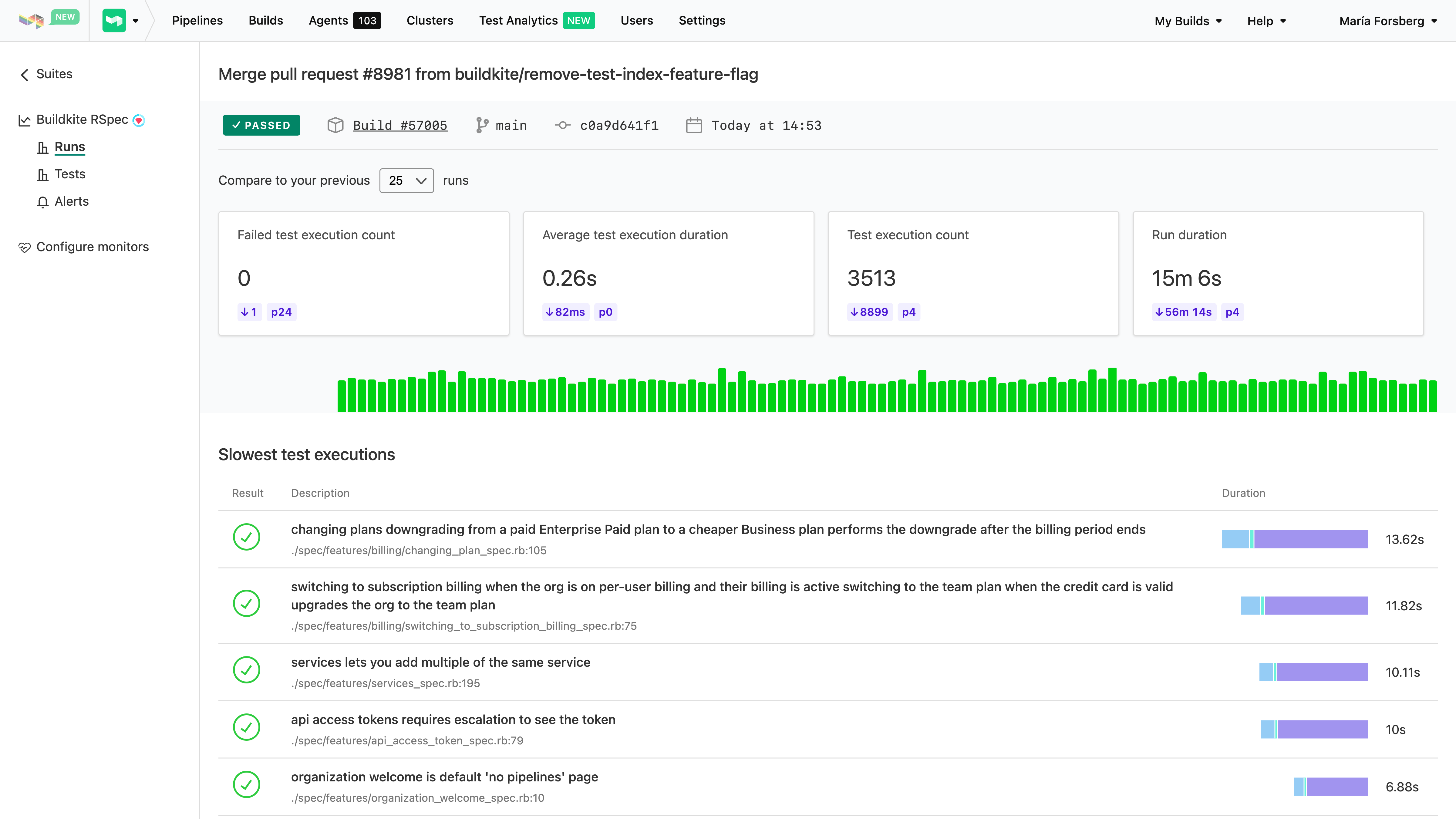
    Buildkite has added an analytics tool to its continuous integration/continuous delivery (CI/CD) platform that identifies flaky tests.

    Buildkite’s co-CEO Keith Pitt said the company’s Test Analytics tool enables continuous performance monitoring and real-time insights for test suites that, when not properly written, only serve to waste DevOps teams’ time. Rather than eliminating those tests, most DevOps teams just opt to run them again on the assumption that the code they are testing will eventually pass because the test is poorly constructed, noted Pitt.

    Buildkite reports there are more than 800 million seconds—or the equivalent of 25 years—of flaky tests manually re-run on its platform by developers each month.

    In addition to being integrated with the Buildkite CI/CD platform, the Test Analytics tool can also be applied to tests residing in CI platforms such as CircleCI, GitHub Actions and Jenkins.

    Test Analytics includes a dashboard that identifies the slowest and least reliable tests to help prioritize test remediation efforts. Historical views and trend graphs are also available to provide further insight into recurring issues.

    DevOps teams can also take advantage of user-defined thresholds to define whether a test is slow or unreliable, which generate custom alerts when discovered. Finally, there are integrations with commonly used testing frameworks to determine where tests are, for example, wasting time running database queries against application programming interfaces (APIs) that have timed out.

    Pitt noted that most tests today are created by developers and software engineers rather than dedicated testing teams. As such, the chances there will be an issue with a test that is returning flaky results are high.

    Organizations are, of course, trying to determine how far left to shift application testing. Developers can write their own tests, but how thorough and objective those tests are is debatable. There are also certain tests that should be applied to all applications that organizations can embed within their DevOps workflows to make sure they are always run.

    Obviously, the more testing that occurs the fewer issues DevOps teams will encounter after an application is deployed. However, when tests are flaky, it becomes easier for developers to justify not running them even though that test might still surface an issue they should address. In addition to increasing confidence in the quality of those tests, knowing which tests are flaky allows a DevOps team to determine which tests should be run first. That’s critical at a time when more organizations are trying to increase developer productivity; that productivity is often adversely impacted by waiting for tests to be completed before more code can be written.

    Eventually, the overall quality of tests should improve as machine learning algorithms and other forms of data science are applied. In the meantime, however, the onus for improving application testing is clearly on the engineers that create them. The challenge is many of those engineers may not even be aware how flaky a test really is until someone shows them some empirical data that can’t be disputed.

  • The Two Types of Code Vulnerabilities

    The Two Types of Code Vulnerabilities

    Spell checkers, grammar checkers and predictive keyboards all help reduce errors in written communication, but in a creative medium where writers need to innovate new expressions, nothing can eliminate all errors. The same is true in the code we write.

    Of course, your code is probably perfect but, on average, all code has bugs. Some of those bugs are benign. Some will cause unexpected early termination. A few will cause runaway resource consumption. And some bugs lead to security vulnerabilities that let users do things that are unexpected and sometimes undesirable.

    Those security bugs are behavioral vulnerabilities because they depend on how the code behaves when executed. Another type is an intelligence vulnerability, something that’s part of the correct behavior of the code, but which gives away details about how to exploit a system. These are the two main types of code vulnerabilities; both come with risks.

    Behavioral Vulnerabilities at Runtime

    Tl;dr: How the code works and how attackers can leverage what it does to their advantage.

    This covers a broad range of problems, but all of them are a result of the behavior of the code leading to undesirable outcomes in specific circumstances. Most of these are unintentional. An unescaped user input sent to a database can lead to a SQL injection vulnerability or an unsanitized string sent to a browser could create a cross-site scripting (XSS) vulnerability. Some behaviors are intended, but have unexpected consequences; the Log4j string substitution behavior that allowed it to output environment variables or read data from external resources was intentional, but the malicious usage we now call Log4Shell was not. In another recent example, a combination of behaviors could be exploited to gain root privileges on Linux desktop computers.

    Intelligence Vulnerabilities in the Content

    Tl;dr: What the content of the code tells an attacker about the system and how to access it. 

    In the 1950s, the phone company—there was pretty much just one at the time—began implementing completely automated dialing that didn’t require a human operator at the switching station to connect the call. The details were first published in a technical journal in November 1954 (see pages 1209 and 1309 here), and the information gleaned from that led to the creation of “blue boxes” that used insider knowledge to allow outsiders to control telephone equipment and make free long-distance calls.

    That’s hardly the first example of insider knowledge being leveraged for outside advantage, but its role at the heart of computer hacking and the origins of the PC (the ‘hack’ inspired Wozniak and Jobs) is so legendary that it demands recognition here.

    The phone system’s intelligence vulnerabilities were published in the company’s technical manuals—manuals that many thought were only for internal use, and nobody realized were available to untrusted readers. Today, though, intelligence vulnerabilities are in our code.

    Secrets abound in code, along with the details about which systems those secrets connect to. These secrets were once difficult to manage and putting them in code was the only practical choice. Now we have tools like Hashicorp Vault, as one example, and secure keystores in almost every cloud, but the legacy and security debt of all those secrets in legacy code are a goldmine for attackers like Lapsus$ and others who specifically target code.

    Security Is a Process, not a Product

    There’s a lot hidden under the surface in the two categories outlined here. Each of us can name many types of behavioral vulnerabilities—many more than the different types of intelligence vulnerabilities—but the two classes of vulnerabilities represent relatively equal risk. Recent events have demonstrated how an attacker with inside knowledge gleaned from code—and with passwords and keys taken from it—can move quickly despite firewalls and other access controls.

    Identifying secrets and other intelligence risks in code is relatively easy, but few teams do it because detection is the easy part. Integrating detection in developer workflows so they can take action in-context while working on and reviewing code is the most effective way to eliminate creating new security debt. And tools that give developers the information they need to understand the overall picture of intelligence risks in their code, the areas of highest risk—and that point them to actionable issues they can fix immediately to improve their code health—are necessary to help teams mitigate historical risks, ideally by rotating any secrets found.

    Tools exist that can automate that process and help teams to eliminate more than half the risk in their code—but the first step is recognizing where that half resides.

  • Survey Reveals High Cost of Application Modernization

    Survey Reveals High Cost of Application Modernization

    A survey of 250 software developers and architects in the U.S. found nearly three-quarters of respondents (74%) reported that the average cost of an application modernization project is nearly $1.5 million, with 79% noting that at least one of these projects has failed.

    Conducted by Wakefield Research on behalf of vFunction, a provider of a platform that automatically converts monolithic applications into microservices, the survey polled developers and architects at organizations with 5,000 or more employees that have been in business for at least 15 years and are maintaining Java applications. The survey found that the primary reasons application modernization projects failed were expectations not being set correctly (43%) and the need for organizational structural changes (37%).

    Despite the cost and inherent risks, however, the survey also found a full 92% of respondents planned to or are currently modernizing applications. Nearly two-thirds (62%) said having the right resources and tools is the key to application modernization success.

    Well over half of the respondents (58%) also noted that, on average, it takes 16 months to complete these projects, with more than a quarter (27%) noting it takes two years or more. Not surprisingly, a full 97% said they expected someone in their organization would push back on a proposed project.

    Application modernization, of course, is something of a catch-all phrase that can involve everything from providing applications with a web frontend to lifting-and-shifting them into the cloud or completely refactoring them to run natively on a cloud platform.

    vFunction CEO Moti Rafalin said that regardless of the scope of the initiative, most organizations should first pick these projects based on what makes the most sense for the business. Once identified, it then becomes critical for IT teams to have a deliberate strategy in place to achieve that goal given the high cost of failure, he added.

    Organizations would also be well-advised to determine how job roles will evolve, because one of the biggest inhibitors to application modernization is concern over how any job might be impacted, noted Rafalin.

    It’s not clear how quickly organizations are opting to modernize existing applications versus replacing them outright. However, as more organizations opt to run applications in the cloud, the level of interest in using microservices to build applications has risen sharply. The goal is to employ microservices to make applications both more resilient and secure. The tradeoff is that microservices-based applications tend to have lots of dependencies that make them more challenging to manage and secure.

    Regardless of approach, it’s more a question of when an application will be modernized or retired versus if. The level of technical debt that accrues over time for each application eventually becomes unsustainable. The issue, of course, is that most organizations don’t have the resources required to modernize every application at once, so it may take a decade or more to work through an entire application portfolio—even as that portfolio continues to grow. In fact, as technologies continue to evolve, it may turn out that application modernization is not a task to be completed as much as it is a permanent state of IT affairs.