Category: Continuous Testing

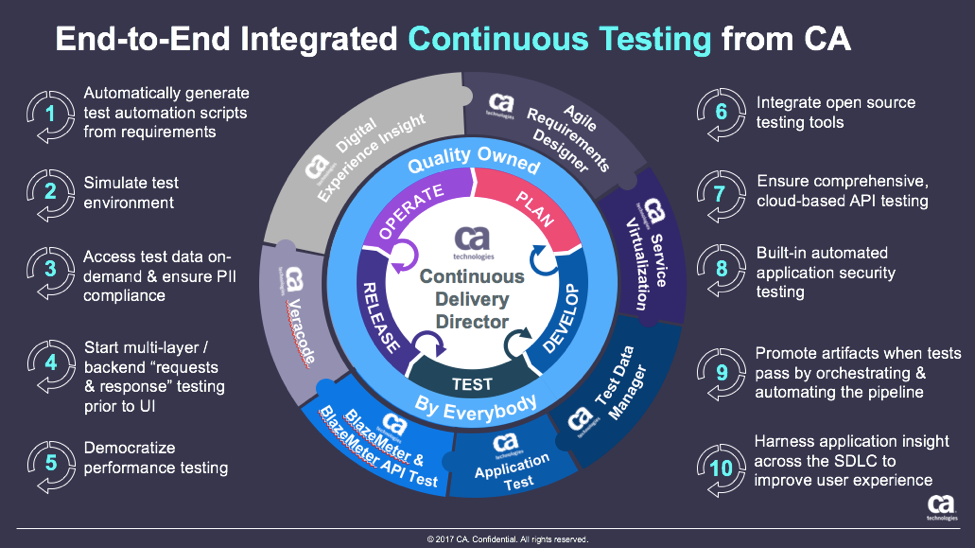
Continuous testing is the process of executing automated tests as part of the software delivery pipeline to obtain immediate feedback on the business risks associated with a software release candidate.

  • Lack of Continuous Testing Mastery Slows DevOps Progress

    Lack of Continuous Testing Mastery Slows DevOps Progress

    Progress in achieving the maximum benefits to be gained from investing DevOps processes appears to be held in check by a failure to master the art of continuous testing. A new survey of 923 IT and testing professionals published this week by CA Technologies suggests that only 20 percent of the respondents could be classified as “leaders” when it comes to implementing continuous testing.

    A full 93 percent of respondents identified testing automation as important, but only 1 in 5 respondents said they achieved a high level (80 percent or more) of test automation coverage. Seventy-five percent said continuous testing is important as well. Unfortunately, most of the respondents continue to rely on manual processes. In fact, respondents attributed continuous testing challenges to the lack of automation in almost every aspect of the testing process, including generation of test cases through test execution to critical activities such as fast, safe and efficient test data management.

    Scott Edwards, senior director of product marketing for CA Technologies, says failure to automate continuous testing will only lead to an increased DevOps divide. Organizations that have automated DevOps processes not only release more code faster, the report find they enjoy advantages such as:

    • 2.3 times more likely to have succeeded in left-shifting testing activity to developers;
    • 2.6 times more likely to reduce defects by more than 50 percent;
    • 2.4 times more confident in quality of output;
    • 1.9 times more confident in speed of delivery; and
    • 3.9 times more likely to be working in an organization exhibiting rapid revenue growth.

    Edwards says those results indicate that organizations that are further down the DevOps process will enjoy a substantial competitive advantage at a time when organizations of all sizes are realizing how dependent they are on software to differentiate themselves. Organizations may be operating in a variety of vertical industries, but increasingly they are becoming software companies that happen to specialize in a specific area, says Edwards.

    Making that shift requires IT organizations to move away from thinking about developing applications as an art to building what amounts to a software factory, he says. The factory approach not only eliminates silos in the DevOps process, it also should ideally allow developers to continuously test their own applications. Of course, the biggest issue with testing may very well be the simple fact that most developers build applications today using notebooks and workstations that don’t accurately reflect the complexity of the data center environments those applications will ultimately be deployed in. However, thanks to the rise of technologies such as service virtualization and cloud-based development environments, it has become easier to more closely mimic production environments.

    The degree to which an absence of continuous testing impedes both the rate at which applications are deployed in a production environment will naturally vary by organization. But the one thing that is almost certain is that organizations that have mastered continuous testing are much more likely to deliver a quality application experience than those that don’t.

    — Mike Vizard

  • Tricentis Introduces Exploratory Testing Tool for Atlassian JIRA

    A Fully Integrated JIRA Add-on Facilitates Collaboration for Fast Feedback on Quality Matters—Enabling Agile Teams to Keep Pace with Accelerated Release Cycles

     Mountain View, CA — July 12, 2017 — Tricentis, named the leader in Continuous Testing by top analysts, released the industry’s first exploratory testing tool available as a native add-on for Atlassian JIRA.  The Tricentis session-based exploratory testing tool simplifies the planning, documentation, and reporting of exploratory testing directly within the JIRA environment—with full traceability between exploratory test results and the associated JIRA issues.

    Exploratory testing helps Agile teams rapidly and reliably deliver comprehensive feedback on the application under test. The semi-structured nature of Tricentis Exploratory Testing provides the flexibility needed to keep pace with constant change—and helps teams provide fast, valuable feedback on quality matters even if testing time or resources are limited.

    “In response to the rising demand for new and innovative software, development teams shifted their software development processes to become more agile and iterative,” said Wolfgang Platz, Founder and Chief Product Officer of Tricentis.  “This means that there must also be a fundamental change in the way we test software.  We have found that exploratory testing is vital for accelerating test cycles and keeping pace with release expectations.”

    Tricentis Exploratory Testing frees testers to focus on testing without worrying about preparing documentation. Test actions are captured automatically with screenshots and videos that can be annotated—reducing the time required to document test actions and issues by 80 to 90 percent.

    With the Tricentis Exploratory Testing add-on, teams can plan and timebox (allocate a fixed time period for) sessions, write charters, define test objectives, invite team members, and add related artifacts directly from the Atlassian JIRA environment.  A broad array of team members—QA, developers, UX specialists, technical writers, product owners, business analysts, etc.—can be invited to participate, and they can immediately start testing with the click of a button. Session owners gain a quick overview of session results and progress, while all participating testers get instant access to all the details required for testing.

    To facilitate rapid defect reproduction and resolution, session owners can instantly send the responsible developer detailed information about each session and the issues it uncovered, including specific test steps and system information. This simplifies defect reproduction so each issue can be addressed promptly and accurately. Annotated screenshots and videos help developers zero in on the issues and understand the tester’s perspective.

    “Our primary goal with this JIRA add-on was to elevate exploratory testing to the enterprise level, helping organizations extend their exploratory-testing best practices and tooling across cross-functional teams and marry them with their preferred issue or project management environment,” explained Ingo Philipp, Tricentis product manager. “It empowers seamless collaboration on testing without extensive planning. We’re enabling a semi-structured, session-based exploratory testing approach that’s the perfect complement to test automation—helping teams rapidly and reliably deliver fast feedback on quality in today’s accelerated development environments.”

    The tool can be downloaded as a free trial at the Exploratory Testing for JIRA page on the Atlassian Marketplace, with fixed pricing upon expiration of the trial period.  Additional information can be found on the Tricentis Exploratory Testing Tools page, and a live demonstration will be provided during the Exploratory Testing for JIRA webinar on July 20.

    Tricentis supports exploratory testing with a full suite of educational and training materials, including webinars, videos, conferences, workshops, and free online trainings. Visit tricentis.com for details.

    About Tricentis

    Tricentis provides a Continuous Testing platform that accelerates testing to keep pace with Agile and DevOps. With the industry’s most innovative functional testing technologies, Tricentis breaks through the barriers experienced with conventional software testing tools—achieving test automation rates of over 90%. Our integrated software testing solution, Tricentis Tosca, consists of a unique Model-based Test Automation and Test Case Design approach, encompassing risk-based testing, test data management and provisioning, service virtualization, and more. Prominent analysts have recognized us as a Leader in both Software Test Automation and in Functional Automation Tools. We are established as a reliable enterprise partner, helping to deliver significant performance improvements to testing projects.

    Tricentis’ 400+ customers include global names from the Top 500 brands such as HBO, Toyota, Allianz, BMW, Starbucks, Deutsche Bank, Lexmark, Orange, A&E, Vantiv, Vodafone, Telstra and UBS. For regular news and information about Tricentis and the automated testing market, like and follow the company on: www.tricentis.com

    ©Tricentis and Tosca are registered trademarks of Tricentis.  Other trade names used in this document are properties of their respective owners.

    — Parker Yates

  • Continuous Testing: Solving the Biggest DevOps Bottleneck

    Continuous Testing: Solving the Biggest DevOps Bottleneck

    It’s time to start implementing the practices of Continuous Testing

    Earlier this year, Computing Magazine conducted a fascinating study around the adoption and benefits of DevOps in its DevOps Review 2017 publication. The findings that stood out most fascinating to me where around quality assurance and testing.

    In this survey, the question was asked, “Where are the main holdups in the software production process?” Of all the self-proclaimed DevOps practitioners, a whopping 63 percent said the biggest delays occurring in the QA/Test phase. In fact, this cited bottleneck was more than 2 times greater than the next proclaimed bottleneck, which they felt was in planning (29 percent).  In this same survey, another question asked, “What tends to lose out more in DevOps environments?” While 43 percent said, “Nothing,” nearly 30 percent of these DevOps practitioners said that quality was being sacrificed. When asked which area they wanted to focus on improving in the next year, over 40 percent opted for quality.

    Why is it that quality has taken such a hit?  The study cited two issues: 1) Testing and QA is often siloed from the other parts of the organization, and 2) Testing tools haven’t matured much in the past five years.

    Testing must become a cross-functional operation across the software development lifecycle (SDLC) spectrum, one that involves all teams. Agile developers and testing teams don’t have weeks to test, but hours. Testing hasn’t kept up because it hasn’t applied the methods and concepts of agile development have not been applied to testing and QA processes. By removing the constraints that force testing to the end of a development cycle, developers and QA teams can achieve accurate, automated testing from day one. They can create an integrated pipeline, capable of taking an idea from design to deployment, at speed, without compromising quality.

    Open-source, cloud-based solutions can be the catalyst that brings the speed of agile to testing.  Here are a few examples.

    Better In-Sprint API Testing: Since APIs have become the major component of applications, organizations are shifting their approach from starting testing when the user interface is complete to shifting the focus of testing at the API level.  But the hard thing is finding enough time in a development sprint to test them sufficiently.

    Today’s applications are a collection of microservices and API calls. UI testing alone just won’t cut it. UI testing is very brittle, and whenever it changes, testing breaks. Testing needs to shift left into the development cycle—into sprints. But if you shift testing left to be a focus of the sprints, what kind of API testing can you really do? How comprehensive can they really be?  Creating those API tests has to be quick, and simple.

    Dev and Test teams must utilize automated tools that not only generate API tests, but create an exhaustive set of test cases from the API, then execute those tests. These tools also need to support the most popular open-source testing frameworks allowing developers to run functional API tests as performance tests without any proprietary conversion issues. And, vice versa, developers must be able to take open-source performance tests and be able to run them as functional API tests.

    Orchestrating Testing: A Continuous Delivery Pipeline Manager: “Faster” is becoming table stakes with automation.  The facts show that companies who have widespread agile adoption and are deploying more frequently with significantly reduced lead times. But, this too often leads to release failures, quality issues and disorder with multiple—if not hundreds—of applications rolling through the SDLC. Plus, things slow down significantly with time-consuming handoffs and rework in the release process. DevOps teams, who release features and fixes frequently while significantly reducing errors and manual processes, need toolchain-agnostic pipeline planning, orchestration and optimization solutions that enable them to eliminate spreadsheets, automate test processes and feedback, and continually improve the delivery of revenue-generating features to end-customers. New CD SaaS tools help make this orchestration process easy.

    Performance and Functional Testing Using Open Source Frameworks: More and more organizations are trying to move from legacy testing tools. It’s not so much that these don’t adequately test, but they were never designed to meet the needs of agile development approaches. Rather, they were designed for releases that occurred two to three times per year. But that won’t cut it anymore.

    And as developers begin to incorporate testing activities in the coding process, they need simple-to-use, open-source tools. Luckily, there are such tools like JMeter, Selenium, Gatling, Locust and others. There are even tools that help you convert from legacy platforms to open source technology with ease, and guides to transform existing functional tests created with other tools over to load tests.

    These are just a few examples of how continuous testing eliminates the testing hurdle. With continuous testing, organizations can:

    • Automatically convert user stories from requirements management tools like CA Agile Central or Atlassian JIRA into the minimum number of test cases required for complete code coverage, and being able to adapt automatically to changing business requirements.
    • Reduce test cycle prep time by requesting test data from within requirements.
    • Request, reserve, and create test data at any time, even from requirements phase.
    • Virtualize APIs for better testing, while managing API access to developers.
    • Institute easy API testing that can generate comprehensive test cases (positive, negative, edge case, and SQL injection) and execute those tests automatically.
    • Democratize testing with SaaS-based testing tools so that developers can test early and test often.
    • Speed testing by feeding test data directly and securely to virtual services.
    • Use open-source testing tools such as JMeter, Selenium, Jenkins, Jenkins, Appium, Taurus, Gatling, Locust and more.
    • Orchestrate the application delivery pipeline to promote releases from one environment to the next as soon as all the tests pass and enable faster feedback loops.

    This is testing unleashed, going hand in hand with agile development to accelerate quality into production.

    By adopting next-generation testing practices, DevOps teams have the ability to test early, often, automatically and continuously. To learn more about continuous testing and why it is critical to DevOps and Continuous Delivery initiatives, visit this Continuous Testing informational page.

    — Aruna Ravichandran

  • Automated Testing: Remember Security

    Automated Testing: Remember Security

    Run down doors
    Insufficient Security.

    Between continuous integration (CI) and release automation (RA), we’ve come a long way in making testing both integral and automated. This testing has allowed QA staff and developers to spend more time adding value by looking at problem areas instead of running tests by hand. Shops that have CI well-integrated into their application processes and are using test driven development (TDD) claim they have improved both time to deployment and code quality.

    But we’re still struggling to get security adequately integrated into the overall system. Part of this is that some testing—such as application-level penetration testing—is very custom to the application being developed. There are tools to help, and they do offer some amount of automation, but they’re not yet to the point of being the only route to test. The other reason is that even today security and compliance are seen as road bumps that slow deployment. It is sad but true that the V-Tech data breach was a simple SQL injection attack. No doubt security was not involved in the deployment of that dozen or so websites/databases, or if they were, their ability to influence the product was limited.

    But automated testing can help in many of the standard attack vectors that SQL injection is just one example of. And for some reason, an automated tool informing DevOps teams that they have to fix a whole slew of vulnerabilities is taken much better than the security team doing the same thing.

    The breadth of security concerns mean that security must be involved at some level in every phase of DevOps. But tools can lighten the load, and the tools are getting better all the time.

    And the idea that a breach is a risk that should have a certain level of acceptance is no longer en vogue. Doing what you can to avoid them, and paying the price to do so, is increasingly the norm. Automation tools help to cover not just the employee time gap, but also the skills gap. If a tool can validate the entire deploy environment for your chosen cloud environment at the time of deployment, that relieves any shortage in knowledge about the security features of your given cloud environment. Of course, eventually security staff will need to know more, but just like a deployment tool can throw up an entire big data infrastructure in hours instead of weeks, leaving operations time to learn about configuration details as they need to, security automation can do the same for security teams.

    I highly recommend looking at building standardized controls into both the test environment and the deployment environment. While you won’t get perfect automation yet, you will get automation. The overall result of that automation will be increased security posture for the business, and since compromises are a business risk, that is in line with the overall point of DevOps: better serving the business. There will likely still be more work than there are hands/eyes/brains at this point (which says a whole lot about our pre-automation security posture), but you’ll be better off.

    As I and others have mentioned, a small security staff will likely have to be trainers/consultants to Dev/Test/Ops functions to properly support all of the needs of locking down an application. This is still true with a high degree of automation, simply because there is a large surface area, and we’ve traditionally gone with the “most urgent” issues first. But just as automating (with human controls/approval) updates where possible to get the newest protections has reduced workload, so can automation of other security goals. I chose the word “goals” on purpose. It’s not about today’s processes, it’s about achieving goals, so just as Dev was taken apart and re-assembled for agile, and Dev and Ops changed how they do things for DevOps, look for the best, most efficient way to achieve the goal. And like everyone else in IT, iterate on it.

    We all know we must increase the security posture of our organizations. We all know security doesn’t have the staff it needs. This is the type of conundrum that DevOps was designed to solve. Start looking into how your DevOps efforts can include security. At a minimum, look into more and newer automation (I’m currently enjoying playing with newer code scanning tools, to see how far we’ve come since last I looked close). Will it take an upfront investment? Yes. But if it saves security time every single week for several years before you have to move to new tech? It’s probably worth a learning curve or even an investment (be it CapEx or OpEx).

    — Don Macvittie

  • Continuous Testing vs. Test Automation: 3 Key Differences

    Continuous Testing vs. Test Automation: 3 Key Differences

    Testers have been wrestling with test automation for years, yet most teams are not satisfied with their current level of test automation or the overhead required to maintain it. Additionally, the past few years have brought a sea change in the way that applications are architected, developed and consumed—increasing both the complexity of testing and the business impact of software failures.

    How can software testing professionals help the business control risk in light of the increased complexity and pace of modern application delivery? Enter continuous testing.

    What is Continuous Testing?

    Continuous testing is the process of executing automated tests as part of the software delivery pipeline to obtain feedback on the business risks associated with a software release candidate as rapidly as possible.

    Test automation is designed to produce a set of pass/fail data points correlated to user stories or application requirements. Continuous testing, on the other hand, focuses on business risk and provides insight on whether the software can be released. To achieve this shift, we need to stop asking, “Are we done testing?” and instead concentrate on, “Does the release candidate have an acceptable level of business risk?”

    Why Do We Need Continuous Testing?

    Today, changes across the industry are demanding more from testing while making test automation more difficult to achieve (with traditional tools and methods, at least):

    • Application architectures are increasingly more distributed and complex, embracing cloud, APIs, microservices, etc., and creating virtually endless combinations of different protocols and technologies within a single business transaction.
    • Thanks to Agile, DevOps and continuous delivery, many applications are now released anywhere from every two weeks to thousands of time a day. As a result, the time available for test design, maintenance and especially execution decreases dramatically.
    • Now that software is the primary interface to the business, an application failure is a business failure—and even a seemingly minor glitch can have severe repercussions if it impacts the user experience. As a result, application-related risks have become a primary concern for even non-technical business leaders.

    How Is Continuous Testing Different From Test Automation?

    The main differences between continuous testing and test automation can be grouped into three broad categories: risk, breadth and time.

    Risk

    Businesses today have not only exposed many of their internal applications to the end user, they also have developed vast amounts of additional software that extends and complements those applications. For example, airlines have gone far beyond exposing their once-internal booking systems. They now let customers plan and book complete vacations, including hotels, rental cars and activities. Exposing more and more innovative functionality to the user is now a competitive differentiator—but it also increases the number, variety and complexity of potential failure points.

    Large-scale “software fails” have such severe business repercussions that application-related risks are now prominent components of a business’ public financial filing. Given that notable software failures resulted in an average -4.06 percent decline in stock price (which equates to an average of negative $2.55 billion loss of market capitalization), it’s not surprising that business leaders are taking note—and expecting IT leaders to take action.

    If your test cases weren’t built with business risk in mind, your test results won’t provide the insight needed to assess risks. Most tests are designed to provide low-level details on whether user stories are correctly implementing the requirements—not high-level assessments of whether a release candidate is too risky to release. Would you instantly stop a release based on test results? If not, your tests aren’t properly aligned with business risks.

    To be clear: We’re not suggesting that low-granularity tests aren’t valuable; we’re stating that more is needed to stop high-risk candidates from going out into the wild.

    Breadth

    Even if a business manages to steer clear of large-scale software fails that make the headlines, even seemingly minor glitches can still cause trouble these days. If any part of the user’s experience fails to meet his expectations, you not only risk losing that customer to a competitor—you also risk brand damage if that user decides to take his issues to social media.

    Just knowing that a unit test failed or a UI test passed doesn’t tell you whether the overall user experience is impacted by recent application changes. To protect the end user experience, you need tests that are broad enough to detect when an application change inadvertently impacts functionality which users have come to rely on.

    Time

    Now that the speed at which organizations ship software has become a competitive differentiator, the vast majority of organizations are turning to Agile and DevOps to accelerate their delivery processes.

    When automated testing emerged, it focused on testing internal systems that were built and updated according to waterfall development processes. Systems were all under the organization’s control, and everything was completed and ready for testing by the time the testing phase was ready to start.  Now that Agile processes are becoming the norm, testing must begin in parallel with development; otherwise, the user story is unlikely to be tested and deemed “done done” within the extremely compressed iteration time frame (often two weeks).

    If your organization has adopted DevOps and is performing continuous delivery, software may be released hourly—or even more frequently. In this case, feedback at each stage of the process can’t just be “fast”; it must be nearly instantaneous. If quality is not a top concern for your application (e.g., if there are minimal repercussions to doing a rollback when defects are discovered in production), running some quick unit tests and smoke tests on each release might suffice. However, if the business wants to minimize the risk of faulty software reaching an end user, you need some way to achieve the necessary level of risk coverage and testing breadth—fast.

    For testing, there are several significant impacts:

    • Testing must become integral to the development process (rather than a “hygiene” task tacked on when development is complete)
    • Tests must be ready to run almost as soon as the related functionality is implemented
    • The organization must have a way to determine the right tests to execute at different stages of the delivery pipeline (smoke testing upon check-in, API/message layer testing after integration, end-to-end testing at the system level, …)
    • Each set of tests must execute fast enough that it does not create a bottleneck at the associated stage of the software delivery pipeline
    • A way to stabilize the test environment is needed to prevent frequent changes from causing an overwhelming number of false positives

    Continuous Testing> Test Automation

    If you only take one idea away from this article, we hope that it’s this:

    Test automation ≠ continuous testing

    Continuous testing > test automation

    Even the teams that have achieved fair levels of success with traditional test automation tools hit critical roadblocks when their organizations adopt modern architectures and delivery methods:

    • They can’t create and execute realistic tests fast enough or frequently enough
    • The constant application change results in overwhelming amounts of false positives and requires a seemingly never-ending amount of test maintenance
    • They can’t provide instant insight on whether the release candidate is too risky to proceed through the delivery pipeline

    It’s important to recognize that no tool or technology can instantly “give” you continuous testing. Like Agile and DevOps, continuous testing requires changes throughout people, processes and technology. However, trying to initiate the associated change in people and processes when your technology is not up to the task will be an uphill battle from the start … and ultimately a losing one.

    If your organization is starting or scaling your continuous testing automation efforts, we encourage you to review two new pieces of research by Forrester and Gartner. Both reports provide insight into continuous testing and test automation trends as well as how the top continuous testing tools compare.

    About the Author/Wayne Ariola

    Wayne Ariola (1)Wayne Ariola, CMO of Tricentis, is a recognized thought leader on software testing topics such as continuous testing, risk-based testing, service virtualization, and API testing. Wayne has created and marketed products that support the dynamic software development, test, and delivery landscape. He has driven the design of many innovative technologies and received several patents for his inventions. He has been a contributor to the software testing space for fifteen years and in the software industry for more than 20 years. Connect with him on LinkedIn.


  • Testing What’s Important: Keep Growing Your Test Base

    Testing What’s Important: Keep Growing Your Test Base

    This project has gone on soooo long…

    In most human endeavors that take a stretch of time to complete, the idea is latched onto and people become excited about being involved. It doesn’t matter if it is building a skyscraper, inventorying a massive warehouse or even going to war. People are intrigued by the possibilities and want to get started doing the thing. After a time, though, this enthusiasm wanes, and most often is replaced by a weary determination to get the thing done. The nature of the endeavor doesn’t have to change; the reality of its implementation just becomes the dominant factor.

    IT projects in general—and continuous integration (CI) projects in particular—are no different. Whether a new project or implementing comprehensive CI on an existing project, the beginning is the most exciting part. Soon the excitement wanes and achieving the desired level of test coverage and a consistent build success rate becomes the goal that is trudged toward. It is a rare team that reaches for 100 percent code coverage with testing on initial implementation. The key becomes “testing what’s important.” And that varies by team and project.

    But testing at all levels—unit, integration, smoke, system, regression—could be better on almost every project. That improvement can be done incrementally while running through sprints. While some of the testing is managed by QA, some is managed by the developers—and in a CI/CD environment, arguably more is managed by developers. They are more involved in the testing process in CI/CD, so are more likely to be more involved in test development/management.

    The point is, good enough coverage is just that. And there is a hidden cost in getting too carried away with testing every line of code for every possible input, but improving tests is more than simply cranking out more permutations. Improving existing tests, or writing tests for functionality currently poorly tested, is increasing testing.

    So, as you strive to make your code get better, strive to make your testing get better, too. Testing after the baseline is established is one of the first things to get minimum attention, even in automated test environments. But improving it reduces the risk of releases, and that’s a benefit to the team and to the company. So it’s worth staying up on.

    Unless you have my friend, who we will only call Pete, on your staff. Then, no matter the quality of your testing, no matter the number of tools and layers of testing, he’ll find a way to break your product within 5 minutes. That made him a good tester, made him a better developer and, now, a better architect. But most of us don’t have Pete, so work on those tests.

    — Don Macvittie

  • Top 6 Challenges of API Testing

    Top 6 Challenges of API Testing

    Testing teams face several unique challenges when testing application programming interface (API) implementations. API testing is part of the integration testing process and concerns the communication between two systems—one of which your staff likely has no control over.

    Below you’ll find the following six common challenges when testing APIs and our recommended solutions.

    Initial Setup of API Testing

    Manual testing helps confirm whether something works. Automated testing is necessary with APIs to gauge how well they perform under pressure. Getting the testing infrastructure up and running is often one of the most challenging parts of the process, not because it is particularly difficult, but because it can be a substantial motivation-killer. Once you manage to motivate your team to get through the process, however, it pays off over the long-term.

    Solution: API testing should start in the design phase—how is the API going to be tested? Ensure interval checking of your APIs for 100 percent uptime.

    Updating the Schema of API Testing

    The schema—in other words, the data formatting that handles requests and responses for the API—needs to be maintained throughout the testing process. Any updates to the program that create additional parameters for the API calls need to be reflected in the schema configuration.

    Solution: In today’s API economy, having an ever-changing API helps facilitate the demand. However, there can be downtime caused by those changes. One way to avoid that is to thoroughly test the API in beta and alpha environments. The chances of issues decrease to 90 percent when testing in these environments.

    Testing Parameter Combinations

    APIs handle communication between systems by assigning data values to parameters and passing those parameters through data requests. It’s necessary to test all possible parameter request combinations in the API to test for problems pertaining to specific configurations. A larger project could end up assigning two different values to the same parameter, or create instances where numerical values appear when text values should be. Adding an additional parameter exponentially increases the number of possible combinations.

    Solution: We’ve learned from our customers that having release candidates are important. For example, picking one or two applications to utilize the API on and release it to just those applications. Pick applications that aren’t critical to daily operations. This way you’re able to see how the API is being utilized and if there are any configurational changes that need to be made to have a general availability (GA) release.

    Sequencing the API Calls

    In many cases, API calls need to appear in a specific order to work correctly. This creates a sequencing challenge for the testing team. For example, if a call to return a user’s profile information goes through before the profile is created, the request will return an error. Alternatively, a call to create a map needs to run prior to placing location pins on the map to work correctly. This process can get increasingly difficult when working with multiple-threaded applications.

    Solution: This relates to the point above of having a release candidate to help in managing and seeing what the sequencing of the API calls are. We recommend making a flowchart to visualize the API calls. This will help developers build API calls and integrate them faster without causing issues.

    Validating Parameters

    Testing teams may find validating the parameters sent through API requests challenging as well. The sheer number of parameters and use cases for those parameters can make it a daunting task. The team needs to make sure all parameter data uses the correct string or numerical data type, fits within length restrictions, fits within a designated value range and passes other validation criteria. For example, U.S. phone numbers should appear in a 10-digit format, and returning a 5-digit zip code should trigger an invalidation error.

    Solution: This can be avoided by having continuous synthetic API monitoring to catch the problem early on. Moreover, it should be combined with an APM solution to get an overall 360-degree view. Validating parameters is one of the most important things. It should show you how fast you’re serving those parameters. If making those calls has significant impacts on your system, implementing synthetic and APM solutions will ensure you catch the problem early on.

    Tracking System Integration

    The final challenge is making sure the API testing system is working correctly with the data tracking system. This is necessary to bring back correct responses on whether a call is working correctly. It’s also used to passively monitor API performance. Since this step can come late in the process, the team may be too fatigued to give it the attention it needs.

    Solution: Think about your application in the design phase and how it will integrate with other systems. Different applications have different requirements that need to be met. Make sure you aren’t causing applications to fail by testing in parallel with critical integration systems. This can be accomplished by implementing and including load testing in your continuous delivery.

    API testing is an essential part of application development in the modern business environment.

    About the Author / Sven Hammar

    Sven Hammar is co-founder and Chief Strategy Officer of Apica, a provider of technology for testing, monitoring, and optimizing the performance of cloud and mobile applications. Mr. Hammar has more than a decade of experience and expertise in web performance and web optimization, e-commerce, cloud services, IT entrepreneurship and the Internet. He is also a serial entrepreneur who has founded several successful IT companies over the years. Connect with him on LinkedIn.

  • Avoid Crashes: 5 Best Practices for Load Testing

    Avoid Crashes: 5 Best Practices for Load Testing

    Demanding customer expectations and the rapid distribution of information across social media have made website and applications crashes an off-limits path for today’s companies and organizations.

    Crashes resulting from traffic spikes cause immediate and long-term loss of sales, as well as tarnishing the brand name. When servers or websites go down during highly anticipated events such as Black Friday, the Big Game or before a major concert, the repercussions can be permanent.

    Yet, avoiding the “website temporarily unavailable” screen is also easier than ever before. By performance testing your website continuously and proactively you can easily detect errors, bottlenecks and bugs, and then fix them to ensure your website handles any amount of traffic.

    Here are five best practices for load testing your website or app:

    Define Your Load Goals

    Before starting your tests, you need to figure out what it is that you need to test.

    This includes the number of concurrent users, traffic patterns and areas that users can visit on your site. For example, if your site has 10,000 users concurrent at its peak, but  3,000 arrive in the morning and that total slowly climbs up to 10,000 in the afternoon—and these visitors mostly just browse your homepage—you’ll need to run a different test than if you have 10,000 concurrent users on your website all day long, constantly browsing multiple pages.

    To determine your load goals, you need to engage directly with your business colleagues. For instance, get your product manager to set the system’s expected abilities, ask the marketing team to inform you about any special campaigns that might increase website traffic, and then look at server logs and tools such as Google Analytics to determine previous customer patterns.

    Choose Your Load Testing Tools

    There are multiple open-source load-testing tools that you can use to run your tests.

    JMeter is the most popular tool, but you can also use Gatling, Locust, Tsung, The Grinder or Selenium. See here to learn more about the differences between these toolsets.

    Does this seem complicated? Taurus is an open-source automation test framework that simplifies running these tools, by using a simple YAML script. If you need to run your tests from the cloud, utilizing rich analytics or requiring user collaboration, you might consider using BlazeMeter.

    Take Your System to the Limit

    To make sure you stand up to your load goals, you need a buffer; specifically, you need to make sure that your system can handle heavier loads.

    This ensures that the CPU stays low and you don’t experience memory leaks. However, we also recommend you take your system to the limit and see when and how it fails. This ensures that you know exactly what your system’s weaknesses are, giving you a better ability to fix any errors that might occur.

    This is especially important if you come across an unexpected traffic spike—say, if your competitor’s website crashes and all their customers come running to you. Wouldn’t you rather be prepared for that?

    Monitor Test Results

    Set aside resources for looking at test results.

    Examine KPIs including Response Time and Hits/s, as well as the correlations between them, to learn what your system’s abilities and bottlenecks are. This information will help you see what needs fixing.

    As you continue testing over time, you will be able to identify KPI trends, which will help you monitor system health. We also recommend you monitor backend KPIs like DB Queries, with APM tools.

    Test Again

    So, you’ve tested, you’ve analyzed, and you’ve fixed.

    Now you have one last thing to do: Run your tests again to make sure everything is working smoothly after the committed changes. That ensures nothing gets overlooked. It would be a shame if all your hard work went down the drain due to a minor oversight.

    Now, let’s get testing!

    To get more load testing tips, check out this free whitepaper, “How to Ensure Your Website or App Won’t Fail at Peak Times.” To learn more about BlazeMeter, request a demo.

    — Noga Cohen

  • Test Driven Development, Continuous Test and Code Quality

    Test Driven Development, Continuous Test and Code Quality

    We’ve gotten a lot of good out of agile development methodologies. I’m never a “One True Way” kind of person, but agile has a ton of benefits that development needed (and Ops increasingly needs). Extending that to the Dev side of DevOps is painless, since much of agile is wrapped in DevOps clothes these days.

    From my perspective, the most impactful bit to come from Agile was test driven development. By writing the test to fulfill the requirement, then writing the code to pass the test, our small team (I was on a team of developers with no Ops people supporting us—or more accurately, we were the Ops team when I first used TDD) needed the assistance it provided. Without dedicated QA staff, we were able to perform as rigorous a test suite as our changes warranted, simply by running the tests that we’d used for development.

    Of course, this is old news to some of you, TDD has largely been consumed in the larger Agile/DevOps movements and you’re at it daily. But the shift to having developers do more of their own testing is something that I’m still pretty iffy about, to be honest.

    Devs Aren’t Necessarily Testers

    While it can work, devs certainly can understand the weak points in their code, I would argue that the person writing the code is not the correct person to write the tests for it. Particularly as you get into more the integration phase of testing, and the complexity of code inter-relationships heats up. Some developers will do well at it. My experience is, many will not. Why? Because if they don’t know of a weakness in their solution when writing the solution, they won’t know of the weakness when writing the test case. And it is a truly rare shop that has 100 percent code coverage for testing, so those weaknesses could end up being time bombs.

    Simply put, QA needs to work with Devs to write the tests. Two heads are indeed better than one when looking for faults with solution designs. But the reality of development often doesn’t allow for this type of cooperation. When you’re on a sprint and this one bit is slated for half a day, setting aside time to get together can be difficult for a problem the developer has already written the test for and solved in their head. After all, the whole point of Agile and DevOps was to speed delivery, and making the simple more complex isn’t generally part of that equation.

    Have a Plan, and Use it

    I know of a couple of shops where integration testing is pretty much an afterthought. One has a QA team that fights to make certain it is done and done well (though still as an afterthought), rather than cobbled together as a PoC (I was thinking Proof of Concept; take either use of that acronym, both are accurate) not too long before release. The others muddle through, figuring out what doesn’t work in fits and starts (too often in production), rather than following a stream. The result is, unsurprisingly, missed deadlines and ever-extending sprints.

    For all of the good that DevOps in general, and CI/CD in particular have brought us, there are a few areas—one of them being testing—where speed and/or quantity has replaced quality. We run tests a LOT. But are they the right tests? For unit tests in a TDD environment, yes—for lines that have test coverage. Outside of that narrow space, I think the answers are much more iffy, and it depends upon a lot of things.

    The best hedge is to have QA involved in writing the tests for TDD environments, even for small bits. It’s not an overhead if it shortens the overall timeline to delivery; even if it slows a piece here or there, it’s the timeline to finished product that really matters, not the timeline of a given piece of it.

    If you don’t have a QA team—as many shops do not—I recommend devs doing it for each other. That’s not to say that QA is not needed, but it does utilize the “Two heads are better than one” mantra, and keeps the ideas flowing. Otherwise, the Ops members of a DevOps team are great for that. Historically, production woes fell on them, so no doubt they’ve honed their skills in detecting problem areas.

    Don’t Be That Person

    No matter how you go about it, do not go light on the testing. Do TDD, and keep it up. Make every change request start with test modification, and then fix what fails. Document the tests, since they’re code also, and stressing what is being tested and why is as important as the code talking about what it’s doing and why.

    After all, you don’t want to end up with the difference between ‘==’ and ‘>=’ placing you in the headlines for a week, mostly with bad news. That difference is an obvious TDD test case if ever one was written; don’t be that person.

    Continuous testing works, test driven development works. You just have to think about it when implementing them, and stick to a plan that tests beginning to end. It’s about quality code quicker, not about any code quicker. Note that I’ve been focused on the process end of testing, not the smoke/load/regression end. Those are important too, but their issues are different, so I opted to throw them into a separate blog.

    So go forth, iterate quickly, but test thoroughly. I doubt most of us will achieve 100 percent code coverage anytime soon, let alone 100 percent integration nested coverage … But test what’s important, and bring what’s important to test.

    — Don Macvittie

  • The Top 10 Reasons to Use Cassandra

    The Top 10 Reasons to Use Cassandra

    The Apache Cassandra database is the right choice of database if you are looking for scalability and high availability without compromising performance for your mission-critical applications. Additionally, Cassandra’s support for replicating across multiple data centers is best-in-class, providing lower latency for users and the peace of mind of knowing that you can survive regional outages. To that end, we’ve compiled a list of the Top 10 reasons why enterprises onboarding and deploying mission-critical applications should use Cassandra (Apache Cassandra, DataStax Enterprise).

    1) Requirement for fast writes: Easily deals with data velocity, data variety and data complexity issues

    Many of the challenges associated with next-generation cloud applications center around data volume and data velocity. Is Cassandra able to handle the speed of data coming into the system? The answer is “yes” based on the amount of data and cluster size. Not only does Cassandra come with this ability out of the box, but there are systems of data pipeline architectures being built around ingestion speed. And to top it off, it scales linearly, making it easy to determine the right amount of capacity based on data flow.

    But, there are also two often overlooked components it provides: 1) data variety and 2) data complexity. Data variety is an alternate way of saying that data coming into one database can come in different forms. An example of this would be sensor input from a heart monitor and sensor input from an IV both for the same patient. The second component, data complexity, extends the previous example. The heart monitor might report 100 metrics twice per second under normal operating circumstances and up to 125 metrics once per second while the wearer is sleeping. This means the write patterns, locations, and frequencies can vary. Cassandra handles these situations gracefully.

    2) Can handle massive data sets

    If there were any questions about whether Cassandra is capable of handling large data sets, there is no need to look any further than the companies using it. They operate at massive scale—Netflix, Hulu, Instagram, eBay, Apple, and Spotify all have Cassandra working in interesting ways as part of their offerings.

    The other way you know Cassandra is up to the challenge is in use case examples. Many organizations use it for applications where data grows in an unbounded way very quickly. These include Twitter clones, a web log analytics data warehouse and telemetry or sensor data.

    3) Homogeneous environment

    Unlike some of the legacy distributed systems, Cassandra does not require outside support for synchronization. All of the required components for basic operation are built in. Since Cassandra also operates in a peer-to-peer fashion, this means that there is no master-slave or sharding setup and that all nodes in the ring are equal. Additionally, there is only one machine type that an administrator needs to worry about.

    4) Highly fault-tolerant

    Cassandra employs many mechanisms for fault tolerance. Since it is masterless, there is no single point of failure. There is also the potential for zero downtime rolling upgrades. This is because Cassandra can support the temporary loss of multiple nodes (depending on cluster size) with negligible impact to the overall performance of the cluster.

    The safety net Cassandra offers extends outside of your data center as well. Cassandra allows you to replicate your data to other data centers and keep multiple copies in multiple locations. This helps satisfy many regulatory requirements in addition to being a part of an strong disaster recovery and business continuity plan.

    5) Proven success across enterprise applications and in many use cases already

    There are already many examples where Cassandra is being used effectively. Banks and other financial institutions are storing large quantities of financial data in Cassandra. Analytics companies are using Cassandra to store web analytics data. Medical companies are using Cassandra to store sensor data and other time series inputs. There are also many companies making use of Cassandra for storing internet of things (IoT) data.

    6) Ease of administration

    Cassandra is a straightforward system to administer. With Cassandra being a masterless system, all nodes in the ring are the same—a homogenous system. It’s fault-tolerant and can support the temporary loss of nodes with minimal impact to production performance. This means that nodes are easy to replace and the requirement to replace downed nodes immediately isn’t as strict.

    7) Custom tuning

    There are a lot of knobs and levers that can be turned to get Cassandra to perform optimally for your workload and environment. You can set it up to operate in a way that is consistent with your workload. For example, if you write lots of log data and read infrequently, then there are configuration tweaks to be made for write-heavy systems. If you write heavily to one data center and then do all your reading from another data center, then you can adjust the settings on a data center-by-data center basis.  This idea of tuning isn’t just available at the application level; you can also tune the JVM and Java settings, including GC and logging levels. Changes can even be made by the drivers at connection time to aid in the performance of your system.

    8) Easy to integrate core applications

    A lot of work has been done on data manipulation and parsing systems to integrate with Cassandra. For instance, the full text search engine Apache Solr has been packaged to work with Cassandra to provide full featured search capabilities to an existing Cassandra database. Apache Spark, a big data analytics engine, also has been plugged in to work on an existing database. There are entire suites of tools that can be integrated or bolted on to increase its capabilities. These include Apache Mahout, Kafka and Zipkin, to name a few. This is important because the more tools you have available to you, the more powerful your data becomes. You also have the ability to gain more insight about your data without having to build and maintain the application systems that were previously required.

    9) Excellent Monitoring Options

    Included in the system of tools referenced in No. 8 are monitoring packages. If you are a user of automated monitoring platforms such as Datadog or Netuitive, you’ll find examples of prepackaged agents to monitor the important parts of Cassandra. You can then tack on your own additions of other metrics that are important to you. This is made possible by Cassandra taking advantage of Java MBeans and exposing them to the client. You can use these to get at much of the internal information Cassandra uses to make its own decisions and decide on its own health. Datastax also offers its own monitoring and control application called Opscenter.

    10) Amazing community

    One of the best things about any piece of software is having a great community of developers and experts available to you for help or guidance. There is a huge yearly database summit put on by Datastax, the primary backer and largest contributor of code to Cassandra. It also sponsors community events all over the world so you can meet and interact with other developers around you.

    For open-source software to be successful, there needs to be an ecosystem that develops around it. In the case of Cassandra, there are consultancies, monitoring and troubleshooting systems, plugins, instrumentation systems and backup systems. That is all a set a competencies that your organization no longer needs to own and can use what the greater community has already created. There are even PaaS companies that will completely take over the management for you, leaving you just the development of your application to focus on.

    Given the sizable number of organizations and people that are a part of the ecosystem and the Cassandra community as a whole, there is no shortage of articles, documentation and people willing to help. A welcoming and helpful community isn’t always a given, but in the case of Cassandra, it’s alive and thriving. This is important because software is always about people.  The more of them that you can interact with that have shared your experiences, the better. It also will be easier to find solutions to your problems having a network of people who might have faced them before.

    There are many reasons why Cassandra could be the right tool for your application. Knowing your systems requirements, workloads and future will help you make the right choice. As you can see, if you do choose Cassandra, you are bound to be in good company.

    — Michael Colby