Category: Continuous Testing

Continuous testing is the process of executing automated tests as part of the software delivery pipeline to obtain immediate feedback on the business risks associated with a software release candidate.

  • Continuous Delivery Challenge Looms Large in 2022

    Continuous Delivery Challenge Looms Large in 2022

    As 2022 kicks off, it’s becoming apparent that the major DevOps challenge organizations will face is mastering best practices that enable continuous delivery.

    A global survey of more than 19,000 software development professionals conducted by the Continuous Delivery (CD) Foundation found 44% of respondents use either continuous integration or deployment. However, less than one in five (18%) use both practices to automate the entire software delivery life cycle. Continuous integration is currently the most popular DevOps-related activity (32%) followed by continuous deployment at 29%, the survey found.

    The survey also found that only 14% of respondents said, on average, that they can go from code checked-in to successfully running that code in production in one day. Just 10% said they routinely deploy code to production each day. Nearly a third of respondents said they still manually approve code deployments to production.

    Tracy Miranda, executive director for the CD Foundation, said it’s clear there is a need for a better understanding of continuous delivery as a distinct DevOps discipline that stands apart from continuous integration processes. While the two DevOps practices are complementary, she noted that continuous delivery requires a level of engineering expertise that many developers either lack or are simply not interested in gaining.

    In fact, the survey found more than a quarter of respondents (26%) are not involved in DevOps-related activities at all. At the same time, however, the survey revealed that 80% of respondents that work for companies with two or more employees are involved in DevOps to some degree. Nearly 60% of enterprise developers that participated in the survey employ a continuous integration/continuous delivery (CI/CD) platform, as opposed to 48% of developers working in small businesses and 42% of contractors. However, it’s clear from the survey results that much of that activity is focused on continuous integration rather than continuous delivery.

    The survey revealed, for example, that less than a quarter of respondents (23%) are involved in infrastructure provisioning and management at all. That compares to nearly a third (32%) that are involved in application and infrastructure monitoring. Only 20% are involved in creating automated tests, Collectively, the survey results make it clear there is still a long way to go in terms of shifting responsibility for DevOps practices further left toward developers.

    One reason continuous delivery is so challenging is that automating deployments across platforms has never been especially easy. Each platform tends to be customized to the point where it is difficult to automate application deployments. In effect, each platform is its own unique type of “snowflake.”

    However, with more attention focused on the integrity of software supply chains in the wake of a series of high-profile breaches, Miranda noted that automating software delivery will play a major role in achieving automation goals by reducing the need to rely on manual processes that are more easily compromised.

    At the same time, more organizations are starting to embrace Kubernetes clusters—this can simplify automation of software delivery across a set of platforms that all share a common application programming interface (API), she noted.

    The growing complexity of application development projects, coupled with increased reliance on software to drive digital business transformation initiatives, will also accelerate the adoption of continuous delivery best practices, added Miranda.

    One way or another, application deployment in 2022 is shaping up to be a lot more automated than it was in previous years. The only thing left to be determined now is the degree to which that goal can be achieved.

  • Best of 2021 – Best Practices for Application Performance Testing

    As we close out 2021, we at DevOps.com wanted to highlight the most popular articles of the year. Following is the eighteenth in our series of the Best of 2021.

    When done properly, software application performance testing determines if a system meets certain acceptable criteria for both responsiveness and robustness. Before you jump in to testing, though, there are some best practices to remember.

    Start by defining test plans that include load testing, stress testing, endurance testing, availability testing, configuration testing and isolation testing. Align these plans with precise metrics in terms of goals, acceptable measurements, thresholds and a plan to overcome performance issues for the best results. Make sure you can triage performance issues in your testing environment; you should analyze issues impacting application performance by examining system functionality under load, not just the indicators of poor performance on the load testing tool side. Leveraging application performance management (APM) tools, which simulate production environments, provide much deeper insights into application functionality, as well as into overall performance under stress or load.

    10 Performance Testing Best Practices

    1. Test Early and Often

    Performance testing is often an afterthought, performed in haste late in the development cycle, or only in response to user complaints. Instead, you should be proactive. Take an agile approach that uses iterative testing throughout the entire development life cycle. Specifically, provide the ability to run performance “unit” testing as part of the development process – and then repeat the same tests on a larger scale in later stages of application readiness. Use performance testing tools as part of an automated pass/fail pipeline, where code that passes moves through the pipeline and code that fails is returned to a developer.

    2. Consider Users, Not Just Servers

    Performance tests often focus solely on the performance of servers and clusters running software. Don’t forget that people use software, and performance tests also should measure the human element. For instance, measuring the performance of clustered servers may return satisfactory results, but users on a single, troubled server may experience an unsatisfactory result. Tests should take user experience into account, and user interface timing should also be captured along with server metrics.

    3. Understand Performance Test Definitions

    It’s crucial to have a common definition for the types of performance tests that should be executed against your applications, such as:

    • Single User Tests. Testing with one active user yields the best possible performance, and response times can be used for baseline measurements.
    • Load Tests. Understand the behavior of the system under average load, including the expected number of concurrent users performing a specific number of transactions within an average hour.
    • Peak Load Tests. Understand system behavior under the heaviest anticipated usage for concurrent number of users and transaction rates.
    • Endurance (Soak) Tests. Determine the longevity of components, and whether the system can sustain average to peak load over a predefined duration. Monitor memory utilization to detect potential leaks.
    • Stress Tests. Understand the upper limits of capacity within the system by purposely pushing it to its breaking point.
    • High Availability Tests. Validate how the system behaves during a failure condition while under load. There are many operational use cases that should be included, such as seamless failover of network equipment or rolling server restarts.

    5. Build a Complete Performance Model

    Measuring your application’s performance includes understanding your system’s capacity. This includes planning what the steady state will be in terms of concurrent users, simultaneous requests, average user sessions and server utilization during peak periods of the day. Additionally, you should define performance goals, such as maximum response times, system scalability, user satisfaction scores, acceptable performance metrics and maximum capacity for all of these metrics.

    6. Define Baselines for Important System Functions

    In most cases, QA systems performance don’t match production systems performance. Having baseline performance measurements for each system can give you reasonable goals for each testing environment. These baselines provide an important starting point for response time goals, especially if there are no previous metrics, without having to guess or base them on the performance of other applications.

    7. Perform Modular and System Performance Tests

    Modern applications are incorporate many individual, complex systems, including databases, application servers, web services, legacy systems and so on. All of these systems need to be performance tested individually and together. This helps expose weaknesses, highlight interdependencies and understand which systems you should isolate for further performance tuning.

    8. Measure Averages, but Include Outliers

    When testing performance, you need to know average response time, but this measurement can be misleading by itself. Be sure to include other metrics, such as 90th percentile or standard deviation, to get a better view of system performance.

    KPIs can be measured by looking at average and standard deviations. For example, set a performance goal for the average response time plus one standard deviation beyond it (see Figure 1). In many systems, this improved measurement affects the pass/fail criteria of the test, matching the actual user experience more accurately. Transactions with a high standard deviation can be tuned to reduce system response time variability and improve overall user experience.

    application

    9. Consistently Report and Analyze the Results

    Performance test design and execution are important, but test reports are, too. Reports communicate the results of your application’s behavior to everyone in your organization, especially project owners and developers. Analyzing and reporting results consistently also helps to determine future updates and fixes. Remember to consider your audience and tailor reports to each audience. Reports for developers should differ from reports sent to project owners, managers, corporate executives and even customers, if applicable.

    10. Triage Performance Issues

    Providing the results of performance tests is fine, but those results, especially when they demonstrate failure, are not enough. The next step should be to triage the code/application and system performance, and involve all parties: developers, testers and operations personnel involved. Application Monitoring Tools can provide clarity regarding the effectiveness of triage.

    Additionally, remember to avoid throwing your software “over the wall” to a separate testing organization, and ensure your QA platforms match production as closely as possible. As with any profession, your efforts are only as good as the tools you use. Be sure to include a mix of manual and automated testing across all systems.


  • Best of 2021 – 7 Popular Open Source CI/CD Tools

    Best of 2021 – 7 Popular Open Source CI/CD Tools

    As we close out 2021, we at DevOps.com wanted to highlight the most popular articles of the year. Following is the fourth in our series of the Best of 2021.

    DevOps is a software development strategy that incorporates agile practices for fast, efficient product creation and release. It focuses on integration of development and operations teams, continuous integration/continuous delivery (CI/CD) and automation of tasks and processes.

    Typically, DevOps teams use pipelines to streamline and standardize processes. DevOps pipelines are toolchains that teams can use to automate tasks and provide visibility into the software development life cycle. In this article, we’ll cover seven popular open source CI/CD tools.

    How DevOps Will Change in the Near Future

    Although DevOps has been around for just over a decade, it has continued to evolve. New DevOps technologies and changing infrastructure have caused teams to adapt and technology advancements that will continue to drive change. Below are a few of the ways you can expect DevOps to evolve in 2021 and beyond.

    AI and Data Science

    Artificial intelligence (AI) and machine learning have significant potential to improve current DevOps processes. Teams can use AI to identify inefficiencies in pipelines, optimize testing or evaluate user needs. Increasing amounts of data about environments, customers, markets and individual habits can all be applied to increase productivity and, ultimately, revenues.

    Serverless Architectures

    Serverless platforms, such as the AWS serverless ecosystem, including AWS Lambda and Fargate and the Azure serverless platform, including Azure Functions and Azure App Service, are becoming increasingly popular. These platforms enable DevOps teams to focus on just their code and eliminate many other variables, such as concern for host operating systems. These architectures provide scalability, deployment speeds, and user experiences that are difficult to match. This value will further secure FaaS in the coming years.

    Cloud-Native

    The growth of cloud-native applications has both driven and been driven by widespread adoption of cloud services. The containers and microservices that make up many cloud applications are used in many pipeline deployments and environments. Efficiently developing cloud-native applications require agility and automation that are difficult to meet without DevOps strategies.

    For the above reasons, DevOps has become almost synonymous with cloud-native. As cloud-native technologies change, tooling and processes adapt, as well. Additionally, since cloud growth isn’t slowing down, you can expect that DevOps will continue to focus on and refine cloud-native development.

    DevSecOps

    When developing applications in an automated CI/CD pipeline, security cannot be an afterthought. Especially in complex microservices architectures, security must be built in from the planning and development stages. Everyone must be aware of security requirements – developers, DevOps engineers and infrastructure teams.

    Transitioning to a DevSecOps paradigm requires a culture change, but also a new technology stack. Shifting security left requires tight integration of application security tooling into the development life cycle, and implementation of cloud security solutions that can help gain visibility, and apply automated security controls, to complex cloud environments.

    Which CI/CD Tools will You Use in 2021 and Beyond?

    As technologies change, so does tooling. While you can continue to use the same tools you started with, you should at least consider if other tools can increase your efficiency. Below are a few popular, open source tools you might want to integrate.

    Argo CD

    Argo CD is a CI/CD tool for Kubernetes development. It is an open source project which is currently in the incubation status at the Cloud Native Computing Foundation (CNCF). It uses Git repositories to store the state of Kubernetes applications, monitors applications and can resync clusters to the desired state, as represented in the git configuration.

    This innovative approach also allows you to store multiple desired states of a Kubernetes application, using branches, tags, or by pinning manifest versions using a Git commit. This provides a flexible environment for managing Kubernetes configurations during the development process.

    CircleCI

    CircleCI is an open source CI/CD tool. It includes features for job orchestration, resource configuration, caching, debugging, security and dashboard reports. CircleCI integrates with a variety of tools, including GitHub, Heroku, Slack and Docker.

    CircleCI is available in three tiers, one of which is free. You can use it in the cloud or on-premises with Linux, Mac or Windows machines.

    GitHub Actions

    GitHub Actions are a recently released open source tooling feature you can use to automate workflows. It enables you to build, test and deploy code directly from GitHub. You can base your automation on any GitHub events, including push or issue creation.

    GitHub actions include features for matrix workflows, hosted runners for all major operating systems, built-in secrets storage and live log reviews. It supports all common programming languages.

    GitHub actions includes hosted runtime environments that are free to use for the first 2000 minutes of use per month. If you need more time for testing, you can purchase time by the minute or in bulk. You can use GitHub actions by including them in your YAML files.

    GoCD

    GoCD is an open source build tool that lets you build CI/CD development pipelines. At its core, it is a continuous integration (CI) server, which lets you work with complex release workflows. It goes beyond classic CI to let you construct a full continuous delivery (CD) pipeline, all the way from automated and secure deployment to production.

    GoCD defines pipelines using code checked into source control – this infrastructure-as-code (IaC) approach lets you test, manage and reuse pipelines across multiple projects. Pipelines can be represented by JSON or YAML templates.

    Another feature of GoCD is the ability to run pipelines both sequentially and in parallel, with configurable dependencies. You can view entire workflows from development to production and track a feature from initial commit to production deployment, using value stream mapping.

    GoCD is extremely flexible, providing an ecosystem of plugins and the tool also allows you to develop and contribute your own.

    Gradle

    Gradle is an open source build automation tool that has been around for about a decade. It continues to be well-adopted and supported. Although it is not a new tool, it can be a good alternative if you’re looking to replace Maven as your build management solution. Gradle is more extensible and faster than Maven, and can be used for native development of C/C++ applications.

    Gradle includes features for incremental builds, build caching and parallel execution. It supports a variety of languages and platforms, including Java, Scala, Android and C/C++. You can integrate Gradle with a range of tools, including Eclipse, IntelliJ and Jenkins.

    You can use Gradle on-premises or with a virtual machine in the cloud. Gradle is free to use; however, if you want enterprise support or training, you need to pay an additional fee.

    Helm

    Helm is an open source Kubernetes package manager. You can use it to define, install and upgrade Kubernetes-orchestrated applications. Helm includes a wide range of pre-built charts (sets of distributable Kubernetes resources) that you can use to deploy services faster and more easily. You can use Helm on Linux, Mac and Windows devices.

    Jenkins X

    Jenkins X is an updated version of the well-known Jenkins. It builds on the existing features of Jenkins with capabilities tailored to Kubernetes and Docker workflows. It includes features for pre-built pipelines, integrated GitOps support, automatically generated preview environments and feedback integration.

    Jenkins X integrates with Tekton, Prow, Helm, Knative and Skaffold. You can use it on Linux, Mac or Windows machines.

    CI/CD and Automation Go Hand-in-Hand

    Agile teams need automation tooling, especially when creating and working with CI/CD pipelines. DevOps environments are dynamic, built for fluid workflows and constant change. Automation helps DevOps teams maintain a high level of visibility and reduce time spent on repetitive tasks. When adding AI and data science into the mix, DevOps teams gain the ability to make data-driven decisions, in addition to automated alerts and response.

  • How Log4j Becomes a Serious DevOps Problem

    How Log4j Becomes a Serious DevOps Problem

    The recent discovery of the Apache Log4j vulnerability has wide-ranging implications for anyone who develops software, especially for those in the DevOps realm. What’s most troubling about the vulnerability (CVE-2021-44228) is how prevalent the use of Log4j is. The vulnerability is reported in a vast array of applications and directly impacts numerous Apache projects, including Druid, Dubbo, Flink, Flume, Hadoop, Kafka, Solr, Spark and Struts. There are also numerous Cisco programs impacted by the vulnerability. The list of impacted applications and libraries seems to be almost infinite, extending to Elastic LogStash, GrayLog2, Neo4J, Steam, Twitter and even the VMware Tanzu family of programs. 

    Simply put, any application that uses Log4J for logging and tracing is subject to the identified family of attacks known as Log4Shell. Those attacks prove easy to exploit and can be used to take control of vulnerable servers.

    Why DevOps Practitioners Should be Concerned

    The world of DevOps is all about reiteration, where features and improvements to applications are slipstreamed into production environments. To accelerate development, the QA process is usually limited to the most recent changes.

    In other words, developers, via their pipelines, can often establish a baseline of quality and then speed up their CI/CD pipelines by testing only what has changed since the last iteration of the application. This process ensures an acceptable level of quality without introducing what are perceived to be unnecessary steps.

    However, those processes do not take into account newly discovered flaws in older APIs and libraries, meaning that those flaws could telegraph into deployed applications and leave DevOps teams completely unaware of the impact and possible disruption. Detecting flaws after an application is deployed is like putting the cart in front of the horse.

    Further complicating the situation is that many developers lack a well-defined and well-maintained software bill of materials (SBOM), which means developers may be unaware of the components and/or libraries being used in a deployed application.

    Without an SBOM, it becomes increasingly difficult to remediate an issue with an application—especially if developers are unaware of the issue to begin with.

    Where Should Responsibility Lie?

    More often than not, vulnerabilities introduced into applications become a game of finger-pointing, where developers blame library suppliers or infosec staffers, and infosec blames developers for not performing due diligence on the components they are selecting to incorporate into their applications.

    Of course, finger-pointing only adds to the angst and delays the process of remediation and does nothing to determine where the responsibility for detecting and remediating vulnerabilities lies. DevOps teams need to put these squabbles aside and establish a process that deals with unintentionally introduced vulnerabilities. What’s more, DevOps teams need to invest in DevSecOps to make sure that vulnerabilities are detected and remediated as quickly as possible.

    To avoid the potentially massive disruption that a vulnerability like Log4Shell can cause, those running DevOps should consider:

    • Creating and maintaining an SBOM 
    • Deploying automated tools that scan for discovered vulnerabilities
    • Automatically comparing the SBOM against vulnerabilities
    • Including DevSecOps processes within their CI/CD pipelines
    • Frequently testing applications for flaws
    • Coordinating with cybersecurity personnel when a flaw is discovered
    • Patching frequently

    With more and more vulnerabilities discovered on an almost daily basis, DevOps teams must be ever vigilant about what components are incorporated into their applications. What’s more, with the increased use of low-code/no-code tools and integrated development environments (IDEs), DevOps will also need to consider if those tools use other libraries that can become compromised.


  • Bridging the AppSec and DevOps Disconnect

    Bridging the AppSec and DevOps Disconnect

    Research estimates that cybercrime is going to cost the world $10.5 trillion annually by 2025, so it is no surprise that cybersecurity has become a top priority for business leaders. 

    Today, security teams are striving to harden their systems against cyberattacks and improve their resilience through more employee security training, incident response programs and the implementation of technology to monitor and detect threats. 

    Many organizations are also adopting a shift left security strategy, where security is being addressed earlier in the application development life cycle. These organizations are realizing that finding security issues in their software after it’s released is much riskier and more costly. After all, the longer a bug is in the wild, the longer an attacker has to find and exploit it. By implementing a shift left security strategy, the window of opportunity for an attacker decreases or can be completely removed if a security issue is addressed in the development stages, while also offering organizations significant security benefits and cost savings. 

    Shifting left is a security testing strategy where DevOps and security teams work in tandem to identify and address vulnerabilities during early development stages. This process significantly improves security as it means vulnerabilities are identified and mitigated before they are introduced to the enterprise environment.

    However, one of the biggest challenges organizations face when adopting a shift left security strategy (DevSecOps) is encouraging security teams and DevOps teams to work together.

    Encouraging AppSec and DevOps Collaboration

    Until recently, DevOps teams and AppSec teams were completely siloed. DevOps teams worked on accelerating the speed at which applications are released into the enterprise; application security teams only got involved in the later stages. However, this process has caused security concerns, particularly as more organizations move to agile development. 

    When security teams eventually got their hands on new applications and updates, security flaws were inevitably found that caused delays and friction with DevOps teams. 

    However, as organizations begin to embrace DevSecOps and shift left strategies, these two previously siloed teams are being forced to work together more closely. So, how can the friction be reduced and the disconnect bridged?

    Culturally, some ingrained attitudes and behaviors challenge the success of any DevSecOps efforts. Security teams have seen DevOps processes accelerate the speed at which software is delivered, but without security considerations, while DevOps teams experienced security slowing down processes and giving inconsistent results and feedback on security issues. Each party has their own manager to please; their own set of metrics that they’re measured against and a priority list as long as their arms already. Both teams follow different processes and, crucially, use different tools. DevOps can’t get around the security tool complexity and lack of integration with their existing toolset and security teams have no control over the CI pipeline to best implement security assurance.

    One of the best ways to overcome this friction is through better technology, process and culture that enables collaboration between teams. First, DevOps teams do care about security, but it might be lower on their priority list. Security teams must understand that DevOps teams care about code, quality and efficiency. They are not security experts and just because an organization is shifting left doesn’t mean they need to become one. Instead, organizations should implement tools for DevOps where security checks can be easily embedded.

    So, what can organizations do to improve the collaboration between AppSec and DevOps teams to achieve DevSecOps?

    DevSecOps is a culture and it requires a shift in thinking. Security teams and DevOps teams need to understand each other’s priorities and understand that by working together they are improving the overall security of the organization and decreasing the risk of cyberattacks. Does the DevOps team understand the potential risks a vulnerability could have on the organization overall? If not, security teams need to educate them.  

    Security automation tools offer great support when organizations are moving to DevSecOps, as they allow bugs and vulnerabilities to be flagged automatically as applications are being developed. This will allow them to be addressed before services go live; however, because they generate frequent alerts, this could add to DevOps’ already busy workloads. By deploying tools which can be synced with CI/CD pipelines and provide custom advisories so DevOps teams can address bugs themselves without having to ask AppSec teams, this can significantly speed up the process, reduce friction and ease workloads.

  • Log4j: It’s All About the Supply Chain, Baby!

    Log4j: It’s All About the Supply Chain, Baby!

    In 2021, the security story in DevOps and DevSecOps has been the supply chain. So, it’s only fitting that we are currently experiencing the mother of all supply chain issues with the Log4j Log4Shell RCE vulnerability to close out the year.

    I won’t waste your time rehashing what Log4j is, why it’s so dangerous and warning you to test all of your own and third-party apps to make sure you’re insulated against this. I will say, though, that I don’t think Log4j is a bug—I think it is a defect in design. Worse, as we are seeing, there are multiple defects in design. All of you Java haters out there—back in the box. Java is no worse or better than any other language that we regularly use to build applications.

    So, what exactly is so special about supply chain security? Why do DevSecOps teams, developers and our security incident management teams have to interpret this as a warning and stay at the top of their game from now on? It’s simple. In the age of SaaSOps; in a world where we Frankenstein applications by cobbling and stitching together numerous third-party components (some open source, some not), we are increasingly reliant on code, even in our own applications, that we did not write. We probably didn’t test it, either. We rely more than ever on the “community” and on unknown third-party suppliers. It has always been a leap of faith with these apps and components, and this year some of those chickens have come home to roost.

    The White House executive order on improving the nation’s cybersecurity calls for a software bill of materials (SBOM) for applications; that is, as they say at the tables in Las Vegas, a fine start, but we need more. If we really had a BOM included with the apps we use (and that includes SaaS apps), how many of you are actually going to read it and act on that information? And besides including all these components in a BOM, what further obligations do suppliers have to ensure that they are replacing and updating vulnerable code?

    This issue becomes increasingly acute with open source. My partner and colleague Mitchell Ashley recently asked if too much open source was a bad thing. I don’t know if I would go that far; the more the better, as far as I am concerned. But we do need better monitoring and management of the open source code that’s out there. More testing before it goes GA, maybe? Yeah, the Cadillac open source projects might have the money and time to do that, maybe, but take Log4j as a perfect example: It’s two guys maintaining it in their free time and trying to do right by the community. How can they possibly keep up?

    I used to think that the answer was in the repos. My friends at Sonatype had a component firewall that would not let you download an old or vulnerable version of code without warning. That was fine if you were downloading it for the first time. But if it was already embedded—then what? Can we scan for older components in an app? My friends at JFrog can do something similar and more with Xray. And Sonatype’s Nexus platform also allows current and prospective users to scan older apps for vulnerabilities—including scanning for Log4j, absolutely free. But is that enough?

    All of these questions involve open source components. What about third-party SaaS apps? Often, we don’t even know what components or code are in those SaaS apps. Again, it is a leap of faith we are making when using them. 

    These supply chain security issues are a problem that we are just beginning to grasp. And while 2021 has been the year the stuff hit the fan and Log4j may be remembered as the biggest of the first, I, for one, am afraid to think about what else is coming. 

    I do know that the only way to tackle this and any future supply chain issues is if developers, DevSecOps, DevOps, SREs and our security incident response teams all work together. Just like most security issues, supply chain security is all of our responsibility.  I hope Log4j hasn’t bitten you too hard, and that you are on top of your exposure. But let’s start thinking about the next one and how we can better prepare for it.

  • Speedscale Makes Free API Observability Tool Available

    Speedscale Makes Free API Observability Tool Available

    Speedscale today announced it is making a free edition of its observability tool for application programming interfaces (APIs) available to developers.

    Ken Ahrens, Speedscale CEO, said the goal is to expose more developers to the company’s API testing tool that can be accessed on their local machine via a command line interface (CLI). Dubbed Speedscale CLI, it is designed to enable individual developers to inspect, detect and map API calls on local applications or containers rather than having to subscribe to the company’s current API testing platform via a software-as-a-service (SaaS) model.

    That approach should reduce the number of disruptions DevOps teams are likely to encounter after an application is deployed in a production environment, noted Ahrens.

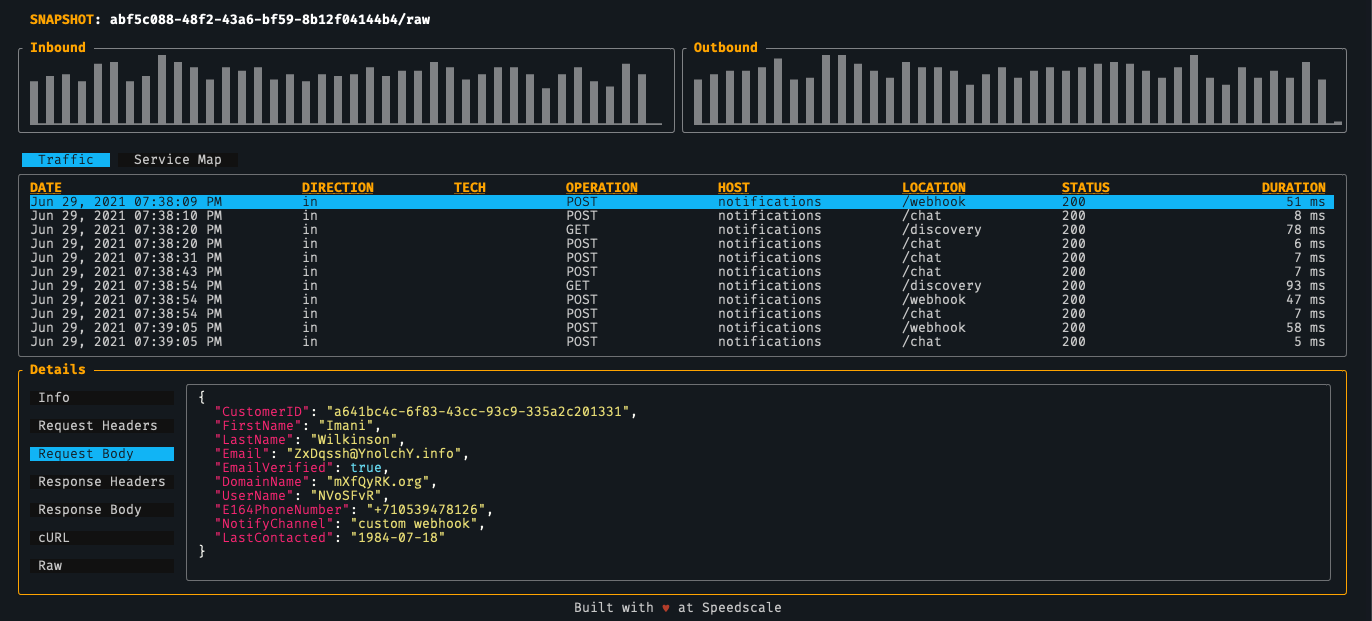
    Speedscale CLI features include service mapping, which enables developers to auto-detect and map external dependencies that could break, a traffic viewer for logging and tracing API calls and latency detection tools that show how code changes are impacting performance. In a forthcoming update, Speedscale also plans to include load generation capability to enable developers to run tests locally. The overall goal is to enable IT organizations to shift more responsibility for the management of APIs further left toward the developers that create them, said Ahrens.

    Naturally, Speedscale is also hoping that, as more developers are exposed to its observability platform for APIs, there will be increased demand for its SaaS platform among DevOps teams that need to manage and maintain APIs in production environments within their existing workflows. Speedscale exposes a set of APIs of its own to enable that integration, noted Ahrens.

    At its core, the Speedscale SaaS platform is designed to enable DevOps teams to replay how calls are made between APIs and external mock services to make it easier to diagnose issues.

    In general, there’s a lot more focus these days on APIs, thanks to digital business transformation initiatives that are dependent on APIs to integrate processes. The challenge organizations face is many of those APIs are built by separate development teams. In some instances, organizations can find themselves deploying redundant APIs. Other organizations will create APIs that, over time, are simply forgotten about or that go dormant when the developers that created them leave the organization. These “zombie APIs” often represent a security risk because cybercriminals now routinely scan IT environments for unattended APIs through which they can exfiltrate data without anyone noticing.

    One way or another, the management of APIs is becoming a distinct discipline within many organizations as they come to appreciate the level of IT flexibility they enable. Replacing backend services is a lot simpler when the APIs calls that invoke them both internally and externally remain relatively simple. The challenge is that building and maintaining microservices-based applications based on APIs is a more complex endeavor than building a monolithic application. The first step toward reducing that complexity is, of course, to provide more visibility into the application environment for all concerned.

  • Overcoming Challenges to Automating DevSecOps

    Overcoming Challenges to Automating DevSecOps

    In the last few years, DevSecOps has been widely adopted among organizations looking to get proactive with their security. Traditionally, development teams would continuously implement and deploy new applications into the enterprise and security was an additional bolt-on at the end. 

    However, as the threat posed by cybercrime has increased, organizations have been ‘shifting left’ with their security and weaving it into the beginning of the development life cycle. 

    This offers significantly increased security benefits and means software vulnerabilities can be identified and remediated before they are exposed to the enterprise. The one drawback is around the additional time this takes. As a result, many organizations are also looking to automate their DevSecOps processes. 

    Automation is a critical feature of DevSecOps as it improves efficiency, cuts costs and can streamline operations. However, to get the most out of DevSecOps automation so it delivers real value to the organization, there are several challenges that must be considered first. But what are these challenges and how can they be overcome?

    How to Approach DevOps Security Automation

    When you first move to security automation, you’ll find some security tasks that can easily be automated and others that are harder to fit in. DevSecOps teams will need to use many tools to cover all their bases, but no one wants teams checking lots of different tool outputs. Making it easier to see what’s going on and where risk lies by consolidating security tools and results in a central platform is the way to go. This makes life easier by giving a single pane of glass. Everyone generally agrees that DevOps teams must adopt cybersecurity best practices, but testing takes time. Development teams don’t have time to learn, use and check lots of security tools on top of their existing workload. Automated solutions get to work without any real need for maintenance or management. These solutions trigger tools to work at the right time depending on the outcomes found without any manual input needed. This gives you and your team valuable time back to focus on other important matters.

    Fitting DevSecOps Into Secure CI/CD Pipelines

    The goal of CI/CD pipelines is fast delivery of build and release steps, typically through automation. A key goal of DevSecOps is to alert someone to a new problem as early in that automated process as possible. You need to develop solutions that don’t overwhelm CI/CD pipelines, yet allow flexibility for differing tech stacks, security tools and environments. What you need to ask is, have the latest changes caused any new and important security issues that should be reported before going live?

    Doing DevSecOps Without Constant CI/CD Changes

    Trying to manually run security tools on your entire application source code each day can be time-consuming and hinder your ability to keep up with daily changes. For security checks to keep pace with code delivery in a CI/CD environment, security automation is a must. Security products need to integrate into the development pipeline and enable both the development and security team to work together instead of just throwing things over the fence to each other. 

    Focusing on Issues Raised for Faster Remediation

    All the artificial intelligence and machine learning (AI/ML) in the world isn’t going to remove non-issues better than a manual triage, so here we recommend being resigned to getting stuck. Treat the first run of a set of security tools as a normal security test. Expect hundreds of issues and be prepared to go through them and mark the false positives, duplicates and issues that just aren’t important right now. But do this with the expectation that you’re creating a baseline against which your future pipeline scans can be measured so you’re only alerted to new important issues. By automatically managing and recording the lists of real issues existing in every DevSecOps pipeline run, we can then concentrate on the differences. These new issues need to be flagged and then made easily visible and actionable for all teams.

    Running Multiple Security Tools in CI/CD

    DevSecOps includes setting up many automated security tools to cover the many types of security issues that need to be checked for. Many organizations run multiple security tools. However, as the number of security tools grows and the DevSecOps processes become more complex, many companies then realize the hardest challenge is to make sense of all of the test results within a short period of time. For some companies, this task of bringing together the results from all of these tools is a full-time job, and one ripe for automation. 

    Triaging Security Issues

    False positives and nonsense issues are consistent problems for using security tools. Removing these gives better results and increases the chances that development teams will have a better relationship with DevSecOps processes. Organizations should build a list of issues that don’t need to be actioned and also use automated security tools to flag new issues and differentiate them from the previous backlog of issues. Automating the ‘best fixes’ across all issues also speeds up fix times, while reducing the workload on security teams. 

    Mapping Security to Development Processes

    Dev and DevOps teams are under pressure to get pipelines running smoothly and don’t want security slowing things down or complicating it. By automating security testing in such a way that it can easily handle changes in repos and containers, organizations can overcome this challenge without compromising security. 

    Risk Prioritization

    DevSecOps will increase the number of issues found as well as the speed with which they should be handled. In reality, only a small number of issues will pose a massive risk to the business. Being able to pinpoint the really big issues in real-time helps security know the big risks are being covered and allows developers to focus on the real issues, not lots of small bugs. You can also intelligently determine the changes in risk for quick and automated decisions in the CI/CD pipeline without slowing down the development team.

  • Vercel Acquires Turborepo to Gain Build System

    Vercel Acquires Turborepo to Gain Build System

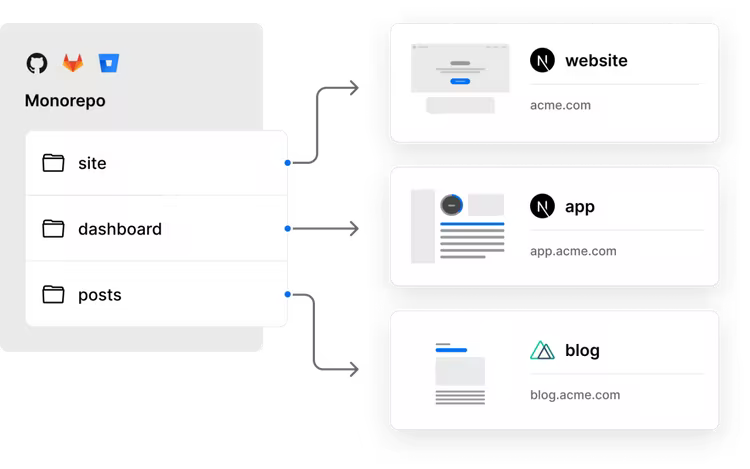
    Vercel today announced it has acquired Turborepo, a provider of a build system for JavaScript and TypeScript applications that provides developers with access to an easy-to-use monorepository for their code.

    In the wake of that acquisition, the command line interface (CLI) for accessing Turborepo will now be available under an open source license.

    Jared Palmer, creator of Turborepo and other popular open source projects including Formik and TSDX, will continue working on accelerating Turborepo’s capabilities as the new leader of a build performance team at Vercel.

    The goal is to move existing users of the Turborepo cloud service to a Vercel platform for building applications using the Next.js framework, which makes it possible to build web applications based on the React library for creating user interfaces that enable both static site generation (SSG) and server-side rendering (SSR).

    Palmer said monrepositories such as Turborepo not only make it easier for developers to manage builds but also reduce the amount of time required to process those builds using a continuous integration/continuous delivery (CI/CD) platform.

    Rival build systems are also much more complex to configure and manage, which Palmer said is a primary reason many developers have not yet set up their own mononrepositories.

    As the number of applications that organizations want to build and deploy in the digital business transformation era increases, the focus on developer productivity is intensifying. Rather than having to maintain a complex build system, Turborepo is designed to be simple to configure. As a result, more developers can reduce build times by as much as 50%, noted Palmer.

    In effect, front-end developers are able to more easily become full-stack developers by combining that build system with the Next.js framework, he added.

    DevOps teams will need to adjust to applications capable of providing richer application experiences without relying as much on backend infrastructure. That shift has implications for everything from the amount of network bandwidth consumed to the performance of web applications. The Vercel platform employs caching, routing and a React framework to optimize application performance in a way that reduces the dependency on backend infrastructure to optimize application performance.

    As web application development continues to evolve, the overall rate at which they web apps are built should increase significantly. Naturally, DevOps teams will need to consider the implications of having more applications move through DevOps pipelines and the need to continuously update those after they are deployed.

    It’s not clear whether or how much DevOps teams will nudge developers toward frameworks such as Next.js to develop web applications that might not tax backend infrastructure as much as previous generations of applications. In effect, developers can take advantage of frameworks that enable them to treat the underlying IT infrastructure as if it were serverless whenever possible with tools that have a familiar JavaScript construct. Vercel claimed there are already more than 30,000 sites running Next.js in production at organizations like Airbnb, Hulu, Nike, Ticketmaster and Uber.

    One way or another, it’s clear that the way web applications are being built is fundamentally changing. The only issue now is determining to what degree the rest of the IT organization is prepared to absorb that level of change.

  • Securing the Software Supply Chain with Behavioral Analysis

    Securing the Software Supply Chain with Behavioral Analysis

    Lately, software supply chains find themselves in a very interesting and uncomfortable position—the industry spotlight—and not in a good way. While significant and costly breaches such as  SolarWinds or Kaseya make front-page news, supply chain attack tactics (e.g. typosquatting or dependency confusion) that target package managers such as npm, PyPI or WinGet can poison downstream applications or compromise developer credentials.  

    The software engineering community has been steadily increasing its use of third-party and open source solutions to help create new offerings. In fact, over the last five years, there has been a 259% increase in the use of open source.

    One reason for this is the simple fact that creating new applications takes time and can strain budgets that are already tight. With open source code, software engineers gain fast access to pre-existing code that’s already demonstrated a proven ability to address the very unique challenge they are looking to solve. By removing the need to reinvent the wheel, the development timeframe is accelerated, the costs are lowered and teams are freed to focus on the creation of new and unique features that the customers demand.

    At this point, turning to third-party code may seem like a no-brainer. However, it can also open the door to potential risks. This is especially true with engineers who, rather than checking software to ensure it is secure and compliant, take the providers’ assurances as gospel. 

    They are not alone. Other groups will try to conduct their initial due diligence at the onset if that’s possible. Soon after they then ease into a “set it and forget it” approach, where they fail to update the code over time. As a result, while the code may appear secure initially, vulnerabilities can emerge over time, and if the software is not continually updated, bad actors can leverage an unprotected window of opportunity. In fact, according to Enterprise Security Group’s “Modern Application Development Security” eBook, 48% of organizations regularly push vulnerable code. The same research also found that 60 percent of organizations have had production application vulnerabilities exploited.

    Organizations conduct static application security testing (SAST) and dynamic application security testing (DAST) to assess pre-production code vulnerabilities. They will also scan with AV before releasing software, examine signing certificates, and code quality. Yet, despite these efforts, they remain challenged by gaps in security processes and the ability to sufficiently inspect large, complex and multi-layered software packages. What’s missing is the ability to conduct in-depth analysis to pinpoint behavioral differences between compiled software versions.  

    Malicious tampering can often involve changing how the software interacts with the system on which it is deployed.  Differential behavior analysis highlighted below makes it easier to detect those unusual changes. For example, having an application suddenly add a pre-install script that downloads files via certutil is highly unusual. If the addition was planned, reasons for the change would be well documented and it would be associated with a significant new feature. For this type of change to happen in any other scenario is suspicious and deserves further investigation before the software is released. In this case, such action would have caught ua-parser-js developer’s account compromise.

    supply chain

    With the software supply chain at risk and with shared code the new normal, what’s needed is software assurance. 

    Software assurance allows teams to inspect every application layer within an installation package for the presence of software tampering, malware and other indicators of software supply chain attacks.   

    Begin the software assurance process with the deep inspection step through recursive package decomposition. The resulting software bill of materials (SBOM) becomes so much more than a build manifest (a list of components that should be in the final build). It becomes the means to determine exactly which components have unacceptable build quality or those that contain unwanted software behaviors. This enables developers to verify the code they are working with and take appropriate action to protect their customers and partners from the majority of software risks. These assessments include:

    • Software grading: The software package and every included component can be graded based on the types and severity of security issues found. Using a grading system makes it easy for software buyers to gauge the level of risk posed by a software package and determine whether additional deployment measures can be taken to mitigate those risks. For developers, component grading makes it easier to prioritize their remediation efforts and aids in the selection of higher-quality third-party components.  
    • Application hardening: Activating specific build or compiler options can mitigate vulnerabilities and protect applications against attack—but only if they are implemented correctly. Assessing whether these mitigations are correctly implemented ensures that these protection mechanisms will work as expected. 
    • Binary behavior analysis: This allows teams to fully understand how each software component interacts with the system on which it will run. The ability to understand third-party component behaviors, even when developers have no access to the source code, delivers a more comprehensive understanding of supply chain risks. Checking for unusual software behaviors or unexpected behavioral changes between one version and the next is often the only way to identify software tampering by a malicious actor. The ability to have this final check before distribution enables software developers to validate that the software being released is trustworthy.

    For companies that are using software to create business value or producing software that is mission-critical for their customers, turning a blind eye or making software assurance assumptions can no longer be tolerated. In today’s climate where increasingly sophisticated threats loom, inspecting software and monitoring updates for signs of tampering, malicious or unwanted additions is essential and must become a part of standard software development practice.