Category: Continuous Delivery

Continuous delivery is a software engineering discipline that allows organizations to consistently develop and release quality software at a rapid pace. It is achieved by automating the software development lifecycle, enabling tasks such as development, testing and release to occur concurrently and continuously.

  • Using Generative AI for Issue Remediation and Software Reliability

    Using Generative AI for Issue Remediation and Software Reliability

    In today’s fast-paced digital landscape, keeping your services up and performant, especially for cloud-based and online services, is crucial for staying competitive. Downtime or latency issues can drive customers away, especially when all it takes is a click to switch over to a competing SaaS solution. DevOps and site reliability engineering (SRE) teams face the constant challenge of minimizing mean-time-to-remediation (MTTR) when dealing with errors and issues. As valuable as search engines like Google are, the sheer amount of information available can make finding the right solutions a time-consuming task. What if there was a way to automate and streamline this process, making error investigation more intelligent, focused and efficient?

    This article will walk you through the journey of error resolution from the first obscure log line to identifying the problem hidden within it. We’ll resolve the issue using several tactics, ultimately leading to the use of generative AI to cut MTTR and provide precise IT recommendations. This journey includes useful measures and principles that can be applied by DevOps teams and explores the potential for applying generative AI.

    The Current Experience of DevOps/SRE

    Picture this: A log line pops up with an obscure error message, and the first instinct is to search for this message on Google for potential solutions. After all, someone else must have encountered a similar problem, right? However, the abundance of resources and search results can be overwhelming. The search results are often displayed based on website relevance, not necessarily the relevance of the error itself. Consequently, precious time is wasted sifting through countless search results, leading to a longer time to understand and remediate the error. For DevOps and SRE teams responsible for maintaining system stability, reducing MTTR is a crucial key performance indicator (KPI). This begs the question: How can we leverage automation and artificial intelligence to improve the search process and accelerate error resolution?

    Our First Step: Cognitive Insights

    In our organization’s initial attempt to tackle this challenge, we focused on leveraging crowdsourcing techniques to get more relevant results than the brute-force Google search. Moreover, we wanted to automate the process and run it offline so that when an incident occurs, we can offer useful insights rather than starting the search as the system is down or malfunctioning.

    The approach involves an offline phase and an online phase. The offline phase involved analyzing all our ingested logs and identifying common log patterns. This also allowed us to count how often this pattern occurred in our system and how prevalent it is. Then we crawled relevant technology forums like StackOverflow, Google Groups and Bing Groups for relevant discourse around these log patterns that could offer relevant solutions. The next step was to rank the search results by relevance and take the top five most relevant links.

    The offline phase resulted in a library of known log patterns and, for each one, a cognitive insight containing these links, as well as additional information such as the severity level, how many times this pattern occurred in the logs, the date of first occurrence and additional tags of involved technologies, tools and domains.

    The online phase occurs in real-time as new logs come in. Upon ingesting the log, it is automatically matched against all known patterns; if it matches one, it gets the cognitive insight for that pattern. This means that as soon as the problematic log comes in, the DevOps engineer already has focused and ranked search results and context to start from, which accelerates the investigation process.

    The Next Step: Why Don’t we ask Generative AI?

    After reflecting on our initial approach, we had an epiphany. Large language models (LLMs) like ChatGPT had already crawled the web and absorbed a vast amount of information. So, why not leverage their capabilities and ask them directly for insights? The idea was simple: Let the AI “read the posts” for us and provide us with recommendations. We started by formulating specific questions such as “What could the possible errors be?” and even went a step further by asking for further investigation steps. However, implementing this seemingly straightforward approach came with its own set of challenges. We needed to run preprocessing before asking the generative AI, as well as running post-processing on the answers it returned, to get what we expected. Let’s see what that process entails.

    How we Did It: Analyzing, Sanitizing and Validating

    Before asking ChatGPT (or any other generative AI tool) for assistance, several preparatory steps were necessary. First, we had to analyze incoming logs, identify patterns and score them based on severity. This allowed us to prioritize the most critical issues.

    Secondly, we had to carefully design our prompts for the generative AI using prompt engineering, ensuring that we framed our questions in a way that yielded precise and relevant responses. Prompt engineering is the practice of strategically designing effective prompts or instructions for language models to achieve more accurate responses. It involves carefully specifying the input format, context or constraints to guide the model’s generation process and obtain more accurate and desired results. This is true for any use of generative AI, and for our case in particular. Beyond accuracy, prompt engineering helped us tune the requested format and length of the answer to fit the “executive summary” paragraph we popped up for the user. This ensured it wasn’t too lengthy nor too short to provide meaningful insights.

    Additionally, we took great care in sanitizing the queries and removing any sensitive data to maintain privacy and security. This step was especially crucial for those working with public services, highlighting the importance of protecting users’ personally identifiable information (PII), such as names, emails, phone numbers, IP addresses or GPS coordinates.

    With all this preprocessing done, we sent the prompt to the generative AI. It is important to note that public services may not always be available (as some returned a “service is busy” message when working with ChatGPT and other services), so automation should take care of delays and employ retries as needed.

    Finally, as responses were received from the AI, it was essential to validate those. We ran an analysis and filtered out non-relevant answers from different domains (after all, a log is also a product of a tree, and Kafka is also a novelist), ensuring there was no offensive content or misleading information. The semantic integrity of the responses was also carefully evaluated.

    These AI insights have proven to be a powerful troubleshooting tool, and we’ve made it an integral part of our service.

    This journey is not unique. In fact, DevOps teams can employ similar measures for their own telemetry data to serve their own operational workflows. These principles, such as data sanitization and validation, even apply to other types of data and use cases.


  • Google Announces Availability of iPaaS Service

    Google Announces Availability of iPaaS Service

    Google today made available an integration platform-as-a-service (iPaaS) capable of invoking a range of methods to integrate applications.

    Initially developed for the Apigee application programming interface (API) management platform Google acquired in 2016, the Application Integration service can now, for example, also consume a publish and subscribe event or an event driven through a Salesforce platform.

    Amit Zavery, vice president and general manager for Google Platform, said the Application Integration service provides IT organizations with all the benefits of an iPaaS without requiring them to stand up and manage an integration platform themselves.

    The Google Application Integration service also provides access to a Visual Integration Designer tool that can be used to build workflows using a low-code tool. In total, there are now more than 75 connectors that can be used to integrate multiple Google Cloud services and third-party platforms that can run in either a cloud or on-premises IT environment, said Zavery.

    In general, visual tools are transforming how integrations are created and expanded within organizations, noted Zavery. Rather than using lower-level procedural code, a visual tool enables developers to employ low-code to create integrations. That makes it simpler to collaborate with business users that can now more easily participate in developing workflows.

    In fact, in some cases, business users, otherwise known as citizen developers, have enough technical acumen to create their own workflows using low-code tools.

    There are, naturally, going to be plenty of complex integration challenges that will require procedural code, but the bulk of the integrations required today are not especially complex.

    Regardless of who creates the integration, the number of them being employed across an enterprise organization continues to increase as more digital business transformation initiatives are launched. Developers are not going to be able to keep pace with the demand for those integrations if they rely solely on procedural code. The only way to effectively reduce the backlog for integrations is to rely more on visual tools to construct them. In most cases, the integration being created is relatively trivial. The only reason it wasn’t created sooner is there are not enough developers available to complete that task using procedural code.

    There are, of course, no shortage of iPaaS options available. As more workloads are deployed in the cloud, Google is betting the center of gravity for integration will shift toward the places where modern microservices-based workloads are deployed to reduce overall latency.

    It’s not clear whether organizations still view integration as an afterthought versus employing an integration platform around which all applications revolve. That latter approach tends to reduce the total cost of integration when compared to using multiple point products that are not managed via single framework, noted Zavery.

    Ultimately, IT teams that adopt an iPaaS are able to focus more on higher-value IT tasks. The issue is determining which integration projects really require professional developers with lots of integration expertise and which, via a low-code tool, can be handled by almost any developer.

  • How Platform Engineering Bridges the IT and DevOps Divide

    How Platform Engineering Bridges the IT and DevOps Divide

    Ballooning lead and process time, with an opaque corollary relationship to fixed and marginal cost, is a significant and complex burden for any enterprise. And multi-cloud complexity and inefficient organizational and technical processes are some of the most wasteful areas companies face–so much so that Synergy Research reports organizations are cutting back on their cloud spend as tech budgets continue to fall under intense scrutiny, resulting in a Q1 2023 cloud spending growth rate of 19% compared to 32% just last year. With cloud cost containment a top priority, Forrester advised tech leaders to demonstrate to CFOs how they will stay on budget and demonstrate ROI at the board level. A key area where companies can eliminate expensive waste and increase time to value is the relationship and workflow between IT and developers, which, while being the DevOps charter for nearly 15 years, has gotten less attention among the viable cost-containment strategies for enterprises in 2023. Revisiting the latest iteration of this DevOps charter through the implementation of platform engineering strategies can help enterprises create a faster, leaner and more scalable dynamic. Let us examine why it’s now time for enterprises to consider platform engineering as a potent way to not only increase efficiency but also to bridge the divide between DevOps and IT.

    The Old Way: Forcing DevOps to Dance to the ITSM Tune

    In traditional enterprise organizations, IT typically dictates a top-down ITSM practice that limits the tools an organization can use for development and deployment; in many cases, it inhibits CI/CD and other core capabilities and practices of DevOps. This awkward attempt to accommodate modern DevOps practice through an aging ITSM paradigm has led to a suboptimal software delivery performance and poor developer experience (DX).

    McKinsey, highlighting the criticality of DX, found developers at a leading SaaS provider spent 20% to 30% of their time integrating different services such as firewall changes, DNS and security access to deliver code through its CI/CD pipeline. That’s a lot of time spent on low-value, repetitive tasks, ensuring a painful journey for a disappointing result. If the DX pain is high enough, developers often go around IT and create resources on their own, leading to shadow IT, adding new cost burdens and growing security exposures. Every minute and engineer count: Five minutes saved per day among 500 developers saves a week’s development time.

    Surely, there is a better way.

    Platform Engineering: Collaboration Through Composition

    Platforming engineering and “platform as a product” have been key to the PaaS ecosystem for years but are now gaining fresh traction in the industry. In Puppet’s State of DevOps Report, 51% of respondents said they had already adopted platform engineering and 93% said it was a step in the right direction. Gartner predicted 80% of software engineering organizations will have platform teams by 2026.

    The concept can be defined in several ways. Gartner reported platform engineering is “an emerging trend intended to modernize enterprise software delivery… designed to support the needs of software developers and others by providing common, reusable tools and capabilities, and interfacing to complex infrastructure.” PlatformEngineering.org’s recent blog post defines it as the discipline of designing and building toolchains and workflows for self-service capabilities in software engineering organizations during the cloud-native era.

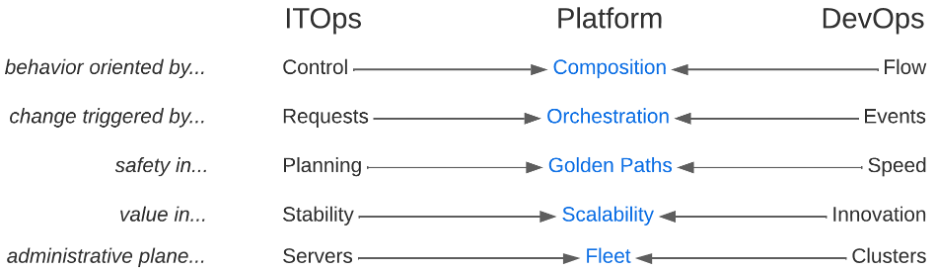
    Regardless of definition, platform engineering is the latest iteration of IT centralization, though now attempting to retain all the benefits of distributed team empowerment through “composition” rather than converged control. As modernization continues, we experience the ebb and flow of composition and decomposition, both organizationally and technically. Microservices, Kubernetes, and GitOps patterns pushed the rational limits of decomposition and significantly raised the level of technical complexity in the enterprise. The natural counter pressure is a new cycle of composition that aims to simplify that complexity through platform engineering practices. Teams now look for these toolchains and workflows to be centralized in internal developer platforms (aka IDPs), exposing the development, deployment and maintenance of the entire life cycle of modern, cloud-native applications.

    IDPs can facilitate the flow, speed and innovation DevOps teams are demanding without sacrificing stability, security and control. They enable developers to configure their toolchain while meeting all controls through approved blueprints or “golden paths,” reducing lead and process time. Developers can focus on delivering business value instead of infrastructure tasks.

    Bringing IT and DevOps Back Into Alignment Saves Time, Money and Sanity

    Platform engineering creates a collaborative framework that connects IT and DevOps teams, so they can focus on outcomes rather than methods. Developers can use an IDP to follow conventions that speed up development and prevent anti-pattern creep. Guardrailing choices through golden paths reduce cognitive load and simplify execution context for security teams. The result? Developers can focus on what they were hired for and want to do–creating innovative, transformative applications and differentiated value. Security can sleep well knowing bespoke behavior isn’t opening new attack surface areas.

    On the Day 2 operations side, IDPs enable SRE and support teams to have a fleet-wide view and work effectively with developers to streamline the management of production needs across all applications, clouds and tech stacks.

    The reframing of composition breaks the false dichotomies between IT and DevOps practices. You don’t have to choose between control and flow, change isn’t triggered by serial requests or async events, safety isn’t found in planning or speed, value isn’t found in stability or innovation and administrative plane primitives aren’t servers or clusters. Platform engineering practices allow you to prioritize composition, orchestration, golden paths, holistic scalability and fleet management to get teams out of entrenched myopia and embrace systems thinking that gets your business delivering strategic gain instead of tactical win/loss tallies.

    Finally, platform engineering positively impacts software delivery and operational performance metrics by streamlining development processes and reducing manual efforts. The bottom line is faster time to market while ensuring more consistency, less human error and improved software quality. This maximizes productivity, minimizes downtime and optimizes resource utilization, leading to cost advantages and increased efficiency for enterprises.

  • Shift Left With DAST: Dynamic Testing in the CI/CD Pipeline

    Shift Left With DAST: Dynamic Testing in the CI/CD Pipeline

    Dynamic application security testing, or DAST, is a process used to evaluate an application’s security while it’s running rather than while it’s in a static state. This method involves simulating attacks on an application, identifying vulnerabilities and analyzing the responses. DAST focuses on the exposed HTTP and HTML interfaces of web-enabled applications, making it an excellent tool for spotting security vulnerabilities that may occur during an application’s active runtime.

    DAST is a ‘black-box’ testing method, meaning it tests the application from the outside in—much like a potential attacker might. It doesn’t have access to the source code and instead focuses on the application as a whole rather than its individual components. This external perspective enables DAST to discover potential security threats that static testing methods might miss.

    While DAST is an effective security testing tool, it becomes even more potent when paired with a shift left approach.

    Understanding the Concept of ‘Shift Left’ in Software Testing

    Shift left is a practice in software development where testing is conducted earlier in the life cycle—that is, it’s ‘shifted left’ on the project timeline. Traditionally, testing was seen as the last phase before the release of a software product. However, with the shift left approach, testing becomes an integral part of every stage of the development process from planning to deployment.

    This approach has several advantages. It allows for the identification and resolution of issues earlier in the development process, reducing the cost and effort required to fix them later. It also encourages collaboration between developers and testers, fostering a more cohesive, efficient development environment.

    Shift left is not just a testing strategy but a philosophy that promotes preventive measures over reactive solutions. It’s about building quality and security into software from the get-go, rather than tacking it on at the end.

    DAST in the Context of Shift Left

    Importance of DAST in Early Stages of Development

    The integration of DAST in the early stages of development is crucial for several reasons. First, by conducting dynamic security testing from the onset, teams can identify vulnerabilities earlier, making them easier and less costly to fix. This proactive approach helps to prevent security issues from becoming ingrained in the code, which can lead to significant problems down the line.

    Second, early integration of DAST encourages a security-focused mindset from the beginning of the project, promoting a culture of security within the team. This cultural shift is crucial in today’s cybersecurity climate, where threats are increasingly sophisticated, and the stakes are higher than ever.

    How DAST Complements Other Testing Methods

    DAST doesn’t replace other testing methods; rather, it complements them. While DAST focuses on external vulnerabilities, other testing methods like static application security testing (SAST) can target internal issues. By combining these methods, teams can achieve a more comprehensive view of their application’s security.

    In a shift left approach, this combination of testing methods can be very powerful. By conducting these tests early and often, teams can ensure that both the external and internal aspects of their application are secure. This layered approach to security testing can help to catch any vulnerabilities that might otherwise slip through the cracks.

    Incorporating DAST Into the CI/CD Pipeline

    1. Understanding the Application Structure

    Before we can integrate DAST into the CI/CD pipeline, it’s crucial to understand the structure of the application we’re working with. This involves understanding the layers of the application, the technologies used and the data flows. By analyzing the application’s architecture, you can identify the critical components that need more attention during the security testing phase.

    Understanding the application structure is not just about knowing the technology stack. It’s also crucial to understand the business logic and the functionality of the application. This will allow you to create better test cases during the DAST process. Additionally, understanding the application structure will enable you to make better decisions when configuring the DAST tool, leading to more efficient and effective security testing.

    Finally, understanding the application structure will help you prioritize the vulnerabilities found during the DAST process. Not all vulnerabilities are created equal; some might be more critical due to the data they expose or the potential damage they could cause to the application. 

    2. Configure the DAST Tool

    The next step is to configure the DAST tool. This involves setting up the scanning parameters, defining the test cases, and tuning the tool to reduce false positives.

    When configuring the DAST tool, it’s important to strike a balance between thoroughness and speed. You want the tool to be able to identify all potential vulnerabilities, but you also want the scanning process to be fast enough not to slow down the development process. This balance can be achieved by carefully selecting the scanning parameters and continuously tuning the tool based on the results of the scans.

    Additionally, when configuring the DAST tool, you should consider the unique characteristics of your application. For example, if your application uses a specific technology or framework that is known to have certain vulnerabilities, you should ensure that the DAST tool is configured to test for these vulnerabilities. Similarly, if your application handles sensitive data, you should prioritize testing the components that process and store this data.

    3. Integrating DAST Into the CI Pipeline

    The next step is to integrate DAST into the CI pipeline. The CI pipeline is a sequence of steps that developers follow to merge their changes into the main codebase. By integrating DAST into this pipeline, we can ensure that every code change is automatically tested for security vulnerabilities.

    Integrating DAST into the CI pipeline can be achieved using various tools and plugins. Most DAST tools provide APIs that allow you to automate the testing process. By using these APIs, you can trigger a DAST scan every time a new code change is pushed to the repository. This allows you to catch vulnerabilities early in the development process, reducing the cost and time needed to fix them.

    However, integrating DAST into the CI pipeline is not a one-time task. It requires continuous monitoring and tuning to ensure that the testing process remains effective. You will need to update your DAST configurations as the application evolves, add new test cases as new features are developed, and fine-tune the testing process to reduce false positives. 

    4. Scan for Vulnerabilities

    After integrating the DAST tool, you can start scanning for vulnerabilities. The scanning process involves executing the test cases defined during the configuration phase and identifying potential security issues in the application. Depending on the size and complexity of your application, this process can take from a few minutes to several hours.

    During the scanning process, the DAST tool will interact with the application just like a real user would. It will send inputs to the application, observe the responses and analyze them for signs of security vulnerabilities. This dynamic approach allows the tool to identify vulnerabilities that static analysis tools might miss, such as runtime vulnerabilities and issues related to the application’s business logic.

    5. Analyze and Prioritize Findings

    Once the scanning process is complete, the next step is to analyze and prioritize the findings. The DAST tool will provide a report of the identified vulnerabilities, including their type, location and potential impact. This information should be used to prioritize the vulnerabilities based on their risk to the application and the business.

    Analyzing and prioritizing the findings is not an easy task. It requires a deep understanding of the application, the business, and the threat landscape. You need to consider various factors, such as the potential impact of the vulnerability, the likelihood of exploitation, the sensitivity of the affected data, and the complexity of the remediation process. By considering these factors, you can prioritize the vulnerabilities and focus your efforts on those that pose the highest risk.

    In addition, analyzing and prioritizing the findings should involve all relevant stakeholders. Developers, security teams, and business leaders should all participate in this process, as they each bring unique perspectives and insights that can help make better prioritization decisions.

    6. Remediate and Retest

    After analyzing and prioritizing the findings, the next step is to remediate the vulnerabilities and retest the application. Remediation involves modifying the application’s code or configuration to eliminate the identified vulnerabilities. Depending on the complexity of the vulnerabilities, this process can involve simple code changes or significant architectural modifications.

    After remediation, it’s crucial to retest the application to ensure that the vulnerabilities have been effectively addressed. This involves running the DAST tool again and verifying that the previously identified vulnerabilities are no longer present. Additionally, retesting allows you to check for new vulnerabilities that might have been introduced during the remediation process.

    Remediation and retesting is a continuous process. As new vulnerabilities are discovered and new features are developed, you will need to repeat this process to ensure the ongoing security of your application. This continuous effort is a critical component of the shift left with DAST strategy.

    7. Continuous Monitoring and Updates

    The final step in incorporating DAST into the CI/CD pipeline is continuous monitoring and updates. This involves regularly checking the effectiveness of the DAST tool, updating its configurations as the application evolves, and tuning it to reduce false positives.

    Continuous monitoring and updates are crucial to maintaining the effectiveness of your shift left with DAST strategy. As the application evolves and the threat landscape changes, the DAST tool needs to be updated to remain effective.

    Conclusion

    In conclusion, incorporating DAST into the CI/CD pipeline is a powerful strategy to enhance the security of your software. By understanding the application structure, integrating DAST into the CI pipeline, configuring the DAST tool, scanning for vulnerabilities, analyzing and prioritizing findings, remediating and re-testing, and continuously monitoring and updating, you can unleash the power of shift left with DAST. This comprehensive approach will allow you to identify and address security vulnerabilities early in the development process, leading to more secure and reliable software.

  • State of API Report Highlights Productization and Generative AI

    State of API Report Highlights Productization and Generative AI

    In today’s software landscape, an API-first strategy is increasingly popular. It’s the bedrock of how applications are built and connected. APIs help promote internal tech reusability, helping developers do more with less. Due to this increasing API reliance, maintaining quality control is increasingly important for internal and partner integrations and ensuring the reliability and security of these connections remains a top priority.

    Due to the rising API ubiquity, nearly half of the total development energy is spent working with APIs. And to continually improve these interfaces, taking a product mindset is proving helpful. In fact, 60% of API developers now view their APIs as products. Generative AI has also shown incredible promise and is now being used in tandem with traditional tools to increase API code quality.

    Postman recently released its fifth annual State of the API Report. The 2023 edition, which surveyed thousands of developers and API professionals, found subtle changes in tooling preferences and styles. It also sheds light on the ongoing API productization movement and API developers’ use of generative AI. Below, I’ll focus on these two key areas and review the report for its other key takeaways.

    API Productization is Hot

    The majority of API developers now view their API as a product, and this figure rises to 68% in large companies. A full 65% of respondents said their API generates revenue, too. This news is significant, as it demonstrates the industry is maturing its view of APIs. They are no longer offshoot developer toys but fully functional services contributing to overall business growth.

    But how much growth? Well, of those monetizing APIs, 43% now say APIs generate a quarter of company revenue. For some companies, APIs generated more than 75% of total revenue! There also appears to be a parallel between API revenue generation and large companies.

    Do you view your APIs as products? Most developers say "yes."
    Do you view your APIs as products? Most developers say yes.

    Other industry reports unearthed similar API productization potential. Rapid’s 2022 State of APIs report found that 42.6% of organizations are now monetizing APIs. And investment into API-first products remains strong even amidst a broader contracted tech investment climate. These findings come as social media giants like Reddit and Twitter attempt to monetize their APIs.

    That said, for 28% of companies, API revenue still equates to less than 10% of total revenue. APIs still don’t get the lion’s share, perhaps because they’re packaged with an existing platform or because of the many other indirect ways APIs might benefit the business. Furthermore, consumers are becoming more cost-conscious, as 60% cite pricing as a factor before integrating with an API. Still, the numbers are significant firsts for the burgeoning economy.

    Most API Developers are Using Generative AI

    Generative AI interfaces like ChatGPT and Bard have certainly taken the tech industry by storm due to their ability to generate code snippets, debug code and more. And for the first time, the State of the API Report spotlighted generative AI and its use within the API economy.

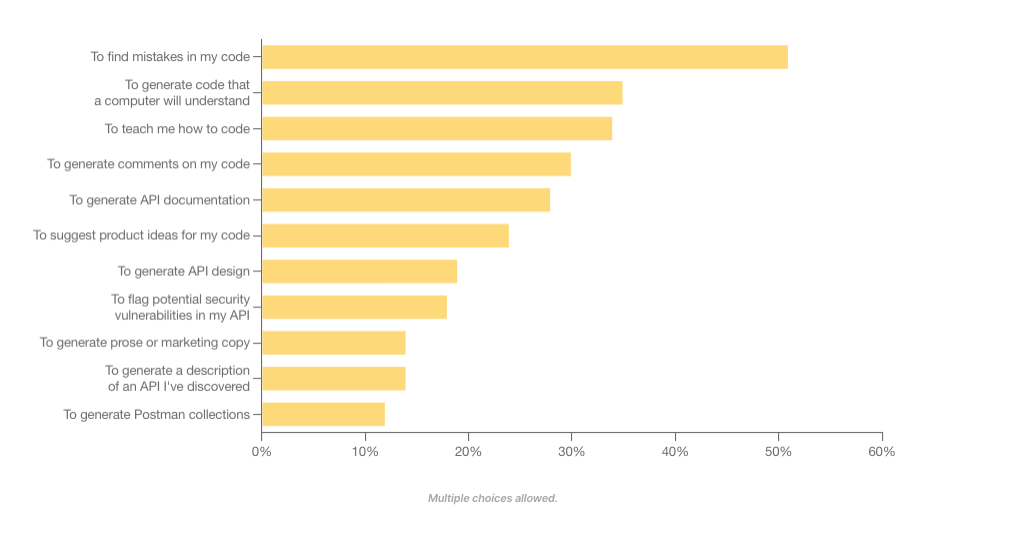
    Today, 60% of API professionals are using generative AI on the job. API engineers commonly use generative AI to find mistakes in code, generate machine-readable code and increase learnability around their programs. Some even use generative AI to suggest potential security flaws in their APIs.

    Compared with other app development endeavors, developers are by far most excited about building generative AI-powered applications in the year ahead. Yet, the efficiency gains are modest—many engineers forecast productivity improvements of 10% to 25%.

    How are API developers using generative AI in their work?
    How are API developers using generative AI in their work?

    Generative AI is set to accelerate many areas, including DevOps and API operations. Yet, contrary to some headlines, generative AI can’t automate all aspects of the software development life cycle. Rather, the technology is more likely to augment the API developer’s workflow than replace the need for seasoned professionals altogether.

    Other Key Takeaways

    Similar to last year’s report, integrating between internal applications, programs or systems remains a top concern for integrating an API or producing an API. The good news is that these integrations continue to increase in quality.

    The report found that deployment failures and times-to-recovery are improving on average. More than half (56%) of respondents said API security incidents occur less than once a year within their organization. This shouldn’t overshadow the significant impact API security breaches can have but signals that DevSecOps is beginning to respond to persistent API vulnerabilities.

    There are more API-first leaders than ever before. And API owners continue to evolve how their services are built and deployed. For example, REST is still by far the most common API style, used by 86% of developers. Webhooks made second place at 36%. However, GraphQL rose in usage, bumping SOAP into fourth position.

    SOAP slips on API architectural styles
    REST is still the dominant style, but GraphQL makes gains as SOAP slips.

    Other Quick API Factoids

    • More non-developers are becoming interested in APIs, as evidenced by 53% of survey takers being non-developers.
    • Most APIs are private—61% percent of businesses’ APIs are for internal use only.
    • After the technology group, business/IT services, financial services and health care are the most common sectors to adopt APIs.
    • Microservices is still the dominant architectural style of APIs, at 42%.
    • Performance, security and reliability are the top factors evaluated when integrating with a new API.
    • Improper authentication, authorization or access control is the most commonly cited API risk.
    • Common API tools include Postman, SwaggerHub, Datadog, SoapUI and Insomnia. Top gateway and API management platforms include AWS API Gateway, Azure API Management, Apigee and Kong.
    • JSON Schema is by far the most popular API specification.
    • The financial industry is a leader in API-first strategies—32% of respondents spend more than 20 hours a week working with APIs.
    • Most developers deploy APIs to production once a week to once a month.
    • When developers leave a company, their departure can cause outdated documentation, zombie APIs and a loss of institutional memory.

    API Obstacles Remain

    Looking to the future, investment in APIs is projected to climb. In fact, 92% of developers said their organization plans to invest the same or more time and resources into APIs in the coming year. Yet, some obstacles remain—a lack of documentation and poor service discoverability are still prominent roadblocks to API consumption. Furthermore, a lack of time and talent are major concerns that might stunt API development.

    The Postman State of API Report surveyed over 40,000 developers and API professionals, making it the largest study conducted on APIs to date. It should be noted that, given Postman’s specific focus in the market and its surveyed pool, figures may be skewed to represent increased API enthusiasm. For deeper insights, you can read the entire report here.

  • Is ChatGPT Helping or Hurting Your Developers’ Productivity?

    Is ChatGPT Helping or Hurting Your Developers’ Productivity?

    ChatGPT’s ability to translate natural language into working code has sparked tremendous interest in the programming community. Developers are exploring ways to use ChatGPT to reduce redundant tasks, from creating code snippets to analyzing and debugging programs. This also allows them to focus on more complex tasks like data analysis and monitoring with the help of a strong full-stack observability platform. Despite ChatGPT’s impressive capabilities, developers and their employers are split on whether the AI chatbot significantly boosts developer productivity.

    We will explore how to use ChatGPT to benefit your developers’ productivity and go over the advantages and disadvantages of ChatGPT to help you make the right decision for your business.

    How to use ChatGPT for Better Productivity

    ChatGPT has quickly become the most popular intelligence chatbot, with over a million user signups in its first five days and over 100 million in the first two months. Here are a few ways ChatGPT, developed by OpenAI, can help boost productivity in your organization.

    Improve Their Code
    Sometimes manually written code snippets consume additional CPU resources. Using ChatGPT, developers can optimize their functions for better performance. Additionally, ChatGPT can also write test cases and spot security vulnerabilities in their code, helping developers work faster.

    Simplify Documentation
    ChatGPT can give a simple explanation for the layman, avoiding technical jargon to a large extent. For instance, a developer at Twitter fed ChatGPT their code and it responded with a pretty detailed explanation. Using ChatGPT to generate the first draft of a company’s internal documentation would make knowledge transfers easier. New hires could quickly get up to speed on the company’s codebase. Further, ChatGPT could also be used for external-facing documents where other developers can learn how to use the company’s APIs and frameworks.

    Test and Understand Code
    ChatGPT can write automated tests for code that is fed into it. Although many developers consider testing boring and stressful—and sometimes a waste of time—it’s a critical step in ensuring that published applications are bug-free.

    With ChatGPT, developers can output reliable, well-tested code much more quickly and easily. ChatGPT can also give high-level and line-by-line explanations of code and even teach developers how to use external modules and APIs in their own code, helping them build much faster.

    Debug Code
    ChatGPT makes a great debugging tool for developers. It can take in error messages and output information on the likely cause of the error and how to fix it. This is typically a lot more time efficient than browsing forums and blogs for a solution.

    The tool can also suggest helpful code alternatives. Many developers claimed that ChatGPT can be much faster and less mentally challenging than the conventional approach of searching the web for a solution.

    As the CEO of Replit, Amjad Masad, put it, “ChatGPT could be a good debugging companion; it not only explains the bug but fixes it and explains the fix.”

    Code Comprehension
    ChatGPT’s terabytes of training data come from various sources, including common crawl and WebText2. This training data makes it easy for ChatGPT to simplify explanations of complex pieces of code for developers. Therefore, developers can save time deciphering any code’s underlying logic and structure.

    For instance, Stanford instructor and well-known developer Matt Harrison used ChatGPT to build a simple graphic design tool. He explained, “I’m using ChatGPT to create a GUI program for drawing lines. I haven’t used QT [a development framework] in years, yet I can throw this together really quickly.”

    Generate Documentation
    Writing code documentation is often considered a mundane task by developers. With ChatGPT, developers can significantly cut down on the amount of time needed for documentation. For instance, they can expedite the creation of troubleshooting guides, tool user manuals and test cases by asking ChatGPT to perform code analysis and generate detailed technical reports. Accelerating this documentation process allows for easier onboarding of new developers and faster product release times.

    Writing Tests
    ChatGPT can analyze code snippets and automate testing for them, saving developers lots of time and helping them output reliable code. Test coverage is an essential metric for most enterprises, and ChatGPT could help streamline the process.

    ChatGPT Disadvantages

    While many developers have praised ChatGPT for increasing developer productivity, others have criticized it as unreliable. Let’s understand some key areas where the tool falls behind.

    Outputting Buggy or Unusable Code
    Developers have complained that the chatbot would sometimes output plausible-looking code that doesn’t work. This might result from misunderstanding the user’s requirements or simply being unable to come up with a correct answer—then faking it.

    Programming Q&A forum Stack Overflow even issued a temporary ban on ChatGPT-generated answers. The ban was because the chatbot generated an influx of answers whose average accuracy was pretty low. ChatGPT sometimes uses nonexistent commands and outdated modules in its code, so while they theoretically might make sense, they don’t work in practice.

    Writing Outdated Code (and Forgetting Previously Written Code)
    Since ChatGPT’s training data cut off in September 2021, the chatbot has no knowledge of the recent developments in programming languages and modules after that. As a result, ChatGPT often needs to use outdated commands, modules and paradigms in its code.

    ChatGPT also occasionally forgets the context within which it is working, affecting code output. Some users have reported that ChatGPT sometimes forgets about the task at hand and begins generating incompatible code.

    Security Concerns
    Security concerns are the biggest drawback to having developers work with ChatGPT. Open AI uses the data users input into ChatGPT to train the underlying AI model.

    Research by cybersecurity firm Cyberhaven has shown that 11% of the data employees input into ChatGPT is confidential. This presents a significant risk, as such data can be used in the chatbot’s next responses. Corporations like JPMorgan and Verizon have even gone as far as to block employees’ access to ChatGPT because of these concerns.

    Lacks Problem-Solving Skills
    A developer’s job is to understand the business problem and develop customized solutions to address it. Although AI/ML tools like ChatGPT help developers code faster, they can’t help in problem-solving or implementing a software application.

    Furthermore, when developers become overly reliant on AI-generated code, they’re discouraged from upskilling on new programming frameworks and languages. This can hurt the organization in ways that might not be evident immediately.

    To ChatGPT or not to ChatGPT

    As Google’s head of developer experience Bret McGowen said, “While AI will transform software development in many ways, human judgment, intuition and creativity will remain essential to building great products.”

    While ChatGPT may not be a perfect solution for every aspect of software development, it can be a useful addition when combined with human problem-solving skills. However, companies should be careful while allowing the usage of AI in day-to-day processes. Guidelines educating in-house developers on the fair usage of AI are a must to protect sensitive information and maintain a high-quality control process.

  • Don’t Let Developer Experience Break Your Business

    Don’t Let Developer Experience Break Your Business

    As organizations digitally transform to support the needs of customers and help them win in their markets, IT leaders, software developers and DevOps teams have emerged as the central players in the transformation landscape. They are also key advocates for improving the developer experience and promoting technology adoption—both critical components of a successful digital transformation. They are also on the front lines of understanding operational and team challenges. Their understanding of the business objectives and the role people and technologies play in support of achieving these goals makes IT an indispensable driver of value creation.

    Digital transformation has also fueled the swift adoption of Kubernetes and cloud-native technologies, which promise enterprise speed and scalability. As these technology adoptions accelerate, so too does the demand to make developer experience a priority. After all, developers are tasked with creating and delivering software to the market quickly to support business objectives.

    As more organizations adopt cloud-native development methodologies, developers have taken on a more strategic role across the business. No longer just writing code, they have been asked to take on ownership of the entire application life cycle. In the cloud-native environment, this shift in developer responsibility comes with an evolving ecosystem of technologies and tools that can have enormous complexity and impact how dev teams collaborate as they code, ship, test and run apps to support business goals.

    Asking developers to take on this level of responsibility is not ideal for productivity. Most developers want to know enough about the full software development life cycle (SDLC) and infrastructure to get their work done but do not want to become Kubernetes experts. Giving developers a good developer experience relies on understanding the importance of creating an experience that removes friction, fosters innovation and fuels the ability to move faster.

    Here are four tips to ensure the developer experience is not your Achilles heel in fueling business performance:

    Share the Why: Don’t just tell developers how to do something. Explain why they’re doing it. Storytelling and making the ‘why’ matter play an often hidden but important role in undoing developer frustration and, hopefully, avoiding it altogether.

    With the pressure to do more with less, ensuring that developers understand the reasons behind their actions and activities is key to relieving their frustrations and getting to safer, faster deliveries that underpin business value. Developers don’t like black boxes, and the more you can share upfront about why and how the plan or strategy works, the better the developer experience.

    The 2022 Stack Overflow Developer Survey found that well over half of the developers polled spent more than 30 minutes a day looking for solutions to problems. Not only is this a distraction from core development work and productivity, but it can also account for up to 650+ hours of lost time per week (in a team of 50 developers). Informing developers about the ‘why’ from the start—and then arming them with the right tools—can alleviate both developer and business challenges.

    Reduce Friction and Preserve Existing Workflows: Developers want to focus on what they do best—writing code. They don’t want to be hunting down answers to problems created by a growing list of complex technologies, processes and tooling that impact their ability to write and ship software fast. Most developers don’t want to think about selecting or having to use a variety of different (or new tools) to support their work.

    Clear the path for developers. Find infrastructure that puts your developers in the driver’s seat and allows them to continue using the toolchains they already know and love and the power to pick and choose which capabilities best support their requirements for fast, scalable app delivery.

    Foster Team Collaboration and Communication: Faster, safer development is not just about developer experience, but includes the experience of the entire development team and its ability to collaborate. The entire DevOps team plays a critical role in getting software out the door. Site reliability engineers (SREs), for example, play a key role in guiding developers through the cloud-native learning curve to use platforms and ecosystems effectively. It’s more than firefighting—it is a trusted partner to create success in deploying, releasing and running services.

    Encourage developers to share pain points and learn about tools and best practices from the SRE team. Rethink communication patterns to unify developer and SRE approaches to problem-solving, i.e., remove the “this is a developer problem” or “this is an SRE problem” to reframe them as “this is a business problem” and shared responsibility.

    Let Developer Voices be Heard: Empathy cushions every good developer experience. This includes listening to and understanding the needs and wants of developers. Offering more training, having a robust onboarding experience, focusing on reducing cognitive load and having an ongoing dialog with developers shows empathy and reinforces your commitment to supporting developer skill sets and roles within the organization.

    Organizations that empathize with their developers can eliminate friction and fuel a more collaborative, supportive onboarding experience that allows developers to provide input as they progress in their journey. Continuing that empathy throughout a developer’s time at an organization fosters an overarching culture of communication, collaboration and empathy.

    Additionally, institute measurable and realistic key performance indicators (KPIs) as this will help organizations quantitatively understand the developer experiences and identify areas for improvement and celebration.

    Many organizations that go cloud native to improve development speed and shipping frequency end up in a situation where they ask themselves, “Why is it taking hours to do what we used to do in minutes?” Here it is essential to return to the core question about developer experience. If developers are struggling with hours of repetitive, non-core work, a clear path is not paved for them. If they never got a solid onboarding, there’s no shared development environment, friction is everywhere and lines of communication are closed, it’s inevitable that the developer experience will suffer—and by extension, so will the business.

    How you respond to the needs of the developer and the developer experience can make or break your business. Invest in the developer experience. It’s critical to fueling developer productivity and supporting a faster time-to-market for your business.

  • Key Insights From the Stack Overflow 2023 Developer Survey

    Key Insights From the Stack Overflow 2023 Developer Survey

    Stack Overflow has released its seminal yearly developer survey. The 2023 report, which surveyed over 90,000 developers, provides a comprehensive view of the current software developer experience.

    Below, I’ll highlight a few important findings, namely the significant programming language and tooling preferences, the use of AI in the development workflow and what these trends could mean for the DevOps field. I also gathered insights from Joy Liuzzo, vice president of product marketing at Stack Overflow, to dive deeper into some of the findings.

    Developer Technology Preferences in 2023

    Of note is that more and more developers are learning to code online. Learning to code using online resources increased from 70% in 2022 to 80% in 2023. Although many developers (47%) still have a Bachelor’s degree in computer science or the equivalent, these trends underscore the movement toward alternative knowledge solutions, especially for younger programmers. The topmost online resources include technical documentation, blogs, forums and how-to videos.

    JavaScript is still king—it’s now in its eleventh year as the most common programming language. But it’s worth highlighting that Python has overtaken SQL as the third top language. “SQL was solidly in the top three (JavaScript, HTML/CSS, SQL) since 2015, so it’s a big deal for it to have fallen below Python,” said Liuzzo. “We’ve seen Python’s popularity increase based on the number of questions asked on our public site, so we’ve been expecting some shifts.”

    TypeScript and Bash/Shell have also consistently grown in usage over the last few years. “These two languages are involved with the functions of other popular programming languages, explaining their prevalence among programmers,” Liuzzo said.

    PostgreSQL also overtook MySQL as the most common database type. In terms of web frameworks, Node.js and React.js are the most dominant. Other frameworks, like jQuery and ASP.NET, are showing signs of going out of style, likely because they are older web frameworks.

    Spotlight on AI

    The explosion of new AI innovations, such as large language models (LLMs) and chat-driven generative AI tools, had a major impact on this year’s technology findings. In fact, 83% of respondents have used ChatGPT over the past year. This is followed by Bing AI (20.6%), WolframAlpha (13.36%) and Google Bard AI (9.86%). GitHub Copilot was ranked as the top most-used AI developer tool.

    There was a significant spike in using AI tools amongst those learning to code—these folks often see benefits like speeding up learning, increasing productivity and greater efficiency. “Pair this with how they are currently using AI tools to debug and get help (68%) and learn about a codebase (50%), and we see that the commonality is that AI tools enable learning,” explained Liuzzo.

    That being said, there’s skepticism around AI’s accuracy, and only 13% see improved accuracy in coding as a benefit of using such tools. These pain points may resolve as LLMs evolve, but for now, there still needs to be human judgment to catch bugs and avoid hallucinations.

    “AI has a complexity cliff. Much like Helmsman’s complexity cliff found in project management, after a certain point, the ability for AI to handle all the nuances and interdependencies of a solution drops off,” said Liuzzo. “That’s when humans, their ability to apply judgment and have original thoughts, saves the day.”

    So what are some takeaways for those working in the DevOps field, namely DevOps tooling providers and platform engineers? Well, new tooling preferences and habits will continue to evolve in the DevOps field in new ways. Here are some potential examples:

    • More Markdown-based collaboration. Markdown is the most admired asynchronous tool and has increased in popularity this year. New programmers are adopting a blend of Markdown, GitHub Discussions and Notion for their asynchronous tooling. Flavors of Markdown are already being used for comments, merge requests, issues and more.
    • Continued Docker reliance. Docker remains the top-used tool, followed by npm and Pip. Despite the rise of managed container services, Docker is still a popular way to package and distribute software.
    • Challengers to the big three loom in the distance. Amazon Web Services (AWS) is still the most-used cloud platform at 48.62%. It’s followed by Microsoft Azure (26.03%) and Google Cloud (23.86%). Yet, newer developers want to work more with Hetzner and Vercel.
    • Online learning is paramount to knowledge sharing. Given the steady increase in new programmers and their reliance on online resources rather than traditional schooling, DevOps and open source communities should seek to enhance their online footprint by making knowledge like tooling documentation and tutorials easily consumable.

    Last but not least, generative AI is set to enhance programming in many areas and is already becoming embedded into many environments. Just as AI can be used for code generation and debugging, LLMs will likely assist the DevOps side of the equation, helping automate the CI/CD pipeline, optimize infrastructure, detect anomalies and provide more chat interfaces to initiate these capabilities.

    “AI tools are empowering and enabling learning,” said Liuzzo. “Generative AI will democratize coding and grow the developer community by several folds—and that growing number of developers will be the ones using the tools and also verifying and validating the outputs as they learn—bringing the power of the developer community and the technological power of AI together.”

  • Loft Labs Makes Tool for Creating Dev Environments Open Source

    Loft Labs Makes Tool for Creating Dev Environments Open Source

    Loft Labs has made available an open source software project that enables DevOps teams to programmatically create developer environments using a tool that runs entirely on a local client.

    Lukas Gentele, Loft Labs’ CEO, said DevPod provides an alternative to cloud-based approaches such as Codespaces from GitHub that lock organizations into a specific platform for building applications.

    Instead, DevPod can automatically spin up developer environments as code on any public cloud or on-premises IT environment that can run a devcontainer.json file, he added.

    In addition, DevPod will also automatically put developer environments to sleep when not being used to reduce costs, noted Gentele. Other capabilities include support for prebuilds, Git and Docker credential synchronization.

    DevPod was created by Loft Labs to streamline the development of a virtualization platform for Kubernetes clusters. The company is now making DevPod available as open source software that any DevOps team can use to manage developer environments as code more easily than complex server-side alternatives, said Gentele.

    It also makes it easier for developers to switch between cloud-hosted and local environments as needed seamlessly, he noted. That’s critical because it enables organizations to reduce dependencies on cloud computing environments for writing code by allowing developers to use their local machine whenever they prefer, noted Gentele.

    Despite the ubiquitous availability of cloud services, most developers continue to prefer to write code on a local machine. The challenge is that replicating a developer environment elsewhere to foster collaboration has been problematic. DevPod provides a means for developers to collaborate with each other and with software engineers without giving up the inherent flexibility a local development platform provides.

    At a time when organizations are more dependent on software than ever, there is much more focus on developer productivity. DevOps teams have historically tended to focus on DevOps Research and Assessment (DORA) metrics that focus more on deployment frequency and mean-time-to-recovery than they do on developer productivity.

    Of course, measuring developer productivity is an inexact science. An organization might once have tracked lines of code written to gauge productivity, but that is not especially good metric. In more recent times, metrics have been developed that, among other things, keep track of how much time developers spend actually coding versus maintaining their software development environment.

    The issue that most IT leaders will immediately encounter is that every minute developers spend on these tasks, however, is one less minute they spend writing the business logic that drives an application.

    Obviously, there’s no way developers are going to write business logic daily for eight hours straight; there are maintenance windows. However, application development is as much art as it is science. No one knows for sure when inspiration might strike, but if developers are busy maintaining code created to provision infrastructure, it’s less likely they’ll have a flash of brilliant insight that allows them to make an application better. The easier it is to spin up a development environment, the more likely it becomes that inspiration will one day turn into code that runs in an actual production environment.

  • How to Keep Your IT Infrastructure Invisible

    How to Keep Your IT Infrastructure Invisible

    IT infrastructure is critical. IT infrastructure enables businesses to run—from day-to-day operational execution to visionary strategic innovation and everything in between. What’s interesting, though, is that people are only aware of it when there’s a problem: HR can’t access the payroll application, customers are complaining about how slow the transactional system is or this month’s cloud bill was double what you expected it to be.

    No one should notice a well-orchestrated environment, but once application performance slows or an outage occurs, people start to grumble. The same is true for IT infrastructure.

    The Top Four Ways Your IT Infrastructure Can Become Undesirably Visible

    Given the complexity of modern hybrid/multi-cloud environments and the applications they support, it’s no surprise that countless things can go wrong—and when they do, your IT team takes the flack.

    If your infrastructure is humming along nicely, that’s a testament to the IT infrastructure team’s hard work and expertise. Sadly, they don’t get the recognition because it’s all invisible to the rest of the organization. It’s only when *BAM!* something happens that the team is scrutinized.

    While there are many ways this can manifest, it usually falls under one of the following four categories:

    • Availability — This may be the most catastrophic because when systems are unavailable, people can’t do whatever it is they need to do.
    • Performance — A system might be available, but that doesn’t mean it’s performing to SLA or user expectations. The result can range from minor annoyance to lost revenue and customer churn.
    • Cost — Runaway expenditures don’t necessarily affect users, but you do not want to be called to account by the finance team or, worse, executive leadership.
    • Compliance — This is another area that may not have a broad impact on user experience, but the repercussions of non-compliance can be financially and reputationally significant.

    Common Infrastructure Culprits and How to Address Them

    To ensure the necessary availability, performance, cost control and compliance to keep your IT infrastructure under the radar, you must understand what can cause problems in these areas. Here are eight common culprits, along with ways you can address them, so your IT team stays invisible.

    Broken or Misunderstood Dependencies
    Your infrastructure is a complex web of interdependent applications and services. Every time you make a change, it could have a rippling effect on the categories mentioned above. Automated discovery and service mapping capabilities enable you to easily trace dependencies throughout your infrastructure to avoid unintended consequences.

    Cloud Waste
    Chances are very high that you’ve got cloud waste. This means that you could be getting billed for a storage block that’s attached to a stopped instance, for compute instances that are not being used, or for unattached load balancers. Finding idle and abandoned resources can keep your monthly cloud bill under control and on budget.

    Un-Breakdownable Cloud Costs
    Cloud bills are notoriously complex, and while cloud providers do offer tools to help you analyze your cloud spend, those tools often don’t answer all the questions your business might have. In addition to adding clarity to such opaque expenses, you need to be able to parse your cloud spend based on what makes business sense to your organization, not what makes technical sense to your cloud provider.

    Poor Capacity Planning
    Your infrastructure needs to meet your business needs, which are continuously evolving. As changes happen, whether it’s increased utilization of existing resources or modified/added resources to support new requirements, workloads could push current capacity and impact performance and stability. You need to be able to forecast infrastructure demands against business objectives to minimize potential issues before they happen.

    Poor Workload Placement Decisions
    Your infrastructure consists of various environments each with its own characteristics. If you migrate a workload without understanding the implications of that particular environment, you could risk performance problems or spiking costs. To prevent this, you need any-to-any migration insights to make better decisions about workload priorities, groups and deployments.

    Poor Reservation Planning
    Reservations (i.e., reserved instances or programmatic discounts) offer discounts for committing to a particular plan. If you plan well, the savings can be significant. But if you don’t use the capacity you’ve bought, the savings might not materialize. To improve cloud resource planning, you need to be able to evaluate your potential savings in varied scenarios.

    Workload Drift
    Over time, your workloads evolve due to changing demand, data volumes, etc. As a result, they can outgrow their current configurations, leading to performance issues or rising costs. This is a natural result of business growth, so the goal isn’t to prevent that drift. Instead, you want to optimize capacity and cost on an ongoing basis to keep your workloads right-sized.

    Slow Problem Troubleshooting and Remediation
    No matter how many precautions you take, something somewhere will inevitably go wrong. And once you become aware of the situation, the clock starts ticking to find the cause and fix it, all of which takes time. The longer the entire process takes, the longer your infrastructure will be visibly and painfully not working as expected. For those cases, you need full-stack visibility with application-centric, AI-based analytics to minimize impact duration as much as possible.

    Keeping the engine running behind the curtain can be a daunting task, but with proper planning and management, your IT team will remain visible to those responsible for managing it and invisible to those in the rest of the organization. Of course, the complexity of today’s cloud infrastructure makes that challenging, and there will be IT fire drills that take place, but it’s about how IT leaders react to the situation and resolve it in the quickest way possible, allowing themselves to return to their preferred place in the shadows.