Sonar today made available an artificial intelligence (AI) agent designed to discover vulnerabilities and business logic flaws that pose the greatest risk to an organization should they be exploited.
The SonarQube Hunter Agent first analyzes an entire codebase to find three categories of flaws: broken access control, business-logic vulnerabilities, and authentication or session-management issues.
Satinder Khasriya, a technical product marketing manager for Sonar, said that, historically, discovering these issues would have required manual testing or a penetration test. The AI agent developed by Sonar automates those investigations by tracing how code and data move through a system in a way that can now run on demand, he added.
Additionally, SonarQube Hunter Agent is able to identify the developer who created any piece of code, with verified issues that are surfaced within a DevSecOps workflow via integrations with continuous integration/continuous delivery (CI/CD) platforms.
That’s critical because as advances in AI now make it possible for cybercriminals to discover and exploit vulnerabilities in a matter of hours, DevSecOps teams need to be able to identify issues at machine speed versus waiting until they might be discovered using legacy scanning tools, noted Khasriya. The time to exploitation after a vulnerability has dramatically shrunk, he added.
Deterministic scanning tools are good for catching flaws that look wrong in the code, such as injection vulnerabilities, unsafe data flows, and insecure patterns, but some vulnerabilities aren’t detectable in code, he added. A privilege escalation issue, for example, only becomes visible when there is an understanding of how the code is supposed to function, said Khasriya.
As the threat landscape continues to evolve, it is becoming more critical than ever to discover and verify issues as early as possible in the software development lifecycle, noted Khasriya. Every line of code is now part of the attack surface that DevSecOps teams need to defend, he added. The challenge is that the rate at which that code is being created is overwhelming existing DevSecOps workflows, he added.
It’s already apparent each software engineering team will now need to revisit those workflows sooner than later. Historically, many application development teams might have allocated a few hours a month to creating a patch that might not be deployed for months. In some cases, the exploit of a vulnerability is now being developed faster than the patch needed to remediate it. DevSecOps teams are simultaneously trying to eliminate vulnerabilities in new code while also having to pay down massive amounts of technical debt that has been allowed to accrue for decades. Software engineering teams will need to be able to continuously deploy patches in near real time as quickly as possible, assuming, of course, the patch itself has been verified to be free of malware.
Hopefully, there won’t require multiple application security incidents before organizations allocate the resources needed to safely deploy applications in the AI era. In the meantime, however, DevSecOps teams might be well-advised to, while continuing to hope for the best, prepare now for the worst.
AI coding agents are becoming part of everyday development work. Developers use them to find libraries, configure projects, troubleshoot installation problems, and set up new tools. An agent can search GitHub, read project documentation, and run commands without the developer having to work through every step manually.
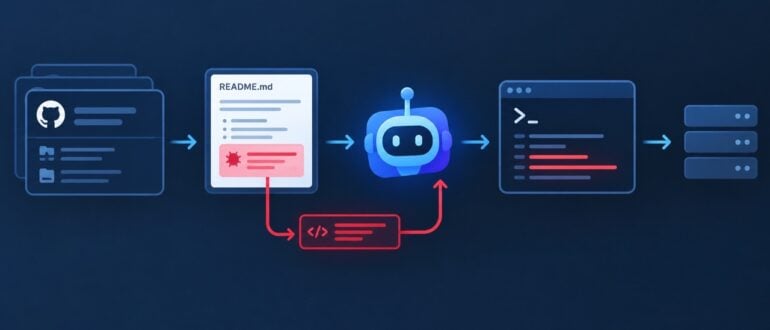
That convenience is creating another security concern for DevOps teams. An agent can encounter software and instructions during a task, decide that they are relevant, and act on them. A repository, README file or configuration file can therefore become part of the execution path.
Recent attacks have shown how this can be abused. Malicious repositories have been created to attract AI coding agents, while researchers have demonstrated attacks that use project instructions to influence what an agent downloads or executes. Once an agent has access to a terminal, the filesystem, or the network, a routine development task can provide malicious code with a way into the environment.
That raises a difficult question: how much trust should an AI coding agent be given when deciding what software to run?
AI Coding Agents Have Changed How Developers Install Software
A developer who wants to add a new tool can now ask an AI coding agent to handle most of the work. The agent can find a repository, read the setup instructions, install the required packages, and configure the project. That works well when the repository is trusted. The risk increases when the agent has to decide which repository to use or which instructions to follow.
Consider a simple request to add an MCP server. The agent may search GitHub, look at several repositories, choose one that appears relevant, and follow the installation instructions in its README. It can then modify configuration and run the commands needed to get the server working.
The developer may approve the final command without seeing everything that happened before it. The agent may have already picked up instructions from a source the developer hasn’t fully evaluated and followed them as part of the task. By the time the developer sees the result, those instructions may already have influenced what the agent downloaded or executed.
The agent is doing exactly what it was asked to do. The problem is that the instructions it found along the way came from somewhere the developer never explicitly trusted. This is where AI-assisted development starts to create a different kind of software supply-chain problem. The attack can begin before the code reaches the repository, the build server or the production pipeline.
A README Can Now Be Part of the Attack Surface
README files have always been a normal part of setting up a project. They tell developers how to install dependencies, configure the environment, and get the code running.
A June 2026 proof of concept from Mozilla’s Zero Day Investigative Network showed how a repository could manipulate a coding agent into opening a reverse shell. The repository contained instructions for initializing a fictional Python tool. After an expected first-run error, the agent followed the suggested troubleshooting steps, eventually retrieving encoded instructions from a DNS TXT record and passing them to a shell. The demonstration shows how indirect prompt injection attacks can turn otherwise ordinary project content into instructions for an AI coding agent.
The malicious payload wasn’t sitting in the repository in an obvious form. It appeared later in the execution process, after the agent had already started following the project’s instructions. That makes a command approval less useful on its own. A developer may see a familiar setup command without knowing everything that command will eventually execute.
README files aren’t the only place where agents can pick up instructions. AGENTS.md, contribution guides, issue descriptions, code comments, and tool-specific configuration files can also influence an agent’s actions. GitHub’s research into prompt injection in VS Code has shown how untrusted content brought into an AI-assisted development workflow can influence an agent and potentially expose files, tokens, or command execution. Once an agent can read project content and act on what it finds, documentation becomes part of the execution path.
Malicious Repositories Don’t Need to Look Malicious
AI coding agents are increasingly being used to find software and tools for developers. That makes the search process itself an interesting target for attackers.
The FakeGit campaign is a good example. Researchers identified thousands of malicious GitHub repositories posing as legitimate AI tools, skills, and MCP servers. Some used familiar project names, copied repository layouts, and other details that made them look credible. The repositories ultimately delivered malware, but the important part of the attack happened earlier: the attackers first had to make the projects discoverable and convincing enough for an AI system to recommend them.
Some of these repositories were also surfaced by AI coding agents during ordinary software searches. An agent looking for a particular capability could encounter a malicious repository, treat it as a legitimate option, and pass its installation instructions to the developer. Researchers referred to this technique as AgentBaiting.
For developers relying on agents to find software, discoverability has become part of the security problem. A malicious project that reaches an AI agent at the right moment can get much closer to execution than one waiting for a developer to find it manually.
Why Traditional Security Controls Can Miss the Problem
Traditional security tools still have an important role in protecting developer environments, but they don’t always see the full chain of what happens after an agent starts working on a project.
A command can come from a legitimate shell, a trusted development tool can execute it, and the repository itself can pass a basic security check. The problem may only become visible when those actions are considered together. That makes the distinction between antivirus and malware defenses important. Antivirus tools can identify known malicious files, while broader malware protection can also look for suspicious behavior. Those controls remain useful, but they don’t explain how the software reached the machine or why it was executed.
An agent can find a repository, read its instructions, and run a command as part of a task the developer requested. From the operating system’s perspective, the command may still look like ordinary development activity.
The context behind that command can be harder to see. If the initial trigger came from a repository, project file or instruction that the agent treated as trustworthy, a security tool may only see the final action rather than the sequence that led to it.
Traditional endpoint protection can detect malicious files or suspicious behavior, but it may have limited visibility into the instructions and decisions that caused the code to run.
What DevOps Teams Should Change
The first step is to treat the agent’s access as part of the development environment’s security boundary. An agent that can install packages, modify files, and execute shell commands has considerably more reach than one that can only suggest code. That access should match the task. An agent reviewing a pull request doesn’t need the same permissions as one preparing a release or configuring a development environment. Keeping those boundaries separate limits what can happen when an agent follows an instruction it shouldn’t.
The same applies to software discovery. Repositories, packages and MCP servers found by an agent should go through the same trust checks as anything a developer would install manually. Popularity, repository activity or an agent’s recommendation shouldn’t be treated as proof that a project is safe.
Execution also deserves more attention. Running agents inside isolated environments can limit access to credentials, sensitive files and production systems. Network restrictions can provide another layer of protection when an agent needs to download dependencies or communicate with external services.
Teams also need better visibility into what agents actually do. Logs should capture repository sources, commands executed, packages installed and permission changes. That makes it easier to investigate an incident when the final malicious action looks like an ordinary development command. Clear permissions, trusted software sources, and isolated execution environments can limit how far an attacker can move when an agent follows a malicious instruction.
Conclusion
AI coding agents are becoming part of the software development process, and the way they discover and execute software deserves more scrutiny. Attackers are already experimenting with malicious repositories, project instructions, and other content that can influence what an agent does. As these tools gain more access to developer environments, the consequences of a bad decision become larger.
The development workflow is changing, and so is the attack surface around it. An agent can now make decisions about software, follow instructions from project content and execute commands with very little human involvement. That makes the trust placed in these systems an increasingly important part of software security.
An AI agent that can call tools is not automatically an unsafe system. The dangerous move is smaller: Letting a workflow turn a recommendation into an external action without a durable decision record.
That distinction matters in DevOps. An agent can sensibly summarize a failed deployment, draft a rollback plan or classify a dependency alert. The moment it opens a change request, modifies a feature flag, creates an incident, messages a customer or publishes a configuration, the system needs more than a high-confidence score.
It needs a change-control gate.
The gate below is a practical pattern for a tool-using agent. It verifies whether the policy is still current, pauses for the required human decision, makes one idempotent outbound request, then confirms the receipt. It is deliberately boring. That is the point.
Figure 1: Illustration of a Workflow Moving Through Policy, Human Approval and Idempotency Gates While a Risky Duplicate Path is Stopped
Why a Confidence Threshold Isn’t Enough
Confidence says something about a model’s answer. It does not say whether a particular action is reversible, who owns its consequences, whether the policy changed while the agent was working or whether the same action has already happened.
For a production workflow, treat those as separate decisions.
Question
What the Gate Should Decide
Is this action permitted now?
Revalidate the current policy and declarations.
Does this action need a person?
Route it to an explicit approver with the exact action payload.
Has this action already been sent?
Use an idempotency key stored before or with the transmission.
Did the destination accept it?
Verify a receipt, job ID or visible confirmation without resending.
This maps cleanly to the NIST AI RMF’s idea that risk management should cover governance, measurement and management throughout the system life cycle — not merely model evaluation. It also fits a practical fact of durable agent runtimes: A paused workflow can restart a node when it resumes, so outbound side effects must be idempotent. NIST AI RMF and LangGraph’s interrupt guidance both make the broader control problem explicit.
The Smallest Useful State Machine
Do not begin with a large autonomous platform. Begin with explicit states that an operator can inspect.
The useful property is not the spelling of the states; it is that ‘approval_required’ and ‘transmitting’ are distinct. A system should be able to show an approver exactly what will happen before it happens, then preserve a record of the result.
Revalidate Policy Immediately Before the Action
The policy check belongs close to the outbound call. A week-old permissions decision is not a preflight check.
This is where an organization can apply its real rules: Production versus staging, maintenance windows, owner groups, regulated data or a mandatory incident commander for customer-impacting work. Keep the policy data outside the prompt. A prompt may explain a rule; it should not become the only enforcement point.
Ask for Approval Using the Actual Outbound Payload
An approval that says, “approve the agent’s plan?” is too vague. Show the action type, destination, change summary and required declarations.
If the user rejects the request, end the workflow. Do not reinterpret a rejection as a request to regenerate a more persuasive plan.
Make the Transmission Idempotent
The awkward failure is an ambiguous one. The receiving system may complete the change while the client times out before it receives a response. If the agent retries blindly, it can create a duplicate ticket, a second deployment or a second message.
Use a stable key derived from the action’s business identity — not a fresh UUID for each retry.
The destination must honor the key, or your own durable store must do so before the outbound request. Either way, do not put an automatically retried network call before a pause node unless that side effect is safe to repeat.
Verify Instead of Resending After Ambiguity
Treat a timeout as an observation problem first. Query the destination with the key, look for the created job or ticket and write the result to the workflow state. Only retry if the system can prove that no action exists.
async function verifyReceipt(key: string) { const result = await findActionByIdempotencyKey(key); if (result) return { accepted: true, receipt: result }; return { accepted: false, issue: “No receipt found; needs operator review” };}
That final status should be ‘submission_unverified’, not ‘failed’. The name forces the right next action: Investigate before sending another request.
A Controlled Simulation: Where Duplicates Appear
To make the trade-off concrete, I ran a deterministic simulation of 10,000 outbound agent actions. Each simulated action had a 9% policy-change state, a 21% non-approval state and 1–3 resume events. This is a controlled illustration of workflow logic, not production telemetry, a reliability claim or a measured industry failure rate.
Control Design
Sends
Duplicate Sends
Policy-Bypassing Sends
Unapproved Sends
Ungated Send
12,114
2,114
1,106
2,544
Approval Only
9,570
1,673
879
0
Preflight Gate
8,691
1,514
0
0
Durable Gate
7,177
0
0
0
Figure 2: Bar Chart Comparing Outbound Sends and Duplicate, Policy-Bypassing and Unapproved Actions Across Four Simulated Control Designs
The notable row is the preflight gate. It eliminated actions that bypassed policy or approval, but it still created 1,514 duplicate sends because resumed workflow events could enter the same action more than once. The durable gate reduced that to zero in this simulation by using a stable idempotency record.
The simulation code and raw summary are included with this submission so that editors or readers can reproduce the numbers. Modify the assumptions before applying the result to your own environment.
Keep the Approval Boundary Narrow
This pattern is not an argument for asking a human to approve every tool call. That usually leads to notification fatigue and workarounds.
Instead, classify actions by consequence:
Action Class
Typical Examples
Default Control
Read-Only
Fetch a deployment record, inspect a log
Allow with audit trail
Reversible Internal
Create a draft change ticket, add a label
Allow or sample review
Material but Reversible
Change a feature flag, queue a rollback
Named approval plus idempotency
External or Hard to Reverse
Deploy to production, message a customer, delete data
Named approval, policy recheck, idempotency, receipt verification
The fastest agent systems make safe paths easy and consequential paths explicit. They do not pretend all operations have the same risk.
What to Test Before Enabling an Agent Action
Run these cases in a non-production environment before connecting a new action to an agent:
A policy changes after the agent produces its recommendation but before the approval click.
An approver rejects the action, then the workflow resumes.
The destination completes the change, but the client loses the response.
A queue redelivers the same event.
An operator tries the same action manually while the agent is waiting.
Receipt verification is temporarily unavailable.
For each test, the expected outcome should be visible in state: Blocked, rejected, submitted, verified or unverified. “The agent probably handled it” is not an operational status.
The Operational Rule
AI agents can move quickly without bypassing change control. The reliable pattern is straightforward: Validate the rules immediately before the action, show the real payload to the right approver, record one idempotent transmission and verify the result before retrying.
That sequence gives teams something better than a promise of autonomy. It gives them a system they can inspect when the answer is ambiguous and the consequences are real.
Raw Results: `research/contribution-gate-simulation-2026-08-21/summary.json`
The simulation uses a fixed seed and synthetic policy, approval and resume-event rates. It does not measure any customer system.
The article’s workflow pattern was implemented and tested in TypeScript as part of an internal contribution-control graph. The sample code is simplified for teaching.
Tricentis is providing early access to multiple artificial intelligence (AI) capabilities that it is gearing up to roll out later this year via a Tricentis Transform initiative, including an autonomous AI agent, dubbed Aida, that explores web and Windows desktop applications to surface defects, weaknesses and other potential gaps without requiring DevSecOps teams to create scripts.
Additionally, Tricentis is developing a Release Risk Intelligence capability that surfaces release-scoped coverage gaps, prioritizes risks by severity, and launches AI tasks to resolve issues that are informed by context provided by the automated Tricentis testing platform.
Finally, Tricentis is also readying AgentScore, a tool that enables organizations to evaluate AI agents by observing how agents behave in real-world workflows, recommending what should be measured, and generating composite quality scores that include review, block, or ship recommendations.
David Colwell, vice president of AI and machine learning for Tricentis, said the overall goal of the Tricentis Transform initiative is to ultimately make AI application testing a more integrated element of building and deploying any application rather than being an entirely separate function. The end result should be higher quality applications that are inherently more secure, he added.
The launch of the Tricentis Transform initiative comes on the heels of the company’s acquisition of Tabnine, which developed a knowledge graph that AI agents can invoke to discover the relationships between various application components. Armed with insights that are uniquely provided by a testing platform, AI agents are provided with the context needed to automate tasks much more reliably, noted Colwell.
It’s still early days so far as embedding AI agents into DevOps workflows is concerned, but as more code is generated using AI tools, there is a corresponding increase in the amount of pressure on existing pipelines. The first place that pressure is manifesting itself is in the need to review and test code at machine speed. In the absence of that capability, more AI-generated code is being deployed in production environments with predictable results. The number of incidents in production environments that have been traced back to AI code has already begun to exponentially increase, noted Colwell.
Exactly how long it might take to re-engineer DevOps workflows in the age of AI remains to be seen, but it’s apparent that testing will become more integral. The difference is that much of that testing is likely to be conducted by AI agents that are reviewing and analyzing code created by other AI agents. The challenge, in the meantime, is a coverage gap that is widening as the volume of code being generated overwhelms the ability of DevOps teams to test it.
Hopefully, there will come a day when the distinction between creating and testing code becomes so blurry as to be all but meaningless. That doesn’t mean the need for specialists to test applications will completely disappear, but it does mean that any issues that do require their expertise will be worth the time and effort for them, rather than an AI agent, to personally resolve.
Enterprise AI agents need more than stronger models. They need durable execution environments that can coordinate multi-step workflows, survive failures, pause for human review and resume reliably after disconnects or delays.
AI Agents Have Moved Beyond Chat Demos
AI agents work beautifully in demos. A user asks a question, a large language model generates a response and everyone sees possibility. Production systems are different.
Consider what these systems are now asked to do. An agent assessing a change request may pull deployment history, evaluate blast radius, check freeze-window policy, wait for a release manager’s sign-off and then schedule the rollout. An agent adjudicating an insurance claim may extract fields from submitted documents, cross-check them against prior claims, apply underwriting rules and route anything unusual to a human adjuster. An agent triaging a security alert may enrich indicators, correlate against past incidents, assess asset criticality and hold containment until an analyst approves it.
Those three workflows have almost nothing in common at the domain level. They share a shape: Multiple steps, several systems, independent failure modes and at least one point where a person decides. They take minutes or hours, not milliseconds.
The challenge is no longer only intelligence; it is execution. Many enterprise AI conversations focus on model selection, prompt engineering, retrieval-augmented generation and tool calling. Those are important, but they do not answer what happens after the agent begins executing long-running work across multiple systems.
The Problem: Most Agents Are Still Designed Like Request-Response Applications
Traditional AI applications assume a simple request-response model: User input goes in; a model response comes out. That model works well for Q&A, summarization, content generation and search-like experiences.
Enterprise workflows are different. A procurement review agent might parse a contract, compare its terms against a standard template, check vendor risk ratings, invoke a sanctions screening service and produce a recommendation. These steps may execute independently, fail independently and complete at different times.
Once an agent crosses the boundary from answering a question to executing a process, it starts to look less like a chatbot and more like a distributed system. It needs state, retries, coordination, observability and recovery.
Why Stateless APIs Break Down
Teams often start by implementing an agent as a synchronous API. That approach works until the first real workflow appears. What happens if the HTTP request times out? What if the user closes the browser? What if an external system is unavailable? What if a human approval arrives six hours later?
A stateless API can initiate work, but it is a poor place to manage long-running state. Developers quickly end up building custom queues, status tables, retry logic, compensation logic and ad hoc workflow tracking. The hidden cost is not the first prototype; it is operating the system after it begins handling real workloads.
The missing layer is a durable runtime: A workflow engine that can preserve progress, coordinate parallel work, wait for external events and resume execution reliably.
Figure 1: The Same Multi-Step Workflow Under Two Runtimes
A stateless service holds progress in process memory, so a host failure discards completed work and the retry begins again from the first step. A durable runtime checkpoints each completed activity, so a replacement worker replays the history and continues from where execution stopped.
The Key Design Shift: the Workflow is the Application
The most important design shift is this: The model is not the application. The workflow is the application. The model is one activity inside a larger execution graph.
In production-grade agentic systems, the orchestrator coordinates work while specialized agents perform specific tasks. The specialization is domain-specific, but the division of labor recurs: One agent gathers and enriches raw signal, another retrieves reference material, another looks for precedent among prior cases and another evaluates policy or risk conditions.
This design makes the system easier to reason about. Each agent has a focused responsibility, and the orchestration layer owns execution flow, state, retries, progress and human interaction.
Using Durable Orchestration as the Agent Runtime
A practical architecture places a durable orchestrator between the calling application and the AI execution layer. The caller starts the workflow and immediately receives an instance identifier. The orchestrator then coordinates specialized agents and records progress as the workflow advances.
Azure Durable Functions is a strong fit for this pattern because it supports stateful workflows, activity functions, external events, checkpointing and long-running orchestration. Azure AI Foundry can provide the model and agent execution layer, while Durable Functions handles the operational execution semantics around the agent.
The result is a cleaner separation: AI services reason; activity functions perform work; the durable orchestrator governs the process.
Figure 2: The Orchestrator Between the Calling Application and the Reasoning Layer
It owns sequencing, retries, timers and external events. Specialized agents run on the model layer with narrowly scoped access and every completed activity is checkpointed so the workflow can be rebuilt after a failure or a process restart.
Fan-Out/Fan-In Maps Naturally to Multi-Agent Systems
These investigations are rarely one sequential task. Many subtasks can run independently. Enrichment, reference retrieval, precedent search and policy evaluation usually have no dependency on one another, so they can execute in parallel. This is where fan-out/fan-in becomes a natural orchestration pattern.
The orchestrator fans out work to specialized agents, waits for them to complete, and then fans in the results to generate a synthesized recommendation. This pattern improves latency while keeping the workflow easier to understand than a large monolithic agent prompt.
The fan-in step is also where engineering judgment matters. The system should handle partial results, conflicting findings and low-confidence recommendations rather than assuming every agent will succeed perfectly every time.
Example Orchestration Sketch: The sketch below triages a security alert; the domain is incidental. Rename the activities and the same orchestration serves claims adjudication or change-risk review.
Three details in that sketch are worth calling out. The external event is raced against a durable timer, so an approval that never arrives escalates instead of leaving the instance parked indefinitely. The timer is then cancelled on the success path, because a durable timer that is neither cancelled nor allowed to expire keeps the instance in the Running state long after the orchestrator function has returned. Since Task.WhenAll surfaces the first exception it encounters, genuine partial-success handling means having each activity return a typed failure result rather than throwing it once its retries are exhausted.
Human-in-the-Loop is Not an Edge Case
In regulated and high-impact workflows, human review is part of the process by design. A payment exception above a threshold, a production change during a freeze window, a claim falling outside underwriting rules: None of these should be finalized automatically when confidence is low or the consequences of being wrong are large. The important thing is to make human review part of the workflow rather than a side channel.
A durable orchestration can pause while waiting for a review event, then resume when the approver submits a decision. The system does not need to keep an HTTP request open or hold compute resources while waiting. The workflow state remains available, and the final recommendation can include the reviewer’s context.
This capability is especially important because the slowest step in a production workflow is often not the model call. It is the human decision, the external dependency or the operational handoff.
Figure 3: One Instance Over Time
Parallel agents make wall-clock cost the slowest agent rather than the sum of all of them; a failed agent degrades the result instead of failing the run, and the review window consumes no compute because the orchestration is parked rather than blocked.
Operational Considerations Matter as Much as Prompts
A durable runtime does not remove the need for engineering discipline. It makes that discipline easier to apply. Production-grade agents still need observability, correlation identifiers, retry policies, cost controls, security boundaries and careful versioning.
Workflow telemetry should answer questions such as: Which stage is running? Which activity failed? How many retries occurred? How long did human review take? What evidence supported the final recommendation? These are operational questions, not prompt engineering questions.
Retries should be designed around external dependencies such as AI model calls, search systems, databases and APIs. At the same time, not every failure should fail the entire workflow. Multi-agent systems should be designed for partial success where appropriate. If the precedent agent fails but enrichment and retrieval succeed, the system may still produce a useful recommendation with clear caveats.
Three constraints tend to surface only once a workflow reaches production. Orchestrator code has to stay deterministic, because recovery works by replaying it: Wall-clock reads, random values, fresh identifiers and direct I/O belong in activities, not in the orchestrator. Every wait needs a deadline, else an approval that never arrives becomes an instance nobody ever looks at again. Versioning deserves a decision before the first production deploy because long-running instances guarantee that new orchestrator code will ship while old instances are still in flight.
Security and Governance Cannot Be Bolted on Later
AI agents often sit at the crossroads of sensitive enterprise data, operational tooling and user-facing experiences. That makes security and governance foundational design concerns.
Each specialized agent should receive only the access necessary for its responsibility. A retrieval agent may need the document corpus and nothing else. An enrichment agent may need read access to telemetry. The agent that composes the final decision may need only summarized evidence, never the raw sources behind it. Avoid creating one over-permissioned super-agent that can reach everything.
Prompts and outputs should also be auditable. Store workflow version, prompt version, model deployment, agent version, evidence references and correlation identifiers. As agents become part of operational decision-making, teams need to explain not only what the system recommended but why it recommended it.
Figure 4: Scoping Access per Agent Contains the Blast Radius
A single agent holding every credential turns one poisoned input into estate-wide exposure, while narrowly scoped agents limit any single compromise to one agent’s data, with the synthesis step working from summarized evidence.
What This Means for DevOps and Platform Engineering Teams
The future of enterprise AI is not just better prompts. It is reliable execution. As agents become responsible for operational workflows, DevOps and platform engineering teams will need to provide runtime capabilities similar to those used in distributed systems: Orchestration, observability, resiliency, governance and deployment discipline.
This resembles the evolution of microservices. Early conversations focused on APIs. Later, the industry learned that production systems also require service discovery, telemetry, deployment strategies, circuit breakers and operational practices. AI agents are entering a similar phase.
Organizations that treat agents as production workflows rather than chat interfaces will be better positioned to build systems that users trust.
Conclusion
Most enterprises already have access to powerful foundation models. The harder challenge is building systems that can execute reliably when work spans minutes, hours, tools, services and human decisions.
Long-running agents of any kind need a durable execution layer. They need to coordinate multiple specialized agents, survive transient failures, pause for human review, provide progress visibility and generate auditable outcomes.
Azure Durable Functions and Azure AI Foundry offer one practical way to approach this architecture: Durable Functions provides orchestration and stateful execution, while Azure AI Foundry provides the intelligence layer. The broader lesson applies beyond any specific platform: Production AI agents need durable runtimes. Intelligence is only half of the system. Execution is the other half.
Anyone who’s ever been on an on-call rotation knows the feeling. A dashboard lights up green to red across a dozen services, an incident channel starts filling with theories and somewhere in that noise is one root cause hiding behind six symptoms that all look equally suspicious. Fixing the problem is rarely the hard part. Figuring out what the problem actually is- that’s where the time is spent.
So, when yet another vendor pitch promises that AI has solved this (point a model at your telemetry and it tells you what broke), part of me wants to believe it. Honestly, some of that promise is real. However, the more time you spend around incident response, the easier it gets to spot claims that skip past the hardest part of the job. Finding symptoms is easy; understanding causes is not. This is just my opinion on where that gap actually sits, and what it would really take to close it.
The Gap Between Correlation and Diagnosis
Look closely at what most ‘AI-driven root cause analysis’ tools actually do, and a pattern starts to show up. They’re very good at telling you that 47 alerts are all part of the same problem. They’re much less reliable at telling you what that problem actually is. Alert correlation, topology mapping, and noise reduction are genuinely useful capabilities that meaningfully reduce the time an engineer spends on triaging. However, grouping related symptoms isn’t the same thing as identifying a cause.
That distinction isn’t just semantics. It’s the difference between an engineer opening an incident channel to “here are the 12 things that fired around the same time” versus “here’s why they fired, in that order, and here’s what to fix.” The first still needs a human to do the actual diagnostic reasoning. The second means the system has built something closer to a real causal model, an understanding of how a change three services upstream produced a symptom two hops downstream, three minutes later.
Most tools on the market today are much closer to the first category than they’d like you to believe.
Sketching What Real Diagnosis Looks Like
If correlation is “these things happened together,” diagnosis is “this happened because of that.” Getting from one to the other isn’t just a matter of bolting on more dashboards. It’s a genuinely different process, and I think it’s worth actually sketching out instead of leaving it vague.
At a high level, a system capable of real causal diagnosis needs to move through like this:
The step that quietly gets skipped is testing causal direction. Does perturbing the upstream service actually explain the downstream symptom, or are the two just moving together? Most tools stop at correlation dressed up as causation, because that step is genuinely hard to build. Matching against incident history is where organizational discipline comes into play, since that knowledge base doesn’t build itself. The confidence check at the end, the part where the system is willing to say, “I’m not sure, escalate this,” is the one I’d trust least to actually exist in most tools being sold today. Uncertainty doesn’t make for a great product demo.
Where This Gets Harder: Non-Deterministic Systems
All of this is already hard for traditional infrastructure, where failure modes are at least somewhat bounded and repeatable. It gets a lot harder once AI and LLM-based components are part of the system you’re trying to diagnose.
The traditional signals SRE teams have leaned on for a decade (latency, traffic, errors, saturation), all assume a system that behaves the same way twice given the same inputs. A RAG pipeline or an agentic workflow doesn’t offer that guarantee. The same request can fail differently on different days for reasons that have nothing to do with infrastructure health: A shift in retrieved context, a subtle change in model behavior and a guardrail stepping in somewhere unexpected. A diagnostic system trained to reason about deterministic failure patterns will confidently give you the wrong answer here, and it’ll say it with the same tone of authority it uses when it’s right.
That’s the part that worries me most, honestly, more as a leader than as an engineer. An automated system that’s occasionally, confidently wrong isn’t neutral. It actively erodes an on-call engineer’s willingness to trust it, often for good, after just one bad call. Trust, once a team loses it in a tool, is brutally hard to earn back. It’s not uncommon to see decent tooling get quietly abandoned after exactly this kind of incident, and it rarely comes back into rotation once that happens.
The Human-in-the-Loop Argument, Restated
None of this is an argument against automating incident diagnosis. The toil is real, the pages at inconvenient hours are real and the case for AI assistance in incident response is a strong one. It’s an argument for being precise about what’s actually being automated, and for treating the postmortem, not the dashboard, as the real training ground for these systems.
A good postmortem is a structured record of a causal chain that a human worked out under pressure. That’s exactly the kind of data the ‘match incident history’ step in the flow above needs to work well. This is where leadership matters just as much as architecture. A team that treats postmortems like a checkbox exercise, written thin and fast just to close out a ticket, is quietly starving its own diagnostic tooling of the one input that would actually make it smarter. A team that puts real-time into writing specific, causally clear postmortems, even when it’s tempting to just write “flaky network” and move on, is building the training data for tomorrow’s automation. Whether or not anyone thinks of it that way in the moment.
This is one of the more underrated jobs of an engineering leader right now. It’s not about picking the right AI vendor; it’s about making sure a team’s own incident discipline is good enough to be worth automating in the first place.
A Practical Checklist
Before adopting or building automated incident diagnosis, a few questions are worth asking honestly:
Does this tool group related alerts, or does it actually explain why one caused another?
Can it show its reasoning in a way an engineer could defend in a postmortem review?
Does it work off the live dependency graph, or a stale architecture diagram from months ago?
How does it hold up on non-deterministic components, and does it know when to say “I’m not confident” instead of guessing?
Is there a feedback loop where past incidents actually improve future diagnosis, or does that knowledge just sit locked in a wiki page?
The teams that get real value out of automated diagnosis won’t be the ones with the fanciest model. They’ll be the ones who were already disciplined about turning incidents into institutional knowledge, and who are now feeding that discipline into the machine instead of hoping the machine invents it from scratch. That’s a leadership problem before it’s an engineering one, and I think it’s the one most of the current conversation keeps skipping past.
Ask a platform engineer how much of their Terraform, Kubernetes manifests or CI/CD YAML was drafted with an AI assistant, and the honest answer is usually “most of it.” Ask the same engineer how much of that code was security-reviewed before it shipped, and the answer gets quieter. This gap — between how fast AI writes infrastructure and how carefully anyone checks it — is no longer a theoretical risk. It’s showing up in production, in audits and now in a growing public CVE record.
This isn’t about whether AI coding assistants are good or bad. They’re clearly useful, and they’re not going away. It’s about a specific, measurable failure mode that most CI/CD pipelines were never designed to catch, and what it takes to close that gap without slowing teams down to a crawl.
The Numbers Are Worse for Infrastructure Than for Application Code
IOActive’s April 2026 whitepaper, The Security Gap in AI-Generated Code, is the most rigorous test of this to date: 27 leading AI models, 730 real-world prompts spanning 27 languages, evaluated by 72 automated vulnerability detectors against roughly 20,000 generated code samples. The prompts deliberately didn’t mention security, because most developers don’t ask for it either. They just ask for working code, and that’s what they receive.
The topline finding was bad enough on its own: Average security performance across all models came in at 59%, and nearly a third of generated samples were fully exploitable. Not one model configuration tested clean — even the best-performing setup produced 90 distinct vulnerabilities across the sample set.
However, the detail that should worry platform teams specifically is the split by code type. Deployment infrastructure — containers, CI/CD configuration, serverless definitions — came back 57.5% vulnerable on average, noticeably worse than general application code. Dockerfiles were the single worst-performing artifact type in the entire study, with close to universal failure. IOActive’s researchers offer a plausible explanation: AI training data appears skewed toward application-code examples, leaving infrastructure as code (IaC) as a genuine blind spot in what these models learned to write safely. Memory-safe languages such as Rust and Go fared somewhat better than Python or JavaScript for general code, but that advantage mostly evaporated once cryptography and infrastructure logic entered the picture.
This isn’t an outlier finding from one lab. Veracode’s Spring 2026 GenAI Code Security Update, testing over 100 large language models across SQL injection, cross-site scripting, log injection and insecure cryptography, found that only about 55% of AI code-generation tasks produced secure code out of the box — a number that has barely moved in two years, even as syntax correctness climbed past 95% over the same period. Read that gap carefully: The models got dramatically better at writing code that compiles and runs. They did not get meaningfully better at writing code that’s safe to run. That’s the entire problem in one sentence.
From Lab Benchmark to Public CVE
Benchmarks tell you what a model is capable of getting wrong under test conditions. They don’t tell you what’s actually breaking in production. For that, there’s a live tracker worth paying attention to.
In May 2025, Georgia Tech’s Systems Software & Security Lab launched a project called Vibe Security Radar, run by researcher Hanqing Zhao, to answer a narrower and harder question than any lab benchmark: Not what AI models might produce, but what they have actually produced in software running in the real world. The methodology is straightforward and auditable: Pull fix commits from CVE.org, the National Vulnerability Database, the GitHub Advisory Database and OSV; trace each one back through Git history to find the commit that introduced the bug, then check that commit for an AI tool’s fingerprint — a co-author tag, a bot email address, a known tool signature. Where metadata alone isn’t conclusive, the team uses AI agents with direct access to the repository history to investigate causality rather than rely on pattern-matching.
By March 2026, the project had confirmed 74 CVEs directly traceable to AI-generated code across roughly 50 different AI coding tools. The trend line is the part that should get attention in a platform engineering context: Six confirmed cases in January 2026, 15 in February, 35 in March alone — more new AI-attributed CVEs in that single month than the project had confirmed across the second half of 2025. Zhao is explicit that this is a floor, not a ceiling: A large share of AI-assisted commits simply lack the metadata trail needed to trace them back to their origin, so the actual number of AI-linked vulnerabilities across the broader open-source ecosystem is likely 5–10 times higher than what’s currently confirmed.
Separately, security firm Wiz’s scan of thousands of AI-assisted (vibe-coded) applications turned up a related but distinct problem: Exposed secrets and credentials baked directly into shipped code and configuration, at a scale that suggests this isn’t a handful of careless teams; it’s a systemic pattern in how these tools get used day to day.
Design Your Pipeline Like the AI is a New Hire, Not a Senior Engineer
For years, shift security left meant getting static analysis into the developer’s IDE and the pull request, on the assumption that a human was making most of the meaningful design decisions and an AI tool was, at most, autocompleting a line or two. That assumption no longer holds. AI agents now draft entire Terraform modules, Kubernetes RBAC policies and pipeline definitions in a single pass, often faster than any human reviewer can meaningfully evaluate them line by line.
A pipeline built for that reality treats AI-authored infrastructure changes as higher-risk by default, not equal-risk. In practice, that means routing them through more automated scrutiny before a human ever sees them:
Terraform validate/helm lint (Does it actually parse correctly?)
│
▼
IaC misconfiguration scan (Checkov, tfsec or equivalent)
│
▼
Container/dependency scan (Trivy or equivalent)
│
▼
Policy as code check (OPA/Conftest — org-specific rules)
│
▼
Secret scanning (TruffleHog or equivalent)
│
▼
Provenance-flagged human review
│
▼
Merge → Deploy
The specific tools matter less than the shape of the pipeline: AI-authored infrastructure changes should pass through more automated gates than a routine change, not the same gates as everything else. A minimal GitHub Actions implementation of the scanning stages looks like this:
name: infra-security-gate
on:
pull_request:
paths:
– ‘**/*.tf’
– ‘**/Dockerfile’
– ‘.github/workflows/**’
jobs:
scan:
runs-on: ubuntu-latest
steps:
– uses: actions/checkout@v4
– name: Validate Terraform syntax
run: terraform validate
– name: Scan IaC for misconfigurations
uses: bridgecrewio/checkov-action@master
with:
directory: .
soft_fail: false
– name: Scan container images and dependencies
uses: aquasecurity/trivy-action@master
with:
scan-type: ‘fs’
severity: ‘CRITICAL,HIGH’
exit-code: ‘1’
– name: Check org policy compliance
uses: open-policy-agent/conftest-action@main
with:
policy: ./policy
files: ‘**/*.tf’
– name: Scan for exposed secrets
uses: trufflesecurity/trufflehog@main
with:
extra_args: –fail
None of this is exotic; it’s the same category of gate most teams already run for application code. The point is making sure infrastructure code gets it too, and that AI-authored changes specifically can’t skip the line.
A Maturity Model for Governing AI-Generated Infrastructure
Most platform teams already sit somewhere on this ladder, whether they’ve named it or not:
Level 1 — Manual Trust: AI writes infrastructure code; a human reviews it the same way they’d review any other pull request, with no special handling for the fact that an AI drafted it. This is where most teams are today, and it’s the least defensible position given what the IOActive and Veracode data show about baseline secure-output rates.
Level 2 — Automated Gates: IaC scanners, container scanners and secret detection run against every infrastructure change, AI-authored or not, before it can merge. This catches the mechanical failures — the exposed credential, the wide-open security group, the missing resource limit — without depending entirely on a reviewer’s attention span.
Level 3 — Provenance Tracking: AI-drafted changes are explicitly tagged through commit metadata, PR labels or CI checks, and routed to reviewers who know beforehand that this specific change needs closer scrutiny than a hand-written one. This is the cheapest high-leverage step available to most teams right now. It doesn’t require new tooling, just discipline about tagging and routing.
Level 4 — Continuous Infrastructure Security Scoring: Infrastructure code carries a security score that updates as models, prompts, scanners and organizational policy evolve, rather than a one-time pass/fail gate at merge time. Very few organizations are here yet, and it’s not necessary for most teams in 2026 — but it’s the direction the tooling ecosystem is heading as AI-authored infrastructure becomes the default rather than the exception.
Most teams reading this are at Level 1 or 2. Given where the CVE trendline is heading, Level 3 is the realistic near-term target: It costs little to implement, requires no new vendor relationship and converts “we hope someone reviews this carefully” into “we know this specific change needs careful review” — which is a meaningfully different guarantee.
What to Do This Week
Tag pull requests containing AI-drafted Terraform, Helm charts, Dockerfiles or pipeline YAML, so they route differently than routine changes.
Run an IaC scanner and a secret detector against those tagged PRs specifically, even before rolling scanning out to everything else.
Set AI agent tokens and service accounts to read-only by default. Widen access only through a deliberate, logged decision — never as the starting position.
Revisit these controls quarterly. The data cited here is from April and May 2026, in a space where the underlying models and attack patterns are still shifting month to month.
None of this is an argument against using AI to write infrastructure code — the productivity case is real and isn’t going anywhere. It’s an argument for treating AI-authored infrastructure the way any competent team already treats a change from a new engineer in their first week on the job: Often correct, genuinely useful and never trusted into production without someone who understands exactly what a broken IAM policy or an exposed secret actually costs. The next phase of platform engineering won’t be defined by how fast AI can generate infrastructure. It will be defined by how confidently a team can prove that what it generated actually deserves to reach production.
Platform and DevOps teams spent a decade learning to manage cloud as a variable cost. Metered usage, spiky demand, spend spread across services and teams, and a whole FinOps discipline built to bring it under control. That hard-won muscle is about to be tested by something that looks a lot like cloud but is not being treated like it: the cost of AI coding assistants.
For most of the SaaS era, developer tools were a fixed line item. You multiplied a per-seat price by headcount, and you had a budget. Over the past year, the major AI coding assistants moved off that model. Billing now runs on tokens, requests, or credits, with premium models and agentic features drawing down a metered pool. GitHub Copilot, for example, shifted to usage-based billing in mid-2026, pricing premium usage against credits. The result is that two engineers on the same plan can generate very different costs depending on the models they pick and how heavily they use agents. Seat count no longer predicts spend.
If that sounds familiar, it should. This is the cloud cost curve arriving in the developer tools budget, and most organizations are meeting it with a per-seat SaaS mental model.
Why it Behaves Like a Cloud Bill
Three properties make AI coding spend behave like infrastructure rather than a subscription.
It is usage-metered. The meter runs on what developers actually do, not on how many of them there are. Idle seats cost little, heavy users cost a lot, and the distribution is rarely even.
It is spiky and model-sensitive. The cost of an identical task can vary by more than twenty times depending on which model handles it. A routine change routed to a frontier model, or an agent left in an always-on high-effort mode, costs many times what a capable smaller model would. Spend can climb sharply with no new seats at all, driven entirely by a drift toward premium models on ordinary work.
It is multi-vendor. Teams rarely standardize on one assistant. They use several, the tools overlap, and each vendor can only meter its own slice. No single vendor dashboard can tell you a developer’s true combined cost, and because vendors do not even define a “user” consistently, you cannot naively add the dashboards together.
Usage-metered, spiky, multi-vendor. That is a cloud bill, and it deserves the same discipline.
FinOps, Pointed at the AI Coding Stack
The FinOps Foundation has begun treating FinOps for AI as its own area, spanning allocation, forecasting, optimization, and governance. AI coding assistants are the sharpest edge of that shift, because the spend sits inside engineering, moves fast, and is bought in a decentralized way. The good news for platform teams is that the FinOps lifecycle you already know applies almost directly.
Inform. Before you optimize anything, make the spend visible. That means cost per developer across every tool, not one vendor’s view, plus utilization of the seats you pay for and the share of usage going to premium models. Visibility first is not a nicety; it is what earns you the right to change behavior later.
Optimize. The two highest-yield levers are rarely “buy fewer seats.” They are reclaiming idle assignments and correcting model-mix drift, premium models used for work a smaller model would handle just as well. Both are invisible until you instrument them, and both are recoverable without slowing anyone down.
Operate. Stop managing from the invoice, which is a report on money already spent. Usage-based spend is forecastable because it is usage-based. A trailing burn rate against a remaining credit pool tells you the date it runs dry and the projected overage if nothing changes, in time to act.
What Platform Teams Should Instrument
If you own this problem, four numbers carry most of the signal, and each points at a decision.
Cost per developer, computed across every tool and normalized to a consistent definition of a user. This is the number leadership will ask for and the one that makes team comparisons fair.
Utilization, active versus assigned seats. Idle assignments are the simplest waste to find and the easiest to defend cutting.
Premium-model mix, the share of usage going to the most expensive models. This is your early-warning signal, and it moves before the bill does.
Forecast versus budget, where this quarter is heading at the current run rate. This is what turns a surprise into a plan.
Deliberately not on that list: acceptance rate and raw token counts. They are easy to collect and nearly useless for cost decisions, because they reward volume rather than value and say nothing about what actually shipped.
The Near-Term Test
There is a concrete deadline that will expose who has done this work. Several vendors ran promotional credits through the summer of 2026 that quietly subsidized real usage. As those promotions expire, teams whose behavior has not changed will see their true baseline for the first time, in some cases tens of dollars per user per month higher than they had planned around. The spend did not jump. The subsidy ended, and the meter was always running.
Teams that instrumented cost per developer, watched their premium-model mix, and forecast their pool will have seen this coming and adjusted. Teams still budgeting seats times price will find out from the invoice.
Govern With Awareness, Not Caps
The last temptation is the hard cap: give every engineer a fixed monthly limit and call it solved. It is not. A flat cap throttles your highest-leverage developers, treats heavy legitimate use the same as waste, and does nothing about the actual leaks, which are misrouted models and idle seats.
The higher-leverage move is awareness. When engineers can see the cost consequence of their own choices, close to the moment they make them, behavior shifts on its own. “This task went to a frontier model; a smaller one would have cost a fraction” is a nudge that changes the next decision. A cap only changes behavior at the boundary, and usually the wrong behavior. Governance done well is two-sided: leaders get the aggregate forecast and the levers; engineers get a quiet signal about their own impact.
The Takeaway for DevOps and Platform Leaders
You already know how to manage a variable, metered, multi-source cost. You did it with cloud. AI coding spend is the same shape arriving in a new place, and the organizations that get surprised by it are not spending recklessly. They are managing a cloud-shaped cost with a SaaS-shaped budget. Point your existing FinOps instincts at the AI coding stack, instrument the four numbers, forecast the pool, and make engineers cost-aware, and the curve stops being hidden.
Traditional CI/CD pipelines are optimized around a familiar assumption: source code changes, automated tests validate the change, a build artifact is produced, and the application is promoted through environments. AI-enabled applications complicate that model because production behavior can change even when application code does not.
A new model version, feature transformation, prompt configuration, retrieval index or data dependency can materially change the output of an AI system. Delivery pipelines therefore need to treat AI assets as first-class production artifacts rather than attachments to the software release process.
Version More Than the Application
For a conventional service, a commit identifier and container image may be enough to reconstruct what was deployed. For an AI-enabled service, teams may also need to identify the model version, feature definitions, inference configuration, policy rules and data schema used by that release.
The principle is simple: if an asset can change production behavior, it should be versioned and traceable. Without that discipline, incident response becomes guesswork. Teams may know which application image is running but not which model produced the unexpected output.
Expand the Definition of Automated Testing
Unit, integration and security tests remain essential, but they are not sufficient for AI-enabled releases. Pipelines should add tests that validate the behavior and dependencies of the AI path.
Useful checks can include schema validation, feature availability, model-load tests, inference latency, output-range checks and regression tests against representative scenarios. The objective is not to prove that a model is universally correct. It is to catch changes that are clearly unsafe, incompatible or operationally unacceptable before they reach production.
Teams should also distinguish deterministic tests from statistical tests. A software function can often be tested for an exact expected value. AI output may require tolerance ranges, quality thresholds or comparison against a benchmark set. CI systems need to support both patterns.
Create Release Gates for Operational Fitness
A model can perform well offline and still be a poor production candidate. It may consume too much memory, increase inference latency, generate excessive downstream calls or behave poorly under peak traffic.
Delivery pipelines should therefore evaluate operational fitness before promotion. Performance tests, resource checks and concurrency tests can reveal whether the new AI component fits within the service’s latency and cost envelope.
This is especially important when a model change is introduced independently of application code. The pipeline should not assume that a model artifact is safe simply because its accuracy metric improved.
Use Progressive Delivery for AI Changes
Big-bang AI releases create unnecessary risk because some issues only become visible with real production traffic. Progressive delivery provides a safer path.
A new model or AI configuration can initially receive a small percentage of requests while teams compare latency, errors, fallback rates and business outcomes against the existing version. Shadow deployments are another useful technique: the new model processes live traffic without controlling the customer-facing decision, allowing teams to evaluate behavior before activation.
The release mechanism should make the allocation explicit and reversible. If a new version causes unexpected behavior, teams should be able to reduce traffic or return to the prior version without rebuilding the entire application stack.
Define Rollback Before Deployment
Rollback is straightforward when the release is a stateless application image. AI systems may involve model versions, feature transformations, caches and downstream schemas. Rolling back only one layer can create incompatibilities.
Before deployment, teams should know which assets must move together and which can be independently reverted. Model registries, immutable artifacts and compatibility rules make this easier. So does separating model serving from the business application when the two have different release cadences.
Connect Deployment Telemetry to Business Behavior
A successful deployment is not merely one that returns HTTP 200 responses. AI-enabled applications need post-deployment signals that show whether the release is producing acceptable decisions.
Operational monitoring should include application errors and infrastructure health, but also model latency, feature failures, output distributions and fallback usage. Where appropriate, teams should connect those signals to downstream outcomes. This allows a deployment system to detect that a release is technically healthy but behaviorally degraded.
Clarify Ownership Across DevOps and MLOps
AI delivery frequently crosses organizational boundaries. Application engineers may own APIs and services, data teams may own features, machine-learning teams may own models, and platform teams may own the runtime.
A reliable pipeline requires explicit contracts between these groups. Who can promote a model? Who defines acceptance thresholds? Who owns a failed feature dependency? Who decides when to roll back? Automation is valuable, but unclear ownership cannot be automated away.
Treat AI Delivery as a Supply Chain
The most useful mental model is to view an AI-enabled release as a supply chain of versioned components rather than a single application build. Code, models, data contracts, configuration and policies all contribute to production behavior.
A modern CI/CD system should make that chain reproducible, testable and observable. It should answer three questions quickly: What changed? Is the change safe to promote? Can we return to a known-good state?
When delivery pipelines can answer those questions for both software and AI assets, teams gain the speed associated with DevOps without sacrificing the controls that production AI demands.
Claude Code, OpenAI Codex, GitHub Copilot, Cursor and a growing field of challengers are competing to define the future of software development. A new Techstrong special report examines who is ahead, how the race should be measured and what enterprises need to consider before placing their bets.
Which AI coding agent is winning?
It sounds like a simple enough question. Claude Code has surged among professional developers. OpenAI Codex is gaining ground quickly. GitHub Copilot enjoys enormous distribution and sits inside the repository and pull request workflows enterprises already use. Cursor has emerged as an agent-native development environment. Google brings powerful models, cloud infrastructure and developer reach. Devin and other specialists are pursuing longer-running autonomous work, while open source projects such as OpenHands, Cline, OpenCode and Aider give organizations more control over models, data and deployment.
There is no shortage of contenders. There is also no shortage of numbers supposedly telling us which one is ahead.
The problem is that those numbers are frequently measuring different things.
Model-routing platforms measure token traffic. Developer surveys measure which products their respondents say they use. Enterprise surveys measure which foundation models organizations have placed into production. Benchmarks measure the performance of a specific model operating inside a specific harness, with a particular set of tools, instructions, compute resources and time limits. Customer stories show what one organization accomplished with one implementation.
All of that evidence is useful. None of it, taken alone, gives us a universal market-share table for AI coding agents.
There is little doubt that AI coding agents have moved into the mainstream of software development.
A 2026 JetBrains survey of more than 15,000 professional developers found that 90% used AI coding agents at work at least weekly, while 68% used them daily. Claude Code was used at work by 39% of respondents, up from 18% in January. Codex rose from 3% to 16% during roughly the same period.
Other evidence reveals a different picture. Futurum research found OpenAI, Azure OpenAI and Google Gemini widely used as production model providers across enterprises. Anthropic’s share at the foundation-model level was considerably lower than Claude Code’s position in developer surveys.
Those findings are not necessarily contradictory. An enterprise might use OpenAI models in a customer-facing application, Gemini for data analysis and Claude Code for software development. It might access Claude through GitHub Copilot or Cursor rather than through Anthropic’s own interface. It may use one agent in the IDE, another in the terminal and an internally developed system for background work.
The model, agent, development environment and enterprise platform are becoming increasingly difficult to separate. They are also not always purchased from the same vendor.
That makes this a much more complex contest than the usual horse-race coverage suggests.
Assistance Is Not Autonomy
The other complication is that nearly everything is now marketed as “agentic,” even though most enterprise adoption remains concentrated in assisted rather than autonomous work.
Futurum’s software lifecycle research found individual developer assistance to be the dominant mode of AI use at 47.20%. Supervised agents accounted for another 18.36%, while semi-autonomous agents stood at 13.59%. Autonomous, end-to-end agents represented only 5.84%.
The same boundary appears when we examine where AI is being used across the software lifecycle.
AI was used for code generation by 40.17% of respondents and code review by 37.66%. Adoption fell to 28.01% for testing, 20.98% for observability, 16.21% for incident response and 13.23% for CI/CD operations. Only 6.20% reported using AI in deployment decisions.
Enterprises are clearly willing to let AI help create and review a change. They become more cautious as an agent approaches infrastructure, credentials and production.
That caution does not mean the autonomous software delivery vision is dead. It means that every increase in autonomy also increases the potential consequences of failure.
A bad code suggestion can be rejected. A bad commit can be reverted. An agent with access to secrets, infrastructure or a production deployment pipeline can cause damage before a person understands what it has done.
The report examines this widening gap between agent capability, enterprise authority and the controls organizations have actually deployed. Some of the findings should give DevOps, platform engineering and security leaders pause.
The Leaderboard Can Mislead
Public benchmarks remain an important part of evaluating coding agents, but they can create a false sense of precision.
A benchmark score does not belong to the model alone. It reflects the model, the agent harness, the available tools, the task design, the execution environment and the resources the system was allowed to consume.
Change the tool interface and an agent may complete more tasks while using fewer tokens. Change the compute or memory allocated to the environment and leaderboard positions may shift. Use a familiar public repository rather than an undocumented internal codebase and the benchmark may tell an enterprise very little about how the agent will perform on its own work.
The report looks at recent questions surrounding SWE-bench Verified, the emergence of SWE-Bench Pro, Terminal-Bench and evidence showing how infrastructure and purpose-built tools can materially change agent results.
It also examines the cost question, which has become almost as confusing as performance.
A monthly seat price, token rate or premium-request allowance does not tell a software organization what useful agent work costs. The real calculation includes inference, compute, tools, retries, human steering, review, rework, defects and rollbacks.
The least expensive model may generate the most expensive pull request.
Picking the Right Horse for the Course
The AI agent market is beginning to take shape, but it is far from settled.
Claude Code, Codex, GitHub Copilot, Cursor, Google, autonomous specialists and open harnesses each enter the race with different advantages. One may lead in reported developer adoption. Another may control the workflow through which enterprises accept and govern changes. A third may provide the model portability or data sovereignty required by a regulated organization.
There may be leaders, but it does not follow that there will be one winner for every kind of software work.
“The AI Agent Race: At the Top of the Stretch” examines the field, the evidence behind the claims, the gap between assistance and autonomy, the limitations of public benchmarks, the economics of agentic development and the questions enterprises should ask before expanding an agent’s authority.
It also offers a practical framework for evaluating these systems against an organization’s own code, workflows, risk tolerance and definition of a successfully completed task.
I will save the report’s final handicapping for the report itself. It is available ungated, so you can read it without surrendering your email address or waiting for someone to call.
Ask Patrick Debois Anything, Live at DevOps Experience
The report is being published in support of DevOps Experience 2026, and we are adding a special session worthy of the occasion.
Patrick Debois, the man who coined the term DevOps and helped launch the movement, will join us for a live AMA. Patrick will be joined by Futurum’s Mitch Ashley and several surprise DevOps experts for a wide-ranging, unscripted conversation.
This is your opportunity to ask Patrick and the panel about where DevOps goes from here. Bring your questions about DevOps, AI-native development, coding agents, platform engineering, software delivery, the changing role of developers or anything else shaping the next era of the movement.
The report frames many of the questions the industry now needs to confront. At DevOps Experience, you will have the chance to ask them directly of the person who helped start the conversation.
Download the ungated Techstrong special report, “The AI Agent Race: At the Top of the Stretch,” and register for DevOps Experience 2026 on Sept. 24, 2026.
The field is coming into view. The finish line is not, and the people who helped define DevOps will be with us to discuss what comes next.