Author: Andrew Storms

  • Lean Security: How Better Development Can Protect Your Business

    Lean Security: How Better Development Can Protect Your Business

    If companies are to reach their strategic goals—reducing time to market, boosting sales, improving product market fit and brand image, and cutting cybersecurity costs—then it’s time for a new outlook on software security.

    Today’s business leaders must learn to see security for what it is: A differentiating factor. Companies with reputations for secure developmental processes and infrastructure will rise above those known for data breaches.

    Security as a Business Strategy

    The road to a more secure company—and realizing the perks associated with it—begins with lean security. This is an approach to information security similar to the Toyota principles of management and production that calls for environmentally aware engineering, simplified coding, automation of security checks and constant incorporation of feedback.

    Although some business leaders believe organizational security is inherently expensive, lean security doesn’t mean massive costs. Much like DevOps, lean security champions process improvements and cultural changes above purchasing new tools.

    Lean security does, however, require engineers to keep its principles in mind throughout the development process. In this way, security is much like sales: A sales representatives’ best strategy is to consider his goals from the beginning. Just as the salesperson isn’t trying to make any sale, the engineer isn’t trying to create just any product. For the salesperson, this means tweaking the sales process—perhaps by vetting leads before engaging them—to make profitable sales. For the software engineer, it means structuring the development process through lean security to create secure products.

    Done right, lean security results in a self-defending, simple system created by people who are aware of a product’s real-world security risks and the company’s business goals. Lean security recognizes your company’s data is always at risk, no matter the size of the company or team, and it works to create value through systemic protection. Here’s how to start:

    Improve Environmental Awareness

    Lean security approaches risk management as a team effort. Think about a hospital. Everybody working there — from the cooks to the nurses to the executives — has a responsibility to take care of patients.

    Software firms must function the same way: Everyone from engineers to salespeople to the CIO must keep data privacy, software security and business needs in mind throughout product development and a product’s life cycle.

    Environmental awareness means addressing security with the same sensibilities that you would your own life. Just as you don’t hand your credit card to random people, neither should you hand the keys to a software engineer who doesn’t know the risks of insecure development.

    More secure coding begins with a change of mindset. Once team members understand a product’s security risks, they start thinking about how to create a more secure environment. If a developer is creating a mobile app for a car, for instance, then they must recognize the app will be used in conjunction with a device that carries human life.

    Simplify Engineering

    Complexity is the enemy of security. Simplification, however, cannot just be limited to lines of code: It means organizing your teams—and thus, your entire system—in a way that improves time to market and tightens feedback loops.

    DevOps is a great way that business leaders can improve security through sensible reorganization. While the integration of development and operations teams has been lauded as a security boosting measure by software leaders at companies including Dell, CA Technologies recently studied DevOps’ business benefits. It found companies that have implemented DevOps techniques are 2.5 times more likely to improve customer retention, twice as likely to grow their revenues and 3.4 times more likely to improve their market share.

    In short, keep teams compact and agile and design with the end in mind. The more lines of code you add, the more complex teams you create and the more times you reinvent the wheel—and, ultimately, the less secure and less profitable your company’s products become.

    Automate or Die

    Automation is an essential component of lean security, and DevOps engineers are no strangers to automation. Threats are constantly increasing, and no engineer—or team of engineers—can discover and remedy them all manually.

    Look to Netflix for a great example of automated security. Once upon a time, Netflix addressed malware alerts by manually creating a help desk ticket and assigning an engineer to investigate the problem. The time from alert generation to eventual resolution, according to Netflix, often spanned more than a week. As Netflix’s security challenges increased in both diversity and complexity, it found itself spending exponentially more time and money combating these threats.

    Then, Robert Fry, Netflix’s senior information security architect, came up with a brilliant solution: He engineered FIDO, an orchestration layer that automatically evaluates, assesses and responds to security threats. FIDO detects threats, then scores them based on the attack’s intended target and other factors. FIDO then attempts to mitigate the event by closing a network port, ending a VPN session or disabling the account.

    Tools such as Netflix’s FIDO automatically detect risks in seconds, while it could take a human months to stumble across them. Think of security automation like a home security system: ongoing, vigilant security without the need for continued manpower.

    Measure Everything

    Although its origins are disputed, many credit English mathematician Karl Pearson with quipping, “That which is measured improves. That which is measured and reported improves exponentially.”

    Development teams should take Pearson’s wisdom to heart, and measurement must begin with identification of goals. Is your goal to reduce application downtime or decrease event response time? Then it’s essential to measure mean time to repair. Do you want to reduce code defect density? Begin by measuring the number of issues per thousand (or million) lines of code.

    Once you’ve identified goals, use software to track progress over time. Etsy’s engineers built a tool they call StatsD. The software helps Etsy monitor everything from login failures to coffee availability. The data is then displayed in handy graphs to help the team make sense of the information.

    Once you’ve taken baseline measurements, be sure to review your metrics on a regular basis. For instance, you might realize an application’s deployment times aren’t where you’d like them to be. Keep measuring results—and keep trying new things—to nudge those values into better territory. Just remember: You cannot improve that which you do not measure.

    The Business of Lean Security

    The value of a secure, simple system cannot be understated: It means getting products to market faster; it means better public perception and press; it means more satisfied customers who feel secure using your product; and it means fewer disruptions in engineers’ work schedules. At its core, lean security lowers a company’s overall exposure to risk and reduces its expenses.

    Companies are already staking their futures—and consumers’ safety—on code that facilitates transactions, drives vehicles and manages power plants. The Internet of Things will soon run everything from toasters to jet engines, and security will grow even more important. Protect your company from within through lean security.


  • DevOps Security Talks At RSA USA 2015 Conference

    DevOps Security Talks At RSA USA 2015 Conference

    DevOps and security. Its a muddled mix of waters made even more confusing by the wet ink still on the concept of DevOps. There is no denying the popularity of DevOps and there is a lot of talk on how the DevOps movement functions alongside security teams.

    The annual USA RSA conference is just around the corner and its worth noting a handful of DevOps focused talks deserving of your attention.

    I am anticipating a lot of common themes around integrating DevOps and Security regarding tools, processes and culture. Given the history of these speakers, you can probably anticipate many of them to be on the bandwagon of security and DevOps folks better learn to work together and learn from each other or be prepared to find a new job.

    If I missed a talk that specifically covers the nexus of DevOps and Security at RSA USA this year, please leave a comment and I’ll be sure to get it included.


  • Security Should Be the Top Driver for DevOps

    Security Should Be the Top Driver for DevOps

    I’ve often said that the driving factor for many companies in adopting a comprehensive information security program are the dreaded “F” and “A” words – FUD and Audit. Technically FUD is an acronym for fear, uncertainty and doubt. And it might be better said that audit is the action used to hopefully demonstrate compliance and trust.

    Just a few years ago, the predominant drivers for security spending were regulatory and compliance requirements. While compliance remains a driver today, the primary moving force for many is the concern of cybercrime. Fear of being the next Sony, Target, Chase or countless other victims is driving information security budgets to be readdressed.

    In a recent CA survey the top obstacle (28%) to DevOps in their organization were security or compliance concerns. Yet, in the same study, a huge percentage (88%) already have or plan to adopt DevOps in the next 5 years. The dichotomy of the situation has not escaped me. Organizations are in a situation where they are actively spending money on DevOps and information security, but at the same time view these two initiatives as counter.

    The answer is simple, information security teams need to adopt DevOps principles.

    While a widely agreed upon definition of DevOps is still up for grabs, its safe to say that DevOps is generally inclusive of a few core tools and principles. First, DevOps promotes a culture of cooperation and sharing among different groups in an organization. Second, DevOps promotes the use of heavy automation, decreasing time to market and agile development.

    Information security’s goals are the CIA triad – confidentiality, integrity and availability. Security teams argue that DevOps is the antithesis of good security. Constant change, open culture and automation smack directly in the face of security’s tactics of compartmentalization and tight process control.

    Here is a little secret – DevOps is winning, information security is losing.

    DevOps teams are deploying code faster and faster. They are reducing time to market and increasing revenue. Information security teams, well, lets just say that they continue to be in the news for the wrong reasons.

    The second little secret – the companies which are really winning are using DevOps tools and principles everywhere in their organization. Even in information security. Imagine overseeing infrastructure configurations with code that ensures compliance 24×7 across an entire organization. Or picture being able to instrument thousands of data points to benchmark security performance over time. Conceptualize being in charge of an automatic closed-loop security system which automatically takes action to mitigate attacks based on shared threat intelligence. These are possible with DevOps.

    For all that DevOps provides, security should not be a hinderance to DevOps adoption. Instead, security should be a top driver for adopting DevOps. Using DevOps to create the next generation information security program might just be your only hope in combating the next cyber threat.

  • Writing Security Acceptance Criteria into a DevOps Story

    Writing Security Acceptance Criteria into a DevOps Story

    When organizations write user stories for development it should include the acceptance criteria.  The acceptance criteria being a detailed description of the expected features and functionality the story should deliver.  Far too often developers and product managers fail to include information security requirements as part of the acceptance criteria.  Including security criteria in every story is a requirement of SecDevOps and rugged software development.  I often get asked about what kind of security criteria should be included in a user story.

    While not every user story needs to include a litany of security criteria there are a few basic rules one should follow that will go a long way in building a more secure and rugged application.  Here are a few example categories of stories to consider requiring security acceptance criteria.

    Input Validation

    Most developers understand the importance of validating any kind of data input. Failure to properly sanitize and validate data has been the root of more kinds of attacks than any other method.  Buffer overflows, cross site scripting and SQL injection are just a few of the more well known attack methods due to input validation failure.  The bottom line when dealing with any kind of input data, especially that coming from an end-user, is simply never trust it – ever.  Any user story that deals with input data needs to include acceptance criteria stating that the data needs to at least be sanitized and validated against the expected.

    Storage or Transfer of Private Information

    Before an organization can put controls around restricted information, they first have to define what is considered private by the organization.  Start by defining what’s considered restricted.  Data might fall into categories such as PII, PHI, IP, customer data or other.  Any story that touches these classes of data needs to have information security acceptance criteria.  Depending on how the company has chosen to protect, store or transmit this data will drive the story development and acceptance criteria.

    Any use of Cryptography

    There are a few basic, but important rules when it comes to cryptography.  The first and most important rule is don’t invent your own cryptography.  The second rule is to use a trusted and reputable cryptography library provider.  The third rule is to only use cryptographic functions approved according to your company security policies.  The fourth and hardest rule is to ensure you are using cryptography for its intended purpose. Keep these four rules in mind when authoring a story that has anything at all to do with cryptography and how they can be used to develop acceptance criteria.

    Authentication, Authorization, Accounting

    Authentication, Authorization and Accounting or often simply referred to as AAA is the heart of any access control system.  AAA is the intelligence behind controlling access to resources, policy enforcement and auditing of said events.  It might be better said that everything in AAA is information security related.  When developing a story that deals with AAA, one should ensure the testing criteria include both the permit and the deny cases for the desire access matrix.  For example, simply testing that a user can login with the right password doesn’t assume that a wrong password attempt will deny access.  The other general point to consider is that AAA actions generally should include a log event for audit purposes.

    Committing to develop rugged software is a key component of SecDevOps. Ensuring stories include security acceptance criteria goes a long way in moving security to the left in the development pipeline.

  • Moving Security To the Left In a DevOps World

    Moving Security To the Left In a DevOps World

    Moving security to the left has become a coined phrase meant to describe the process of getting the security team involved earlier in a process.  Most typically, the phrase is used in conjunction with IT or software development projects. One of the top suggestions for ensuring security in a DevOps world is to move security to the left in the process tool chain. But what exactly or how exactly can you move security to the left?

    Grab that Open Seat

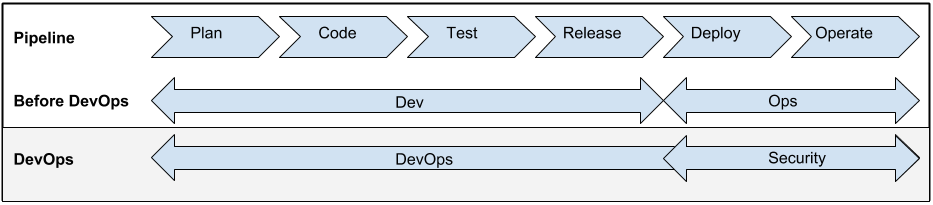
    The new DevOps process pipeline created an opening for a seat at the table for security. Prior to DevOps, the development team owned the entire pipeline from plan to release.  The Ops team would historically receive the release from over the wall and then be responsible for the deployment and operating the software inside the production environment.  With the Ops team joining forces with Development in the process pipeline, that has opened a proverbial seat at the table. What I’ve started to witness are security teams taking advantage of the musical chairs to quickly grab the open spot.

    DevOpsProcessPipeline


    Taking a seat at the end of the development pipeline is not enough.  Too many security teams are still being relegated to positions too late in the process.  While running pen tests and security code reviews after a release is better then nothing, its still not ideal.  Security needs to find ways to add value to the process so they can act as a force for positive change instead of the after thought.

    Threat Vector Analysis

    Threat vector analysis is part science and part art and part trying to guess uncertainty. What is certain, however, is that most developers would rather be spending their time writing new functionality instead of trying to understand how an attacker could be break their code. The security team could offer a tremendous service to an organization by offering their expertise in this area.

    Continuous Integration Security Testing

    Continuous integration is a key component of DevOps. The security team can leverage the development chain to insert early yet important risk control tests. Those tests could be for example static or dynamic code analysis. Other tests could be simple yet known vulnerability checks in included libraries. The OWASP introduction to testing guide lists a plethora of application security tests that should be checked often and early.

    Author Micro Security Services

    Think about how great it would be if there was a group who specialized in authoring and delivering security related services into your application?  Proponents of services models generally promote splitting the development team up into groups that are organized around business capabilities.  For example, there are separate development groups for UI, middleware and DB.  What’s missing in most of those models is who is responsible for security services such as authentication, authorization and audit. Security has an opportunity just waiting for them to add incredible value while also ensuring the security services used pass muster.

    Summary

    Where we once had Ops fighting their way to be part of the entire development process, we now have security trying to do the same. Ops managed to garner their way into the club by coming to the table with invaluable skills and resources. Now its up to security to present their creative sweet spot in order to secure their own seat at the table.

    Further Reading

    Andi Mann on Ensuring security and managing risk in enterprise DevOps

  • Deputizing Everyone for Security – Building Agile Assurance

    Deputizing Everyone for Security – Building Agile Assurance

    Those of us highly focused on the delivery pipeline of DevOps will wonder why we should include the security guy to the party.  After all, aren’t they just going to slow down the process and make it harder to deliver good features to end customers?

    My prior post about introducing SecDevOps by example was not about defining a new role, but introducing how security can and should be part of the automation delivery suite.  Whether you are talking about traditional infrastructure change process or automated instantiation of new nodes to handle customer demand, the tools and processes of DevOps merged with security requirements are available to provide security accountability and assurance.  Those of you coming from the traditional security space, which might fear security automation, should consider just how exciting SecDevOps delivers on agile assurance.

    Rich Mogull provided an excellent example and code to show how firewall changes in a real life situation can be fully automated.  There is no need to be squirrely about what is emerging. Everyone needs to be involved with development and operations to take more opportunities to minimize risk.

    Dwaye Melancon also recently wrote about the issues of security and risk when the baton is handed off from one owner to another.  This too is another great example of where process and monitoring automation aids in delivering continuous security assurance.

    I believe everyone craves for a future when security events are automated with full transparency from beginning to end.  If security had a real closed-loop transparent agile process, then just imagine how easy it could be to deliver on both compliance and real risk reduction. As Richard Stiennon recently stated in a CloudPassage webcast “Compliance standards are woefully behind with the reality of operations”. Haven’t we all had an experience with an auditor and a clipboard asking for specifics that are clearly aligned with another age of computing?

    Wouldn’t it be better to give auditors the same tools, to get a picture of accountability and risk decisions made in the DevOps cloud environments?   Take for example the recent HeartBleed events that many security teams are still struggling with.  As a DevOps professional, I would have rather just showed the security team and the auditors the truth – that none of my team did anything at all to mitigate this risk.  Truth be told, our orchestration tools had already installed the new version of OpenSSL and generated audit logs before many people had their first cup of coffee.

    Security can be improved with more integrated automation and by deputizing everyone to do more with DevOps tools. A SecDevOps approach will improve the compliance and audit process with tactical security tools for all. Burn the clipboards and provide an enlightened way to prove best security practices from the collective group of Dev and Ops. Maybe give the Security guy a break and invite him to the after audit beer bash too.

  • SecDevOps: Security Automation By Example – The Firewall Change

    SecDevOps: Security Automation By Example – The Firewall Change

    Security Automation By Example

    The Firewall Change

    Just when you thought DevOps was the new black, along comes SecDevOps.  Yes folks, like most things in life, the new cool is already here.  Before I move on to trying to explain SecDevOps, please accept my mea culpa because for many people DevOps is yet to be clearly defined.  I can imagine your frustration that I’m going to try and explain a new term based on a loosely defined term.

    I’m not going to try and provide a complete definition of SecDevOps, but instead I’d like to provide what I believe to be important attributes of the SecDevOps movement.  In this post, lets discuss security automation and use a firewall change process as an example.

    One important attribute of SecDevOps is heavy use of security automation.  In particular when I think security automation, I tell people to use IFTTT thinking.  Stolen from the service whose tagline is “put the Internet to work for you”, I explain security automation simply as “if this, then that”.  Its a highly simplistic, but poignant way to imagine ways in which one would automate workflow.

    A simple act of changing a firewall has huge potential for security automation.  The SecDevOps firewall change process goes beyond changing a few lines in a config, but also provides an independent and automated verification process that most organizations don’t perform today.

    Consider what happens when a firewall policy is changed.  First the policy change request is reviewed and approved.  Then the policy change request is assigned and acted upon.  Many times, but not always, the change is verified by another person through configuration review.

    Security automation takes this process one step further.  Imagine when a firewall is changed that a security audit event is automatically logged.  Next, an automation component notices the firewall change and automatically spins up a remote scanning instance in a cloud provider.  Next, that scanning instance is contacted using APIs to perform a remote network scan.  The scan completes, results are exported and compared with prior scan results automatically.  Finally, the automation component automatically updates the firewall change request in a ticketing system showing the scan results.  We have now completed an automatic, independent and autonomous firewall change verification.   That simplified yet powerful workflow is security automation and completes what many people refer to as a closed loop.

    The new SecDevOps method for a firewall change not only provides a closed loop process, but does so by automating the verification steps.  Joining traditional security processes with new API driven cloud services is a true force multiplier that many organizations will soon wish they had.

    In upcoming posts, I’ll also discuss some of the other important components of what I believe make up the new black of SecDevOps.

  • Delivering Delight At ChefConf 2014

    Delivering Delight At ChefConf 2014

    Chef CEO Barry Crist stirs the pot to open ChefConf 2014

    The theme from ChefConf 2014 is stirring delight and if you listened to Barry Crist during todays opening keynote, then you would know its more appropriately “F****ing Delight”.  Amidst high energy, loud music and a smattering of exciting expletives, Barry Crist called for attendees to stir delight in their enterprises using DevOps methodologies and, of course, Chef.

    Crist defined delight when the customer’s experience exceeds expectations.  Using Uber as an example when traveling in New York, he joked that the influx of Uber cars was so high that it took only 30 seconds for him to wait for a ride.  And what more he didn’t have to deal with payment when exiting the car at the airport.  In short, the service not only provided the expected functionality of something as simple as a car ride, but provided a delightful experience.  The new economy, we are part of he said, is the “delight economy”.  And the call to action for ChefConf attendees is to bring others along with them into this new and leading economy.

    Using Volvo as a case study, Crist also touched on the concept that many companies, not just web development organizations, can utilize DevOps practices.  When his wife’s Volvo navigation system needed a map update, he received a set of DVDs. The DVDs needed to be manually loaded into the on-board computer while leaving the car running for 5 hours.  Crist countered that Volvo is more like a software company than a car manufacturer, but they just didn’t know it yet.  For example, this would have been an excellent case for continuous delivery in that the Volvo probably didn’t need to ship him a handful of DVDs, but just the small changes and probably could have been delivered in a much more economical means.

    Crist concluded that using DevOps methods and delivering delight isn’t limited to any industry and certainly isn’t just for web dev shops. And so ChefConf 2014 begins.

  • Using AWS CloudWatch for Anomaly Detection

    Using AWS CloudWatch for Anomaly Detection

    Based on my unscientific poll of friends, one of the least used and most overlooked features of AWS is CloudWatch.  Not only can CloudWatch be used to monitor the availability of your AWS services, but it can also be used as anomaly an detection tool. Did I mention that these feature are free?

    Since the holy grail of DevOps is to bring  the security and the operations teams together to meet the same goals in an automated fashion; Cloud Watch is a perfect DevOps tool. In fact, once it’s implemented for your environment  you are one step closer to the exalted state of SecDevOps.

    If you aren’t familiar with AWS CloudWatch then head on over to https://aws.amazon.com/cloudwatch/. As a quick introduction, here’s how AWS website describes the service:

    “Amazon CloudWatch provides monitoring for AWS cloud resources and the applications customers run on AWS. Developers and system administrators can use it to collect and track metrics, gain insight, and react immediately to keep their applications and businesses running smoothly. Amazon CloudWatch monitors AWS resources such as Amazon EC2 and Amazon RDS DB instances, and can also monitor custom metrics generated by a customer’s applications and services. With Amazon CloudWatch, you gain system-wide visibility into resource utilization, application performance, and operational health.”

    Let’s assume that both security and Ops teams need to be aware when weird things are happening with their servers and applications.  Events outside the norm (aka weird things) can be either be related to security or operational events; either way they may merit investigation. Here’s a simple CloudWatch  monitoring process you can use  to give you a heads up on events that could indicate someone is trying to exfiltrate data from your systems.

    Opening Scene

    Think about what kind of information attackers are after.  They want your intellectual property and your customer data because it can be converted to cold, hard cash.  Next, consider the architecture of your systems and where that data is stored. Most likely your treasures are stored in databases or Git repositories.

    Guess what? Attackers know that so that’s exactly what they are looking for.  Take a few minutes and think like an attacker bent on exfiltrating your data.  Obviously, the first thing you should do is carefully monitor your egress traffic for suspicious activity.  In addition, look for anomalies in traffic flows – they can also help determine if suspicious events are happening.  Amazon CloudWatch can help you do  both of these things.(Note: This process assumes you haven’t already been breached.)

     1. Enable CloudWatch

    2. Establish a baseline

    Review the historical data on a daily, weekly and monthly basis.  Soon you will start to see a trend in your egress bandwidth usage.  Start with eyeballing the min, max and average usage over time.  Put these in your favorite tracking tool (text file, spreadsheet, abacus, whatever).

    3. Configure alerts

    When you feel comfortable with your baseline, configure your first alert to send an email if traffic usage goes over the baseline.  Consider how “chatty” you want this event to be.  For example, alerting over the average baseline will often generate more alerts than alerts over maximum usage.  This is a tricky balance and you’ll need to make trade offs between missing problems and the time spent responding to potential false positives.

    4. Respond

    However you choose to respond is up to you.  I suggest you start with automatically opening a ticket in your tracking system so that someone will be sure to review the alert and make notes on their findings.

    5. Tune as needed

    Make a plan to review the alerts and the data on a regular basis.  Architecture and other changes to the system are going to change the baseline and the alerts may need to be reconfigured.

    Building and automating security into DevOps is a requirement that everyone should be working toward. It’s a theme I’m going to be returning to in future posts because it’s really important.

    AWS Cloudwatch is a free tool that you can help you get started automating security right now, so what are you waiting for?

  • Logging Wins for Devops and Security

    Logging Wins for Devops and Security

    Its always great when companies can invest in tools that serve multiple groups and purposes.  Ensuring proper setup and use of logs is one toolset that can serve both DevOps and Security.

    Why logs are important to DevOps

    DevOps use  logs primarily  to understand what’s going on inside an application server, database system or the operating system.  For the most part, logs are a resource that helps DevOps diagnose problems and ensure proper working order of systems.  Sometimes logs provide a tracking mechanism that helps DevOps understand what customers are doing in their application.  DevOps folks are intimately familiar with newer and popular logging aggregation services like Splunk, SumoLogic and Loggly.

    Security Loves Logs Too

    The good news is that security teams love logs too.  The use, review and management of logs is so important to the security function of an organization, its even part of the SANS top 20 critical security controls.  From a security standpoint, logs provide a ton of important data for everything from forensic analysis to audit records.

    Recommendations

    Since logs are so important to both DevOps and Security teams, it pays to implement your logging tools in a way that will serve the needs of both teams. Here a few quick tips that will help you set up logging tools in a way that will create a better world for both DevOps and Security.


    Centralized Logging & Log Off Site

    Setup all your systems to log to the same centralized location.  If you have all your logs in one place it’s much easier to setup log reviews and alerts.  Its also a good idea to log to multiple locations for security reasons.  Consider logging to a centralized location within your network and also to a remote location.  For example, have all systems log to a central server and also log to a remote service such as SumoLogic, Loggly or Splunk.  That way you have multiple copies of your logs available for forensic purposes.

    Time Sync

    Make sure all your systems are in tight time synchronization.  There is nothing worse than reading your centralized logs to find that a few systems are not properly time synchronized.  NTP is your friend for setting up time sync.  Be sure to use two or more reliable upstream time servers and configure all your servers to peer with each other.

    Applications and Operating System Logs

    Start with the most common base configuration  so that all systems use syslog to capture and distribute logs.  In the beginning, the logs in syslog will probably only be from the operating system and few processes that  are already configured to use syslog.  However, there are a ton of other processes running that should also be logging to your centralized system.  The DevOps group will want to ensure that all applications, even custom developed code, logs important information.  Make sure that your custom apps log enough useful information that problems can be diagnosed when they occur.

    Setup Alerts & Reports

    Nobody wants to be trolling through tons and tons of logs. To prevent this, one of tne of the first things you should do is to set up a basic set of alerts and reports.  Security teams will want to make sure that logs record and alert when users gain administrative access to a system or an application, but there are lots of other events that should need logs and alerts. Spend some time thinking about events that could mean something is not working correctly and needs attention.  Ask the development team to specifically log non-critical events that should be reviewed and incorporate these into a daily report.

    Be Verbose, But With Care

    Crank up the logging levels on all systems but don’t go too far. You want to be careful you aren’t logging too much.  For example, you probably don’t need to run all your systems in debug mode all the time.  You also need to make sure you aren’t logging sensitive information like user passwords or authentication tokens. With logs, there is such a thing as too much.

    If logs are set up correctly, they will provide nearly endless benefits to both the DevOps and Security teams. Now, go forth and log!