Author: Mike Vizard

  • Google Adds GenAI Tool to Automate DevOps Workflows

    Google Adds GenAI Tool to Automate DevOps Workflows

    Google this week added a generative artificial intelligence (AI) tool dubbed Gemini Cloud Assist to automate a wider range of tasks across the software development lifecycle, including troubleshooting applications running on the Google Cloud Platform (GCP) to surface recommendations to improve performance and enhance security.

    Announced at the Google Cloud Next ’24 conference, Gemini Cloud Assist is integrated with an existing publish and subscribe capability to enable DevOps teams to launch generative AI prompts to automate tasks that previously would have required them to develop a script. Gemini Cloud Assist can also generate architecture configurations based on the code being deployed.

    At the same time, Google is making available via a private preview an update to Gemini Code Assist tool to generate code that has been trained on a large language model based on one million tokens.

    Brad Calder, vice president and general manager for GCP and technical infrastructure told conference attendees that version 1.5 of Gemini Code Assist will now generate code based on the largest LLM trained using code vetted by Google to generate more reliable outputs.

    The challenge going forward will be determining where the line between generative AI tools provided by a cloud service provider such as Google leaves off and where the generative AI tools provided by Google partners such as GitLab begins.

    GitLab has been working closely with Google to develop its Duo AI capabilities using core services that Google makes available via its Vertex platform for managing machine learning operations (MLOps).

    David DeSanto, chief product officer for GitLab, said as AI continues to be applied to DevSecOps workflows the routing capabilities developed by GitLab will make it simpler to orchestrate prompts that can be applied to multiple LLMs. That approach provides a layer of abstraction from the underlying LLMs that makes it simpler to swap out as new capabilities are added, he noted. Most DevOps teams are not going to need to access an LLM directly because the natural language prompts they create will be executed by the underlying platform, DeSanto added.

    It’s not clear to what degree AI is capable of automating DevSecOps workflows, but as the reasoning engines embedded in LLMs become more advanced, the ability of these platforms to automate manual tasks is only going to increase. As those manual tasks are eliminated, developer productivity should substantially increase because much less time will, for example, be needed to spin up a remote development environment.

    Rather than tracking outdated metrics such as the amount of code generated, however, IT leaders should be focused on the rate at which test failures are declining as the quality of code being written steadily improves, said DeSanto. Too many developers are spending the bulk of their time trying to get code that runs on their laptop to execute in production environments, he noted.
    In addition, it will become a lot easier to onboard new members to a software engineering team as, for example, summarizations of how existing code works become readily available, said DeSanto.

    Ultimately, the number of applications any DevOps team can build, deploy and manage is about to substantially increase in a way that doesn’t require IT organizations to add a small army of software engineers to build, deploy, manage and secure.

  • Five Great DevOps Job Opportunities

    Five Great DevOps Job Opportunities

    DevOps.com provides a weekly DevOps jobs report through which opportunities for DevOps professionals are highlighted, as part of an effort to better serve our audience.

    Our goal in these challenging economic times is to make it just that much easier for DevOps professionals to advance their careers.

    Of course, the pool of available DevOps talent is still relatively constrained, so when one DevOps professional takes on a new role it tends to create an opportunity for others.

    The five job postings shared this week are selected based on the company looking to hire, the vertical industry segment and naturally, the pay scale offered.

    We’re also committed to providing additional insights into the state of the DevOps job market. In the meantime, for your consideration:

    CareerBuilder.com

    Insight Global
    Chantilly, VA
    Cloud DevOps Engineer
    $140,000

    Indeed.com

    General Motors
    Warren, MI
    Senior DevOps Engineer
    $128,900 to $232,900

    SimplyHired.com

    Maxar Technologies
    Springfield, VA
    DevOps Engineer
    $131,000 to $219,000

    Dice.com

    Adobe
    San Jose, CA
    DevOps Engineer
    $124,000 to $234,000

    LinkedIn

    Ascendion
    Seattle, WA
    DevOps/Platform Engineer
    $100,000 to $135,000

  • Mastering AWS Troubleshooting: A Deep Dive Into Debugging Queue Message Age Alerts

    Mastering AWS Troubleshooting: A Deep Dive Into Debugging Queue Message Age Alerts

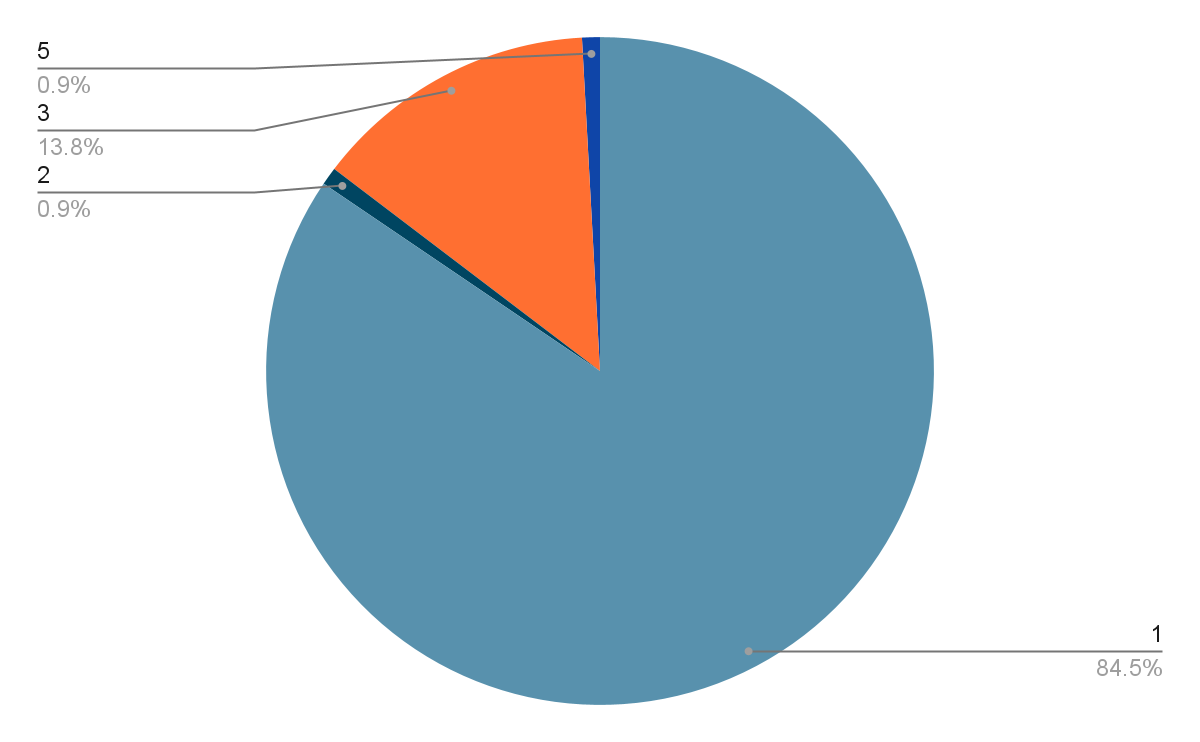
    Quiz #23 was:

    As a seasoned Site Reliability Engineer, you’ve encountered an alert indicating that the “worker-prod queue message age” has exceeded its threshold. This alarm could potentially impact the system’s performance and reliability. To effectively troubleshoot and address this issue, which of the following steps should you prioritize?

    1) Increase the number of EC2 instances running the worker service to scale up the processing power, assuming the worker service is under-provisioned.

    2) Immediately clear all messages from the “worker-prod” queue to reset the message age metric, assuming the messages are outdated or irrelevant.

    3) Review CloudWatch metrics and logs for the “worker-prod” service to identify any recent changes in error rates or execution times that could be delaying message processing.

    4) Temporarily disable the AWS alarm for “worker-prod queue message age” to avoid receiving further alerts while you investigate unrelated system components.

    5) Manually execute the worker service’s tasks to process the queue messages, assuming the automated process has failed.

    Correct Answer: 3) Review CloudWatch metrics and logs for the “worker-prod” service to identify any recent changes in error rates or execution times that could be delaying message processing.

    Rationale: The most effective initial step in debugging the “worker-prod queue message age” alarm is to analyze the CloudWatch metrics and logs for the worker service. This approach allows you to pinpoint any recent changes or anomalies in the service’s behavior, such as increased error rates or longer execution times, which could be contributing to the delayed processing of queue messages. Understanding the root cause is essential for implementing a targeted and effective solution, unlike the other options which might temporarily mitigate symptoms without addressing the underlying issue.

    116 people answered this question and 14% got it right.
    In the realm of cloud computing, especially within AWS environments, SREs (Site Reliability Engineers) face a myriad of challenges daily. One such challenge is effectively troubleshooting and resolving alerts like the “worker-prod queue message age” without disrupting the system’s performance. This blog aims to dissect this issue, analyze potential responses, and illustrate why a particular strategy outshines the others. Along the way, we’ll tackle the complexities involved in each approach and offer code snippets to enrich your troubleshooting toolkit.

    The Challenge At Hand

    When an alert for “worker-prod queue message age” pops up, it signals that messages within the queue are not being processed swiftly enough. This lag can lead to performance bottlenecks, customer dissatisfaction, and potentially severe system failures. How we approach this problem is crucial, and here’s a breakdown of potential actions:

    Option A: Increasing EC2 instances to enhance processing power seems like a straightforward solution. However, it’s a bit like adding more horsepower to an already overloaded truck without first checking if the load can be redistributed or lightened. It’s essential, but it doesn’t address the root cause. In this manner this quiz is similar to our previous quiz on AWS ELB Performance.

    Code Snippet for Scaling EC2 Instances:

    import boto3

    # Initialize a boto3 client

    ec2 = boto3.client(‘ec2′, region_name=’your-region’)

    # Scale up EC2 instances

    ec2.modify_auto_scaling_group(AutoScalingGroupName=’your-auto-scaling-group-name’,DesiredCapacity=new_desired_capacity)

    Option B: Clearing the queue might offer temporary relief but could lead to data loss or further issues down the line. It’s akin to wiping the slate clean without learning from the errors written on it.

    Option C: This is where the gold lies. Diving into CloudWatch metrics and logs can reveal patterns, spikes in error rates, or increases in execution time, offering clues to the underlying issue. It’s detective work that requires patience and keen insight. But what if an AI could do this for us – this is precisely what Webb.ai’s solution does. It leverages AI to automate troubleshooting identifying the root cause. Try it:

    Troubleshooting modern cloud environments is hard and expensive. There are too many alerts, too many changes, and too many components. That’s why Webb.ai uses AI to automate troubleshooting. See for yourself how you can become 10x more productive by letting AI conduct troubleshooting to find the root cause of the alert: Early Access Program. It uses an intuitive approach based on first principles so it is easy to follow and for every step of troubleshooting it provides the commands that you can copy and run in your environment to verify the findings.

    Code Snippet for Reviewing CloudWatch Logs:

    import boto3

    # Initialize a boto3 client

    logs = boto3.client(‘logs’, region_name=’your-region’)

    # Fetch logs for analysis response = logs.filter_log_events(

    logGroupName=’your-log-group-name’,

    startTime=unix_start_time,

    endTime=unix_end_time,

    filterPattern=’ERROR’

    )

    print(response[‘events’])

    Option D: Disabling the alarm might silence the noise, but it’s equivalent to ignoring the check engine light on your dashboard. It doesn’t solve anything and could lead to more significant problems.

    Option E: Manual intervention might fix the immediate issue but fails to offer a scalable or long-term solution. It’s a band-aid on a potentially gaping wound.

    Why Option C Reigns Supreme

    Option C is the clear winner because it encourages a methodical, data-driven approach to problem-solving. By analyzing CloudWatch metrics and logs, SREs can identify the root cause of the delayed queue message processing. This approach not only solves the immediate problem but also aids in the development of more resilient systems by providing insights into how similar issues can be prevented in the future.

    The Complexity Of Analysis

    Each option presents its own set of challenges. For instance, scaling EC2 instances (Option A) requires a good understanding of the system’s load and capacity planning. Clearing the queue (Option B) might necessitate data recovery strategies, while manually processing tasks (Option E) could involve complex script writing. Disabling the alarm (Option D) is the least desirable, as it avoids addressing the issue altogether.

    In conclusion, troubleshooting the “worker-prod queue message age” alarm in AWS requires a blend of tactical decision-making and strategic analysis. By opting for a data-driven approach and diving into CloudWatch metrics and logs, SREs can not only address the immediate issue but also enhance their system’s reliability and performance. Remember, the key to effective troubleshooting is not just fixing problems as they arise but preventing them from occurring in the first place.

    Troubleshooting modern cloud environments is hard and expensive. There are too many alerts, too many changes, and too many components. That’s why Webb.ai uses AI to automate troubleshooting. See for yourself how you can become 10x more productive by letting AI conduct troubleshooting to find the root cause of the alert: Early Access Program.

  • Hasura Adds “Supergraph” to Platform for Managing APIs

    Hasura Adds “Supergraph” to Platform for Managing APIs

    Hasura, whose product helps compose GraphQL APIs backed by databases and services, today made available in beta an update to its platform. The company is adding a graph modeling framework that makes it simpler to manage application programming interfaces (APIs) at scale.

    The goal is to make it easier for IT teams to declaratively create APIs and then manage them at scale, said Hasura CEO Tanmai Gopal. As application environments made up of multiple backend services and databases become the enterprise norm, there is a pressing need to simplify the management of what has become thousands of APIs in an enterprise IT environment using query compilers and routing capabilities built into the platform, he added.

    In version 3.0 of the Hasura Data Delivery Network (DDN), the “supergraph” execution engine is based on a serverless runtime engine that, the company says, will replace its previous graph technologies to manage both GraphQL and REST APIs.

    In addition, all connectors provided by Hasura have been rebuilt using an open specification and are now available as open source software on the Hasura Connector Hub. Hasura is also making available a software development kit (SDK) to enable IT teams to build custom connectors.

    Written in the Rust programming language, the supergraph framework eliminates the need to create and manage GraphQL servers or services to deploy a graph. Additional data domains as a result can be added or replaced without breaking the graph used to manage other APIs.

    The update to the Hasura DDN also adds new build system to provide instant API previews and support for rollbacks, a redesigned console featuring a graphical supergraph viewer, API analytics, observability, and auto-generated API documentation capabilities. Every iteration of the Hasura supergraph is instantly available as an immutable build that can be tested in preview. Every change to the supergraph is also validated before build, letting users identify potential bugs, stylistic issues, syntax, and type errors.

    In addition, Hasusa has added a sub-millisecond cold start capability to enable rapid autoscaling and plane to shortly add caching to improve API performance in edge computing environments.

    Longer term, the company plans to add additional a range of artificial intelligence (AI) capabilities to enable IT teams to identify issues requiring troubleshooting earlier and generate reports, Gopal added.

    While REST APIs are still more commonly used than GraphQL, more IT teams are employing the latter. That’s because GraphQL provides more control over how data is accessed and consumed. Most organizations will soon be using a mix of REST and GrapgQL APIs, but it might be years before REST is supplanted as the dominant format simply because those APIs are more familiar to developers and easier to create.

    Regardless of the type of API used, however, their numbers continue to steadily increase with each microservice added to an IT environment. It’s not always clear which teams within an IT organization are managing those APIs but increasingly best DevOps practices are being used to deploy, manage, secure and update them alongside every other type of software artifact. The challenge, of course, is making it simple to manage those API workflows in a way that doesn’t require yet another specialist to be added to the DevOps team.

  • Five Great DevOps Job Opportunities

    Five Great DevOps Job Opportunities

    DevOps.com is now providing a weekly DevOps jobs report through which opportunities for DevOps professionals are highlighted. Our goal in these challenging economic times is to make it just that much easier for DevOps professionals to advance their careers.

    Of course, the pool of available DevOps talent is still relatively constrained, so when one DevOps professional takes on a new role it tends to create an opportunity for others.

    The five job postings shared this week are selected based on the hiring company, the vertical industry segment and naturally, the pay scale being offered.

    We’re also committed to providing additional insights into the state of the DevOps job market. In the meantime, for your consideration:

    Indeed.com

    SAP
    Bellevue, WA
    DevOps Engineer
    $182,312

    CareerBuilder.com

    HRL Laboratories
    Malibu, CA
    Senior DevOps Engineer
    $145,745 to $186,688

    LinkedIn

    Visa
    Atlanta
    DevOps Data Engineer
    $142,000 to $179,900

    SimplyHired.com

    Amazon Web Services (AWS)
    Seattle
    Senior Software Development Engineer
    $134,500

    Dice.com

    Travelers
    Hartford, CT
    DevOps/Machine Learning Operations (MLOps) Engineer
    $94,900 to $156,600