Author: Manish Mistry

  • How to Choose the Right IoT Cloud Provider

    How to Choose the Right IoT Cloud Provider

    The flexibility and scale of cloud-native development makes it an obvious choice for IoT initiatives. That’s partly because IoT engineering tends to be more complex, requiring seamless interoperability between software, hardware, a UI, together with connectivity and data handling capabilities. Typical IoT initiatives are compute-intensive too, again making them a good fit with the functionality a cloud-native development platform can provide. The right cloud platform can help accelerate the launch of an IoT project and reduce the risks associated with rollout. Simultaneously, cloud-native development should also increase efficiencies through the development cycle, which both speeds things up and lowers costs.

    Considering the significant benefits of cloud-native engineering, what, if any, are the downsides? For those new to engineering in the cloud, there is a learning curve involving a few new variables that need to be taken into consideration to avoid disruptions and vulnerabilities in the software development and operations environment. Furthermore, selecting the right cloud tools can be confusing. The cloud giants (Microsoft, Amazon Google, and IBM) all have comprehensive offerings. In addition, dozens of specialist providers compete alongside them with targeted sector-specific solutions.

    An IoT platform should help to minimize risk and ensure quality digital service delivery from end-to-end. It should provide organizations with tangible benefits that amount to a head start in engineering terms: built-in tools and capabilities that cut effort, costs and time required. Many specialist vendors offer attractive packages that address IoT solutions needs without requiring too much customization. However, engineering teams must also take into account how the IoT solution integrates with their organization’s wider digital offering. IoT systems deliver the most value when they are closely aligned with the rest of the business. As a result, data handling and data integration become critical factors in the decision-making process.

    More generally, IoT platforms offer some very attractive services to help companies get started in setting up their IoT solutions. There are trade-offs, however, which often come later down the line in the form of pricing, technical constraints, complexity and vendor lock-in. When it comes to evaluating cloud platform providers for IoT, there are a number of factors every organization needs to keep front of mind.

    1. Is there a cloud platform name that keeps cropping up in conversations with your trusted influencers? Enterprises should seek recommendations, then follow up to ensure providers can share examples and evidence to back up success stories.
    2. Pay attention to scalability. Cloud providers will dazzle prospective clients with how many millions of connections they can handle. Can they show consistently high uptime? Can they help you make the job of scaling easier? Can they monitor the performance of devices?
    3. Finding a cloud platform that can meet your IoT solution needs is your primary concern. But longer-term, it is worth asking how well the platform accommodates changing use cases.
    4. How will your IoT system handle regular updates? These come in the form of system integrations from the IoT platform vendor and firmware updates that you will want to push out to your connected devices.
    5. The new IoT environment will need to seamlessly manage data, so businesses need to consider how they will ensure that happens. When approaching the challenge of data management, they will need to evaluate if they have the skills and resources in-house to work alongside their IoT cloud provider to ensure success, or if additional external support may be required.
    6. Congratulations, your role is now to own, manage and secure millions of data points! How will your IoT cloud platform work alongside your existing security practices to bolster security and privacy in the IoT system?
    7. Established all-rounders or small specialists? Proprietary or open source? There are many factors to weigh up, including the trade-off with ease of setup, where enterprises feel the benefits immediately, but potentially at the expense of future constraints such as vendor lock-in.
    8. It’s important to read the small print when it comes to disaster recovery options. A whole host of environmental factors can impair the ability of an IoT system to function. This is an opportunity to examine how DR planning is handled right from the get-go, and to question a provider’s track record when it comes to outages.
    9. The difficulty businesses most often have in budgeting for their IoT platform support is failing to account for how their needs change. A pricing model that seems great upfront can prove costly in the long run. Try to anticipate the changing needs and ask what kind of pricing flexibility the IoT cloud platform can offer.

    While there are undoubtedly many factors to consider before undertaking cloud-native IoT development, cloud engineering confers many significant benefits. Nowadays the right IoT cloud platform is much more than hosting and accessing resources in the cloud. Cloud-native computing enables companies to take advantage of the most up-to-date techniques and services. These include PaaS, multi-cloud, microservices, agile methodologies, containers, CI/CD, data engineering, IoT, AI, and machine learning, but the list could go on. With the right IoT cloud partner, companies can harness the latest technical capabilities to progress toward their strategic business goals. Embracing cloud-native engineering helps organizations accelerate digital delivery as well as achieve scale, increase reliability and improve efficiency.

  • Optimize Performance, Cut Costs With AWS Autoscaling Services

    Optimize Performance, Cut Costs With AWS Autoscaling Services

    A very easy (and free) way to get the get your money’s worth on the AWS Cloud platform is autoscaling. Autoscaling allows for better fault tolerance, better availability and better cost management, quickly scaling up and down to meet traffic demands while keeping your costs within budget by detecting and replacing the components that are not healthy enough to be present in the infrastructure.

    Some of the key benefits of autoscaling are:

    1. Meeting the traffic requirement on-demand and scaling accordingly.
    2. Adjusting scaling group capacity through the scheduled actions on the autoscaling groups.
    3. Reducing resources and costs.
    4. Increasing application availability by deploying across the availability zones.

    AWS has several services that help autoscaling the infrastructure components and reduce the management associated with scaling. They are mediated through the CloudWatch monitoring and observability service. CloudWatch provides up to 1-second visibility of metrics, 15 months of data retention (metrics) and the ability to perform calculations on metrics. This allows digital engineering teams to perform historical analysis for things such as cost optimization, for instance. On top of the specified metrics, teams can create alarms and alarm trigger the autoscaling policy to perform predefined steps, either to scale out or scale in.

    Autoscaling Services on AWS Cloud Platform

    EC2 Instance Auto Scaling

    EC2 instance autoscaling helps us to keep the correct number of EC2 instances available to handle incoming traffic requests for the application. We can create an EC2 autoscaling group, which is a collection of EC2 instances. In that group, we can specify a minimum, making sure that the group never goes below a specified size. We can also specify a maximum number of EC2 instances, which ensures that the group never goes above the specified size. This keeps capacity at a minimum and maximum range and ensures that your autoscaling group has EC2 instances specified in the desired capacity. Autoscaling also allows us to configure scheduled actions that can change the minimum, maximum and desired auto-scaling group capacity at a specified time.

    EC2 instance autoscaling allows for the configuration of scaling policies that will scale up or down according to the policy to increase or decrease EC2 instances in your infrastructure.

    There are two types of scaling: manual, in which we can attach and detach EC2 instances from the autoscaling group, and dynamic scaling, in which we can define how to scale the autoscaling group capacity in response to the incoming request or changing demand in terms of specific resource utilization. This allows us to configure policies that can take care of scale-up and scale-down and acts according to the policy for factors such as the number of requests, CPU and memory utilization.

    Below are the three types of dynamic scaling policies:

    • Target-tracking: This policy will increase or decrease the autoscaling group’s current desired capacity based on the target value for the specific metric. This policy maintains the capacity to match specified target metrics like CPU or memory utilization. Let’s assume that you have set 60% utilization of your autoscaling group—the target-tracking policy will add or remove EC2 instances to meet the specified utilization.
    • Step Scaling: This policy increases or decreases the current capacity of the autoscaling group based on a set of scaling adjustments (EC2 instances) that vary based on the size of the alarm breach. Let’s assume that the autoscaling group has three stages for tracking CPU utilization—the first alarm would be triggered when 40% is reached and would add one EC2 instance, the second alarm would be triggered when 60% is reached and two EC2 instances are added, and the third alarm is triggered when 80% is reached and three EC2 instances would be added.
    • Simple Scaling: This is a simple scaling policy option that increases or decreases the current autoscaling group capacity based on a single scaling adjustment. Here we can add one EC2 instance when specified alarm breaches.

    EC2 autoscaling provides on-demand instance scaling and spot fleet instance autoscaling, through which we can automatically increase or decrease the current capacity of the spot fleet based on the demand. It can launch (scale out) or terminate (scale in), within the specified range.

    ECS Container Service Auto Scaling

    Elastic Container Service (ECS) Auto Scaling works on published container CloudWatch metrics such as CPU and memory usage. It increases or decreases the desired capacity of container tasks in ECS service automatically. CloudWatch metrics can be used to scale out (add more tasks) to handle a high degree of incoming requests and scale in (remove tasks) during low utilization.

    ECS Auto Scaling allows us to configure policies including target tracking, step scaling and scheduled scaling actions.

     RDS Storage Auto Scaling

    Amazon Relational Database Services (RDS) for MariaDB, MySQL, PostgreSQL, SQL Server and Oracle support storage autoscaling, with zero-downtime RDS storage autoscaling automatically to scale the backend storage volume attached to the RDS database in response to growing database size.

    RDS monitors current storage consumption and scales storage capacity up when current consumption reaches near the actual provisioned size, without affecting current database operation and disturbing current database transections.

    Aurora Auto Scaling

    AWS Aurora autoscaling adjusts the number of Aurora replicas dynamically. You can define the scaling policy and Aurora acts accordingly. It scales Aurora replicas to handle a sudden increase in the database connectivity or the workload. As and when database connections or workload decreases, Aurora Auto Scaling removes unwanted Aurora replicas automatically, so customers are not charged for the unwanted replica instances.

    Just as we were able to define scaling policies in other services, so we can define them in Aurora Auto Scaling, and it also allows us to configure the minimum and the maximum number of Aurora replicas that can be managed. Aurora Auto Scaling is available for both of the Aurora engines MySQL and PostgreSQL.

    DynamoDB Auto Scaling

    The most difficult part of the DynamoDB workload is to predict the read and write capacity units. If an application needs high throughput for a specific period, it is not necessary to overprovision capacity units for the entire time. Amazon DynamoDB Auto Scaling dynamically adjusts provisioned throughput capacity on your behalf in response to actual incoming traffic request patterns.

    As and when the workload decreases, application autoscaling decreases the provisioned throughput capacity units, so that customers do not pay for any unnecessary capacity.

    With DynamoDB Auto Scaling, we can create scaling policies on the table or global secondary index. We can specify within the scaling policy whether we want to scale read capacity or write capacity (both), and the minimum and maximum provisioned capacity unit settings for the table or index.

    Prime Your Infrastructure For Autoscaling

    For these AWS autoscaling services to function as they should, organizations need to ensure they have:

    • Specified application user session state and persistence when using EC2 instances.
    • Tested, monitored and tuned their autoscaling strategy to ensure that it functions as expected.
    • Decision-making logic in place that evaluates these metrics against predefined thresholds or schedules and decides whether to scale out or scale in.
    • Service-specific limits in place before configuring autoscaling.
    • While using EC2 autoscaling, teams have specified cooldown time as well as which application to start up, and are ready to serve in a defined time.
  • How to Achieve AWS Security in 10 Steps

    How to Achieve AWS Security in 10 Steps

    Looking to lock down your AWS cloud service? Here are the 10 steps to take for AWS security

    As more companies embrace the cloud, security is becoming a more significant challenge. Irrespective of size, organizations are increasingly realizing the importance of having proper cloud security practices in place. More and more companies are creating a culture where digital engineering teams are making cloud security a priority and checking whether their service providers can provide the correct security levels for their cloud workload. It is up to organizations, in partnership with their cloud service providers, to understand the different security roles, responsibilities, tools and best practices.

    It turns out that getting the balance right security-wise is becoming easier. For example, AWS has published its cloud security best practices to help customers implement cloud services in a highly secure manner. These best practices provide guidance to organizations unsure of the tools or services they require. The AWS cloud platform allows customers to scale and innovate while maintaining a secure environment; customers only pay for the cloud security services they are using without any upfront expenses, unlike the on-premises environments.

    When it comes to cloud security SNAFUs, misconfigurations that accidentally and unnecessarily expose services are the biggest culprits. Any misconfigurations during implementation can potentially lead to big problems down the road. In the cloud, resource provisioning, management and monitoring happen via APIs, consoles and command-line interfaces (CLIs). So, it’s essential to secure all these connections during the early stage of cloud adoption.

    Learning From Experience

    Teams also must ensure that virtualization, identity and access management (IAM), workload protection and network security and encryption are a part of this architecture blueprint. We are all familiar with catastrophic data breaches that make the news, but there are many others that do not, and the vast majority of these are avoidable. Let’s examine the following three scenarios, all derived from real experiences, and then look at how the vulnerability could have been avoided.

    Case 1: Passwords Matter

    An AWS account was compromised due to a weak root user password, combined with MFA not being configured. An attacker removed EBS, EC2 instances, S3 data backup and asked for a ransom to provide the database backup file.

    This could have been prevented by utilizing an IAM user with a specific policy instead of using the root account. 

    Case 2: Visible Access Keys

    The developer posted the development account credentials for the AWS access and secret access key in the script, which was on the public Git repository. Using those keys enabled the attackers to deploy multiple resources in all regions and created multiple dummy resources. For the six to eight hours that the account was hijacked, the attackers racked up a bill of $4,000 to $5,000.

    This could have been prevented by using an IAM role instead of hard-coding the access keys into code. Access keys should be rotated periodically.

    Case 3: Misconfigurations

    The security group was not properly configured. In particular, port 22 was allowed globally, ports 80 and 443 were also open from all. The application which was hosted on EC2 instance was front-ended by the application load balancer. The attackers found a basic cross-site scripting vulnerability and SQL injection, tried injecting malicious scripts and removed all the data from the server.

    This could have been prevented by following a trusted advisory, putting WAF on top of the application load balancer and utilizing the AWS inspector for security assessments.

    AWS Security in 10 Steps

    These three cautionary tales are all examples of where a small security vulnerability caused big losses, and they all demonstrate how easy it would have been to deploy the secure cloud option. Hindsight is a wonderful thing, but it is even better to avoid making the error in the first place. Here is a 10-step guide to understanding security best practice structures and how users should implement the AWS platform and its services in the best way.

    1. Understand the Shared Responsibility Model

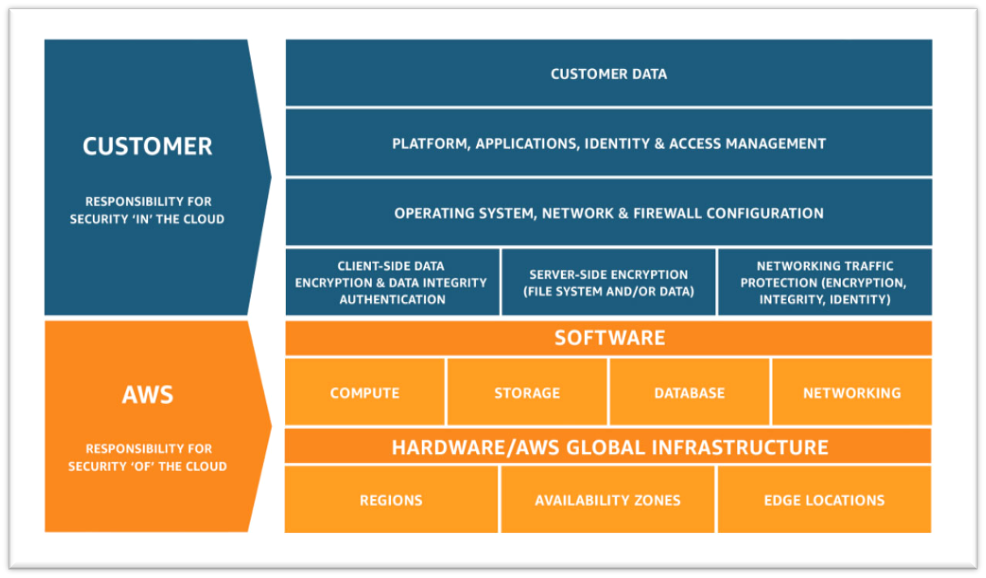
    • Amazon’s responsibility: AWS is focused on infrastructure security, including computing, storage, database and intrusion prevention networking services. AWS is also responsible for the security of the software, hardware and the physical facilities that host AWS services.
    • Customer’s responsibility: AWS customers are responsible for the secure usage of AWS services that are considered unmanaged. The customer is responsible for managing user base access-authentication methods, encryption of data stored inside AWS.

    2. Follow IAM Best Practices

    • The AWS Identity and Access Management Service enables users to manage access to AWS services and resources securely.
    • The AWS account can be administrated by creating groups and users and applying granular permission policies to users to provide limited access to APIs and resources. This video takes a deep dive into IAM policy management.
    • When granting IAM roles, follow the “least privileges” approach to security.
    • Rotate access keys and passwords.

    3. Manage OS-level Access and Keep Ec2 Instances Secure

    • Run an inspector assessment to generate an OS-level vulnerability report.
    • Use System Patch Manager to keep OS packages updated.
    • Patch the EC2 instance periodically to protect your infrastructure from newly discovered bugs and vulnerabilities.
    • Follow the security advice provided by OS vendors RedHat, Suse, Microsoft, etc. This helps to keep all OS-specific packages updated from a security perspective.

    4. Encryption

    • There are two methods for encryption in AWS: in transit and at rest.
    • Use AWS KMS for storing at rest encryption keys, which can be AWS-generated or customer-generated.
    • Use Cloud HSM to provide hardware-encrypted devices for storing keys.
    • Most AWS services provide in-transit encryption by providing https endpoints that provide encryption end to end.
    • AWS Certificate Manager allows you to create an SSL certificate for the public domain.

    5. Follow Security Best Practices for AWS Database and Storage Services

    • RDS storage should be encrypted at rest.
    • Restrict access to RDS instances to decrease the risk of malicious activities such as brute force attacks, SQL injections or DoS attacks.
    • S3 storage should be encrypted at rest.
    • S3 policy should be used to restrict access to S3 content. Keep your S3 bucket private if you don’t have any requirement to expose objects.
    • Use AWS Macie to detect and secure sensitive data within AWS-S3.
    • Use the AWS Parameter Store to store environment-specific credentials and secrets, which you can easily achieve using secrets management for your cloud-native application.

    6. Network Security

    • Intrusion detection systems (IDS) or Intrusion prevention systems (IPS) allow the detection and prevention of attacks on critical infrastructures such as payment gateway of banking-related transaction applications.
    • VPC flow logs should be enabled to monitor network traffic.
    • Restrict access by security group (EC2, RDS, Elastic Cache, etc.)
    • Use Guard Duty to monitor AWS accounts and infrastructures continuously.

    7. Web Application Security

    • Web application firewalls (WAF) provide deep packet inspection for web traffic.
    • WAF can also help to prevent platform and application-specific attacks, protocol sanity attacks and unauthorized user access.
    • Amazon Inspector is an automated security assessment service that improves security and compliance of applications deployed on AWS.
    • Use AWS Cognito to authenticate application user pools securely. It also supports federated access from Google, Amazon and Facebook.

    8. Enable Configuration Management

    • AWS Config helps to audit, assess and evaluate the configuration changes within AWS.
    • Customers can also rely on third-party configuration management tools, which can provide more granular visibility.

    9. Monitoring and Alerting

    • CloudTrail enables auditing and monitoring of authorized and unauthorized activities within the AWS account.
    • CloudWatch alerts can be set up for malicious activities within the AWS account and infrastructure deployed inside AWS and application logs.
    • Set billing alarms to keep your team aware of the cost utilization of specific accounts or infrastructure.

    10. Compliance, Training and Certification

    • AWS Artifact helps customers to get a no-cost, self-service portal for on-demand access to AWS compliance reports.
    • Train and educate teams using the AWS cloud platform for deploying or are responsible for the infrastructure.

    Implementing these cloud security best practices guidelines provided by AWS helps organizations implement the proper security measures, irrespective of where they are in their digital transformation journey or how large their organization is.