Author: Lori MacVittie

  • SDN has a lot to offer to DevOps

    SDN has a lot to offer to DevOps

    When discussing DevOps it’s natural to focus the attention on the one operations  team that focuses on application infrastructure. But when you start digging in to DevOps and its applicability to all four operations groups you’ll find that technological shifts in the network – like software-defined networks (SDN) – are just as important to the overall success of DevOps-related initiatives as the spread of software-defined operations going on across the application infrastructure.

    One of the intersections of network and app infrastructure operations is around speed. Not just speed of deployment of services supporting applications, which is critical, but also the resulting speed of the application itself. Application performance management (APM) is a less often mentioned concern of those looking at DevOps but it is one with which developers and app infrastructure operations alike are very interested in not just monitoring and measuring but improving.

    But here’s the thing: the relationship between the app infrastructure and the network are intertwined when it comes to application performance. Measuring and monitoring in the app infrastructure is all well and good, but it is impacted by network performance. And vice versa. Technically speaking, the app infrastructure folks are going to end up tweaking things like TCP; changing window sizes and timeouts in order to improve poorly performing apps. And they should, as TCP is highly tunable and one of the primary means of changing the performance behavior of an application.

    But tweaking TCP has an impact on network performance. TCP is a reliable transport protocol, meaning its particular about thinks like packet order and its very responsible about making sure each and every packet is received. When one isn’t, it resends it. And resends it. And resends it. Retransmit storms contribute to the congestion of the network, which in turn contributes to the need to retransmit, which in turn… well, I think you see the Catch-22 here. While the app infrastructure team is pointing fingers at network operations, the network operations team is pointing fingers at the app infrastructure team.

    Both are equally responsible for the problem.

    SDN promises, in part, to address the problems associated with speed. Both speed of service deployment (through operationalization) as well as speed of delivery, i.e. application performance. SDN will, ostensibly, provide the means to both recognize application specific performance requirements and adjust, as necessary, the delivery of application data through the network in order to meet those requirements. But what it also implies is the ability to provide visibility into the reason why new routes were necessary. There are plenty of reasons an application might initiate a retransmission storm and some of them are related to the application platform (TCP problems), others to the client or the Internet itself, and still others to the network. Being able to quickly identify what is causing a degradation in application performance gives everyone the ability to react and resolve the problem faster.

    That goes to MTTR (mean-time to resolution), a key DevOps-related metric.

    But for all that to happen, there has to be some collaboration (sharing) going on between network and app infrastructure operations. There has to be less finger pointing and more question asking going on between the two, and the sharing of collected performance data across the entire application delivery chain – from network to platform to the app itself. SDN provides a means through which such measurements can be obtained and shared with other systems – and teams. This ability is important. Puppet Labs 2014 State of DevOps Report named it a “top practice” correlated with MTTR, and CA’s latest report indicated 19% of organizations adopting DevOps have experienced “Improved quality and performance of our deployed applications.”

    Monitoring and measuring application performance is a key component of DevOps, and yet a significant portion of that performance is dependent on and related to the network. Which means app infrastructure operations can’t measure or address poor performance without understanding the network’s contribution to the whole.

    SDN “apps” can be one way in which app infrastructure and network operations can gain insight into how apps are performing and how the network is impacting that performance – for good or bad. Whether it’s simply having the data to share or providing an interface into the network to gather the data, SDN has the potential to enable greater collaboration across network and app infrastructure teams.

    That makes it an excellent player in the wider ecosystem of tools and frameworks that support the need for monitoring and measurement associated with DevOps initiatives.


  • Mobility Means Enterprises Need to Get Lean with DevOps

    Mobility Means Enterprises Need to Get Lean with DevOps

    When people say “mobile” most folks think “devices.” Phones. Tablets. Phablets. Smart things. Wearables.

    But what we really ought to be talking about in most cases is apps.

    A McKinsey & Company survey noted, “When we recently surveyed 250 CIOs on their mobility strategies, 56 percent reported strong demand from employees to support a wide range of mobile devices.” With no direct mention of applications you might think CIOs are reporting just that employees be allowed to use mobile devices, but dig deeper into this and similar surveys and you’ll find what CIOs and employees mean by “support a wide range of mobile devices” is really this: make applications available across all the myriad devices we might want to use.

    When we say “mobility” is a driving factor for the adoption of a technology or an emerging methodology like DevOps, we don’t mean just the insatiable demand consumers have for engaging with you through mobile apps. We also mean your employees, who have an increasing appetite for engaging with business applications and tools through mobile apps.

    For enterprises, mobile means apps as much as devices – and lots of them. If there is one area of enterprise concern that aligns well with the startup mentality of measuring the success of a DevOps approach by the number of deploys per , it is around mobile applications.

    the state of applications

    That’s because mobile apps change a lot. According to an Oracle-sponsored survey, “35 percent of midsize and large enterprise organizations update their application portfolio monthly, while an additional 34 percent update their applications quarterly. More than four-fifths (82 percent) of respondents expect those rates to increase over the next two years.”

    That rate may seem trivial to organizations seeking to achieve “X deploys per day” but traditionally enterprises plan for a single change window a month, and if you can’t fit in that window, you’ll just have to wait. There’s only so much time – and so many cans of Mountain Dew one can drink – in a single Saturday night change window and these numbers don’t take into account existing applications – both new and updates to existing – that are being pushed out on a monthly basis.

    A 2012 survey from VersionOne found 37% of organizations push 6-25 net new applications per year. Nearly half (46%) push 11-50 upgrades during the same time period. That’s atop an existing base of apps that must be managed, scaled and secured.

    One of the ways DevOps is able to assist is through the optimization of deployment processes that take that app or app update to production. Whether it’s through value-stream mapping or Six Sigma or automation – or all of the above- the precepts of “lean” that underpin many DevOps concepts are invaluable to enterprises looking to up their number of deploys – even if it is just per window.

    If you can automate and optimize deployment processes to fit 2 or 3 more applications into each window, you gain ground. And gain ground you must, because mobile isn’t going away and neither is cloud and neither is the application economy we’re running headlong into.

    There is certainly room for operational improvement – and DevOps – in the enterprise to accommodate the increasing number of applications (mobile and otherwise) that need to get to market faster and with greater assurance of availability and competitive performance.

  • The Dark Side of Infrastructure as Code

    The Dark Side of Infrastructure as Code

    We spend a lot of time extolling the virtues of infrastructure as code. All of it is true. Treating infrastructure as code can add great value in terms of its ability to promote consistent, predictable and repeatable results during the application deployment process. One of the ways in which infrastructure is treated as code is through the use of programmability.

    Programmability is an integral component in software defined architectures and a part of the DevOps approach is automation through integration with traditionally development lifecycle focused tools and technologies. APIs, app templates and the ability to programmatically interact with the data path are enabling rapid provisioning of services in the network. That’s important to the business. Improving service velocity in the network is critical to achieving faster time to market and enabling the operational scale necessary to meet growing pressure on networks arising from the growth of applications driven by cloud, mobile and the Internet of Things.

    Speeds and feeds of processes are now as important to gain a competitive advantage as speeds and feeds of packets.

    Those who see DevOps and SDN as having a strategic impact on their organization view programmability as having even greater importance.

    But that does not mean that treating infrastructure as code doesn’t have its dark side. Because adopting a programmatic approach to anything means you get both the benefits and the risks.

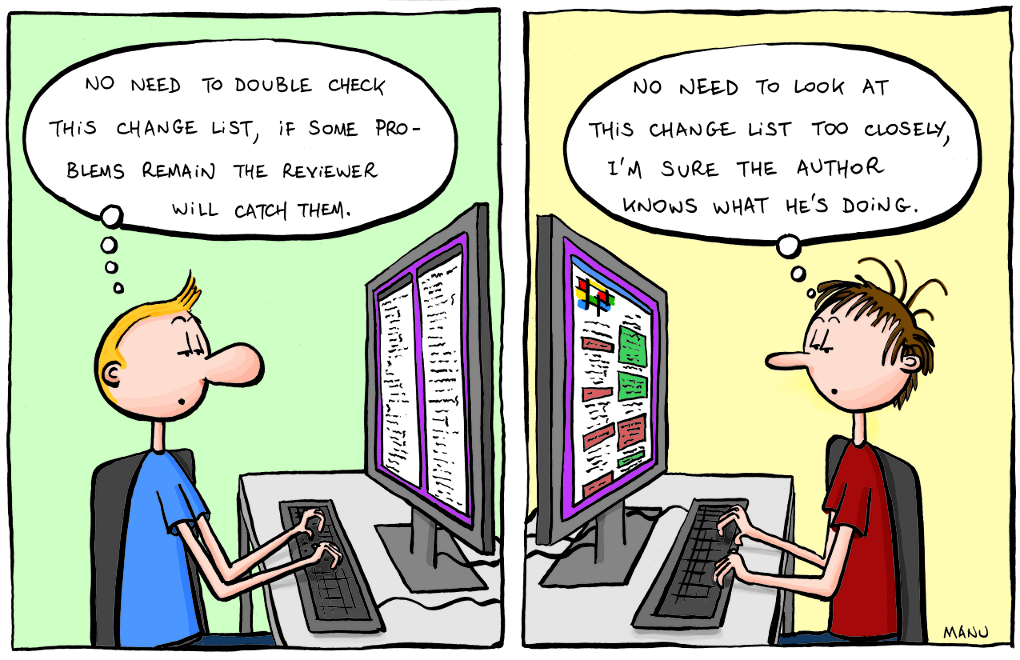
    I happened to be cogitating on this topic when I stumbled across a post reminding us of the importance of code reviews. The content was so-so, but the premise was spot on: code reviews are a must for those embracing the notion of treating their infrastructure as code.

    Why is that (or should it be) an imperative?

    Consider some stats from InitialState, “a technology startup helping engineers capture and understand product data. Our cloud-based log visualization-as-a-service platform helps engineers make sense of the exploding number of logs being produced by “smart”, complex products and applications.”

    According to their data, developers have to find and fix 100 bugs per 1000 lines of code. And it takes 30 times longer to fix one of those bugs than to write one line of code. Overall, developers end up spending 75% of their time (about 1500 hours per year) debugging code.

    Now spend a moment thinking about what that means when you start treating infrastructure as code, writing scripts to automate provisioning and integrating with other systems to orchestrate deployment processes.

    2011.09.18_code_reviews

    I won’t lie, code reviews can be tedious. But the first time someone points out an error, particularly one that could have resulted in a security breach or an undesirable service outage, the pain is more than made up for. In the long run, code reviews are beneficial to eliminating disruptive errors. A SmartBear survey in 2012 found that “70% of organizations indicated that code reviews are very important” and “Those that do code reviews clearly have a greater level of satisfaction in the overall quality of their software – they were twice as likely to indicate that they were very satisfied with their software quality.”

    In other words, code reviews are an important part of the software development lifecycle (SDLC). Which means it should be a part of the software deployment lifecycle when it leverages programmability to treat infrastructure as code.

    Therefore it is important in the early stages of DevOps (or SDN if you’re going that way) adoption that you put into place processes to check (and perhaps double check) the scripts, templates and integrations you’re using to automate application and service deployment along the entire operational chain – from the app to the network.

  • Right-Picking the First Project to Go DevOps On

    Right-Picking the First Project to Go DevOps On

    One of the hardest things to do when starting a new initiative is picking the right project to work on. Should I start with App A? App B?  Does it really matter as long as I get started on this DevOps thing and prove its value to management?

    Yes, actually, it might.

    If you think about it, one of the reasons you’re doing DevOps in the first place is not just because it’s cool (it is, of course, but that rarely flies with the business guys) but because it’s going to add value in one or more ways by improving time to market, reducing risk and lowering operating costs. If the project you choose to go DevOps on isn’t capable of showing those benefits (or isn’t capable of showing those benefits in a reasonable time frame) then you might just be choosing the wrong one to start with.

    So how do you choose? Well, how about starting with an app that’s being developed using agile methodologies?

    According to the “8th Annual State of Agile” survey from VersionOne 88% of respondents were practicing agile development, which means you shouldn’t have a hard time finding one.

    Except, you might if you aren’t paying attention. A high adoption rate doesn’t necessarily mean a high saturation rate, however.

    number of projects using agileDig a bit deeper into the survey and you’ll find that agile isn’t used for every project. On the contrary, there’s a good distribution of agile and traditional (waterfall ) methodologies being used. While over half of the respondents are using agile to manage more than 50% of projects, the other 48% are using some other methodology.

    Which offers some interesting strategies for how to get started with DevOps on the other side of the wall (that’s you, in operations land).

    On the one hand, the projects most in need of improved velocity in deployment (time to market) are likely those being developed using agile methodologies. The aforementioned survey validates that approach, with the top reason cited for adopting agile being “accelerate time to market.” The general premise of agile is fast, frequent updates, making the need to deploy into production a more pressing priority. Choosing an app that’s being developed using agile methodologies means you’ll be able to practice, refine, and optimize the processes as you work to automate the deployment. Because of the frequency with which agile-developed projects tend to need deployment, this gives you the opportunity to practice similar techniques on your automation and optimization.

    You’ll be able to automate individual tasks and test them thoroughly before moving on to the next one and the next one and the next one, until you’ve got the process orchestrated (yes, Virginia, there is a difference). You’ll then have ample opportunity to optimize the process, finding redundancies or inefficiencies in the way information is gathered and disseminated into the process. Optimization of the process means greater efficiency, especially if you can knock out those all important wait times between tasks.

    The key here is that you have to know which projects are being developed using agile methodologies, and which aren’t. That means communicating with developers. And not just by sending an e-mail and asking for a list, but really talking to them to understand which projects the business would benefit from improving time to market. Getting an app that is the vehicle for competitive advantage to market faster seems a bigger return on investment than the app used by just a few people for non-critical purposes. You’ve got to dig in and determine which agile projects need agile deployment the most, and then decide where to dig in.

    This is not to imply that less frequently deployed apps will not benefit from agile. They most certainly will, though the benefits that DevOps brings to those apps are more about stability and consistency than they are those derived from improving time to market.

    What’s important is to decide what your goals are with DevOps and what benefits will be worth the most bang for the buck (cause it ain’t going to be cheap in terms of time investment). Getting DevOps on an infrequently but mission-critical app can reduce the risks associated with rusty processes and improve stability in general. Automating the deployment  of such applications can certainly save time and resources that can be redirected to agile projects in need of greater deployment velocity.

    But if you’re looking to show value and return on investment, you’ll likely want to choose one of the agile-developed projects that already exists and needs some attention. Not only because it’ll show value faster, but because it’s releasing frequently enough that you’ll actually get the opportunity to refine (and one hopes optimize) your automation and orchestration.

  • My Little Operations: DevOps is Magic

    My Little Operations: DevOps is Magic

    Bear with me, it will all make sense in the end.


    If you aren’t familiar with My Little Pony: Friendship is Magic (because you don’t have a child who watches it over and over and … well, over)  let me sum up for you:

    There’s a pony who knows something horrible is coming. She wants to stop it. She’s instead sent by management to make friends, which seems to her to be ridiculous in the face of a looming catastrophe. When that catastrophe happens, she and her new “friends” (her coworkers) set off to find the elements of harmony – the only thing that can save the world. But lo and behold, evil destroys the elements. Or so it appears. See, it turns out that the friends are the embodiment of the elements of harmony and through their friendship they create the most powerful element of them all: magic. Together, they are strong enough to defeat the evil and restore harmony to the data center. Err, I mean, to the pony world.

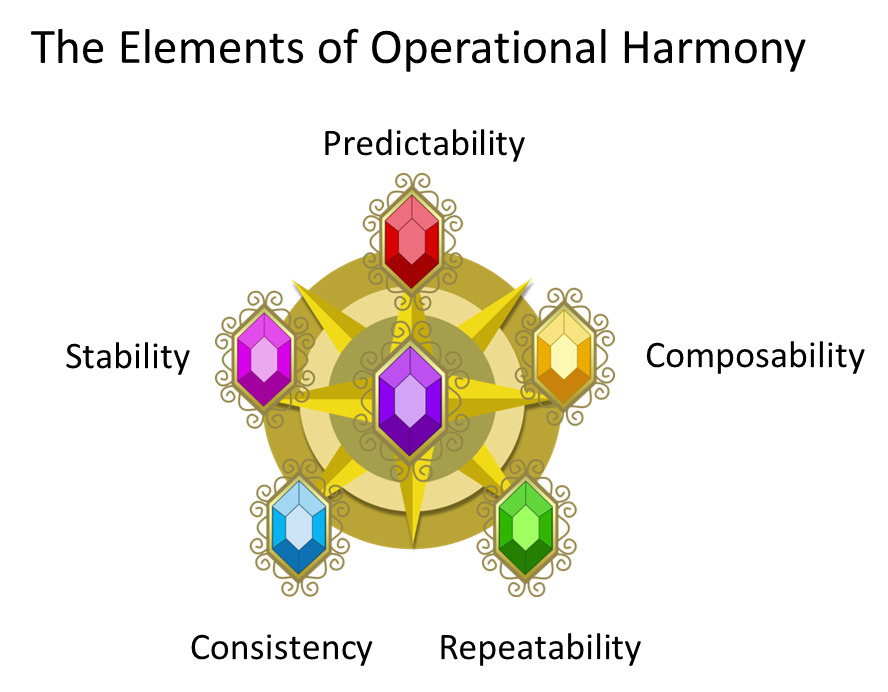
    If we take this and apply it to operations, you should start seeing some common themes. Primarily, you might note that, like magic, the ultimate goal of DevOps – agility – can only be “achieved” by the collaborative efforts of the other elements of operational harmony, namely predictability, repeatability, composability, consistency and stability. It isn’t a tangible “thing” you can buy, it doesn’t come in a can, it can’t be delivered by Amazon.

    These elements combine and, when practiced cooperatively, create a new element: agility. Which is a significant goal of DevOps operational harmonybased on a variety of surveys. Oh, it’s always stated a different way: we want to improve the time to market, increase frequency of deploys, reduce downtime due to errors, etc… but in general, these all fall under the need to enable the same level of “agility” in operations (and the network, but that’s a different discussion) as is present in application development today. Fast and frequent change to match application (and business) changes. Agility.

    But agility, like magic, can only be achieved through friendship (or as we’ll call it, collaboration). That’s because agility requires a variety of separate concerns (qualities) to come together in concert before it can be realized:

    Agility (DevOps)

    • Predictability (time to deploy, important for planning)
    • Repeatability (of process to other applications)
    • Composability (reuse of steps in other processes)
    • Consistency (important for maintainability and trust in process)
    • Stability ( of the overall infrastructure )

    That’s why it’s important not to look at DevOps as a set of tools. There are multiple facets to DevOps that can be enabled by tools and enhanced by tools and even monitored by tools, but DevOps is not the tools themselves any more than the elements of harmony were the gems the Little Ponies sought. The real magic of DevOps is the agility created by collaboratively working together to bring each of the elements into operations. Without stability, have you achieved agility? Or is it really chaos?

    If you can’t repeat the process (apply it to other applications) have you really achieved agility or just strictly codified a single deployment? If the process isn’t consistent, and gives different results have you realized an agile environment or anarchistic one?

    These elements are necessary to achieve real agility of operations, and those elements can only come about in a cooperative environment in which they all work together.

    DevOps, so it seems, is magic after all.


  • Provisioning versus Configuration Example

    Provisioning versus Configuration Example

    A few weeks back I wrote about the difference between configuration and provisioning noting, primarily, that there are differences between the two tasks. It remains an important distinction to make because it’s really where the rubber meets the road (or the app meets the network) where it becomes important. As the infrastructure/network side of the house is where we’re concentrating our efforts to apply DevOps, it’s necessary to dig a bit deeper on this topic.

    So today we’ll examine  couple of concrete examples of the difference – and why it’s important.

    Your application is being deployed and it needs, wonder of wonders, a load balancer. Cause, elasticity. Scale. You know, cloudy type stuffs.

    So you grab that golden image and launch that virtual machine with Whatever Your Favorite Load Balancing Thing might be (HA Proxy, Nginx, F5, etc…). Voila! You’re ready to go, right?

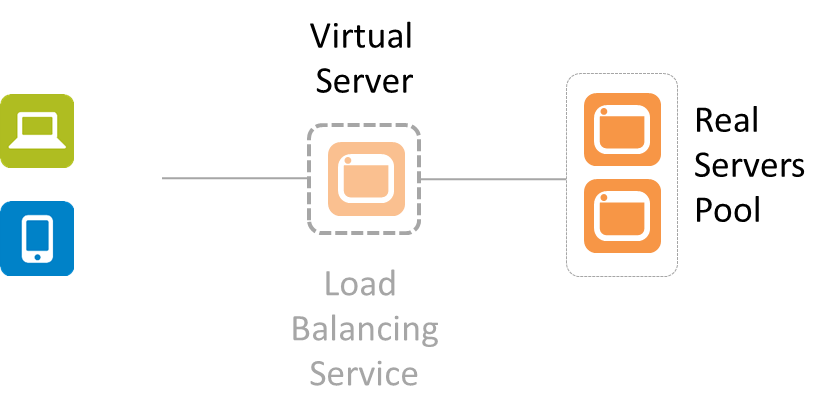
    Not by a long shot. You’ve provisioned a load balancing service, yes. But is it configured? Probably not. In addition to the basic networking needed (IP addresses, VLANs, etc…) there are also a whole bunch of very application specific things that must be configured. There’s no “golden” load balancing service that can be generically applied to your application. Period. At a minimum the virtual server (that represents your application to the rest of the world) needs two things: an IP address and a pool of app instances to select from.

    simplified-lb


    That means there’s some configuration that must occur after the provisioning. There’s no single LB image that will work for all applications, period. Even if all other settings are the same (LB algorithm, L7 app routing rules, TCP options, etc..) you still have to tell it which pool of real servers to select from and what IP address to use so clients can connect.

    This is true for pretty much all application services (infrastructure) that support an application deployment. Because there’s no single golden image that just “works” for everything and no way to use dynamic configuration options for everything (DHCP for IP addresses is one thing, but there’s no “dynamic load balancing algorithm selection” service out there yet) there remain a set of options that must be configured after provisioning occurs. Consider application security like a web app firewall (WAF). It has to be configured to protect a specific application. It has to learn the URIs and the data expected to be exchanged so it recognizes when some interaction is out of bounds and potentially dangerous. That’s unique to the application, and thus it requires some specific configuration after provisioning.

    It’s important to note this distinction lest we get caught up in believing that we can simply create a golden image of all our network infrastructure and services and put them into production with the touch of a button.

    This little reality also helps to understand why it doesn’t really matter whether the network service in question is launched on custom hardware or some server off the shelf. The bulk of the work when automating the deployment of network services is in the configuration, not the provisioning.

    While you can minimize the amount of post-provisioning configuration necessary, you can’t eliminate it entirely. That’s why API-enabled, programmable infrastructure is a critical piece of the larger DevOps picture. It is the API, programmable templates and similar capabilities that enable the configuration to be automated and orchestrated so as to not be the bottleneck in the deployment process.

  • Keep Calm and Refactor Operations

    Keep Calm and Refactor Operations

    Developers have been refactoring forever to gain efficiencies and avoid mistakes. Let’s apply more than just theory to ops to do the same.

    keep-calm-and-refactor-operatorsThere’s about a million articles, blogs, tweets and infographics available today that bespeak of DevOps as this or that or the other thing. But one core truth remains: DevOps in part attempts to apply methodologies like agile to operations in order to gain efficiencies and avoid mistakes. We need the efficiencies because the number of apps that need to be deployed, updated, migrated, and maintained is increasing, not decreasing, and there simply isn’t enough time in the day (or during the monthly change window) to get it all done.

    We need to eliminate mistakes because they are, according to data from initialstate, very costly. It takes 30x longer to fix one bug (an error) than it does to write one line of code. Anyone who has ever spent time chasing a wild pointer will immediately say that’s too low an estimate, but anecdotally I’m willing to go with that figure. It is an average, after all. To put that in perspective, the same data indicates that developers must find and fix 100 product bugs per 1000 lines of code. That’s a 10% error rate.

    I’ll let you ponder for a moment what that means to DevOps and the desire to treat infrastructure as code.


    Exactly. You probably want to avoid that kind of error rate as you go about automating and orchestrating provisioning, configuration and general management of all that infrastructure. Just a few errors can effectively negate time gained by automation. So how do you avoid that?

    One of the ways to avoid some of that is refactoring.

    Refactoring is most commonly used to extract pieces of code (script) that repeat over and over into composable functions (in a procedural language) or methods (in an object-oriented language) or services (in a micro-service or SOA-based system). It’s a primitive form of abstraction that serves to produce more manageable, extensible code bases.

    Basically, you’re taking a set of actions that you repeatedly perform and turning them into a reusable, repeatable “thing”. In the case of operations that “thing” is probably a script.

    Say, for example, that every time you deploy an application you’re also deploying a load balancing service because, of course, you’ll want it scalable and/or reliable. You always perform the same set of steps to complete this task with only a few changes – usually IP addresses, host names, or other network and app-specific settings.

    But you’re doing it manually, or writing a new script every time. Manually making changes are, in most cases, where errors are introduced. Fat fingers are a common cause, especially when you’re not paying close attention because, well, boring! You’ve done this fifty million times and quite frankly, you’re sick to death of the tediousness of it all. refactor all the things

    We’ve all done it, don’t pretend you haven’t both thought it was boring and made a mistake. You’re in good company, trust me.

    What developers do when this is the case is refactor the common code and reuse it across the system. Those bits that get changed are parameterized and everything else stays the same. Even DBAs do this, they just call the resulting code a stored procedure.

    The result of such efforts are self-contained automated tasks that, when used to orchestrate a process, enable composable operations. You string together a set of these scripts and voila! Provisioning complete, minus the fat fingered errors or missed manual steps.

    Refactoring code is much more complex than this, of course, as would also be the case within operations, but the general premise here is that the practical application of DevOps includes the process of refactoring operations. It’s about restructuring it into more composable, logical and discrete tasks that can be automated and orchestrated as a means to achieve more manageable and extensible operations. It’s about identifying those steps in a process that are repeatable and can be refactored into a single, shared executable task.

    When starting an initiative that applies DevOps it is likely you’re going to have to prove the time you’re taking is worth the investment. One of the ways to do that is by refactoring those operations that are continually used and reused to enable a more consistent, predictable and repeatable provisioning and deployment process. By choosing those steps that are most often repeated and refactoring them into their own composable scripts, you can gain efficiencies as well as reduce errors (and eliminate the time they require to find and fix).

  • Enterprises, DevOps and Economies of Scale

    Enterprises, DevOps and Economies of Scale

    In infrastructure there are two economies of scale: operational and capital. DevOps should attend to the former, especially in the enterprise.

    Soon after cloud burst (sorry, pun not intended) onto the scene we all learned about economy of scale because that, primarily, is what cloud computing’s business model is based on. At great volume, standardization can be used to achieve greater output and, thus, can cost less.

    But there’s a second economy of scale at work with cloud; the operational economy of scale. If cloud providers scaled operations in the same way that enterprises traditionally scale operations, well, instance prices would be much, much higher.

    What cloud providers recognized is that in order to achieve the economy of scale required to make cloud a success they had to address both the operational and capital economies of scale.

    infrastructure economies of scale


    According to research, surveys and studies, operational overhead consumes anywhere from 63% to 80% of IT budgets. That’s just maintenance, management and general “keeping the lights on” kind of things. And each time a new application is pushed into production, that number gets bigger because there are more of everything – from storage to compute to network – to maintain.

    To wit, Computer Economics “IT Spending and Staffing Benchmark 2014/2015” indicates that 67% of organizations were increasing their operational expenditures versus only 20% that planned on a decrease. Because IT budgets are generally determined as a percentage of revenue, that means operational budgets are chewing up the business, slowly but surely, and leaving little room for becoming an enabler of business rather than an application assembly line.

    The holy grail, as its been described, for IT is to move budget from operational overhead to innovation. To do that means somehow magically reducing the costs associated with operations. Adding more people doesn’t help; that just adds more overhead. The goal is to do more with less; to increase the ratio of systems and services and applications per operator that can be managed. That’s operational economy of scale at work.

    To do that, enterprises need to look to DevOps and its leverage of automation tools to enable leaner, more efficient operational processes. That means not just automating, but enabling a self-service model in which common provisioning and deployment processes can be orchestrated at the behest of the app or business owner. It means applying the same “gold image” standard used for provisioning and managing virtual machines to infrastructure; leveraging templates to gather the requisite input from app or business owners and automatically provisioning systems.

    Limited variations on an infrastructure deployment template  will enable customization where necessary, but otherwise provide standardized (stable) provisioning and deployment processes that can be self-service enabled. By empowering developers, app and line of business owners to provision application required infrastructure services, operations can use technology to scale to meet demand while lowering costs.

    The goal of DevOps in the enterprise is not to enable 10 application deployments a day. It’s to achieve  operational economies of scale and a more consistent, predictable and repeatable operational environment.

  • Is SDN just DevOps for the network?

    Is SDN just DevOps for the network?

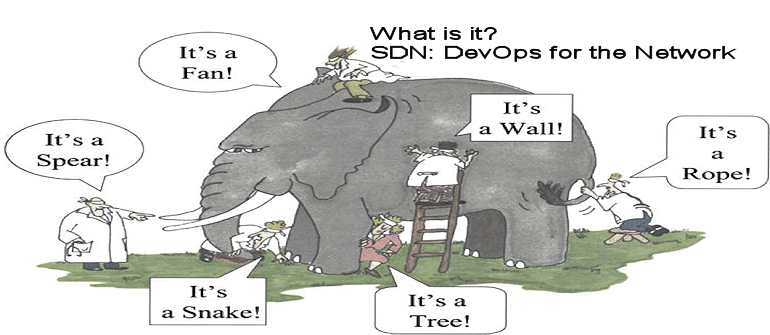
    The answer depends on your definition of SDN.

    (more…)

  • Provisioning versus Configuration

    Provisioning versus Configuration

    There’s a ton of hype and excitement surrounding containers, a la Docker, today, much in the same way virtualization took the data center by storm. In both cases, the excitement for operations focuses on the ease with which infrastructure might be deployed and managed via such technology.

    Whether container or hypervisor, however, there remains a distinct difference between server and network virtualization that must be considered before getting too excited about the possibilities.

    There are two distinct use cases for which virtualization and containerization of anything are considered beneficial: scale and deployment.

    Scale

    In terms of scale, both virtualization and containerization are excellent technologies. Both can fully encapsulate a service – whether application or network – and enable rapid deployment of multiple instances of the same service with very little (if any) post-provisioning requirements. This is the premise upon which cloud computing and NFV is based: clones of services and applications rapidly deployed to enable elastic scalability that matches demand.

    For scalability purposes, virtualization or containerization of services is a match made (mostly) in data center heaven.

    Deployment

    Enabling rapid deployment of new services using virtualization or containers, however, is not necessarily going to net the same benefits. It is important note that the standardization and APIs associated with virtualization and containers that enable scalability so seamlessly is focused solely on the management of the container or virtual machine. The ability to provision a virtual machine or container is not at issue; APIs enable the rapid provisioning of a container or virtual machine with extreme alacrity.

    What those APIs do not do is enable the rapid configuration of those services once provisioned.

    Configuration != Provisioning

    This is a critical differentiation that must be made lest we assume we can leverage virtualization and containers to enable a self-service style data center, a la IT as a Service. While virtualization and containers make provisioning a service instance a relatively painless experience, configuring those services must still be accomplished. When deploying a new service, existing configurations will not be wholly valid. There will always be some amount of customization that must occur, if only to make sure the service is interacting with the right application.

    This means that once provisioning of the service is complete, there is still work to be done. One does not simply launch a load balancing service, for example, without instructing it how to distribute load (what algorithm to use) and to what set of servers (configure a pool).

    provisioning versus configuration

    It is important to recognize the difference between these two steps in the deployment process and take into consideration the impact of configuration after provisioning on that process. Depending on the method of configuration, this step can have a serious impact on the speed and efficiency of the deployment process as a whole.

    It is also important to note for monitoring purposes, as virtual machine health and status is not the same as the health and status of the service, whether that be an application or a network service. Both must be monitoring and managed in a virtualized infrastructure to meet MTTD (mean time to detection) and MTTR (mean time to resolution) objectives.

    In most cases, the impact from configuration is the greater of the two, with its time requirements most significantly impacting the application deployment lifecycle. It is optimization of configuration processes, not provisioning, that will ultimately provide the biggest benefits for DevOps in terms of reducing errors and improving time to market.