Author: Jason Beres

  • The Future of Low-Code Development

    The Future of Low-Code Development

    The days when IT teams relied on clunky software development processes and labor-intensive hand-coding to build tangible, reliable and modern applications are coming to an end. With the rise of new automation technology, rapidly rising expectations and demands from innovation-craving customers and end users and a shortage of developers, the software sector has been forced to seek alternative approaches to not only deliver their services and products but to also remain digitally-current. Now, overcoming this challenge is possible with low-code development platforms.

    What is Low-Code Development and Why all the Fuss? 

    Low-code development is a software development practice that empowers digital product teams and citizen developers to build apps without time-consuming hand-coding. In general, a typical low-code platform includes a visual integrated development environment (IDE), connectors to various backends or services, an application life cycle manager and an integrated design-to-code system.

    With these features and attributes, low-code platforms:

    • Abstract away the code behind complex commands and actions
    • Streamline how projects are being innovated and distributed in the span of weeks, not months
    • Enable citizen developers to build apps

    These tools are so effective because they break the mold and automate the app development cycle by providing reusable building blocks. These building blocks can easily be assembled into an entire app, allowing both experienced and beginner technical minds to handle a bigger volume of projects faster than ever. This flexibility is handy, especially when the digital world expects over 500 million apps and digital services to be built and deployed by the end of 2023, according to IDC FutureScape. That is more than all of the software solutions created in the last four decades. 

    A report by Gartner forecasts that by 2024, low-code adoption will be so widespread that 75% of the software solutions built around the world will be made with the help of such tools. While these tools won’t entirely replace traditional software development, they deliver a contemporary, simpler and faster approach to building apps.

    Benefits of Low-Code Development

    Whether it is automating individual manual tasks, eliminating old development models like waterfall methodology or making it easier for a tech newbie to build a prototype or a flexible app, low-code development has many benefits.

    The benefits of low-code software include:     

    Innovative projects can be assembled by a non-technical audience 

    Low-code app builders are game-changers. The need for experienced coders is reduced as this type of tool provides the necessary components and building blocks for non-technical audiences to be involved in full-cycle app development. Another recent Gartner report said that 80% of technology products and services will be created by people outside of tech-driven fields by 2024. And in times when the demand for commercial software, new progressive solutions and skilled developers exceeds the supply, low-code tools are a perfect fit for citizen developers, designers, professional developers, non-technical stakeholders and others.

    Velocity and optimized development cost

    Today, speed is everything. IT businesses and clients require their software to be built within short timeframes and within a strict budget. Legacy systems need rapid modernization without a big investment. One of the greatest advantages of low-code tools is that they let people build at scale without incurring heavy costs or consuming too much time. Automation apps, mission-critical systems and mobile applications can all be created with low-code software.

    Reinventing traditional processes and reshaping how software is built

    Using these automation tools, you don’t have to worry about HTML/CSS, scalability, coding rules, page layout, branding or screen sizes. As mentioned above, some low-code development platforms come with a system that covers everything from design to code and generates production-ready code in the end. Designers and developers come together to use a single platform that simultaneously:

    • Allows them to create solutions that are easy to maintain and that scale on cloud-native architecture
    • Modernizes and facilitates their work 
    • Improves productivity and collaboration
    • Fits their workflow and skills

    Low-code/no-code tools are quickly becoming the next prototyping tools in the enterprise—without needing the technical skills in traditional UX/visual designer-focused tooling. With low-code or no-code tools, screen design is typically done using drag-and-drop, WYSIWYG design-time experience; it’s usually as simple as making a PowerPoint deck. The main difference between this and a UX/visual design tool is that the low-code/no-code tool is building a running app in the background, with real code, connected data, real screen interactions and more. This means that any team member with an idea can express the design, not just a person who has access to a designer.

    No special skills are needed to build something tangible and real—while at the same time going beyond what a mockup or prototype can deliver.

    The future of tools in this space will include connectors and adapters to popular design tools, such as Sketch, Figma and Adobe XD. These connectors and adapters will enable digital product teams—designers and developers—to use a design process and then import designs, interactions, branding and themes into low-code tools, while still obtaining the considerable benefits of time and cost savings of not having to re-build screens that have already been designed pixel-perfect.

  • The Power and Potential of Stored Procedures

    The Power and Potential of Stored Procedures

    One way of saving time when writing code is with stored procedures; prepared SQL code that you can save so the code can be reused over and over again. Stored procedures are a powerful vehicle for speeding up your code and giving you gains in performance. 

    Stored procedures have many benefits—they can be easily modified, are reusable and they possess the ability to automate a task that requires multiple SQL statements. Another advantage of stored procedures is the ability to access or modify data in a database.

    Before incorporating stored procedures, it’s important to know exactly what a stored procedure is, how it differentiates itself, how to create a stored procedure and how to use them in embedded analytics.

    Performing Tasks With Stored Procedures

    A stored procedure is defined as a set of SQL statements and other PL/SQL constructs that are stored in a relational database management system as a group that you can save and reuse. A stored procedure can be comprised of multiple SQL statements like SELECT, INSERT, UPDATE or DELETE. These statements run as a unit and are used to solve a specific problem or perform a set of related tasks.

    Stored procedures are among the most frequently used and most popular database subjects. Using stored procedures can help simplify and speed up the execution of SQL queries.

    Stored procedures can reduce network traffic between servers and clients, for example. This is a result of the commands being executed as a single batch of code rather than multiple. Rather than every single line of code being sent for execution individually, only the call to execute the stored procedure is sent to the server.

    The other benefits of using stored procedures include maintainability, performance and efficiency and complex business logic. And maintaining one stored procedure is easier on the server than maintaining copies on multiple machines. Procedure scripts are stored in one location and they can be freely used in other applications, too. In the event of a definition change, only the stored procedure will be affected—not the application that calls it.

    Advantages of Stored Procedures

    Once you compile a stored procedure, it can then be used many times. This can save a lot of time writing, especially if you are doing ad-hoc queries. This also gives you a slight performance edge on the first execution of a stored procedure over the first execution of an ad-hoc query.

    A stored procedure is ultimately a function call on a database. You may include IF statements, LOOPS, security checks and more to ensure the correct data is being sent back to the call of the stored procedure.

    Another advantage of stored procedures is that they are easily modified. Simply change one or more statements in a stored procedure with the ALTER PROCEDURE command and it quickly updates the results sent back to the calling app. Unlike a middle-tier component which includes business logic that would need a potentially costly re-deployment, a quick change to a stored procedure takes seconds.

    Another benefit of using stored procedures is the security it provides to its data source. The security of an application can be enhanced when using stored procedures by restricting unauthorized access. You may grant someone access to a procedure that updates the database table without allowing access to the table itself. You may also use stored procedures to “hide” the underlying table names from the end user of the stored procedure. Since the caller of the stored procedure has the name of the stored procedure and not the name of the tables used in the stored procedure, they cannot directly access the tables with your data.

    Best Practices For Creating a Stored Procedure

    Creating a new stored procedure is fairly straightforward. Here are the three basic steps:

    1. Within the SQL Server Object Explorer, right-click on the Stored Procedures node under Programmability.

    2. Within the New Stored Procedure Template, modify the CREATE PROCEDURE statement to include the tables, parameters and query options to return the desired data from the stored procedure.

    3. Within the Toolbar, click the Execute button to compile and save your stored procedure.

    There are multiple tools you can use to create stored procedures. Using the interactive SQL Server Management Studio is the easiest, as it gives you an easy way to start connecting to many different types of database servers, including Azure and SQL Server Analysis Services.

    Behind the Scenes in Embedded Analytics

    More organizations are using data to predict future outcomes and stay competitive, offering their customers what they want when and where they want.

    Embedded analytics business intelligence software holds the key to unlocking the power of data. Stored procedures can be incorporated into embedded predictive models and continuous computational language code for data streaming scenarios.

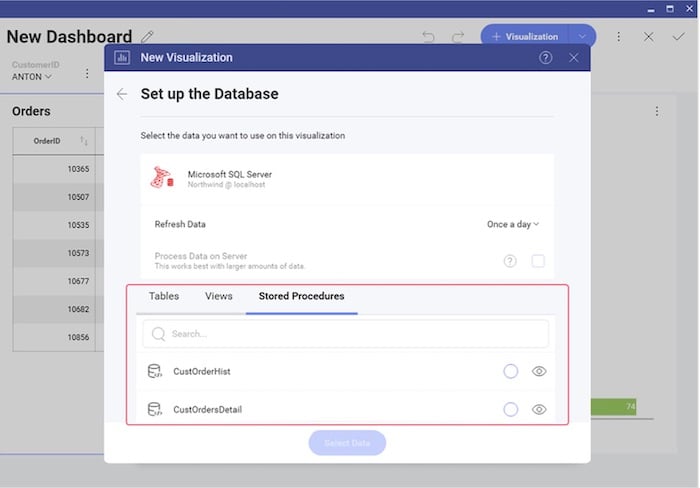
    To create a new visualization on a database that supports stored procedures, first review the list of stored procedures that are available. You will treat the stored procedure you select just like any other data source. The only difference is a parameterized stored procedure, which you can use in a Filter by passing variables to the stored procedure.

    Some embedded analytics platforms, for example, offer complete programmatic control over stored procedures and parameters via code. To pass a stored procedure name, as well as any required parameters, use the ChangeVisualizationDataSourceItemAsync function. This is an example of passing a stored procedure named CustOrderHist and passing the CustomerID parameter in the Reveal platform.

    The Power of Stored Procedures

    Stored procedures are a powerful tool to query a database and return results to a calling app. They are secure, offer performance advantages and are easy to maintain and modify. Stored procedures can be a good avenue for simplifying the way you present data and deal with parameters in your application code versus using error-prone and lengthy ad-hoc queries. As you develop applications, you may want to consider incorporating useful stored procedures in your next project or visualization database.