Author: Glen Rabie

  • Why an Embedded Analytics Maturity Framework is Essential

    Why an Embedded Analytics Maturity Framework is Essential

    Contextual analytics, or embedding analytics directly into a business application’s transactional environment and core workflows, is the most sophisticated stage of business intelligence (BI) currently available to organizations today. It is one level ahead of the traditional integration of analytics, which is a standalone capability presented as a separate dashboard or reporting module.

    Today, there is an increasing shift among organizations toward embedding transactional analytics into their enterprise applications. Because contextual analytics is the most advanced option in the market, there is also an increasing need for assessing our analytics readiness first.

    The fundamental difference of contextual analytics lies in how it offers analytics to the user to explore data or derive insight within their transactional environment rather than accessed as an external tool. This approach requires a deeper evaluation of the product’s analytical maturity level using a formal framework. Having such a framework can act as a deployment guide for your developers for every stage of embedded BI implementation, including contextual analytics.

    But first, what makes contextual analytics so different that it necessitates a readiness evaluation?

    Contextual Analytics Vs. Embedded Analytics

    With contextual analytics, dashboards, reports and charts are no longer separated but are part of the main user experience. This integral change necessitates a closer look at your data and integration capabilities to align what it brings with all aspects of your software, including existing analytics.

    Embedding these elements directly into core software workflows isn’t a replacement for any existing analytics, but is instead another big step toward making data and analytics a more seamless part of your end users’ everyday work.

    It should be stressed that contextual analytics accommodates various levels of implementation and business requirements. Analytics can be embedded lightly, such as in the form of basic in-line charts and graphs users can see as they explore your software, or embedded deeper to offer AI-assisted insights and real-time alerts that trigger action from users while they work. It can be integrated with an experienced BI vendor partner or in-house if you possess the skill set internally.

    Avoidable Pitfalls of an Improvised Approach

    The need to assess your application’s analytical maturity and readiness for embedding analytics directly into the transactional workflow comes down to avoiding unnecessary BI roadblocks. 

    For many organizations, BI and analytical capabilities are traditionally lower in priority than other aspects of the software. Intending to add BI features later is well-meaning and understandable, but leaving developers to add in features intermittently and leaving it to your users to demand them when needed creates an issue of visibility. Vendors typically lose sight of what their application currently is capable of analytically, or what development needs to make the addition of a new feature not only technically achievable but worth the time and cost investment.

    If you take the time to reassess your application’s analytical capability, your developers and leaders can better understand that your product could be at an earlier stage of readiness than previously believed, and prepare accordingly before seeking out a contextual or other BI solution.

    For example, approaching contextual analytics ad-hoc could mean you find an unexpected older dashboard module, a cost that could have been accounted for in a formal maturity assessment. 

    What it comes down to is this: Implementing a basic dashboard module or data export feature, completely separate product features, is fundamentally different from fully embedded analytics in your users’ core workflow experience. Pursuing a formal evaluation to guide the introduction of contextual analytics—or even a form of embedded analytics at an earlier stage—means your users and product receive the best type of analytical capability your business is ready for today.

    The Five Stages of Embedded Analytics Maturity

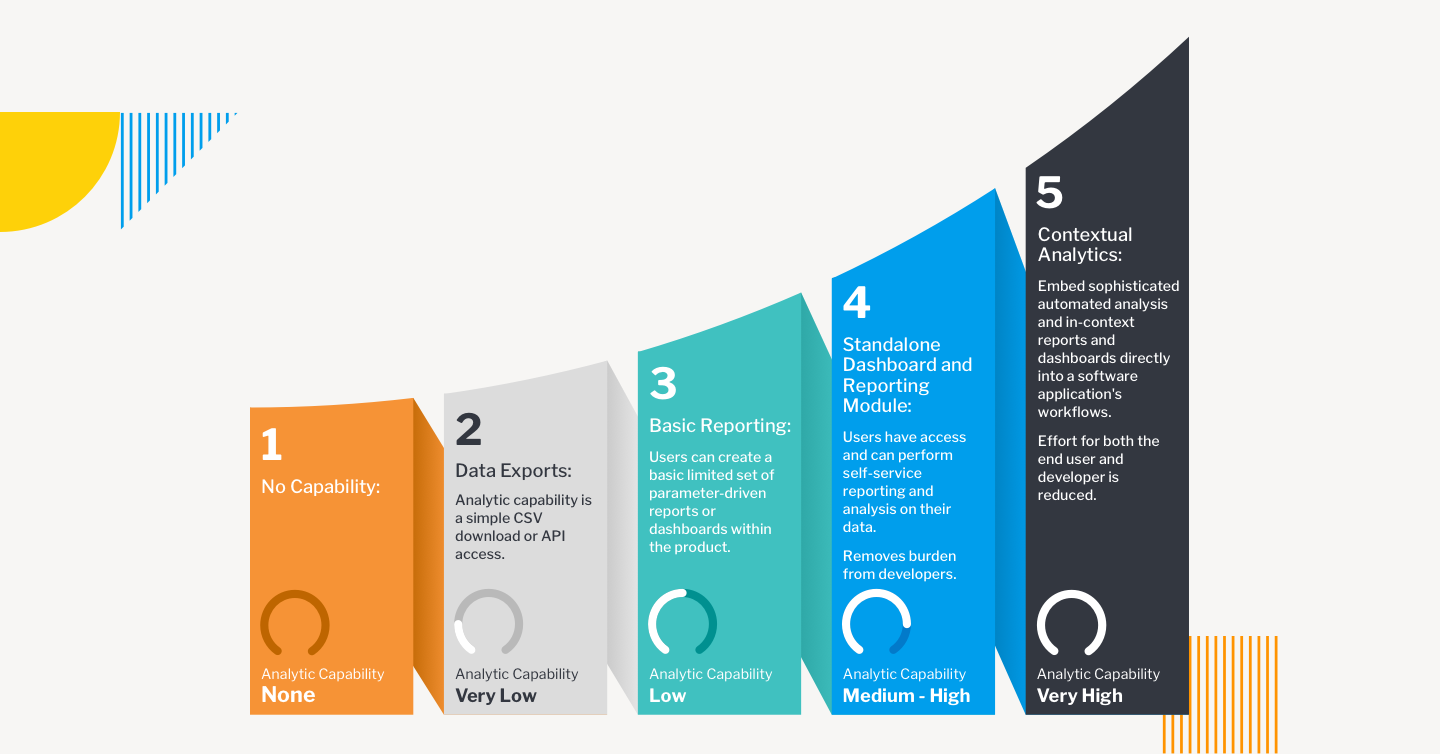
    Based on our experience, there are five possible stages of product development, as illustrated in the embedded analytics maturity curve below. As contextual analytics is the final, most advanced stage of an embedded analytics integration available to product owners, the need for a formal assessment of maturity is most important, should it be the target state.

    Accelerating the implementation of contextual analytics comes down to your skillset, which will allow you to identify and evaluate your state of readiness accurately and determine a BI solution’s flexibility. If you do not have the internal expertise, implementing contextual analytics is easier with the help of specialized BI vendors that can help you in your assessment, and offer a contextual analytics platform built around openness. We recommend you look for vendors and partners that allow for:

    • Advanced APIs that lower total integration time and ensure the need to rearchitect the software is minimal to zero.
    • Customized experiences to make your desired contextual linkages, such as showing a user a relevant embedded chart when they click on a table of a client, possible.
    • An open platform that allows for options for on-premises, cloud, multiple operating systems that guarantee long-term security, scalability and flexibility with your analytics.
    • Rapid adaptation to your product development roadmaps with automated processes and administrative tools to lower total cost of ownership
    • White-labelling to make the rebranding and blending of the analytical solution and your native application components seamless.

    Ultimately, having an awareness of your product’s readiness and taking the time to examine your application’s current state means you avoid costly integration mistakes, save time and ensure developers implement the best solution according to your exact needs now.

  • Turbocharge Enterprise Apps With Contextual Analytics

    Turbocharge Enterprise Apps With Contextual Analytics

    Software product managers and developers typically treat analytics as a standalone capability—something to be integrated into their application’s dashboard or reporting module. As a product feature, analytics is undoubtedly a valuable tool. But offering it merely as a tacked-on function is an approach that lags behind where your users are today.

    When data analytics is limited to dashboards, users must switch away from their transactional environment whenever they need to interrogate data or derive insight. This disrupts workflows and interrupts trains of thought, creating friction for the user. Moreover, a standalone analytics capability doesn’t provide context or guided analysis. Users must look for anomalies or trends manually. As a result they’re less likely to dive into analytics to support good business decision making.

    Contextual analytics, on the other hand, gives users a powerful tool right at the point of their daily work. Contextual analytics is defined as any analytics solution that is integrated directly into an application’s core workflows. This approach delivers the benefits of analytics in the situational framework where decisions must be made.

    Embedding analytics in this fashion creates significant value for the user. Charts, tables and metrics sit side-by-side on the screen, alongside the application’s central functions. With one click, the user gains instant, guided and dynamic insight.

    Such an improvement is helpful for all kinds of business activity. Retail store managers can instantly access demand forecasts while creating weekly work schedules. Inventory managers can view trends and analyze stock without leaving their ordering screen. Supply chain, finance, logistics, sales and marketing, manufacturing—any process involving routine data processing can profit from contextual analytics.

    A Rich Workflow Asset

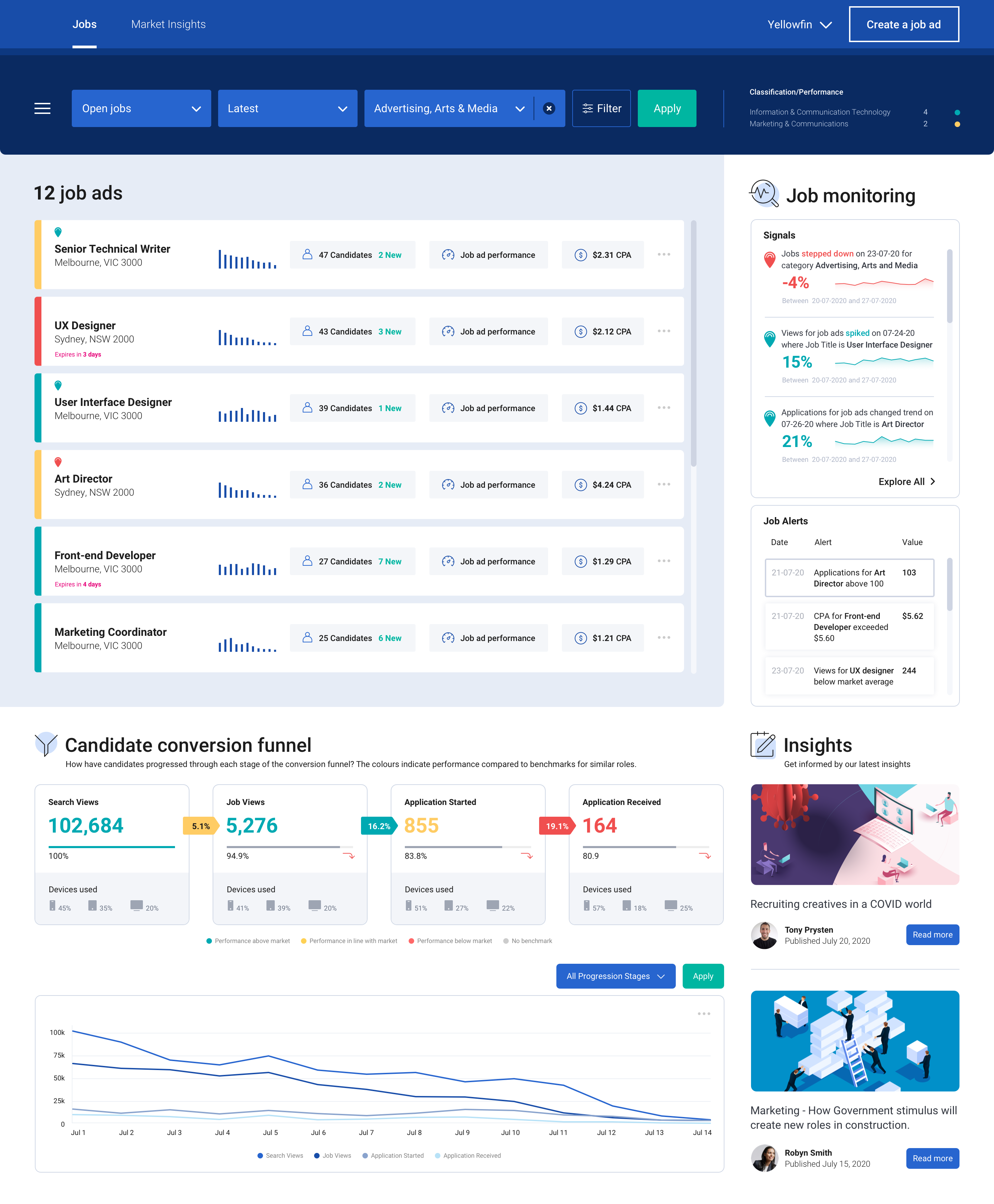
    When embedded into transactional workflows, contextual analytics can deliver two forms of understanding. The first comes from predefined visualizations, ranging from simple KPI numbers to line and bar charts and even contextual dashboards. These visualizations are presented based on user action; a customer’s purchase history, for example, can pop up in chart format while viewing the account record, enabling the user to make decisions about sales incentives or priorities for service.

    Second are dynamic analyses and alerts. These indicate that either thresholds have been crossed or anomalies in a record have been discovered, prompting the user to explore and take further action. Pop-up alerts can be invaluable in sales, production, finance or many other disciplines.

    For both predefined and dynamic contextual analytics, outcomes can be based on simple aggregations of transactional data or as the result of sophisticated data science modeling (e.g., propensity to purchase). Specific outcomes can be set by either the product manager or the user to maximize utility.

    Contextual analysis is ideal for supporting or triggering actions according to any business need. The capability enhances transactional workflows by providing metrics pertaining to a particular transaction; it will also trigger a new workflow via an alert or suggestion for action, based on the output of a data science model.

    contextual analytics

    Of course, none of this means that dashboard-based analytics aren’t still important. Users will always need to conduct broad data analysis. Dashboards and/or report analytics allow users to monitor overall business performance, drilling down when necessary into the details behind the numbers.

    With the secondary addition of contextual analytics, however, users can be continually guided in their decision making as they work. They receive a constant flow of deeper insight, supporting management tasks intuitively at a granular level.

    Deployment Framework for Developers

    Embedding transactional analytics into enterprise applications can be directed according to a maturity model. There are five possible stages of product development:

    • Stage One: No Capability. The main engineering focus is on bringing a new application to market. Minimal Viable Product (MVP) attributes lead development, and reporting capabilities are rarely included.
    • Stage Two: Data Exports. Analytics are provided based on customer feedback, but only through a CSV download or API access that allows the end user to analyze data in their preferred tool. The burden of building analyses rests with the customer.
    • Stage Three: Basic Reporting. A limited set of reports are supported by analytics, and in-house developers are tasked with creating the capability, often to the detriment of new features for the core product.
    • Stage Four: Standalone Dashboard and Reporting Module. This is often the end journey for most enterprise applications. Self-service reporting and analysis are available via out-of-the-box dashboards and reports.
    • Stage Five: Contextual Analytics. Sophisticated, automated analysis is available as part of the application’s core workflows, as well as at the dashboard. Users are guided to optimal decision-making at both the transactional and reporting level.

    These stages are not mutually exclusive. Especially for stages four and five they can be additive, so that end users will have a variety of mechanisms to access the data they need, at the time they need it.

    contextual analytics

    Accelerating Implementation

    Elevating the end user analytics experience is easier to achieve than it once was, thanks to BI vendors that specialize in embedded and contextual analytics built on an open platform. The best vendors are able to adapt quickly and easily to product development roadmaps, aligning features to meet specific needs and following up with administrative tools and automation processed to support the lowest possible cost of ownership.

    Working with an analytics vendor means development teams will have maximum support from prototype and design to integration, deployment and subsequent iteration. Options for Windows and Linux, on-premises or cloud will ensure the versatility, security and scalability required for highly marketable offerings.

    How Customers View Analytics

    As a product feature, analytics can often be dismissed as an afterthought—but your users don’t see it that way. BI analytics is increasingly seen as critical to business governance. Users want to glean as much insight as possible from the data they’re collecting—and on multiple levels. This means your users want to get more from your product, even in ways they haven’t yet imagined. Contextual analytics can provide that enhanced appeal for your application, putting your product out in front at a time when enterprise applications are more essential—and more competitive—than ever before.

  • Embedded Analytics Essentials: A Checklist for Success

    Embedded Analytics Essentials: A Checklist for Success

    Integrating the analytics capabilities into your application can be easier than you think

    Today, the ability to create and explore dashboards and reports, embedded directly into the apps your customers use every day, is no longer a luxury but a necessity to keep your product competitive and deliver value to users.

    Embedded analytics brings many benefits for different groups. For end users, it’s a valuable tool to explore their data and discover new insights. For analysts, it’s an integral capability for advanced performance analysis. For product managers, it’s the best way to enrich and cultivate a data-driven experience for your customers with the latest analytical capabilities, built-in.

    Moving away from decisions based on instinct toward decisions based on analytics and metrics delivered by centralized systems is one of the most impactful changes you can drive today. But for product managers in the business of delivering software or utilizing an application to drive customer interaction, the choices available for embedding analytics is a looming challenge.

    This article covers the key challenges, scenarios and checklist considerations product managers need to tick off before implementing any type of embedded analytics solution.

    Embedded Analytics: A Business Case for Buy vs. Build

    Typically, the decision around embedded analytics boils down to build or buy.

    Even with a need for fast technical integration and time-to-market pressures, many product teams first lean toward getting in-house developers to build embedded analytics into their app.

    It’s an understandable first thought, given many have a specific vision for their app that a third-party might not ‘get’ immediately. But opting to build-in analytics more often than not leads to long-term challenges that aren’t always initially obvious.

    The fact is creating an analytics platform from scratch is a complex task that takes years of work to create and refine. Aside from the advanced data expertise and technical integration required, having your developers focus on embedding analytics means they now have to:

    • Face a very high investment cost to recruit the necessary skills for implementation.
    • Provide all support, maintenance and upgrades for your homegrown BI functionality.
    • Replicate the look and feel of your core application to ensure UX consistency.
    • Match the analytical features of specialist BI solutions—a near impossible task.

    With the time and skills needed to build your own analytics into your app from the ground up, you could face higher costs, increased risk and delayed time-to-market for your product—not to mention less time innovating and improving the core product experience for your users.

    Your users ultimately expect to have data accessible to them for their day-to-day work. When they use your product, they will demand a certain level of reporting and analysis comparable to the BI tools they may already use in their own businesses at the moment—and yes, it will go beyond just having basic dashboards. If you don’t have confident answers for the most common questions required before building an embedded solution in-house—do you have the expertise, the manpower, time and knowledge—it’s not advised to pursue the build path.

    So, what about buying an embedded analytics solution for your application?

    What to Look for in an Embedded Analytics BI Solution

    Buying an established embedded analytics solution often does away with many of the problems of building it.

    You can shift away from home-grown reporting to a proven platform that can seamlessly integrate custom analytics into your app, amplify the reach of your product by engaging new and existing users with the latest analytical features, and even automate data discovery and analysis so you gain competitive advantage—though the last capability depends on the particular vendor.

    However, buying comes with its own very important considerations that your product team and business as a whole need to evaluate and answer before making a decision. Below, we list the most important things to look for in both the embedded solution and the partner behind it.

    Does it include everything I need to meet end-to-end operational reporting needs?

    Your users will have a range of functional needs from the embedded analytics solution you buy, so the first thing you must answer is whether it can cater to their day-to-day work and provide access to advanced analytics. For instance, your customers want to know what to do next: Some might only need tabular reports (traditional), while others will demand richly visualized and interactive dashboards that drive action (modern). Eventually, some may look to use automation and AI in their analysis (augmented). The best options are those vendors that let you embed it all—dashboards, authoring, charts, collaboration, data preparation and modelling, admin and security. How each element is embedded (iFrames, JavaScript libraries with REST API calls) and where embedded code can run (cloud, desktop, mobile, web) is just as important to factor in, too. It’s not just about having dashboards in your app, but ensuring you have future-proof capability that continuously scales with your users as their data needs grow.

    Can the solution be embedded seamlessly?

    It’s not just all about having the best and latest features. A cohesive, seamless user experience between the analytics portion of your product and the core software itself is a big part of delivering an exceptional product, so when choosing to embed analytics, ensure the solution allows your team to have exceptional control to make it look like a part of your app rather than like one different app hosting another. Many modern embedded solutions allow you to white-label; this is recommended to allow for consistent design across your platform, as you will eliminate your users’ potential concerns around security, performance or support with using another product.

    Can it help me ensure faster time to market?

    A common problem with creating an embedded analytics solution in-house is the investment in time and money it takes to get your product to market with the new capabilities. It’s also difficult to ensure the integration process can be done as quickly and efficiently as desired. The embedded tool you buy should accelerate that process and significantly reduce the development cycle, so your team is able to begin using your new analytics within days instead of weeks and your devs stay focused on improving your product’s core value instead of configuring reports.

    Next Steps

    Selecting an embedded analytics product can be a difficult task, but so long as you keep your product and analytics objectives aligned and follow best practices checklists, integrating the latest analysis capabilities into your application is not as far-off a future as you may think.