Author: Don Macvittie

  • What Customers Need From Sales and Marketing

    What Customers Need From Sales and Marketing

    There are plenty of historical examples of good solutions being buried by inadequate or outright wrong sales and marketing tactics. As an analyst, I often talk to the marketing, marcom or AR/PR department of a company and think they could do their solution more justice. Normally, it is little things; sometimes, not so much.

    But there is one industry-wide thing that I would like to see changed because it impacts all of us and is endemic.

    We don’t want to hear about your five biggest customers. We’re thrilled that you sold into several Fortune 100s. But you spent those five slides of your presentation basically saying the exact same thing five times: “We sold into a Fortune 100!” (or 500, whatever). You lost the opportunity to expand the message to “… and we support all organizations.” The idea that supporting a company with a run rate larger than most nations is in any way relevant to supporting small-to-medium-sized enterprises is mistaken. Talking about an example of a large customer helps us to understand scalability and support levels. Then, we want to know how that works for the rest of the market because most organizations are not Fortune 500s, by definition.

    Tell us how the product is used in organizations closer to our size. Instead of five slides about massive multinationals, include the best two that showcase the product and its benefits. Then, use those other three slides to talk about the wider market. People expect that large enterprises like the Fortune 500 pay more in raw dollars and get more support in raw hours. They want to understand how that relates to an organization their size. Because if you don’t work at an F500, information about F500s has limited usefulness.

    I recently had a presentation with a vendor; I love the technology, have been following them for years and use their solutions in a small business (not the reason for the presentation, but an expression of my belief that they offer a good solution). And their presentation was all about how well they serve large organizations. Thing is, they do a great job of serving small organizations, too, but unless you were an analyst like me, you would not have known that from the presentation. I get a lot of briefings, so while this one spurred me to write this blog, they are not the only ones, by far.

    So do us a favor: Give us presentations that are relevant to the entire market, not the subset someone told you is “most important.” It is, indeed, impressive if the solution can scale to multinationals and it is relevant. Just don’t obsess about it; we need to know if it supports our architecture, tooling, etc.

    We’re here rocking it every day, you should bring the broadest focus you have to let us know if you can be part of the solution moving forward. If you don’t, well, we might just think our business isn’t all that important to you. And we’re pretty sure most vendors don’t want that.

  • Shift That [bleep] Left

    Shift That [bleep] Left

    Seriously. The more you can shift things like security and test to the left, the more responsive the DevOps process will be. Some things are better shifted right … But only while solving the problem with shifted-left work. A good example is blocking zero-day attacks proactively while the development process fixes the code to stop the attacks permanently.

    One thing we in IT are terrible about is following up on that “fix it” part—because we are very busy. Once a problem is blocked, we tend to fight other fires because we have too many things going on. We have absolutely got to get better about that. But I don’t want to get sidetracked. Today’s topic is about fixing bugs/vulnerabilities as they are created.

    One of the issues with the way we used to handle test and security was that by the time we had “This is an issue we need to fix,” feedback, the developer was off doing other things. But with the increasing inclusion of security and testing in the DevOps process, we now have the ability to provide feedback far more quickly.

    My favorite innovation in the DevOps space is not some wild new bug/vulnerability detection feature, nor is it rampant use of AI (though some uses of AI do come close to being my favorite). It is the humble IDE plugin.  As a developer, writing buggy or insecure code is never the goal, but it happens every day. IDE plug-ins, hooked into test and security software, allow developers to get a heads-up that there might be an issue while writing the code. This not only addresses the problem while it is fresh in the developer’s mind, it also allows developers the opportunity to improve their craft simply by understanding which issues they create often and learning how to avoid them.

    We have all written bad code. I once actually over-wrote databases for a bank; it was a great humbling and learning experience for a young hotshot who needed to be reminded he was not perfect when coding. Others no doubt have similar, if less catastrophic, stories to tell. The ability to get warned about issues—but quality and security—while writing the code cannot be overestimated. Some developers will hate it because it is more intrusive than the old school “Okay, all the code is written, you can test now,” process, but it is powerful precisely because it is more intrusive and proactive.

    The challenge for those in the testing and development security spaces will be to keep false positives at a minimum. I’d say zero, but I’d rather get the occasional “Oh, that. Yeah, not an issue in this case,” than go through having it tell me things throughout development and still end up with buggy/insecure code.

    You all are still rocking it. The amount of software in use every day across the world is staggering, and you’re cranking it out and keeping it maintained—whether you’re working on internal applications or commercial packages. You’re making it work. Take a look at QA and security IDE plug-ins, make an honest assessment of whether they could make your work more secure and/or higher quality. I think they can for nearly all of us. And they can save time by doing it earlier in the development process. And maybe you’ll get recognized for rocking it. Okay, probably not, but it is possible.

  • Agile Pricing, Agile Uptake

    Agile Pricing, Agile Uptake

    It is pretty amusing, the number of software vendors that are selling us tools to work in our Agile and/or DevOps infrastructure but are not at all agile in their sales cycle implementation.

    Top-line vendor hint: If you have a page titled “pricing” and there are no prices on it, you’re doin’ it wrong.

    Let’s be serious, here. I should not have to drop everything, call you and go through a whole lengthy, involved process before I can implement a product that you claim makes my development or deployment life cycle more agile.

    Beyond the ‘there is no price on the pricing page’ issue, there are the vendors that go to great lengths to keep us from knowing what they cost. Some fail because they have public cloud images with pricing on them, but some even get around that by including “bring your own license” and selling the instance cheaply.

    In almost every case, competitor pricing is available, is simple and TCO can be calculated. If yours can’t, you are not winning mindshare.

    I probably recounted here that, once, a big-name database vendor tried to charge us insane amounts using the “You have to talk to us” model. I escalated to my VP, who told the salesperson, “I am not buying your Lamborghini,” and we then paid to have the product ported to a competing database with open and easy pricing and minimized use of the product on the offending DB. The moral of the story is, “Keep it simple and make it worthwhile.” We would have paid millions more than we did (which was already a lot) for that project. The vendor got nothing by making convoluted pricing schemes that allowed them to say every endpoint was a user and insisting we should pay the full license price for them.

    Top line vendor hint number two: We’re professionals. We install, configure and manage a variety of systems every day. If your system requires services to get up and running, you should consider why that is.

    We are not looking to spend months scheduling installation and configuration because you, the vendor, think services are a mandatory part of implementation. We can deploy entire infrastructures without requiring assistance; what is wrong with your product that we cannot deploy it in the same manner?

    In general, organizations are willing to pay well for a product that does the job. Hidden pricing, confusing pricing and mandatory services to get the system running all make it harder for an organization to evaluate the value of the product. Saying “Start Free Trial” without explaining pricing is perhaps the funniest vendor move ever. Of course we want to know what we might be getting into before we sign up for that free trial!

    Sell us good tools at a clear and reasonable price. We’ll buy them. Because we have a job to do and we want the tools to do it. We don’t want to drop everything to find out what it will cost us to do it and we don’t want to be forced to buy services to get it running.

  • Know What You Want and Need

    Know What You Want and Need

    Over the years, what we purchase from vendors has changed significantly. It used to be that IT would define a need, go out and find a bit of software to solve it, install and configure the software and, in most cases, spend the majority of time on the project getting it to work correctly in their environment. Those days are largely gone. First, we started buying appliances for some functionality, then we started using MSPs for some or all functionality, then some vendors wanted to deliver in a VM where they could make configuration much easier by controlling the environment. That was the first step to virtualizing purchases. Then we started looking at infrastructure-as-a-service (IaaS), then SaaS, then some vendors offered PaaS … Currently, all of the cool vendors are offering containers—which are an improvement over VMs, and offer a virtual appliance that is quick to get running and tested to do what it was purchased for. Or at least tested to do what it was sold for. We’ve all got stories about what we did with these purchases that were “off label”—things that a product really wasn’t designed for. Along the way, we also introduced open source vendors; a bit of an oxymoron that really described service orgs that base their product on an open source project. Some far more successfully than others.

    And all of that, dear reader, is why we are here. Before purchasing, there is a lot more to find out than there used to be. What, actually, is the product this software vendor is selling? In the end, IT is looking to solve a problem. Most of the time, whether that problem is solved by SaaS, local install or cloud instance is less important than how well the problem is solved. But implementation—and licensing—are important to an organization if not immediately, then over the long term.

    When purchasing an open source “product”, you’re … actually not. You are getting the product and purchasing support. Since open source can be hacked to run just about anywhere given enough time, more than one OSS vendor has pretended that makes them superior to commercial products targeted at a specific platform. That is blatantly untrue—unless the OSS vendor is supporting the product anywhere and everywhere which, of course, they are not. I can port the OSS project MyFunApp to any platform I want without paying for support that won’t do a thing for me when I get it up and running on OS/2 (as an extreme non-existent example).

    SaaS has more issues when it comes to TCO. While pay-as-you-grow is cool and all, locking in a monthly payment forever is a big step and should be considered. And at an enterprise, “forever” needs to be considered realistically. Implement a particular SaaS CRM and you are unlikely to move to another, even if you claim that you will in a heartbeat. It’s work. A lot of work. It is definitely possible, but for most organizations, unlikely. So know what you are getting into. And while you are evaluating, don’t forget to consider variable charges, which most SaaS products have. Make certain you understand what the actual monthly costs are likely to be. IaaS suffers this same variability problem, as many of us have learned.

    Containers are a very sweet solution to appliance-like functionality—drop a container into your Kubernetes flavor of choice and move along. The problem here is a combination of proliferation—how many are required? One per pod can get expensive over time, for example. Those resources aren’t free, no matter the platform. The other issue is updates. Automatic updates are the norm for container instance-delivered products. From a security perspective, you should have questions. Updating things in your network should probably require your approval.

    I’m not suggesting that one delivery method is better than others here; I’m simply suggesting that we all need to be more deliberate about those choices than we’ve needed to be in the past. Knowing not just SLAs but the cost and support implications of every choice is important both today and down the road.

    Keep kicking it, and keep picking the solutions that best solve the organization’s problems. Just be aware that sometimes, the issues a delivery method introduces undermine the effectiveness of the solution.

  • Where Does Your Data Go?

    Where Does Your Data Go?

    One of the most interesting developments in security and compliance in recent years is the ability to follow a piece of data through an application from input to consumption and see each bit that touches it. For me, the reason this is so interesting is that it allows postmortems to actually determine exactly what was lost in a data breach. “Oh, that library was compromised? Okay, let’s see what inputs that library actually touches …” It’s so very cool, given the free-for-all that data has traditionally been in applications.

    I’m not a huge compliance fan for a variety of reasons, but this is one great result of mandating compliance. I don’t think that we would have this level of data tracking without compliance requirements driving it.

    So what can we do with this information? That’s the interesting part that I think we’ll see developing over time. If we know everywhere that a given piece of data is used, we have a powerful bit of development information. It is still early days for implementation–this is not easy stuff–but think about it. I could see a future where all redundant data access is eliminated. If we’re getting the same set of data from multiple sources, and it is being fed to the same internal consumers, then we can standardize the you-know-what out of it. A singular library to standardize formatting, a singular library to standardize look-ups, etc.

    For the most part, we currently validate and format on input. Like straight away as the data is brought into the system. That is a great idea for a system where we are uncertain where the data is going, and are sure that some attacks are coming through those inputs. But what if we discovered 10,000 more lines of code to maintain than is necessary? What if data tracing allowed us to eliminate that code by centralizing those functions? We would have to harden the routine doing the validation and formatting–because it will be getting dirty data–but no more so than we are doing literally everywhere today.

    If we can reduce source code by using a tool that is designed to improve security, is that not the ultimate shift left? The volume of source code that handles data entering the system is staggering, also. For enterprise systems, most of what we develop is actually data processing, no matter how convoluted it gets. The data store is the central repository and apps are simply accessing and modifying it. So shift left with regard to data is huge.

    Consider it. I know that you are all super-busy with other projects, but less source code lightens the load on everyone; take a look at data tracing functionality in products you already own (mostly available in vulnerability management and source code scanning toolsets), and see if it suits your needs. It might save everyone time and will help with some data-centric compliance requirements, too. That leaves you more time to make systems better.

  • Cloud: Why Must We Be Confusing?

    Cloud: Why Must We Be Confusing?

    When I was a kid learning to play Dungeons & Dragons (D&D), the concept of level was never confusing—though the authors should have seen that it very well could be. For those unfamiliar, D&D has many uses of the word level—character level, caster level, spell level, dungeon level and, increasingly, as time went on, monster level. I can almost guarantee that I missed some uses of the word level in the game, but you get the idea.  In fact, if I missed your favorite, feel free to add a comment.

    We used context to determine what was meant, and we clipped along without any (game) world-shattering consequences. Though some people were horribly confused.

    (Side note: I worked with D&D co-creator Gary Gygax for a while and he knew about the over-use but didn’t feel that after D&D’s surge in popularity it could be fixed. His later RPG creations did seek more clarity and less word reuse, but most RPG systems available today still have many uses of the word level.)

    I am comfortable declaring that those of us who grew up on RPGs are now running vendor companies and doing analysis. Otherwise, why would we have so many uses for unique words? I mean, we no sooner got DevOps than we made a total mess about what, exactly, you meant when you said “CD”. Was it continuous deployment? Continuous delivery? Both? Similarly, we malformed continuous integration. Let’s call it CI—and then make an entire market around it really being continuous test while it is still used to refer to continuous integration, because that is not at all confusing.

    But then we jumped to cloud, and spent some time being really busy trying to confuse everyone about what “cloud” actually means. Is it only public cloud, or does it include private cloud? If private cloud, does that include virtual private cloud only, or does it include cloud in a co-host or data center? Is SaaS actually cloud, or is that a completely different beast?

    And that brings us to the reason I came here to write this particular blog post. We are now being barraged with “cloud” that includes Docker hosted on Kubernetes. I think of this as akin to one too many uses of the word “level”.

    Kubernetes is not cloud. It offers similar infrastructure in a smaller format, but the key to Kubernetes is that it supersedes cloud. Kubernetes doesn’t care about your cloud (or lack thereof) once it has been implemented. Cloud simply becomes infrastructure-as-a-service (IaaS) when Kubernetes is deployed. This is terribly important for a variety of reasons, not the least of which is that if you drop Kubernetes onto a cloud provider, you have two sets of infrastructure to lock down. Two sets that have a lot of internet exposure—because it’s not called “public cloud” for nothing.

    I do understand where referring to Docker hosted on Kubernetes as ‘cloud’ comes from; there are a ton of similarities. But Kubernetes needs a platform—hardware or virtual—to run on. And hand-waving the implications of that nested relationship is asking for trouble. And when cloud is either a thing of the past or so totally commoditized that people don’t think about it, Kubernetes or its successors will likely be the reason. So let’s take it easy re-using cloud too much.

    In the short term, though, my advice is that if someone in the industry mentions cloud in their product offering or analysis, ask which use of ‘level’ they mean. Because honestly, Kubernetes, if implemented on hardware or IaaS, can be picked up and moved to whereever it is needed. And that’s not “cloud”.

    Keep kicking rear. Doesn’t matter where your apps are running, it matters that you’re keeping them running and locked down. Keep it up, and call things what they are—container orchestrators are not cloud platforms, no matter which functionality they share. And to all my RPG peeps, keep having fun. There are always new adventures to be had… No matter the level.

    Image: Photo by S L on Unsplash.

  • Fear of the Unknown

    Fear of the Unknown

    We IT folks are pretty fearless. Because it is newer technology, and change in IT is easier than in areas like heavy manufacturing, we are regularly thrown new tools, products and methodologies and expected to be able to master them. And we do. And it works. If your career is more than a couple of years old, you are not doing what you started out doing. DevOps and Agile have made this process more pronounced because they increased the rate of change, but this phenomenon has been going on since the PC became readily available. Someone somewhere is currently developing your next toolset. And when they do and it gets thrown at you, you’ll figure it out and run with it.

    The problem is that our architectures are never black and white, and we should fear the unknown more. The unknown residual cruft that is all over our networks. Doesn’t matter if “networks” means data center, cloud or both, there’s residual cruft on it. Some organizations even have a full-time position finding cloud instances and services no longer in use and eliminating them. But it is much more broad than cloud instances; there is garbage all over your network and it is time to try to clean it up.

    Most of us believe that we can’t possibly get a handle on everything that is out there. Oh, zombie containers and VMs are relatively easy, but the modules and libraries we loaded up and then, through the natural evolution of the software, stopped using, or whatever was bundled in with the OS chosen for that particular project, but was never used—it’s all over, it’s hidden and lots of it isn’t easy to find. That doesn’t even touch on the software that one employee from accounting absolutely had to have—but that employee is long goneand no one in accounting is willing to remove the software, either because they’re unaware of its existence or because they are unaware of what purpose it might be serving.

    There are tools to help with some of this, like SBOM generators for excess software on instances, and application maps that work much like network maps to help you understand what is interrelated. But they’re not perfect. They can’t be. You’ve been building this spaghetti application infrastructure for years; it’s going to be tough to work out. Get a list of what’s deployed, tag a person as responsible for it–that app in marketing? The person who requested it is responsible for it (or their manager is, if the original person is gone). IT is responsible for cataloging and, in some orgs, managing the app, but the business unit can explain why it is in use, and if it is still necessary.

    It’s a ton of work and, as a former enterprise architect, I can confidently say that it won’t be easy getting names attached to apps. Some apps you might have to turn off to see if they are still in use … and the work will likely never be complete because the infrastructure is changing non-stop as you work.

    But it’s worth it. It saves the org money; it reduces IT footprint and it reduces security exposure. It may even save IT staff time, which is one of the most precious commodities your organization currently has. So, start wrangling. Start with one business unit and ask them to help you–after all, they are almost guaranteed to have running apps or SaaS that IT is unaware of. The goal is not to take control of those apps and relationships, but to inventory them so that when they’re no longer needed they can be cleaned up. A side benefit is that if four business units are using similar software outside of IT’s purview, it may be possible to merge those solutions for a corporate approach … But that’s a blog for another time.

    Meanwhile, keep rocking it! Just remember there is more on the cloud and in your data center than are dreamt of in your architecture plans (many apologies to Shakespeare). And keep solving the business’ problems.

  • SCA, SBOMs and Floodgates

    SCA, SBOMs and Floodgates

    Two criteria are used to determine pervasiveness of a new idea. Availability of an easy-to-understand solution and customer need. Given both of these items, what might be a market-differentiating feature available in a single IT/DevOps market becomes a wave of options in multiple markets that an organization can (and should) choose from.

    What started this off? Well, I’ve been working in areas that involve expansive use of open source. This is pretty much to say, “I’ve been working in IT,” at this point, but that’s a different blog. The thing is, today, working with open source implies a complex software infrastructure that, traditionally, no one actually had a handle on. What is directly included in that project? What is indirectly included in that project?

    But then we had some pretty stellar security issues related to commonly-used open source. And we had commonly-used programming language modules pulled out from under hundreds of thousands of applications. Then we started paying attention. Or, more accurately, then we finally set out to fix a problem we’d been ignoring.

    This market is a bit confused by different use cases and the fact that there are two toolsets to achieve what IT sees as one job. So let’s talk about the complexities, just for clarity. First off, a software bill of materials (SBOM) is the list of what is included in a software project. The complexities here are twofold. From a programming perspective—meaning tools designed to be used by programmers during development—“included” means libraries, modules, etc. that the application calls on to do what the organization needs. These are “included” in the build process. From a systems perspective, “included” means everything installed on the image when it goes to production. These are similar but very different lists. The developer list is a subset of the production list because all of the items in the development list are included in production, but the production list will have other software that is used to support the developed application. Think of the application having all of its libraries and modules, but assuming SSL termination will be there. Because it will. In the image. That’s the difference. Many products have had an internalized version of SBOM for years now—developer security tools and release scanning tools pretty much require a list of everything they need to scan. But few made these lists public, and many tools did not have them.

    Software composition analysis (SCA) takes the SBOM and adds value. While a list of everything included is useful, a subset that lists everything that’s actually used is more to the point, for example. So is a list of flaws found in included libraries/packages and suggestions on how to address them. This can be done from either the source or production SBoM side, depending upon implementation.

    Once the value of both tools was made clear—and implementations existed that showed both how to implement them and what the benefits were—the floodgates opened. Now there are few DevOps or security tools that do not offer one or both of these features. That gives us an embarrassment of riches. Which tool(s) do we use for compliance and security review? As we do with data, I’m going to suggest that a single product is chosen as the “source of truth” and run with. At this time, I do not have suggestions on which ones are better for this purpose, just a suggestion that if you use different ones for different purposes you are likely to get different results, and that isn’t going to help simplify things at all. So, look at the ones you already have access to—they’re in enough products that you likely have more than one available in your existing infrastructure—and make it your standard.

    Then, use that standard to help monitor use of open source. Monitoring can help with open source licensing, with application and infrastructure security, with image simplification and with compliance. So strip unused packages out of images and clean libraries that are no longer called out of your build process. Respond to issues faster, and keep that application infrastructure you’ve been nursing along humming. And keep kicking it; your users should appreciate it, even if they do not.

  • This Has Been a Test

    This Has Been a Test

    For nearly the entire history of application development—certainly since application development became available to a larger market with the adoption of the personal computer for expansive business use—testing has taken a back seat across most of the industry. This is not because we don’t care about code quality but because it takes resources away from developing cool new tools—or even products—and slows down release cycles. Historically, both of these issues have been huge. Manual testing staff grows quickly from a few people to a massive department and waiting for that process to complete could take forever.

    So, we’ve not done a lot of it. Oh, when executives or someone in leadership demanded more thorough testing, IT management would promise to do so and then—to fit within budget and time constraints—would tell developers to test their own code. There are several areas where you don’t ask the person responsible for creating the final product to review that final product—because if they knew they were doing something wrong, they’d fix it. Writing is one such area—that’s why good editors are worth their weight in gold, even in the age of the internet where anyone can (and too many do) spew onto the digital page whatever they like without the benefit of an editor. Another is testing application code. I test as I write my code, and like every person who has spent time as a professional developer, I have made a couple of stupendous errors. If I’d known that the particular weakness I left in the system was there, I would not have said it was done.

    When DevOps came along, I expected things to change—until I understood that DevOps (and Agile, in lockstep) was all about delivering faster, not better. Anything that slowed down the process—testing, security, even compliance, to an extent, that cannot be avoided—was frowned upon. When test-driven development (TDD) came along, I instantly developed a love/hate relationship with it. We used it for a project I was on and, frankly, it shifted quality concerns to the tests—the code could be forced to pass all of the tests, but how thorough and accurate the tests themselves were—particularly as the project grew and changed—became the question. Done right, TDD would solve a lot of our testing problems. Heck, even done wrong it would have taken care of most problems that simple unit testing could cover.

    But after decades, I think we are finally at the point where we can demand and require thorough testing with acceptable and growing coverage numbers. And you need to consider it. Test automation has come a long way and far too many of you haven’t come along with it. If you struggle to justify investing in test suites, I get it. I’ve been the manager that had to choose between improving DB performance and testing. But the modern iteration includes security testing. So if, out-of-the-box, you could get a  tool that checked for valid inputs and alerted to places where invalid data might break the application, that might help. And that’s just the simplest case. I’m currently working in an adjacent space, so I don’t want to get too crazy selling you here. I’ll just say, “Testing isn’t what it was even a couple of years ago. Check it out.” Both application and security testing. And the changes will continue to come as claims of using AI/ML turn into applying actual algorithms that your AI or data science people can compare to help choose a high-quality product.

    We could debate all day whether DevOps made apps more or less stable and secure, but we don’t need to. Finally, continuous testing is real. Check out the vendors doing this, compare them and see how easy it is to fit them into your environment. More stable, more secure, not the hold-up you have stuck in your head. What’s not to like? You are already rocking it; automated testing could make you look even better.

  • The Real Pipeline

    The Real Pipeline

    I’ve made no secret of the fact that DevOps was a game-changing advance in how the business of IT was done. But people tend to get religious about the methodology and forget the point. That’s okay, DevOps has its roots in that mentality. After years of thinking bad things about the authors of The Phoenix Project for portraying anything that slows the process–you know, like code quality or security–as bad, I have come to accept that absolutes were required to drive forward motion in the market. “We’ve always done it this way!” was king in IT, but the rest of the business was fed up. That book got the ball rolling and we’ve slowly but surely pushed back against the mentality that adding milliseconds (or even a week) to build times in the average enterprise has any impact worth mentioning. Oh, some people still claim it does, but we can convincingly make the code quality/security argument.

    It is funny to me that the first few years of DevOps were focused on “We’re gonna change your religion!”—wanting to force upheaval of the entire IT org chart without a thought to the fact that you still needed specialists in storage, ops, etc. to keep the lights on. The mentality was that development issues were a people problem. To a large extent, they were right; they just missed one people problem in the set of equations. Let’s look at the real pipeline that we all don’t talk about, but really should:

    Notice there aren’t tools in this chain; instead, there are groups of people. It is sad but true that the last two–representing acceptance testing and customer rollout–are almost always merged these days in all but a few organizations.

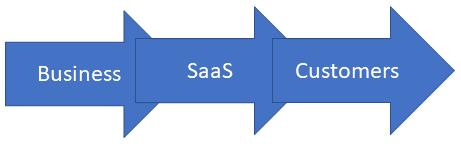
    This isn’t controversial; we still do the dev bit largely before the ops bit; the business has to decide what we want to offer the customer and customers are at the end of the line. And that is the key. Customers are at the end of the line. Now, I get to make you uncomfortable. Nothing in the above diagram matters except the first and last arrows. Think of it like this:

    What’s important in what we do comes down to two questions: “What does the business unit want to offer customers?” and “What do the customers expect of the business unit?” In this sense, “business unit” might be IT and “customers” might be co-workers. That changes nothing. What the business unit offers and what customers want is all that matters. The rest is implementation detail.

    Don’t believe me? It is an easy case to prove. Let’s try this one, with or without IT involvement, depending upon the problem being solved and the organization:

    The business unit determines what they want to offer, customers let their demands be known (one way or another) and the business offers the solution they think fits for the customers. As I said above, the rest is implementation details.

    What is your point?

    This leads me to the inevitable observation. Testing and security are:

    • Completely expected by users. They don’t want buggy software, and they don’t want to enter information assuming it will get nicked by hackers. There is no compromise here; users don’t “kind of want a product that works” nor do they want a product that “might be secure, but we’re not sure.”
    • Desired by the business. They have constraints on what is reasonable–the old meme of a server with the network cable cut is only funny because it shows extremes. But they absolutely do want the product or service they are offering customers to be stable and secure. “We can just spin out a new version” only works so often and for so long.

    So, your toolchains need to include stability and security tools—I would argue at every step of the process, but where and how much is really a business call. My security peeps will get upset that I called security a business call, but it is. You can choose to be non-compliant and insecure; the impact of those decisions on your organization is all on you. OTOH, of all the things that the organization (both the business generally and IT specifically) are focused on, you can afford to drop a few and get security and stability right the first time.

    Meanwhile, you’re keeping things running while we debate things like this. While I repeatedly refer to a large portion of my target audience as “implementation detail,” I’m sure you all know how much I (and many others) appreciate the rockstar job you’re doing keeping the IT org supporting the greater org.