Author: contributor

  • DevOps: Metrics Do Matter

    DevOps: Metrics Do Matter

    One of my favorite quotes about metrics or KPIs is from Jim Fowler, CIO of GE Capital: “Don’t measure me on cost or traditional IT metrics, but on the metrics of the business.”

    It’s a perfect tee-up for me to talk about metrics in the context of DevOps.

    DevOps is the movement of enabling a business via technology or the ability to look at business processes and issues to mitigate them or achieve a goal.

    The Importance of Metrics

    DevOps has as one if its five major principles the concept of measuring (CLAMS: culture, lean, automation, measurement and sharing). DevOps helps the business understand how it uses and benefits from its second major resource after people: technology. This is where key performance indicators (KPIs) come in, though hopefully not KPIs such as this:

    a

    This specific KPI was created to show the productivity of developers, using lines of code written as the measure. Could you use or explain this? It’s a great example of metrics or KPIs that are based on bygone times of being complicated, disconnected from business goals, or driving the wrong behaviors by placing quantity ahead of quality.

    Catch the Ball

    DevOps enables everyone to work together toward a common goal. The DevOps lifecycle approach of creating a strategy, figuring out how to do it, introducing those steps, checking the results and, via feedback (people or tools), improving that strategy or product aids in improving the use and proving the benefit of IT.

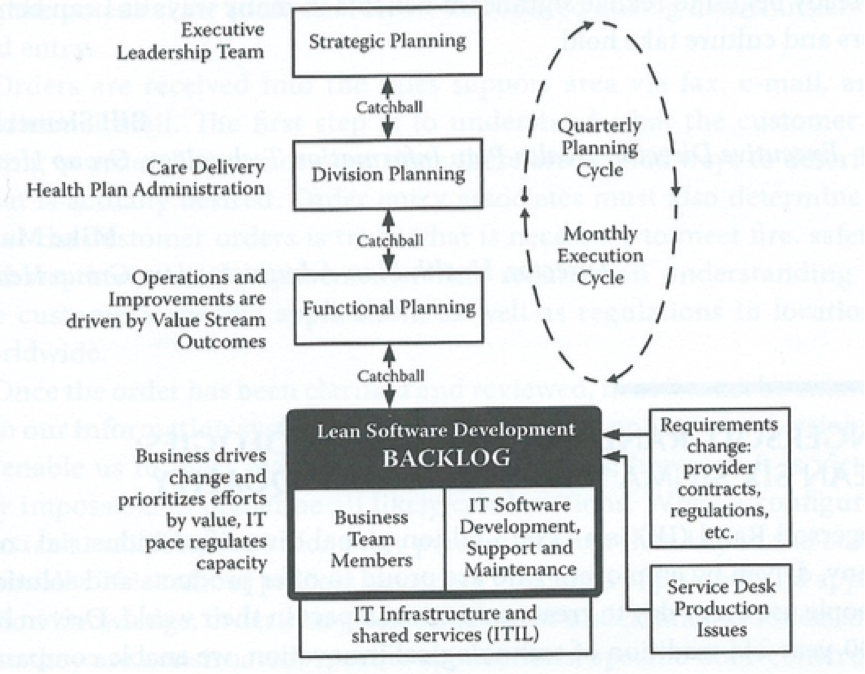
    DevOps can use a trick from lean (Hoshin Kanri), where the strategy from senior management is passed down to each level (“catchball”) such that each team can create its own way of supporting that strategy. Hoshin Kanri allows every person to set their own way of working to meet the goal. How DevOps is that?

    b

    By permission Steve Bell: LeanIT @All rights reserved worldwide

    KPIs should be designed to help answer these questions:

    • Did we improve or decline?
    • Are we on course?
    • Does the impact effect our organization?
    • Do we need help?

    KPIs provoke a Yes/No response and force an immediate action/decision. If not, they are simply metrics that probably support a KPI but do not key to help fulfill a strategy or request.

    How Do You Create a KPI?

    First, look at a business target. Can you see what’s required to help achieve the goal or remove the obstacle to achieving the goal? Then could you determine how you would know this was happening and whether you could you prove it? All answers have to be Yes/No.

    I like making a tree, which also acts as a dashboard to quickly show at the various levels the indicators of performance and their status.

    c

    This helps make KPIs such as Cost of Delay, Mean Time between Repair, Defects2Incidents and others relevant to the right people at the right time. You could even be brave and flash the status using red and green: Red = we have a problem and need help to overcome or improve and green = all ok. Don’t hide behind amber—see how using just two colors helps guide easier, faster, better and safer.

    KPIs should be collaboration and communication tools. Create and use them wisely to keep your organization in business and on course.

    About the Author/Daniel Breston

    dDaniel Breston is the Chief of DevOps Transformation for Ranger4. Daniel has 30+years leading IT Service, Operations, Applications, Data Center and service partners in management of technology enabling business processes and functions. He has also spent 15 years of consulting and coaching leadership teams across the EU and UK in developing their people, processes and use of technology to deliver technology services better, faster, safer. Daniel has qualifications in IT Service Management (ITIL, COBIT,etc.), Lean and DevOPS.

  • Reasons Why Developers Should Test More

    Reasons Why Developers Should Test More

    When I got started as a professional software developer, I thought awesomeness in development was measured by the lines of code (LOC) per day and how quickly code got to QA for testing. Coding a few thousand lines overnight gave one instant bragging rights, regardless of how well the code worked (or didn’t) in the morning. The more senior guys always acted like they knew better, suggesting that it’s not about the quantity but the quality. But I was too young and arrogant to listen. And, of course, I had to learn it the hard way. My seemingly amazing overnight code would show cracks once under the microscope of the QA team.

    True today as it was then, most mistakes are tiny and easy to fix, but even small problems require a tedious set of steps from when a QA engineer finds the mistakes to when the developer fixes them and sends them back to QA for verification. Some bugs are the size of the Mariana trench and require weeks of work and thousands of additional LOC. And, even new code, once resubjected to QA, can generate bugs, therefore repeating the cycle without an end in sight. Of course, by this time projects are late and developers are tired, frustrated and burnt out.

    After this happened to me too many times, I realized that maybe I was wrong. Maybe the experienced guys were on to something with this quality thing. They never seemed too tired, and their projects were in much better shape. I decided that for my next feature, delivering quality instead of LOC would be my priority.

    I’m sure you think you know what’s coming next. I’m going tell you that I tested my stuff from that day on and it worked perfectly—no more boring bug-fixing. You think I’m going to tell you, you should do it too, right? Well, no. I actually spent a lot of time in my second attempt instrumenting my code better so that I could debug it faster as the need arose. I also spent a lot of time writing my own test tools because I didn’t have one. But I kept moving forward and learned the hard way. Here is what I took away from those moments:

    Develop More, Bug-Fix Less

    There are two common reasons for developers’ involvement in a project. Developing a new feature or enhancement is about creativity, as it gives one the opportunity to design and implement new things. And then there’s the challenge of bug-fixing, which is all about maintaining existing functionality within older, already-made things. As a developer needs to do both, often at the same time, minimizing bug-fixing time is important to have more time in which to actually be creative and develop new functionality. And the best way to minimize bug-fixing is to test code more, as it’s developed, to avoid the death spiral I describe above. Good initial quality will mean QA will find fewer bugs and it is very likely that the criticality of the bugs found will be greatly reduced. As such, fixes no longer would be a struggle on short notice; shortcuts that generate more bugs don’t have to be used; and developers can focus on new features as opposed to fixing bugs. In all, the reasons are to develop more, and bug-fix less to be more productive.

    Be More Reliable

    Bugs also are nasty in that they tend to appear really, really late in the game. The Murphy’s Law on bugs should be something like, “The hardest bug is found one hour before the release is pushed to production.” This typically happens because everyone is busy peeling the onion, finding and fixing bug after bug until they get the “system” stable enough for QA to crush it with those large-scale system test cases that expose that one nasty bug. It is an artifact of waterfall development but also happens in agile development, as no agile team can afford running long duration tests in a sprint. So what happens then? Who ends up in crunch mode? The developer. To avoid this, developers need to find and fix the easier bugs sooner, as they write the code. That way, the onion is half peeled once it reaches the QA team. The nasty bug will be found much sooner—if the developer did not find it and fix it already. In short, developers can be more reliable by avoiding last minute bug-fixing. And we all know, reliability in execution is fundamental for fostering trust with management. A trusted developer is the one that gets to work on important, meaningful projects.

    Be More Flexible

    While in an ideal world the design of a feature is not changed frequently, in real life the exact opposite is true. At some point, even regularly, developers will have to modify the code as the scope of the features keeps changing. Massive code changes such as refactoring, if not done right, can send developers right back to a long, teeth-grinding, bug-fixing period. Avoiding it by testing early, as they change the code, offers a significant advantage—flexibility. Developers would be able to accommodate required changes more quickly.

    Agile Development is Critical

    Let’s do a quick recap: By simply testing code as it is written, developers can spend less time fixing bugs and more time developing new features, to become more productive, more reliable and trustworthy and even more flexible in implementing changes. This takes us to our final reason for early testing: Agile development is no longer nice to have, but business-critical. All of the attributes described above are quintessential for succeeding in an agile team. Developers are expected to be flexible, reliable and build a lot in short time periods. The days of trial and error, of learning the hard way, are gone. Today, we need to go from design to development to testing to going live in days, not months. Quality is what differentiates products. Developers need to do all of this to be successful.

    About the Author/Gabriel Chiriacescu

    UntitledGabriel Chiriacescu is the director of Software Development at Ixia, with more than 13 years of experience in embedded software development. He is currently leading the product management effort for the new Ixia Developer solution, an agile test tool designed specifically for developers.

    At Ixia, Gabriel has led multiple engineering teams responsible for developing market-leading test solutions in a variety of technological areas, including wireless, broadband access, data center, triple play, authentication and security.

    A native of Bucharest, Romania, Gabriel holds a BS in computer science from the Polytechnic University of Bucharest. After living several years in Los Angeles, Gabriel is now based in North Carolina and enjoys discussing CICD, SOA design patterns and the evolution of software development.

  • Top 10 IT Management Tools

    Top 10 IT Management Tools

    Staying up with the latest IT management tools is akin to keeping up on the latest Starbucks drink options. We simplify it here through a look at the most useful tools, from monitoring to DevOps orchestration and APM.

    IT management tools have entered a new heyday, thanks to the advent of cloud, DevOps and mobile computing. With all of the new types of infrastructure, software and development methods, developers and IT managers need simple automation to get through the day. But with hundreds of IT management and DevOps tools on the marketplace today, both open source and commercial, it’s hard to know where to start.

    The global DevOps tools market alone is expected to be worth $3 billion by 2019, according to Technavio. While there are many applications to choose from, we have compiled a list of our favorites below. Some of these are tried and true, while others are newfangled and still in their early days of experimentation.

    Microsoft System Center Operations Manager (SCOM)

    IT Operations Management and IT Service Management

    Microsoft SCOM is a legacy enterprise infrastructure monitoring and management tool that delivers comprehensive coverage for the Microsoft ecosystem of assets and devices, whether they are installed on internal data centers or in the cloud. SCOM has evolved over the years to monitor network and storage along with Unix-based systems.

    Cautions: Since SCOM is a deep monitoring tool that collects data from many different systems, it generates a large volume of data and alerts that can overwhelm systems administrators and IT managers.

    Vistara

    IT Operations Management and IT Service Management

    Vistara is a comprehensive tool for monitoring heterogeneous multivendor assets and devices, whether installed on-premise or in the cloud. It covers a wide swath of Microsoft and Unix applications and systems, major enterprise vendors such as Oracle and Symantec, and top storage and networking technologies. Vistara also integrates well with other monitoring tools. A unique feature of Vistara is that it records all user sessions, which provides an audit trail for tracing system changes and other events.

    Cautions:  Vistara is a powerful, multifunctional tool and needs to be set up properly to derive the maximum benefits.

    SolarWinds

    Network Monitoring

    SolarWinds is a leading tool for managing and monitoring performance of a multivendor distributed network environment. The tool delivers a lot of useful metrics, including performance, capacity and downtime. It is particularly useful in companies with many locations, such as a retail brand, or a national or multinational company with a large number of branch offices and locations.

    Cautions: SolarWinds does not provide comprehensive monitoring for servers or storage systems.

    (Editor’s Note: SolarWinds reached out to devopsy.kinsta.cloud to clarify that it does offer comprehensive monitoring for servers and storage systems through its Server & Application Monitor and Storage Resource Monitor tools.)

    Nimsoft (CA)

    Network Monitoring

    Nimsoft is another excellent network monitoring tool, but is best-suited for an on-premise (internal data center) environment that has standardized on a few types of equipment and has a low rate of change. A company that is adding new technologies and devices frequently won’t find the tool to be flexible enough to adapt to evolving needs.

    Cautions: This legacy tool is not ideal for diverse and fast-changing IT environments.

    ServiceNow

    IT Service Management

    ServiceNow is well-known in the industry for comprehensive service management, including service level management, financial management, incident management, availability management, change and release management and more. ServiceNow has the broadest coverage for all ITIL activities, making it the de facto standard for service management and suitable for use in small companies up to the enterprise.

    Cautions: Because this tool is so flexible, you can easily customize it to meet your organization’s specific needs. Beware that by doing so, you’ll need a full-time administrator to manage the customized system.

    Chef/Puppet

    DevOps Automation and Management

    When it comes to tools for managing cloud application development and deployment, Chef and Puppet have near-cult status among developers. Companies occasionally use them both, but there is overlap between the tools. Chef is ideal for DevOps provisioning, orchestration and configuration management and is a more flexible platform overall, featuring auto rollback to previous versions. Chef also provides real-time visibility into metrics and messages. Puppet is best for DevOps automation and administration and is a highly prescriptive, process-driven platform that does not allow shortcuts, which should make IT Operations people happy.

    Cautions: Chef and Puppet are used primarily by developers, not IT Ops, and therefore raise some level of caution if developers are spending too much time managing the tools vs. writing code.

    Docker

    DevOps/Containerization

    Docker is the industry-leading tool for DevOps automation of application deployment inside software containers. It can be used for nearly any software project and infrastructure environment, and is especially helpful for managing dependencies and version inconsistencies. The application is a game-changer for simplifying the complexities of deployment. Docker containers wrap up a piece of software in a single, portable unit that contains everything it needs to run: code, runtime, system tools, system libraries and so on.

    Cautions: Docker’s approach to security is still unproven, and some believe it is not up to enterprise security standards.

    Apache Mesos/Google Kubernetes

    DevOps/Clustering

    Apache Mesos is best for cluster management and utilization for distributed applications in a DevOps world, while Google Kubernetes is ideal for automating deployment, scaling, and operations of application containers across clusters of hosts. Clustering tools sit on top of hardware and increase utilization through effective workload management and resource-sharing. They work in both public and private cloud infrastructure environments, across many different platforms, and allow IT organizations to run more workloads on the same hardware. While both of these tools are fairly new, Mesos has been around longer and is more appropriate for large environments with heavy management and scale needs.

    Cautions: When looking at small clusters of say, fewer than a dozen nodes, Mesos may be an overly complex solution.

    New Relic

    Application Monitoring

    New Relic is well-known for its real-time capabilities in monitoring and managing web and mobile applications within cloud, hybrid and on-premise infrastructure. For an APM tool, New Relic is strong at identifying server-based performance issues. It also allows for real user page performance tracking so you can see if certain classes of users (for instance, by region) are having worse performance than others.

    Cautions: New Relic does not capture 100 percent of transactions, but does a sampling. This may or may not be important depending upon your business needs. It is also somewhat rigid, and may not be too flexible in an environment that has a lot of microservices.

    Graphite/Grafana

    Dashboards

    Graphite and Grafana are two leading graph and dashboard builder for visualizing time series metrics. The tools are particularly useful for analyzing metrics and other types of data from on-premise systems, public cloud, private cloud and IoT systems.

    Grafana is most commonly used for visualizing time series data for Internet infrastructure and application analytics but is also used in domains including industrial sensors, home automation, weather and process control.

    Graphite is excellent at visualizing data and metrics.

    Cautions: You will need a complex and elaborate configuration of databases to gather the data and a compute engine to generate the dashboard.

    About the Author/Ravikumar Raghavenderrao

    ravikumar-raghavenderraoRavi RRK, as he is known, is the Vice President – Service Delivery at NetEnrich. Ravi’s responsibilities include service delivery management, customer satisfaction, and new service introduction. Ravi’s team also has the responsibility to ensure and enforce quality and policy standards across the NetEnrich organization.

    Ravi has over two decades of experience in the IT industry in the areas of remote infrastructure management, delivery and large account management. Prior to joining NetEnrich, Ravi spent over 20 years at Wipro Technologies in various positions. Ravi holds a Bachelor of Engineering (Mechanical) degree from Osmania University and a Master of Engineering (Mechanical) degree from the Indian Institute of Science.

  • ‘Admins’: The Movie

    ‘Admins’: The Movie

    In the IT industry, where we are exposed to various levels of incompetence, it is quite tempting to become a little cynical. A few years ago we hit rock bottom. Our patience—not to mention our sanity—lay in the balance. Like many of you, we sought refuge in laughter. We found comfort and comic relief through Kevin Smith’s vulgar yet oddly accurate low-budget movie “Clerks.”

    Now, it’s time to pay it forward. As longtime fans of Kevin Smith, we wanted to honor his work by creating an IT spin of a very similar story. That is the genesis of “Admins.” It’s a day in the life of a disenchanted government contractor surrounded by incompetence, idiots and debauchery.

    The story centers around Dan, a system admin working for a government contractor, who is forced to come into the office on his day off. His day gets progressively tougher as he discovers mounting technical issues and the reality that his position may be in jeopardy due to cutbacks. Fearing unemployment, Dan sidesteps additional contract work and pursues the holy grail of guaranteed lifetime employment (a.k.a. “a government job”). The allure of job security leads Dan to the crossroads of an ethical dilemma where he and his co-worker, Randy, engage in morally questionable and professionally reprehensible activities.

    About the Authors

    AaronGoodmillerAARON GOODMILLER – Director | Producer

    With a lifelong passion for movies, Aaron got into film making in 2001 when digital video had just started to take off and it became something he could afford to do. Having written and directed three shorts and been a producer on 11, he worked with Eric Espejo on producing their first full length feature together “Ghosts Don’t Exist.” Their current film, “Admins,” is something they have talked about doing for several years. After this they have several other projects is various stages of production.


    EricEspejo (1)ERIC ESPEJO – Writer | Producer

    Eric has been involved in film since 2002. After writing and directing eight short films, he wrote and directed his first full-length feature, “Ghosts Don’t Exist,” in 2009. He continues to oversee a number of creative projects all while writing screenplays and serving on the George Mason University advisory board for its Film and Video Studies. Eric started delving into indie film by attending the Hollywood Film Institute, where under the tutelage of Dov Simens, he acquired the valuable knowledge of the artistic and business sides of filmmaking. An avid and talented screenwriter, he is currently writing his next movie.


  • Cohesion Critical in a Successful DevOps Team

    Cohesion Critical in a Successful DevOps Team

    In the push to adopt DevOps among enterprise IT organizations, cohesion has been one of the biggest challenges in collaborating effectively. Historically, departments within a business existed in disparate locations, or silos. Marketing, IT and operations all had their own teams and their own communication channels, which made it difficult for members of separate teams to work successfully with one another despite the fact that they were working toward a common goal.

    However, with the continuing adoption of DevOps, IT admins are finding that projects are easier and more well-executed when all the parts of the development cycle—creation, coding, testing and deployment—are working in tandem. Therefore, it’s becoming ever more critical that agile product teams are on the same page when it comes to their DevOps projects.

    Cohesion Matters

    Why is it so important to have a development team that coheres as one entity and communicates effectively among all its members? Let’s take a look:

    Quicker feedback cycles

    When team members are working as one unit instead of disparate entities, testing and development cycles don’t have to be long, drawn-out affairs. One of the biggest benefits of DevOps itself is the ability to shorten time to market and deploy code more quickly, with fewer errors—so enabling teams to communicate can only enhance that benefit.

    According to devopsy.kinsta.cloud contributor John Balena, facilitated collaboration allows teams to achieve continuous testing goals and streamline processes. This can lead to a continuous delivery cycle, which is the goal of DevOps in the first place.

    “DevOps can best be realized when IT operates in a social, collaborative environment that ensures all groups are working with a visual model in their context with the necessary information from downstream and upstream teams, as well as in collaborating with relevant experts at the moment when clarifications are needed or issues arise,” Balena wrote.

    Shared responsibility

    With a collaborative DevOps culture, no one person or group of people is responsible for the entire project. It is a team effort that doesn’t rest on anyone’s shoulders unnecessarily. This makes the project more of a shared endeavor, which everyone is invested in and cares about. With silos, when something goes wrong, members of different teams may try to lay blame on one another, which lowers morale and may defeat the entire purpose of DevOps. But when teams are communicating effectively, they can share blame—but they also share success.

    This mindset enhances the teamwork aspect of software development and can help get rid of the culture of fear, according to devopsy.kinsta.cloud contributor Claire Agutter. When teams work together within a blameless culture, they can more quickly see and learn from their mistakes.

    Common goal

    Throughout all of the steps of the software development life cycle, another important advantage of teams working together is that they share a common vision of how the company should progress. Business needs and customer satisfaction are both critical factors in the DevOps cycle, and team members should all be on the same page when it comes to these goals.

    In all, it’s critical for IT managers to support a culture of collaboration and communication if their DevOps endeavors are going to succeed. You need the right tools for the job, but you also need to have the right attitude.

    “Culture is like quality,” DZone contributor Jim Bird wrote. “You don’t build culture, or quality by talking about it. You build it by doing things, by acting, by making things happen and making things change, and reinforcing these actions patiently and continually over time.”

    A collaborative DevOps culture can improve project success.

    About the Author/Sanjay Zalavadia

    SanjayHeadShot (1)As the VP of Client Service for Zephyr, Sanjay brings more than 15 years of leadership experience in IT and Technical Support Services. Throughout his career, Sanjay has successfully established and grown premier IT and Support Services teams across multiple geographies for both large and small companies. Most recently, he was Associate Vice President at Patni Computers (NYSE: PTI) responsible for the Telecoms IT Managed Services Practice where he established IT Operations teams supporting Virgin Mobile, ESPN Mobile, Disney Mobile and Carphone Warehouse. Prior to this Sanjay was responsible for Global Technical Support at Bay Networks, a leading routing and switching vendor, which was acquired by Nortel. Sanjay has also held management positions in Support Service organizations at start-up Silicon Valley Networks, a vendor of Test Management software, and SynOptics.

    Connect with Sanjay:

    Facebook: https://www.facebook.com/getzephyr?_rdr=p

    LinkedIn: https://www.linkedin.com/in/sanjayzalavadia

    Twitter: https://twitter.com/yourzephyr

    Google+: https://plus.google.com/+Getzephyr/about

  • The New Age of “Operations” in a DevOps Enterprise

    The New Age of “Operations” in a DevOps Enterprise

    My encounters with commercial clients in the DevOps space have been exciting, curious, political, and challenging. What most don’t realize is that DevOps is not just about infusing tool automation into a delivery pipeline, but it also has to do with re-mobilizing and challenging the status quo when it comes to “who does what”. As teams become more tightly integrated, functional lines blur, and uncertainty may set in.

    I find more and more, that clients and colleagues want to know:

    • What happens to the operations/run tower people if tools like UrbanCode Deploy automate the promotion of applications and releases to run-time environments?
    • What happens to our system administrators and “build out” teams, if tools like Chef, Puppet, Vagrant and pattern-based provisioning systems like IBM Cloud Orchestrator and UrbanCode Deploy with Patterns can perform solution stack build outs with minimal custom network, hardware, software, and middleware configurations?
    • If developers can provision and deploy their own apps, what do the sys admins do?
    • Will Operations Staff be replaced by tool automation?

     The truth is, now, more than ever, a savvy, astute, and innovative operations staff is essential to successfully execute effective DevOps within the enterprise.

     As development and test teams are being empowered to deploy their own applications with tool automation, Operations will need to shift the focus to enabling and empowering these teams with standardized, reusable automation assets. Design, development, maintenance and management of these automation assets will be the core foundation of DevOps success within the enterprise. A corollary to this is a set of standards and policies must be clearly defined and adopted as a framework for implementation.

    Standardization is paramount to making DevOps successful on a wide scale in the enterprise. If we were to think of our applications as a “solution stack” of network, hardware/virtual machine, operating system, middleware, and custom application components, standardized assets in each of the solution layers would enable faster assembly, development, test and delivery of a solution.

    When it comes to effectively enabling the enterprise for DevOps, you must become a hater of snowflakes. Snowflakes can be elegant, but they are unique and difficult to automate with tools. Examine applications and systems for uniqueness…and ask, can it be standardized? Typically, snowflakes occur higher up on the solution stack at the Application or Middleware layers. Network teams are not likely to implement new security policies for each application. However, moving up to OS and middleware, uniqueness is more likely to occur (OS release versions, MW versions and packages and so on).

    Once opportunities have been identified for standardized assets, operations teams must mobilize to enable the enterprise for automation:

    • Encapsulate enterprise policies in standardized automation assets (which can be reused across the enterprise).
    • Centrally manage and maintain automation assets within the enterprise (to maintain standard and policy compliance).
    • Evangelize, encourage, and incentivize the use of automation assets in delivery of applications.
    • Provide a continuous delivery pipeline tool set (preferable, as a service) providing an infrastructure to enable the automation assets for development and test teams

    Automation assets can occur at every layer in the solution stack, providing an opportunity for the new Operations team to inject enterprise influence and compliance at every level. This approach ensures standards and compliance, but also relieves application development and test teams from worrying about whether their application violates any corporate policies.

    Examples of automation assets and some enabling technologies are shown below, but this is obviously not an all-inclusive list (even a hardened shell script can be an asset). The point is, for each layer in the solution stack, assets and corresponding enabling technologies can be chosen to invest in. Some technologies can address multiple layers in the solution stack.

     img

    There is clearly a lot of good, solid, critically important work for the new age Operations team to manage and maintain. Interfacing with enterprise architecture and corporate standards groups are essential. However, the focus remains largely around empowering and enabling delivery using standardized assets.

    You can also watch this short video that I recorded recently. Please do share your feedback on this blog and how you see the evolving role of IT Operations in a DevOps Era.

    https://www.youtube.com/watch?v=TRlbiPcFOxc

    img2

    About the author

    Andrea Martinez is the DevOps Solution Leader for Cloud Services in IBM. Andrea’s mission is focused on delivery of DevOps solutions in cloud and traditionally hosted environments. Andrea has lead the solution architecture, implementation and initial adoption of one of IBM’s first DevOps Deployment Offerings. As a member of the IBM Academy of Technology, and a certified Thought Leader in application architecture, Andrea is keenly interested in enabling and empowering practitioners with innovation and technology to deliver solutions faster.

    Connect with Andrea LinkedIn | Twitter

  • Test Better, Test Faster, Test Smarter

    Test Better, Test Faster, Test Smarter

    How do you balance the need to “go fast” with the need to test everything and deliver high-quality software?

    With applications the driving force in today’s economy, the quality and release cadence of your software are critical to your business and your bottom line. You want to get software updated in the hands of your end users as quickly as possible. However, even the fastest release cycle wouldn’t make a difference if your product ends up being buggy or malfunctioning, resulting in a bad user experience or service interruption.

    I want to take a look at one of the most important (if not the most important) aspects of the software delivery process: testing! As software teams become more mature in their implementation of DevOps and continuous delivery to streamline their software delivery, testing takes a central role as a prerequisite to these practices.

    You need to have testing on your mind from the very beginning, and plan your testing as part of the initial stages of designing your software—mapping your test procedures, infrastructure configuration and acceptance criteria. As you design and develop your app, you also need to think about how you’re going to test it. The more testing is on your mind, the more you’ll have a solid understanding of what you need to test, what’s the definition of “done,” and the faster, more streamlined, your overall process will be.

    Let us review four questions every development or QA team should consider when planning their testing, as they try to balance quality with speed—managing and accelerating their testing, while ensuring a reasonable time-to-market.

    How Much Testing is Enough?

    The age-old question: How much testing do I really need to do? Unfortunately, there is no concrete answer. But with a bit of initial legwork, you can get a good feel for how much testing is necessary.

    The amount of testing that is necessary is influenced largely by the industry you’re in. If you are testing mission-critical aircraft software, let’s hope it’s very thoroughly tested! On the other hand, if you’re building a game app, the amount of necessary testing may be lower. The truth is when you run tests, the success rate is usually not 100 percent. Therefore, the key is to define what, for your specific piece of software, can reasonably be considered “done.” Instead of arbitrarily deciding at some point that your release is ready to ship, make the decision before the fact: What are we going to accept? What level of pass/fail are we willing to roll out with? What are we comfortable with based on what we have done in the past?

    The amount of testing required can sometimes be a fluid thing. A good way to measure your comfort level with your testing procedures and the amount of testing you’ve done, is to ask yourself, “If it was now 11 o’clock at night, and I needed to ship this code to my end users, am I sufficiently comfortable rolling this out, or am I not sure how it’s going to behave in the wild?” If you’re leaning toward the latter, than it’s probably an indication that you should have done some more testing. That’s a gut feeling and depending on the industry, the point at which you’ll fire off a release and not have any worries can vary greatly. And, obviously, for some regulated industries, you’ll need to prove compliance and ensure you’ve recorded that all tests were successful before you can even start thinking about releasing anything.

    What Kind of Testing Should You Invest in?

    Decide what kinds of things you really care about and what you need to verify and test for. What are the requirements that we expect from the application, and from the different stakeholders in this project?

    Every piece of software needs to be tested differently. Because of this, you have to plan what the testing will be. You can’t just say, “I’m going to unit test the heck out of my code, each and every time, no matter what.” Sometimes, unit testing isn’t the most important test you need to be running.

    The investment has to be in automation. No matter what type of tests you decide are most functional and relevant to your project—whether you’re doing a ton of unit testing or a bunch of functional stress tests—it needs to be automated.

    Particularly, as you open up your services to the world, you need to put into place the relevant performance and reliability tests so that if suddenly your load increases by 200 percent, you have a plan for how to handle that. Are you going to autoscale? Can you autoscale? And finally, do you even need to auto-scale?

    All of those questions need to be answered as part of your development cycle. Automating your tests will let you not only create tests for these scenarios, but it will let you run those tests over and over. By automating your tests, you can establish a baseline and see where you deviate.

    It can also be helpful to think of testing in a different way. Don’t look at testing as a tool to validate technical requirements, but as a way to make your customers happy. You want to make sure your tests are directly contributing to your customer’s overall experience. So start with the highest-level tests that look at things such as overall business functionality—and make sure the software works at the business level.

    How Can You Make Testing Faster?

    Automate, automate, automate! That might seem obvious, but try to think outside the box. Find things you thought couldn’t be automated and wrangle them into shape. Remember that every minute that one of your developers is sitting there running a test that could be automated, it is costing you time (and money) that he or she could have spent on more productive things. In the long run, not automating can cost much more than making the commitment to doing it right.

    Other simple things you can look at to increase the speed of your testing is to make sure your development environments are mirror images of your production environments, and that you have fidelity of configuration throughout the lower and higher environment.

    It is also helpful to make sure you’re defining user requirements that are thin vertical slices, instead of trying to test huge cumbersome pieces of functionality. The ideal situation is if you can run only tests against components that have changed. Componentization of both your application and your testing procedures is critical because you do not want to have to rebuild and re-test everything all the time. Remember, also, that if you make incremental changes to your code and frequently release them to your users (Agile, anyone?), you will get just enough feedback to improve quickly and reliably. Be cognizant of not biting off more than you can chew.

    Segregating the tests to several phases is a good way to accelerate your CI and test cycle—but make sure that both your application, build and test batteries are designed for that. With this approach, you are essentially running multiple phases of CI, starting with the fastest cycles that require the smallest build(s), with minimal dependencies, and move on to the outer/cascading cycles of tests. Following a submit, run a minimal build, so that you do not need to wait—sometimes many hours—to run an extensive set of all your tests with every single commit to see if it passes. Start with unit tests to minimize the build and provide fast feedback, then in various junctions incorporate additional tests, such as integration tests, installers and usability and performance tests.

    Another way to streamline your testing process is to take a look at the entire scope of your build and test cycle and go after the most inefficient stage. After automating your manual processes, look at the bottlenecks and what takes the most time and figure out how you can optimize that specific process. Often the answer is parallelization, but other times it is hardware. Iterate on your process and figure out where you can gain the most ground!

    Lastly, parallelization and distribution of the build and tests provide a huge time saver, so consider running tests across a cluster of CPUs to cut down the run time.

    Where Do You Start if You Want to Make Sure All Your Builds Are Green?

    Ask yourself, What are you trying to achieve? Is it a process where you can release code more quickly? Or where you can address bugs more readily? Then make sure you’re intimately aware of what you have in place. You need to know every step, task, process and tiny bit of your testing procedures and supporting infrastructure. Draw your entire end-to-end workflow on a whiteboard and find the bottlenecks that are slowing it down.

    Once you’ve defined your objectives and are aware of your current state, you can put the relevant tools in place—from development environment to your testing frameworks all the way to post-dev tools such as your analytics tools—design the right testing pipelines and hire the relevant people with the relevant skills. Don’t insist on making all the mistakes yourself (tongue firmly in cheek), but find folks who have already made the mistakes and learned from them—and hire them!

    Also, give your team a great system that gives feedback fast. Do frequent code reviews so there is accountability and a constant learning process.

    Consider the following best practices for improving your testing processes:

    1. Be sure to plan what your testing approach will be ahead of time if possible. When you’re designing your software, designing how you’re going to test it is important.
    2. The amount of testing you need to do is dependent on what industry you’re in and your specific use case.
    3. Consider what level of test pass/fail you’re comfortable with, based on what you’ve done in the past.
    4. Consider pre-commit or pre-flight builds to ensure your tests are more likely to pass once checked to Mainline
    5. Define your requirements for each test cycle
    6. Segregate your tests to “fast” and “slow” and decide which battery of tests you need to run every time, and which processes you only need to run at certain junctions.
    7. If you hire well and bring new skills to your team, your process will get better and faster.
    8. Consider what problems your customers are facing and perform an analysis. Use whatever tools are best to test your software like a customer would to achieve the highest end user satisfaction.
    9. Automate manual steps that you take for granted to accelerate cycle times and improve productivity. Speed comes second.
    10. Iterate on the testing process, and not just on the code itself. You should always be looking for new ways to test.
    11. Test your test processes. Hold regular meetings with your team to reassess if your testing strategy is working for you.
    12. Enact code reviews so that there is accountability with the rest of the team.

    As you map, design and optimize your tests, remember that your testing policies don’t need to be set in stone, and that you can—and should—adjust and tweak as you go.

    Happy testing!

    About the Author/Anders Wallgren

    Anders HeadshotAnders Wallgren is chief technology officer at Electric Cloud. Anders has more than 25 years’ experience designing and building commercial software. Prior to joining Electric Cloud, he held executive positions at Aceva, Archistra, and Impresse and management positions at Macromedia (MACR), Common Ground Software, and Verity (VRTY), where he played critical technical leadership roles in delivering awardwinning technologies such as Macromedia’s Director 7. Anders holds a B.SC from MIT. He invites you to download the community edition of ElectricFlow to build your pipelines and deploy any application, to any environment for free.


  • The Cost of Not Building with Security in Mind

    The Cost of Not Building with Security in Mind

    The unfortunate reality for today’s organizations is the fact that a security breach is bound to happen. Major breaches are happening with alarming frequency and fill the news headlines almost daily. And behind many of these major breach stories is a software vulnerability that has been exploited. There is a silver lining, however. Addressing security at the development stage can help organizations “get upstream” of certain issues, which goes a long way toward alleviating potential breaches.

    Now there are always two sides to every coin, and this is where companies need to weigh the costs of not taking a proactive approach to making security a key part of their software development process. Is the upfront time and effort worth it when it comes to developing software and ensuring bugs and vulnerabilities are addressed before it is put into the wild? The simple answer is, yes! We are already seeing this in certain industries such as financial services, which learned the hard way that it is a critical component of software development—mitigating risks and significantly lowering the financial burden associated with a major breach.

    In fact, security should have been more central to software development a long time ago. As software, and more broadly technology, continues to evolve and permeate our lives from more angles, it is crucial that security be a consideration—a “use case” as developers call it—from the earliest conceptual stages of a project. The costs of not doing so are simply too painful to imagine otherwise.

    Shifting to Security-First

    To build more secure software, organizations typically must implement a software security initiative. You can break it down into four steps:

    • Assess your current software assurance posture
    • Define the strategy your organization should take to ensure a viable posture
    • Formulate a road map of how to achieve that posture
    • Implement your strategy

    The above steps are simple and when you think of the alternative to not doing this, adding security as a pivotal part of the software development process seems like a no-brainer. To better understand what I mean, you need only look at the cost the average breach has on an organization. According to the 10th annual “Cost of Data Breach Study” independently conducted by Ponemon Institute, the average consolidated total cost of a data breach in 2015 was $3.8 million, an increase of 23 percent from 2013. The study also reported that the cost incurred for each lost or stolen record containing sensitive and confidential information increased 6 percent, to a consolidated average of $154 from $145. Depending on how much data has been compromised, the financial fallout can be staggering, if not crippling, to an organization.

    Conversely, the cost to repair a single vulnerability in an application during the design phase is less than $500, according to the IEEE Computer Society. The fact that the financial impact of not addressing security during the development process can quickly become cost prohibitive, is a clear indication that secure software development practices can no longer be overlooked. Breaches are now a boardroom issue and require a seat at the development table.

    As we can see from the stats above, the economic fallout for organizations is obvious, but with the Internet of Things coming to a house near you, this issue is suddenly becoming more personal and painful for the average person. Whether an attacker takes over your thermostat from Russia or finds a way to monitor your home via your baby camera, vulnerabilities are making it easier for malicious actors to corrupt corporate, government and now individual networks like never before.

    We are well beyond the “it will never happen to me” phase. Breach stories that used to happen to so called “other” people are more likely to happen to you if software defects continue to be ignored and are not fixed when they should be. No matter how you crunch the numbers, if security isn’t addressed at the software development level, the result will always end in a costly lesson learned.

    About the Author/John Dickson

    John Dickson_HeadshotJohn B. Dickson is an internationally recognized security leader, entrepreneur and Principal at Denim Group, Ltd. He has nearly 20 years hands-on experience in intrusion detection, network security and application security in the commercial, public and military sectors.

    Dickson is a popular speaker on security at industry venues including the RSA Security Conference, the SANS Institute, the Open Web Application Security Project (OWASP) and at other international conferences. He is a sought-after expert and regularly contributes to Dark Reading and other publications. A Distinguished Fellow of the International Systems Security Association, he has been a Certified Information Systems Security Professional (CISSP) since 1998.

    As a Denim Group Principal, he helps executives and Chief Security Officers (CSOs) of Fortune 500 companies and government organizations launch and expand their critical application security initiatives.

    Twitter: http://twitter.com/johnbdickson
    Linkedin: https://www.linkedin.com/in/john-b-dickson-cissp-41a149

  • Tales Of DevOps Discovery: Q&A from the Field

    Tales Of DevOps Discovery: Q&A from the Field

    DevOps is a buzzed-about industry term, yet many companies are still trying to figure out how to start the journey to a DevOps transformation. Each organization’s journey will be different, but planning and starting the journey always should include assessing the current state of a company’s software delivery process, quantifying the objectives and plotting the “route.” This begins with a discovery process.

    This multipart series will review questions commonly asked during the DevOps discovery process, highlight common answers and provide examples of the resulting guidance. It will show that DevOps is really about optimizing software development and delivery on the planes of process, tools and technology, across multiple stakeholders. Based on experience with a broad cross-section of real-world organizations, the series draws on actual interactions that have led to successful DevOps transformations.

    Starting the Discovery

    Often, organizations embarking on a DevOps transformation want to “pass go” and get straight to, “Tell us how to do it!”  Some initial statements frequently heard are:

    • “We already do and understand [CI, CD, etc.], don’t waste time reviewing that.”
    • “We are practicing [Scrum, ITIL, Six Sigma…]; we are just like everyone else, so there is no need for interview or discovery.”
    • “We don’t need to discuss [process, culture, or technology], just tell us what tools we need.”

    The eagerness to “just go” helps fuel excitement for the transformation; however, it is important to slow the rush to a solution and start with the basics. This includes:

    • Setting a baseline definition of practices: Agile, continuous integration, continuous delivery and DevOps are highly talked-about industry practices that often have multiple definitions and are misunderstood, which fosters resistance or ends up being implemented poorly.
    • Starting with foundational discovery: Ask the most fundamental questions about the current state of the organization’s delivery process and the objectives of the DevOps transformation. These questions must be asked of each stakeholder, including the Business, Development, Quality Assurance (QA), Change Management and Operations.

    Taking these initial steps can be like pulling teeth, yet they spawn insightful discussion, surface key differences in perspective and begin the process of gaining alignment between stakeholders. With alignment among the stakeholders, shared priorities become clear and actionable.

    Once stakeholders align on both the current state and objectives and identify shared priorities, only then is it possible to plot a “route” for the DevOps transformation. At this point a mission statement can be formed, which will act as the North Star or guiding light for the journey. For example, a resulting mission statement may be one of the following:

    • We will increase the stability of our releases while increasing Developer, QA and Operations productivity and job satisfaction. This will improve our ability to retain employees, satisfy customers and be more competitive.
    • We will do this for our existing and new mobile and web products through the use of iterative development, continuous integration, test automation and continuous delivering applications to a production-like environment.
    • We, as Development, QA and Operations, will work as one toward this common objective.
    • We will transform incrementally, empirically establishing best practices and expertise within teams and sharing them across the organization.

    The mission statement may seem like a trivial part of the process, but in reality it is absolutely vital to achieving the cross-fictional buy-in necessary for DevOps. It works to not only outline the strategy, but also gives the teams something to refer back to during the transformation process.

    The other key step to starting the transformation, defining DevOps and related terms, will be discussed in the next post.

    About the Author/Brian Dawson

    BrianDawson-headshot-1200x1200[1]Brian is currently a DevOps evangelist and practitioner at CloudBees, where he helps the community and customers in implementation of Agile, CI, CD and DevOps practices. Prior to CloudBees Brian spent 22-plus years as a software professional in multiple domains including QA, Engineering and Management. Most recently he led an Agile Transformation Consulting practice helping organizations small and large implement CI, CD and DevOps.

    Prior to CloudBees, Brian worked at CollabNet, VA Software, Sony Computer Entertainment, Sega, Namco and Apple. His roots are as a C/C++ developer, but his primary job has always been gathering and distributing knowledge and using shared solutions to solve unique problems.

  • The Two-Month Hello World

    The Two-Month Hello World

    How Project Onboarding Can Undermine DevOps Efforts at Large Organizations

    A “hello world” application is the most basic program a developer, typically a beginner, will write to learn a new language. It’s a sort of “everything works”—a stack-checker app to kick off a project quickly and see its results.

    The resulting hello world program is typically a message printed to your screen: “Hello world.” That’s it. No microservices, REST API or class factories, but very satisfying, nonetheless. The stack works; you built it and ran it from scratch.

    The average time for a programmer to write a hello world application code is probably a few minutes, or even seconds. The average time to set up the developer’s computer or workstation and servers to be able to compile/build and run a hello world app may take a while longer, maybe a few hours to set up. And I’m thinking cloud server or container. Publishing a hello world app to Google Play, including setup, build and deployment, takes around a few hours for the first-timer. That’s not too bad. But here’s the deal: It’s a few minutes for your first program to run vs. a few hours for your first deployment.

    That’s a 60:1 ratio.

    Let’s raise the bar a little: Take a large corporation with an IT department of 1,200-plus employees, for example. In that environment the average time to publish a brand new hello world application increases by at least an order of magnitude—even more if the developer is not just onboarding an application but also herself or her team into the organization.

    Cutting through IT red tape is a great distraction as epics, user stories and customer requirements pile up. These tasks can be simple to complex, such as setting up your code repository and development stack; identity, security, disk, network and other stack provisions; boilerplate artifacts and following testing and release policies. That’s a considerable chain of requests and wait periods—enough to make that hello world program loop around for months before it reaches production.

    DevOps for the Hello World

    The ability of a business to respond to market changes start by a quick new-project ramp-up. And in a microservices world that’s often the case. But that’s mostly at the architecture level. How easy is it to provision and manage the external environments beyond microservices? Or, how easy is it to provision and manage the full Dev to Ops stack at your organization, period?

    A good way to tackle this is to offer a menu of automated tasks through a help desk-like setup, a configuration catalog if you may. A configuration catalog holds tasks à la carte for every need in the DevOps cycle. Call it the IT user interface for teams requesting or delivering changes to the organization.

    This is nothing new. ITIL talks about it everywhere. It’s called a service desk. In a DevOps culture, however, traditional service catalogs do not cope well with continuous deployment and infrastructure-as-code approaches. And vice versa. The reason is that there are plenty of needs that tend to fall outside the common service desk and configuration management automation realms, so they end up in an issue tracker, service ticket or, worst case, plain emails, chat and phone call requests.

    From Zero-to-Deploy

    A catalog of configuration services can be application or project-oriented and should keep state, knowing what has been requested and delivered in the past to enable future interactions. Every task offered by the catalog has one or more rules associated with it. These rules, or recipes, do the dirty work and automate provisioning, emails, boilerplate setup and other tasks that antecede or surround most of the core DevOps delivery automation.

    Think of it as your classic service desk catalog and configuration management tool set combined.

    Building a configuration management front end can greatly mitigate and simplify the effort of onboarding applications. Here are some of the features and strategies to consider:

    • Baseline Templates: Offer teams a set of baseline configurations, tasks and services that can be provisioned around project typologies, such as “Mobile App,” “Python-Django-Postgres” or “Java-Spring-AngularJS-Oracle DB.” That means that on Day 1 the developer only has to select the preapproved application type to get started. Push-button onboarding should include straightforward guidelines that guarantee that the project starts on the right foot, including committing boilerplate source code to the repository and directory verification.
    • Incremental Services: Make the catalog offering incremental, providing development teams only the options they should have at a given time for each project at its given stage. A good configuration system will keep track of what every application has installed at a given point in each environment, so progressive options will be offered.
    • Broaden Your Scope: Automate all provisioning tasks in sight. Just because your application is containerized or configuration management is automated it doesn’t mean it’s a push button from start to finish. Reasonably sized applications have many dependencies, approvals and setup steps that are don’t have a place in typical scripted recipes.
    • Manual Tasks: Make the work flow by bringing every manual process into the onboarding pipeline and avoid the need for emails. Make sure to cater to non-standard requests also, as that will help keep everything in one place.
    • Draft and Versioned Provisioning: Allow provisioning plans to be built along with the code, be it infrastructure-as-code or catalog requests. As new requirements come into play, revise provision drafts accordingly.
    • Scale to Environment: For every new environment in the onboarding chain just reapply the previous requests and configurations, but adjust them to that particular stage. For example, a preproduction environment template will probably need to scale CPU, network and memory to closely mimic production.
    • Just-in-time: Make sure provisioning happens before code is delivered. If before means just-in-time, great. Maybe it’s just a matter of putting provisioning before deployment in the automation pipeline. Or maybe it’s a non-standard request that needs human intervention and holds up a release for a short time. The closer provisioning looks like continuous deployment, the better.

    The next generation of configuration management tools must tackle many different aspects of onboarding applications and services to become an effective DevOps front end. This is not just giving developers a “Request Cloud VM” button but the full how, why and where chain that assists teams with writing boilerplate application and infrastructure code, passing the first build or scaling environments correctly. And moving forward, ChatOps and machine learning are replacing the classic request workflow, adding needed insight and foresight to manage project deliveries from zero-to-deploy.

    DevOps practices should start early on in the cycle and offer a great user experience all the way through. A good delivery chain needs to tackle the newcomer workflow, just like the application interfaces of today tend to target first-time users. A friendly and capable DevOps front end is what separates mature organizations from the rest, helping them smoke the from-hello-world-to-deploy test suite gracefully.

    About the Author/Rodrigo González

    roddyRodrigo Gonzalez is the CEO and co-founder of Clarive. Besides running the day-to-day operations, Rodrigo oversees the overall strategy for the company. Rodrigo, originally from Brazil, holds a B.S. in Computer Science from Texas Tech University and has nearly 20 years experience working at tech companies in the United States, Brazil and across Europe, including Lucent Technologies and CA Inc.