Author: Bob Reselman

  • Mainframes: The Cloud Before the Cloud

    Mainframes: The Cloud Before the Cloud

    Here’s something to think about: Despite the fact that IBM stopped manufacturing personal computers in 2005, deciding instead to focus on higher margin business services, the company continues to produce mainframes and by all estimates will continue manufacturing them well into the future. The question is, why? The answer: because there is still significant demand for this type of hardware.

    The fact is that a mainframe is a monster when it comes to computation and processing transactions. One mainframe can process 2.5 billion transactions daily. That’s the equivalent of 100 Cyber Mondays in a single day. To give you a clearer idea of the immensity of scale, keep in mind that Cyber Monday sales in 2018 were $7.9 billion. This translates into a mainframe being able to handle a bit more than three-quarters of a trillion dollars in transactions each day, which is almost twice the yearly GDP of Austria!

    As I said, the mainframe is a workhorse. Yet, its power and potential are hidden from most people who work in the modern cloud. This is surprising because there’s a good argument to be made that, given its power and scalability, coupled with its support for a large number of concurrent users, the mainframe was the cloud before there ever was a cloud. However, the technology is practically unknown among younger developers, mostly due to cultural reasons and a lack of historical awareness. That more people are not taking advantage of the tremendous opportunities at hand is a misfortune. When it comes to mainframe computing, there’s a lot of interesting tech to be learned and a good amount of money to be made. It’s just a matter of increasing awareness to do this. A good place to start is to redefine the narrative.

    Allow me to elaborate.

    A Special Club

    When mainframes appeared on the commercial landscape, few people interacted with computers and even fewer worked with them directly as programmers or system administrators. Just as in a modern data center, the machines were isolated in climate-controlled rooms to which few had access. Access to the actual physical machine was restricted to a special few. But unlike today, when restricted access is due more to security concerns because there are a lot more people around who are potential black hats, back then access was also restricted due to the exclusivity of the profession.

    In the 1950s, 1960s and well into the 1970s, not just anybody could program or be a systems administrator. You could go to a technical school to learn to become a computer operator, which meant you could work at a terminal as a bank teller or travel agent. Or you could learn to become a data processing clerk and work in a back office at a brokerage firm. But to learn to program, you had to go to college. Then after college, you had to go to work for a company or organization that actually used computers in day-to-day operations. These were banks, insurance companies, major manufacturers such as General Motors and General Electric, airlines, very large retailers and government. Computing was a club and you had to be well-educated to get in and be well-liked by the organization to keep your membership. Yes, there were the outliers—Gates, Allen, Joy, Wozniak and Jobs—but for most people, the career path to being a programmer was college and then into big business or government.

    As a result, computing had an air of mystery and magic to it. Remember, until the mid-1980s, most people had never touched a computer. It was the stuff of moon landings and election night predictions on network TV. Then the PC came along and changed everything. Within 10 years computers became commonplace. Even elementary schools had them—at least, those that had the budget and foresight. The power that business applications such as the spreadsheet program Lotus 1-2-3 brought to small business motivated even the dry cleaner on Main Street to plunk down the thousands of dollars it cost to buy a PC. The productivity boost was worth it. Also, since the dry cleaner actually owned the machine, the dry cleaner’s kid could learn to program on the box unencumbered, when it wasn’t being used during business hours. Remember, the Microsoft DOS operating system that shipped on every IBM-compatible PC came bundled with the programming language BASIC. You didn’t need to go to college to learn to program; all you needed was a book.

    So, PC programming took off. Instead of having to go through the effort required to get into the special club the mainframe programmers belonged to, PC programmers started their own clubs and anybody could get in. All you had to do was show up. PC programming became a meritocracy. Also, it became extremely lucrative work. There were a lot of PCs being shipped and the appetite for applications to run on them was enormous. The unlikeliest of people, such as Lotus Software founder Mitch Kapor and his sidekick, Grateful Dead lyricist John Perry Barlow, became wealthy, thanks to the PC.

    The PC became cool and programming for it became cooler. But there was a fact that got obscured as the popularity of the personal computer grew: Compared to the mainframe, the PC was a toy—a productive toy, a liberating toy, but a toy nonetheless, very much in the same way that a go-kart is a toy compared to a Formula One race car.

    Feature for feature, the mainframe ate the personal computer’s lunch. The IBM System/370 Extended Architecture Mainframe released in 1983 was a 31-bit machine that could support up to 8MB of memory with a processor running at 38 MHz. By comparison, the IBM PC-XT, also released in 1983, was an 8-bit machine that shipped with 128KB of RAM and an 8088 processor that ran at a speed of 4.77 MHz.

    But, as the saying goes, “You should never underestimate the value of cool,” and the PC was very cool. It got a lot of attention while the mainframe stayed hidden away in climate-controlled rooms in the basements of banks and insurance companies. Yet, the mainframe was more powerful, and whereas the PC was meant to meet the needs of a single user, a mainframe can service thousands.

    Built to Scale Built from Inception

    Mainframe computers from the start were designed to support hundreds (if not thousands) of users. However, more importantly, mainframes were and are designed to support millions of concurrent transactions. When you think about it, while it’s possible for a high number of user requests to exhaust CPU utilization in a typical commodity machine—which is the reasoning for being able to scale up CPU count by increasing VM allocation in the cloud-based computing cluster—the real burden on the CPU is not so much the request count but the computing burden that each request incurs. For example, one request getting a .JPG of a cat will incur nowhere as much burden as a request that needs to convert an audio file in .WAV format to MP3.

    The need to alleviate request burden has been around since bank tellers working in the various branches of a big bank had to make deposits and withdrawals at the same time. Mainframe engineers addressed the problem decades ago. Technologies such as batch processing and message queues, which make computational activity asynchronous and are optimized to fully utilize CPU capacity efficiently, were and are commonplace in the mainframe landscape.

    IBM’s 360 mainframes supported batch processing in its OS/360 system starting in 1964. Batch processing allows thousands of instructions to be performed on terabytes of data at pre-scheduled times (usually “off-hours”), all without human intervention.

    Message queuing allows processes to take data in the form of a message stored in a message queue and perform computational activity according to the data in the message. Processing is performed independent of a request in an asynchronous manner. When processing is complete, a new message is created and sent on to another queue, where another process will do more processing or create a notification indicating that work is complete. IBM MQSeries was an early message-queuing technology first used in 1993 at State Street Bank well before the internet became commonplace.

    The reason that support for user and transactional concurrency was possible in mainframes is due to a technology that is commonplace in today’s cloud environment but was unheard of among PC users back in the days when most data was exchanged between standalone PCs using floppy disks. That technology is virtualization.

    Virtualization Takes Mainframe Computing to the Next Level

    Today we take virtualization—the capability to have software simulate hardware—for granted. Without it, we couldn’t have native cloud providers such as Amazon Web Services, Google Cloud and Microsoft Azure. These services rely on virtualization to provide the segmentation and computational isolation required to meet the needs of the modern computing. Yet, as essential as virtualization is in the world of commodity cloud computing, putting a layer of virtual machines on a commodity PC is a fairly recent event in the history of computing. VMWare, VirtualBox and KVM became mainstream in the mid-2000s. On the other hand, virtualization has been part of mainframe technologies since the mid-1960s. Virtual memory appeared in the mainframe in 1965. Machine virtualization was introduced on the IBM 370 mainframe in 1972 and is still an important part of the mainframe computing experience today.

    Every single person who logs onto the mainframe when working in a native mainframe operating system gets an identical address space. You can think of each address space as a standalone virtual mainframe system. These address spaces are created instantly and are protected from interfering with each other. Also, many companies create logical partitions of their hardware called LPARs (logical partitions). The logical partitions are controlled by a native firmware hypervisor called PR/SM (pronounced Prism).

    The value that LPARS provide is a further separation between environments. This means not only can you separate users, but you can also create distinct computing environments such as those created when virtualizing X86 machines. For example, you can have a shared development environment as well as environments for testing, staging and production. You can allocate resources and security access to a particular environment based on need, just like you would in a data center full of commodity machines. This means you can configure production systems to be more secure and have higher execution priority and more resources such as memory. In fact, according to the U.S. government, from a security perspective, virtual machines created on the mainframe are considered distinctly separate machines.

    LPARs running on the same hardware or different hardware under the native mainframe z/OS operating system can be linked together as a Sysplex for redundancy and to easily provide additional capacity. Dynamic Virtual IP Addressing (DVIPA) is used to dynamically route IP traffic across multiple LPARs in a Sysplex. This is analogous to being able to tie together a variety of web servers behind a load balancer or organize them within a Kubernetes cluster. Being able to tie computers together is an important feature for making systems scalable. Also, linking computers across geographic regions increases performance. It’s always faster to work with a machine that’s closer to you than one that’s further away. As mentioned earlier, being able to scale systems up and down is a key feature of cloud-based computing. Dynamic connection, which is part of mainframe architecture, is critical for scaling to work.

    The important thing to understand is that the stuff we consider to be modern in terms of the machine virtualization that we rely upon to make the cloud work has been in play for years on the mainframe. Also, virtualization on the mainframe makes it possible for programmers and system administration staff to work in a variety of operating systems and programming languages as we’ve come to expect in commodity cloud instances. Machine virtualization allows mainframes to support Linux. Whether the computing environment is virtualized Linux or native mainframe, developers can code in Java, C/C++, Python, Perl and a variety of other languages, including something as new as Swift. But, then again, the mainframe was always intended to support many programming languages.

    Even back in the ’60s and ’70s, programmers could write in COBOL, PL/I, job control language (JCL) and Customer Information Control System (CICS). Also, writing low-level code in Assembler has always been possible. Clearly, the versatility that modern developers enjoy programming in a variety of languages in a cloud environment has been part of mainframe computing for a while. Yet, the benefit has never been at the forefront of developer awareness. Maybe it’s time to change the narrative.

    Changing the Narrative About Mainframe Computing in the Cloud

    As I stated at the beginning of this article, IBM continues to make mainframes because there’s a growing demand for the technology—particularly as smartphones and IoT devices proliferate worldwide. Netflix might be spinning up containers on a commodity machine in a data center to let you view past episodes of “Orange is The New Black.” But when it comes time to pay for your Lyft ride using your iPhone, that credit card transaction will most likely be processed on a mainframe that’s providing service via some sort of API gateway.

    There is little benefit to arguing that mainframes should or can be used interchangeably with commodity servers. That’s like saying a fleet of automobiles can be used interchangeably with a city bus. You can do it, but it doesn’t make much sense. Each technology has benefits that when used together, make the overall transportation system more efficient. The trick is to understand where and how the technologies fit together in the big picture. In this case, the big picture is the cloud.

    The old narrative around mainframe technology is based on perceptions that are no longer applicable. The modern mainframe is no more centralized than the single building that houses a regional data center. In terms of programming languages, mainframes moved beyond FORTRAN and COBOL decades ago. Current mainframe virtualization technology makes it possible to run programs written in just about any programming language. And, mainframe emulators, such as ZD&T, make it possible to get the hands-on experience necessary to get familiar working in a mainframe environment.

    The Perceptions of the Past are No Longer Applicable

    The modern mainframe is a powerful resource that provides extraordinary benefits for cloud computing. The new narrative is that the mainframe is modern, adaptable and well-suited to accommodate a very high volume of transactions at lightning-fast speeds. And, it’s a good way to make good money.

    As the current workforce (which is admittedly aging) approaches retirement, a new breed of mainframe developer will be needed to continue the work of making the mainframe a mission-critical resource in the modern cloud. In addition to understanding the essentials of mainframe computing, these developers will need to be well-versed with the modern tools and techniques that drive cloud computing. It’s an investment that I’ve urged many up-and-coming developers to make.

    Putting It All Together

    Let me share a piece of personal history: A while back I needed to do some programming. So, I went to my desk, logged into my system, wrote some code and ran it. It worked like a charm! I saved my work, finishing up just in time for dinner. A while later, it was again time to program. I went back to my desk, logged into the system and coded away. Just another day of slinging the code, right? Well, not really.

    My first coding session was in 1975. “A while later” is today. Forty-four years have passed. Back then, I was working on a mainframe that was 50 miles away. Today, I logged into an online programming environment that was also miles away, maybe even halfway around the world. That’s how it is with cloud computing: The resources are any way at any time.

    Interestingly, despite the passage of a significant amount of time, my current developer experience is not that different than the one I had decades ago. It’s still just me and a terminal. Back then, the terminal was a screen full of green characters. Today, my terminal is able to accommodate a variety of media and input devices. But, at the other end of the wire, who knows what’s going on? For all I know, I might still be connecting to the same mainframe I used back in 1975. Which is my point.

    Much of what we consider new and wonderful about cloud computing today has actually been around for a while in mainframe technology. In many ways, the mainframe was the cloud before the cloud. And, it’s still a powerful resource for what we have come to know as modern cloud computing. Given its power, versatility, scalability and support for modern DevOps tooling, the mainframe is a perfect resource for today’s and tomorrow’s cloud computing infrastructure. It’s a computing resource that we’ll do well to take advantage of as we move forward in our development efforts on an increasingly connected planet.

    — Bob Reselman

  • ABO and the Mystical Art of Source Code Compilation

    ABO and the Mystical Art of Source Code Compilation

    Compilation can make or break the performance quality of an application. A developer might spend weeks creating the most elegant, efficient algorithm known to man, only to have it run at a snail’s pace in production because the compiler used to create the application’s executable binary is old, and not optimized to take advantage of the enhanced performance features offered by modern hardware.

    When it comes to getting the most out of code, companies in the know figured out a while ago that compilers count. Yet, for the most part, they remain a complex—if not somewhat mystical—set of technologies. I’ll admit it, for the longest time my understanding of compilation and compilers went only so far as running a make or build command. I was woefully ignorant about what was going under the covers.

    But that was then, and this is now. Recently, I’ve been taking an interest in IBM’s Automatic Binary Optimizer (ABO) technology. ABO is a technology that optimizes existing COBOL code to run better in mainframe environments, without having to alter source code or modify existing compilations.

    ABO intrigues meet for two reasons. First, it spurs my curiosity about mainframe compilation in general. Second, it makes me wonder how it’s possible to refine code that is already compiled and operating in a production environment.

    So, I decided to go beyond my comfort zone and find the answers to some of the fundamental questions around this mysterious process. Exactly how does a mainframe compiler work? What’s the difference between a good compiler and a bad one? And finally, how does a low-level optimization technology such as ABO do its work, given that it’s being applied to code already compiled?

    The following is the result of my research.

    Understanding Front-End and Back-End Compilation

    Compilation is the process of taking text-based source code and transforming it into a binary file that is executable against a specific piece of hardware. Mainframe computing compilation is divided into two parts: front-end compilation and back-end compilation. Front-end compilation has absolutely nothing to do with clients or GUIs. Rather, the purpose of front-end compilation is surprisingly similar to that of linting, as applied to interpreted languages. Front-end compilation is the process of making sure that the text-based source code is grammatically correct in terms of syntax, semantics, type usage and function declaration.

    Once source code is subjected to front-end compilation, it’s passed on to the back end compiler for further processing.

    Back-end compilation is the place where the artifact created by the front end, called the intermediate representation, is made into the binary format specific to the particular operating system and CPU of the targeted hardware. This binary file is what gets run on the targeted system. (See Figure 1).

    Figure 1: Compiling COBOL source code transforms it into an opaque binary.

    Back-end compilation is where the rubber meets the road in terms of machine-specific performance. A well-designed back end compiler will create binary code that’s optimized to take full advantage of the CPU architecture of the target system, squeezing out every bit of performance benefit possible. A good compiler will create a binary file that is fast to load and fast to run. However, if the underlying source code is inefficient—for example, having code that makes unnecessary trips to the database, thus creating episodic increases in network latency—no amount of back-end compilation is going to improve such runtime inefficiency. However, given that the source code is well-written, a good back-end compiler will improve overall application performance significantly. A compiler that is just so-so can do more harm than good; thus, the importance of compiler technology in the software development life cycle.

    Yet, for all the benefit that it provides, there is a potential problem that is inherent in any piece of compiled code. Once source code is compiled into an executable binary, it becomes difficult to maintain—particularly when the source code is no longer available.

    Compilation Creates Challenges

    Unlike interpreted languages such as Python or JavaScript, in which source code is stored as plain text on a machine and executed at runtime by an interpreter, compiled code exists in a binary format that is opaque to human inspection. It’s machine readable only. Once the code is compiled, it’s “locked down” and opaque.

    This creates two challenges. First, because the binary is locked down, it uses only the instruction sets that were available on the targeted system at the time of compilation. Thus, even though hardware that supports more robust instruction sets evolves, older code compiled for older systems will not be able to take advantage of the features of the modern hardware. All the compiled code can do is execute the instruction sets that were available on the older systems. The result is new hardware, yet old performance. The compiled code just doesn’t know how to move any faster.

    The second challenge is that while it’s easy to change programming behavior later on by rewriting the source code from which the compiled code is created, there’s no easy way that compiled code can be changed directly. Thus, maintenance developers are left in a lurch should they need to upgrade an application for which the source code is unavailable.

    In the world of mainframe computing, this is a big problem. Don’t forget that 80 percent of corporate data still resides in mainframes. There’s a lot of code out there that needs to be upgraded.

    More than one company has been in the situation of having to update code that is decades old, yet both the source code and the person who created the code is nowhere to be found. The result is that companies are left with an asset that is not realizing its full value. The code remains static while significant technological advances have taken place.

    There are tools that can be used for decompiling the binaries back to the original source code against which changes can be made, but the process is time-consuming and error-prone. Even if the decompiler gets it right and manages to reproduce source code that accurately reflects the original version, you still need to find a developer who can make the required changes. Such developers are in high demand in the mainframe world. Many companies simply prefer to leave well enough alone and allocate their mainframe developers to projects that have the highest return on investment.

    Clearly, having a way to transform old, legacy binaries into ones that are optimized to run on modern mainframes, without having to go through a complicated decompilation and recompilation process, will benefit any company that needs to get better code to market, faster and in a cost-effective manner. Fortunately, IBM has provided a way with its ABO technology.

    ABO: Solving the Compilation Challenges

    ABO is designed to modernize old code without having to go through an arduous compilation/recompilation process, as described above. The way it works is interesting.

    ABO works directly on the compiled binary to re-create its program structure as represented in the intermediate representation. The program structure is then passed onto the optimizer, which recompiles a new binary. This new binary takes advantage of the additional instruction sets offered by new hardware. And, it does so in such a way that the original programming logic is not altered in any way. (See Figure 2).

    Figure 2: ABO performs optimization on program structures extracted from the legacy binary without affecting program logic.

    For example, ABO optimizes standard math operations in COBOL such as SUBTRACT, MULTIPLY, DIVIDE and EXPONENTIATION by creating instructions in machine language that are more elegant and execute faster. No doubt, improving math operations is significant considering that COBOL is primarily used for business-oriented number crunching and correlation (being able to do math faster really counts, no pun intended), yet the important thing to understand is that the essential value of ABO optimization is that it’s taking advantage of the advanced instructions sets offered by the new target system. Remember, running older compiled code on new systems is not going to make that much of a difference in performance. In the PC world, it’s the same as running 32-bit code on 64-bit machines. Sure, in most cases it will work, but the code will never go beyond the efficiency of the low-level instructions supported by 32-bit processors.

    Yes, there is some performance boost that can take place without having to recompile due solely to the improved clock speed of the CPU. However clock speeds on new mainframe models are beginning to plateau. As clock speed levels off, so will the time it takes for code to execute on the processor. This fact has not been lost on mainframe designers. New ways of enhancing overall performance, beyond simply moving the bits through the processor faster, are being devised. Sadly, there is no magic in play; for legacy code to realize better performance that’s not dependent solely on clock speed, the code will need to be compiled.

    Recompiling from scratch using the source code is viable, but doing so is expensive. And, if that recompilation affects any part of the source code, additional testing needs to take place. Thus, the cost of change is increased due to both the expense of hands-on development and the added testing.

    ABO, on the other hand, works with existing binaries. The result is an upgraded binary that’s optimized to the latest mainframe technology. In addition to having state-of-the-art code that’s fast and efficient, a company saves time and money in the refactoring process. It’s pretty amazing when you think about it.

    What does such increased efficiency look like? IBM is reporting 24 times the reductions in CPU consumption time. That’s a substantial number.

    Now, granted we’re talking about optimizing existing functionality. Refactoring an existing application to add new features requires code rewrites, no question about it. Yet, there are a lot of applications in play today that are doing what’s required. The problem is that they’re performing poorly and slowing down workflows overall. Optimizing existing binaries means not only that applications can have better performance, but that entire workflows become more efficient as more room is made for other applications to run.

    Putting It All Together

    Making legacy code better is, and has been, a continuous burden for companies since the first days of computing. Updating code is difficult enough when the source code and developer who wrote it are available to do the work. When both are absent and all that’s left behind is an executable binary, refactoring the application becomes a herculean set of tasks. Decompilers will only get you so far.

    Fortunately, an optimization technology such as ABO makes things easier. ABO modernizes legacy binaries without the need to have the source code on hand. The result is improved system performance, reduced costs and faster release cycles.

    As those of us who have been out on the terrain have learned, the rate of change in computer technology never slows down. It only goes faster. Companies that can adapt to the breakneck speed of technological innovations will prosper. This includes companies that rely upon mainframe technology to get work done. Reducing the time it takes to optimize legacy code is essential to stay competitive in today’s marketplace. For those companies that rely upon mainframe technology to get work done, ABO’s ability to optimize code directly against existing binaries provides a transformational advantage that is difficult to ignore.

    — Bob Reselman

  • Full-Time Employment in the Age of Automation

    Full-Time Employment in the Age of Automation

    Back in 1930, the economist John Maynard Keynes wrote a short essay, “Economic Possibilities for our Grandchildren,” in which he predicted that in a hundred years the 15-hour work week will be commonplace. Keynes made this assertion based on two factors: first, the increase in capital due to extraordinary yields from the compound interest that was made possible by increased foreign (global) investment; second, the growth of technological achievement made necessary by the competitive forces of capitalism and made possible by the availability of excess capital.

    Keynes pointed out that these events are recent in terms of the entirety of human history, taking place over the last 500 years. Before that time, things were stagnant. Gold reserves remained static until the opening of the New World and technology, save for a few episodic breakthroughs, was pretty much unchanged. For example, the way cloth was made during the time of Joan of Arc, around 1400 AD, was not that different than the way it was made when the Roman emperor Hadrian had a wall built across northern England in 100 AD.

    But, the growing availability of money and technology changed everything. By 1920, the more affluent in the population wore factory-manufactured clothing bought in a store. Those of lesser means might still be making clothes at home, but the cloth from which the garment was made came from a factory.

    Mass-market capitalism powered by technological innovation increased human productivity on a scale unique in the human experience. Abundance on a global scale seemed a real possibility within a few generations. According to Keynes,

    “If capital increases, say, 2 percent per annum, the capital equipment of the world will have increased by a half in 20 years, and seven and a half times in a hundred years. Think of this in terms of material things—houses, transport, and the like.”

    Yet, today most people work 40 hours a week, if not more. Considering that Keynes was essentially a quant who lived and breathed data, how could he get it so wrong?

    My thinking is not so much that Keynes got it wrong, but that we’re having a hard time accepting that he might have gotten it right.

    Allow me to elaborate.

    The Facade of Productivity

    I have a theory: For the average contributor-employee in a medium- to large-size corporation (with 500 employees and more), of all the tasks he or she performs during a 40-hour week, only about half—20 hours’ worth—actually add value to the enterprise. The rest is organizational overhead. Thus, there is a good argument to be made that when you do the math, what we can call real full-time employment is closer to Keynes’s prediction of the 15-hour work week than not. The remaining time, which I call “organizational overhead,” is really just a facade of productivity.

    This theory occurred to me a while back, when I was sitting in a sprint planning meeting observing a project manager and tech-leads do task assignments. The first thing the project manager did was to determine how much time each member of the project team had available to work on the project’s tasks. The agreed-upon number was 20 hours a week.

    The 20-hours a week number struck me as strange. All members of the project team were completely dedicated to the project. They had no side work. The project was their one and only focus. What were they doing with the other 20 hours?

    I asked the project manager and he answered, “Well, they have to do things like answer emails, go to meetings and sometimes there’s some firefighting to be done.”

    Oh.

    The Amazing Ability to Absorb the Cost of Organizational Overhead

    I wish I could say that the project manager’s response was unique. But, in my experience, it’s not. I’ve been in more than one company in which meetings, email and firefighting occupy at least half of a full-time employee’s work week. And, I’ve got to tell you that, except in the rarest instance of mission-critical firefighting, most of these situations have marginal productive value.

    Granted, my theory is based on experiences that are anecdotal. The actual numbers might prove me wrong. Obviously, a thorough, quantitative study is needed. Still, whether it’s five, 10, 20 or even 35 hours a week, what’s amazing is not that employees spend a lot of time in activities that have questionable productive value, but rather, that businesses can actually operate profitably despite these ongoing time-sinks. Why? Because of automation. Machines and software are allowing people to do more work in less time—and it’s not only confined to IT.

    The Dirty Little Secret of Working on an Assembly Line

    Doubling up has always been the dirty little secret of automotive factory work. Ben Hamper revealed the details of technique in his 1986 book, “Rivethead: Tales from the Assembly Line.” Here’s how it works: Imagine that you and I work in a GM plant and do jobs at the same location on an assembly line—say, putting headlights and taillights in a car. Your job is to put in the headlights; my job is to put in the taillights. One day I notice that I can probably put the headlights and taillights in a car in the same amount of time it takes two of us to do the tasks separately. So, I propose a deal to you: I’ll do your job and my job for four hours a day in exchange for you doing the same for me. This way we can both work half time for full-time pay. We might have to pay the line foreman a small bribe to look the other way, but what the heck? The benefits are obvious, so we do it. Win-win, as the saying goes.

    How can we pull this off? Simple: as stated earlier, automation.

    Without the technology of the assembly line, we just couldn’t double up. The car needs to be brought to us for us to increase productivity to the point where one person can do the work of two. The automation of the assembly line effectively reduced our work week while maintaining our productivity, just as Keynes predicted.

    As you can see, the 15-hour work week is quite possible—and, in many cases, quite real. It’s just that the facade of productivity, which exists in larger companies, hides its existence. But, what about the smaller companies such as construction companies, law firms, small manufacturers, dental offices and software startups that employ fewer than 100 people? These types of companies cannot afford a lot of non-productive activity. How do these companies get to the 15-hour work week? Is it possible?

    My answer is yes, but the world that will need to exist to make the 15-hour work week possible will look dramatically different than the one we have today. What will that world look like? Allow me to illustrate using my neighborhood cafe, the C&M, as an example.

    The Real Implications of the 15-Hour Work Week

    My favorite neighborhood cafe is the C&M. It’s a hangout sort of place with good food, good coffee and Wi-Fi. The C&M is usually staffed by two employees during its business hours—7 a.m. to 5 p.m., seven days a week. Between them, they take orders as well as make the food and deliver it to the tables.

    Let’s do the math. Let’s figure that the actual working day at the C&M is 12 hours—10 hours of operation time and two hours of setup and cleanup. That comes out to 84 hours a week. Thus, excluding the owners’ time, the number of employee hours needed to run the C&M is 168. (two employees at 84 hours a week.) This comes out to around four people required to staff the business using the current 40-hour work week model, again excluding the owner’s time.

    Now, let’s say the business is quite profitable and the owner can afford to pay employees $20 an hour, plus health insurance. Adding in payroll tax and workman’s compensation (more than $5 an hour) plus the cost of health insurance ($400 a month, for illustration purposes), the weekly cost of each employee working 40 hours is $1,100, which translates into a total weekly labor cost for the C&M of $4,400.

    So far, so good.

    This time, let’s interpret the C&M labor situation in terms of the 15-hour work week. To cover the 168 hours per week that the C&M is operational, at a 15-hour work week per employee, the C&M needs to employee 11 people—actually, it’s 11.2 employees, but I rounded down. So, under Keynes prediction, if each employee is entitled to the established full-time compensation of $1,100 as calculated earlier, the weekly payroll for the C&M goes from $4,400 a week to $12,100—an almost three times increase, which is not an affordable number. Even though the number of employees has gone up, the odds are that the actual sales will remain the same. Instead of having to employ four people producing $14,000 a week in sales—$2,000 a day over seven days, again for illustration purposes—now the owner of the C&M will be employing 11 people to produce the same amount. Bankruptcy is imminent.

    Clearly, the C&M cannot tolerate 11 people working 15 hours a week for a full-time wage under current conditions. So much for the 15-hour work week. Well, not so fast. Let’s reimagine the scenario from a different angle: Suppose that the number of employees stays at four, but instead of working 40 hours a week, each employee works 15. What could we add to the mix to make this scenario possible? Give up? OK, I’ll tell you: robots.

    Imagine that instead of having two people on hand to set up the cafe, take orders, make the food, bring it over to tables, bus the table and then clean up at the end of the day, we had one person on hand to do what we’ll call human essential work. All the other work gets done by robots. Then, the typical interaction looks like this: Customers enter orders directly into an iPad, the robotic coffee maker gets the order and makes the double espresso, a robot in the kitchen makes the food, with the intermittent help of a human when necessary, and a robot delivers the food to the table. The one human on hand interacts with customers and picks up the slack work the robot can’t do. You can think of the scenario as the restaurant equivalent of a driverless Uber ride.

    Is such a world possible? Yes. In fact, it’s happening as you read this article. There’s already a chain of waiterless sushi restaurants in Japan. As the technology drops in price, more restaurants will make the transition.

    The 15-hour work week could indeed become a real possibility provided that two conditions exist: affordable robotic technology with a high degree of manual dexterity is available, and the employer is willing to pay the higher wages necessary to support the model.

    In the past, workers such as Ben Hamper used their ingenuity to take advantage of the reduction in labor that automation made possible. Sadly, such efforts were clandestine and deceitful. All that GM needed to do to realize a better return on labor was to speed up the assembly line. Yet, when you think about it, back then GM wasn’t doing that badly when Hamper was doubling up. 1984 was a record-setting year in sales, despite his shenanigans. Speeding up the line would undoubtedly increase GM’s bottom line. But, would it double Hamper’s take home? Probably not. (Author’s Note:  GM’s sales dropped 26 percent in 1986, but profits were still a healthy $1.06 billion.)

    So here are two questions to contemplate: As companies, large and small, adopt robotics to increase productivity, will they indeed share the benefits of the increased productivity with the average worker so he or she can enjoy a 15-hour work week? And then, should the 15-hour work week indeed become standard, what will the average person do with all this newfound leisure? As the saying goes, idle hands make fretful minds. According to Keynes:

    “Yet there is no country and no people, I think, who can look forward to the age of leisure and of abundance without a dread. For we have been trained too long to strive and not to enjoy. It is a fearful problem for the ordinary person, with no special talents, to occupy himself, especially if he no longer has roots in the soil or in custom or in the beloved conventions of a traditional society.”

    For those of you that think about such things, I will leave up to you to answer these questions. As for me, I can’t wait for the robots to take over so I can go back to my studies, full-time.

    — Bob Reselman

  • Minor Crimes and Misdemeanors in the Age of Automation

    Minor Crimes and Misdemeanors in the Age of Automation

    Giving automation the power to detect crime and enforce punishment has ramifications, even for minor infractions

    In November, I broke the law. I crossed over a solid white line to make a right turn at a traffic intersection. At the time I was unaware of my violation. I was on my way to a shopping mall in an unfamiliar part of town to buy my wife a gift for her birthday. My only defense is that I was following the instructions emitted from the map app on my cellphone. It told me to make a right turn. So I did. Little did I know I was being watched.

    Automation enhances law enforcement capabilities

    A few weeks later, I received a citation in the mail. The citation had photos of me, my car’s license plate and the car crossing the solid white line. Turns out, there were cameras at the intersection watching all traffic activity. I was busted. I was also a bit shocked: My experience getting a traffic ticket 10 years earlier involved a real police officer writing me up in real time. Now it was as if Big Brother was indeed watching.

    In addition to the eerie feeling that goes with being charged with a crime anonymously well after the fact, I also felt baffled. The traffic citation did not list the amount of the fine I had to pay. The only information it provided was that I needed to go to the traffic court website to learn the details. So I did.

    I logged into the website and entered my citation number. The site had no record of the ticket, but noted that it can take up to 30 days for an automated ticket to make it into the system. I felt powerless; I was charged with a crime, liable for a fine and yet didn’t know how much my transgression was going to cost me.

    I decided to call the telephone number provided on the citation for more information. I dialed the number using the same cellphone that had gotten me into trouble in the first place. I was connected to an automated answering system. After navigating through various Yes/No and “enter the proper number” prompts, I learned that the system had no record of my citation. My only option was to wait 30 days for the systems to get their collective act together.

    A month later, a formal citation did indeed arrive in the mail, noting the amount of my fine ($480) and options for payment. Also, the citation provided instructions to go online and pay the ~$500 required to attend traffic school, should I so desire. (Traffic school is an option in California in which you attend a one-day class about traffic safety and your violation is kept private from insurance companies. The result is, your automobile insurance rates don’t go up. Here in Los Angeles, a lot of professional actors teach traffic school as a side job. As you can imagine, traffic school can be quite entertaining. But, I digress.)

    At this point, I was completely bewildered. I’d been busted for a crime I didn’t know I committed, by machines I didn’t even know were there. The only way I could get the details about my transgression was by interacting with other machines on the internet or on the phone. And, should I decide to plead guilty and settle matters, my first, best option is to do so via automation.

    Still, the technology was failing me. I needed to talk to a person, any person. So I went down to the courthouse in Santa Monica. There I found a special window on the exterior of the courthouse building for processing traffic inquiries. (One of the nice things about living in sunny Southern California is that providing service outdoors throughout the year is a viable option.)

    I waited in line. Finally, I got called forward to the window—which, by the way, was a pane of blackened glass. I had no way of knowing who or what I was talking to; all I saw was my reflection in the black mirror. A voice from the speaker at the bottom of the window asked me to state my business. I did. The conversation continued. The responses from the speaker seemed brusque, if not a bit preformulated. I started to wonder, Am I talking to a machine or a person? So I asked a random question, “How much is two plus two.” The voice in the speaker responded, “Sorry I am not programmed to respond to that information.”

    Now I was really thrown. Was I confronting yet another piece of automation? After a minute or two, the voice in the speaker said, “I’m just messing with you. I get this all the time. They all think I’m a machine.”

    It turns out that the voice did indeed belong to a human, and the human’s name is Dante Pipkins. Dante shared an interesting fact with me: Even though my violation was caught on camera, the actual OK to create the citation was issued by a human police officer behind the scenes. Go figure.

    Thus, having been enlighted about the details of enforcing traffic law via camera, I finished my business by having Dante give me a date to appear in traffic court, before a human judge, to plead my case. I knew there was no way to proclaim my innocence. I had been caught red-handed. My intention was to throw myself on the mercy of the court to get a reduced fine.

    The Power of Automation

    Automation is a great thing. It empowers us. It saves us time and money. Without automation, there’s no AWS, Google, Azure, Digital Ocean, Netflix, Etsy, Shopify, Facebook, Instagram, Slack, Airbnb, New York Stock Exchange … the list goes on. Automation is more than a technological feature. It’s now a way of life. And, for those of us who work in DevOps, automation is fundamental—none of us want to go back to the days of manual deployment and guesswork system monitoring, to say the least.

    Yet, we do walk a tightrope. As my recent travails with a very minor aspect of the legal system demonstrate, automation is becoming a key factor in everyday law enforcement. On face value, this might seem like no big deal, but consider this: Today, charging a citizen with a crime is still subject to some sort of human intervention. There are a lot of details to consider that go beyond the current capabilities of AI and machine automation. Human judgment is still the most reliable form of judgment. Yet, it’s time-consuming and expensive. Eliminating time-consuming, expensive tasks with cheap, fast, accurate machine-driven processes is a key motivator for using automation.

    As automation becomes more familiar with the activities it is processing, it becomes an expert. And, as automation achieves expert status, it replaces human activity. Just think about detecting credit card fraud; these days, practically all of it is done using automation. While we still have a long way to go in terms of totally automated processes, automation is creeping its way into law enforcement. My recent experience is proof.

    Now, imagine a world in which crimes such as tax evasion, financial fraud, embezzlement, regulatory non-compliance and yes, moving traffic violations are detected, reported and, most importantly, prosecuted using automation. Let’s go further: Let’s imagine that automation becomes the default method of prosecution. Imagine that the justice system becomes so automated that the defendant is presented with an offer to plead guilty to a sentence already predetermined according to an AI algorithm. Or, the defendant can choose to opt into a human interaction but will need to bear the burden of the increased court costs, very much in the same way that an automated audio transcription service charges extra for a human to do the work.

    Is such a scenario possible? Well, think about this: My interactions around the traffic violation were conducted without me ever having once had to interact with a human being. I was guilty as charged and automation proved this beyond a reasonable doubt. Not only did the technology detect my transgression, but it also connected me to my car, thus making citation possible. Hence, there’s a good argument that, when it comes to automation-enabled law enforcement, the distance from catching misbehaving drivers in the act to actually going after real crooks is just not that far a leap.

    So, what does this have to do with DevOps? When you scrape away all of the technological marvels, at some point there’s going to be someone in DevOps either creating, deploying or fixing the systems that make this all possible. It’s a big deal to give automation the power and technical wherewithal to enforce “the law.” As the feasibility of putting complex, comprehensive law enforcement systems into play increases, are we in DevOps going to consider such deployments as just another day in the CI/CD pipeline, or are we going to think through the game-changing impact of what we’re about to make?

    For now, I’ll leave it up to you to decide.

    — Bob Reselman

  • Best of 2018: The Beauty of the COBOL Programming Language

    Best of 2018: The Beauty of the COBOL Programming Language

    As we close out 2018, we at devopsy.kinsta.cloud wanted to highlight the five most popular articles of the year. Following is the first in our weeklong series of the Best of 2018.

    Well-written code is a work of art. Always has been, always will be. A programmer pulls a thought pretty much out of nowhere and transforms it into a working idea that can be used by others. It’s abstract expression made real. Computer programming requires a depth of creativity and discipline of logic that is hard to find elsewhere. Maybe architecture and the theoretical sciences come close, but computer programming stands apart. Computer programming is special and I love it!


    Thus, I am always interested to learn a new programming language. Every programming language offers a new way to expand my thinking. It’s always time well-spent.

    Recently I decided to learn COBOL, for no other reason than the fact that there are a lot of mainframe installations out there and it’s the mainstay language for many of them. Mainframes are critical to the operations of many banks, insurance companies, transportation systems and governmental agencies. Learning COBOL been on my Bucket List for while.  So I took the plunge.


    What does the term, COBOL stand for? Common Business-Oriented Language

    Working with COBOL in a Modern IDE

    The first thing I needed in my journey to learn COBOL was an IDE. I am a big supporter of coding in an integrated development environment (IDE). I like being able to write, test and run code all in one place. Also, I find the support features that an IDE provides, such as visual code structure analysis, code completion and inline syntax checking, allow me to program and debug efficiently.

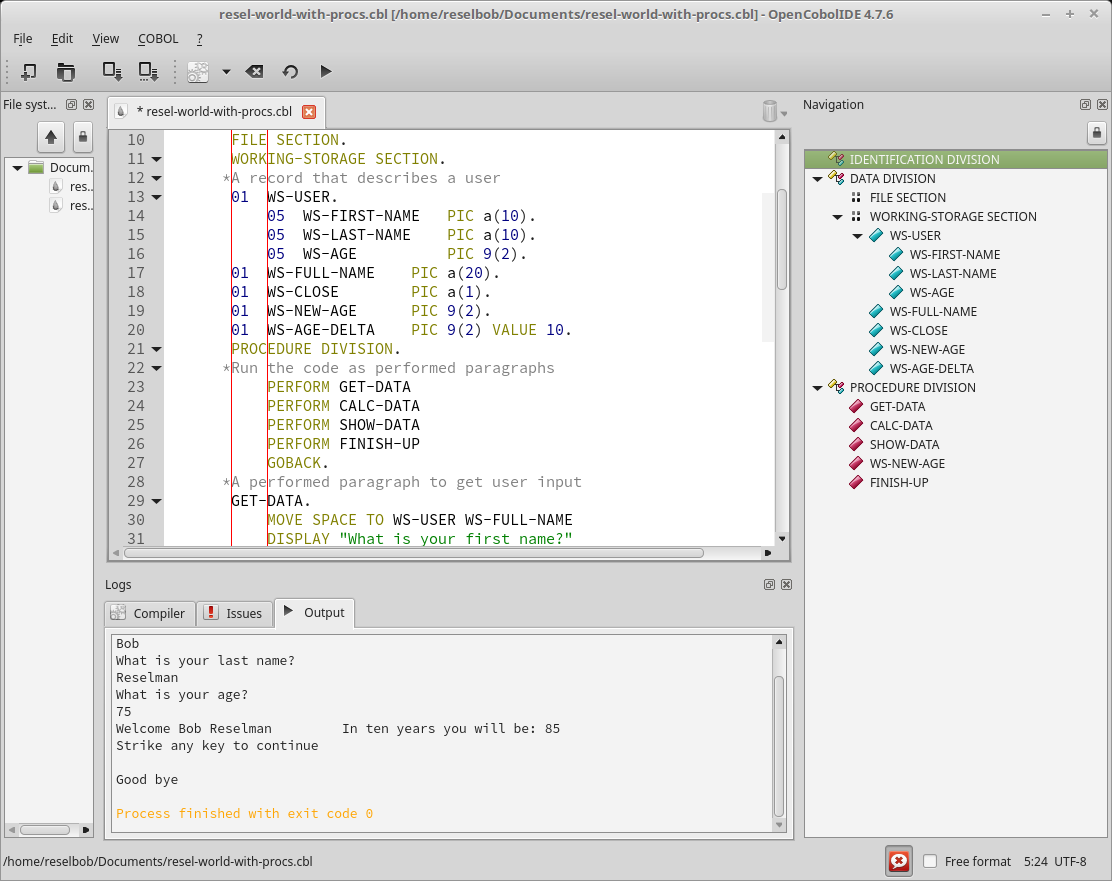
    The IDE I found is an open source product, OpenCobolIDE, as shown below in Figure 1.

    Figure 1: OpenCobolIDE provides many tools to make COBOL programming easier

    OpenCobolIDE allows me to write, compile and run code all in one place, without having to go out to the command line, which is very good because I am the world’s worst typist!

    Programming COBOL in the Real World

    When it comes time to do real world, mainframe based COBOL programming, you will do well to look at the IDEs that IBM provides. The tools are designed to go about against its Z Systems environment seamlessly as a set of Eclipse plugins. These tools allow COBOL developers working in the mainframe environment to code, debug, unit test and do problem determination.

    Having set up my development environment, the next thing to do was design my first project.

    Designing My First COBOL Program

    Typically when learning a new language I like to start small and work my way up into more complex tasks. I did the typical Hello World program. You write the code to display string, Hello World, to standard output. Every developer does one. It’s a trivial program, as shown below in Listing 1

    beauty-of-cobol-listing-01
    Listing 1: A Hello World program written COBOL


    While the Hello World required that I learn about the concept of a DIVISION, which I will discuss in detail below, in the scheme of things, I needed more. I wanted to write a program that would force me to learn how the following:

    • How to create and use variables.
    • How to structure data into a hierarchy.
    • How to structure code into encapsulated procedures.
    • How to do some basic arithmetic.
    • How to accept user input and then do some manipulation around that input.

    Thus, I create the program, RESEL-WORLD, as shown in Listing 2, below.

    beauty-of-COBOL-Listing-02

    Listing 2: The COBOL program, RESEL-WORLD accepts and manipulates users’ input

    The user input and program output is shown below in Figure 2.


    Figure 2: The RESEL-WORLD COBOL program asks a user for first name, last name and age, then manipulates the input

    The RESEL-WORLD program taught me a lot about COBOL and how to program in the language. In the spirit of giving, I am going to share what I learned from writing the program. However, before I delve into the details, please be advised that the information I’m presenting is but a high-level overview. As with any programming language, it takes about a year of consistent coding to become an entry-level professional. My sincere hope is that the information I provide gives the reader a good sense of the language and enough motivation to want to learn more. As I mentioned early, learning COBOL is worth the effort.

    COBOL is Code in a Structured Document

    The most important thing to understand when learning COBOL is that is very strict in terms of code layout. The layout rules relate to the use of columns and characters. Also, the format uses a hierarchical outline structure. The following sections describe the details of layout specification.

    The COBOL Column Specification

    In COBOL a line of code can be no longer than 80 columns in length. You can also think of a column as a character. Columns are segmented into groups, with each group serving a particular purpose. The columns groups are as follows:

    Columns 1-6 is the group in which a programmer defines a sequence number. A sequence number is similar to a line number.

    Column 7 is reserved for special characters. Asterisk (*) starts a line of comment. Hyphen (-) indicates line continuation and slash (/) is form feed.

    Columns 8-11 is called Area A. Area A is the group of columns in which you start a DIVISION, PARAGRAPH and SECTION. We’ll talk more about these below in the next section, The COBOL Structural Hierarchy.

    Columns 12-72, also known as Area B, is where you write code statements.

    Columns 73-80 is reserved for developer use. You can write poetry in there, if you so desire. Just make sure you don’t go past column 80.


    Figure 3, below illustrates the columns grouping described above.

    Figure 3: Each column in a COBOL file is specified to serve a specific purpose
     

    COBOL is a compiled language. When it’s time to run your code, the compiler will check to make sure that the code layout adheres to the column grouping specification. If there is a violation, the compiler will error.

    Understanding Performance in Terms of Compilation and Compilers

    COBOL is a compiled language, as are others such as Java, C# and C++. Compilation is the process of taking textual source code and converting into a binary format that the computer can understand.

    There’s a lot of variety in the COBOL world when it comes to compilers, particularly when it comes to cost and performance efficiency. For example, how a compiler orchestrates the way numbers are loaded and then computed in memory matters a lot! A good compiler will make code run really fast.

    IBM has been in the COBOL business for a long time and has a keen understanding about making compilers that are fast and cost-effective. For example, the z14 System compilers improve efficiency by taking advantage of almost 24 new low-level instructions. As a result, computation speeds improve dramatically.

    As you work more with COBOL, you’ll come to appreciate the power that an industry-leading compiler such the IBM Z Systems brings to the coding experience.

    The COBOL Structural Hierarchy

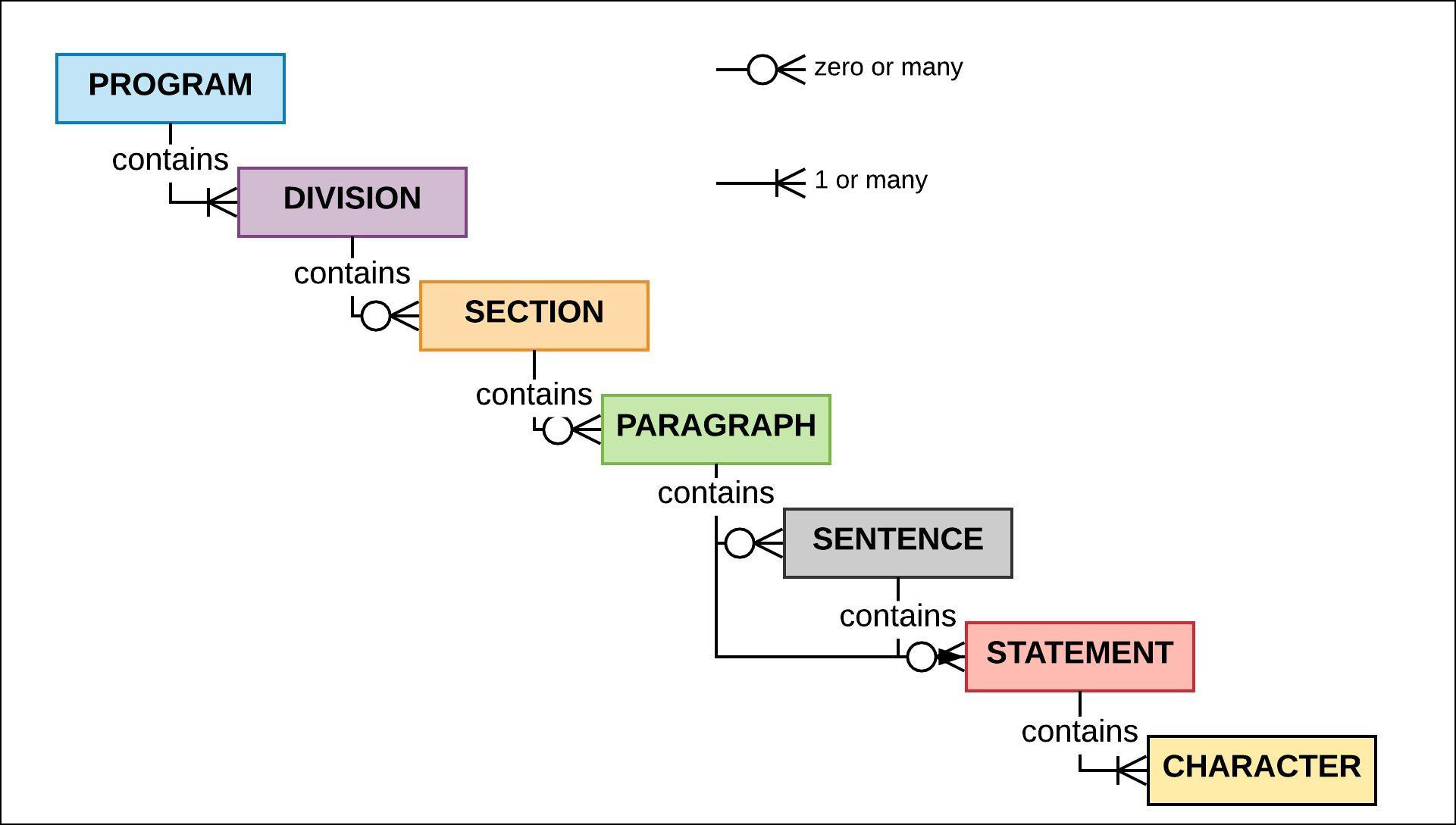
    The concept behind the file format of a COBOL program is based on the structure of a document outline, with a single top-level heading followed by subordinate levels. The organizational units that make up the hierarchy are PROGRAM, DIVISION, SECTION, PARAGRAPH, SENTENCE, STATEMENT and CHARACTER. Figure 4 illustrates the hierarchy.


    Figure 4: The structural hierarchy of COBOL program entities

    PROGRAM is the root level of the COBOL code hierarchy. PROGRAM represents the unit of code that the mainframe job scheduler, the JCL, loads into memory to run. The program is identified by the PROGRAM ID statement in the IDENTIFICATION DIVISION. The IDENTIFICATION DIVISION is part of the next level of hierarchy that descends from PROGRAM. PROGRAM must contain the IDENTIFICATION DIVISION.

    There are other DIVISIONs that can be included. These other DIVISIONs are: ENVIRONMENT DIVISION, DATA DIVISION and PROCEDURE DIVISION,  which occur after IDENTIFICATION. Also, these subsequent DIVISIONs must appear in the order defined: ENVIRONMENT, DATA and then PROCEDURE. You can read a detailed description of each DIVISION here. DIVISION names are terminated with a period, for example,

    DATA DIVISION.

    The next organizational level down from DIVISION is SECTION. (Please see Figure 5.) Each DIVISION will contain SECTIONs that are special to it. For example, the DATA DIVISION can contain FILE SECTION, a, WORKING-STORAGE SECTION and/or the LINKAGE SECTION. You can read the details about DIVISIONs and SECTIONs here.


    Figure 5: A COBOL program is structured in a hierarchical manner

    A SECTION name is terminated with a period, for example:

    WORKING-STORAGE SECTION.

    A SECTION contains zero or many PARAGRAPHs. (Typically a SECTION will have at least one PARAGRAPH.) A PARAGRAPH name is terminated with a period, similar to a DIVISION and a SECTION.

    A PARAGRAPH contains SENTENCEs or STATEMENTs. A SENTENCE is a group of STATEMENTs. Usually a PARAGRAPH contains one or more STATEMENTs. A STATEMENT is a line of execution. A STATEMENT is made up of CHARACTERs. A CHARACTER can be an alphanumeric symbol or a special character. CHARACTER is at the bottom of the COBOL code format hierarchy.

    Variable and Data Types

    COBOL allows you to declare variables in a variety of data types. Special to COBOL is the concept of a variable level as represented by a level number. A level number defines a variable in terms of being or having a parent variable. (You’ll see more about this in the section, COBOL Supports Hierarchical Data, later on.)

    The following statement, which will be declared in the WORKING-STORAGE SECTION of the DATA DIVISION, is the declaration of a variable, WS-QUANTITY. WS-QUANTITY will hold a numeric value.

    01  WS-QUANTITY PIC 9(2) VALUE 12

    The expression above above declares a variable , WS-QUANTITY to be a two-digit value with an initial value of 12. Also, the variable is declared to be at level 01, which is the highest level possible. The variable has no parent. The way we know that WS-QUANTITY is a variable for a two-digit value is due to the PIC (Picture) clause. You can think of a PIC clause as a type declaration. Table 1 provides a high-level description of the various PIC clause symbols.

    Symbol Description Example Declaration Sample Value
    9 A numeric value where each occurance of 9 represents a digit 99 or 9(2) 35
    a Alphabetic aaa or a(3) “Bob”
    x Alphanumeric xxxx or x(4) “R2D2?”
    v Implicit decimal* v(3) .175
    s Sign s9(2) -76
    p Assumed decimal* p9 .6

    Table 1: Symbols for a PIC Clause

    *COBOL has a special way of storing numbers such that the numeric conversion take place when the characters are loaded into memory. For example, a variable with a PIC of p9(2) will be stored as 56 and loaded into memory as .56. For a more detailed discussion of usage and the PIC clause, go here.

    COBOL Supports Hierarchical Data

    Storing data in a named group of variables makes programing easier. For example, in the C programming language, we can use a struct to name a group of variables, as shown below in Listing 3.

    struct User { 
      char  first_name[10]; 
      char  last_name[10] 
      int   user_id; 
    };

    Listing 3: A simple structure in C


    One of the real nice things about COBOL is that it allows you to organize data according to a named group of values similar to that of a C struct. What’s interesting in a historical sense is that COBOL has had this capability well before Kernighan and Ritchie created the C programming language.

    The way COBOL accomplishes named data grouping is with construct called a record. Figure 6 below shows a graphical representation of a record named, WS-USER.

    Figure 6: The record, WS-USER contains subordinate variable, WS-FIRST-NAME, WS-LAST-NAME, WS-AGE

    The code snippet in Listing 4, which is from the RESEL-WORLD program at the start of this article, shows the COBOL code that declares the record, WS-USER.


    beauty-of-COBOL-Listing-04

    Listing 4: The record, WS-USER contains 3 subordinate elements, WS-FIRST-NAME, WS-LAST-NAME, WS-AGE

    Notice in Listing 4 above the there are two levels of data variables in play: 01 WS-USER and 05  WS-FIRST-NAME, 05 WS-LAST-NAME, 05 WS-AGE. The variable, WS-USER is a parent to the subordinate, level 05 variables, WS-FIRST-NAME, WS-LAST-NAME, and WS-AGE.

    Assigning variable to a numeric level is special to COBOL. The declaration logic is that a record variable (the root of the record) has a level number of 01.  Levels 02 to 49 are used to declare subordinates elements. (You can think of a element as a member of the record.)

    You use the reserved word OF to access an element of a record. Listing 5 below shows two statements. The first asks a user to input their first name. The second statement takes the value entered and assigns it to the element, WS-FIRST-NAME of the record, WS-USER.

    DISPLAY "What is your first name?".
    ACCEPT WS-FIRST-NAME OF WS-USER.

    Listing 5: Accessing an element of a record in COBOL


    It make sense that records were part of COBOL from the start. COBOL was intended to be a language used for business application. Businesses have been organizing values according to named groups since before the customer form was created. COBOL was designed to reflect business needs. It’s interesting that the fundamental needs of businesses in terms of logical data structures have been surprisingly consistent over time.

    COBOL Has a Natural Language Syntax

    Expressing a statement in COBOL is very similar to the way a person speaks naturally. Listing 6 below shows the statement that adds together the values of the two variables, WS-AGE-DELTA and WS-AGE (from the record WS-USER), and stores the result in the variable, WS-NEW-AGE.

    
    ADD  WS-AGE-DELTA WS-AGE OF WS-USER TO WS-NEW-AGE.

    Listing 6: Adding two integers, WS-AGE-and DELTA WS-AGE, then storing the sum in the variable, WS-NEW-AGE

    Notice that the statement in Listing 6 is very close to saying, “Add WS-AGE-DELTA and WS-AGE from WS-USER to WS-NEW-AGE.”


    What I find pretty astounding is that many modern programming paradigms try to capture the ease of natural language expression that COBOL has had for years. What comes to mind immediately is the use of natural language expressions in the NodeJS Chai package. Chai is used in NodeJS unit testing to express BDD assertions. Here’s a Chai expression that checks a variable, myVar to assert that it’s a string.

    expect(myVar).to.be.a('string');
    
    FAST FACT: Is COBOL a case-sensitive language?

    No. COBOL will consider a variable named WS-FIRST-NAME to be the same as one named ws-first-name.

    COBOL supports DRY

    For programming language to be really useful, it needs to support DRY. DRY is an acronym for Don’t Repeat Yourself. Most programmers don’t want to write the same code over and over again, nor should they. What you want to do is to encapsulate code in to a single area of execution that can be called repeatedly. Being able to program by DRY is common for most languages—BASIC, Java, C#, Javascript, Python, to name a few and … you guessed it: COBOL.

    COBOL supports code segmentation and reuse in a variety of ways. One way is through linkage, calling routines between programs. Another way is to segment code inline under a PARAGRAPH in the PROCEDURE DIVISION and then call that PARAGRAPH. (See Figure 7.)

    Figure 7: You can make code reusable in COBOL PARAGRAPHs

    The little RESEL-WORLD program I wrote uses the inline PARAGRAPH technique. Before I go in to the details of calling code encapsulated into a PARAGRAPH, it’s important that you know that in COBOL the entry point of execution into a program is the first line of code after the declaration of the PROCEDURE DIVISION, as shown below in Listing 7.

    beauty-of-COBOL-Listing-07
    Listing 7: COBOL supports reusable code by using PARAGRAPHS to segment execution

    Notice the PERFORM statements right after PROCEDURE DIVISION. These four statements are calling PARAGRAPHs. (For those of you familiar with JavaScript, you can think of each PARAGRAPH as a function definition.) Essentially what the code is saying is, “Execute the code at the paragraph named, GET-DATA, then perform the code at CALC-DATA, SHOW-DATA and then FINISH-UP.”

    Encapsulating code into STATEMENTs within a PARAGRAPH prevents code from become spaghetti that is hard to maintain. Also, the encapsulation enforces the sensibility of DRY. Any language worth its salt needs to support some sort of encapsulation. COBOL meets the need with room to spare.

    An Expressive Language for Now and the Future

    The more I learn about COBOL, the more I like it. The language continues to evolve to meet the needs of our fast-changing times, with revisions as recent as 2014. Since its inception there have been a dozen enhancements to COBOL including a continuing stream of formal standards.

    Today’s COBOL supports modern programming paradigms such as object orientation. The IDEs have grown to keep pace with the demands of modern users. And, given the immense installation base out there, there is a lot of money to be made doing COBOL programming. To quote Wikipedia:

    In 2006 and 2012, Computerworld surveys found that over 60% of organizations used COBOL (more than C++ and Visual Basic .NET) and that for half of those, COBOL was used for the majority of their internal software.


    What’s even more amazing to me is the cleverness of engineering the language has promoted. COBOL developers addressed problems in the past that still vex many today. We modern developers can fall prey to thinking that before we came along, there was no cool stuff. It’s like the young, aspiring guitarist who thinks thinks he has his chops down and can shred to the top of the heap. Then one day his music teacher gives him a 1936 recording of Django Reinhardt playing guitar, and playing with only two functional fingers on his left hand! At that point the young artist realizes that virtuosity transcends era and that creativity has no bounds. This is what it’s like for me as I learn COBOL. It’s a beautiful, expressive language that was cool then and is very cool now. Learning it is making me appreciate how much amazing thinking went on back then and continues to emerge. There’s a lot of rich opportunity at hand to make great code for mainframes using COBOL. It’s only a matter of mastery, creativity and discovery.

    Special Thanks

    If I have seen further it is by standing on the shoulders of giants.

    —Isaac Newton, Letter to Robert Hooke, February 5, 1675

    Learning any programming language is hard work. Years ago, when I wanted to learn a new language, I would get a few books on the topic and then hunker down to spend the hours necessary to absorb the required knowledge. If I had the time, I might take a course. Maybe I had an expert friend I could call up when I hit a wall or needed real-world guidance.

    We’ve come a long way since that time. The internet is a game-changer. Online tutorials, videos and interactive, digital books make things a whole lot easier than in earlier times. My experience learning COBOL testifies to the value of these modern benefits. But still, as I’ve been learning, I’ve hit more than one wall that required professional guidance and review. Allan Kielstra and Roland Koo at IBM (who also wrote this great article) provided the expertise that made my learning COBOL not only less difficult, but also fun. I am in their debt. Their enthusiasm for COBOL was infectious. Their commitment to technical excellence is inspiring.

    — Bob Reselman

  • Reducing Poverty in the Age of Automation

    Reducing Poverty in the Age of Automation

    In 1966, more than half of the people in the world lived in extreme poverty. I don’t mean public housing, food stamps, subsidized school lunch, free health clinic poverty. I mean the type of poverty in which there’s no electricity, no running water, no toilets and open sewers, and most children never see a doctor or the inside of a classroom. Back then, people living in extreme poverty had a daily diet of gruel; not rice and beans, mind you, but mushy, flavorless, boring gruel. Violence was rampant. Infant mortality was high and living to 65 was more the exception than the rule.

    While it’s true that there were pockets of prosperity to be found in the Third World, for most people, if you didn’t live in Australia, Japan, North America or Europe, the odds were your life was not that different from a peasant living in the Middle Ages, except that maybe you had access to a TV or radio in the village square.

    Cheap Technology Contributes to Declining Rates of Poverty

    But things changed. In 1997, the number of those living in extreme poverty dropped to 42 percent of the people in China and India. By 2017, the number dropped again, this time to an amazing 12 percent in India and .07 percent in China. Now, this doesn’t mean that everybody in India and China rode around in Toyota Camrys and spent their evenings gazing at a 52-inch high-def TV, but it does mean that just about everybody went to school, saw a doctor and had some choice in what they ate for dinner. It might not seem like a lot, but when you consider that their great grandmothers could barely read a newspaper, it’s a big deal.

    This progress didn’t happen by magic, and there’s a good argument to be made that it didn’t happen because of politics. My opinion is that it’s due in good part to the proliferation of cheap technology brought about by automation.

    The Toothbrush as an Agent of Change

    Small pieces of cheap technology can make a big difference. Take the toothbrush, for example. Not that long ago, a personal toothbrush was a luxury item for many. Today there are machines that make them automatically by the dozens, for pennies in material cost. Anybody can buy one and those who can’t many times can get one for free. Think what it must be like for a 7-year-old child in a classroom trying to learn how to read while in the throes of dental pain. There wouldn’t be a lot of learning happening.

    Studies have shown that a leading indicator of good health in the long term is the practice of good dental hygiene on a daily basis. Giving a child a toothbrush and some toothpaste early in life makes a big difference. Children who brush their teeth regularly fare better. A toothbrush might seem like a trivial consumer good, but it is actually a high-impact technology that has lifted many people out of poverty.

    Faster Credit Reporting Means Less Poverty

    Another example of a small piece of automation that’s improved the lives of billions is credit reporting. Thirty years ago it took a few days to get the credit rating of a company, and getting the credit rating of a sovereign state could take longer. Today, getting a credit report takes seconds. Automated credit reporting accelerates financing, which not only makes it easier for a consumer to get a home mortgage or car loan, but also for sovereign states such as India to get large-scale, industrial goods such as bulldozers. More bulldozers translates into more roads; more roads lead to more commerce and more commerce leads to prosperity for more people. It’s a pattern that’s difficult to ignore. Just take a look at the economic growth that accompanied the expansion of the U.S. interstate highway system in the last century. In this century, the same growth pattern is underway as China grows its One Belt, One Road (OBOR) transportation infrastructure on a global scale.

    The Cellphone: A Tool for Prosperity on a Global Scale

    Which brings us to the cellphone. The first mobile phone cost $4,000. Today, you can buy a prepaid, throwaway one with service for around $50. Given the technical infrastructures required to build the phone and networking infrastructure necessary to provide service, selling a fully functional cellphone profitably at $50 is a near miracle. And, its impact goes way beyond a simple, “What time will you be home for dinner?” conversation. There’s a big difference between living in poverty and living in poverty yet having a cellphone. A cellphone puts a person on the grid even when living in a hut in a remote village in Niger. Having a cellphone means being able to solicit paying work. It means having access to simple bank services. It means being able to get medical care in an emergency. And, a cellphone can connect users with online learning resources that can enhance the educational experience for those living in parts of the world where access to secondary education is rare. It’s no wonder the Gates Foundation is focusing on programs that use cellphone technology to address issues in poverty stricken areas.

    Not only has cheap technology reduced the cost of cellphones to nearly free, it also has reduced the cost of dental crowns through 3D printing technology and international trade through automated navigation systems for ocean-going vessels. Cheap technology also has brought about free online college courses and built-in writing assistants for email clients that have had the surprising effect of giving people better command of the written word.

    The Fall of Global Death and Destruction

    Our technological achievements allow us to grow more food, educate more people and reduce the level of violence to an all-time low. Remember, 20 million Russians were killed in World War II. That’s 5 million people a year over from the beginning of hostilities in June of 1941 until the war’s end in August of 1945. We’ve not seen slaughter in such numbers since that time. Yet, news of today’s conflicts is broadcasted on a global scale, so it can seem as though millions are dying everywhere. But the actual number of people killed in armed conflicts today comes nowhere close to the number casualties that were the result of the world wars of the last century.

    As the Numbers Go Down, the Risks Become Greater

    Things are getting better for more people and we technologists have been significant contributors to these improvements. Yet, new risks are on the horizon that could stifle the upward trends. One of the biggest potential dangers is a worldwide pandemic. While cheap air travel has removed the barriers of international travel for more people, it also has made it easier for a highly contagious disease such as Ebola to spread faster.

    And then there’s always the risk of nuclear catastrophe. The number of nuclear weapons has decreased, but technology has made possible nuclear devices that are the size of a suitcase. Whereas it takes the resources of a sophisticated sovereign state to create and deliver missiles capable of a nuclear strike across continents, all that is required for a non-state belligerent to deliver a nuclear blow is a small device hidden in the trunk of a car driven across an unguarded frontier. It’s a remote possibility but a possibility nonetheless, and one that can have a catastrophic outcome of unimaginable dimensions. Fortunately, for better and worse, we in technology have created planetary surveillance systems that make it possible to guard against such an occurrence.

    Considering the Big Picture

    Technology grows in complexity every year, particularly for those of us in DevOps. The rate of innovation can be overwhelming. We’ve got to know more to do more. As such, many of us give most of our attention to the details that make the technology work. Sometimes we lose sight of the big picture. But, here’s something to consider: As weird as it may sound given current perceptions, there’s a good argument to be made that, given the increasing rate of technological innovation and the reduced costs of mainstream technology produced by such innovation, we might eradicate extreme poverty in our lifetime, if not the lifetime of our children. In the past such thinking was considered grandiose. But, as the $50 cellphone demonstrates, it’s a goal we can look forward to achieving.

    Authors note: The source of the data on the reduced rates of poverty worldwide described in the opening of this article comes from the book, “Factfulness” (pages 52-53) by Hans Rosling , Anna Rosling Rönnlund and Ola Rosling.

    — Bob Reselman

  • Life and Death in the Age of Automation

    Life and Death in the Age of Automation

    Has automation changed the way we perceive interaction with others?

    A few weeks back I got an email from an old friend, Jim. Typically, that’s no big deal; I get emails from old friends all the time. Except, in this case, it was different. According to a posting on Facebook, Jim passed away about a year ago.

    Another friend who is still among us reports having a similar experience of receiving emails from those who are dead. It’s an eerie event that’s becoming more common. Bad actors hack into a data store and pull up some email addresses, which they blast about nefariously to unsuspecting recipients. It’s a strange, almost morbid experience when you’re on the receiving end.

    But it’s gotten me thinking: What does it mean to be alive on the internet? And, more importantly, how much of what we perceive on the internet as a human really is? Jeepers—for all I know, the Facebook post could have been a ruse. Maybe Jim uploaded his consciousness into eternity and he really is trying to make contact. How would I know it otherwise?

    Allow me to elaborate.

    Technology that Captures the Moment

    Mankind has been using technology to represent reality since early caveman figured out how to draw pictures of hunters and animals on the walls of caves. The more real a depiction seemed, the more valuable it was. A sign of significant wealth was having the wherewithal to pay an artist to paint your portrait. The painting passed your likeness onto future generations. Your posterity knew what you looked like. The poor just drifted in away into imageless anonymity.

    However, whether you were rich or poor, there was one thing that technology couldn’t do: It couldn’t capture the moment. A painting took weeks, maybe months to complete. And, no matter what, the rendering was an interpretation.

    Photography changed all that. It captured the moment, which was a first in human history. And it democratized portraiture. In practically no time at all, it seemed that just about every town and city had a photography studio. Affordable photography made it so images of mothers and fathers could be passed on—future generations had a very clear idea of what great-great-grandma Mary and grandpa William looked like.

    Portraits of George Washington left a lot to the imagination. Photographs of Abraham Lincoln left no doubt.

    Figure 1: Portraits of George Washington are renderings of the artist’s perception created over time, not in the moment.


    Figure 2: Photographs capture a moment in time. Abraham Lincoln in 1858 (left). Abraham Lincoln in 1861 (right).

    The first time that 19th century former slave, abolitionist and author Frederick Douglass had his photograph taken was in 1841. By the time of his death, he was the most photographed man in America. Douglass understood the power of the technology both in terms of information representation and dissemination. Photographs of Douglass made his humanity real at a time when a good portion of the population of the United States was deemed subhuman.

    Figure 3: Frederick Douglass, born a slave, was the most photographed man in 19th century America. The reality that the technology revealed confirmed his humanity.

    The power that photography brought the technological and cultural landscape created trust in the image. The veracity of information in a newspaper article could be argued, but the image the camera captured represented reality beyond a doubt—at least until the practice of doctoring photos to misrepresent reality came into practice.

    Reincarnation as Seen on TV

    And then came television, which made it possible to represent reality as a stream. Whereas a photograph captured the moment, television captured as many moments as the viewer had to spare. But, it was a trade-off. Television distorted perceptions of life and death. Before TV, no child ever had the experience of viewing an actor portraying a character who died in an episode of “Gunsmoke” one week, only to reappear as another character on another TV show the following week. Death became impermanent. Also, the line between fact and fantasy blurred. The same television screen that brought the nightly news also delivered episodes of “Star Trek.”

    In terms of time and space, the only “real” thing is the TV set. Everything else is content. Sometimes you could tag the content as “fact” and other times as “fiction.” Or, you could tag it to a third category, “I’m not sure,” which gave rise to the harebrained idea that the 1969 moon landing really happened in a TV studio at a secret government location.

    Now, here’s where it gets really interesting. In the past, most people interacted with others most of the time in close proximity. You went to Grandma’s house for the holidays. You bought your groceries at the neighborhood supermarket. You sat in classrooms under the supervision of one or many teachers for at least 12 years, maybe more.

    That was then and this is now.

    Today, visiting Grandma for the holiday might be nothing more than a call on Skype. More people are making essential purchases online. The online class is replacing the brick-and-mortar school building.

    The fact is, we’re spending a lot of time in an environment that is essentially representational. Every day, more of our interactions with the “world” take place on the screen of a smartphone, tablet or a desktop computer. In some cases, it’s nothing more than talking to a device by name, as in “Alexa, what time is it?”

    Is it Human? Does it Matter?

    And thus we have the problem of distinction. We’re at the stage now where we’ve come to accept that some of the interactions we have online might be with a human and some interactions might be with a machine powered by AI. Sometimes it’s easy to tell. After all, I know there’s is no miniature person living inside my Echo device. And I know there is no little man inside my refrigerator who turns on the light as I open the door. This is low-hanging fruit; it’s obvious what the machine is. Still, in the long run, how can we tell? And, even if we can’t, does it matter?

    These days I have a lot of interactions with people on video conference and on the phone. I estimate that of all the people I interact with regularly, I’ve shaken the hand of about half. Twenty years ago, I physically touched nearly all. Such is the way of progress.

    I’ve had the benefit of living in a time in which the person came before the photograph. Now, we live in a time in which the photograph can come before the person. We think up the ideal actor and send it over to the special effects department for rendering. Today, we interact with images that have no human origin and yet behave in a way that is indistinguishable from a human. For those born today, it’s entirely possible that most of the meaningful relationships they have throughout their lifetime will be with non-human intelligence. Yes, there is a good argument to be made that people will still gather together in real time for concerts, religious services and sporting events. But consider this fact: 73,000 people attended the 2018 Super Bowl in a stadium, in real time. However, 103 million watched the event on TV. The “attendance” at the digital representation of the event exceeded the real-time experience by more than a factor of 10. And, companies paid millions of dollars for advertising time during the televised game. Today, that which we perceive as real is just as meaningful as that which actually is real.

    Which brings us to life and death in the age of automation. Unless Kurzweil proves right and uploading ourselves to a computerized host becomes possible as the Singularity approaches, all of us will die. And yet the images, both the ones we make and the ones that were made for us, will live on forever. Will these images take on a life of their own? Will we be able to use artificial intelligence to inject these images with the behavior that made us us, using information about us that was gleaned by observing every aspect of the online interactions we had over our lifetime?

    I’m not sure. But the possibility has stopped me from replying to that latest email from my friend, Jim. To be honest, I’m afraid of what would happen if I did.

    — Bob Reselman

  • Dependency Based Build Promotes the Freedom to Program

    Dependency Based Build Promotes the Freedom to Program

    Whenever I want to be amazed, all I need to do is reflect on the fact that the continuing development of the Linux operating system is done essentially by a community of volunteers. That’s right! One of the most popular and important operating systems is updated and maintained through donated labor. Any programmer anywhere in the world can make a contribution to improve the Linux kernel.

    That such a herculean undertaking is done though volunteer labor is mind-boggling. What’s more amazing is that the software created has an extraordinarily high level of quality. Let’s face it, working on the Linux kernel is not something a kid in high school with a year’s worth of experience programming in C can do. But, any kid in high school can make a contribution to the Linux code base, provided the code passes muster. That it happens is almost magical, in a way. But it does, every day.

    What enables such freedom? To my thinking, it’s the concept of the the pull request.

    The Powerful Elegance of the Pull Request

    The pull request is a simple yet important part of the open source development process. A developer creates a feature branch off the Master branch of the Linux repository, then adds to or modifies the code in that feature branch. Of course, the developer writes tests that verify the new code works. Once the code is complete, the developer sends a pull request to the project, which is typically hosted on GitHub or another popular Git repository platform. The project maintainers, a group of people who have expert knowledge of the code base, review the pull request using tools that are baked into the Git repository platform. Each maintainer inspects the code and, if the code passes inspection, the reviewer votes to approve. If the code has shortcomings, the reviewer makes suggestions for improvement directly in the code using the Pull Request Commenting features, which are available in practically all the Git Repository Platforms including GitHub, GitLab and Bitbucket.

    It’s a simple yet powerful process and one that has changed the way enterprise-worthy software gets created. Any developer can implement an idea any way they want, as long as the implementation is compatible with the code base. It’s up to the developer to figure out how to do what they desire; nobody is dictating anything. The process is straightforward: Figure out how to make your contribution to the code. Make a feature branch. Do your work. Do a pull request. If your contribution is useful and the coded well, you’re in. If not, we’ll try to help you make it better.

    Bringing Git to Mainframe Development Using DBB

    The pull request is a compelling approach to making software—so much so that IBM has made it a central part of software development on the mainframe. And, its product, Dependency Based Build (DBB), streamlines the mainframe pull request process by reducing the work reviewers need to do in the code review process.  [su_pullquote align=”right”]A Dependency Based Build trial is available in the IBM Z Trial Program at zero cost, and with no installation required. The trial environment includes hands-on tutorials.[/su_pullquote]

    Git version control is supported by practically all the modern IDEs. For example, developers can configure Visual Studio Code, JetBrains products and Eclipse to work with remote Git repositories automatically. Once integrated, Git operates behind the scenes, allowing developers to work under version control without having to issue Git commands directly. IBM’s mainframe integrated development environment, IDz EE, provides Git integration as well. This is a big deal, as Git is now part of the mainframe ecosystem. The developer accustomed to using Git version control when working on a standalone x86 Java app now can move over to developing for a mainframe without having to learn a new source control management (SCM) system. But what’s even more impressive that Git is used as the SCM for more traditional mainframe artifacts; for example, COBOL source code.

    Also, Git integration goes beyond developers working on source code; Git is used throughout the mainframe build process—which, by the way, can be controlled by Jenkins. And, Git is a foundational technology used by IBM DBB, a dependency control agent that works with Git to make sure that all files—source and dependencies—in the mainframe build process are current. Again, this is a big deal: Having all the moving parts in the mainframe deployment process, from programming to build to release, use Git as the common code repository allows z/OS mainframe components to be part of a platform-agnostic deployment process. Use of DBB overcomes a significant hurdle between the mainframe and distributed world.

    So, what does this have to do with the power of pull requests?

    Adding Pull Requests and Code Review to the Mainframe Experience

    The pull request review process is more than just “looking at code.” When you have a project that might have millions of lines of code, such as the Linux kernel, no developer is going to pore over each line of code. They’ll read the documentation, run the unit tests, look at the lines of code that have been added or removed and search for blatant problems and inefficiencies. Now, on a PC, compiling something such as the Linux kernel is straightforward—all the code is in the single repository. On mainframes, however, it’s a bit different: The code is more widely dispersed and dependency management can get tricky. DBB takes care of tracking dependency changes in various Git repositories, so when it comes time to do the pull request, the reviewer doesn’t have to waste time resolving dependency issues to get mainframe code to compile. DBB will take care of that. With regard to the pull request, reviewers can do what they are supposed to do: make sure the code works and the quality is such that it can all be merged back into a master branch.

    This might not seem like much, but anybody who has stayed up until 3 a.m. trying to resolve dependency issues understands the importance of having code that builds all the time, any time. This is the power that DBB brings to the table.

    The Freedom to Program

    Programming is a special vocation. It requires an unusual combination of art, science, creativity and engineering discipline. Also, it’s not a vocation that lends itself to well to prescription. Each programming project is special, requiring new ideas. And new ideas come about when developers are free to use their imagination to think differently. The pull request is one of the best ways to ensure developers have the freedom to program in way that produces useful, high-quality code. DBB extends the freedom to program to the mainframe community.

    History has shown that when a developer is given the freedom to code and a community in which to code, the result is great software. Just ask Linus Torvalds.

    — Bob Reselman

  • Education in the Age of Automation

    Education in the Age of Automation

    Automation is changing the nature of education and the ways people learn. More schools are using online learning to supplement in-class activities. In fact, some schools are completely online. Distributed computing on the internet and the automation that drives it makes this possible.

    Everything changes when the formal education process becomes embedded in the internet. Courseware delivery becomes asynchronous; people learn what they want, when they want to. Test administration becomes more about the efficient acquisition of data and evaluation thereof. Human-to-human interaction as a basis for a meaningful educational experience becomes optional. Today, it’s entirely possible to learn all you need to know to make a good living in the modern world without ever needing to sit in a classroom or interact with a human directly. Let’s face it: You can do a lot of learning from YouTube.

    As a result, more people are beginning to question the conventional wisdom of spending four years and thousands of dollars to get a bachelor’s degree—particularly now that companies including IBM, Google and Apple no longer require one to get hired.

    Coincidentally, as companies eliminate the college degree requirement for new hires, we’re seeing significant growth in technical bootcamps. One study reports that this year, 20,000 students will complete a course of study at a coding boot camp and be “job ready.” Considering that the number of students who graduated with a computer science degree from a typical college in 2017 numbered about 93,000, there’s a good case to be made that boot camps are siphoning off a number of students that otherwise would be headed to academia.

    Going to boot camp instead of college is an upward trend: The study projects that the number of boot camps are expected to grow 20 percent this year. The career path for a technical professional does not necessarily involve going college. Going to a boot camp for a year—if not less—will suffice.

    Is this a problem? I’m not sure. On the plus side, I am reminded of the scene in the film, “Good Will Hunting,” when Matt Damon’s character Will Hunting, a genius with a photographic memory who walked the halls of MIT working as a janitor, makes the profound remark:

    “… you dropped a hundred and fifty grand on a f****** education you coulda got for a dollar fifty in late charges at the public library.”

    There’s a good argument to be made that when it comes to getting a good paying job, the $15,000 median price tag for attending a coding boot camp has a better much better ROI than spending  ~$200,000, the cost of a four-year degree from MIT.

    But then, I am reminded of Aldous Huxley.

    In his book, “Brave New World,” people are grown in test tubes according to a specific formulas, the result of which is a biological caste system. Those in the Epsilon caste are grown to be 3 feet tall and abhor the outdoors. Their job is to work their way underneath the machines on the factory floor to do simple maintenance. Deltas, the next caste up in the hierarchy, do the menial chores—janitors, for example. Gammas are the bookkeepers and data entry clerks. Then you get to the higher levels, Alphas and Beta. Betas are technicians who do very sophisticated jobs, such as mixing dangerous chemical together. One mishap can result in an explosion, killing all. Finally, at the top of hierarchy are the Alphas. Alphas possess advanced analytical skills and a broad knowledge base. They are able to plan and strategize. They have a high degree of creativity. Their role is to run the society.

    Thus, I have a concern about the increasing role of technology and  automation education, and the emergence of tech-focused boot camps as the prime post-secondary educational experience for many.

    As more of those entering the workforce forgo a formal college education, we run the risk of creating a society in which most of the technical workforce is Betas. They’re able to do highly complex tasks, yet have no idea why they’re doing them.

    Let me be specific. Let’s talk about Kubernetes: It takes a lot of knowledge and experience to be good at getting Kubernetes to work. It’s a complex, evolving technology that you need to keep your eye on. Companies are spending a good deal of money making sure their IT staff are competent with Kubernetes—as well they should be. One little misstep can result in the digital equivalent of a chemical explosion. Yet, I wonder how many of those “working Kubernetes” are thinking about the bigger picture—for example, the purpose and value of the enterprise using Kubernetes. Are these engineers questioning if the technology they’re working is doing good or harm?

    Or, let’s turn the dials down a bit and ask a question that’s less loaded philosophically. How many of those working Kubernetes today wonder if an alternative orchestration technology such as Docker Swarm might be a better choice to meet the need at hand. Or are they so concerned with getting Kubernetes to run that they don’t have the bandwidth to think about anything else? Do they just defer such critical thinking to “the system architects”?

    Critical thinking, although an acquired skill, is not one that’s new on the cognitive landscape. It’s been taught for thousands of years, since the time Socrates sat under an olive tree asking simple questions that forced his students to transform their assumptions and allusions into thoughts based on reason and reflection.

    Developing the ability to think critically traditionally has been one the aims of a college education. The romantic ideal is that college is the place where students are exposed to a variety of ideas from a variety of viewpoints. The hope is that such exposure, along with instruction aimed at developing one’s ability to engage in higher-order thinking, will create graduates who will contribute to making a better-functioning, more prosperous and more humane society.

    But, that’s the traditional perception of college. The reality is changing. Maybe college is just the place you go to get the skills required to get a good job. If that’s the case, given that a college education is becoming less affordable to more people, maybe the boot camp approach is best. Yet, there is a risk.

    A good while back when I was considering enrolling in a doctoral program, I attended a required orientation at Harvard University. I sat in an auditorium composed of about 50 aspiring doctoral students. One of the department heads on stage said the following, “The objective of our doctoral programs is simple. We want to train you to run the world.”

    Yep, that’s right. And, I can say with a good deal of confidence that this objective is the same today—to create thinkers who have the skills and knowledge necessary to run the world. The Alphas, if you will.

    So, we’re at a crossroads. Automation is a liberating force in education in that it makes infinite knowledge available to anyone who wants it at a fraction of a cost of a traditional college education. All that’s required is the time and desire to take advantage of the opportunity at hand. However, if the result of such education is a workforce in which the concern of most is to ensure that the technology works and does not blow up, then the risk we run is that bigger decisions will be made by those who had the time and money for an increasingly elite education. In other words, as more people spend time focused on turning the dials and setting the levels to make the technology go, a very small minority actually will be determining the purpose and direction of the machine the technology supports.

    Still, the fact is, most of us need to make a buck to survive. This means being good at getting the tech to work. Yet, we will do well to understand that there is a Big Picture and if don’t pay attention to it, someone else who has been educated to run the world will.

    — Bob Reselman

  • Implementing DevSecOps in the Mainframe-Driven Enterprise

    Implementing DevSecOps in the Mainframe-Driven Enterprise

    DevSecOps is emerging as an important trend in corporate IT. It makes sense. With each passing day more applications serve a larger user base. Whereas in the past the typical business application was accessible only from within the confines of an enterprise’s internal network, today, the software-as-a-service (SaaS) paradigm enables millions of users work with a single application.

    In the SaaS paradigm, a single application will service a number of companies and give each user in the company access to data and functionality based on a given company’s subscription plan. Take Saleforce.com for example: There is but one Salesforce.com providing service to thousands of companies worldwide, each with one to thousands of employees. Each company and each employee within a company will have particular access rights to the application. A paradigm in which there is one application servicing millions, perhaps billions of users requires a comprehensive approach to security. The slightest breach can result in havoc. Imagine what would happen if a SaaS application contained a flaw that allowed a company to see the financial data of its competitor that also subscribed to the SaaS.

    Given that the internet is the de facto network for all worldwide, today’s security concerns go way beyond restricting network access. Keeping bad actors away is becoming more difficult all the time. The sad fact is that a seemingly good actor can turn into a bad actor instantly and wreak havoc not only on the servers with the network—as is the case of a DDos attack—but on the application layer as well. In fact, according to IBM, an enterprise’s network layer is half as vulnerable as the application layer, yet more money gets spent protecting the network.

    This is an eye-opening fact and one not on the minds of most application developers. But, it might be, if developers had the benefit of the expertise and ongoing guidance required to implement bulletproof security at the application level.


    Which leads us to the mainframe.

    In today’s world of modern, web-based cloud computing, the mainframe is a major player. Seventy percent of corporate data lives on a mainframe. Also, now that the Linux operating system is pervasive in the mainframe environment, enterprise-level application developers can—and do—write Java, Python and NodeJS code for the Big Iron just as they do for X86 commodity environments. Technologies such as IBM’s z/OS Connect EE and StrongLoop make it possible to use an industry-standard specification such as OpenAPI to expose mainframe services as REST API without a lot of low-level fiddling around.

    This is good news.

    The bad news that application developers are just not that adept at security best practices. They don’t have the experience of a CISSP professional who has spent years, if not decades, in the trenches battling the bad guys in cyberspace. But that was then and this is now. Today we have DevSecOps.

    DevSecOps is the next generation of IT transformation. The goal of DevOps is to create an IT culture that is unified, automated and self-correcting. DevOps combines development and operations into a single organization focused on creating and deploying quality software at ever-increasing rates. DevSecOps adds security into the mix. The scope of DevSecOps activity is not confined to software development for commodity-based X86 servers and mobile devices. DevSecOps is intended to apply across all facets of the enterprise, from mobile to mainframe.

    DevSecOps is about a lot of things. It’s about the adoption of tools such as IBM’s AppScan, a tool that allows an enterprise to implement and monitor a variety of tests (web, mobile, dynamic, static and interactive) in a unified dashboard. It can include leveraging Secure Service Containers to ensure external security and safety from insider threats.

    DevSecOps is about putting in place a set of policies, along with appropriate operational checks and balances, that ensure that the enterprise follows security best practices at all times. It’s about following practices that go beyond episodic security testing. This means continuously analyzing the IT infrastructure to identify vulnerabilities as well as defining ways to mitigate risks and prioritize prevention activities accordingly. It means making compliance to regulations such as GDPR, PCI-DSS, PA-DSS, ISO 27001 and ISO 27002, HIPAA, GLBA and Basel III  an enterprise-wide responsibility, not just something that’s siloed away to the Compliance Department.

    DevSecOps is about acting proactively by using automation to rigorously inspect all code to uncover potential hazards. It means using HTTPS as the default protocol for public-facing URLs. It means making sure that all third-party components are built from source code when possible—and, if building against source is not possible, ensuring third-party components and libraries are certified safe by an accepted authority.

    DevSecOps is about a lot of things, but there is one principle that overrides all others:

    When it comes to DevSecOps, the most important principle to follow is to make sure that a security expert is a starting member of any team involved with making software for the enterprise.

    It doesn’t matter if the company is 30 years old running on a mainframe or 30 days old using native cloud services, there must be security experts as part of its development work from the start.

    This may sound obvious, but it’s easier said than done.

    It’s not a new challenge. It took the enterprise a long time to get QA personnel involved at the start of development process. Before the DevOps/Agile sensibility took hold, QA personnel showed up at the end of the release cycle, well after code was hardened.

    The same is true of release personnel. Before DevOps, release management was given some code and told to just get it out as soon as possible. There was limited knowledge as to what the code was about or the potential impact it might have on the infrastructure. As a result, weekends were spent in war rooms struggling to deploy code that was sparsely documented and mysteriously tested. You can bet that once release management showed up at the first project planning meeting, things changed.

    Now, with the emergence of DevSecOps, it is security’s turn in the tumbler. Security has always been an important part of enterprise IT. The number of compliance regulations on the books attest to the fact. However, security was usually the responsibility of the Compliance Department more than part of the IT organization overall. For many companies, the only time security ever came to the forefront was during audit time. As a result, security practices were more reactive than proactive. And, for many companies, they still are—think back to reactions to the Equifax and Target breaches.

    However, the success of DevOps has not gone unnoticed. The standard features of DevOps—unifying groups toward a common purpose, implementing automation whenever possible and using sprints and retrospectives to facilitate fast releases and address shortcomings quickly—has had positive results. Forward-thinking companies understand that DevOps works, and its successor, DevSecOps, will work provided the essential principle is followed: Make sure security experts have a seat at the table from the beginning.

    For many companies this means transforming from a culture of isolated silos in which managers serve as gatekeepers and powerbrokers to one of unified open groups in which a manager’s job is to assemble self-directing groups and to make sure that all the right people are involved from the beginning of a project. It’s a fundamentally different way of doing business.

    When it comes to realizing the promise of DevSecOps, tools are important. So are processes. But, the most important thing is to make sure that security is built into the fabric of the development life cycle, from start to release.

    DevSecOps will fill the missing link in the software development chain. It has to. There is little choice otherwise. Adhering to the most important principle of DevSecOps—to have security involved as an equal player from the beginning of the process—will go a long way toward ensuring that all software, from mobile and IoT to native cloud installations and mainframe instances, will provide the degree of safety and reliability required to serve the needs of users and companies in the digital economy of the modern world responsibly.

    — Bob Reselman