Author: Andi Mann

  • Visibility Drives Data-Driven Decision-Making

    Visibility Drives Data-Driven Decision-Making

    One of the biggest challenges of DevOps today is lack of visibility—especially shared visibility—into application delivery process and outcomes. A common data fabric allows all stakeholders to share visibility into DevOps processes, so they can more easily collaborate and communicate, use objective data to make decisions, and deliver better code faster.

    The DevOps Visibility Challenge

    A typical DevOps process relies on a loosely coupled tool chain. It includes separate tools for discrete functions including project management, source code control, provisioning and configuration, test execution and workflow automation. A tool chain approach adds much value, but becomes complex quickly. Also, it makes it difficult for stakeholders to get accurate insight into application delivery.

    This challenge is especially endemic to large and distributed enterprises. It’s even more difficult when there are thousands of developers and dozens of data centers across multiple geographies. Having duplicate tools, specialized teams, varying processes, distributed locations and multiple business units makes it even harder.

    As a result of this poor visibility into application delivery, stakeholders from business and IT:

    • Cannot manage the velocity of feature delivery. They cannot detect and fix slowdowns or bottlenecks in the process or allocate and prioritize resources. They also cannot plan for downstream activities or triage slowdowns and stoppages in the software development life cycle.
    • Cannot make objective decisions on quality. They risk releasing error-ridden software, slowing down response times, introducing security vulnerabilities, oversaturating infrastructure, damaging reputation and adding unnecessary costs.
    • Cannot properly collaborate on detection, diagnosis and remediation of production problems. They also cannot share an understanding of the impact of code changes on business key performance indicators. Customer satisfaction, customer signups, cart fulfillment rates and revenue all could be affected.

    Data Mining Enables Visibility

    To overcome these obstacles, successful DevOps teams are using objective metrics mined from machine data. That helps them gain insight into the end-to-end delivery cycle, from idea to release.

    Collecting, correlating and analyzing machine data from multiple sources gives dev and ops (and others) continuous insight. They can see the velocity, quality and business impact of application delivery. It provides individual contributors the data they need to be responsible for their own work, accountable to each other and aligned with business objectives. It enables managers to make data-driven decisions about workload prioritization, resourcing, scheduling, performance and value delivery.

    How to Get to Data-Driven DevOps

    Some of the key actions you can take to start on a journey of data-driven DevOps include:

    Measure your speed of application delivery: The machine data generated by your DevOps tool chain provides a wealth of information about all phases of the development cycle. It shows what is in development, close to release, in backlog and slowing you down. It shows which stages in the process are failing and what teams are most efficient. Consider mining and sharing velocity-related measures such as commit rates, sprint times and “idea to cash” time, to name a few.

    Measure the quality of your application code: Even if you are already using testing tools to understand release quality, there is more to quality than test coverage. Again, choosing the right KPIs is critical, as is sharing those measurements throughout your team(s). Some other key metrics may include the number and importance of defects, defect variance from release to release (or from team to team) and build/integration/deployment failures.

    Measure the business impact of application code: All too often organizations measure activity, but fail to align application delivery with business goals. As one customer recently told me, “Shipping crappy releases faster won’t help.” Business stakeholders especially are looking for business KPIs such as:

    • user signups or cancellations
    • customer satisfaction
    • cart fulfillment or abandonment
    • time on site
    • transaction failure rate
    • sales volume
    • application revenue
    • app downloads
    • offer open rates
    • customer satisfaction; and
    • customer acquisition costs

    Measure the human impact of DevOps: DevOps is mainly about people, so you must find ways to measure culture change, too. You can mine various applications for objective metrics such as number of sick days, “work from home” days and variance in team and individual productivity. However, machine data will not provide all the relevant KPIs; you will need subjective measures too, such as from “stay interviews,” feedback forms or surveys.

    Data-Driven DevOps with a Common Data Fabric

    A data-driven DevOps approach more effectively drives continuous improvement and higher levels of agility. It also helps achieve greater collaboration, improved security and compliance, and better alignment with business KPIs. These all occur while enabling rapid iteration and innovation.

    A common data fabric provides the objective measurement and shared visibility critical for a data-driven DevOps approach. With comprehensive and continuous visibility into key performance measures, provided through a shared data fabric, DevOps teams can:

    • Isolate “waste,” detect and correct slowdowns, and deliver applications faster
    • Correlate test and QA outcomes to find more problems sooner and improve code quality
    • React faster to detect and address problems that do get through to production; and
    • Use real-time insight to measure business impact and iterate faster on good change
     

  • Making DevOps Work with External Contractors

    Making DevOps Work with External Contractors

    On a recent ‘virtual panel’ session, many questions came in real-time from almost a thousand attendees around the globe. I’ll try to cover the most interesting questions in this column over coming weeks, but one that came through many times is very typical of the discussions I have with my customers and others, especially those from larger enterprises:

    Q. How can we implement a DevOps approach with external contractors, consultants, vendors and service providers?

    Many of my customers regularly use external programming shops and third-party consultants, from across the street and across the globe. A majority also use third-party service providers, especially cloud and hosting services, to help delivery the on-demand infrastructure that fuels DevOps.

    The good news is that you can definitely incorporate these third-party vendors into your DevOps approach, even in a large enterprise, starting with a few simple steps.

    Establish Open Communication

    Establishing open communication lines is critical to DevOps, and no less so with external contractors and service providers. This open dialog should start at the planning stages, working together to establish common goals and expectations, including timelines, work methods, pace of delivery, and generally ‘how things work.’

    I recommend connecting face-to-face if at all possible, even if you can only do it once or twice, whether you meet at their place or they come to you. There is something special about meeting in person that brings to life many important DevOps concepts – like empathy, sharing, communication and cultural understanding.

    For large and globally diverse teams, in-person meetings can be cost- and time-prohibitive, but you can also achieve similar outcomes through virtual conferencing. Here I recommend immersive ‘tele-presence’ style systems, rather than the more common ‘cheap-and-cheerful’ web conferencing tools. Grainy headshots taken with low-res webcams, displayed seven-to-a-row in tiny windows, simply will not create the deep personal connections the same way as high fidelity communications.

    Maintain Ongoing Collaboration

    However, inexpensive web-based technologies are ideal for maintaining ongoing collaboration, once you have established those initial lines of communication. Use web–based video-conferencing to bring external consultants into your teams’ regular communications, from planning sessions and standup meetings to post-mortems and ad hoc chats.

    Also consider integrating external teams into your internal messaging systems, providing them with corporate e-mail addresses, including them in mailing groups and directories, connecting them to your chat and IM applications, and providing access to collaboration tools like shared workspaces and shared storage. None of this requires them to be on-site, or even in-country, but will help immensely to make them part of a collaborative, integrated team.

    Share Access to Internal Technologies

    Speaking of technologies, I have also seen multi-national and other cross-silo teams using common tools to share SDLC activities, status reports, system views, operational insights, and even vocabularies. Sharing access to common tools between contractors and employees alike – for example to share goals and assignments during planning, manage and report on project or backlog status, check code in and out, perform QA and integration tests, integrate new code into existing repos, release code updates into QA or prod, monitor and triage operational performance, or provide feedback from one system or team to another – definitely helps to connect and integrate external teams with internal teams.

    Share Processes with Automation Tools

    Automation tools in particular will help to integrate third-party contractors into established DevOps practices and processes. Shared automation allows you to make your ‘known-good’ processes a repeatable and reliable shared resource to all your teams, internal and external. Providing shared access to automated processes for check-out/check-in, code integration, test data management, provisioning and configuration, code release, and more helps external teams to adopt the same approaches, and implement change in the same ways, as internal teams – while also providing essential audit and control.

    Use Virtualization to Span the Globe

    Virtualization technologies especially will help to abstract internal environments for external workers – across the street or across the globe. Server and OS virtualization (and related approaches like containerization and cloud computing) allow easy exchange of common platform and build environments; network virtualization allows remote teams to code for abstracted internal networks; service virtualization allows multiple teams to develop and test in parallel even without shared access to internal systems; virtual storage allows teams to easily swap in or out common shared datasets; exposing functions or microservices as virtual APIs allows remote specialists to work independently yet still leverage others’ work; and of course virtual private networks allow secure access to internal systems for remote users anywhere.

    Find Your Own Approaches

    Fundamentally, there is no reason DevOps will not work with external contractors, consultants, vendors and service providers. Communication, collaboration and integration can certainly face new barriers at the enterprise’s edge, but these are not insurmountable. Ultimately you must find approaches that work for your enterprise – and I would love to hear about them in the comments below or on Twitter – but if you establish mutual goals, ongoing communications, common processes, and shared tools, you will be well on the way.

  • The ROI of Enterprise DevOps

    The ROI of Enterprise DevOps

    Ever since the 1996 film Jerry Maguire, I can never think about any technology development without hearing Cuba Gooding Jr as professional footballer Rod Tidwell screaming out, “Show me the money!” So I was not surprised when the CIO of a large enterprise recently asked me the enterprise exec version of that famous line:

    Q. Where is the ROI in Enterprise DevOps?

    Fortunately there is plenty of evidence to show enterprise executives exactly where to look when trying to determine the ROI of DevOps.

    “Show me the money!”

    Here on devopsy.kinsta.cloud, Rajat Bhargava has posted on talking to your CFO about DevOps, outlining four key areas of financial impact: generating cash, reducing expenses, enabling growth, long-term stability. I also had some ideas about financial aspects of getting executive support for DevOps in a great article by Erica Chickowski. And site editor Alan Shimel has posted some excellent insight on vendor-sponsored research from IDC on the cost-benefit of downtime avoidance.

    “Show me the money!”

    Not enough? Well, we also have several years of research on ROI factors associated with DevOps adoption in both small businesses and large enterprises. The company I work for, CA Technologies, has commissioned independent third party research into enterprise DevOps adoption since 2013; Puppetlabs has run similar research [PDF] with good data on all sized organizations, but especially mid-sized businesses.

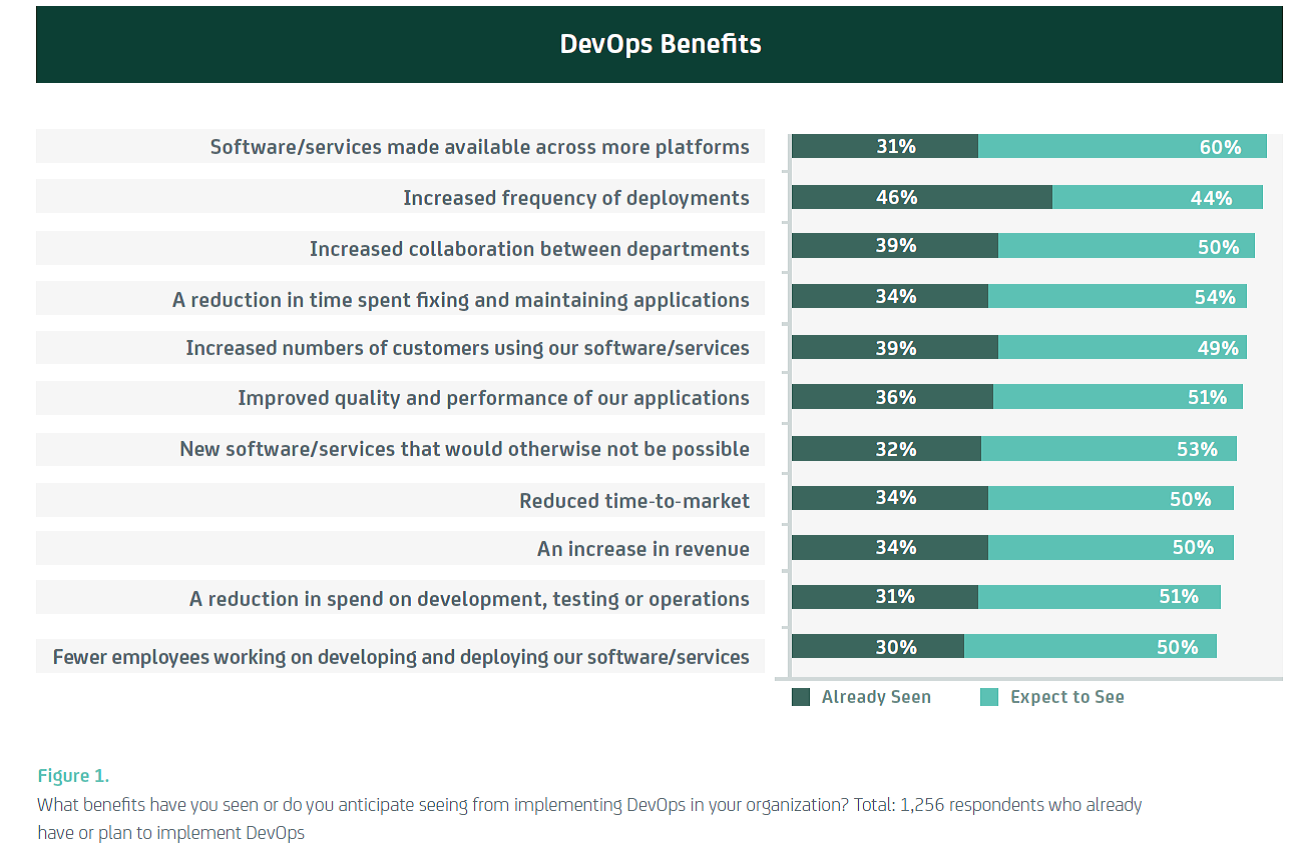
    You can see in the chart below the areas where benefit accrues through the adoption of DevOps (taken from CA Technologies/Vanson Bourne research released in November 2014):

    Image 1

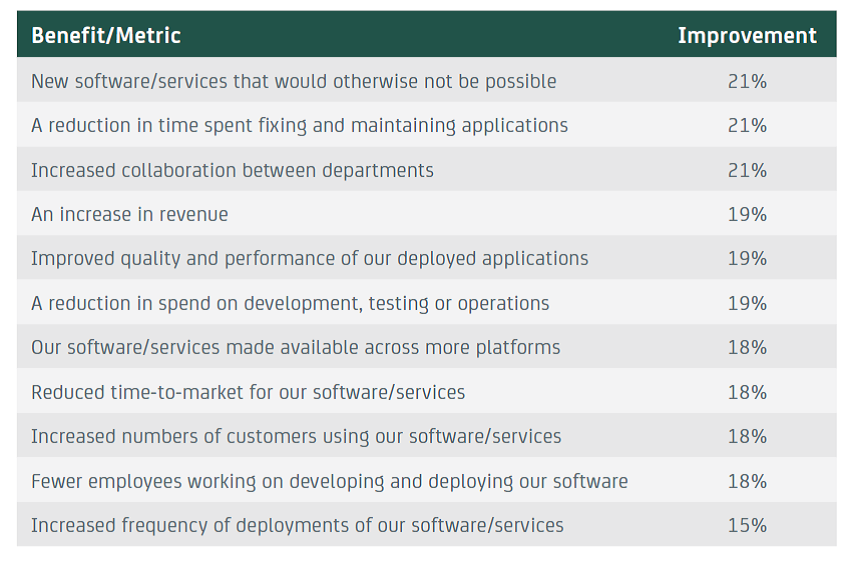
    Still need more? No problem! There is also good data on how much of a return you can expect from DevOps. Again, the following chart is taken from the same CA Technologies/Vanson Bourne research:

    Image 2

    Figure 2 Respondents report seeing double-digit improvements in key technology and business areas. Total varies by benefit. Figure 1 & 2 Source: Vanson Bourne/CA Technologies 2014

     “Show me the money!”

    Okay, I get it – you still want more, and you want a straight answer – a single, simple heuristic to work with. In talking with many enterprise CxOs, faster application delivery is a pressing goal, so just this one factor can act as a key ROI driver. At the Continuous Delivery (CoDe) conference in Copenhagen in October, Jan Bosch (Professor of Software Engineering at Chalmers University of Technology) showed very elegantly how faster delivery acts to reduce (i.e. shorten) the ROI period.

    His theory is based on the premise that for many (most? all?) businesses, time to revenue is dictated substantially by product release cycles. Maximum revenue accrues around product release, then tails off before spiking again for the next new product release. For example, a smartphone manufacturer will get revenue in 6-month peak and trough cycle as they release a new device twice a year; a software vendor will get a revenue peak with a new game release, which tails off until new DLC is released or a new game hits the stores.

    Because DevOps can accelerate business cycles, Jan theorized, business can bring in revenue faster, which in turn makes a DevOps-based business more profitable over the mid- to long-term. This is especially critical in the modern application economy where almost every business is a software business.

    So, for example, if DevOps allows a business to release twice as fast, they can effectively double their annual revenue, as seen below.

    Image 3

    Figure 3 Proportional revenue acceleration from doubling product release frequency with DevOps

    The impact is exaggerated for this illustration, but based on actual data (see above), a 20% increase in annual revenue would be on par with enterprise averages.

     “Show me the … costs!?”

    Of course, any discussion of ROI must realistically reflect costs too. Adopting DevOps in a large enterprise is not free – it requires investment in people, process, and technology. On the people side, even just a small cultural change often requires new activities and other behavioral shaping. Process change requires training and often impacts short-term revenues. Technology investment includes procurement of automation and measurement solutions – key components of a CAMS (Culture, Automation, Measurement, and Sharing) approach to DevOps, especially in a larger enterprise.

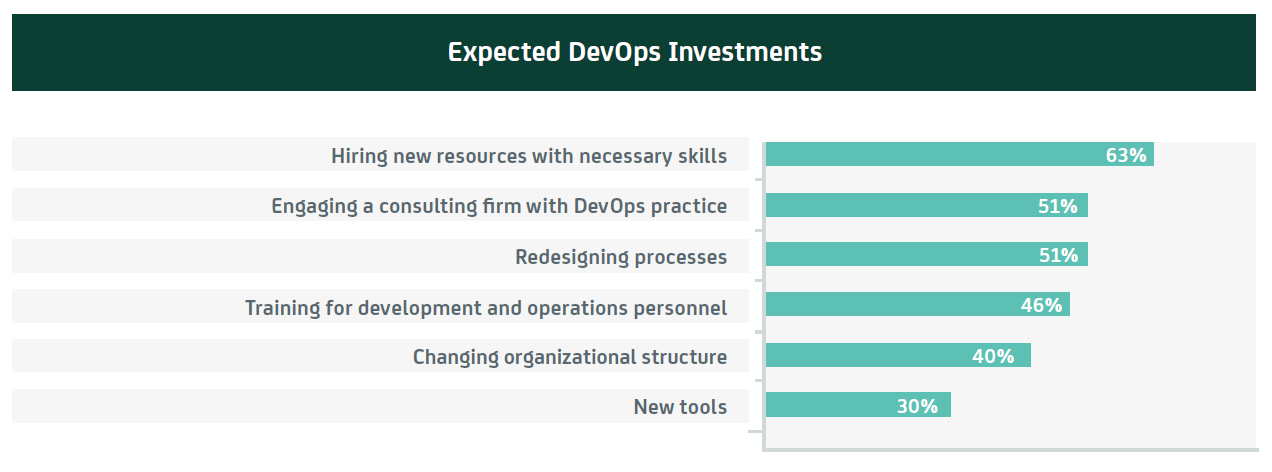
    Many of the investment factors can be seen in the following chart, again using CA Technologies/Vanson Bourne research:

    Image 4

    Figure 4 Which of the following is your organization likely to invest in over the next year as part of your implementation of a DevOps methodology? Total = 499 ITDMs who have already or plan to implement DevOps in the next two years. Source: Vanson Bourne/CA Technologies 2014

     “Show me … my own ROI!”

    These ROI factors are of course a combination of averages, research data points, and anecdotes. As with all generalizations, when it comes to a specific enterprise your mileage may vary. However, this is certainly a good starting point when building a business case to prove the expected ROI for your organization.

    You may find other areas for ROI too – upstream in the PMO, DBA, or downstream in NetSec, training, documentation. If you have additional data points on finding the ROI for DevOps, I would love to hear about it. Add your ideas here in the comments, or connect with me and/or devopsy.kinsta.cloud on Twitter – at @AndiMann and @DevOpsDotCom respectively.


  • The Ultimate Endpoint of Enterprise DevOps

    The Ultimate Endpoint of Enterprise DevOps

    There’s a reason we so often use the word “journey” when we talk about DevOps – it is a critical aspect to a practical approach to DevOps. While we focus a lot on culture in the DevOps community, as I have previously said, culture is an output, not an input; it is the destination, not the journey. By contrast, the set of ‘best-practice’ application delivery methods that improve communication, collaboration, and integration between development and operations are the ongoing journey that drives this transformation for continual growth and improvement, and helps us reach the destination.

    Which leads to the question for this next article in the Enterprise DevOps Q&A:

    Q. What is the Ultimate Endpoint of Enterprise DevOps?

    My initial reaction when asked this was to wonder whether the DevOps journey even has a defined endpoint. While many might say ‘culture change’ is the destination, many others would say there is no ultimate endpoint.

    However, for enterprises especially, with their rigorous set of annual, quarterly, and even monthly goals and metrics (and associated performance reviews, bonuses, stack ranking, etc.), it is difficult to absorb such boundless activity. Larger organizations often need, if not one specific endpoint, at least multiple SMART waypoints along the journey.

    If we follow through on the journey analogy, using CAMS (Culture, Automation, Measurement, and Sharing) as a rough roadmap, we may start trying to change the culture by removing structural barriers to collaboration, or attempt to shape new sharing behaviors. For large enterprises with goal-oriented metrics, automation is happening further down the road – which makes it a worthwhile next waypoint for organizations that have started their journey but are asking “What’s next?”

    Waypoint 1: Release Automation

    Release automation is a key technology that integrates dev, test and ops at that precarious gap between them – code release. Release automation solutions work by modeling components (e.g., images, packages, source code, configurations, etc.) of the development, test, pre-prod and production environments for each stage in the application release life cycle, and then fully automating the deployment and promotion of changes across those environments.

    This is important in DevOps because in enterprises where release automation does not occur, dev and ops (and/or test, QA, staging, acceptance, etc.) staff have to perform these release steps manually. This not only limits their productivity and pushes out application delivery dates, but is also highly error prone.

    Here’s an example from a recent case study by Enterprise Management Associates (disclaimer: I worked for EMA a long time ago and think they are excellent people and very strong analysts). During the Christmas season, a consumer electronics company’s website failed to perform as large numbers of customers logged on to configure and provision their new home entertainment systems. The company deployed a cross-functional “WebOps” group to investigate the problem, which was occurring within their software deployment processes. In short, a lack of standardization made it possible for code, configuration or process errors introduced during deployment to create flawed execution environments.

    The company responded by implementing a release automation solution that can execute a given workflow and configurations automatically, so each environment mirrors the last and errors are reduced or eliminated. As a result, the company has moved from a manual deployment method, where IT staff had to execute multiple scripts in sequence by hand, to an automated one in which IT can “deploy with a high state of reliability in 15 minutes with few adverse after-effects.” This allowed the company to standardize its deployment processes, improve the consistency and reliability of its website and ultimately meet the needs of its customers and vendor partners.

    Waypoint 2: Continuous Delivery

    Automating these handoffs is a great waypoint for enterprises to measure their journey. It is also a great starting point to the concept of continuous delivery – end-to-end application delivery that combines an ecosystem of people, processes and technologies into an automated, iterative, ‘assembly line’. In such a scenario, release operations build on release automation to integrate and orchestrate promotion across environments, enabling predictable, monitored and measurable continuous delivery from development to production.

    At a high level, development involves four phases: planning, building, testing and releasing an application. When an organization achieves continuous delivery, every technology and people process that can be automated between these phases is, so for example, development data from a release automation tool could be fed into a portfolio management solution, which would help automate approvals and future planning phases. In addition, if you used shared services in composite architectures, each team didn’t build the same thing over and over. You built it once and all shared it.

    Then, as iterations occur and the portfolio management tool amasses more and more data, IT leaders will see first-hand how different methods led to better results (e.g., when this technology was used, the project was delivered X% faster). And of course, this kind of real-time data can be used to make better, more nimble business decisions that enable companies to differentiate and be more reactive in the marketplace. This is often exactly the type of intermediate measurement that larger enterprises need to justify the changes they are making; to justify the journey, with real business metrics.

    DevOps: A Continuous Journey of Continuous Improvement

    Returning to the question I posed at the beginning of this blog, I can tell you that neither release automation nor continuous delivery are the endpoint of DevOps – but they are certainly significant milestones to shoot for on the journey. So if they’re not the answer, what is?

    To be perfectly honest, I’m not sure DevOps has a concrete endpoint. As the cliché goes, it’s more about the journey than the destination. As I have written in previous blogs, DevOps is all about delivering high-quality applications faster and at lower cost. As long as you’re continuously improving in that direction, the endpoint really doesn’t matter.


  • The Role of a Traditional NOC in the new DevOps World

    The Role of a Traditional NOC in the new DevOps World

    This new question in the devopsy.kinsta.cloud Enterprise DevOps Q&A series comes from a large business, though not what many would recognize as a traditional or legacy enterprise. This organization, like many high-growth businesses, is in a relatively new market segment that only exists due to the rise of cloud computing and digital media. In their business, the network (especially access to and from their public cloud service) is critical to the value they provide their customers.

    So it is no surprise then that, as they contemplate their transformation to an agile environment built on DevOps principles, they are asking me about the role of the Network Operations Center (NOC).

    1. What Role Does a NOC Play in the DevOps World?

    Despite coming from a ‘new tech’ business, this is another of the questions that is typical in a large enterprise. While smaller startups and even many web-scale businesses may have an Application Support team, not many run their own NOC, and even fewer separate out these roles from the rest of the operations team.

    First, some things do not change in a DevOps world. Fundamentally, the NOC is still tasked with maintaining high quality production networks and systems, detecting potential problems as soon as possible, triaging those problems to find root cause, and remediating problems as fast as they can.

    However, the NOC team will gain additional activities and support a broader interlock beyond just the production environment, especially as networking becomes more embedded in application delivery through capabilities like software-defined networks and cloud computing. They will work more closely with teams like app dev, SQA, pre-prod and release; they will provide input to design and development; and they will contribute earlier in the software cycle. This is the logical outcome of a DevOps approach that emphasizes the need to work more collaboratively across the entire end-to-end SDLC.

    So you should consider bringing these network specialists into:

    • development planning, to help architects and engineers to build applications with operable networking by design, including software-defined networks that help make a truly idempotent application
    • testing and QA, so they can provide engineers and SQA teams with tests and analysis that accurately reflect the reality of the prod network, rather than leaving network testing to after production deployment
    • dev/test support (where they may already be acting), to ensure that the environments that dev/test rely on to create new capabilities are just as stable and reliable as the systems they will eventually be deployed to
    • release and deployment, to ensure they have input into determining and defining ‘known good values’ for production monitoring and for problem diagnosis, triage, and escalation – before release, not just after
    • expanding interoperability and self-service, by exposing ‘known-good’ deployment, triage, and (re-)configuration capabilities as automated software-defined processes (or APIs) that dev/test can use without opening a new service ticket
    • a broader role in ensuring the end-to-end quality of the network, alongside traditional operations/infrastructure support as part of a new role commonly referred to as a ‘Site Reliability Engineer’ (SRE)

    Because DevOps is about improving collaboration, remember too that you should also bring dev, test, QA, etc. into the NOC, and even rotate them onto support, so they have an understanding of the core operations of a production network, how their code acts in a real environment, and how their work affects other teams. This will help to build the empathy between teams that is a core tenet of DevOps.

    You may be concerned that asking your NOC to work more upstream is adding a load of work to those teams that they didn’t have before. That may be true, but a significant outcome of Enterprise DevOps in practice is to reduce the ‘busy work’ of such teams, free them up to do more ‘smart work’, and to do it earlier in the software lifecycle.

    For example, recent research has shown that DevOps is correlated with improving the quality of applications (especially before they hit production), reducing the amount of time and effort the NOC team spends on problem detection, triage, and remediation. In fact, in this research, ‘reduction in time spent fixing and maintaining applications’ is one of the strongest outcomes, with an average 21% reduction in this metric.

    Similarly, standardizing on known-good processes, APIs, configurations etc., and enabling other teams to employ self-service and software-defined networking capabilities will allow the NOC team to spend less time on routine responses to things like servicing provisioning and configuration tickets.

    I cannot guarantee they will not be a zero-sum game, especially in the short-term, but over time a DevOps approach should actually spare workload from the NOC team, freeing them up to ‘shift left,’ moving their talents earlier in the SDLC, as they communicate, collaborate, and integrate more closely with upstream teams like dev, test and QA.

  • Top Skills for Enterprise DevOps

    Top Skills for Enterprise DevOps

    There is one question I hear almost every time I talk with my large enterprise customers about DevOps:

    1. What skills do my people need to be successful with DevOps?

    Talk of DevOps almost immediately focuses on culture – like having empathy for fellow workers, being flexible and adaptable, seeking continuous improvement, building relationships, etc. However, while critically important in DevOps, culture is an outcome, not an input; and such attributes are mostly either innate or acquired slowly. Culture cannot easily be taught.

    At the other end of the spectrum, we often look at technologies – agile development, coding languages, virtualization/cloud platforms, management tools, etc. Again, these can be important, but while learning these skills might make you a better dev or op, they may not make you a DevOps practitioner.

    Like most transformations, DevOps will need new people, process and technology skills, so in this post I take a look at a handful of the most important, pragmatic, and trainable skills in all three areas for practitioners looking to adopt DevOps, especially in large and more complex organizations.

    People Skills

    • Communication skills – while this may not come easily to typically introverted IT staff, both written and verbal communications, within and across the organization, and even with customers, are essential to a strong DevOps approach. This skill is learnable from formal courses, groups like Toastmasters, direct mentoring, social activities, or informal sessions like ‘lunch and learn.’ For extra credit, jump on stage for open mic night at a local comedy club!
    • Business alignment – much of a dev or ops life is spent embedded in the technology of software delivery, rather than the business need. This can cause many issues, and is something DevOps tries to address. Understanding the business strategy, goals and priorities is essential to DevOps, helps drive and easily trainable. A ‘big picture view’ helps everyone collaborate on common objectives to deliver high-value business outcomes – a key tenet of DevOps
    • Workplace history – “an appreciation for history, both technical and organizational”* will help staff understand the critical antecedents of DevOps, so they can internalize its principles not just rote learn its actions. For example, understanding hierarchical and network structures, why we adopted open work environments (and why it hasn’t always worked), and the antecedents of DevOps in things like The Toyota Way will help staff not just to act predictably in known circumstances, but adapt appropriately to new ones. (*Thanks to @garethr for input on this!)

    Process Skills

    • Agile development – it may be possible to take a DevOps approach in a waterfall environment, but it is almost definitely less effective. DevOps arose out of the Agile movement, and they pair so well that it is sometimes referred to as ‘agile for infrastructure.’ Teaching on one or more specific agile approaches (Scrum, Kanban, Kaizen, etc.) will give staff an approach and mindset informed by agile practices to help teams work together to improve flow, delivery and quality
    • Lean approaches – ‘lean’ theories born in the manufacturing world (see ‘history’ above) give a pragmatic foundation for applied DevOps, not just new-age ideals. Concepts like Just-In-Time, Toyota Production System, Design for Manufacture, Theories of Constraint and Waste can be learned from original texts, courseware and many business courses. Some are also revised in modern IT-specific texts like The Phoenix Project or Implementing Lean Software Development
    • Process reengineering – DevOps is as much about refining and improving ‘flow’ in the SDLC as it is about encouraging a sharing culture, so classic learning about how to effect change in business processes is invaluable to early stage DevOps adoption. Understanding how and why to analyze needs, identify problems, and effect change in software processes, organizational structures, teaming etc. is essential to DevOps and a long-established body of knowledge

    Technology Skills

    • Coding/scripting – in its current iteration there is a lot of focus on helping operators to understand coding languages; and teaching developers to use script-driven operations tools. From JavaScript (eek!) to C# or .NET, any coding or scripting skills will help both dev and ops to have empathy for each other’s jobs, and help to develop the elusive ‘T-shaped people’ that are so well-suited to a DevOps approach
    • IT Automation – Enterprise DevOps especially will likely involve (require?) a raft of technologies in an automated tool chain. Because DevOps is concerned with end-to-end flow, such skills need to cover the whole SDLC. Look to provide training in Portfolio Management, Agile Project Management, Source Code Management, Version Control, Test Automation, Test Data Management, Service Virtualization, Continuous Integration, Release Automation, Cloud Provisioning, Configuration Management, Process Automation, Performance Monitoring and Event Management, whether through formal training or informal knowledge transfer
    • Workflow mapping – smaller organizations might get away with pen and paper, or even a whiteboard/flipchart, but to document, share, analyze and rationalize the SDLC for large, complex, enterprise applications, you will need to learn to use workflow mapping tools. This will allow team members across the org (and the world) to take ownership of the end-to-end process, and start to collaborate on continual improvement

    This is of course a (very) short list, but should give you a starting point for developing essential skills for enterprise DevOps practitioners. As always, please feel free to drop a comment and tell me what I missed, what is more important, or even what I got wrong. I am always interested in discussing ideas and learning new things!

  • 3 Tips to Shape Human Behaviors and Achieve Your DevOps Goals

    3 Tips to Shape Human Behaviors and Achieve Your DevOps Goals

    DevOps raises many questions around processes and technologies, but it is important to remember that people are the essential piece that makes DevOps work. Since my post on Generalists vs. Specialists here on devopsy.kinsta.cloud, I have had many questions about shaping human behaviors, like this one:

    Q. How can I help my team build up the attitudes and behaviors we need for our DevOps team?

    In an industry often dominated by technical advancements, flashy applications and an ever-changing “next big thing,” it’s probably not surprising that the human aspects behind them usually fly under the radar. That is changing with DevOps, but there is a need for prescriptive advice on how to encourage a ‘DevOps attitude.’

    This question then is typical of many looking for specific steps to help shape the human element of DevOps. So here are three approaches to help you encourage DevOps behaviors to be successful.

    1. Connect Individual Job Duties to Higher-level Business Processes and Goals

    In traditional environments, staff are often only concerned with their silo, not the overall process. They may fulfil their duties within their silos – writing code, testing release, maintaining stability – without ensuring the whole process contributes to the ultimate business goal, which is really the whole point.

    By contrast, DevOps treats the SDLC as a value chain in which discrete activities (designing, coding, testing, etc.) occur in a complementary fashion to add value to the final deliverable – a production application. Traditional value chains have taught us that optimizing at the individual activity level can only get you so far – true evolution happens when you optimize at a higher, end-to-end process level.

    I have posted before about encouraging a ‘big picture’ view of enterprise DevOps, but sometimes this is not enough. To take this a step further, you should directly connect the job duties of each team and each individual to the business goals, and hold them accountable to hit these goals.

    2. Update Compensation Plans so They Align with Your DevOps Strategy

    Speaking of accountability, one of the best ways to shape staff behaviors is to align rewards with desired end-to-end goals. Tying compensation to the entire team’s ability to accelerate delivery of high quality services, each individual will bear responsibility for all aspects of the SDLC. Not only does this provide ample incentive to embrace change, but it also gives staff a clear direction and specific goals.

    This contrasts with a silo-based approach with, for example, a developer rewarded only for release speed, so they pump out code as fast as they can, regardless of defects; or an operations silo rewarded solely for stability, which encourages them to delay release in case new code breaks something.

    Of course, pay is not the only compensation that motivates great dev and ops teams. So don’t forget other rewards, like training, conference tickets, new projects, team activities, or new responsibilities.

    3. Technologies and Tools Will Help DevOps Staff Excel

    When trying to model behaviors, it is important to remember that technology can help. For example, if your goal in adopting DevOps is to compress software delivery to meet a shorter timeline, you can’t just expect people to work harder, faster, and/or longer; you’ll need to help them with shared technologies that let your people work together better and smarter, not just harder.

    For example, service virtualization relieves the need to build up physical test environments for every new code release, so dev and QA can build better code, test more, and improve quality. Release automation relieves of the need to manually release new code into production, so development and operations can focus on improving code quality and architecting for scale. Plus, both teams end up going faster, with fewer errors cause by human intervention.

    Beyond specific tool selection, make sure your entire DevOps team is trained on their use, so they can all contribute by working smarter and better to achieve the company’s goals across their silos. This cross-skilling and shared responsibility helps to ensure the collaboration, communication, and integration of people that is an essential part of a DevOps approach.

  • Cloud-Based Documentation at the Speed of DevOps

    Cloud-Based Documentation at the Speed of DevOps

    Welcome back to this (semi-)regular column where I attempt to answer questions about DevOps, especially in larger enterprises. This time I address a vexing issue facing many large enterprises – how to make sure downstream processes move as fast as development and operations:

    Q. In my enterprise we are getting faster at releasing code, but we are still slow to update and translate downstream product documentation. How can documentation and technical writing be optimized as part of a DevOps approach?

    As I have said before, you can ask me any question you want (in the comments below, via e-mail, or on Twitter), but that doesn’t mean I know all the answers. If (when) I don’t know, I have promised to try to find someone who does – and this is one of those times.

    This question stumped me, so I asked around to find some insight into this issue. As it turns out, my company (a large enterprise, building out our DevOps capabilities, developing and operating new software every day, in many different languages, across about 40 countries worldwide) is working with what we think is an answer to this question. So I asked my colleague Jim Turcotte to explain what we are doing to address this problem. Here is what he said:

    The problem – serial downstream processing

    I know exactly the problem that this writer is facing! We have been wrestling with this ourselves. The problem is that with current industry practice, a team of technical writers shadow developers to document the latest product functionality. By the time product is delivered, it’s a mad dash to publish the PDF/HTML. Then, to make matters worse for international customers [our software users], it may be days or weeks before localized [translated] versions of content follow. It’s a slow, tedious, serial process that ends up being a rush to the content finish line every time.

    To make matters worse, both documentation and code are typically “thrown over the wall” for Support to discover and address bugs. Documentation bugs are often handled by Support engineers writing dozens of knowledge docs.  The end result is that skilled Support engineers are often diverted from addressing customer issues, to updating documentation.  We then expect users of our software – our customers – to search through the product documentation and sometimes hundreds of Support knowledge documents to find answers to their questions—not exactly an optimal self-service experience!

    Introducing a cloud-based collaborative approach

    Something we have started doing to address this concern is by applying what we call ‘DocOps.’ It is a continuous content supply chain that connects all the stakeholders, and which is agile and collaborative. In this way, our approach mirrors many of the characteristics and culture of DevOps.

    Instead of waiting until code is complete before starting on documentation, multiple writers “curate” content throughout the product lifecycle. Instead of producing static, standalone knowledge documents in PDF (or even HTML), we use cloud-based documentation, wikis, forums and chat groups. Instead of a single one-time effort, original content topics are matured continuously in a collaborative effort.  Instead of channeling documentation through a single technical writer, we allow developers, operations, support, and even technical field staff [pre-sales] to curate documentation.

    On-demand translation is performed as needed using local cloud-based translation services. Highly automated workflows determine which vendors will be used for each product and language. The platform senses the customer’s language preference and automatically pulls up the content in the language they prefer.

    Then there’s online help. With the approach, we provide contextual help by linking content directly to product UIs. This allows customers to access additional sources of information like education courses and discussion threads all from the same source. Customers no longer have to log into multiple systems or sites to find the information they need to be successful.

    Benefits of the new approach for end-users – and for us

    For end-users, collaborative curation ensures documentation is always crisp and relevant, reducing the age-old problem of large quantities of duplicated knowledge/content. Customers who need help using a product are always able to find and use the latest curated content – in their language, relevant to their experience. Customers can also now access not only the developer’s original instructions, but also knowledge from other product experts, colleagues and peers.

    For us, we can use its analytics to provide real-time operational feedback, so technical writers can make updates on the fly to further improve the customer experience. The new approach also enables us to close the feedback loop, connecting end user questions with engagement and lead generation tools such as Marketo, marking the first time product documentation can also be leveraged as a serious sales tool.

    The old school Content Supply Chain cannot support the business agility that DevOps requires to be successful. The new documentation approach solves that. It was conceived and built around the need for an improved customer experience with product information. Do you really want to maximize your DevOps platform? Support the content with the new approach for the ultimate agile experience.

    Jim Turcotte is a Senior Vice President with CA Technologies and the Business Unit Executive for its Information Services team. For more information about DocOps, follow him on LinkedIn Pulse.


  • Enterprise DevOps and the Project Management Office

    Enterprise DevOps and the Project Management Office

    Welcome back to this occasional devopsy.kinsta.cloud series on Enterprise DevOps Q&A. Remember, if you have questions about DevOps in the enterprise, let me know and I will try to answer them (or find someone who can). E-mail me at andi.mann@ca.com, tweet me at @AndiMann, or leave a comment below.

    This week brings a question about DevOps that could only come from a large enterprise:

    Q. For software development and IT operations, the picture is quite clear. But in my company the PMO has so much control over what projects we take on, what their scope is, when they are due, etc. How can I encourage and enable DevOps in our PMO?

    Startups and ‘DevOps unicorns’ likely have never worried about dealing with a Project Management Office (PMO), but this is a very common process gate for enterprise-scale organizations. The PMO provides essential capabilities to plan application strategy, gather requirements, prioritize projects, allocate resources and budgets, manage project risk, and report on delivery, especially across complex organizations. However, as with many uniquely ‘enterprise’ departments, the PMO often seems like a significant bottleneck too.

    That means enterprise DevOps initiatives must bring the PMO along too. After all, you cannot deliver business-critical software faster if you have no idea of your business priorities or requirements. You cannot claim a successful release without measuring how (or if) it has delivered on business goals. While this will often happen organically in small businesses, in large enterprises this is the remit of the PMO.

    Unfortunately I have not seen a lot of ‘best practice’ (or even ‘good practice’) advice on this yet, as DevOps discussions have focused mainly on smaller organizations. However, what I have seen working in large enterprises to foster a closer relationship between the PMO and the DevOps teams is a shared approach to agile Project and Portfolio Management (PPM).

    I have seen this shared, agile PPM working in three key ways:

    Align development with business priorities

    First, a shared, agile approach to PPM helps the PMO and DevOps teams come together and collaborate to prioritize development of capabilities that matter to the business. The PMO shares portfolio priorities and project plans with dev, ops and other stakeholders; dev and ops share development estimates and operational requirements to enable accurate planning with realistic timelines. DevOps teams can help foster this collaboration by bringing PMO stakeholders into requirement gathering and agile planning, even into standup meetings as part of the scrum methodology. This benefits DevOps teams too, by ensuring immediate feedback and shared alignment against business goals.

    Manage agile parallel development and continuous operations

    Second, encouraging DevOps teams to track and report on timelines, resources, and deliverables helps the PMO to report back to business leaders on progress across multiple parallel projects. In large distributed enterprises, DevOps teams can assist by sharing granular project status (e.g. burndown, commits, etc.) with PMO stakeholders, so they can measure delivery against business objectives. Shared project reporting also helps DevOps teams to measure themselves, and assign responsibilities appropriately too. This shared commitment to business deliverables is itself a key objective of DevOps in any size organization.

    Measure and iterate the SDLC

    Third, a shared, agile PPM approach can help drive iteration back into development. After new features have been released, shared reporting means the PMO can immediately measure the impact of new releases on business priorities. This also allows them to ensure DevOps teams have delivered against the prior plan before they reassess the current portfolio and start on the next plan. With shared project reporting, the PMO can adjust project plans to reflect achievements, prioritize the new set of macro and micro gaps, and close the feedback loop back by driving requirements into the next development cycle.

    Shared, agile PPM tools and solutions

    Much of this change – as with all DevOps change – is primarily cultural; it is not necessary to use specific PPM tools to enable an agile, shared approach to PPM. However, as with many activities in DevOps, automation and tooling can certainly help. Especially in large enterprises with complex portfolios and geographically dispersed teams, a shared PPM toolset may be essential.

    As you mature and move from waterfall to agile development and DevOps, all stakeholders will appreciate a shared PPM solution that allows a business view of the current application portfolio, a shared view of planning and priorities, common management for both waterfall and agile projects, and roll-up reporting of application delivery and portfolio value. You may find your current PPM solution already fits; or you may need to consider supplementing or replacing it.

    Where agile and DevOps aim (at least in part) to accelerate time-to-market for new business ideas by bringing business closer to service delivery, a formal Project Management Office can seem like a brake on productivity. However, as the whole business needs to go faster, IT teams can help bring the PMO onboard the DevOps train with a shared, agile approach to Project and Portfolio Management.

  • Four key vectors for closing the DevOps feedback loop

    Four key vectors for closing the DevOps feedback loop

    A question I am asked frequently about DevOps – and a perennial challenge to all DevOps slide artists – is what exactly we mean by the idea of ‘closing the feedback loop’

    Q. What do you mean when you mention ‘closing the feedback loop’? Ops monitor our systems today, and alert devs when they are needed (next step, devs carrying pagers!). Is this the same Ac?

    Yes, this is definitely part of the equation. Feedback from operations (and more) to development (and more) – through alerts, monitoring, log entries, service tickets, or verbally – is essential. Good fast feedback helps, for example, to:

    • connect dev and ops more closely to user experiences
    • establish shared insight to replace fragile tribal knowledge
    • foster ownership from both teams in the entire service
    • provide rapid response to problems or new requirements
    • encourage faster experimentation and a tolerance for failure

    Feedback loops in smaller organizations tend to be relatively simple – just lean over the cubicle and tell your counterpart what is going on, or program the monitoring system to send you an alert. However for larger organizations the multiplicity of teams, volume of events, separation of duties, and variety of feedback can make this harder to handle.

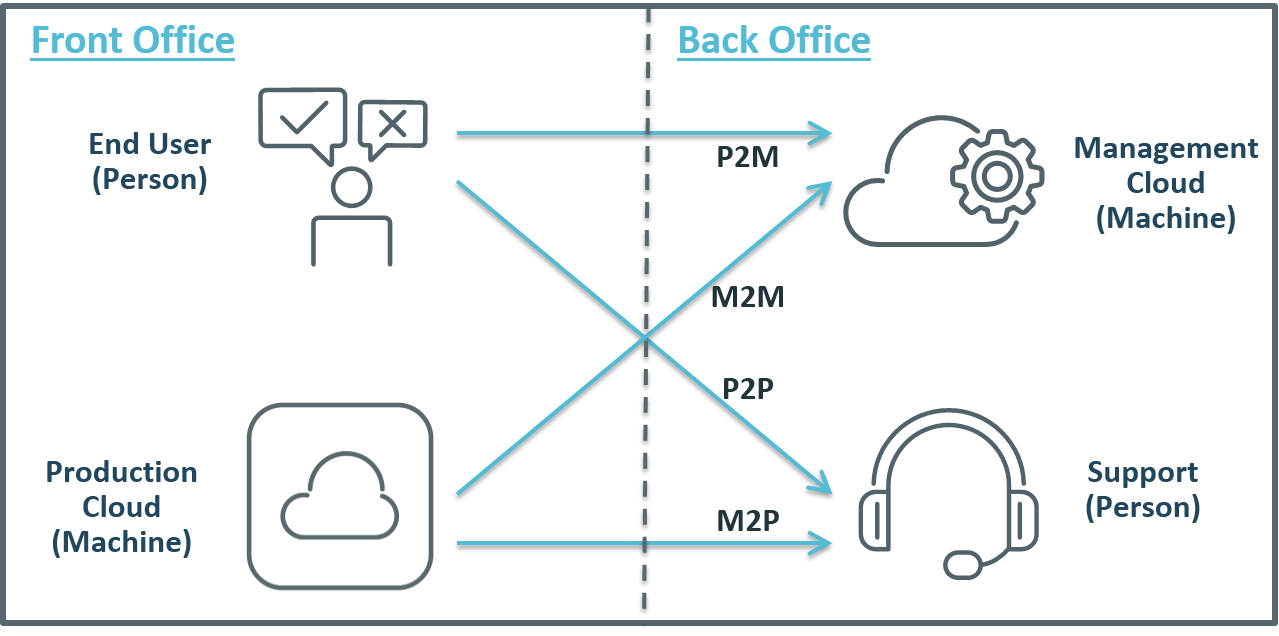
    In larger organizations then, I see four key vectors used in closing the DevOps feedback loop:

    • Machine to Person (M2P)
    • Person to Person (P2P)
    • Machine to Machine (M2M)
    • Person to Machine (P2M)

    I have tried to illustrate these 4 vectors below (and not being any kind of graphic artist, I would love any feedback on this image):

    FeedbackLoops

    Machine to Person (M2P)

    This is more or less the alert cycle the original question posed – a machine process (performance monitoring, for example) picks up an error situation that it cannot identify it as a ‘known resolvable’ issue, so forwards it to a person to take charge. Machines can resolve many problems automatically with intelligent orchestration – rollback a release, increase capacity, modify a configuration, migrate a workload, restart a service – but sometimes a person needs to fix hard and/or infrequent problems.

    Person to Person (P2P)

    This is just the classic ‘hot line’ feedback, where application users (internal or external) talk directly to someone in IT (e.g. help desk staff). This can be the most powerful feedback of all. Not only can it help identify defects, but it can also identify opportunities for improvement – from new features to entirely new services. However, to be useful this personal feedback must be transferred into development or operations process – e.g. to update configuration scripts, or as input to future release planning.

    Machine to Machine (M2M)

    This includes automated problem resolution (e.g. monitoring detects a performance bottleneck, triggers a provisioning engine to add additional capacity), but also includes data mining that feeds back ‘real-world’ production data to build more realistic test and QA environments, or to inform more accurate capacity plans. This feedback makes prod more stable, makes QA and test more realistic, reduces human and process errors, and helps to build scalability into applications from the start of the SDLC.

    Person to Machine (P2M)

    This can take many forms, such as end-users logging problems into a self-service portal or Service Desk, or rating a mobile app, or complaining online. Automation can trigger resolution for known problems, so end users can address problems automatically; or feedback can reach product owners to resolve common user complaints. However, P2M feedback may waste resources and increase technical debt, as solvable problems are fixed repeatedly rather than permanently; or user complaints are ignored.

    Final Tips

    These four vectors of active feedback are just a starting point, but describe a framework that enterprises can work to when looking to close and accelerate your feedback loops. Remember too that in a DevOps mode, feedback needs to be faster, it needs to be more accurate, and especially in a large organization it needs to connect not just with dev and ops, but with other stakeholders too – business owners, test and QA teams, security teams, and of course end users.

    What are your feedback loops? Do you cover all four vectors? Do you have more that I am missing? Please let me know in the comments below – as always, I would love to hear from you.